



介绍
Kubernetes 支持对节点上的 AMD 和 NVIDIA GPU (图形处理单元)进行管理,目前处于实验状态。
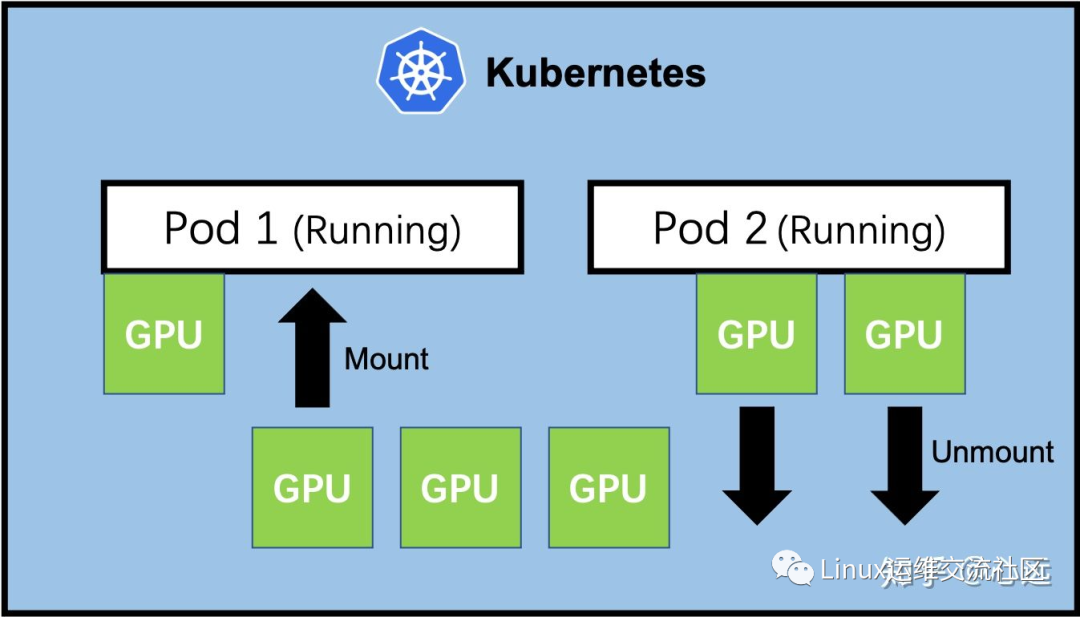
修改docker配置文件
root@hello:~# cat /etc/docker/daemon.json{"default-runtime": "nvidia","runtimes": {"nvidia": {"path": "/usr/bin/nvidia-container-runtime","runtimeArgs": []}},"data-root": "/var/lib/docker","exec-opts": ["native.cgroupdriver=systemd"],"registry-mirrors": ["https://docker.mirrors.ustc.edu.cn","http://hub-mirror.c.163.com"],"insecure-registries": ["127.0.0.1/8"],"max-concurrent-downloads": 10,"live-restore": true,"log-driver": "json-file","log-level": "warn","log-opts": {"max-size": "50m","max-file": "1"},"storage-driver": "overlay2"}root@hello:~#root@hello:~# systemctl daemon-reloadroot@hello:~# systemctl start docker
添加标签
root@hello:~# kubectl label nodes 192.168.1.56 nvidia.com/gpu.present=trueroot@hello:~# kubectl get nodes -L nvidia.com/gpu.presentNAME STATUS ROLES AGE VERSION GPU.PRESENT192.168.1.55 Ready,SchedulingDisabled master 128m v1.22.2192.168.1.56 Ready node 127m v1.22.2 trueroot@hello:~#
安装helm仓库
root@hello:~# curl https://baltocdn.com/helm/signing.asc | sudo apt-key add -root@hello:~# sudo apt-get install apt-transport-https --yesroot@hello:~# echo "deb https://baltocdn.com/helm/stable/debian/ all main" | sudo tee /etc/apt/sources.list.d/helm-stable-debian.listroot@hello:~# sudo apt-get updateroot@hello:~# sudo apt-get install helmhelm install \--version=0.10.0 \--generate-name \nvdp/nvidia-device-plugin
查看是否有nvidia
root@hello:~# kubectl describe node 192.168.1.56 | grep nvnvidia.com/gpu.present=truenvidia.com/gpu: 1nvidia.com/gpu: 1kube-system nvidia-device-plugin-1637728448-fgg2d 0 (0%) 0 (0%) 0 (0%) 0 (0%) 50snvidia.com/gpu 0 0root@hello:~#
下载镜像
root@hello:~# docker pull registry.cn-beijing.aliyuncs.com/ai-samples/tensorflow:1.5.0-devel-gpuroot@hello:~# docker save -o tensorflow-gpu.tar registry.cn-beijing.aliyuncs.com/ai-samples/tensorflow:1.5.0-devel-gpuroot@hello:~# docker load -i tensorflow-gpu.tar
创建tensorflow测试pod
root@hello:~# vim gpu-test.yamlroot@hello:~# cat gpu-test.yamlapiVersion: v1kind: Podmetadata:name: test-gpulabels:test-gpu: "true"spec:containers:- name: trainingimage: registry.cn-beijing.aliyuncs.com/ai-samples/tensorflow:1.5.0-devel-gpucommand:- python- tensorflow-sample-code/tfjob/docker/mnist/main.py- --max_steps=300- --data_dir=tensorflow-sample-code/dataresources:limits:nvidia.com/gpu: 1tolerations:- effect: NoScheduleoperator: Existsroot@hello:~#root@hello:~# kubectl apply -f gpu-test.yamlpod/test-gpu createdroot@hello:~#
查看日志
root@hello:~# kubectl logs test-gpuWARNING:tensorflow:From tensorflow-sample-code/tfjob/docker/mnist/main.py:120: softmax_cross_entropy_with_logits (from tensorflow.python.ops.nn_ops) is deprecated and will be removed in a future version.Instructions for updating:Future major versions of TensorFlow will allow gradients to flowinto the labels input on backprop by default.See tf.nn.softmax_cross_entropy_with_logits_v2.2021-11-24 04:38:50.846973: I tensorflow/stream_executor/cuda/cuda_gpu_executor.cc:895] successful NUMA node read from SysFS had negative value (-1), but there must be at least one NUMA node, so returning NUMA node zero2021-11-24 04:38:50.847698: I tensorflow/core/common_runtime/gpu/gpu_device.cc:1105] Found device 0 with properties:name: Tesla T4 major: 7 minor: 5 memoryClockRate(GHz): 1.59pciBusID: 0000:00:10.0totalMemory: 14.75GiB freeMemory: 14.66GiB2021-11-24 04:38:50.847759: I tensorflow/core/common_runtime/gpu/gpu_device.cc:1195] Creating TensorFlow device (/device:GPU:0) -> (device: 0, name: Tesla T4, pci bus id: 0000:00:10.0, compute capability: 7.5)root@hello:~#

https://blog.csdn.net/qq_33921750
https://my.oschina.net/u/3981543
https://www.zhihu.com/people/chen-bu-yun-2
https://segmentfault.com/u/hppyvyv6/articles
https://juejin.cn/user/3315782802482007
https://space.bilibili.com/352476552/article
https://cloud.tencent.com/developer/column/93230
知乎、CSDN、开源中国、思否、掘金、哔哩哔哩、腾讯云
文章转载自Linux运维交流社区,如果涉嫌侵权,请发送邮件至:contact@modb.pro进行举报,并提供相关证据,一经查实,墨天轮将立刻删除相关内容。
