



IvorySQL 概述
IvorySQL 是瀚高软件以PostgreSQL为基础进行开发的,并且兼容Oracle的开源数据库。
IvorySQL社区始终承诺与PostgreSQL数据库保持100%兼容,并且可以直接替换最新版本的PostgreSQL。
IvorySQL增加了一个名为 ivorysql.compatible_mode 的GUC参数用以控制IvorySQL的兼容模式,该参数有 oracle 和 pg 两种值。在初始化数据目录的时候,通过指定 -m 参数来指定数据目录的兼容模式,-m pg 则数据目录为PostgreSQL模式,该模式下 ivorysql.compatible_mode 参数将会失效,-m oracle 或者不指定 -m 参数则数据目录为兼容Oracle模式,该模式下 ivorysql.compatible_mode 参数初始值为 oracle 并且不支持部分PostgreSQL的语法,通过 set ivorysql.compatible_mode to pg 就可以使得数据库100%支持PostgreSQL的语法及功能。
IvorySQL的亮点之一是PL/iSQL过程语言,它支持Oracle的PL/SQL语法。同时,IvorySQL通过增加与内核绑定的插件 ivorysql_ora 来实现兼容Oracle的功能,目前实现的功能包括内置函数、数据类型、系统视图、merge以及GUC参数的增加,未来将会继续以绑定内核的插件的形式来实现新的兼容功能。
IvorySQL 4.6 于 2025年9月10日发布,基于PostgreSQL 17.6版本,包括各种错误修复。有关更新的完整列表,请访问文档网站。
IvorySQL 核心应用场景
IvorySQL数据库的主要应用场景:
1、企业数据库
如 ERP、交易系统、财务系统涉及资金、客户等信息,数据不能丢失且业务逻辑复杂,选择 IvorySQL 作为数据底层存储,一是可以帮助您在数据一致性前提下提供高可用性,二是可以用简单的编程实现复杂的业务逻辑。
2、含 LBS 的应用
大型游戏、O2O 等应用需要支持世界地图、附近的商家,两个点的距离等能力,PostGIS 增加了对地理对象的支持,允许您以 SQL 运行位置查询,而不需要复杂的编码,帮助您更轻松理顺逻辑,更便捷的实现 LBS,提高用户粘性。
3、数据仓库和大数据
IvorySQL 更多数据类型和强大的计算能力,能够帮助您更简单搭建数据库仓库或大数据分析平台,为企业运营加分。
4、建站或 App
IvorySQL 良好的性能和强大的功能,可以有效的提高网站性能,降低开发难度。
5、数据库迁移
如果需要将Oracle数据库迁移到PostgreSQL数据库,可以直接使用IvorySQL数据库进行迁移。
IvorySQL 安装部署
环境说明
| 主机名 | ip地址 | OS版本 | 内存、CPU | 安装软件 | 用途 |
|---|---|---|---|---|---|
| node1 | 192.*.*.60 | Centos7.9 | 4G 、 1个双核 | IvorySQL 4.6数据库 | 数据库单节点 |
IvorySQL 安装方式
IvorySQL安装方式包括以下5种:
• yum源安装
• docker安装
• rpm安装
• 源码安装
• deb安装
IvorySQL 下载
下载地址:https://github.com/IvorySQL/IvorySQL/releases/tag/IvorySQL_4.6
本次体验主要使用rpm安装方式和源码安装方式安装IvorySQL。两种方式对应的安装包下载方法:
cd /soft
# rpm安装包下载
wget https://github.com/IvorySQL/IvorySQL/releases/download/IvorySQL_4.6/IvorySQL-4.6-adc1923-20250904.x86_64.rpm
# 源码安装包下载
wget https://github.com/IvorySQL/IvorySQL/archive/refs/tags/IvorySQL_4.6.tar.gz
[root@node1 soft]# ll
total 186316
-rw-r--r-- 1 root root 157130367 Sep 18 20:31 IvorySQL-4.6-adc1923-20250904.x86_64.rpm  ##rpm安装包
-rw-r--r-- 1 root root  33655973 Sep 18 20:31 IvorySQL-IvorySQL_4.6.tar.gz  ##源码安装包
[root@node1 soft]#
rpm包安装
安装IvorySQL软件
命令如下:
yum install -y lz4 libicu libxslt python3
cd /soft
yum --disablerepo=* localinstall *.rpm
安装过程如下:
[root@node1 ~]# yum install -y lz4 libicu libxslt python3
略
[root@node1 ~]# cd /soft
[root@node1 soft]# ls
IvorySQL-4.6-adc1923-20250904.x86_64.rpm  IvorySQL-IvorySQL_4.6.tar.gz
[root@node1 soft]#  yum --disablerepo=* localinstall *.rpm
Loaded plugins: fastestmirror, langpacks
Examining IvorySQL-4.6-adc1923-20250904.x86_64.rpm: ivorysql4-4.6-adc1923.x86_64
Marking IvorySQL-4.6-adc1923-20250904.x86_64.rpm to be installed
Resolving Dependencies
--> Running transaction check
---> Package ivorysql4.x86_64 0:4.6-adc1923 will be installed
--> Finished Dependency Resolution

Dependencies Resolved

=============================================================================================================================================================================================================================================
 Package                                           Arch                                           Version                                                Repository                                                                     Size
=============================================================================================================================================================================================================================================
Installing:
 ivorysql4                                         x86_64                                         4.6-adc1923                                            /IvorySQL-4.6-adc1923-20250904.x86_64                                         497 M

Transaction Summary
=============================================================================================================================================================================================================================================
Install  1 Package

Total size: 497 M
Installed size: 497 M
Is this ok [y/d/N]: y
Downloading packages:
Running transaction check
Running transaction test
Transaction test succeeded
Running transaction
  Installing : ivorysql4-4.6-adc1923.x86_64                                                                                                                                                                                              1/1
  Verifying  : ivorysql4-4.6-adc1923.x86_64                                                                                                                                                                                              1/1

Installed:
  ivorysql4.x86_64 0:4.6-adc1923

Complete!
[root@node1 soft]#
安装过程中会自动创建 ivorysql用户和组,数据库软件被安装在/usr/ivory-4/路径下。
[root@node1 soft]# cd /usr/ivory-4/
[root@node1 ivory-4]# ll
total 16
drwxr-xr-x 2 ivorysql ivorysql 4096 Sep 18 20:32 bin
drwxr-xr-x 4 ivorysql ivorysql 4096 Sep 18 20:32 include
drwxr-xr-x 6 ivorysql ivorysql 4096 Sep 18 20:32 lib
drwxr-xr-x 8 ivorysql ivorysql   82 Sep 18 20:32 share
[root@node1 ivory-4]#
切换到ivorysql用户,配置环境变量:
su - ivorysql
vi .bash_profile 加入:
export PATH=/usr/ivory-4/bin:$PATH
export PGDATA=/usr/ivory-4/data
:wq

#环境变量生效
source .bash_profile
数据库初始化
su - ivorysql
mkdir /usr/ivory-4/data
initdb -D /usr/ivory-4/data
初始化过程如下:
[root@node1 soft]# su - ivorysql
Last login: Thu Sep 18 21:15:07 CST 2025 on pts/2
[ivorysql@node1 ~]$ exit
logout
[root@node1 soft]# cd /usr/ivory-4/
[root@node1 ivory-4]# ll
total 16
drwxr-xr-x 2 ivorysql ivorysql 4096 Sep 18 20:32 bin
drwxr-xr-x 4 ivorysql ivorysql 4096 Sep 18 20:32 include
drwxr-xr-x 6 ivorysql ivorysql 4096 Sep 18 20:32 lib
drwxr-xr-x 8 ivorysql ivorysql   82 Sep 18 20:32 share
[root@node1 ivory-4]# su - ivorysql
Last login: Thu Sep 18 21:22:10 CST 2025 on pts/2
[ivorysql@node1 ~]$ mkdir /usr/ivory-4/data
[ivorysql@node1 ~]$ initdb -D /usr/ivory-4/data
The files belonging to this database system will be owned by user "ivorysql".
This user must also own the server process.

The database cluster will be initialized with locale "en_US.UTF-8".
The default database encoding has accordingly been set to "UTF8".
The default text search configuration will be set to "english".

Data page checksums are disabled.

fixing permissions on existing directory /usr/ivory-4/data ... ok
creating subdirectories ... ok
selecting dynamic shared memory implementation ... posix
selecting default "max_connections" ... 100
selecting default "shared_buffers" ... 128MB
selecting default time zone ... Asia/Shanghai
creating configuration files ... ok
running bootstrap script ... ok
performing post-bootstrap initialization ... ok
syncing data to disk ... ok

initdb: warning: enabling "trust" authentication for local connections
initdb: hint: You can change this by editing pg_hba.conf or using the option -A, or --auth-local and --auth-host, the next time you run initdb.

Success. You can now start the database server using:

    pg_ctl -D /usr/ivory-4/data -l logfile start

[ivorysql@node1 ~]$
启动数据库
pg_ctl -D /usr/ivory-4/data -l /usr/ivory-4/data/ivory.log start
启动数据库过程如下:
[ivorysql@node1 ~]$ pg_ctl -D /usr/ivory-4/data  -l /usr/ivory-4/data/ivory.log start
waiting for server to start.... done
server started
[ivorysql@node1 ~]$
查看数据库进程:
[ivorysql@node1 ~]$ ps -ef|grep postgres
ivorysql   5600      1  0 21:34 ?        00:00:00 /usr/ivory-4/bin/postgres -D /usr/ivory-4/data
ivorysql   5601   5600  0 21:34 ?        00:00:00 postgres: checkpointer
ivorysql   5602   5600  0 21:34 ?        00:00:00 postgres: background writer
ivorysql   5604   5600  0 21:34 ?        00:00:00 postgres: walwriter
ivorysql   5605   5600  0 21:34 ?        00:00:00 postgres: autovacuum launcher
ivorysql   5606   5600  0 21:34 ?        00:00:00 postgres: logical replication launcher
ivorysql   5622   5494  0 21:35 pts/2    00:00:00 grep --color=auto postgres
[ivorysql@node1 ~]$
使用数据库
psql连接数据库
[ivorysql@node1 ~]$ psql
psql (17.6)
Type "help" for help.

[ivorysql@node1 ~]$ psql
psql (17.6)
Type "help" for help.

ivorysql=# \c
You are now connected to database "ivorysql" as user "ivorysql".
ivorysql=#
testdb=# select version();
                                           version
---------------------------------------------------------------------------------------------
 PostgreSQL 17.6 (IvorySQL 4.6) on x86_64-pc-linux-gnu, compiled by gcc (GCC) 10.4.0, 64-bit
(1 row)

testdb=# show port;
 port
------
 5432
(1 row)

ivorysql=# \l
                                                     List of databases
   Name    |  Owner   | Encoding | Locale Provider |   Collate   |    Ctype    | Locale | ICU Rules |   Access privileges
-----------+----------+----------+-----------------+-------------+-------------+--------+-----------+-----------------------
 ivorysql  | ivorysql | UTF8     | libc            | en_US.UTF-8 | en_US.UTF-8 |        |           |
 postgres  | ivorysql | UTF8     | libc            | en_US.UTF-8 | en_US.UTF-8 |        |           |
 template0 | ivorysql | UTF8     | libc            | en_US.UTF-8 | en_US.UTF-8 |        |           | =c/ivorysql          +
           |          |          |                 |             |             |        |           | ivorysql=CTc/ivorysql
 template1 | ivorysql | UTF8     | libc            | en_US.UTF-8 | en_US.UTF-8 |        |           | =c/ivorysql          +
           |          |          |                 |             |             |        |           | ivorysql=CTc/ivorysql
(4 rows)

ivorysql=# create database testdb;
CREATE DATABASE
ivorysql=# \c testdb
You are now connected to database "testdb" as user "ivorysql".
testdb=# \du
                             List of roles
 Role name |                         Attributes
-----------+------------------------------------------------------------
 ivorysql  | Superuser, Create role, Create DB, Replication, Bypass RLS

testdb=# create user testuser with password '********';
CREATE ROLE
testdb=# alter user testuser with superuser;
ALTER ROLE
testdb=# \c - testuser
You are now connected to database "testdb" as user "testuser".
testdb=# \dn
      List of schemas
  Name  |       Owner
--------+-------------------
 public | pg_database_owner
(1 row)

testdb=# create schema testuser;
CREATE SCHEMA
testdb=# create table testtab(id int);
CREATE TABLE
testdb=# insert into testtab values(1),(2),(3);
INSERT 0 3
testdb=# \d
           List of relations
  Schema  |  Name   | Type  |  Owner
----------+---------+-------+----------
 testuser | testtab | table | testuser
(1 row)

testdb=#
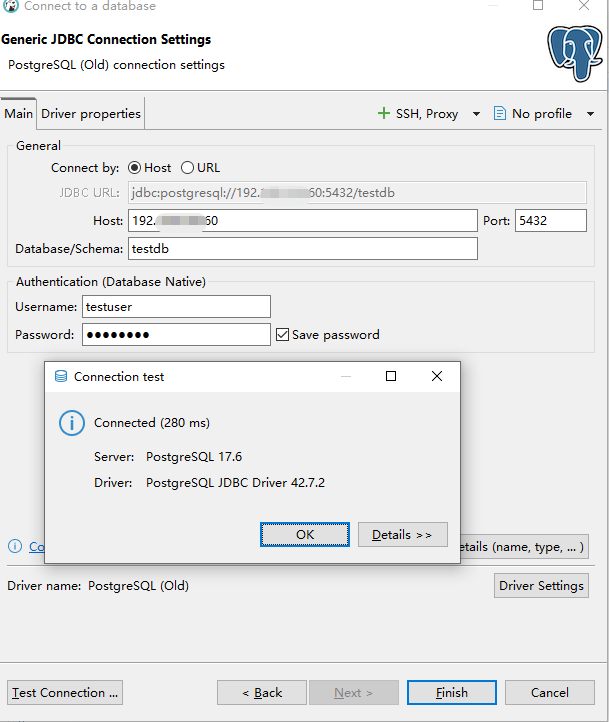
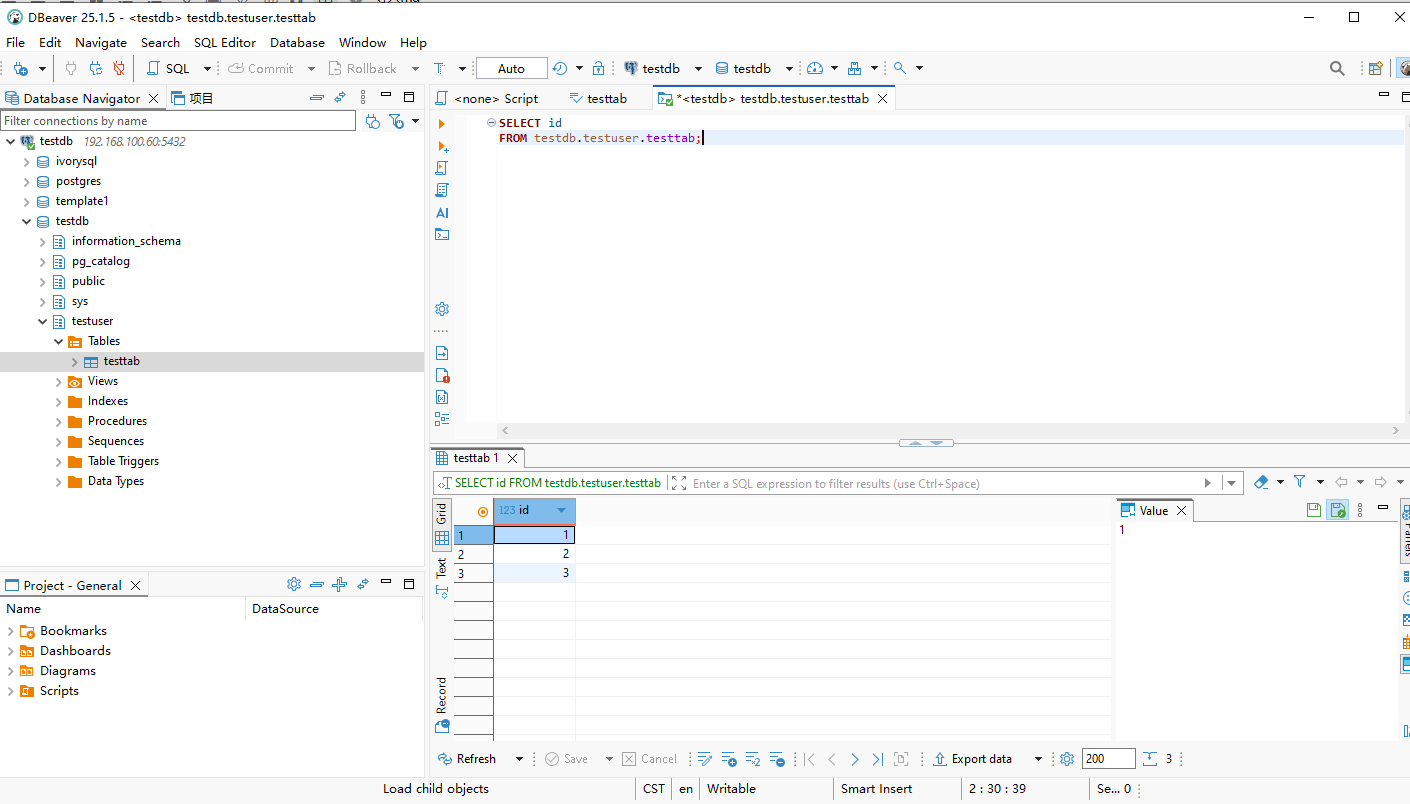
dbeaver连接数据库
源码包安装
创建组和用户
groupadd ivorysql
useradd -u 5000 -g ivorysql ivorysql
echo "******" |passwd ivorysql --stdin
安装依赖包
yum install -y bison readline-devel zlib-devel openssl-devel libicu-devel libxml2-devel
解压安装包
chown -R ivorysql:ivorysql /soft/
chown ivorysql:ivorysql  /data
su - ivorysql
cd /soft
tar -zxvf /soft/IvorySQL-IvorySQL_4.6.tar.gz
解压后目录如下:
[ivorysql@node1 soft]$ ll
total 32872
drwxrwxr-x 7 ivorysql ivorysql     4096 Sep  1 10:28 IvorySQL-IvorySQL_4.6
-rw-r--r-- 1 ivorysql ivorysql 33655973 Sep 18 20:31 IvorySQL-IvorySQL_4.6.tar.gz
配置、编译、安装
cd /soft/IvorySQL-IvorySQL_4.6/
./configure  --prefix=/data/ivory-4/
make
make check
make install  #执行以下命令安装,数据库将被安装在上述由—prefix指定的路径下。
./configure --prefix=/data/ivory-4/ 部分执行过程如下:
[ivorysql@node1 IvorySQL-IvorySQL_4.6]$ ./configure  --prefix=/data/ivory-4/
checking build system type... x86_64-pc-linux-gnu
checking host system type... x86_64-pc-linux-gnu
checking which template to use... linux
checking whether NLS is wanted... no
checking whether CURSOR_UNNAME is wanted... checking for default port number... 5432
checking for default port number in oracle compatible mode... 1521
checking for block size... 8kB
checking for segment size... 1GB
checking for WAL block size... 8kB
checking for maximum number of arguments to a function... 100
checking for gcc... gcc
checking whether the C compiler works... yes
checking for C compiler default output file name... a.out
checking for suffix of executables...
checking whether we are cross compiling... no
checking for suffix of object files... o
checking whether we are using the GNU C compiler... yes
checking whether gcc accepts -g... yes
checking for gcc option to accept ISO C89... none needed
checking for gcc option to accept ISO C99... -std=gnu99
checking for g++... g++
checking whether we are using the GNU C++ compiler... yes
checking whether g++ accepts -g... yes
checking for gawk... gawk
...略...
configure: using LDFLAGS=  -Wl,--as-needed
configure: creating ./config.status
config.status: creating GNUmakefile
config.status: creating src/Makefile.global
config.status: creating src/include/pg_config.h
config.status: creating src/include/pg_config_ext.h
config.status: creating src/interfaces/ecpg/include/ecpg_config.h
config.status: linking src/backend/port/tas/dummy.s to src/backend/port/tas.s
config.status: linking src/backend/port/posix_sema.c to src/backend/port/pg_sema.c
config.status: linking src/backend/port/sysv_shmem.c to src/backend/port/pg_shmem.c
config.status: linking src/include/port/linux.h to src/include/pg_config_os.h
config.status: linking src/makefiles/Makefile.linux to src/Makefile.port
[ivorysql@node1 IvorySQL-IvorySQL_4.6]$
make部分执行过程如下:
gcc -std=gnu99 -Wall -Wmissing-prototypes -Wpointer-arith -Wdeclaration-after-statement -Werror=vla -Wendif-labels -Wmissing-format-attribute -Wformat-security -fno-strict-aliasing -fwrapv -fexcess-precision=standard -O2 -fPIC -fvisibility=hidden -I. -I. -I../../src/include -D_GNU_SOURCE    -c -o btree_number.o btree_number.c
gcc -std=gnu99 -Wall -Wmissing-prototypes -Wpointer-arith -Wdeclaration-after-statement -Werror=vla -Wendif-labels -Wmissing-format-attribute -Wformat-security -fno-strict-aliasing -fwrapv -fexcess-precision=standard -O2 -fPIC -fvisibility=hidden -I. -I. -I../../src/include -D_GNU_SOURCE    -c -o btree_interval.o btree_interval.c
gcc -std=gnu99 -Wall -Wmissing-prototypes -Wpointer-arith -Wdeclaration-after-statement -Werror=vla -Wendif-labels -Wmissing-format-attribute -Wformat-security -fno-strict-aliasing -fwrapv -fexcess-precision=standard -O2 -fPIC -fvisibility=hidden -I. -I. -I../../src/include -D_GNU_SOURCE    -c -o btree_binary_float.o btree_binary_float.c
gcc -std=gnu99 -Wall -Wmissing-prototypes -Wpointer-arith -Wdeclaration-after-statement -Werror=vla -Wendif-labels -Wmissing-format-attribute -Wformat-security -fno-strict-aliasing -fwrapv -fexcess-precision=standard -O2 -fPIC -fvisibility=hidden -I. -I. -I../../src/include -D_GNU_SOURCE    -c -o btree_binary_double.o btree_binary_double.c
gcc -std=gnu99 -Wall -Wmissing-prototypes -Wpointer-arith -Wdeclaration-after-statement -Werror=vla -Wendif-labels -Wmissing-format-attribute -Wformat-security -fno-strict-aliasing -fwrapv -fexcess-precision=standard -O2 -fPIC -fvisibility=hidden -I. -I. -I../../src/include -D_GNU_SOURCE    -c -o btree_varcharchar.o btree_varcharchar.c
gcc -std=gnu99 -Wall -Wmissing-prototypes -Wpointer-arith -Wdeclaration-after-statement -Werror=vla -Wendif-labels -Wmissing-format-attribute -Wformat-security -fno-strict-aliasing -fwrapv -fexcess-precision=standard -O2 -fPIC -fvisibility=hidden -I. -I. -I../../src/include -D_GNU_SOURCE    -c -o btree_timestamp.o btree_timestamp.c
gcc -std=gnu99 -Wall -Wmissing-prototypes -Wpointer-arith -Wdeclaration-after-statement -Werror=vla -Wendif-labels -Wmissing-format-attribute -Wformat-security -fno-strict-aliasing -fwrapv -fexcess-precision=standard -O2 -fPIC -fvisibility=hidden -I. -I. -I../../src/include -D_GNU_SOURCE    -c -o btree_yminterval.o btree_yminterval.c
gcc -std=gnu99 -Wall -Wmissing-prototypes -Wpointer-arith -Wdeclaration-after-statement -Werror=vla -Wendif-labels -Wmissing-format-attribute -Wformat-security -fno-strict-aliasing -fwrapv -fexcess-precision=standard -O2 -fPIC -fvisibility=hidden -I. -I. -I../../src/include -D_GNU_SOURCE    -c -o btree_dsinterval.o btree_dsinterval.c
gcc -std=gnu99 -Wall -Wmissing-prototypes -Wpointer-arith -Wdeclaration-after-statement -Werror=vla -Wendif-labels -Wmissing-format-attribute -Wformat-security -fno-strict-aliasing -fwrapv -fexcess-precision=standard -O2 -fPIC -fvisibility=hidden -I. -I. -I../../src/include -D_GNU_SOURCE    -c -o btree_utils_num.o btree_utils_num.c
gcc -std=gnu99 -Wall -Wmissing-prototypes -Wpointer-arith -Wdeclaration-after-statement -Werror=vla -Wendif-labels -Wmissing-format-attribute -Wformat-security -fno-strict-aliasing -fwrapv -fexcess-precision=standard -O2 -fPIC -fvisibility=hidden -I. -I. -I../../src/include -D_GNU_SOURCE    -c -o btree_utils_var.o btree_utils_var.c
gcc -std=gnu99 -Wall -Wmissing-prototypes -Wpointer-arith -Wdeclaration-after-statement -Werror=vla -Wendif-labels -Wmissing-format-attribute -Wformat-security -fno-strict-aliasing -fwrapv -fexcess-precision=standard -O2 -fPIC -fvisibility=hidden -shared -o ora_btree_gist.so  btree_gist.o btree_number.o btree_interval.o btree_binary_float.o btree_binary_double.o btree_varcharchar.o btree_timestamp.o btree_yminterval.o btree_dsinterval.o btree_utils_num.o btree_utils_var.o  -L../../src/port -L../../src/common    -Wl,--as-needed -Wl,-rpath,'/data/ivory-4/lib',--enable-new-dtags  -fvisibility=hidden -lm
make[1]: Leaving directory `/soft/IvorySQL-IvorySQL_4.6/contrib/ora_btree_gist'
make -C contrib/ora_btree_gin all
make[1]: Entering directory `/soft/IvorySQL-IvorySQL_4.6/contrib/ora_btree_gin'
gcc -std=gnu99 -Wall -Wmissing-prototypes -Wpointer-arith -Wdeclaration-after-statement -Werror=vla -Wendif-labels -Wmissing-format-attribute -Wformat-security -fno-strict-aliasing -fwrapv -fexcess-precision=standard -O2 -fPIC -fvisibility=hidden -I. -I. -I../../src/include -D_GNU_SOURCE    -c -o ora_btree_gin.o ora_btree_gin.c
gcc -std=gnu99 -Wall -Wmissing-prototypes -Wpointer-arith -Wdeclaration-after-statement -Werror=vla -Wendif-labels -Wmissing-format-attribute -Wformat-security -fno-strict-aliasing -fwrapv -fexcess-precision=standard -O2 -fPIC -fvisibility=hidden -shared -o ora_btree_gin.so  ora_btree_gin.o -L../../src/port -L../../src/common    -Wl,--as-needed -Wl,-rpath,'/data/ivory-4/lib',--enable-new-dtags  -fvisibility=hidden
make[1]: Leaving directory `/soft/IvorySQL-IvorySQL_4.6/contrib/ora_btree_gin'
[ivorysql@node1 IvorySQL-IvorySQL_4.6]$
编译完毕,安装之前可先执行make check或make all-check-world测试刚刚编译的结果。
make check部分执行过程如下:
# parallel group (13 tests):  predicate hash_part reloptions explain partition_info memoize compression stats partition_aggregate partition_join indexing partition_prune tuplesort
ok 205       + partition_join                           4356 ms
ok 206       + partition_prune                          4594 ms
ok 207       + reloptions                                387 ms
ok 208       + hash_part                                 309 ms
ok 209       + indexing                                 4491 ms
ok 210       + partition_aggregate                      4077 ms
ok 211       + partition_info                            522 ms
ok 212       + tuplesort                                5113 ms
ok 213       + explain                                   518 ms
ok 214       + compression                               873 ms
ok 215       + memoize                                   795 ms
ok 216       + stats                                    2765 ms
ok 217       + predicate                                 261 ms
# parallel group (2 tests):  oidjoins event_trigger
ok 218       + oidjoins                                  464 ms
ok 219       + event_trigger                             520 ms
ok 220       - event_trigger_login                        58 ms
ok 221       - fast_default                              333 ms
ok 222       - tablespace                                780 ms
1..222
# All 222 tests passed.
make[1]: Leaving directory `/soft/IvorySQL-IvorySQL_4.6/src/test/regress'
[ivorysql@node1 IvorySQL-IvorySQL_4.6]$
make install安装部分执行过程如下:
make[1]: Leaving directory `/soft/IvorySQL-IvorySQL_4.6/src'
make -C config install
make[1]: Entering directory `/soft/IvorySQL-IvorySQL_4.6/config'
/bin/mkdir -p '/data/ivory-4/lib/postgresql/pgxs/config'
/bin/install -c -m 755 ./install-sh '/data/ivory-4/lib/postgresql/pgxs/config/install-sh'
/bin/install -c -m 755 ./missing '/data/ivory-4/lib/postgresql/pgxs/config/missing'
make[1]: Leaving directory `/soft/IvorySQL-IvorySQL_4.6/config'
make -C contrib/ivorysql_ora install
make[1]: Entering directory `/soft/IvorySQL-IvorySQL_4.6/contrib/ivorysql_ora'
'/bin/perl' gensql.pl gcc_build  1.0
/bin/mkdir -p '/data/ivory-4/lib/postgresql'
/bin/mkdir -p '/data/ivory-4/share/postgresql/extension'
/bin/mkdir -p '/data/ivory-4/share/postgresql/extension'
/bin/install -c -m 755  ivorysql_ora.so '/data/ivory-4/lib/postgresql/ivorysql_ora.so'
/bin/install -c -m 644 ./ivorysql_ora.control '/data/ivory-4/share/postgresql/extension/'
/bin/install -c -m 644 ./ivorysql_ora--1.0.sql  '/data/ivory-4/share/postgresql/extension/'
make[1]: Leaving directory `/soft/IvorySQL-IvorySQL_4.6/contrib/ivorysql_ora'
make -C contrib/ora_btree_gist install
make[1]: Entering directory `/soft/IvorySQL-IvorySQL_4.6/contrib/ora_btree_gist'
/bin/mkdir -p '/data/ivory-4/lib/postgresql'
/bin/mkdir -p '/data/ivory-4/share/postgresql/extension'
/bin/mkdir -p '/data/ivory-4/share/postgresql/extension'
/bin/install -c -m 755  ora_btree_gist.so '/data/ivory-4/lib/postgresql/ora_btree_gist.so'
/bin/install -c -m 644 ./ora_btree_gist.control '/data/ivory-4/share/postgresql/extension/'
/bin/install -c -m 644 ./ora_btree_gist--1.0.sql  '/data/ivory-4/share/postgresql/extension/'
make[1]: Leaving directory `/soft/IvorySQL-IvorySQL_4.6/contrib/ora_btree_gist'
make -C contrib/ora_btree_gin install
make[1]: Entering directory `/soft/IvorySQL-IvorySQL_4.6/contrib/ora_btree_gin'
/bin/mkdir -p '/data/ivory-4/lib/postgresql'
/bin/mkdir -p '/data/ivory-4/share/postgresql/extension'
/bin/mkdir -p '/data/ivory-4/share/postgresql/extension'
/bin/install -c -m 755  ora_btree_gin.so '/data/ivory-4/lib/postgresql/ora_btree_gin.so'
/bin/install -c -m 644 ./ora_btree_gin.control '/data/ivory-4/share/postgresql/extension/'
/bin/install -c -m 644 ./ora_btree_gin--1.0.sql  '/data/ivory-4/share/postgresql/extension/'
make[1]: Leaving directory `/soft/IvorySQL-IvorySQL_4.6/contrib/ora_btree_gin'
切换到ivorysql用户,配置环境变量:
su - ivorysql
vi .bash_profile 加入:
export PATH=/usr/ivory-4/bin:$PATH
export PGDATA=/usr/ivory-4/data
:wq

source .bash_profile
数据库初始化
[ivorysql@node1 ~]$ initdb -D /usr/ivory-4/data
The files belonging to this database system will be owned by user "ivorysql".
This user must also own the server process.

The database cluster will be initialized with locale "en_US.UTF-8".
The default database encoding has accordingly been set to "UTF8".
The default text search configuration will be set to "english".

Data page checksums are disabled.

creating directory /usr/ivory-4/data ... initdb: error: could not create directory "/usr/ivory-4": Permission denied
[ivorysql@node1 ~]$ initdb -D /data/ivory-4/data
The files belonging to this database system will be owned by user "ivorysql".
This user must also own the server process.

The database cluster will be initialized with locale "en_US.UTF-8".
The default database encoding has accordingly been set to "UTF8".
The default text search configuration will be set to "english".

Data page checksums are disabled.

fixing permissions on existing directory /data/ivory-4/data ... ok
creating subdirectories ... ok
selecting dynamic shared memory implementation ... posix
selecting default "max_connections" ... 100
selecting default "shared_buffers" ... 128MB
selecting default time zone ... Asia/Shanghai
creating configuration files ... ok
running bootstrap script ... ok
performing post-bootstrap initialization ... ok
syncing data to disk ... ok

initdb: warning: enabling "trust" authentication for local connections
initdb: hint: You can change this by editing pg_hba.conf or using the option -A, or --auth-local and --auth-host, the next time you run initdb.

Success. You can now start the database server using:

    pg_ctl -D /data/ivory-4/data -l logfile start
数据库启动
[ivorysql@node1 ~]$ pg_ctl -D /data/ivory-4/data -l /data/ivory-4/data/ivory.log start
waiting for server to start.... done
server started
[ivorysql@node1 ~]$ ps -ef|grep postgres
ivorysql  34591      1  0 22:00 ?        00:00:00 /data/ivory-4/bin/postgres -D /data/ivory-4/data
ivorysql  34592  34591  0 22:00 ?        00:00:00 postgres: checkpointer
ivorysql  34593  34591  0 22:00 ?        00:00:00 postgres: background writer
ivorysql  34595  34591  0 22:00 ?        00:00:00 postgres: walwriter
ivorysql  34596  34591  0 22:00 ?        00:00:00 postgres: autovacuum launcher
ivorysql  34597  34591  0 22:00 ?        00:00:00 postgres: logical replication launcher
ivorysql  34600  34511  0 22:00 pts/1    00:00:00 grep --color=auto postgres
[ivorysql@node1 ~]$
总结
本文主要是使用rpm包和二进制安装包两种方式部署了ivorysql数据库,后面会介绍oracle数据库迁移到ivorysql数据库的过程,敬请期待~~~
关于作者
网名:飞天,墨天轮2024年度优秀原创作者,拥有 Oracle 10g OCM 认证、PGCE认证、MySQL 8.0 OCP认证以及OBCA、KCP、KCSM、ACP、YCP、磐维等众多国产数据库认证证书,目前从事Oracle、Mysql、PostgresSQL、磐维数据库管理运维工作,喜欢结交更多志同道合的朋友,热衷于研究、分享数据库技术。
微信公众号:飞天online
墨天轮:https://www.modb.pro/u/15197
如有任何疑问,欢迎大家留言,共同探讨~~~
