




点击蓝字,关注我们
作者 | 李杰 移动云,Apache DolphinScheduler贡献者
在现代数据驱动的企业中,工作流调度系统是数据管道(Data Pipeline)的“中枢神经”。从 ETL 任务到机器学习训练,从报表生成到实时监控,几乎所有关键业务都依赖于一个稳定、高效、易扩展的调度引擎。
笔者认为 Apache DolphinScheduler 3.1.9 是稳定且广泛使用的版本,故本系列文章将深入其源码核心,剖析其架构设计、模块划分与关键实现机制,帮助开发者理解 Master 和 Worker “如何工作”,并为进一步二次开发或性能优化打下基础。
我们之前解读了 Apache DolphinScheduler 3.1.9版本源码的 Master server 启动流程,感兴趣的可以去查看。本文是 Apache DolphinScheduler 3.1.9 版本源码解读的第二篇:Worker Server 启动流程源码解读以及相关流程设计。结尾处附有相关流程图,供大家参考。
1
Worker启动核心概览
代码入口:org.apache.dolphinscheduler.server.worker.WorkerServer#run
public void run() {// 1. rpc启动this.workerRpcServer.start();// 忽略,因为workerRpcServer初始化时包含workerRpcClient初始化的功能this.workerRpcClient.start();// 2. 任务插件初始化this.taskPluginManager.loadPlugin();this.workerRegistryClient.setRegistryStoppable(this);// 3. worker 注册this.workerRegistryClient.start();// 4. worker管理线程,不断从任务队列中waitSubmitQueue领取任务,提交到线程池处理this.workerManagerThread.start();// 5. 消息重试线程。负责轮询通过RPC发送服务,如当task在运行中,若未收到master的ack信息,会周期给master发送“运行中”信号this.messageRetryRunner.start();...}
2.1 rpc启动:
描述:注册相关命令的process处理器,如接收任务请求、停止任务请求等。 代码入口:org.apache.dolphinscheduler.server.worker.rpc.WorkerRpcServer#start
public void start() {LOGGER.info("Worker rpc server starting");NettyServerConfig serverConfig = new NettyServerConfig();serverConfig.setListenPort(workerConfig.getListenPort());this.nettyRemotingServer = new NettyRemotingServer(serverConfig);// 接收派发任务请求。然后将任务放置到任务队列waitSubmitQueue中,等待workerManagerThread去处理this.nettyRemotingServer.registerProcessor(CommandType.TASK_DISPATCH_REQUEST, taskDispatchProcessor);// 停止任务请求this.nettyRemotingServer.registerProcessor(CommandType.TASK_KILL_REQUEST, taskKillProcessor);// 接收任务运行中的ack请求this.nettyRemotingServer.registerProcessor(CommandType.TASK_EXECUTE_RUNNING_ACK,taskExecuteRunningAckProcessor);// 接收任务结果的ack请求this.nettyRemotingServer.registerProcessor(CommandType.TASK_EXECUTE_RESULT_ACK, taskExecuteResultAckProcessor);this.nettyRemotingServer.registerProcessor(CommandType.TASK_REJECT_ACK, taskRejectAckProcessor);this.nettyRemotingServer.registerProcessor(CommandType.PROCESS_HOST_UPDATE_REQUEST, hostUpdateProcessor);this.nettyRemotingServer.registerProcessor(CommandType.TASK_SAVEPOINT_REQUEST, taskSavePointProcessor);// logger serverthis.nettyRemotingServer.registerProcessor(CommandType.GET_APP_ID_REQUEST, loggerRequestProcessor);this.nettyRemotingServer.registerProcessor(CommandType.GET_LOG_BYTES_REQUEST, loggerRequestProcessor);this.nettyRemotingServer.registerProcessor(CommandType.ROLL_VIEW_LOG_REQUEST, loggerRequestProcessor);this.nettyRemotingServer.registerProcessor(CommandType.VIEW_WHOLE_LOG_REQUEST, loggerRequestProcessor);this.nettyRemotingServer.registerProcessor(CommandType.REMOVE_TAK_LOG_REQUEST, loggerRequestProcessor);this.nettyRemotingServer.start();LOGGER.info("Worker rpc server started");}
此处以TASK_DISPATCH_REQUEST为例进行描述。当有任务从master派发请求时,worker会接受TASK_DISPATCH_REQUEST的RPC
请求,然后触发process处理器taskDispatchProcessor(org.apache.dolphinscheduler.server.worker.processor.TaskDispatchProcessor#process)
的处理:
public void process(Channel channel, Command command) {...TaskExecutionContext taskExecutionContext = taskDispatchCommand.getTaskExecutionContext();...// set cache, it will be used when kill taskTaskExecutionContextCacheManager.cacheTaskExecutionContext(taskExecutionContext);// 设置执行任务的worker地址taskExecutionContext.setHost(workerConfig.getWorkerAddress());// 设置任务执行日志的目录taskExecutionContext.setLogPath(LogUtils.getTaskLogPath(taskExecutionContext));// 构建任务执行线程。整个任务执行需要依赖该线程WorkerDelayTaskExecuteRunnable workerTaskExecuteRunnable = WorkerTaskExecuteRunnableFactoryBuilder.createWorkerDelayTaskExecuteRunnableFactory(taskExecutionContext,workerConfig,workflowMasterAddress,workerMessageSender,alertClientService,taskPluginManager,storageOperate).createWorkerTaskExecuteRunnable();// submit task to manager// 提交到一个task队列,然后有消费者消费该队列boolean offer = workerManager.offer(workerTaskExecuteRunnable);...}
最终会提交给waitSubmitQueue队列,后续有消费者不断进行消费。
public boolean offer(WorkerDelayTaskExecuteRunnable workerDelayTaskExecuteRunnable) {if (workerConfig.getTaskExecuteThreadsFullPolicy() == TaskExecuteThreadsFullPolicy.CONTINUE) {return waitSubmitQueue.offer(workerDelayTaskExecuteRunnable);}if (waitSubmitQueue.size() > workerExecThreads) {logger.warn("Wait submit queue is full, will retry submit task later");WorkerServerMetrics.incWorkerSubmitQueueIsFullCount();// if waitSubmitQueue is full, it will wait 1s, then try addThreadUtils.sleep(Constants.SLEEP_TIME_MILLIS);if (waitSubmitQueue.size() > workerExecThreads) {return false;}}return waitSubmitQueue.offer(workerDelayTaskExecuteRunnable);}
2.2 任务插件初始化:
描述:task的相关模板操作,如创建task、解析task参数、获取task资源信息等。对于该插件,api、master、worker都需要进行注册,在worker的作用是获取文件资源、创建任务信息等。
2.3 worker 注册:
描述:将worker信息注册至注册中心(本文以zookeeper为例),同时监听注册变化情况。 代码入口:org.apache.dolphinscheduler.server.worker.registry.WorkerRegistryClient#start
public void start() {try {// 1、将worker信息注册至注册中心(本文以zookeeper为例)registry();// 2、监听自身与注册中心的连接情况;registryClient.addConnectionStateListener(new WorkerConnectionStateListener(workerConfig, registryClient, workerConnectStrategy));} catch (Exception ex) {throw new RegistryException("Worker registry client start up error", ex);}}
2.4 worker管理线程:
描述:不断从任务队列中waitSubmitQueue领取任务,提交到线程池处理。 代码入口:org.apache.dolphinscheduler.server.worker.runner.WorkerManagerThread#run
public void run() {Thread.currentThread().setName("Worker-Execute-Manager-Thread");while (!ServerLifeCycleManager.isStopped()) {try {if (!ServerLifeCycleManager.isRunning()) {Thread.sleep(Constants.SLEEP_TIME_MILLIS);}// 1、如果任务线程池线程个数够用,则处理任务if (this.getThreadPoolQueueSize() <= workerExecThreads) {// 消费task队列并且执行任务执行线程final WorkerDelayTaskExecuteRunnable workerDelayTaskExecuteRunnable = waitSubmitQueue.take();workerExecService.submit(workerDelayTaskExecuteRunnable);} else {// 2、若线程池资源紧张,则进行循环等待WorkerServerMetrics.incWorkerOverloadCount();logger.info("Exec queue is full, waiting submit queue {}, waiting exec queue size {}",this.getWaitSubmitQueueSize(), this.getThreadPoolQueueSize());ThreadUtils.sleep(Constants.SLEEP_TIME_MILLIS);}} catch (Exception e) {logger.error("An unexpected interrupt is happened, "+ "the exception will be ignored and this thread will continue to run", e);}}}
workerDelayTaskExecuteRunnable
核心内容:
public void run() {...// 初始化任务,如任务启动时间等initializeTask();...// 任务执行前的操作beforeExecute();// 任务回调,如更改任务的appId。可以先忽略TaskCallBack taskCallBack = TaskCallbackImpl.builder().workerMessageSender(workerMessageSender).masterAddress(masterAddress).build();// 执行任务,等待结果executeTask(taskCallBack);// 任务执行后的操作afterExecute();...}
初始化:
protected void initializeTask() {logger.info("Begin to initialize task");// 设置任务启动时间Date taskStartTime = new Date();taskExecutionContext.setStartTime(taskStartTime);logger.info("Set task startTime: {}", taskStartTime);// 获取环境变量,默认从dolphinscheduler_env.sh获取String systemEnvPath = CommonUtils.getSystemEnvPath();taskExecutionContext.setEnvFile(systemEnvPath);logger.info("Set task envFile: {}", systemEnvPath);String taskAppId = String.format("%s_%s", taskExecutionContext.getProcessInstanceId(),taskExecutionContext.getTaskInstanceId());taskExecutionContext.setTaskAppId(taskAppId);logger.info("Set task appId: {}", taskAppId);logger.info("End initialize task");}
执行前:
protected void beforeExecute() {// 设置任务状态为运行中taskExecutionContext.setCurrentExecutionStatus(TaskExecutionStatus.RUNNING_EXECUTION);// 向master发送“运行中”信号,且将任务的关键信息一起发送,如任务执行节点、任务日志目录等workerMessageSender.sendMessageWithRetry(taskExecutionContext, masterAddress, CommandType.TASK_EXECUTE_RUNNING);logger.info("Set task status to {}", TaskExecutionStatus.RUNNING_EXECUTION);// 查看租户是否存在TaskExecutionCheckerUtils.checkTenantExist(workerConfig, taskExecutionContext);logger.info("TenantCode:{} check success", taskExecutionContext.getTenantCode());// 创建任务执行目录(是一个本地的临时目录)TaskExecutionCheckerUtils.createProcessLocalPathIfAbsent(taskExecutionContext);logger.info("ProcessExecDir:{} check success", taskExecutionContext.getExecutePath());// 从存储介质下载文件资源(如从hdfs下载aa.jar)TaskExecutionCheckerUtils.downloadResourcesIfNeeded(storageOperate, taskExecutionContext, logger);logger.info("Resources:{} check success", taskExecutionContext.getResources());TaskChannel taskChannel = taskPluginManager.getTaskChannelMap().get(taskExecutionContext.getTaskType());if (null == taskChannel) {throw new TaskPluginException(String.format("%s task plugin not found, please check config file.",taskExecutionContext.getTaskType()));}// 利用task插件创建任务信息,此处的task是是具体的任务类型,如shell、spark等task = taskChannel.createTask(taskExecutionContext);if (task == null) {throw new TaskPluginException(String.format("%s task is null, please check the task plugin is correct",taskExecutionContext.getTaskType()));}logger.info("Task plugin: {} create success", taskExecutionContext.getTaskType());// 任务参数准备。如将shell任务执行脚本解析出来、将spark任务的jar包、main类解析出来task.init();logger.info("Success initialized task plugin instance success");task.getParameters().setVarPool(taskExecutionContext.getVarPool());logger.info("Success set taskVarPool: {}", taskExecutionContext.getVarPool());}
任务的具体执行。如shell任务的具体执行过程:
org.apache.dolphinscheduler.plugin.task.shell.ShellTask#handle
public void handle(TaskCallBack taskCallBack) throws TaskException {try {// construct process// 利用shell任务内容在执行目录生成一个脚本文件String command = buildCommand();// 执行脚本等待结果TaskResponse commandExecuteResult = shellCommandExecutor.run(command);// 设置执行情况setExitStatusCode(commandExecuteResult.getExitStatusCode());// 设置进程idsetProcessId(commandExecuteResult.getProcessId());shellParameters.dealOutParam(shellCommandExecutor.getVarPool());} catch (InterruptedException e) {Thread.currentThread().interrupt();logger.error("The current Shell task has been interrupted", e);setExitStatusCode(EXIT_CODE_FAILURE);throw new TaskException("The current Shell task has been interrupted", e);} catch (Exception e) {logger.error("shell task error", e);setExitStatusCode(EXIT_CODE_FAILURE);throw new TaskException("Execute shell task error", e);}}
执行后:
protected void afterExecute() throws TaskException {if (task == null) {throw new TaskException("The current task instance is null");}// 发送告警相关信息sendAlertIfNeeded();// 往master发送任务结果sendTaskResult();TaskExecutionContextCacheManager.removeByTaskInstanceId(taskExecutionContext.getTaskInstanceId());logger.info("Remove the current task execute context from worker cache");// 清理任务执行目录clearTaskExecPathIfNeeded();}
2.5 消息重试线程:
描述:对于worker向master发送的RPC请求。如“任务运行中”、“任务结束”等命令,若未收到master的ack回复时,此重试线程会间隔5min进行命令重新发送操作。直至收到ack请求或者收到停止任务命令。
2
相关流程图
官网描述了很多流程图,如master、worker容错机制流程图、分布式锁实现流程图等,详见:https://dolphinscheduler.apache.org/zh-cn/docs/3.1.9/contribute/architecture-design 与 https://dolphinscheduler.apache.org/zh-cn/docs/3.1.9/architecture/design
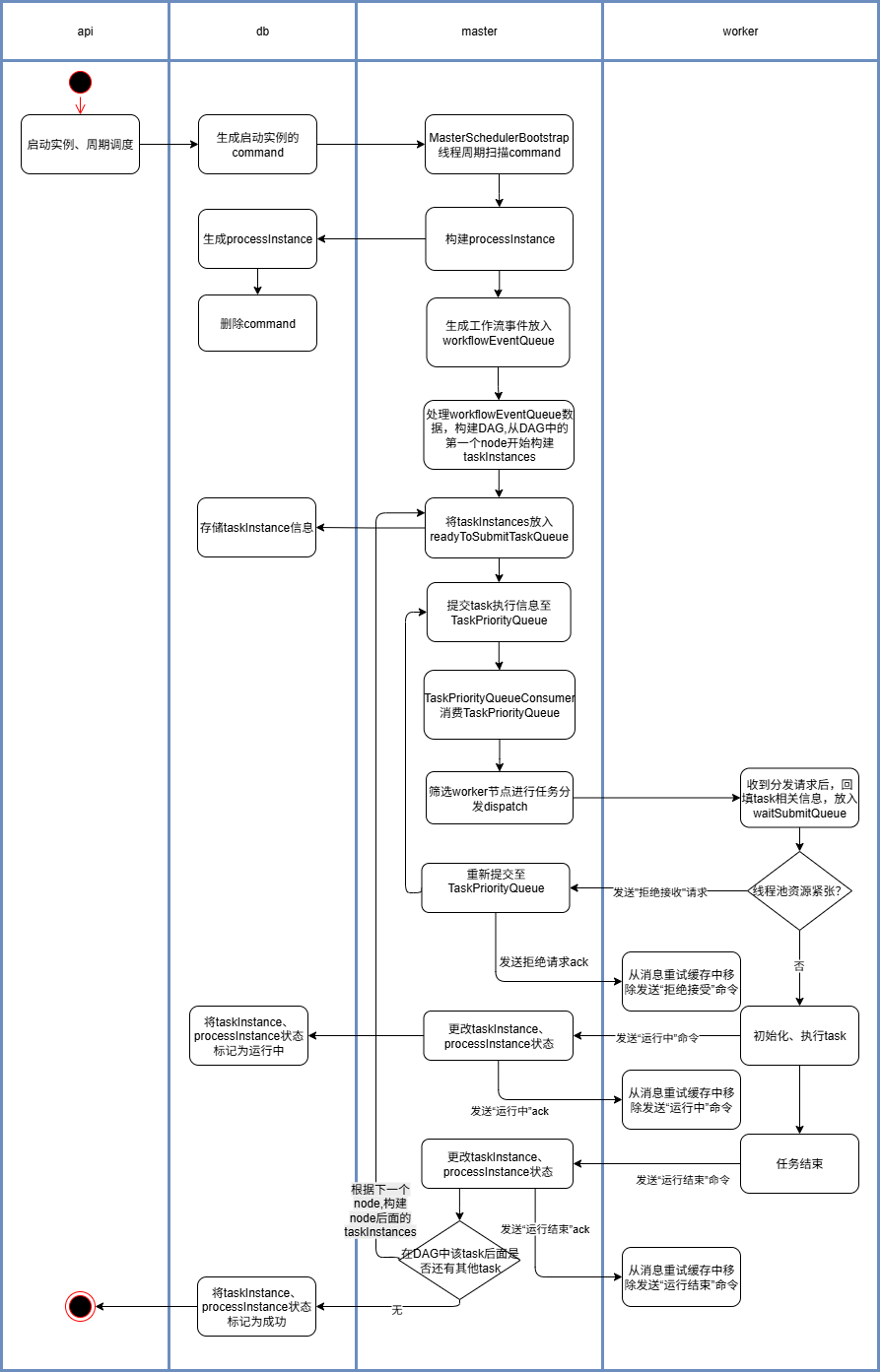
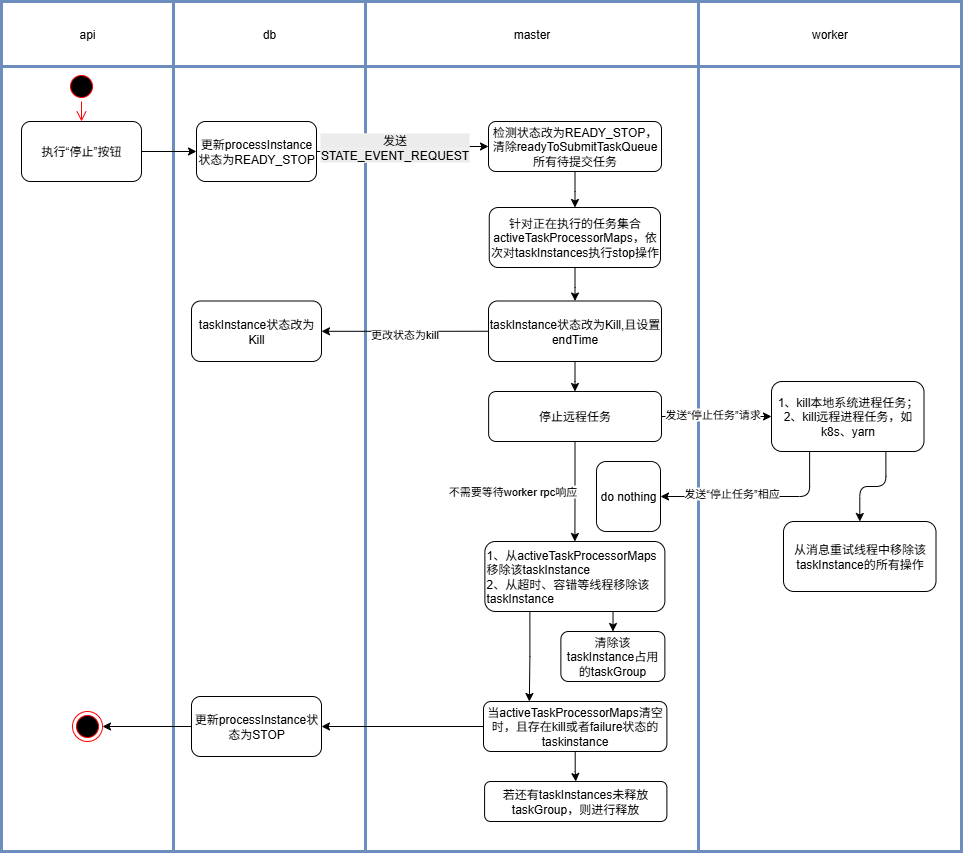
本文补充任务派发与任务停止流程图,且只描述正常的实例启动、停止流程,不包含实例容错恢复场景,不包含相关锁以及并发场景。
任务派发流程:
任务停止流程:
3
结语
以上是笔者对 Apache DolphinScheduler 3.1.9 版本特性与架构的初步理解,基于个人学习与实践整理而成。由于水平有限,文中难免存在理解偏差或疏漏之处,恳请各位读者不吝指正。如有不同见解,欢迎交流讨论,共同进步。
如果你对 Apache DolphinScheduler 的源码有兴趣,可以深入研究其任务调度策略的细节部分,或者根据自身业务场景进行二次开发,充分发挥 DolphinScheduler 的调度能力。



用户案例
迁移实战
发版消息
加入社区
关注社区的方式有很多:
GitHub: https://github.com/apache/dolphinscheduler 官网:https://dolphinscheduler.apache.org/en-us 订阅开发者邮件:dev@dolphinscheduler@apache.org(向邮箱发送任意内容,收到邮件后回复同意订阅即可) X.com:@DolphinSchedule YouTube:https://www.youtube.com/@apachedolphinscheduler Slack:https://join.slack.com/t/asf-dolphinscheduler/shared_invite/zt-1cmrxsio1-nJHxRJa44jfkrNL_Nsy9Qg
同样地,参与Apache DolphinScheduler 有非常多的参与贡献的方式,主要分为代码方式和非代码方式两种。
📂非代码方式包括:
完善文档、翻译文档;翻译技术性、实践性文章;投稿实践性、原理性文章;成为布道师;社区管理、答疑;会议分享;测试反馈;用户反馈等。
👩💻代码方式包括:
查找Bug;编写修复代码;开发新功能;提交代码贡献;参与代码审查等。

你的好友秀秀子拍了拍你
并请你帮她点一下“分享”
