



🐘 PostgreSQL 18 在 Rocky Linux 9 源码编译安装指南

🚀一、引言
PostgreSQL 18 于 2025 年 9 月 25 日 正式发布,这是近几年最具突破性的一次版本更新。
它不仅在 性能架构 上实现了质的飞跃,还在 SQL 功能、安全认证、复制与运维可观测性 等方面带来了大量企业级特性。
本文适合 DBA、后端工程师、数据库管理员直接实操部署。内容包括环境准备、依赖安装、源码下载、编译参数、io_uring 异步 I/O 支持、系统用户与服务配置、启动与测试等全过程。
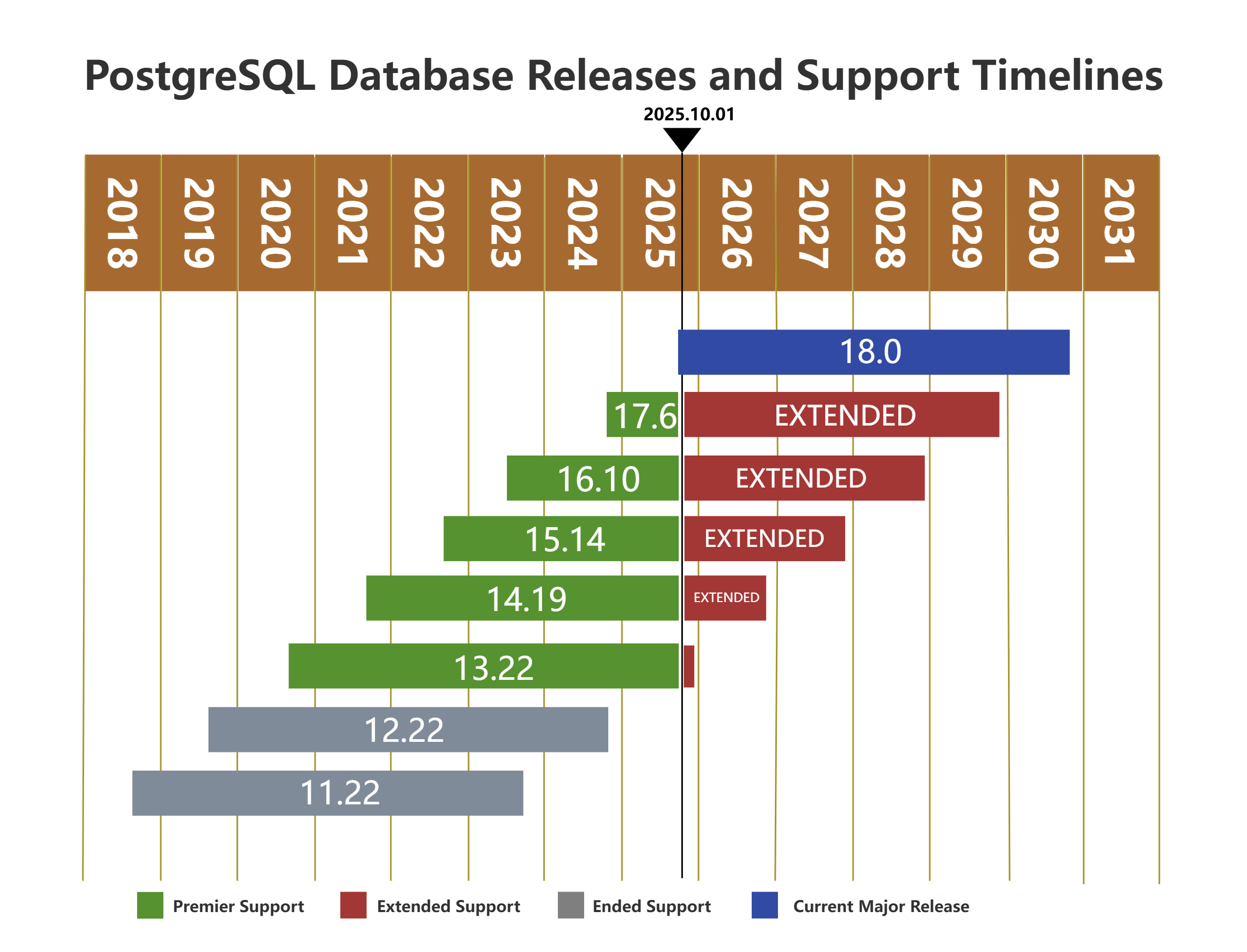
1. 版本历史
| 大版本 | 当前本版 | 支持 | 发行时间 | 结束时间 |
|---|---|---|---|---|
| 18 | 18.0 | 是 | 2025年9月25日 | 2030年11月14日 |
| 17 | 17.6 | 是 | 2024年9月26日 | 2029年11月8日 |
| 16 | 16.10 | 是 | 2023年9月14日 | 2028年11月9日 |
| 15 | 15.14 | 是 | 2022年10月13日 | 2027年11月11日 |
| 14 | 14.19 | 是 | 2021年9月30日 | 2026年11月12日 |
| 13 | 13.22 | 是 | 2020年9月24日 | 2025年11月13日 |
| 12 | 12.22 | 否 | 2019年10月3日 | 2024年11月14日 |
| 11 | 11.22 | 否 | 2018年10月18日 | 2023年11月9日 |
2. 最新版本概述
异步 I/O 性能提升
版本引入异步 I/O(AIO)子系统,通过并行执行多个读取请求提升性能。在顺序扫描、位图堆扫描和清理作业(VACUUM)等场景中,性能最高可提升 3 倍。当前仅支持异步读操作,后续将扩展至写入场景。
查询优化与索引改进
- 优化器调整:自动移除不必要的表自连接,将某些
IN (VALUES...)转换为x = ANY...以提高效率,并允许将OR子句转换为数组以加速索引处理。 - 索引加速:GIN 索引支持并行创建,B-tree 索引新增 跳跃式扫描(Skip Scan),允许查询非首列索引。
系统功能增强
- UUID 支持:新增 UUIDv7 生成函数,提供时间序可排序的识别码,改善索引性能;UUIDv4 成为
gen_random_uuid的别名。 - 安全升级:集成 OAuth 2.0 身份验证,支持更易与 SSO 系统集成;逐步淘汰 MD5 密码验证机制,推荐使用 SCRAM。
运维与监控优化
- VACUUM 改进:普通 VACUUM 操作可冻结完全可见页面,减少后续全表扫描冻结的开销;新增
ONLY选项限制处理分区表。 - 升级工具优化:pg_upgrade 支持平行检查和目录交换功能,缩短升级时间。
以上特性通过改进系统架构和查询执行效率,进一步提升了 PostgreSQL 在云存储、大数据量场景下的处理能力 。
📦 二、系统环境准备
1. 环境信息
本文的安装环境信息如下:
| 主机名 | 内存 | 磁盘空间 | IP地址 | 操作系统版本 | PostgreSQL版本 |
|---|---|---|---|---|---|
| PG18 | 16G | 100G | 192.168.17.18 | Rocky Linux 9.6 | PostgreSQL 18.0 |
2. 检查系统信息
## 查看系统版本信息
[root@PG18 ~]# cat /etc/os-release
NAME="Rocky Linux"
VERSION="9.6 (Blue Onyx)"
ID="rocky"
ID_LIKE="rhel centos fedora"
VERSION_ID="9.6"
PLATFORM_ID="platform:el9"
PRETTY_NAME="Rocky Linux 9.6 (Blue Onyx)"
ANSI_COLOR="0;32"
LOGO="fedora-logo-icon"
CPE_NAME="cpe:/o:rocky:rocky:9::baseos"
HOME_URL="https://rockylinux.org/"
VENDOR_NAME="RESF"
VENDOR_URL="https://resf.org/"
BUG_REPORT_URL="https://bugs.rockylinux.org/"
SUPPORT_END="2032-05-31"
ROCKY_SUPPORT_PRODUCT="Rocky-Linux-9"
ROCKY_SUPPORT_PRODUCT_VERSION="9.6"
REDHAT_SUPPORT_PRODUCT="Rocky Linux"
REDHAT_SUPPORT_PRODUCT_VERSION="9.6"
[root@PG18 ~]# cat /etc/redhat-release
Rocky Linux release 9.6 (Blue Onyx)
[root@PG18 ~]#
3. 关闭防火墙
[root@PG18 ~]# systemctl stop firewalld.service
[root@PG18 ~]# systemctl disable firewalld.service
[root@PG18 ~]#
4. 关闭 SELINUX
[root@PG18 ~]# setenforce 0
setenforce: SELinux is disabled
[root@PG18 ~]# sed -ri 's/SELINUX=enforcing/SELINUX=disabled/' /etc/selinux/config
[root@PG18 ~]#
5. 创建安装用户
[root@PG18 ~]# groupadd postgres
[root@PG18 ~]# useradd -g postgres postgres
[root@PG18 ~]# echo "postgres"|passwd --stdin postgres
Changing password for user postgres.
passwd: all authentication tokens updated successfully.
[root@PG18 ~]#
6. 安装编译所需要的包
[root@PG18 ~]# dnf config-manager --set-enabled crb
[root@PG18 ~]# dnf -y groupinstall "Development Tools"
Rocky Linux 9 - BaseOS                                                                                                                                                                                                                                                                                                   785  B/s | 4.1 kB     00:05
Rocky Linux 9 - AppStream                                                                                                                                                                                                                                                                                                914  B/s | 4.5 kB     00:05
Rocky Linux 9 - CRB                                                                                                                                                                                                                                                                                                      954  B/s | 4.5 kB     00:04
依赖关系解决。
=========================================================================================================================================================================================================================================================================================================================================================
 软件包                                                                              架构                                                                               版本                                                                                   仓库                                                                                 大小
=========================================================================================================================================================================================================================================================================================================================================================
安装组:
 Development Tools

事务概要
=========================================================================================================================================================================================================================================================================================================================================================

完毕!
[root@PG18 ~]# dnf -y install gcc gcc-c++ make readline-devel zlib-devel meson ninja-build pkgconfig \
  bison flex perl-FindBin perl-ExtUtils-Embed openssl-devel libxml2-devel libxslt-devel \
  readline-devel zlib-devel libicu-devel wget tar which llvm-devel clang liburing liburing-devel
上次元数据过期检查:0:00:07 前,执行于 2025年10月08日 星期三 21时05分16秒。
软件包 gcc-11.5.0-5.el9_5.x86_64 已安装。
软件包 gcc-c++-11.5.0-5.el9_5.x86_64 已安装。
软件包 make-1:4.3-8.el9.x86_64 已安装。
软件包 readline-devel-8.1-4.el9.x86_64 已安装。
软件包 zlib-devel-1.2.11-40.el9.x86_64 已安装。
软件包 meson-0.63.3-1.el9.noarch 已安装。
软件包 ninja-build-1.10.2-6.el9.x86_64 已安装。
软件包 pkgconf-pkg-config-1.7.3-10.el9.x86_64 已安装。
软件包 bison-3.7.4-5.el9.x86_64 已安装。
软件包 flex-2.6.4-9.el9.x86_64 已安装。
软件包 perl-FindBin-1.51-481.1.el9_6.noarch 已安装。
软件包 perl-ExtUtils-Embed-1.35-481.1.el9_6.noarch 已安装。
软件包 openssl-devel-1:3.2.2-6.el9_5.1.x86_64 已安装。
软件包 libxml2-devel-2.9.13-12.el9_6.x86_64 已安装。
软件包 libxslt-devel-1.1.34-13.el9_6.x86_64 已安装。
软件包 libicu-devel-67.1-10.el9_6.x86_64 已安装。
软件包 wget-1.21.1-8.el9_4.x86_64 已安装。
软件包 tar-2:1.34-7.el9.x86_64 已安装。
软件包 which-2.21-30.el9_6.x86_64 已安装。
软件包 llvm-devel-19.1.7-1.el9.x86_64 已安装。
软件包 clang-19.1.7-1.el9.x86_64 已安装。
软件包 liburing-2.5-1.el9.x86_64 已安装。
软件包 liburing-devel-2.5-1.el9.x86_64 已安装。
依赖关系解决。
无需任何处理。
完毕!
[root@PG18 ~]#
7. 配置系统参数文件
[root@PG18 ~]# cat >>/etc/sysctl.conf << "EOF"

#postgresql set
fs.file-max = 76724200
kernel.sem = 10000 10240000 10000 1024
kernel.shmmni = 4096
kernel.shmall = 1073741824
kernel.shmmax = 4398046511104
net.ipv4.ip_local_port_range = 9000 65500
net.core.rmem_default = 262144
net.core.wmem_default = 262144
net.core.rmem_max = 4194304
net.core.wmem_max = 1048576
fs.aio-max-nr = 40960000
vm.dirty_ratio = 20
vm.dirty_background_ratio = 3
vm.dirty_writeback_centisecs = 100
vm.dirty_expire_centisecs = 500
vm.min_free_kbytes = 524288
vm.swappiness = 0
vm.overcommit_memory = 2
vm.overcommit_ratio = 75
kernel.io_uring_disabled = 0

EOF
[root@PG18 ~]# /sbin/sysctl -p
fs.file-max = 76724200
kernel.sem = 10000 10240000 10000 1024
kernel.shmmni = 4096
kernel.shmall = 1073741824
kernel.shmmax = 4398046511104
net.ipv4.ip_local_port_range = 9000 65500
net.core.rmem_default = 262144
net.core.wmem_default = 262144
net.core.rmem_max = 4194304
net.core.wmem_max = 1048576
fs.aio-max-nr = 40960000
vm.dirty_ratio = 20
vm.dirty_background_ratio = 3
vm.dirty_writeback_centisecs = 100
vm.dirty_expire_centisecs = 500
vm.min_free_kbytes = 524288
vm.swappiness = 0
vm.overcommit_memory = 2
vm.overcommit_ratio = 75
kernel.io_uring_disabled = 0
[root@PG18 ~]# cat >> /etc/security/limits.conf << "EOF"

#postgresql set
postgres soft nofile 1048576
postgres hard nofile 1048576
postgres soft nproc 131072
postgres hard nproc 131072
postgres soft stack 10240
postgres hard stack 32768
postgres soft core 6291456
postgres hard core 6291456

EOF
[root@PG18 ~]#
8. 创建安装目录
[root@PG18 ~]# mkdir -p /opt/pg/{pg18,data,archive} /usr/local/src
[root@PG18 ~]# chown -R postgres:postgres /opt/pg /usr/local/src
[root@PG18 ~]#
📥 三、下载 PostgreSQL 18 源码
从官方源或镜像下载最新的 18.0 源码包:
[root@PG18 ~]# su - postgres
[postgres@PG18 ~]$ cd /usr/local/src
[postgres@PG18 src]$ wget https://ftp.postgresql.org/pub/source/v18.0/postgresql-18.0.tar.gz
--2025-10-08 21:10:27--  https://ftp.postgresql.org/pub/source/v18.0/postgresql-18.0.tar.gz
Resolving ftp.postgresql.org (ftp.postgresql.org)... 151.101.111.52
Connecting to ftp.postgresql.org (ftp.postgresql.org)|151.101.111.52|:443... connected.
HTTP request sent, awaiting response... 200 OK
Length: 29262032 (28M) [application/gzip]
Saving to: ‘postgresql-18.0.tar.gz’

postgresql-18.0.tar.gz                                                                 100%[=========================================================================================================================================================================================================================>]  27.91M  1.45MB/s    in 20s

2025-10-08 21:10:49 (1.42 MB/s) - ‘postgresql-18.0.tar.gz’ saved [29262032/29262032]

[postgres@PG18 src]$
✅ 建议始终从官方源获取源码,以确保安全性和完整性。
🛠️ 四、编译与安装 PostgreSQL 18
1. 配置编译参数
推荐配置如下:
[postgres@PG18 src]$ ll
total 28580
-rw-r--r--. 1 postgres postgres 29262032 Sep 23 04:15 postgresql-18.0.tar.gz
[postgres@PG18 src]$ tar zxf postgresql-18.0.tar.gz
[postgres@PG18 src]$ cd /usr/local/src/postgresql-18.0/
[postgres@PG18 postgresql-18.0]$ ./configure --prefix=/opt/pg/pg18 \
  --with-pgport=5432 --with-openssl --with-libxml --with-libxslt \
  --with-icu --with-llvm --with-liburing
checking build system type... x86_64-pc-linux-gnu
checking host system type... x86_64-pc-linux-gnu
checking which template to use... linux
checking whether NLS is wanted... no
checking for default port number... 5432
checking for block size... 8kB
checking for segment size... 1GB
checking for WAL block size... 8kB
checking for gcc... gcc
checking whether the C compiler works... yes
checking for C compiler default output file name... a.out
checking for suffix of executables...
checking whether we are cross compiling... no
checking for suffix of object files... o
checking whether we are using the GNU C compiler... yes
checking whether gcc accepts -g... yes
checking for gcc option to accept ISO C89... none needed
checking for gcc option to accept ISO C99... none needed
checking for g++... g++
checking whether we are using the GNU C++ compiler... yes
checking whether g++ accepts -g... yes
checking for gawk... gawk
。。。省略
configure: creating ./config.status
config.status: creating GNUmakefile
config.status: creating src/Makefile.global
config.status: creating src/include/pg_config.h
config.status: creating src/interfaces/ecpg/include/ecpg_config.h
config.status: linking src/backend/port/tas/dummy.s to src/backend/port/tas.s
config.status: linking src/backend/port/posix_sema.c to src/backend/port/pg_sema.c
config.status: linking src/backend/port/sysv_shmem.c to src/backend/port/pg_shmem.c
config.status: linking src/include/port/linux.h to src/include/pg_config_os.h
config.status: linking src/makefiles/Makefile.linux to src/Makefile.port
[postgres@PG18 postgresql-18.0]$
看到checking for liburing… yes。说明
io_uring支持已正确启用 ✅。
2. 编译并安装
## 耐心等待十来分钟编译安装
[postgres@PG18 postgresql-18.0]$ make world -j2
。。。省略

[postgres@PG18 postgresql-18.0]$ make install-world -j2
。。。省略
cd '/opt/pg/pg18/lib/postgresql/bitcode' && /usr/bin/llvm-lto -thinlto -thinlto-action=thinlink -o pgcrypto.index.bc pgcrypto/crypt-blowfish.bc pgcrypto/crypt-des.bc pgcrypto/crypt-gensalt.bc pgcrypto/crypt-md5.bc pgcrypto/crypt-sha.bc pgcrypto/mbuf.bc pgcrypto/openssl.bc pgcrypto/pgcrypto.bc pgcrypto/pgp-armor.bc pgcrypto/pgp-cfb.bc pgcrypto/pgp-compress.bc pgcrypto/pgp-decrypt.bc pgcrypto/pgp-encrypt.bc pgcrypto/pgp-info.bc pgcrypto/pgp-mpi.bc pgcrypto/pgp-mpi-openssl.bc pgcrypto/pgp-pgsql.bc pgcrypto/pgp-pubdec.bc pgcrypto/pgp-pubenc.bc pgcrypto/pgp-pubkey.bc pgcrypto/pgp-s2k.bc pgcrypto/pgp.bc pgcrypto/px-crypt.bc pgcrypto/px-hmac.bc pgcrypto/px.bc
make[2]: Leaving directory '/usr/local/src/postgresql-18.0/contrib/xml2'
make[2]: Leaving directory '/usr/local/src/postgresql-18.0/contrib/pgcrypto'
make[1]: Leaving directory '/usr/local/src/postgresql-18.0/contrib'
[postgres@PG18 postgresql-18.0]$
3. 设置环境变量
[postgres@PG18 postgresql-18.0]$ cat >> /home/postgres/.bash_profile << "EOF"
>
> #PostgreSQL settings
> export PGPORT=5432
> export PGUSER=postgres
> export PGHOME=/opt/pg/pg18
> export PGDATA=/opt/pg/data
> export LD_LIBRARY_PATH=$PGHOME/lib
> export MANPATH=$PGHOME/share/man
> export PATH=$PGHOME/bin:$PATH
> export LANG="en_US.UTF-8"
>
> EOF
[postgres@PG18 postgresql-18.0]$ source ~/.bash_profile
[postgres@PG18 postgresql-18.0]$ postgres --version
postgres (PostgreSQL) 18.0
[postgres@PG18 postgresql-18.0]$
📂 五、初始化数据库集群
1. 初始化数据库
[postgres@PG18 postgresql-18.0]$ initdb -D /opt/pg/data -k -E UTF8 -U postgres -W
The files belonging to this database system will be owned by user "postgres".
This user must also own the server process.

The database cluster will be initialized with locale "en_US.UTF-8".
The default text search configuration will be set to "english".

Data page checksums are enabled.

Enter new superuser password:
Enter it again:

fixing permissions on existing directory /opt/pg/data ... ok
creating subdirectories ... ok
selecting dynamic shared memory implementation ... posix
selecting default "max_connections" ... 100
selecting default "shared_buffers" ... 128MB
selecting default time zone ... Asia/Shanghai
creating configuration files ... ok
running bootstrap script ... ok
performing post-bootstrap initialization ... ok
syncing data to disk ... ok

initdb: warning: enabling "trust" authentication for local connections
initdb: hint: You can change this by editing pg_hba.conf or using the option -A, or --auth-local and --auth-host, the next time you run initdb.

Success. You can now start the database server using:

    pg_ctl -D /opt/pg/data -l logfile start

[postgres@PG18 postgresql-18.0]$
2. 修改posgresql.conf文件
[postgres@PG18 postgresql-18.0]$ cat >/opt/pg/data/postgresql.conf << "EOF"

#add line
listen_addresses = '*'
port = 5432
shared_buffers = 4GB
effective_cache_size = 12GB
maintenance_work_mem = 1GB
work_mem = 30MB
huge_pages = off
maintenance_work_mem = 256MB
temp_buffers = 256MB
max_connections = 500
checkpoint_completion_target = 0.9
wal_buffers = 16MB
min_wal_size = 4GB
max_wal_size = 64GB
wal_log_hints = on
wal_keep_size = 1000
default_statistics_target = 100
random_page_cost = 1.1
effective_io_concurrency = 200
max_worker_processes = 8
max_parallel_workers_per_gather = 4
max_parallel_workers = 8
max_parallel_maintenance_workers = 4
wal_level = replica
logging_collector = on
log_directory = 'log'
log_filename = 'postgresql-%Y-%m-%d_%H%M%S.log'
log_file_mode = 0600
log_rotation_age = 1d
log_rotation_size = 0
log_truncate_on_rotation = off
archive_mode = on
archive_command = 'test ! -f /opt/pg/archive/%f && cp %p /opt/pg/archive/%f'

EOF
[postgres@PG18 postgresql-18.0]$
🔥 六、启动 PostgreSQL 18
1. 手动启动(测试用)
[postgres@PG18 postgresql-18.0]$ pg_ctl -D /opt/pg/data -l /opt/pg/data/logfile.log start
waiting for server to start.... done
server started
[postgres@PG18 postgresql-18.0]$ pg_ctl stop
waiting for server to shut down.... done
server stopped
[postgres@PG18 postgresql-18.0]$
2. 配置 systemd 服务(推荐)
创建服务文件 /usr/lib/systemd/system/postgres.service:
##切换到root账号设置
[postgres@PG18 postgresql-18.0]$ exit
logout
[root@PG18 ~]# cat > /usr/lib/systemd/system/postgres.service << "EOF"

[Unit]
Description=PostgreSQL database server
After=network.target
[Service]
Type=forking
User=postgres
Group=postgres
Environment=PGPORT=5432
Environment=PGDATA=/opt/pg/data
OOMScoreAdjust=-1000
ExecStart=/opt/pg/pg18/bin/pg_ctl start -D $PGDATA
ExecStop=/opt/pg/pg18/pg_ctl stop -D $PGDATA -s -m fast
ExecReload=/opt/pg/pg18/bin/pg_ctl reload -D $PGDATA -s
TimeoutSec=300
[Install]
WantedBy=multi-user.target

EOF
[root@PG18 ~]#
启用服务:
[root@PG18 ~]# chmod +x /usr/lib/systemd/system/postgres.service
[root@PG18 ~]# systemctl daemon-reload
[root@PG18 ~]# systemctl enable --now postgres.service
[root@PG18 ~]# systemctl status postgres.service
● postgres.service - PostgreSQL database server
     Loaded: loaded (/usr/lib/systemd/system/postgres.service; enabled; preset: disabled)
     Active: active (running) since Wed 2025-10-08 21:44:43 CST; 11s ago
    Process: 160605 ExecStart=/opt/pg/pg18/bin/pg_ctl start -D $PGDATA (code=exited, status=0/SUCCESS)
   Main PID: 160607 (postgres)
      Tasks: 11 (limit: 101706)
     Memory: 132.8M
        CPU: 114ms
     CGroup: /system.slice/postgres.service
             ├─160607 /opt/pg/pg18/bin/postgres -D /opt/pg/data
             ├─160608 "postgres: logger "
             ├─160609 "postgres: io worker 0"
             ├─160610 "postgres: io worker 1"
             ├─160611 "postgres: io worker 2"
             ├─160612 "postgres: checkpointer "
             ├─160613 "postgres: background writer "
             ├─160615 "postgres: walwriter "
             ├─160616 "postgres: autovacuum launcher "
             ├─160617 "postgres: archiver "
             └─160618 "postgres: logical replication launcher "

10月 08 21:44:43 PG18 systemd[1]: Starting PostgreSQL database server...
10月 08 21:44:43 PG18 pg_ctl[160605]: waiting for server to start....
10月 08 21:44:43 PG18 pg_ctl[160607]: 2025-10-08 13:44:43.575 GMT [160607] LOG:  redirecting log output to logging collector process
10月 08 21:44:43 PG18 pg_ctl[160607]: 2025-10-08 13:44:43.575 GMT [160607] HINT:  Future log output will appear in directory "log".
10月 08 21:44:43 PG18 pg_ctl[160605]:  done
10月 08 21:44:43 PG18 pg_ctl[160605]: server started
10月 08 21:44:43 PG18 systemd[1]: Started PostgreSQL database server.
[root@PG18 ~]#
🧪 七、测试 PostgreSQL
1. 用psql登录测试
[root@PG18 ~]# su - postgres
[postgres@PG18 ~]$ psql
psql (18.0)
Type "help" for help.

postgres=# select version();
                                                 version
----------------------------------------------------------------------------------------------------------
 PostgreSQL 18.0 on x86_64-pc-linux-gnu, compiled by gcc (GCC) 11.5.0 20240719 (Red Hat 11.5.0-5), 64-bit
(1 row)

postgres=# \l
                                                     List of databases
   Name    |  Owner   | Encoding | Locale Provider |   Collate   |    Ctype    | Locale | ICU Rules |   Access privileges
-----------+----------+----------+-----------------+-------------+-------------+--------+-----------+-----------------------
 postgres  | postgres | UTF8     | libc            | en_US.UTF-8 | en_US.UTF-8 |        |           |
 template0 | postgres | UTF8     | libc            | en_US.UTF-8 | en_US.UTF-8 |        |           | =c/postgres          +
           |          |          |                 |             |             |        |           | postgres=CTc/postgres
 template1 | postgres | UTF8     | libc            | en_US.UTF-8 | en_US.UTF-8 |        |           | =c/postgres          +
           |          |          |                 |             |             |        |           | postgres=CTc/postgres
(3 rows)

postgres=#
2. 设置io_uring异步I/O
postgres=# show io_method;
 io_method
-----------
 worker
(1 row)

postgres=# exit
[postgres@PG18 ~]$ cat >/opt/pg/data/postgresql.conf << "EOF"
>
> io_method = io_uring
>
> EOF
[postgres@PG18 ~]$ pg_ctl restart
waiting for server to shut down.... done
server stopped
waiting for server to start....2025-10-08 13:57:25.733 GMT [160702] LOG:  starting PostgreSQL 18.0 on x86_64-pc-linux-gnu, compiled by gcc (GCC) 11.5.0 20240719 (Red Hat 11.5.0-5), 64-bit
2025-10-08 13:57:25.734 GMT [160702] LOG:  listening on IPv6 address "::1", port 5432
2025-10-08 13:57:25.734 GMT [160702] LOG:  listening on IPv4 address "127.0.0.1", port 5432
2025-10-08 13:57:25.736 GMT [160702] LOG:  listening on Unix socket "/tmp/.s.PGSQL.5432"
2025-10-08 13:57:25.738 GMT [160706] LOG:  database system was shut down at 2025-10-08 13:57:25 GMT
2025-10-08 13:57:25.740 GMT [160702] LOG:  database system is ready to accept connections
 done
server started
[postgres@PG18 ~]$ psql
psql (18.0)
Type "help" for help.

postgres=# show io_method;
 io_method
-----------
 io_uring
(1 row)

postgres=#
✅八、总结
本文介绍了PostgreSQL 18正式版本在Rocky Linux 9 源码安装。包含环境准备、依赖安装、源码下载、编译参数、io_uring 异步 I/O 支持、系统用户与服务配置、启动与测试等全过程。😄
「喜欢这篇文章,您的关注和赞赏是给作者最好的鼓励」
关注作者
【版权声明】本文为墨天轮用户原创内容,转载时必须标注文章的来源(墨天轮),文章链接,文章作者等基本信息,否则作者和墨天轮有权追究责任。如果您发现墨天轮中有涉嫌抄袭或者侵权的内容,欢迎发送邮件至:contact@modb.pro进行举报,并提供相关证据,一经查实,墨天轮将立刻删除相关内容。
