



参考之前:https://www.modb.pro/db/624217
https://www.modb.pro/db/624348
此次将脚本改成了随系统启动,然后每3秒检查是否主库,如果主库则挂接vip
(以前的脚本是通过每分钟定时任务调用,这样不仅增加了系统负担,而且多了cron的日志输出)
节点1:
[root@longxi01 ~]# cat /etc/redhat-release
Anolis OS release 8.6
[root@longxi01 ~]# ll /etc/rc.d/rc.local
-rwxr-xr-x. 1 root root 541 10月  9 14:48 /etc/rc.d/rc.local
[root@longxi01 ~]# ll /etc/rc.local
lrwxrwxrwx. 1 root root 13 4月  21 2022 /etc/rc.local -> rc.d/rc.local
[root@longxi01 ~]#
[root@longxi01 ~]# cat /etc/rc.local
#!/bin/bash
# THIS FILE IS ADDED FOR COMPATIBILITY PURPOSES
#
# It is highly advisable to create own systemd services or udev rules
# to run scripts during boot instead of using this file.
#
# In contrast to previous versions due to parallel execution during boot
# this script will NOT be run after all other services.
#
# Please note that you must run 'chmod +x /etc/rc.d/rc.local' to ensure
# that this script will be executed during boot.

touch /var/lock/subsys/local
/etc/vip_check.sh > /dev/null 2>&1 &


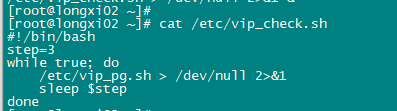
[root@longxi01 ~]# cat /etc/vip_check.sh
#!/bin/bash
step=3
while true; do
    /etc/vip_pg.sh > /dev/null 2>&1
    sleep $step
done
[root@longxi01 ~]#
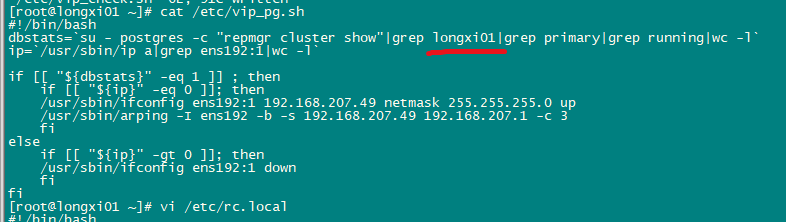
[root@longxi01 ~]# cat /etc/vip_pg.sh
#!/bin/bash
dbstats=`su - postgres -c "repmgr cluster show"|grep longxi01|grep primary|grep running|wc -l`
ip=`/usr/sbin/ip a|grep ens192:1|wc -l`

if [[ "${dbstats}" -eq 1 ]] ; then
    if [[ "${ip}" -eq 0 ]]; then
    /usr/sbin/ifconfig ens192:1 192.168.207.49 netmask 255.255.255.0 up
    /usr/sbin/arping -I ens192 -b -s 192.168.207.49 192.168.207.1 -c 3
    fi
else
    if [[ "${ip}" -gt 0 ]]; then
    /usr/sbin/ifconfig ens192:1 down
    fi
fi
[root@longxi01 ~]#
[root@longxi01 ~]#


[root@longxi01 ~]# su - postgres
[postgres@longxi01 ~]$
[postgres@longxi01 ~]$
[postgres@longxi01 ~]$ repmgr cluster show
 ID | Name     | Role    | Status    | Upstream | Location | Priority | Timeline | Connection string
----+----------+---------+-----------+----------+----------+----------+----------+---------------------------------------------------------------------------
 1  | longxi01 | standby |   running | longxi02 | default  | 100      | 10       | host=192.168.207.69 user=repmgr dbname=repmgr port=5432 connect_timeout=2
 2  | longxi02 | primary | * running |          | default  | 100      | 10       | host=192.168.207.70 user=repmgr dbname=repmgr port=5432 connect_timeout=2
[postgres@longxi01 ~]$
[postgres@longxi01 ~]$ ip a|grep 192.
2: ens192: <BROADCAST,MULTICAST,UP,LOWER_UP> mtu 1500 qdisc mq state UP group default qlen 1000
    inet 192.168.207.69/24 brd 192.168.207.255 scope global noprefixroute ens192
节点2:[root@longxi02 ~]# cat /etc/redhat-release
Anolis OS release 8.6
[root@longxi02 ~]# ll /etc/rc.d/rc.local
-rwxr-xr-x. 1 root root 541 10月  9 14:48 /etc/rc.d/rc.local
[root@longxi02 ~]#
[root@longxi02 ~]#
[root@longxi02 ~]# ll /etc/rc.local
lrwxrwxrwx. 1 root root 13 4月  21 2022 /etc/rc.local -> rc.d/rc.local
[root@longxi02 ~]#
[root@longxi02 ~]# cat /etc/rc.local
#!/bin/bash
# THIS FILE IS ADDED FOR COMPATIBILITY PURPOSES
#
# It is highly advisable to create own systemd services or udev rules
# to run scripts during boot instead of using this file.
#
# In contrast to previous versions due to parallel execution during boot
# this script will NOT be run after all other services.
#
# Please note that you must run 'chmod +x /etc/rc.d/rc.local' to ensure
# that this script will be executed during boot.

touch /var/lock/subsys/local
#su - postgres -c "repmgrd -d" ##该进程可自动切换主备库
/etc/vip_check.sh > /dev/null 2>&1 &
[root@longxi02 ~]#
[root@longxi02 ~]# cat /etc/vip_check.sh
#!/bin/bash
step=3
while true; do
    /etc/vip_pg.sh > /dev/null 2>&1
    sleep $step
done
[root@longxi02 ~]#
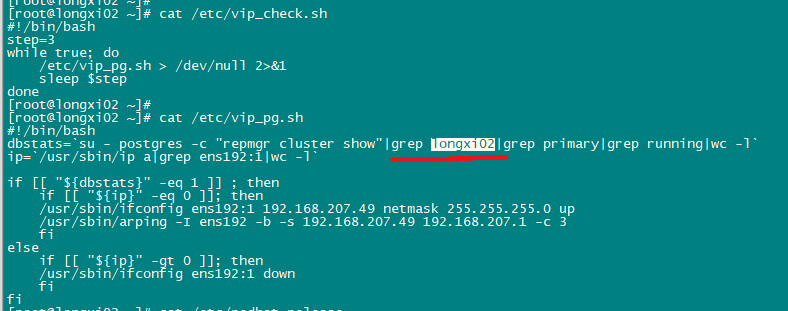
[root@longxi02 ~]# cat /etc/vip_pg.sh
#!/bin/bash
dbstats=`su - postgres -c "repmgr cluster show"|grep longxi02|grep primary|grep running|wc -l`
ip=`/usr/sbin/ip a|grep ens192:1|wc -l`

if [[ "${dbstats}" -eq 1 ]] ; then
    if [[ "${ip}" -eq 0 ]]; then
    /usr/sbin/ifconfig ens192:1 192.168.207.49 netmask 255.255.255.0 up
    /usr/sbin/arping -I ens192 -b -s 192.168.207.49 192.168.207.1 -c 3
    fi
else
    if [[ "${ip}" -gt 0 ]]; then
    /usr/sbin/ifconfig ens192:1 down
    fi
fi
[root@longxi02 ~]#

[root@longxi02 ~]# su - postgres
[postgres@longxi02 ~]$ repmgr cluster show
 ID | Name     | Role    | Status    | Upstream | Location | Priority | Timeline | Connection string
----+----------+---------+-----------+----------+----------+----------+----------+---------------------------------------------------------------------------
 1  | longxi01 | standby |   running | longxi02 | default  | 100      | 10       | host=192.168.207.69 user=repmgr dbname=repmgr port=5432 connect_timeout=2
 2  | longxi02 | primary | * running |          | default  | 100      | 10       | host=192.168.207.70 user=repmgr dbname=repmgr port=5432 connect_timeout=2
[postgres@longxi02 ~]$
[postgres@longxi02 ~]$
[postgres@longxi02 ~]$ ip a|grep 192.
2: ens192: <BROADCAST,MULTICAST,UP,LOWER_UP> mtu 1500 qdisc mq state UP group default qlen 1000
    inet 192.168.207.70/24 brd 192.168.207.255 scope global noprefixroute ens192
    inet 192.168.207.49/24 brd 192.168.207.255 scope global secondary ens192:1

增加启动自动切换的的进程:主备节点一样配置。
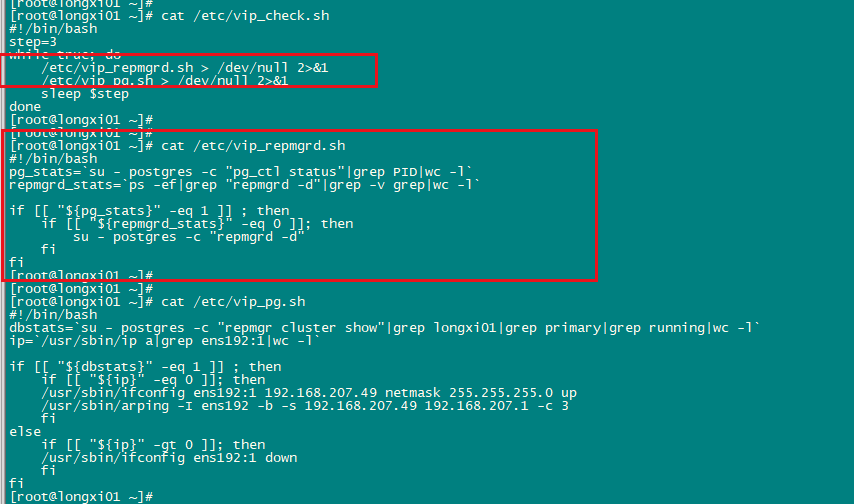
[root@longxi01 ~]# cat /etc/vip_check.sh
#!/bin/bash
step=3
while true; do
    /etc/vip_repmgrd.sh > /dev/null 2>&1
    /etc/vip_pg.sh > /dev/null 2>&1
    sleep $step
done
[root@longxi01 ~]#
[root@longxi01 ~]#
[root@longxi01 ~]# cat /etc/vip_repmgrd.sh
#!/bin/bash
pg_stats=`su - postgres -c "pg_ctl status"|grep PID|wc -l`
repmgrd_stats=`ps -ef|grep "repmgrd -d"|grep -v grep|wc -l`

if [[ "${pg_stats}" -eq 1 ]] ; then
    if [[ "${repmgrd_stats}" -eq 0 ]]; then
        su - postgres -c "repmgrd -d"
    fi
fi
[root@longxi01 ~]#
[root@longxi01 ~]#
[root@longxi01 ~]# cat /etc/vip_pg.sh
#!/bin/bash
dbstats=`su - postgres -c "repmgr cluster show"|grep longxi01|grep primary|grep running|wc -l`
ip=`/usr/sbin/ip a|grep ens192:1|wc -l`

if [[ "${dbstats}" -eq 1 ]] ; then
    if [[ "${ip}" -eq 0 ]]; then
    /usr/sbin/ifconfig ens192:1 192.168.207.49 netmask 255.255.255.0 up
    /usr/sbin/arping -I ens192 -b -s 192.168.207.49 192.168.207.1 -c 3
    fi
else
    if [[ "${ip}" -gt 0 ]]; then
    /usr/sbin/ifconfig ens192:1 down
    fi
fi
最后修改时间:2025-10-10 09:55:57
「喜欢这篇文章,您的关注和赞赏是给作者最好的鼓励」
关注作者
【版权声明】本文为墨天轮用户原创内容,转载时必须标注文章的来源(墨天轮),文章链接,文章作者等基本信息,否则作者和墨天轮有权追究责任。如果您发现墨天轮中有涉嫌抄袭或者侵权的内容,欢迎发送邮件至:contact@modb.pro进行举报,并提供相关证据,一经查实,墨天轮将立刻删除相关内容。
