



自己安装的openGauss环境
启动openGauss
gs_ctl -D /gauss/data/db1/ start
登录openGauss
gsql -d postgres -p 26000 -r
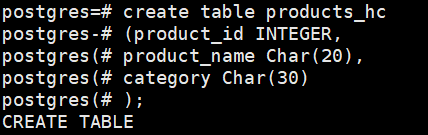
1.创建一个表products_hc
字段名 数据类型 含义
product_id INTEGER 产品编号
product_name Char(20) 产品名
category Char(30) 种类
create table products_hc
(product_id INTEGER,
product_name Char(20),
category Char(30)
);
2.向表中插入数据,采用一次插入一条和多条记录的方式
product_id product_name category
1502 olympus camera electrncs
1601 lamaze toys
1700 wait interface Books
1666 harry potter toys
insert into products_hc(product_id,product_name,category) values(1502,‘olympus camera’,‘electrncs’);
insert into products_hc(product_id,product_name,category) values(1601,‘lamaze’,‘toys’),(1700,‘wait interface’,‘Books’),(1666,‘harry potter’,‘toys’);

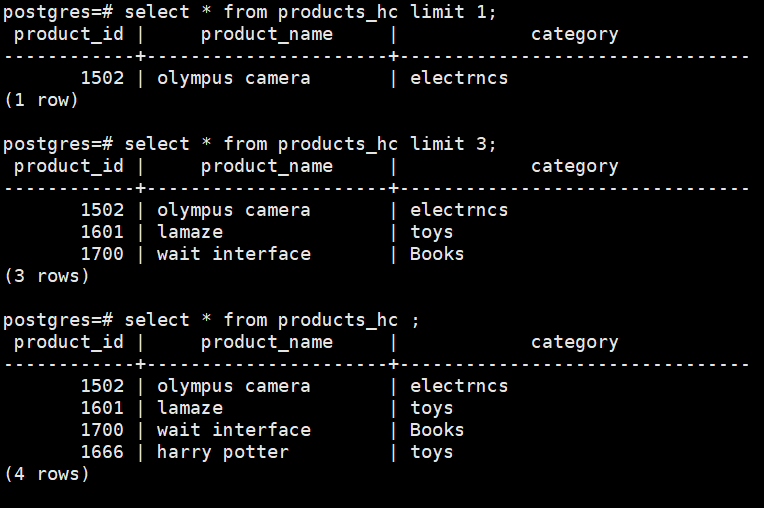
3.获取表中一条记录、三条记录和所有记录
select * from products_hc limit 1;
select * from products_hc limit 3;
select * from products_hc ;
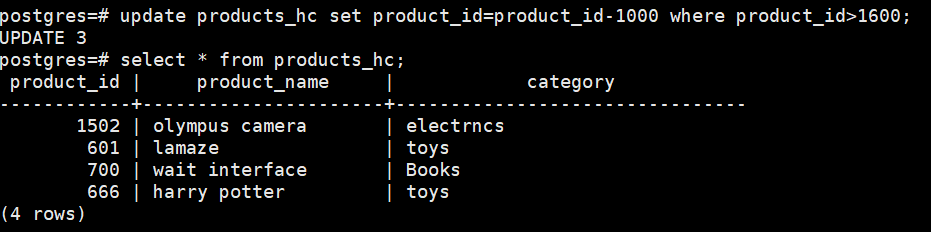
4.将满足product_id > 1600的记录的product_id更新为product_id – 1000,并查看products中所有记录是否更新成功
update products_hc set product_id=product_id-1000 where product_id>1600;
select * from products_hc;
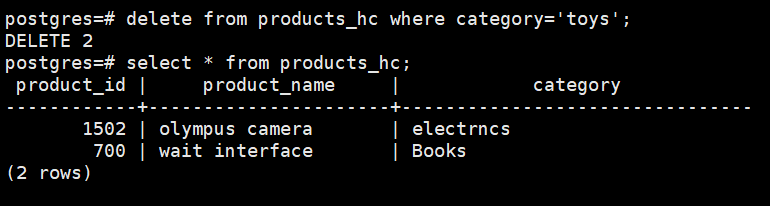
5.删除category为toys的所有记录,并查看products中数据是否删除成功
delete from products_hc where category=‘toys’;
select * from products_hc;
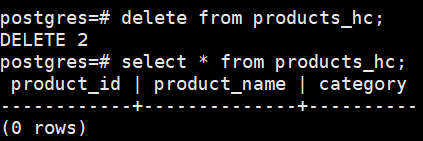
6.删除products中所有数据,并查看数据是否删除成功
delete from products_hc;
select * from products_hc;
7.删除表products_hc
drop table products_hc;

