



在1月14日加拉斯举行的2025 Oracle AI World上,Oracle 再一次更改了其长期版本的的数据库的名称,改后的名称叫做 Oracle AI Database 26ai。和以前的名字Oracle database 23ai相比,前面也加了一个AI前缀,一个名称里面有两个AI,是不是有点画蛇添足呢?
不管是互联网还是云计算,Oracle都不是开创者,但跟进都很及时,跟进后也很快能够站稳脚跟,在新技术领域分得很大一块蛋糕。
这次的改名和以前的改名又有不同,这一次AI加在在前面,以后不是Oracle 数据库了,而是Oracle AI 数据库了。和AI agent,AI 大模型一样,Oracle 数据库也加入了AI的大家庭,成为AI大家庭里面的一个成员了。
Oracle AI Database 26ai将人工智能深度融入数据管理核心,进一步践行了Oracle帮助客户安全地将AI技术应用于全域数据的承诺。这一里程碑推动了Oracle“AI for Data””愿景的实现——通过在整个数据与开发栈中全面运用AI技术(包括AI向量搜索、数据库自治管理、数据智能开发、AI应用开发及智能分析),打造下一代原生AI数据库。如今客户可运行动态智能体工作流,通过融合私有数据库与公共信息源,获取精准的洞察分析与智能决策支持。
Oracle AI database在官网可以下载,下载的地址见Try Oracle AI Database for free,支持windows、linux、MAC操作系统,linux下也有容器的版本可以下载,今天下载Linux的安装版本体验一下。
1 操作系统支持
Oracle AI Database 26ai支持Oracle linux和Oracle Enterprise Linux 8和9,在Oracle Linux 8也提供 Arm版本。根据自己的linux版本下载相应的安装包。
2 安装步骤
我这里的安装环境比较复杂,这个虚拟机上已经安装了Oracle 23AI数据库(也是用rpm包安装的)
2.1 下载相应的安装包
查看oracle linux版本
[root@localhost ~]# cat /etc/oracle-release
Oracle Linux Server release 8.10
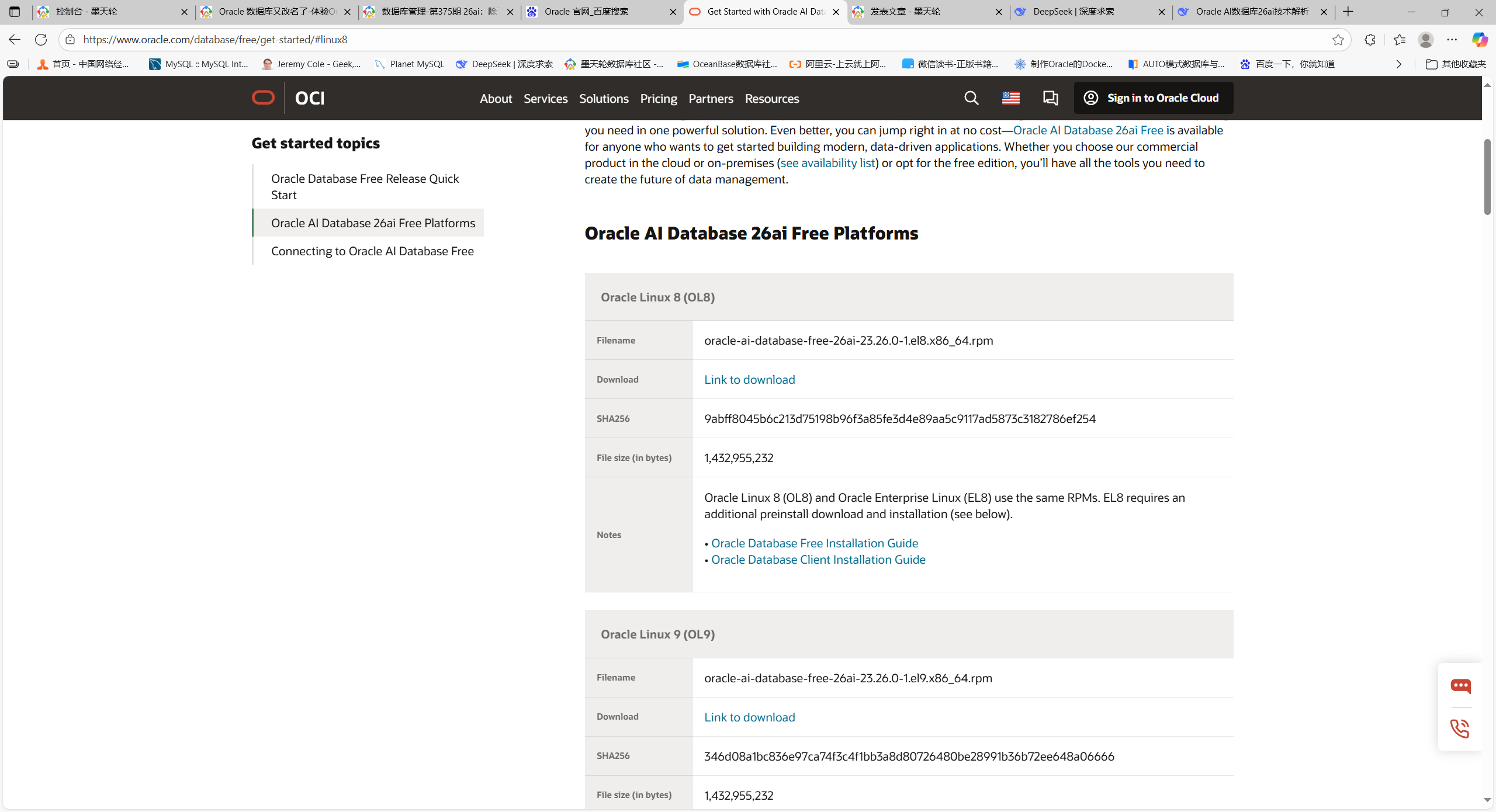
Oracle linux和Oracle Enterprise Linux使用的是相同的安装包,Enterprise Linux需要单独安装安装包。
检查下载的安装包
[root@localhost ~]# ls -lh oracl*
-rw-r--r--. 1 root root 1.4G Oct 15 01:26 oracle-ai-database-free-26ai-23.26.0-1.el8.x86_64.rpm
2.2 开始安装
不要使用rpm命令,使用dnf命令
[root@localhost ~]# dnf -y install oracle-ai-database-free-26ai-23.26.0-1.el8.x86_64.rpm
Last metadata expiration check: 0:01:34 ago on Wed 15 Oct 2025 01:37:51 AM EDT.
Error:
 Problem: package oracle-ai-database-free-26ai-23.26.0-1.x86_64 from @commandline conflicts with oracle-database-free-23ai provided by oracle-database-free-23ai-23.8-1.x86_64 from @System
  - conflicting requests
  - problem with installed package oracle-database-free-23ai-23.8-1.x86_64
(try to add '--allowerasing' to command line to replace conflicting packages or '--skip-broken' to skip uninstallable packages or '--nobest' to use not only best candidate packages)
这个虚拟机上以前安装有Oracle 23AI,与现有版本冲突,加入–allowerasing选项可以移除冲突包。
[root@localhost ~]# dnf -y install oracle-ai-database-free-26ai-23.26.0-1.el8.x86_64.rpm --allowerasing
Last metadata expiration check: 0:05:37 ago on Wed 15 Oct 2025 01:37:51 AM EDT.
Dependencies resolved.
=============================================================================================================================================
 Package                                          Architecture         Version                             Repository                   Size
=============================================================================================================================================
Installing:
 oracle-ai-database-free-26ai                     x86_64               23.26.0-1                           @commandline                1.3 G
Installing dependencies: ##安装依赖的程序包
 compat-openssl10                                 x86_64               1:1.0.2o-4.el8_10.1                 ol8_appstream               1.1 M
 oracle-ai-database-preinstall-26ai               x86_64               1.0-1.el8                           ol8_appstream                29 k
Removing dependent packages: 移除冲突的以前版本的数据库程序包
 oracle-database-free-23ai                        x86_64               23.8-1                              @@commandline               3.6 G

Transaction Summary
=============================================================================================================================================
Install  3 Packages
Remove   1 Package

Total size: 1.3 G
Total download size: 1.2 M
Downloading Packages:
(1/2): oracle-ai-database-preinstall-26ai-1.0-1.el8.x86_64.rpm                                                17 kB/s |  29 kB     00:01
(2/2): compat-openssl10-1.0.2o-4.el8_10.1.x86_64.rpm                                                         313 kB/s | 1.1 MB     00:03
---------------------------------------------------------------------------------------------------------------------------------------------
Total                                                                                                        321 kB/s | 1.2 MB     00:03
Running transaction check
Transaction check succeeded.
Running transaction test
Transaction test succeeded.
Running transaction
  Preparing        :                                                                                                                     1/1
  Installing       : compat-openssl10-1:1.0.2o-4.el8_10.1.x86_64                                                                         1/4
  Running scriptlet: compat-openssl10-1:1.0.2o-4.el8_10.1.x86_64                                                                         1/4
  Installing       : oracle-ai-database-preinstall-26ai-1.0-1.el8.x86_64                                                                 2/4
  Running scriptlet: oracle-ai-database-free-26ai-23.26.0-1.x86_64                                                                       3/4
  Installing       : oracle-ai-database-free-26ai-23.26.0-1.x86_64                                                                       3/4
  Running scriptlet: oracle-ai-database-free-26ai-23.26.0-1.x86_64                                                                       3/4
[INFO] Executing post installation scripts...
[INFO] Oracle home installed successfully and ready to be configured.
To configure Oracle AI Database Free, optionally modify the parameters in '/etc/sysconfig/oracle-free-26ai.conf' and then run '/etc/init.d/oracle-free-26ai configure' as root.

  Running scriptlet: oracle-database-free-23ai-23.8-1.x86_64                                                                             4/4
[SEVERE] Database or a listener exists. To delete the database and the listener run '/etc/init.d/oracle-free-23ai delete' before proceeding.
error: %preun(oracle-database-free-23ai-23.8-1.x86_64) scriptlet failed, exit status 1

Error in PREUN scriptlet in rpm package oracle-database-free-23ai
  Running scriptlet: oracle-ai-database-preinstall-26ai-1.0-1.el8.x86_64                                                                 4/4
error: oracle-database-free-23ai-23.8-1.x86_64: erase failed

  Running scriptlet: oracle-database-free-23ai-23.8-1.x86_64                                                                             4/4
  Verifying        : compat-openssl10-1:1.0.2o-4.el8_10.1.x86_64                                                                         1/4
  Verifying        : oracle-ai-database-preinstall-26ai-1.0-1.el8.x86_64                                                                 2/4
  Verifying        : oracle-ai-database-free-26ai-23.26.0-1.x86_64                                                                       3/4
  Verifying        : oracle-database-free-23ai-23.8-1.x86_64                                                                             4/4

Installed:
  compat-openssl10-1:1.0.2o-4.el8_10.1.x86_64                              oracle-ai-database-free-26ai-23.26.0-1.x86_64
  oracle-ai-database-preinstall-26ai-1.0-1.el8.x86_64
Failed:
  oracle-database-free-23ai-23.8-1.x86_64

Error: Transaction failed
数据库的软件包已经完成了,在创建数据库的过程中出现了报错,报错的原因是因为这台虚拟机上以存在以前创建的数据库,登录到这个数据库看一下
[root@localhost ~]# su - oracle
[oracle@localhost ~]$ sqlplus / as sysdba

SQL*Plus: Release 23.0.0.0.0 - Production on Wed Oct 15 01:53:30 2025
Version 23.8.0.25.04

Copyright (c) 1982, 2025, Oracle.  All rights reserved.

Connected to an idle instance.

SQL> startup;
ORACLE instance started.

Total System Global Area 1603287928 bytes
Fixed Size                  4922232 bytes
Variable Size             570425344 bytes
Database Buffers          603979776 bytes
Redo Buffers                4530176 bytes
In-Memory Area            419430400 bytes
Database mounted.
Database opened.
SQL> select * from v$version;

BANNER
--------------------------------------------------------------------------------
BANNER_FULL
--------------------------------------------------------------------------------
BANNER_LEGACY
--------------------------------------------------------------------------------
    CON_ID
----------
Oracle Database 23ai Free Release 23.0.0.0.0 - Develop, Learn, and Run for Free
Oracle Database 23ai Free Release 23.0.0.0.0 - Develop, Learn, and Run for Free
Version 23.8.0.25.04
Oracle Database 23ai Free Release 23.0.0.0.0 - Develop, Learn, and Run for Free
         0

BANNER
--------------------------------------------------------------------------------
BANNER_FULL
--------------------------------------------------------------------------------
BANNER_LEGACY
--------------------------------------------------------------------------------
    CON_ID
----------

SQL> show parameter compatible

NAME                                 TYPE        VALUE
------------------------------------ ----------- ------------------------------
compatible                           string      23.6.0
noncdb_compatible                    boolean     FALSE
这是以前23AI版本的数据库,现在还可以访问,应该有方法可以将这个数据库升级到最新的AI数据库,这里将它删除
2.3 创建新数据库
关闭这个实例后删除这个数据库,使用下面的命令
[root@localhost ~]# /etc/init.d/oracle-free-23ai delete
Deleting Oracle Listener.
Deleting Oracle Database FREE.
[WARNING] [DBT-11503] The instance (FREE) is not running on the local node. This may result in partial delete of Oracle database.
   CAUSE: A locally running instance is required for complete deletion of Oracle database instance and database files.
   ACTION: Specify a locally running database, or execute DBCA on a node where the database instance is running.
[WARNING] [DBT-19202] The Database Configuration Assistant will delete the Oracle instances and datafiles for your database. All information in the database will be destroyed.
Prepare for db operation
32% complete
Connecting to database
35% complete
39% complete
42% complete
45% complete
48% complete
52% complete
65% complete
Updating network configuration files
68% complete
Deleting instance and datafiles
84% complete
100% complete
Database deletion completed.
Look at the log file "/opt/oracle/cfgtoollogs/dbca/FREE/FREE0.log" for further details.
创建新的数据库
[root@localhost ~]# /etc/init.d/oracle-free-26ai configure
Specify a password to be used for database accounts. Oracle recommends that the password entered should be at least 8 characters in length, contain at least 1 uppercase character, 1 lower case character and 1 digit [0-9]. Note that the same password will be used for SYS, SYSTEM and PDBADMIN accounts:
Confirm the password:
Configuring Oracle Listener.
Listener configuration succeeded.
Configuring Oracle AI Database FREE.
Enter SYS user password:
******
Enter SYSTEM user password:
*****
Enter PDBADMIN User Password:
******
Prepare for db operation
7% complete
Copying database files
29% complete
Creating and starting Oracle instance
30% complete
33% complete
36% complete
39% complete
43% complete
Completing Database Creation
47% complete
49% complete
50% complete
Creating Pluggable Databases
54% complete
71% complete
Executing Post Configuration Actions
93% complete
Running Custom Scripts
100% complete
Database creation complete. For details check the logfiles at:
 /opt/oracle/cfgtoollogs/dbca/FREE.
Database Information:
Global Database Name:FREE
System Identifier(SID):FREE
Look at the log file "/opt/oracle/cfgtoollogs/dbca/FREE/FREE1.log" for further details.

Connect to Oracle AI Database using one of the connect strings:
     Pluggable database: localhost.localdomain/FREEPDB1
     Multitenant container database: localhost.localdomain
登录数据库
[root@localhost ~]# su - oracle
[oracle@localhost ~]$ lsnrctl start

LSNRCTL for Linux: Version 23.0.0.0.0 - Production on 15-OCT-2025 02:12:30

Copyright (c) 1991, 2025, Oracle.  All rights reserved.

TNS-01106: Listener using listener name LISTENER has already been started
[oracle@localhost ~]$ sqlplus / as sysdba

SQL*Plus: Release 23.0.0.0.0 - Production on Wed Oct 15 02:12:46 2025
Version 23.8.0.25.04

Copyright (c) 1982, 2025, Oracle.  All rights reserved.

Connected to an idle instance.

SQL> startup;
ORA-01078: failure in processing system parameters
LRM-00109: could not open parameter file '/opt/oracle/product/23ai/dbhomeFree/dbs/initFREE.ora'
SQL> exit
Disconnected
找不到数据库的配置文件,看一下数据库的配置日志
[oracle@localhost ~]$ more /opt/oracle/cfgtoollogs/dbca/FREE/FREE1.log
[ 2025-10-15 02:01:42.446 EDT ] Prepare for db operation
DBCA_PROGRESS : 7%
[ 2025-10-15 02:01:42.830 EDT ] Copying database files
DBCA_PROGRESS : 29%
......
......
System Identifier(SID):FREE
Trace file location:/opt/oracle/cfgtoollogs/dbca/FREE/trace.log_2025-10-15_02-01-20AM_11729
检查后面的trace文件,Oracle 安装的home目录应该是/opt/oracle/product/26ai/dbhomeFree/,看一下这个目录下
[oracle@localhost ~]$ ls -l /opt/oracle/product/26ai/dbhomeFree/dbs
total 20
-rw-rw----. 1 oracle oinstall 1544 Oct 15 02:09 hc_FREE.dat
-rw-r-----. 1 oracle oinstall 3079 May 14  2015 init.ora
-rw-r-----. 1 oracle oinstall   24 Oct 15 02:01 lkFREE
-rw-r-----. 1 oracle oinstall 2048 Oct 15 02:04 orapwFREE
-rw-r-----. 1 oracle oinstall 3584 Oct 15 02:14 spfileFREE.ora
数据库的配置文件果然在这个目录下,而不是/opt/oracle/product/23ai/dbhomeFree/dbs/下,这应该是环境变量ORACLE_HOME目录的设置问题,更改一下这个环境变量,再登录数据库
[oracle@localhost dbhomeFree]$ export ORACLE_HOME=/opt/oracle/product/26ai/dbhomeFree
[oracle@localhost dbhomeFree]$ sqlplus / as sysdba
SQL*Plus: Release 23.0.0.0.0 - Production on Wed Oct 15 02:29:01 2025
Version 23.8.0.25.04
Copyright (c) 1982, 2025, Oracle.  All rights reserved.
Connected to:
Oracle AI Database 26ai Free Release 23.26.0.0.0 - Develop, Learn, and Run for Free
Version 23.26.0.0.0
SQL> desc v$version;
 Name                                      Null?    Type
 ----------------------------------------- -------- ----------------------------
 BANNER                                             VARCHAR2(129)
 BANNER_FULL                                        VARCHAR2(258)
 BANNER_LEGACY                                      VARCHAR2(129)
 CON_ID                                             NUMBER
SQL> select BANNER_FULL from v$version;
BANNER_FULL
--------------------------------------------------------------------------------
Oracle AI Database 26ai Free Release 23.26.0.0.0 - Develop, Learn, and Run for F
ree
Version 23.26.0.0.0
新建数据库的版本是23.26.0.0.0,数据库已经安装配置完成,看一下数据库的内存设置
SQL> show parameter sga

NAME                                 TYPE        VALUE
------------------------------------ ----------- ------------------------------
allow_group_access_to_sga            boolean     FALSE
lock_sga                             boolean     FALSE
pre_page_sga                         boolean     TRUE
sga_max_size                         big integer 1536M
sga_min_size                         big integer 0
sga_target                           big integer 1536M
内存设置是默认的,需要优化后才能使用。
3 小结
Oracle AI database26AI的安装很容易上手,由于限制了操作系统,安装的过程中也不容易报错。如果以版本的数据库也是使用rpm包安装的,删除以来也比较容易。
