



一、Oracle AI Database 26ai 介绍
2025年10月14 日,Oracle 23ai 改名为 Oracle 26ai。Oracle AI Database 26ai 是一个长期支持版本,用以取代 Oracle Database 23ai。客户只需进行 2025 年 10 月的版本更新,即可从 23ai 升级到 26ai 现有功能。客户不但可以获得当前可用功能,还有资格享用未来发布的更多功能。客户无需进行数据库升级或重新认证应用。诸如 AI Vector Search 等高级 AI 功能均附带在内,无需额外付费。

Oracle AI Database Free 版使用限制:
Oracle AI Database 26ai Free 支持最多使用 2 个 CPU、2 GB RAM 和 12 GB 存储处理数据。
1.1 Oracle 数据库版本发布与支持时间表
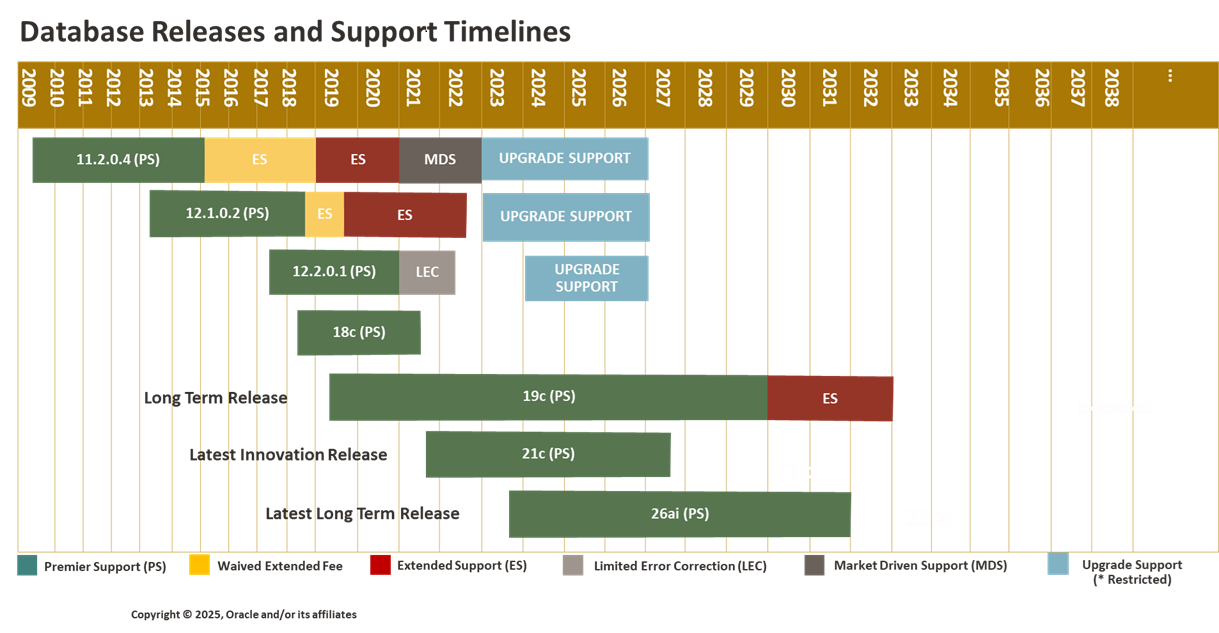
从图中可以看出,Oracle 26ai生命周期到2031年。
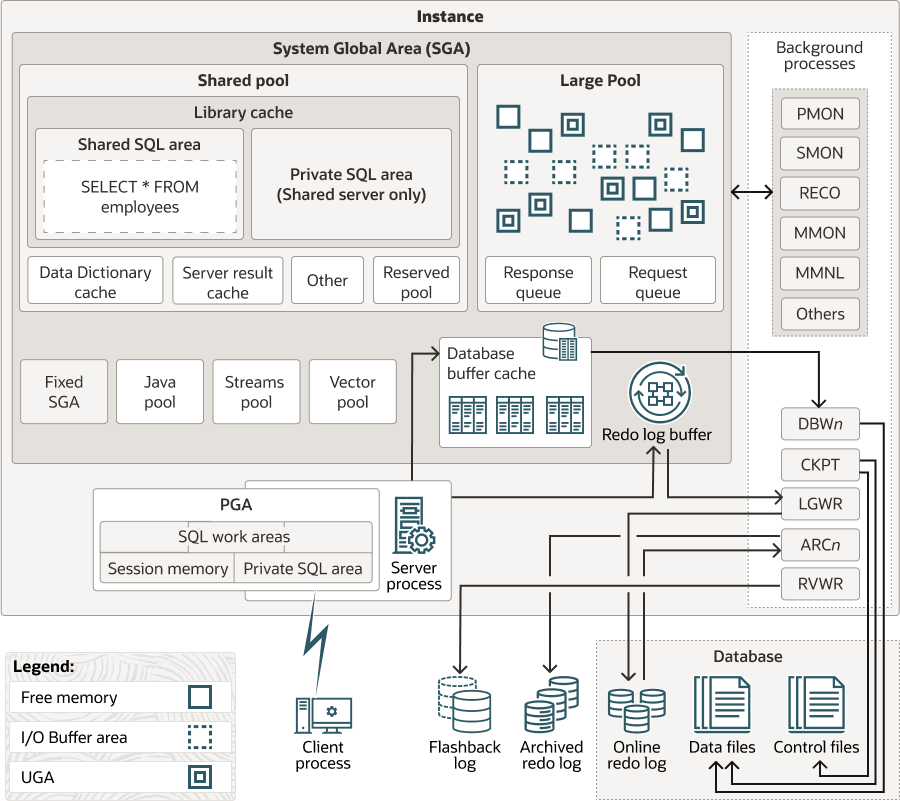
1.2 数据库体系架构
二、Oracle AI Database 26ai 下载
网址:
https://www.oracle.com/database/free/get-started/
安装包:
oracle-ai-database-preinstall-26ai-1.0-1.el9.x86_64.rpm
oracle-ai-database-free-26ai-23.26.0-1.el9.x86_64.rpm
三、Oracle AI Database 26ai 安装
3.1 环境说明
| 主机名 | ip地址 | 操作系统 | 内存 | cpu |
|---|---|---|---|---|
| dbserver1 | 192.*.*.70 | Rocky9.6 | 4G | 1个双核,x86-64 |
3.2 操作系统设置
关闭防火墙
systemctl stop firewalld.service
systemctl disable firewalld.service
关闭SELINUX
vi /etc/selinux/config
修改SELINUX=disabled
或者
sed -i 's/^SELINUX=enforcing/SELINUX=disabled/g' /etc/selinux/config
3.3 安装Oracle AI Database软件
3.3.1 预安装
dnf -y install oracle-ai-database-preinstall-26ai-1.0-1.el9.x86_64.rpm
预安装过程如下:
[root@dbserver1 ~]# dnf -y install oracle-ai-database-preinstall-26ai-1.0-1.el9.x86_64.rpm
Rocky Linux 9 - BaseOS 1.3 MB/s | 2.5 MB 00:01
Rocky Linux 9 - AppStream 2.6 MB/s | 9.5 MB 00:03
Rocky Linux 9 - Extras 23 kB/s | 17 kB 00:00
Dependencies resolved.
=========================================================================================================================================================================================================================================
Package Architecture Version Repository Size
=========================================================================================================================================================================================================================================
Installing:
oracle-ai-database-preinstall-26ai x86_64 1.0-1.el9 @commandline 34 k
Installing dependencies:
chkconfig x86_64 1.24-2.el9 baseos 160 k
compat-openssl11 x86_64 1:1.1.1k-5.el9_6.1 appstream 1.5 M
gssproxy x86_64 0.8.4-7.el9 baseos 108 k
initscripts x86_64 10.11.8-4.el9 baseos 208 k
ksh x86_64 3:1.0.6-7.el9_6.1 appstream 879 k
libXxf86dga x86_64 1.1.5-8.el9 appstream 20 k
libdmx x86_64 1.1.4-12.el9 appstream 16 k
libev x86_64 4.33-6.el9 baseos 51 k
libnfsidmap x86_64 1:2.5.4-34.el9 baseos 60 k
libverto-libev x86_64 0.3.2-3.el9 baseos 13 k
lm_sensors-libs x86_64 3.6.0-10.el9 appstream 41 k
nfs-utils x86_64 1:2.5.4-34.el9 baseos 430 k
pcp-conf x86_64 6.3.7-1.el9_6 appstream 31 k
pcp-libs x86_64 6.3.7-1.el9_6 appstream 645 k
rpcbind x86_64 1.2.6-7.el9 baseos 56 k
sssd-nfs-idmap x86_64 2.9.6-4.el9_6.2 baseos 39 k
sysstat x86_64 12.5.4-9.el9 appstream 465 k
xorg-x11-utils x86_64 7.5-40.el9 appstream 106 k
xorg-x11-xauth x86_64 1:1.1-10.el9 appstream 36 k
Transaction Summary
=========================================================================================================================================================================================================================================
Install 20 Packages
Total size: 4.8 M
Total download size: 4.7 M
Installed size: 14 M
Downloading Packages:
(1/19): chkconfig-1.24-2.el9.x86_64.rpm 318 kB/s | 160 kB 00:00
(2/19): sssd-nfs-idmap-2.9.6-4.el9_6.2.x86_64.rpm 69 kB/s | 39 kB 00:00
...略
(19/19): xorg-x11-xauth-1.1-10.el9.x86_64.rpm 48 kB/s | 36 kB 00:00
-----------------------------------------------------------------------------------------------------------------------------------------------------------------------------------------------------------------------------------------
Total 1.8 MB/s | 4.7 MB 00:02
Rocky Linux 9 - BaseOS 1.7 MB/s | 1.7 kB 00:00
Importing GPG key 0x350D275D:
Userid : "Rocky Enterprise Software Foundation - Release key 2022 <releng@rockylinux.org>"
Fingerprint: 21CB 256A E16F C54C 6E65 2949 702D 426D 350D 275D
From : /etc/pki/rpm-gpg/RPM-GPG-KEY-Rocky-9
Key imported successfully
Running transaction check
Transaction check succeeded.
Running transaction test
Transaction test succeeded.
Running transaction
Preparing : 1/1
Installing : libnfsidmap-1:2.5.4-34.el9.x86_64 1/20
Installing : libXxf86dga-1.1.5-8.el9.x86_64 2/20
Installing : libdmx-1.1.4-12.el9.x86_64 3/20
Installing : xorg-x11-utils-7.5-40.el9.x86_64 4/20
Installing : xorg-x11-xauth-1:1.1-10.el9.x86_64 5/20
Installing : lm_sensors-libs-3.6.0-10.el9.x86_64 6/20
Installing : ksh-3:1.0.6-7.el9_6.1.x86_64 7/20
Running scriptlet: ksh-3:1.0.6-7.el9_6.1.x86_64 7/20
Installing : compat-openssl11-1:1.1.1k-5.el9_6.1.x86_64 8/20
Installing : pcp-conf-6.3.7-1.el9_6.x86_64 9/20
Installing : pcp-libs-6.3.7-1.el9_6.x86_64 10/20
Installing : sysstat-12.5.4-9.el9.x86_64 11/20
Running scriptlet: sysstat-12.5.4-9.el9.x86_64 11/20
Created symlink /etc/systemd/system/multi-user.target.wants/sysstat.service → /usr/lib/systemd/system/sysstat.service.
Created symlink /etc/systemd/system/sysstat.service.wants/sysstat-collect.timer → /usr/lib/systemd/system/sysstat-collect.timer.
Created symlink /etc/systemd/system/sysstat.service.wants/sysstat-summary.timer → /usr/lib/systemd/system/sysstat-summary.timer.
Running scriptlet: rpcbind-1.2.6-7.el9.x86_64 12/20
Installing : rpcbind-1.2.6-7.el9.x86_64 12/20
Running scriptlet: rpcbind-1.2.6-7.el9.x86_64 12/20
Created symlink /etc/systemd/system/multi-user.target.wants/rpcbind.service → /usr/lib/systemd/system/rpcbind.service.
Created symlink /etc/systemd/system/sockets.target.wants/rpcbind.socket → /usr/lib/systemd/system/rpcbind.socket.
Installing : libev-4.33-6.el9.x86_64 13/20
Installing : libverto-libev-0.3.2-3.el9.x86_64 14/20
Installing : gssproxy-0.8.4-7.el9.x86_64 15/20
Running scriptlet: gssproxy-0.8.4-7.el9.x86_64 15/20
Running scriptlet: nfs-utils-1:2.5.4-34.el9.x86_64 16/20
Installing : nfs-utils-1:2.5.4-34.el9.x86_64 16/20
Running scriptlet: nfs-utils-1:2.5.4-34.el9.x86_64 16/20
Installing : chkconfig-1.24-2.el9.x86_64 17/20
Installing : initscripts-10.11.8-4.el9.x86_64 18/20
Running scriptlet: initscripts-10.11.8-4.el9.x86_64 18/20
Created symlink /etc/systemd/system/sysinit.target.wants/import-state.service → /usr/lib/systemd/system/import-state.service.
Created symlink /etc/systemd/system/sysinit.target.wants/loadmodules.service → /usr/lib/systemd/system/loadmodules.service.
Installing : oracle-ai-database-preinstall-26ai-1.0-1.el9.x86_64 19/20
Installing : sssd-nfs-idmap-2.9.6-4.el9_6.2.x86_64 20/20
Running scriptlet: oracle-ai-database-preinstall-26ai-1.0-1.el9.x86_64 20/20
Running scriptlet: sssd-nfs-idmap-2.9.6-4.el9_6.2.x86_64 20/20
Verifying : sssd-nfs-idmap-2.9.6-4.el9_6.2.x86_64 1/20
Verifying : chkconfig-1.24-2.el9.x86_64 2/20
Verifying : gssproxy-0.8.4-7.el9.x86_64 3/20
Verifying : initscripts-10.11.8-4.el9.x86_64 4/20
Verifying : libev-4.33-6.el9.x86_64 5/20
Verifying : libverto-libev-0.3.2-3.el9.x86_64 6/20
Verifying : nfs-utils-1:2.5.4-34.el9.x86_64 7/20
Verifying : rpcbind-1.2.6-7.el9.x86_64 8/20
Verifying : libnfsidmap-1:2.5.4-34.el9.x86_64 9/20
Verifying : pcp-conf-6.3.7-1.el9_6.x86_64 10/20
Verifying : sysstat-12.5.4-9.el9.x86_64 11/20
Verifying : compat-openssl11-1:1.1.1k-5.el9_6.1.x86_64 12/20
Verifying : ksh-3:1.0.6-7.el9_6.1.x86_64 13/20
Verifying : lm_sensors-libs-3.6.0-10.el9.x86_64 14/20
Verifying : xorg-x11-xauth-1:1.1-10.el9.x86_64 15/20
Verifying : libdmx-1.1.4-12.el9.x86_64 16/20
Verifying : xorg-x11-utils-7.5-40.el9.x86_64 17/20
Verifying : libXxf86dga-1.1.5-8.el9.x86_64 18/20
Verifying : pcp-libs-6.3.7-1.el9_6.x86_64 19/20
Verifying : oracle-ai-database-preinstall-26ai-1.0-1.el9.x86_64 20/20
Installed:
chkconfig-1.24-2.el9.x86_64 compat-openssl11-1:1.1.1k-5.el9_6.1.x86_64 gssproxy-0.8.4-7.el9.x86_64 initscripts-10.11.8-4.el9.x86_64 ksh-3:1.0.6-7.el9_6.1.x86_64
libXxf86dga-1.1.5-8.el9.x86_64 libdmx-1.1.4-12.el9.x86_64 libev-4.33-6.el9.x86_64 libnfsidmap-1:2.5.4-34.el9.x86_64 libverto-libev-0.3.2-3.el9.x86_64
lm_sensors-libs-3.6.0-10.el9.x86_64 nfs-utils-1:2.5.4-34.el9.x86_64 oracle-ai-database-preinstall-26ai-1.0-1.el9.x86_64 pcp-conf-6.3.7-1.el9_6.x86_64 pcp-libs-6.3.7-1.el9_6.x86_64
rpcbind-1.2.6-7.el9.x86_64 sssd-nfs-idmap-2.9.6-4.el9_6.2.x86_64 sysstat-12.5.4-9.el9.x86_64 xorg-x11-utils-7.5-40.el9.x86_64 xorg-x11-xauth-1:1.1-10.el9.x86_64
Complete!
[root@dbserver1 ~]#
3.3.2 安装
dnf -y install oracle-ai-database-free-26ai-23.26.0-1.el9.x86_64.rpm
安装过程如下:
[root@dbserver1 ~]# dnf -y install oracle-ai-database-free-26ai-23.26.0-1.el9.x86_64.rpm
Last metadata expiration check: 0:02:28 ago on Wed 02 Nov 2025 08:52:31 PM CST.
Dependencies resolved.
=========================================================================================================================================================================================================================================
 Package                                                               Architecture                                    Version                                               Repository                                             Size
=========================================================================================================================================================================================================================================
Installing:
 oracle-ai-database-free-26ai                                          x86_64                                          23.26.0-1                                             @commandline                                          1.3 G

Transaction Summary
=========================================================================================================================================================================================================================================
Install  1 Package

Total size: 1.3 G
Installed size: 3.6 G
Downloading Packages:
Running transaction check
Transaction check succeeded.
Running transaction test
Transaction test succeeded.
Running transaction
  Preparing        :                                                                                                                                                                                                                 1/1
  Running scriptlet: oracle-ai-database-free-26ai-23.26.0-1.x86_64                                                                                                                                                                   1/1
  Installing       : oracle-ai-database-free-26ai-23.26.0-1.x86_64                                                                                                                                                                   1/1
  Running scriptlet: oracle-ai-database-free-26ai-23.26.0-1.x86_64                                                                                                                                                                   1/1
[INFO] Executing post installation scripts...
[INFO] Oracle home installed successfully and ready to be configured.
To configure Oracle AI Database Free, optionally modify the parameters in '/etc/sysconfig/oracle-free-26ai.conf' and then run '/etc/init.d/oracle-free-26ai configure' as root.

  Verifying        : oracle-ai-database-free-26ai-23.26.0-1.x86_64                                                                                                                                                                   1/1

Installed:
  oracle-ai-database-free-26ai-23.26.0-1.x86_64

Complete!
至此,Oracle AI Database软件安装完成。
3.4 创建和配置Oracle AI Database
配置脚本会创建一个包含一个可插拔数据库(FREEPDB1)的容器数据库(FREE),并在默认端口(1521)配置监听器。可以通过编辑 /etc/sysconfig/oracle-free–26ai.conf 文件来修改配置参数。
3.4.1 查看Oracle AI Database默认配置文件
cat /etc/sysconfig/oracle-free-26ai.conf
[root@dbserver1 database]# cat /etc/sysconfig/oracle-free-26ai.conf
#This is a configuration file to setup the Oracle AI Database.
#It is used when running '/etc/init.d/oracle-free-26ai configure'.

# LISTENER PORT used Database listener, Leave empty for automatic port assignment
LISTENER_PORT=

# Character set of the database
CHARSET=AL32UTF8

# Database file directory
# If not specified, database files are stored under Oracle base/oradata
DBFILE_DEST=

# DB Domain name
DB_DOMAIN=

# Configure TDE
CONFIGURE_TDE=false

# Encrypt Tablespaces list, Leave empty for user tablespace alone or provide ALL for encrypting all tablespaces
# For specific tablespaces use SYSTEM:true,SYSAUX:false
ENCRYPT_TABLESPACES=

# SKIP Validations, memory, space
SKIP_VALIDATIONS=false
[root@dbserver1 database]#
3.4.2 修改端口
vi /etc/sysconfig/oracle-free-26ai.conf
#This is a configuration file to setup the Oracle AI Database.
#It is used when running '/etc/init.d/oracle-free-26ai configure'.

# LISTENER PORT used Database listener, Leave empty for automatic port assignment
LISTENER_PORT=1526                       <------------改为1526

# Character set of the database
CHARSET=AL32UTF8

# Database file directory
# If not specified, database files are stored under Oracle base/oradata
DBFILE_DEST=

# DB Domain name
DB_DOMAIN=

# Configure TDE
CONFIGURE_TDE=false

# Encrypt Tablespaces list, Leave empty for user tablespace alone or provide ALL for encrypting all tablespaces
# For specific tablespaces use SYSTEM:true,SYSAUX:false
ENCRYPT_TABLESPACES=

# SKIP Validations, memory, space
SKIP_VALIDATIONS=false
:wq 存盘退出。
3.5 创建数据库
[root@dbserver1 database]# /etc/init.d/oracle-free-26ai configure
Specify a password to be used for database accounts. Oracle recommends that the password entered should be at least 8 characters in length, contain at least 1 uppercase character, 1 lower case character and 1 digit [0-9]. Note that the same password will be used for SYS, SYSTEM and PDBADMIN accounts:
The password you entered contains invalid characters. Enter password:
The password you entered contains invalid characters. Enter password:
[root@dbserver1 database]# /etc/init.d/oracle-free-26ai configure
Specify a password to be used for database accounts. Oracle recommends that the password entered should be at least 8 characters in length, contain at least 1 uppercase character, 1 lower case character and 1 digit [0-9]. Note that the same password will be used for SYS, SYSTEM and PDBADMIN accounts:
The password you entered contains invalid characters. Enter password:
Confirm the password:
Configuring Oracle Listener.
Listener configuration succeeded.
Configuring Oracle AI Database FREE.
Enter SYS user password:
**************
Enter SYSTEM user password:
**********
Enter PDBADMIN User Password:
*************
Prepare for db operation
7% complete
Copying database files
29% complete
Creating and starting Oracle instance
30% complete
33% complete
36% complete
39% complete
43% complete
Completing Database Creation
47% complete
        49% complete
50% complete
Creating Pluggable Databases
54% complete
71% complete
Executing Post Configuration Actions
93% complete
Running Custom Scripts
100% complete
Database creation complete. For details check the logfiles at:
 /opt/oracle/cfgtoollogs/dbca/FREE.
Database Information:
Global Database Name:FREE
System Identifier(SID):FREE
Look at the log file "/opt/oracle/cfgtoollogs/dbca/FREE/FREE.log" for further details.

Connect to Oracle AI Database using one of the connect strings:
     Pluggable database: dbserver1:1526/FREEPDB1
     Multitenant container database: dbserver1:1526
[root@dbserver1 database]#
配置、数据文件和日志文件位置:
| 文件名和位置 | 用途 |
|---|---|
/opt/oracle |
Oracle base. This is the root of the Oracle AI Database Free directory tree. |
/opt/oracle/product/26ai/dbhomeFree |
Oracle home. This home is where the Oracle AI Database Free is installed. It contains the directories of the Oracle AI Database Free executables and network files. |
/opt/oracle/oradata/FREE |
Database files. |
/opt/oracle/diag subdirectories |
Diagnostic logs. The database alert log is /opt/oracle/diag/rdbms/free/FREE/trace/alert_FREE.log |
/opt/oracle/cfgtoollogs/dbca/FREE |
Database creation logs. The FREE.log file contains the results of the database creation script execution. |
/etc/sysconfig/oracle-free-26ai.conf |
Configuration default parameters. |
/etc/init.d/oracle-free-26ai |
Configuration and services script. |
3.6 设置环境变量
su - oracle
vi .bash_profile加入:
export ORACLE_SID=FREE
export ORAENV_ASK=NO
. /opt/oracle/product/26ai/dbhomeFree/bin/oraenv
export ORACLE_BASE=/opt/oracle/
export ORACLE_HOME=/opt/oracle/product/23ai/dbhomeFree
export PATH=$ORACLE_HOME/bin:$PATH
export PS1="[\`whoami\`@\`hostname\`:"'$PWD]\$ '
:wq 存盘退出
四、Oracle AI Database简单使用
4.1 sqlplus连接数据库
4.1.1 使用操作系统认证方式连接cdb
方法:sqlplus / as sysdba
[oracle@dbserver1:/home/oracle]$ sqlplus / as sysdba

SQL*Plus: Release 23.26.0.0.0 - Production on Wed Nov 2 20:48:43 2025
Version 23.26.0.0.0

Copyright (c) 1982, 2025, Oracle.  All rights reserved.


Connected to:
Oracle AI Database 26ai Free Release 23.26.0.0.0 - Develop, Learn, and Run for Free
Version 23.26.0.0.0

SQL> set lines 200
SQL> select * from v$version;

BANNER
---------------------------------------------------------------------------------------------------------------------------------
BANNER_FULL
--------------------------------------------------------------------------------------------------------------------------------------------------------------------------------------------------------
BANNER_LEGACY                                                                                                                         CON_ID
--------------------------------------------------------------------------------------------------------------------------------- ----------
Oracle AI Database 26ai Free Release 23.26.0.0.0 - Develop, Learn, and Run for Free
Oracle AI Database 26ai Free Release 23.26.0.0.0 - Develop, Learn, and Run for Free
Version 23.26.0.0.0
Oracle AI Database 26ai Free Release 23.26.0.0.0 - Develop, Learn, and Run for Free                                                        0

SQL> show pdbs

    CON_ID CON_NAME                       OPEN MODE  RESTRICTED
---------- ------------------------------ ---------- ----------
         2 PDB$SEED                       READ ONLY  NO
         3 FREEPDB1                       READ WRITE NO

SQL> show con_name;

CON_NAME
------------------------------
CDB$ROOT
SQL>
4.1.2 使用操作系统认证方式连接pdb
方法:
export ORACLE_PDB_SID=freepdb1
sqlplus / as sysdba
[oracle@dbserver1:/home/oracle]$ export ORACLE_PDB_SID=freepdb1
[oracle@dbserver1:/home/oracle]$ sqlplus / as sysdba

SQL*Plus: Release 23.26.0.0.0 - Production on Thu Nov 3 00:52:18 2025
Version 23.26.0.0.0

Copyright (c) 1982, 2025, Oracle.  All rights reserved.


Connected to:
Oracle AI Database 26ai Free Release 23.26.0.0.0 - Develop, Learn, and Run for Free
Version 23.26.0.0.0

SQL> show pdbs

    CON_ID CON_NAME                       OPEN MODE  RESTRICTED
---------- ------------------------------ ---------- ----------
         3 FREEPDB1                       READ WRITE NO
SQL> exit
Disconnected from Oracle AI Database 26ai Free Release 23.26.0.0.0 - Develop, Learn, and Run for Free
Version 23.26.0.0.0
[oracle@dbserver1:/home/oracle]$ sqlplus / as sysdba

SQL*Plus: Release 23.26.0.0.0 - Production on Thu Nov 3 00:53:43 2025
Version 23.26.0.0.0

Copyright (c) 1982, 2025, Oracle.  All rights reserved.


Connected to:
Oracle AI Database 26ai Free Release 23.26.0.0.0 - Develop, Learn, and Run for Free
Version 23.26.0.0.0

SQL> show con_name

CON_NAME
------------------------------
FREEPDB1
4.1.3 使用Easy Connect Naming Method连接cdb
方法:sqlplus username@hostname[:port]
[oracle@dbserver1:/home/oracle]$ sqlplus system@dbserver1:1526

SQL*Plus: Release 23.26.0.0.0 - Production on Thu Nov 3 00:42:10 2025
Version 23.26.0.0.0

Copyright (c) 1982, 2025, Oracle.  All rights reserved.

Enter password:
Last Successful login time: Thu Nov 03 2025 00:39:48 +08:00

Connected to:
Oracle AI Database 26ai Free Release 23.26.0.0.0 - Develop, Learn, and Run for Free
Version 23.26.0.0.0

SQL> exit
Disconnected from Oracle AI Database 26ai Free Release 23.26.0.0.0 - Develop, Learn, and Run for Free
Version 23.26.0.0.0
4.1.4 使用Easy Connect Naming Method连接到pdb
方法:sqlplus username@hostname[:port]/pdb
[oracle@dbserver1:/home/oracle]$ sqlplus system@dbserver1:1526/freepdb1

SQL*Plus: Release 23.26.0.0.0 - Production on Thu Nov 3 00:42:46 2025
Version 23.26.0.0.0

Copyright (c) 1982, 2025, Oracle.  All rights reserved.

Enter password:
Last Successful login time: Thu Nov 06 2025 00:42:13 +08:00

Connected to:
Oracle AI Database 26ai Free Release 23.26.0.0.0 - Develop, Learn, and Run for Free
Version 23.26.0.0.0

SQL>
4.2 查看监听器
[oracle@dbserver1:/home/oracle]$ lsnrctl status

LSNRCTL for Linux: Version 23.26.0.0.0 - Production on 03-NOV-2025 00:37:45

Copyright (c) 1991, 2025, Oracle.  All rights reserved.

Connecting to (DESCRIPTION=(ADDRESS=(PROTOCOL=TCP)(HOST=dbserver1)(PORT=1526)))
STATUS of the LISTENER
------------------------
Alias                     LISTENER
Version                   TNSLSNR for Linux: Version 23.26.0.0.0 - Production
Start Date                02-NOV-2025 22:13:45
Uptime                    0 days 1 hr. 24 min. 0 sec
Trace Level               off
Security                  ON: Local OS Authentication
SNMP                      OFF
Default Service           FREE
Listener Parameter File   /opt/oracle/product/26ai/dbhomeFree/network/admin/listener.ora
Listener Log File         /opt/oracle/diag/tnslsnr/dbserver1/listener/alert/log.xml
Listening Endpoints Summary...
  (DESCRIPTION=(ADDRESS=(PROTOCOL=tcp)(HOST=dbserver1)(PORT=1526)))
  (DESCRIPTION=(ADDRESS=(PROTOCOL=ipc)(KEY=EXTPROC1526)))
Services Summary...
Service "42db7fa5ddd924ebe065020c29b8ef93" has 1 instance(s).
  Instance "FREE", status READY, has 1 handler(s) for this service...
Service "FREE" has 1 instance(s).
  Instance "FREE", status READY, has 1 handler(s) for this service...
Service "FREEXDB" has 1 instance(s).
  Instance "FREE", status READY, has 1 handler(s) for this service...
Service "freepdb1" has 1 instance(s).
  Instance "FREE", status READY, has 1 handler(s) for this service...
The command completed successfully
[oracle@dbserver1:/home/oracle]$
4.3 查看AI组件
  1* SELECT owner, object_name, object_type FROM dba_objects WHERE object_name LIKE '%_AI'
SQL> /

OWNER                OBJECT_NAME                                                                                                                      OBJECT_TYPE
-------------------- -------------------------------------------------------------------------------------------------------------------------------- -----------------------
SYS                  jdk.localedata///sun/text/resources/cldr/ext/FormatData_en_AI                                                                    JAVA CLASS
SYS                  jdk.localedata///sun/util/resources/cldr/ext/CurrencyNames_en_AI                                                                 JAVA CLASS
PUBLIC               com/sun/media/jai/util/MathJAI                                                                                                   SYNONYM
PUBLIC               com/sun/media/jai/widget/DisplayJAI                                                                                              SYNONYM
PUBLIC               javax/media/jai/ImageJAI                                                                                                         SYNONYM
PUBLIC               javax/media/jai/KernelJAI                                                                                                        SYNONYM
PUBLIC               javax/media/jai/ParameterBlockJAI                                                                                                SYNONYM
PUBLIC               javax/media/jai/GraphicsJAI                                                                                                      SYNONYM
PUBLIC               javax/media/jai/CanvasJAI                                                                                                        SYNONYM
PUBLIC               javax/media/jai/JAI                                                                                                              SYNONYM
PUBLIC               javax/media/jai/PropertyChangeEventJAI                                                                                           SYNONYM
PUBLIC               javax/media/jai/LookupTableJAI                                                                                                   SYNONYM
PUBLIC               javax/media/jai/remote/RemoteJAI                                                                                                 SYNONYM
PUBLIC               javax/media/jai/ComponentSampleModelJAI                                                                                          SYNONYM
PUBLIC               javax/media/jai/PropertyChangeSupportJAI                                                                                         SYNONYM
PUBLIC               javax/media/jai/ColorSpaceJAI                                                                                                    SYNONYM
PUBLIC               com/sun/media/jai/codecimpl/util/ComponentSampleModelJAI                                                                         SYNONYM
MDSYS                com/sun/media/jai/util/MathJAI                                                                                                   JAVA CLASS
MDSYS                com/sun/media/jai/widget/DisplayJAI                                                                                              JAVA CLASS
MDSYS                javax/media/jai/ImageJAI                                                                                                         JAVA CLASS
MDSYS                javax/media/jai/KernelJAI                                                                                                        JAVA CLASS
MDSYS                javax/media/jai/ParameterBlockJAI                                                                                                JAVA CLASS
MDSYS                javax/media/jai/GraphicsJAI                                                                                                      JAVA CLASS
MDSYS                javax/media/jai/CanvasJAI                                                                                                        JAVA CLASS
MDSYS                javax/media/jai/JAI                                                                                                              JAVA CLASS
MDSYS                javax/media/jai/PropertyChangeEventJAI                                                                                           JAVA CLASS
MDSYS                javax/media/jai/LookupTableJAI                                                                                                   JAVA CLASS
MDSYS                javax/media/jai/remote/RemoteJAI                                                                                                 JAVA CLASS
MDSYS                javax/media/jai/ComponentSampleModelJAI                                                                                          JAVA CLASS
MDSYS                javax/media/jai/PropertyChangeSupportJAI                                                                                         JAVA CLASS
MDSYS                javax/media/jai/ColorSpaceJAI                                                                                                    JAVA CLASS
MDSYS                com/sun/media/jai/codecimpl/util/ComponentSampleModelJAI                                                                         JAVA CLASS

32 rows selected.

SQL>
可以看出,FREE版本中都是与 JAI(Java Advanced Imaging)相关的组件,与数据库 AI 没关系。
4.4 启停数据库
4.4.1 使用sqlplus启停数据库
--停止数据库
$ sqlplus / as sysdba
SQL> SHUTDOWN IMMEDIATE
--启动数据库
SQL> STARTUP
SQL> ALTER PLUGGABLE DATABASE ALL OPEN;
4.4.2 使用服务启停数据库和监听
--root用户执行
systemctl daemon-reload
systemctl enable oracle-free-26ai
--启停数据库和监听
systemctl start oracle-free-26ai
systemctl stop oracle-free-26ai
--重启数据库和监听
systemctl restart oracle-free-26ai
--查看数据库和监听状态
```bash
[root@dbserver1 ~]# /etc/init.d/oracle-free-26ai status
Status of the Oracle FREE 26ai service:

LISTENER status: RUNNING
FREE Database status:   RUNNING
[root@dbserver1 ~]#
五、参考文档
https://docs.oracle.com/en/database/oracle/oracle-database/26/cncpt/introduction-to-oracle-database.html#GUID-CF765A7D-9429-4901-BF33-36E0B0220293
https://docs.oracle.com/en/database/oracle/oracle-database/26/xeinl/installing-oracle-database-free.html
关于作者
网名:飞天,墨天轮2024年度优秀原创作者,拥有 Oracle 10g OCM 认证、PGCE认证、MySQL 8.0 OCP认证以及OBCA、KCP、KCSM、ACP、YCP、磐维等众多国产数据库认证证书,目前从事Oracle、Mysql、PostgresSQL、磐维数据库管理运维工作,喜欢结交更多志同道合的朋友,热衷于研究、分享数据库技术。
微信公众号:飞天online
墨天轮:https://www.modb.pro/u/15197
如有任何疑问,欢迎大家留言,共同探讨~~~
