



前言
之前有一篇文章 好消息:Oracle 23ai 现已支持一键部署! 安装过一套 Oracle 23ai(23.8),在 10 月 14 日 Oracle 正式将 23ai 更名为 AI 26ai,实际上是 23.26 版本,无需重新安装,可以直接通过打补丁的方式从 23.8 直接升级上去。
Oracle AI Database 26ai replaces Oracle Database 23ai. Transitioning from 23ai to 26ai is simple—just apply the October 2025 release update with no database upgrade or application re-certification. Advanced AI features like AI Vector Search are included at no additional charge.
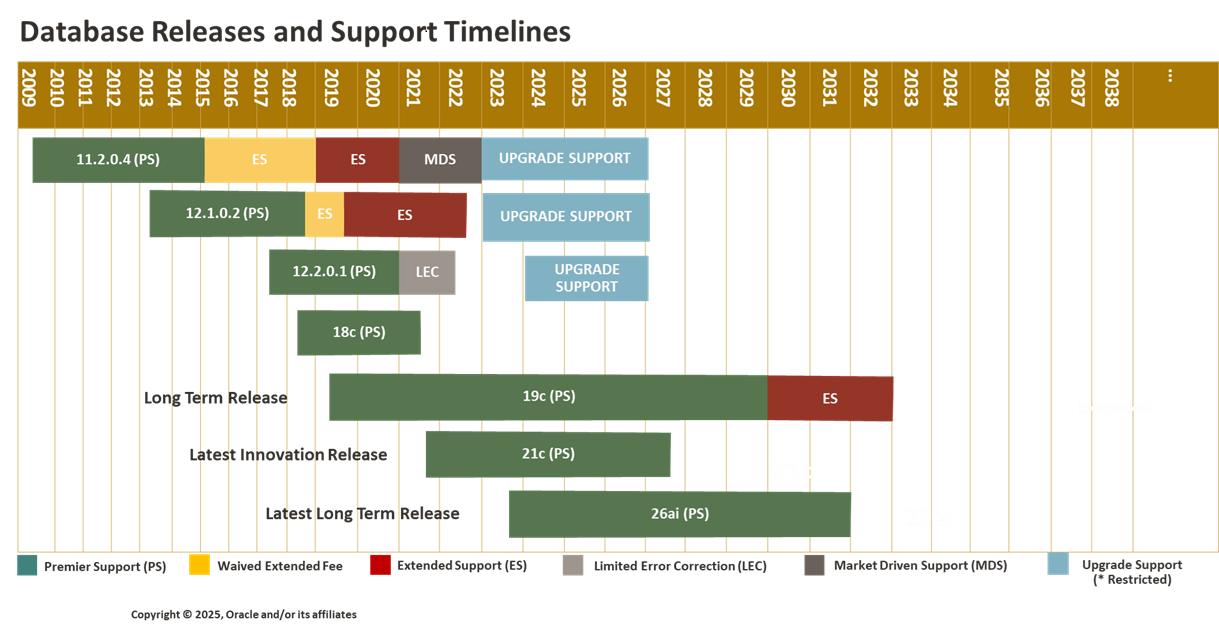
本文使用之前安装的 Oracle 23.8 环境打补丁升级到 23.26,体验一下 Oracle AI Database 26ai 版本。
补丁下载
目前 Oracle MOS 已经提供 23.26 的补丁下载路径,参考文档:Oracle AI Database 26ai Proactive Patch Information (Doc ID 3053981.1)
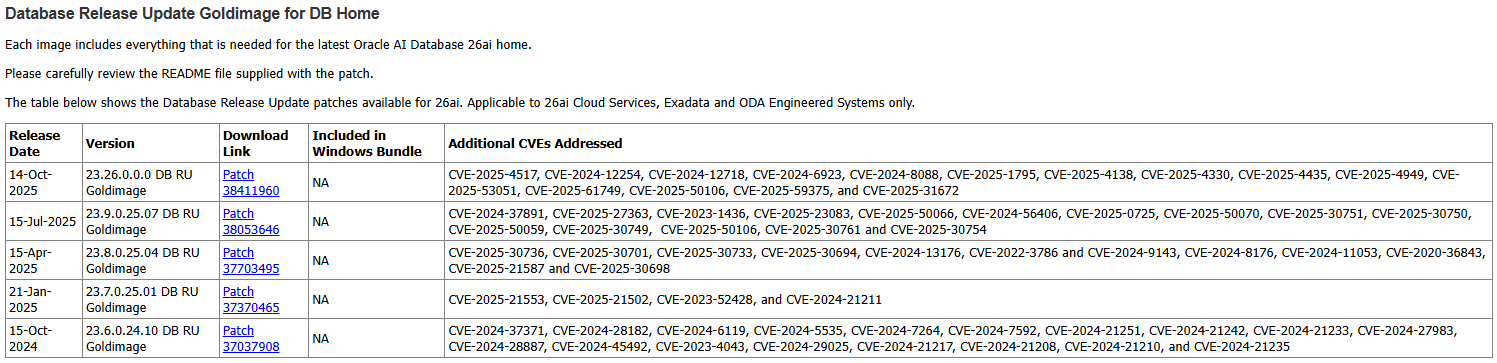
点击链接即可下载 23.26 补丁:
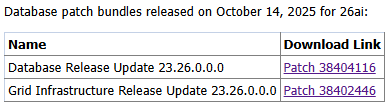
下载完成后,解压查看一下 README 文档:



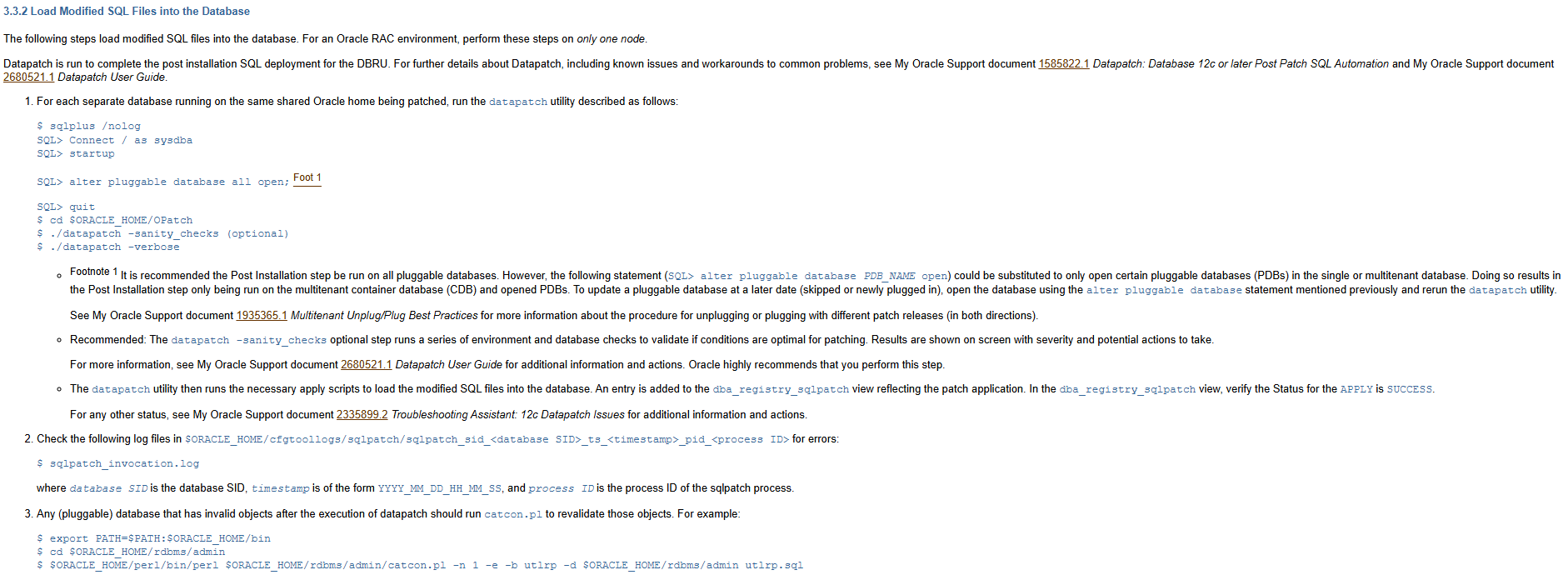
整体看起来和 19C RU 的安装步骤没有什么区别。
补丁升级
将下载好的 OPatch 和 RU 补丁上传到数据库主机:

检查当前数据库补丁版本:
[oracle@orcl:/home/oracle]$ opatch lspatches
37701424;OCW RELEASE UPDATE 23.8.0.25.04 (37701424) Gold Image
37701421;Database Release Update : 23.8.0.25.04 (37701421) Gold Image

OPatch succeeded.
[oracle@orcl:/home/oracle]$ opatch version
OPatch Version: 12.2.0.1.46

OPatch succeeded.
升级 OPatch 补丁:
[oracle@orcl:/home/oracle]$ unzip -qo /soft/p6880880_230000_Linux-x86-64.zip -d $ORACLE_HOME
[oracle@orcl:/home/oracle]$ opatch version
OPatch Version: 12.2.0.1.47

OPatch succeeded.
确保 OPatch 版本符合 12.2.0.1.47 之后,针对单机数据库,需要关闭所有 Oracle 相关的服务:
If this is not an Oracle RAC environment, shut down all instances and listeners associated with the Oracle home that you are updating.
[oracle@orcl:/home/oracle]$ sas

SQL*Plus: Release 23.0.0.0.0 - Production on Thu Oct 16 20:55:54 2025
Version 23.8.0.25.04

Copyright (c) 1982, 2025, Oracle.  All rights reserved.


Connected to:
Oracle Database 23ai Enterprise Edition Release 23.0.0.0.0 - Limited Availability
Version 23.8.0.25.04

SYS@orcl SQL> show pdbs

    CON_ID CON_NAME                       OPEN MODE  RESTRICTED
---------- ------------------------------ ---------- ----------
         2 PDB$SEED                       READ ONLY  NO
         3 PDB01                          READ WRITE NO
SYS@orcl SQL> alter pluggable database all close;

Pluggable database altered.

SYS@orcl SQL> shu immediate
Database closed.
Database dismounted.
ORACLE instance shut down.
SYS@orcl SQL> exit
Disconnected from Oracle Database 23ai Enterprise Edition Release 23.0.0.0.0 - Limited Availability
Version 23.8.0.25.04
[oracle@orcl:/home/oracle]$ lsnrctl stop

LSNRCTL for Linux: Version 23.0.0.0.0 - Production on 16-OCT-2025 20:57:27

Copyright (c) 1991, 2025, Oracle.  All rights reserved.

Connecting to (DESCRIPTION=(ADDRESS=(PROTOCOL=TCP)(HOST=orcl)(PORT=1521)))
The command completed successfully
即可进行补丁安装:
[oracle@orcl:/home/oracle]$ cd /soft/
[oracle@orcl:/soft]$ unzip -q p38404116_230000_Linux-x86-64.zip
[oracle@orcl:/soft]$ cd 38404116/
[oracle@orcl:/soft/38404116]$ opatch apply -silent
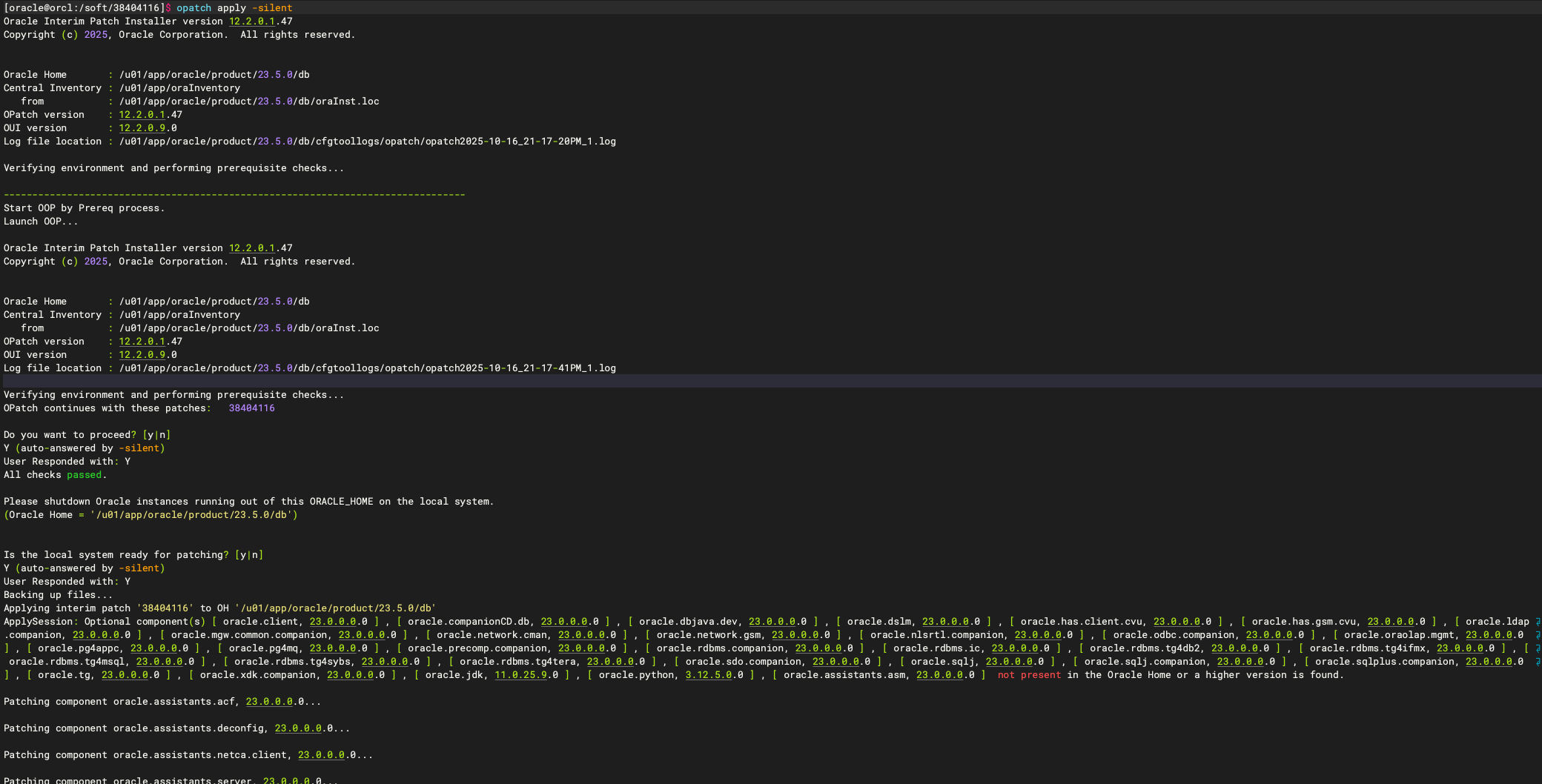
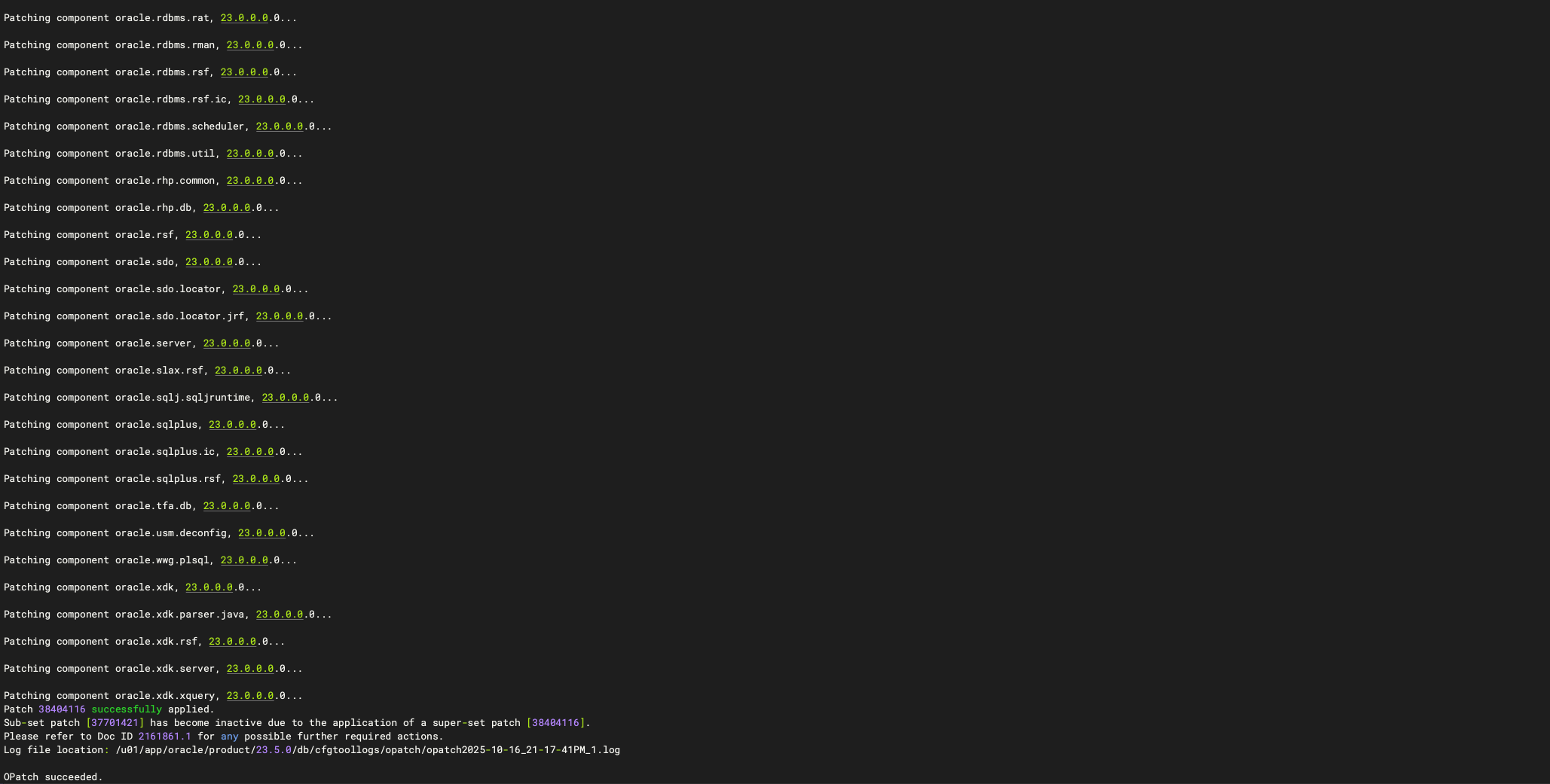
检查补丁补丁:
[oracle@orcl:/home/oracle]$ opatch lspatches
38404116;Database Release Update : 23.26.0.0.0 (38404116)
37701424;OCW RELEASE UPDATE 23.8.0.25.04 (37701424) Gold Image

OPatch succeeded.
补丁安装完成后,启动数据库实例:
SQL> startup
-- 如果配置过 save state,则 pdb 已经都能随 CDB 启动,如果没有则执行以下命令开启所有 PDB
SQL> alter pluggable database all open;
SQL> alter pluggable database all save state;
这里启动遇到报错:
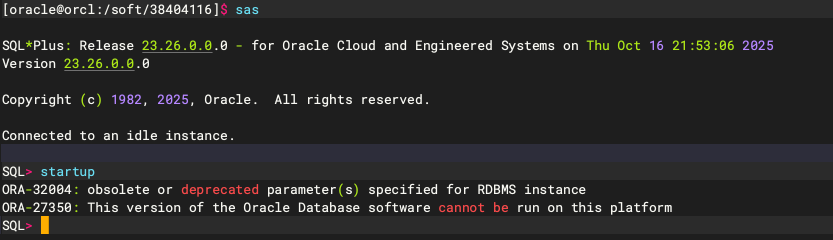
定睛一看,原来补丁安装后变成了 Release 23.26.0.0.0 - for Oracle Cloud and Engineered Systems:

这个版本在启动时会进行大量的硬编码检查:
- kgcs_oracle_cloud
- kscs_is_oracle_cloud
- kscs_is_exadata_or_oracle_cloud
- kcc_check_exadata
- ksxp_real_exadata_box
而我使用的是 VMware 的虚拟化环境:

自然是会报错 ora-27350,不支持的平台,狡诈啊,看来补丁升级无法继续下去了,但是大致的步骤我还是写一下,都是通用的,等正式版发布可以直接应用。
以下部分均为预测,并非实际运行,仅作参考!
执行 datapatch:
## 如果不放心可以先执行以下命令进行预安装检查
$ datapatch -sanity_checks
## 正式 datapatch
$ datapatch -verbose
等待 datapatch 执行完成后,编译所有 PDB 的无效对象:
$ cd $ORACLE_HOME/rdbms/admin
$ $ORACLE_HOME/perl/bin/perl $ORACLE_HOME/rdbms/admin/catcon.pl -n 1 -e -b utlrp -d $ORACLE_HOME/rdbms/admin utlrp.sql
补丁安装完成,检查补丁版本:
$ opatch lspatches
确认一切都正常之后,打开监听,数据库开始提供访问:
$ lsnrctl start
SQL> alter system register;
至此,Oracle AI Database 26ai 升级完成,以上从 datapatch 开始都是预测,无法验证。
写在最后
回过去仔细看了,其实 Oracle 文档一开始就标注了:
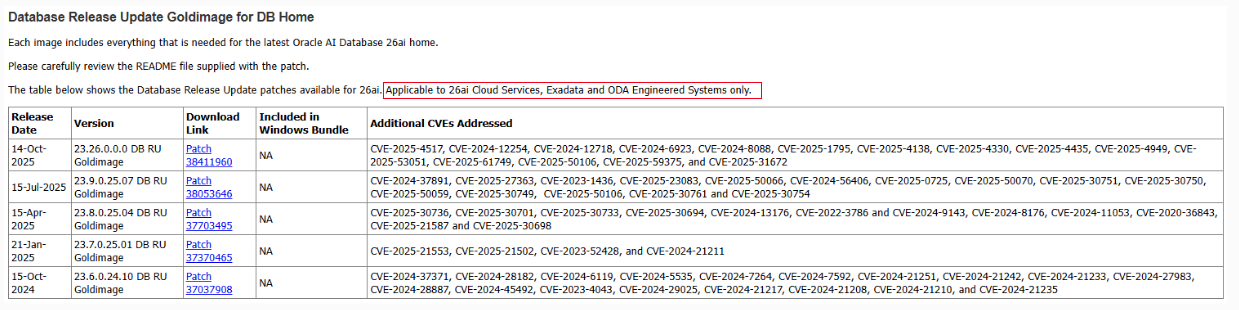
只是我选择选的忽略了而已,就折腾到这吧!
📚 推荐阅读:DBA 学习之路
如果这篇文章对你有帮助,推荐访问我的 Oracle DBA 系统学习站点,涵盖 100 天完整学习路线:
- 🔧 Oracle 安装部署 · RMAN 备份恢复 · Data Pump 数据迁移
- 🏗️ RAC 高可用 · DataGuard 容灾 · 多租户架构
- 🔍 故障排查 · 升级迁移 · GoldenGate 数据同步
