先吐槽一下,seata的文档真的是乱的一批。我们这里只介绍安装及基本使用过程。
1.seata介绍
Seata 是一款开源的分布式事务解决方案,致力于在微服务架构下提供高性能和简单易用的分布式事务服务。具体原理可以参考官网http://seata.io/zh-cn/docs/overview/what-is-seata.html。
[alt type="success"] 一定要注意版本
问题,包括安装的Nacos版本、Seata版本、Spring Cloud版本、Spring Boot版本等等。[/alt]
2.前置条件
2.1安装JDK并配置环境变量
安装JDK1.8及以上版本,并正确配置环境变量。
2.2maven
我这里用的是3.6.3,并配置阿里云仓库。
2.3Git
由于需要将Seata Server的配置文件导入Nacos,所以需要安装Git
2.4安装Nacos
Nacos 2.0.2
版本,关于Nacos的安装,我们稍后会出一个专门的文章进行介绍。[tag type="warning"]温馨提示[/tag] 所以学习本篇文章之前,您至少应该改知道Nacos的安装以及在Spring Cloud中如何利用Nacos进行服务的注册与发现。Nacos默认端口为8848
,由于我这里配置了集群,所以前端端口使用的是1111
,大家在下面配置文件注意以下。
3.seata安装
我这里使用的seata是1.4.2(截止到目前最新的版本)。[btn href="http://seata.io/zh-cn/blog/download.html" type="default"]Seata下载地址[/btn]
3.1.修改配置文件
3.1.1.修改file.conf
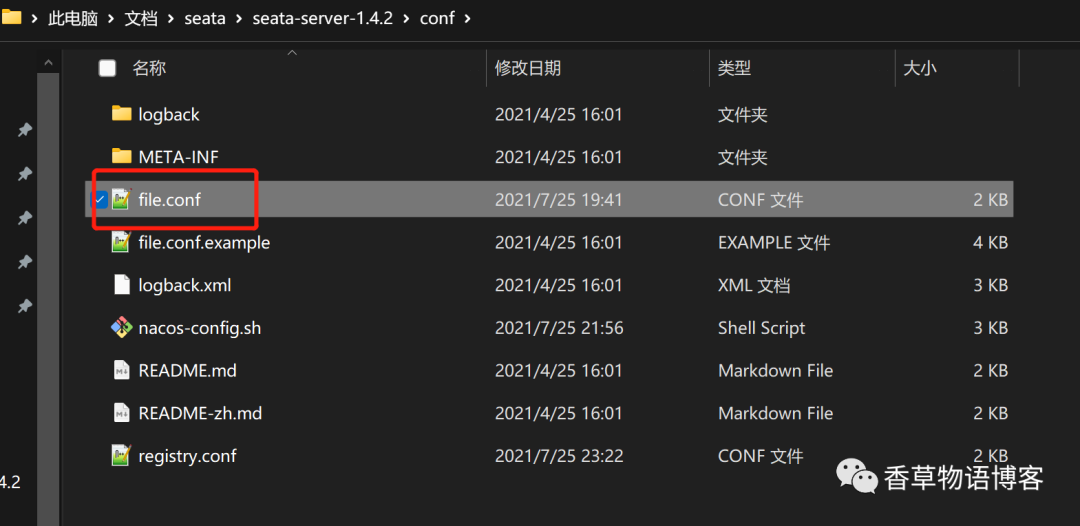
进入Seata的conf
目录,找到file.conf
,如下图
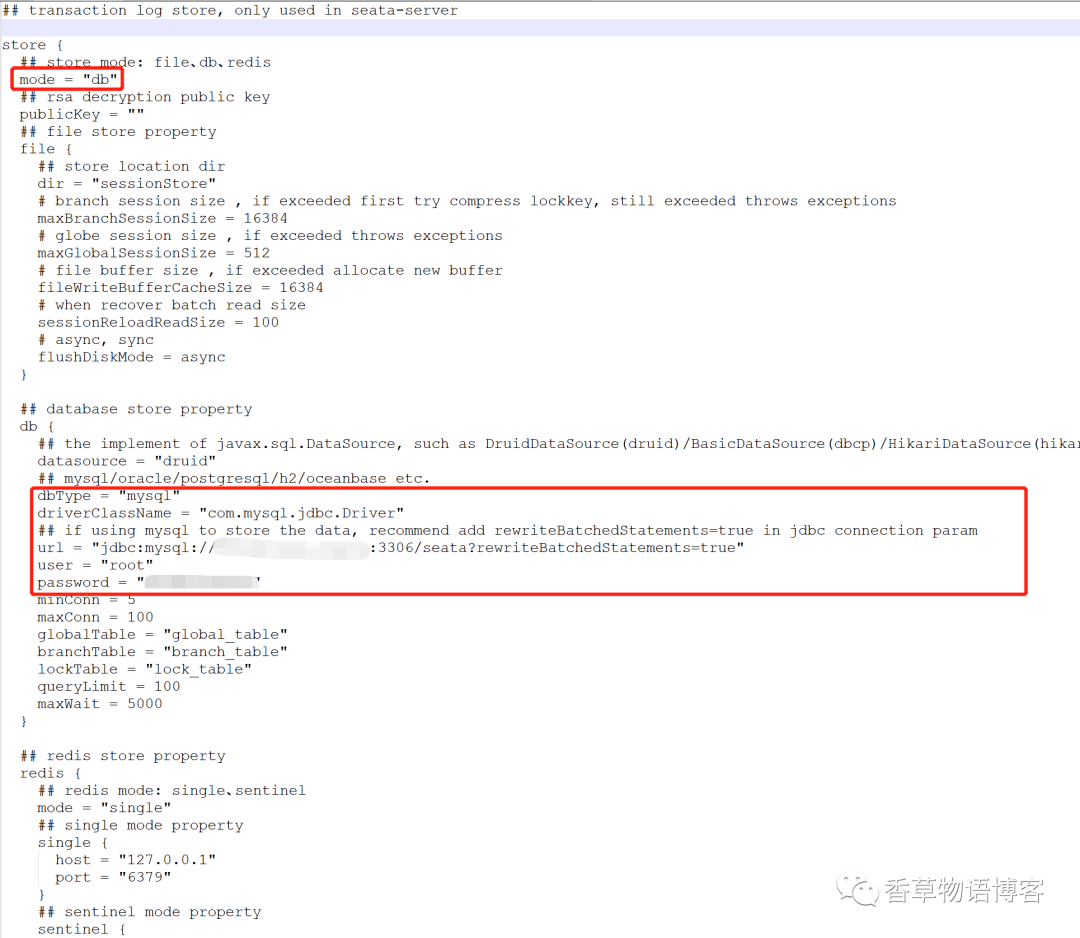
修改以下内容
## transaction log store, only used in seata-serverstore {## store mode: file、db、redismode = "db" #我们用数据库存储,改成db## rsa decryption public keypublicKey = ""## file store propertyfile {## store location dirdir = "sessionStore"# branch session size , if exceeded first try compress lockkey, still exceeded throws exceptionsmaxBranchSessionSize = 16384# globe session size , if exceeded throws exceptionsmaxGlobalSessionSize = 512# file buffer size , if exceeded allocate new bufferfileWriteBufferCacheSize = 16384# when recover batch read sizesessionReloadReadSize = 100# async, syncflushDiskMode = async}## database store propertydb {## the implement of javax.sql.DataSource, such as DruidDataSource(druid)/BasicDataSource(dbcp)/HikariDataSource(hikari) etc.datasource = "druid"## mysql/oracle/postgresql/h2/oceanbase etc.dbType = "mysql" # 改成MySqldriverClassName = "com.mysql.jdbc.Driver"## if using mysql to store the data, recommend add rewriteBatchedStatements=true in jdbc connection paramurl = "jdbc:mysql://ip:3306/数据库名称?rewriteBatchedStatements=true"user = "数据库用户"password = "数据库密码"minConn = 5maxConn = 100globalTable = "global_table"branchTable = "branch_table"lockTable = "lock_table"queryLimit = 100maxWait = 5000}## redis store propertyredis {## redis mode: single、sentinelmode = "single"## single mode propertysingle {host = "127.0.0.1"port = "6379"}## sentinel mode propertysentinel {masterName = ""## such as "10.28.235.65:26379,10.28.235.65:26380,10.28.235.65:26381"sentinelHosts = ""}password = ""database = "0"minConn = 1maxConn = 10maxTotal = 100queryLimit = 100}}
3.1.2.修改registry.conf
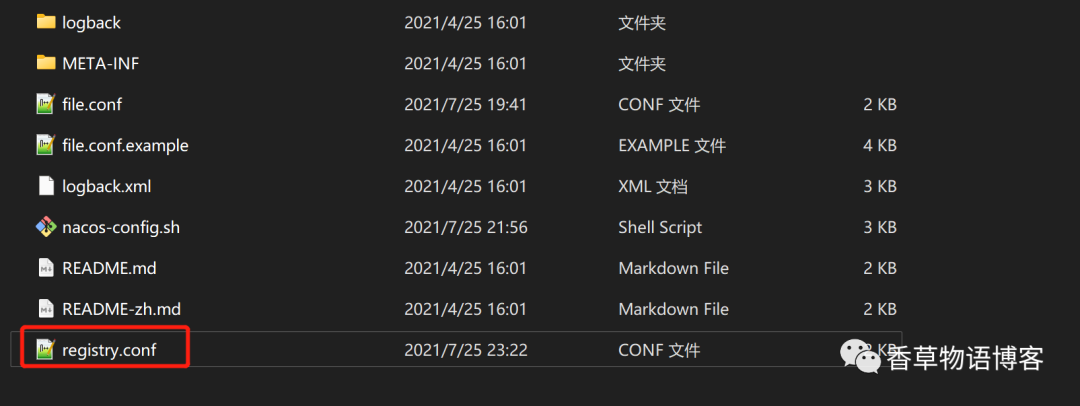
进入Seata的conf
目录,找到registry.conf
,如下图
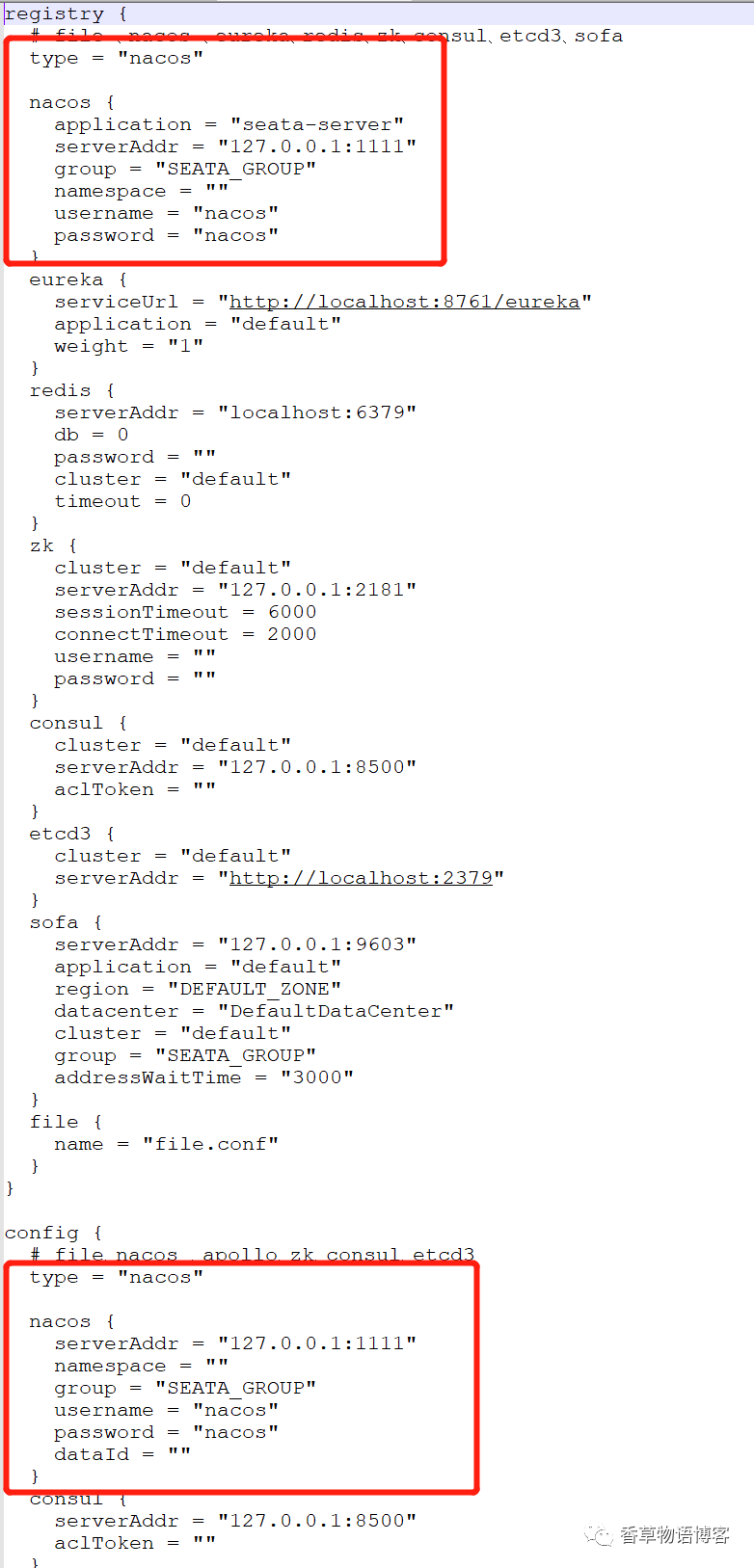
我们这里用Nacos,所以主要是配置Nacos的信息, 配置内容包括两部分,registry
服务,将type从file
改成nacos
,将seata服务配置进nacos;config
将type从file
改成nacos
,这样不需要每个项目都放file.conf
修改内容如下:
registry {# file 、nacos 、eureka、redis、zk、consul、etcd3、sofatype = "nacos" #改成Nacosnacos {application = "seata-server"serverAddr = "127.0.0.1:1111" #Nacos地址,我这里集群用的1111端口,默认为8848端口group = "SEATA_GROUP" #Nacos分组namespace = ""username = "nacos" #Nacos用户名password = "nacos" #Nacos密码}eureka {serviceUrl = "http://localhost:8761/eureka"application = "default"weight = "1"}redis {serverAddr = "localhost:6379"db = 0password = ""cluster = "default"timeout = 0}zk {cluster = "default"serverAddr = "127.0.0.1:2181"sessionTimeout = 6000connectTimeout = 2000username = ""password = ""}consul {cluster = "default"serverAddr = "127.0.0.1:8500"aclToken = ""}etcd3 {cluster = "default"serverAddr = "http://localhost:2379"}sofa {serverAddr = "127.0.0.1:9603"application = "default"region = "DEFAULT_ZONE"datacenter = "DefaultDataCenter"cluster = "default"group = "SEATA_GROUP"addressWaitTime = "3000"}file {name = "file.conf"}}config {# file、nacos 、apollo、zk、consul、etcd3type = "nacos" #改成Nacosnacos {serverAddr = "127.0.0.1:1111" #Nacos地址,我这里集群用的1111端口,默认为8848端口namespace = ""group = "SEATA_GROUP" #Nacos分组username = "nacos" #Nacos用户名password = "nacos" #Nacos密码dataId = ""}consul {serverAddr = "127.0.0.1:8500"aclToken = ""}apollo {appId = "seata-server"## apolloConfigService will cover apolloMetaapolloMeta = "http://192.168.1.204:8801"apolloConfigService = "http://192.168.1.204:8080"namespace = "application"apolloAccesskeySecret = ""cluster = "seata"}zk {serverAddr = "127.0.0.1:2181"sessionTimeout = 6000connectTimeout = 2000username = ""password = ""nodePath = "/seata/seata.properties"}etcd3 {serverAddr = "http://localhost:2379"}file {name = "file.conf"}}
3.1.3.导入Seata相应的配置项到Nacos的配置中心(非注册中心)
由于我这里注册中心跟配置中心用的一个,所以我其实导入的就是一个Nacos。
3.1.3.1.创建导入脚本
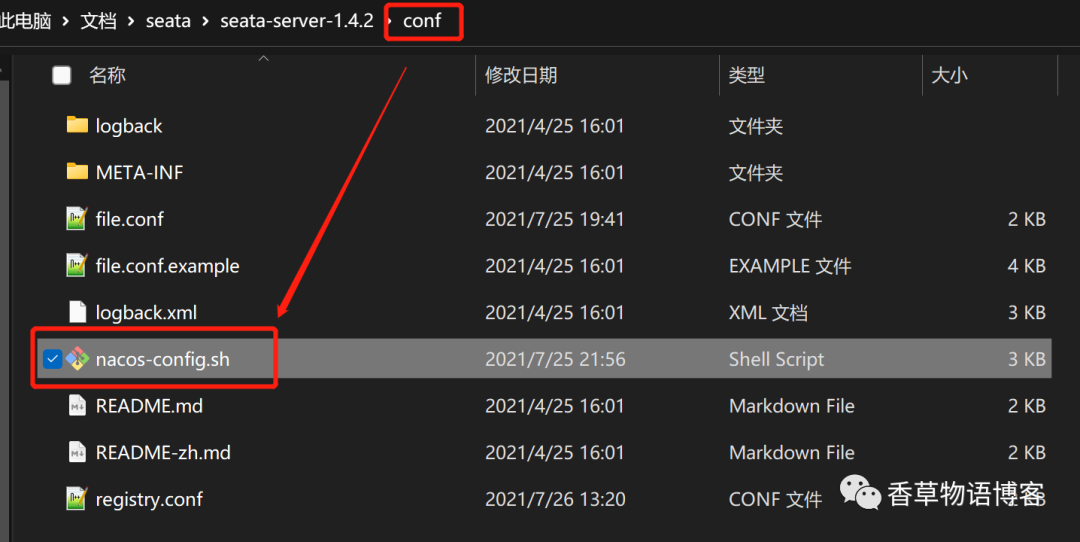
在conf
文件夹下,创建nacos-config.sh
,并将以下内容粘贴进去
#!/usr/bin/env bash# Copyright 1999-2019 Seata.io Group.## Licensed under the Apache License, Version 2.0 (the "License");# you may not use this file except in compliance with the License.# You may obtain a copy of the License at、## http://www.apache.org/licenses/LICENSE-2.0## Unless required by applicable law or agreed to in writing, software# distributed under the License is distributed on an "AS IS" BASIS,# WITHOUT WARRANTIES OR CONDITIONS OF ANY KIND, either express or implied.# See the License for the specific language governing permissions and# limitations under the License.while getopts ":h:p:g:t:u:w:" optdocase $opt inh)host=$OPTARG;;p)port=$OPTARG;;g)group=$OPTARG;;t)tenant=$OPTARG;;u)username=$OPTARG;;w)password=$OPTARG;;?)echo " USAGE OPTION: $0 [-h host] [-p port] [-g group] [-t tenant] [-u username] [-w password] "exit 1;;esacdoneurlencode() {for ((i=0; i < ${#1}; i++))dochar="${1:$i:1}"case $char in[a-zA-Z0-9.~_-]) printf $char ;;*) printf '%%%02X' "'$char" ;;esacdone}if [[ -z ${host} ]]; thenhost=localhostfiif [[ -z ${port} ]]; thenport=8848fiif [[ -z ${group} ]]; thengroup="SEATA_GROUP"fiif [[ -z ${tenant} ]]; thentenant=""fiif [[ -z ${username} ]]; thenusername=""fiif [[ -z ${password} ]]; thenpassword=""finacosAddr=$host:$portcontentType="content-type:application/json;charset=UTF-8"echo "set nacosAddr=$nacosAddr"echo "set group=$group"failCount=0tempLog=$(mktemp -u)function addConfig() {curl -X POST -H "${contentType}" "http://$nacosAddr/nacos/v1/cs/configs?dataId=$(urlencode $1)&group=$group&content=$(urlencode $2)&tenant=$tenant&username=$username&password=$password" >"${tempLog}" 2>/dev/nullif [[ -z $(cat "${tempLog}") ]]; thenecho " Please check the cluster status. "exit 1fiif [[ $(cat "${tempLog}") =~ "true" ]]; thenecho "Set $1=$2 successfully "elseecho "Set $1=$2 failure "(( failCount++ ))fi}count=0for line in $(cat $(dirname "$PWD")/config.txt | sed s/[[:space:]]//g); do(( count++ ))key=${line%%=*}value=${line#*=}addConfig "${key}" "${value}"doneecho "========================================================================="echo " Complete initialization parameters, total-count:$count , failure-count:$failCount "echo "========================================================================="if [[ ${failCount} -eq 0 ]]; thenecho " Init nacos config finished, please start seata-server. "elseecho " init nacos config fail. "fi
3.1.3.2.创建配置文件
在conf
的上级目录,创建config.txt
并粘贴以下内容
transport.type=TCPtransport.server=NIOtransport.heartbeat=truetransport.enableClientBatchSendRequest=truetransport.threadFactory.bossThreadPrefix=NettyBosstransport.threadFactory.workerThreadPrefix=NettyServerNIOWorkertransport.threadFactory.serverExecutorThreadPrefix=NettyServerBizHandlertransport.threadFactory.shareBossWorker=falsetransport.threadFactory.clientSelectorThreadPrefix=NettyClientSelectortransport.threadFactory.clientSelectorThreadSize=1transport.threadFactory.clientWorkerThreadPrefix=NettyClientWorkerThreadtransport.threadFactory.bossThreadSize=1transport.threadFactory.workerThreadSize=defaulttransport.shutdown.wait=3service.vgroupMapping.my_tx_group=default #自定义,一定注意与spring cloud配置文件保持一致service.default.grouplist=127.0.0.1:8091 #seata服务service.enableDegrade=falseservice.disableGlobalTransaction=falseclient.rm.asyncCommitBufferLimit=10000client.rm.lock.retryInterval=10client.rm.lock.retryTimes=30client.rm.lock.retryPolicyBranchRollbackOnConflict=trueclient.rm.reportRetryCount=5client.rm.tableMetaCheckEnable=falseclient.rm.tableMetaCheckerInterval=60000client.rm.sqlParserType=druidclient.rm.reportSuccessEnable=falseclient.rm.sagaBranchRegisterEnable=falseclient.rm.tccActionInterceptorOrder=-2147482648client.tm.commitRetryCount=5client.tm.rollbackRetryCount=5client.tm.defaultGlobalTransactionTimeout=60000client.tm.degradeCheck=falseclient.tm.degradeCheckAllowTimes=10client.tm.degradeCheckPeriod=2000client.tm.interceptorOrder=-2147482648store.mode=dbstore.lock.mode=dbstore.session.mode=dbstore.publicKey=store.file.dir=file_store/datastore.file.maxBranchSessionSize=16384store.file.maxGlobalSessionSize=512store.file.fileWriteBufferCacheSize=16384store.file.flushDiskMode=asyncstore.file.sessionReloadReadSize=100store.db.datasource=druidstore.db.dbType=mysqlstore.db.driverClassName=com.mysql.jdbc.Driverstore.db.url=jdbc:mysql://数据库IP:3306/seata?useUnicode=true&rewriteBatchedStatements=truestore.db.user=数据库用户名store.db.password=数据库密码store.db.minConn=5store.db.maxConn=30store.db.globalTable=global_tablestore.db.branchTable=branch_tablestore.db.queryLimit=100store.db.lockTable=lock_tablestore.db.maxWait=5000store.redis.mode=singlestore.redis.single.host=127.0.0.1store.redis.single.port=6379store.redis.sentinel.masterName=store.redis.sentinel.sentinelHosts=store.redis.maxConn=10store.redis.minConn=1store.redis.maxTotal=100store.redis.database=0store.redis.password=store.redis.queryLimit=100server.recovery.committingRetryPeriod=1000server.recovery.asynCommittingRetryPeriod=1000server.recovery.rollbackingRetryPeriod=1000server.recovery.timeoutRetryPeriod=1000server.maxCommitRetryTimeout=-1server.maxRollbackRetryTimeout=-1server.rollbackRetryTimeoutUnlockEnable=falseserver.distributedLockExpireTime=10000client.undo.dataValidation=trueclient.undo.logSerialization=jacksonclient.undo.onlyCareUpdateColumns=trueserver.undo.logSaveDays=7server.undo.logDeletePeriod=86400000client.undo.logTable=undo_logclient.undo.compress.enable=trueclient.undo.compress.type=zipclient.undo.compress.threshold=64klog.exceptionRate=100transport.serialization=seatatransport.compressor=nonemetrics.enabled=falsemetrics.registryType=compactmetrics.exporterList=prometheusmetrics.exporterPrometheusPort=9898
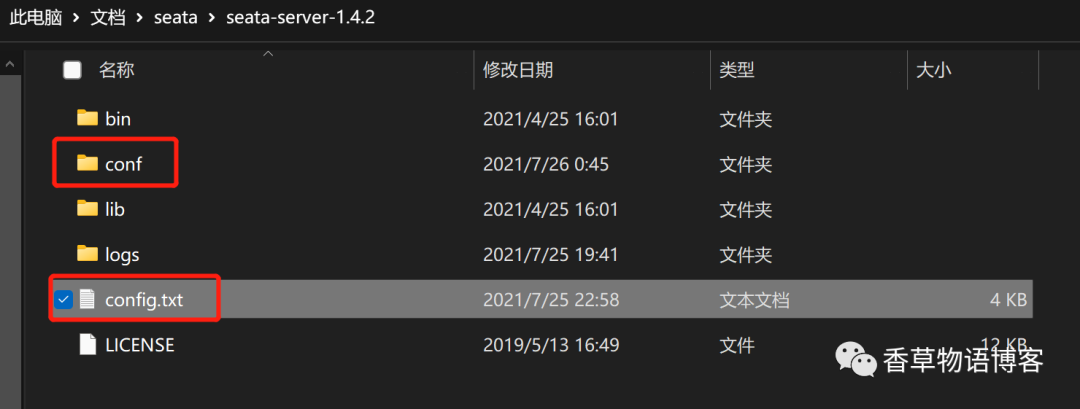
上图一定要注意配置数据库信息及service.vgroupMapping.my_tx_group=default
,这个后续在spring cloud项目的配置文件中会用到。
3.1.3.3.导入配置文件
打开git bash
,进入到conf
目录中,执行以下命令
sh [nacos-config.sh文件路径] -h [nacos-ip地址] -p 8848 -g SEATA_GROUP[导入的组] -u [用户名] -w [密码]
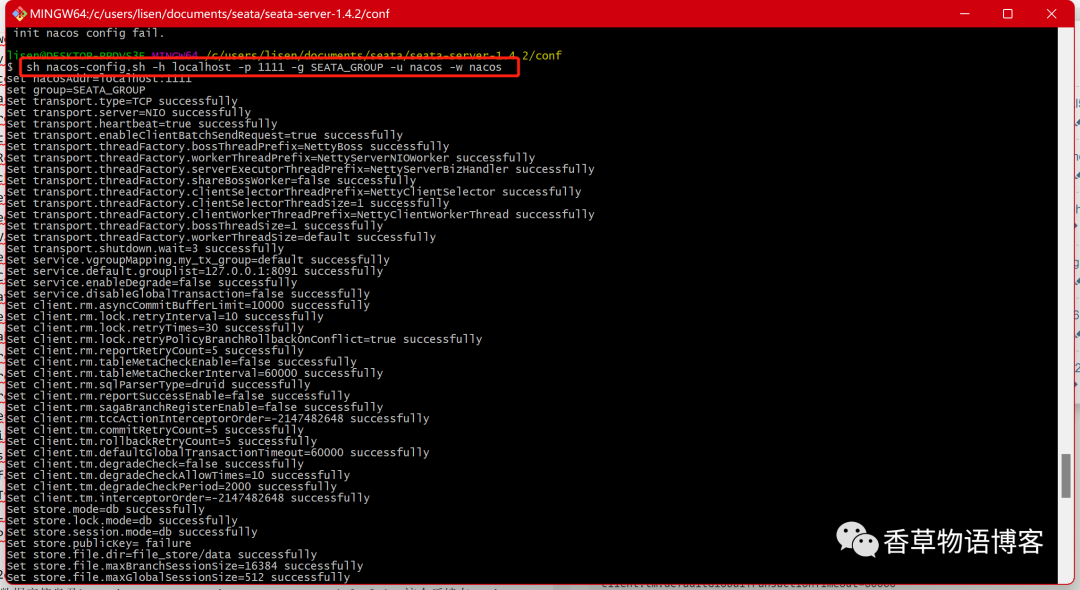
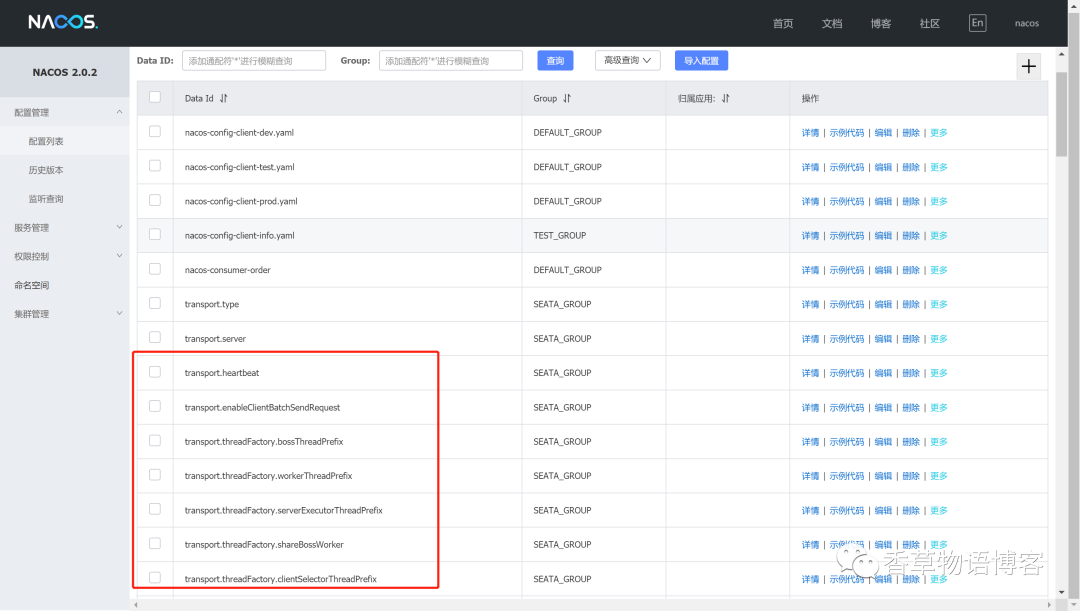
执行完成后,查看我们Nacos配置中心中,配置文件是否已存在。
3.1.4.创建相关的数据库(在回滚或提交前会将日志保存在数据库中,成功后会删除)
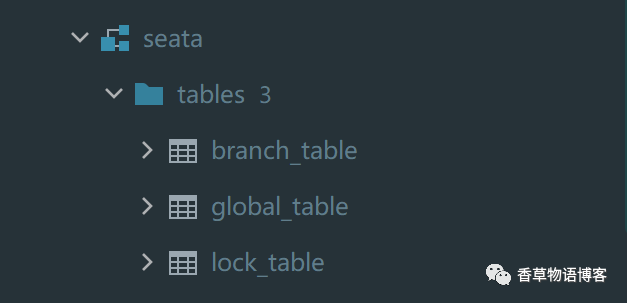
3.1.3.1.创建seata数据库,并预置数据
这个数据库就是我们上面配置文件中使用到的数据库,脚本如下
-- -------------------------------- The script used when storeMode is 'db' ---------------------------------- the table to store GlobalSession dataCREATE TABLE IF NOT EXISTS `global_table`(`xid` VARCHAR(128) NOT NULL,`transaction_id` BIGINT,`status` TINYINT NOT NULL,`application_id` VARCHAR(32),`transaction_service_group` VARCHAR(32),`transaction_name` VARCHAR(128),`timeout` INT,`begin_time` BIGINT,`application_data` VARCHAR(2000),`gmt_create` DATETIME,`gmt_modified` DATETIME,PRIMARY KEY (`xid`),KEY `idx_gmt_modified_status` (`gmt_modified`, `status`),KEY `idx_transaction_id` (`transaction_id`)) ENGINE = InnoDBDEFAULT CHARSET = utf8;-- the table to store BranchSession dataCREATE TABLE IF NOT EXISTS `branch_table`(`branch_id` BIGINT NOT NULL,`xid` VARCHAR(128) NOT NULL,`transaction_id` BIGINT,`resource_group_id` VARCHAR(32),`resource_id` VARCHAR(256),`branch_type` VARCHAR(8),`status` TINYINT,`client_id` VARCHAR(64),`application_data` VARCHAR(2000),`gmt_create` DATETIME(6),`gmt_modified` DATETIME(6),PRIMARY KEY (`branch_id`),KEY `idx_xid` (`xid`)) ENGINE = InnoDBDEFAULT CHARSET = utf8;-- the table to store lock dataCREATE TABLE IF NOT EXISTS `lock_table`(`row_key` VARCHAR(128) NOT NULL,`xid` VARCHAR(128),`transaction_id` BIGINT,`branch_id` BIGINT NOT NULL,`resource_id` VARCHAR(256),`table_name` VARCHAR(32),`pk` VARCHAR(36),`gmt_create` DATETIME,`gmt_modified` DATETIME,PRIMARY KEY (`row_key`),KEY `idx_branch_id` (`branch_id`)) ENGINE = InnoDBDEFAULT CHARSET = utf8;
3.1.4.2.创建undo_log表
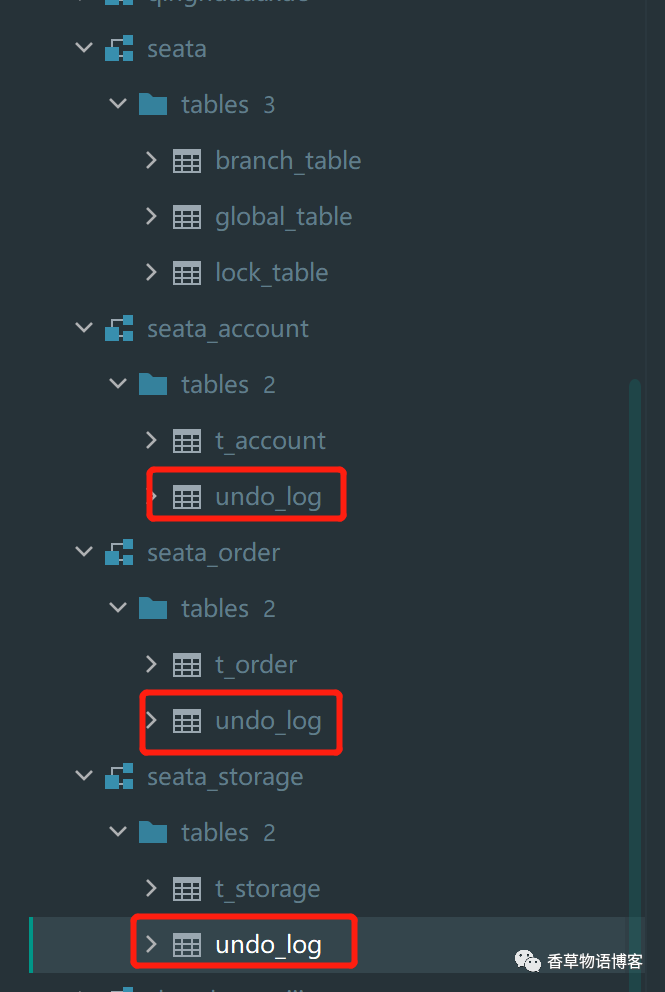
注意:在业务数据库中创建undo_log,与上面的脚本不在一个数据库中。比如我有三个微服务,三个数据库,那么就需要在三个业务数据库中创建undo_log表
-- 在业务数据库中创建undo_log(与上面的脚本不在一个数据库中)CREATE TABLE IF NOT EXISTS `undo_log`(`branch_id` BIGINT NOT NULL COMMENT 'branch transaction id',`xid` VARCHAR(128) NOT NULL COMMENT 'global transaction id',`context` VARCHAR(128) NOT NULL COMMENT 'undo_log context,such as serialization',`rollback_info` LONGBLOB NOT NULL COMMENT 'rollback info',`log_status` INT(11) NOT NULL COMMENT '0:normal status,1:defense status',`log_created` DATETIME(6) NOT NULL COMMENT 'create datetime',`log_modified` DATETIME(6) NOT NULL COMMENT 'modify datetime',UNIQUE KEY `ux_undo_log` (`xid`, `branch_id`)) ENGINE = InnoDBAUTO_INCREMENT = 1DEFAULT CHARSET = utf8 COMMENT ='AT transaction mode undo table';
4.运行seata
运行Nacos
这里不多介绍。
运行seata
进入seata的bin
目录,执行./seata-server.bat
,运行成功后,查看Nacos的服务列表
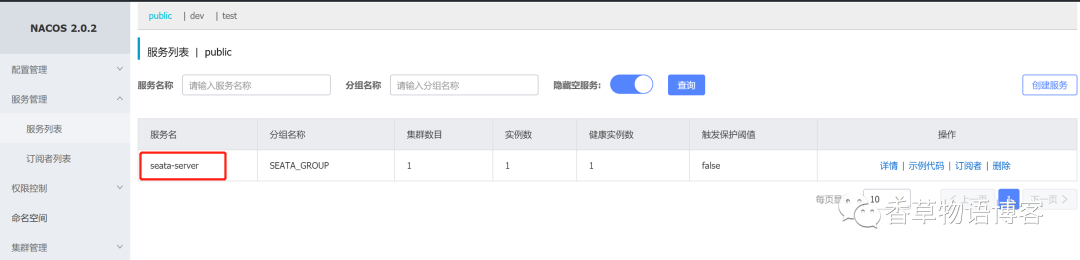
能看到我们配置的seata即代表成功。