




学习在 Spring Boot 中整合 MyBatis-Plus。MyBatis-Plus(简称 MP)是一个 MyBatis 的增强工具,在 MyBatis 的基础上只做增强不做改变,为简化开发、提高效率而生。
1 概述
无侵入:只做增强不做改变,引入它不会对现有工程产生影响,如丝般顺滑 损耗小:启动即会自动注入基本 CURD,性能基本无损耗,直接面向对象操作 强大的 CRUD 操作:内置通用 Mapper、通用 Service,仅仅通过少量配置即可实现单表大部分 CRUD 操作,更有强大的条件构造器,满足各类使用需求 支持 Lambda 形式调用:通过 Lambda 表达式,方便的编写各类查询条件,无需再担心字段写错 支持主键自动生成:支持多达 4 种主键策略(内含分布式唯一 ID 生成器 - Sequence),可自由配置,完美解决主键问题 支持 ActiveRecord 模式:支持 ActiveRecord 形式调用,实体类只需继承 Model 类即可进行强大的 CRUD 操作 支持自定义全局通用操作:支持全局通用方法注入( Write once, use anywhere ) 内置代码生成器:采用代码或者 Maven 插件可快速生成 Mapper 、 Model 、 Service 、 Controller 层代码,支持模板引擎,更有超多自定义配置等您来使用 内置分页插件:基于 MyBatis 物理分页,开发者无需关心具体操作,配置好插件之后,写分页等同于普通 List 查询 分页插件支持多种数据库:支持 MySQL、MariaDB、Oracle、DB2、H2、HSQL、SQLite、Postgre、SQLServer 等多种数据库 内置性能分析插件:可输出 Sql 语句以及其执行时间,建议开发测试时启用该功能,能快速揪出慢查询 内置全局拦截插件:提供全表 delete 、 update 操作智能分析阻断,也可自定义拦截规则,预防误操作
2 基本使用
创建项目,引入依赖
创建 Spring Boot 项目 spring-boot-mybatis-mybatisplus
,添加 Web/MySQL Driver/Lombok
依赖,如下:
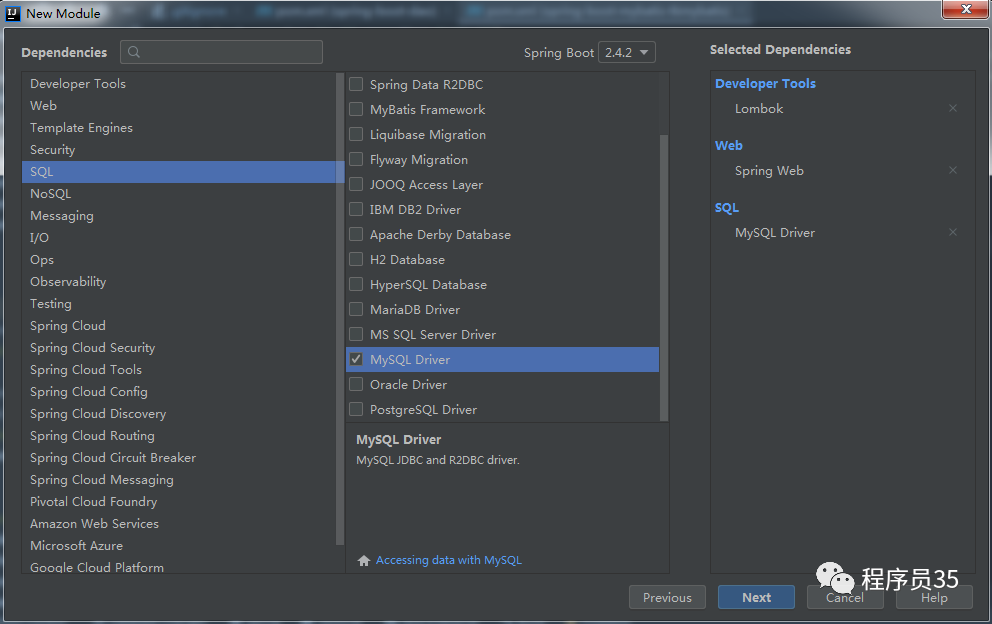
之后手动在 pom 文件中添加 Druid/MyBatis-Plus
依赖(Spring Boot 版本),最终的依赖如下:
<dependencies>
    <dependency>
        <groupId>org.springframework.boot</groupId>
        <artifactId>spring-boot-starter-web</artifactId>
    </dependency>
    <dependency>
        <groupId>com.alibaba</groupId>
        <artifactId>druid-spring-boot-starter</artifactId>
        <version>1.1.10</version>
    </dependency>
    <dependency>
        <groupId>mysql</groupId>
        <artifactId>mysql-connector-java</artifactId>
        <scope>runtime</scope>
        <version>5.1.27</version>
    </dependency>
    <dependency>
        <groupId>com.baomidou</groupId>
        <artifactId>mybatis-plus-boot-starter</artifactId>
        <version>3.4.2</version>
    </dependency>
    <dependency>
        <groupId>org.projectlombok</groupId>
        <artifactId>lombok</artifactId>
        <optional>true</optional>
    </dependency>
    <dependency>
        <groupId>org.springframework.boot</groupId>
        <artifactId>spring-boot-starter-test</artifactId>
        <scope>test</scope>
    </dependency>
</dependencies>
接着在 application.yml
配置文件中添加数据库相关信息的配置,如下:
spring:
  datasource:
    type: com.alibaba.druid.pool.DruidDataSource
    driver-class-name: com.mysql.jdbc.Driver
    url: jdbc:mysql://127.0.0.1:3306/cxy35?useUnicode=true&characterEncoding=utf-8&autoReconnect=true&autoReconnectForPools=true&serverTimezone=Asia/Shanghai
    username: root
    password: '000000'

mybatis-plus:
#  mapper-locations: classpath:/mapper/**/*.xml # 指定 mapper.xml 路径
  global-config:
    db-config:
      id-type: auto # 全局默认主键类型设置为自增
  configuration:
    auto-mapping-behavior: partial # 只对非嵌套的 resultMap 进行自动映射
    map-underscore-to-camel-case: true # 开启自动驼峰命名规则映射

# [MyBatis-Plus 代码生成器](https://github.com/cxy35/generators/tree/master/generator-mybatisplus)
新建实体类
手动新建或用代码生成器生成 User
实体类,并增加相关注解,如下:
@Data
@TableName("t_user")
public class User implements Serializable {
    @TableId(value = "id", type = IdType.AUTO)
    private Integer id;
    private String username;
    private String password;
    private Boolean enabled;
    private Boolean locked;
    private String address;
    private String nickName;
    private Date createTime;
    private Date updateTime;
}
注解说明:
@TableName
:表名注解。@TableId
:主键注解,其中 value 属性定义主键字段名,type 属性定义主键类型,IdType.AUTO 表示数据库 ID 自增。
新建 Mapper 接口
public interface UserMapper extends BaseMapper<User> {
}
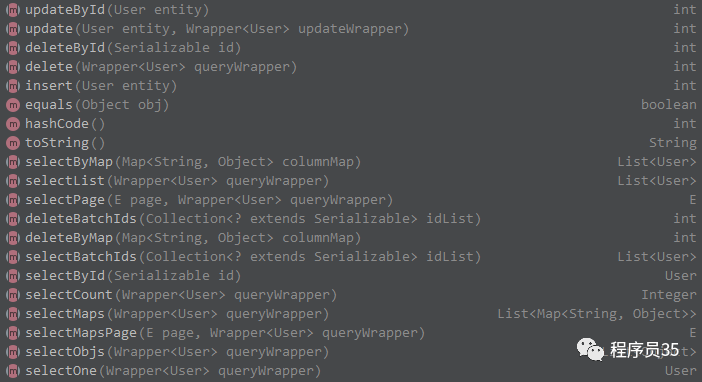
这里继承 Mybatis-Plus 中的 BaseMapper 接口,这样就自动拥有了其中的所有接口,不用写 XXXMapper.xml 文件,相关接口如下:
配置 Mapper 接口的扫描和分页插件
新建 Mybatis-Plus 配置类,如下:。
@Configuration
@MapperScan("com.cxy35.sample.springboot.mybatis.mybatisplus.mapper")
public class MyBatisPlusConfig {
    @Bean
    public PaginationInterceptor paginationInterceptor() {
        PaginationInterceptor paginationInterceptor = new PaginationInterceptor();
        // 设置请求的页面大于最大页后操作, true调回到首页,false 继续请求  默认false
        // paginationInterceptor.setOverflow(false);
        // 设置最大单页限制数量,默认 500 条,-1 不受限制
        // paginationInterceptor.setLimit(500);
        // 开启 count 的 join 优化,只针对部分 left join
        paginationInterceptor.setCountSqlParser(new JsqlParserCountOptimize(true));
        return paginationInterceptor;
    }
}
测试 Mapper
在测试类中注入 UserMapper
完成测试,如下:
@SpringBootTest
class UserMapperTests {

    @Autowired
    UserMapper userMapper;

    @Test
    public void insert() {
        User user = new User();
        user.setUsername("zhangsan");
        user.setPassword("123456");
        user.setAddress("杭州");
        user.setNickName("zs");
        user.setCreateTime(new Date());
        user.setUpdateTime(new Date());
        userMapper.insert(user);
    }

    @Test
    public void deleteById() {
        userMapper.deleteById(5);
    }

    @Test
    public void updateById() {
        User user = new User();
        user.setId(5);
        user.setUsername("zhangsan2");
        user.setPassword("654321");
        user.setNickName("zs2");
        user.setAddress("上海");
        user.setUpdateTime(new Date());
        userMapper.updateById(user);
    }

    @Test
    public void selectById() {
        User user = userMapper.selectById(5);
        System.out.println(user);
    }

    @Test
    public void selectList() {
        List<User> users = userMapper.selectList(null);
        System.out.println(users);
    }

    @Test
    public void selectByMap() {
        Map<String, Object> columnMap = new HashMap<>();
        columnMap.put("address", "杭州");
        List<User> users = userMapper.selectByMap(columnMap);
        System.out.println(users);
    }

    @Test
    public void selectPage() {
        Page<User> page = new Page<>(1, 3);
        QueryWrapper<User> qw = new QueryWrapper<>();
        qw.between("id", 1, 20).eq("enabled", 1).orderByDesc("id");
        Page<User> pageResult = userMapper.selectPage(page, qw);
        System.out.println("总记录数:" + pageResult.getTotal());
        System.out.println("当前页:" + pageResult.getCurrent());
        System.out.println("每页记录数:" + pageResult.getSize());
        System.out.println("获取总页数:" + pageResult.getPages());
        System.out.println("查询结果:" + pageResult.getRecords());
        System.out.println("是否存在上一页:" + pageResult.hasPrevious());
        System.out.println("是否存在下一页:" + pageResult.hasNext());
    }
}
新建 Service 接口和实现类
public interface UserService extends IService<User> {
}
@Service
public class UserServiceImpl extends ServiceImpl<UserMapper, User> implements UserService {
}
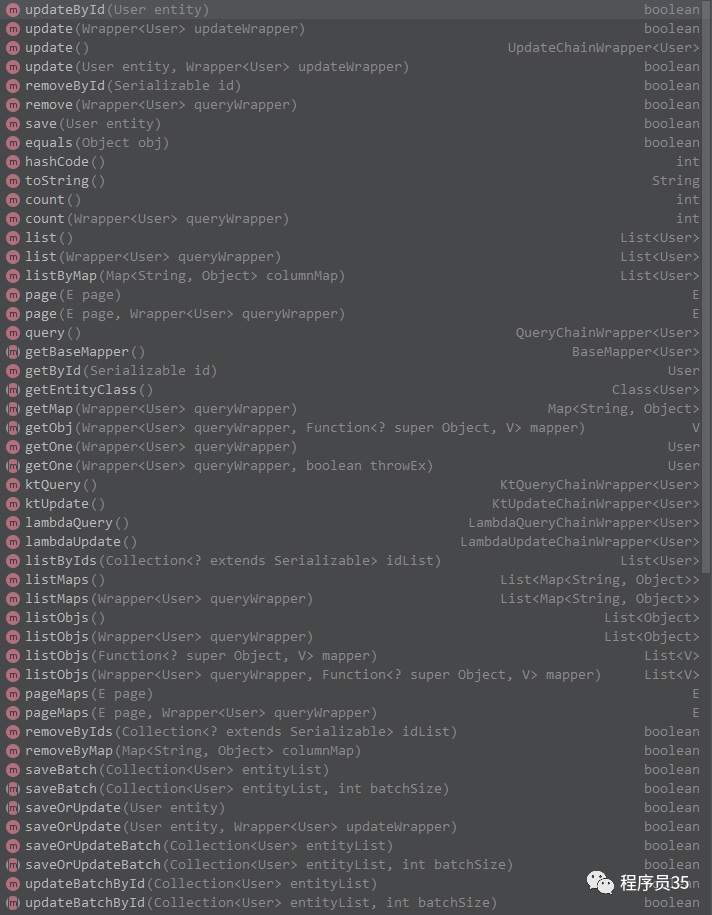
这里继承 Mybatis-Plus 中的 IService 接口,这样就自动拥有了其中的所有接口,相关接口如下:
测试 Service
在测试类中注入 UserService
完成测试,如下:
@SpringBootTest
class UserServiceTests {

    @Autowired
    UserService userService;

    @Test
    public void save() {
        User user = new User();
        user.setUsername("zhangsan");
        user.setPassword("123456");
        user.setAddress("杭州");
        user.setNickName("zs");
        user.setCreateTime(new Date());
        user.setUpdateTime(new Date());
        userService.save(user);
    }

    @Test
    public void removeById() {
        userService.removeById(6);
    }

    @Test
    public void updateById() {
        User user = new User();
        user.setId(6);
        user.setUsername("zhangsan2");
        user.setPassword("654321");
        user.setNickName("zs2");
        user.setAddress("上海");
        user.setUpdateTime(new Date());
        userService.updateById(user);
    }

    @Test
    public void getById() {
        User user = userService.getById(6);
        System.out.println(user);
    }

    @Test
    public void list() {
        List<User> users = userService.list();
        System.out.println(users);
    }

    @Test
    public void listByMap() {
        Map<String, Object> columnMap = new HashMap<>();
        columnMap.put("address", "杭州");
        List<User> users = userService.listByMap(columnMap);
        System.out.println(users);
    }

    @Test
    public void page() {
        Page<User> page = new Page<>(1, 3);
        QueryWrapper<User> qw = new QueryWrapper<>();
        qw.between("id", 1, 20).eq("enabled", 1).orderByDesc("id");
        Page<User> pageResult = userService.page(page, qw);
        System.out.println("总记录数:" + pageResult.getTotal());
        System.out.println("当前页:" + pageResult.getCurrent());
        System.out.println("每页记录数:" + pageResult.getSize());
        System.out.println("获取总页数:" + pageResult.getPages());
        System.out.println("查询结果:" + pageResult.getRecords());
        System.out.println("是否存在上一页:" + pageResult.hasPrevious());
        System.out.println("是否存在下一页:" + pageResult.hasNext());
    }
}
4 代码生成器
MyBatis-Plus 代码生成器
Spring Boot 教程合集(微信左下方阅读全文可直达)。 Spring Boot 教程合集示例代码:https://github.com/cxy35/spring-boot-samples 本文示例代码:https://github.com/cxy35/spring-boot-samples/tree/master/spring-boot-dao/spring-boot-mybatis-mybatisplus
文章转载自程序员35,如果涉嫌侵权,请发送邮件至:contact@modb.pro进行举报,并提供相关证据,一经查实,墨天轮将立刻删除相关内容。
