 Hadoop在2.6.0版本中引入了一个新特性异构存储.异构存储可以根据各个存储介质读写特性的不同发挥各自的优势.一个很适用的场景就是冷热数据的存储.针对冷数据,采用容量大的,读写性能不高的存储介质存储,比如最普通的Disk磁盘.而对于热数据而言,可以采用SSD的方式进行存储,这样就能保证高效的读性能,在速率上甚至能做到十倍于或百倍于普通磁盘读写的速度,甚至可以把数据直接存放内存,懒加载入hdfs.HDFS的异构存储特性的出现使得我们不需要搭建两套独立的集群来存放冷热2类数据,在一套集群内就能完成.所以这个功能特性还是有非常大的实用意义的.下面我介绍一下异构存储的类型,以及如果灵活配置异构存储!
- 超冷数据存储,非常低廉的硬盘存储 - 银行票据影像系统场景
- 默认存储类型 - 大规模部署场景,提供顺序读写IO
- SSD类型存储 - 高效数据查询可视化,对外数据共享,提升性能
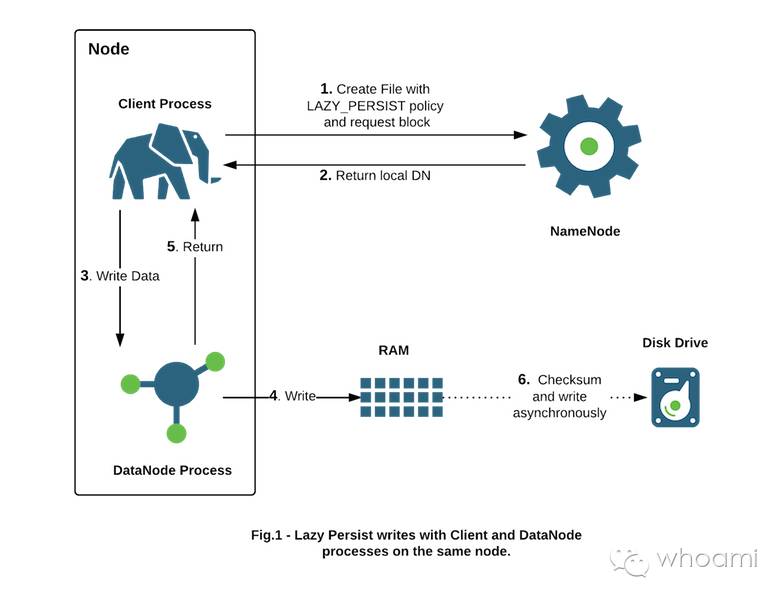
- RAM_DISK - 追求极致性能
- 混合盘 - 一块ssd/一块hdd + n sata/n sas
HDFS Storage Type
storage types:
ARCHIVE - Archival storage is for very dense storage and is useful for rarely accessed data. This storage type is typically cheaper per TB than normal hard disks.
DISK - Hard disk drives are relatively inexpensive and provide sequential I/O performance. This is the default storage type.
SSD - Solid state drives are useful for storing hot data and I/O-intensive applications.
RAM_DISK - This special in-memory storage type is used to accelerate low-durability, single-replica writes.
Storage Policies
HDFS has six preconfigured storage policies.
Hot - All replicas are stored on DISK.
Cold - All replicas are stored ARCHIVE.
Warm - One replica is stored on DISK and the others are stored on ARCHIVE.
All_SSD - All replicas are stored on SSD.
One_SSD - One replica is stored on SSD and the others are stored on DISK.
Lazy_Persist - The replica is written to RAM_DISK and then lazily persisted to DISK.
Setting a Storage Policy for HDFS
Setting a Storage Policy for HDFS Using Ambari
设置存储策略,每个Datanode 使用存储类型,在目录中声明,配置异构存储步骤:添加“dfs.storage.policy.enabled”属性,改变默认值为true
为每个datanode设置存储目录,声明存储类型,例如:
dfs.storage.policy.enabled = true
dfs.datanode.data.dir = [DISK]/data01/hadoop/hdfs/data,[DISK]/data03/hadoop/hdfs/data,[DISK]/data04/hadoop/hdfs/data,[DISK]/data05/hadoop/hdfs/data,[DISK]/data06/hadoop/hdfs/data,[DISK]/data07/hadoop/hdfs/data,[DISK]/data08/hadoop/hdfs/data,[DISK]/data09/hadoop/hdfs/data,[DISK]/data10/hadoop/hdfs/data,[DISK]/data11/hadoop/hdfs/data,[DISK]/data12/hadoop/hdfs/data,[DISK]/data02/hadoop/hdfs/data,[SSD]/data13/ssd/hadoop/hdfs/data,[RAM_DISK]/data14/dn-tmpfs
开启一个终端session,登陆到hdfs某个节点,切换到hdfs用户,通过如下命令设置存储策略,让hdfs目录和配置的存储策略对应,默认写即为普通盘。
HDFS command
   $ hdfs storagepolicies -setStoragePolicy -path <path> -policy <policy>
   path_to_file_or_directory -policy policy_name
HDFS SSD
   $ mount /dev/nvme0n1 /data13/ssd
   $ hadoop fs -mkdir /ssd
   $ hdfs storagepolicies -setStoragePolicy -path /ssd -policy ALL_SSD
      Set storage policy ALL_SSD on /ssd
   $ hdfs storagepolicies -getStoragePolicy -path /ssd
   The storage policy of /ssd:
   BlockStoragePolicy{ALL_SSD:12, storageTypes=[SSD], creationFallbacks=[DISK], replicationFallbacks=[DISK]}
HDFS RAM
  $ mkdir /data14/dn-tmpfs -p
  $ sudo mount -t tmpfs -o size=70g tmpfs /data14/dn-tmpfs
  $ hadoop fs -mkdir /ram
  $ hdfs storagepolicies -setStoragePolicy -path /ram -policy LAZY_PERSIST
mover存储策略对应目录
$ hdfs mover -p <path>restart hadoop
Managing Storage Policies
getStoragePolicy
$ hdfs storagepolicies -getStoragePolicy -path <path>path_to_policylistPolicies
$ hdfs storagepolicies -listPolicies
Test
iperf 检测主机间网络带宽
 yum install http://dl.fedoraproject.org/pub/epel/6/x86_64/epel-release-6-8.noarch.rpm
 yum install iperf -y
 yum install ifstatus -y
如下,在第一个机器启动一个监听,去另外一个服务器压测,网络带宽;可以看到网络带宽:10Gbits
 [root@bigdata-server-1 ~]# iperf -s
 ------------------------------------------------------------
 Server listening on TCP port 5001
 TCP window size: 85.3 KByte (default)
 ------------------------------------------------------------
 [  4] local 192.168.0.64 port 5001 connected with 192.168.0.64 port 51085
 [ ID] Interval       Transfer     Bandwidth
 [  4]  0.0-10.0 sec  24.8 GBytes  21.3 Gbits/sec
 [  5] local 192.168.0.64 port 5001 connected with 192.168.0.63 port 48903
 [  5]  0.0-10.0 sec  10.9 GBytes  9.38 Gbits/sec
 [root@bigdata-server-2 ~]# iperf -c bigdata-server-1
 ------------------------------------------------------------
 Client connecting to bigdata-server-1, TCP port 5001
 TCP window size: 19.3 KByte (default)
 ------------------------------------------------------------
 [  3] local 192.168.0.63 port 48903 connected with 192.168.0.64 port 5001
 [ ID] Interval       Transfer     Bandwidth
 [  3]  0.0-10.0 sec  10.9 GBytes  9.38 Gbits/sec
hdfs NFSGateway
把hdfs通过它提供的gateway接口mount到Linux本地,往里面dd压测,看性能表现。[root@bigdata-server-1 ~]# mkdir /hdfs [root@bigdata-server-1 ~]# mount -t nfs -o vers=3,proto=tcp,nolock localhost:/ /hdfs [hdfs@bigdata-server-1 hdfs]$ dd if=/dev/zero of=/hdfs/test/test004 bs=10M count=1000 记录了1000+0 的读入 记录了1000+0 的写出 10485760000字节(10 GB)已复制,122.15 秒,85.8 MB/秒hdfs fuse
 $ yum install hadoop_2_3_4_0_3485-hdfs-fuse.x86_64
 $ mkdir /mnt/hdfs
 [hdfs@bigdata-server-1 bin]$ ./hadoop-fuse-dfs hadoop-fuse-dfs#dfs://bigdata-server-1:8020 /mnt/hdfs fuse allow_other,usetrash,rw 2 0
   ./hadoop-fuse-dfs: line 7: /usr/lib/bigtop-utils/bigtop-detect-javahome: No such file or directory
   ./hadoop-fuse-dfs: line 18: /usr/lib/bigtop-utils/bigtop-detect-javalibs: No such file or directory
   /usr/hdp/2.3.4.0-3485/hadoop/bin/fuse_dfs: error while loading shared libraries: libjvm.so: cannot open shared object file: No such file or directory
 [hdfs@bigdata-server-1 hdfs]$ tail -2 /etc/profile
 export LD_LIBRARY_PATH=/usr/hdp/current/hadoop-client/bin/../lib:/usr/hdp/2.3.4.0-3485/usr/lib:/usr/jdk64/jdk1.7.0_67/jre/lib/amd64/server
 export PATH=.:/usr/hdp/current/hadoop-client/bin:$PATH
 [hdfs@bigdata-server-1 hdfs]$ hadoop-fuse-dfs hadoop-fuse-dfs#dfs://localhost:8020 /mnt/hdfs
 [hdfs@bigdata-server-1 hdfs]$ df -h|tail -1
  fuse_dfs                          177T  575G  176T   1% /mnt/hdfs
 [hdfs@bigdata-server-1 hdfs]$ dd if=/dev/zero of=/mnt/hdfs/test004 bs=10M count=1000
 记录了1000+0 的读入
 记录了1000+0 的写出
 10485760000字节(10 GB)已复制,64.8231 秒,162 MB/秒
单盘ssd,sata性能
 [root@bigdata-server-1 ssd]# dd if=/dev/zero of=/data12/test004 bs=1M count=100000
 记录了100000+0 的读入
 记录了100000+0 的写出
 104857600000字节(105 GB)已复制,458.219 秒,229 MB/秒
 [root@bigdata-server-1 ~]# dd if=/dev/zero of=/data13/ssd/test004 bs=1M count=100000
 记录了100000+0 的读入
 记录了100000+0 的写出
 104857600000字节(105 GB)已复制,78.6155 秒,1.3 GB/秒
iostat
常见用法:iostat -d -k 1 5 查看磁盘吞吐量等信息。 iostat -d -x -k 1 5 查看磁盘使用率、响应时间等信息 iostat –x 1 5 查看cpu信息。DFSTestIO
SSD
$ time hadoop jar hadoop-mapreduce-client-jobclient-tests.jar TestDFSIO -Dtest.build.data=/ssd -write -nrFiles 4 -fileSize 50000
$ time hadoop jar hadoop-mapreduce-client-jobclient-tests.jar TestDFSIO -Dtest.build.data=/ssd -read -nrFiles 4 -fileSize 50000
SATA
$ time hadoop jar hadoop-mapreduce-client-jobclient-tests.jar TestDFSIO -Dtest.build.data=/sata -write -nrFiles 4 -fileSize 50000
$ time hadoop jar hadoop-mapreduce-client-jobclient-tests.jar TestDFSIO -Dtest.build.data=/sata -read -nrFiles 4 -fileSize 50000
RAM
$ time hadoop jar hadoop-mapreduce-client-jobclient-tests.jar TestDFSIO -Dtest.build.data=/ram -write -nrFiles 4 -fileSize 50000
$ time hadoop jar hadoop-mapreduce-client-jobclient-tests.jar TestDFSIO -Dtest.build.data=/ram -read -nrFiles 4 -fileSize 50000
MapReduce Performance on SSDs/SATA/RAM/SSD-SATA
测试hdfs异构存储性能结果白皮书,后续内容发布…
FAQ
- 1、ambari Version 2.2.2.0 和 HDP-2.4.2.0-258 版本,安装后配置多种异构存储类型,[RAM_DISK]方式ambari配置界面验证失败,无法通过!此为一个bug!
- 详情访问:https://issues.apache.org/jira/browse/AMBARI-14605
参考:
Configuring Heterogeneous Storage in HDFS: https://www.cloudera.com/documentation/enterprise/latest/topics/admin_heterogeneous_storage_oview.html#admin_heterogeneous_storage_config
The Truth About MapReduce Performance on SSDs: http://blog.cloudera.com/blog/2014/03/the-truth-about-mapreduce-performance-on-ssds/
Memory Storage Support in HDFS: http://aajisaka.github.io/hadoop-project/hadoop-project-dist/hadoop-hdfs/MemoryStorage.html
Archival Storage, SSD & Memory: http://aajisaka.github.io/hadoop-project/hadoop-project-dist/hadoop-hdfs/ArchivalStorage.html
How to configure storage policy in Ambari?: https://community.hortonworks.com/questions/2288/how-to-configure-storage-policy-in-ambari.html
Using NFS with Ambari 2.1 and above: https://community.hortonworks.com/questions/301/using-nfs-with-ambari-21.html
Disaster recovery and Backup best practices in a typical Hadoop Cluster:https://community.hortonworks.com/articles/43575/disaster-recovery-and-backup-best-practices-in-a-t-1.html
原创文章,转载请注明: 转载自whoami的博客本博客的文章集合:
http://www.itweet.cn/archives/