



{"batch_id": "SAFETY_QUESTIONS_001111","generated_at": "2024-06-18T08:00:00Z","questions": [{"question_type": "single_choice","content": "高空作业是指作业面坠落高度在多少米以上的作业?","options": {"A": "1.5米","B": "2米","C": "2.5米","D": "3米"},"correct_answer": "B","analysis": "根据中国安全生产标准,高处作业是指在坠落高度基准面2米及以上有可能坠落的高处进行的作业。","difficulty": "简单","category_level1": "实施人员","category_level2": "安全生产","category_level3": "高空作业","enabled": true,"tags": ["定义", "高度"]},{"question_type": "single_choice","content": "高空作业时,必须佩戴安全帽的主要目的是什么?","options": {"A": "防止头部被坠落物打击","B": "防止阳光直射","C": "美观","D": "公司规定"},"correct_answer": "A","analysis": "安全帽主要防止头部被坠落物或碰撞物打击,是高空作业的基本防护装备。","difficulty": "简单","category_level1": "实施人员","category_level2": "安全生产","category_level3": "高空作业","enabled": true,"tags": ["PPE", "安全帽"]},{"question_type": "single_choice","content": "在高空作业中,以下哪种行为是安全的?","options": {"A": "在护栏上行走","B": "使用破损的安全带","C": "在恶劣天气下作业","D": "使用合格的脚手架"},"correct_answer": "D","analysis": "使用合格的脚手架是高空作业的基本安全要求,其他行为都增加了坠落风险。","difficulty": "简单","category_level1": "实施人员","category_level2": "安全生产","category_level3": "高空作业","enabled": true,"tags": ["安全行为", "脚手架"]},{"question_type": "single_choice","content": "高空作业前,对安全带的检查应包括什么?","options": {"A": "检查织带是否磨损","B": "检查扣环是否灵活","C": "检查标识是否清晰","D": "所有以上"},"correct_answer": "D","analysis": "安全带使用前必须全面检查,包括织带、扣环和标识,确保其安全可靠。","difficulty": "简单","category_level1": "实施人员","category_level2": "安全生产","category_level3": "高空作业","enabled": true,"tags": ["安全带", "设备检查"]},{"question_type": "single_choice","content": "当高空作业高度超过多少米时,必须设置安全网?","options": {"A": "3米","B": "5米","C": "10米","D": "15米"},"correct_answer": "B","analysis": "根据安全规程,当作业高度超过5米时,应设置安全网以提供额外保护。","difficulty": "中等","category_level1": "实施人员","category_level2": "安全生产","category_level3": "高空作业","enabled": true,"tags": ["安全网", "高度要求"]},{"question_type": "single_choice","content": "使用移动式脚手架时,以下哪项是正确的?","options": {"A": "移动时可以有人员在上面","B": "移动时必须无人","C": "移动时不需要锁轮","D": "移动时可以快速推动"},"correct_answer": "B","analysis": "移动式脚手架在移动时,必须确保上面没有作业人员,以防止坠落事故。","difficulty": "中等","category_level1": "实施人员","category_level2": "安全生产","category_level3": "高空作业","enabled": true,"tags": ["脚手架", "移动安全"]},{"question_type": "single_choice","content": "高空作业人员应定期进行什么培训?","options": {"A": "安全培训","B": "技能培训","C": "应急演练","D": "所有以上"},"correct_answer": "D","analysis": "高空作业人员需要定期接受安全培训、技能培训和应急演练,以保持安全意识和应对能力。","difficulty": "中等","category_level1": "实施人员","category_level2": "安全生产","category_level3": "高空作业","enabled": true,"tags": ["培训", "安全教育"]},{"question_type": "single_choice","content": "在高空作业中,遇到大风天气时应如何处理?","options": {"A": "继续作业","B": "降低作业高度","C": "立即停止作业","D": "加快作业速度"},"correct_answer": "C","analysis": "当遇到大风等恶劣天气时,高空作业应立即停止,以防止因风致坠落或其他事故。","difficulty": "中等","category_level1": "实施人员","category_level2": "安全生产","category_level3": "高空作业","enabled": true,"tags": ["天气", "应急处理"]},{"question_type": "multiple_choice","content": "以下哪些是高空作业中常见的危险因素?","options": {"A": "坠落风险","B": "物体打击","C": "触电风险","D": "火灾风险"},"correct_answer": ["A", "B", "C"],"analysis": "高空作业主要危险包括坠落、物体打击和触电(如靠近电力线路),火灾风险相对较低,但并非没有。","difficulty": "困难","category_level1": "实施人员","category_level2": "安全生产","category_level3": "高空作业","enabled": true,"tags": ["危险因素", "风险评估"]},{"question_type": "true_false","content": "高空作业时,可以使用任何类型的绳子作为安全绳。","options": null,"correct_answer": false,"analysis": "错误。安全绳必须符合国家标准,具有足够的强度和耐久性,不能使用普通绳子,否则可能断裂导致坠落。","difficulty": "困难","category_level1": "实施人员","category_level2": "安全生产","category_level3": "高空作业","enabled": true,"tags": ["安全绳", "设备要求"]}]}
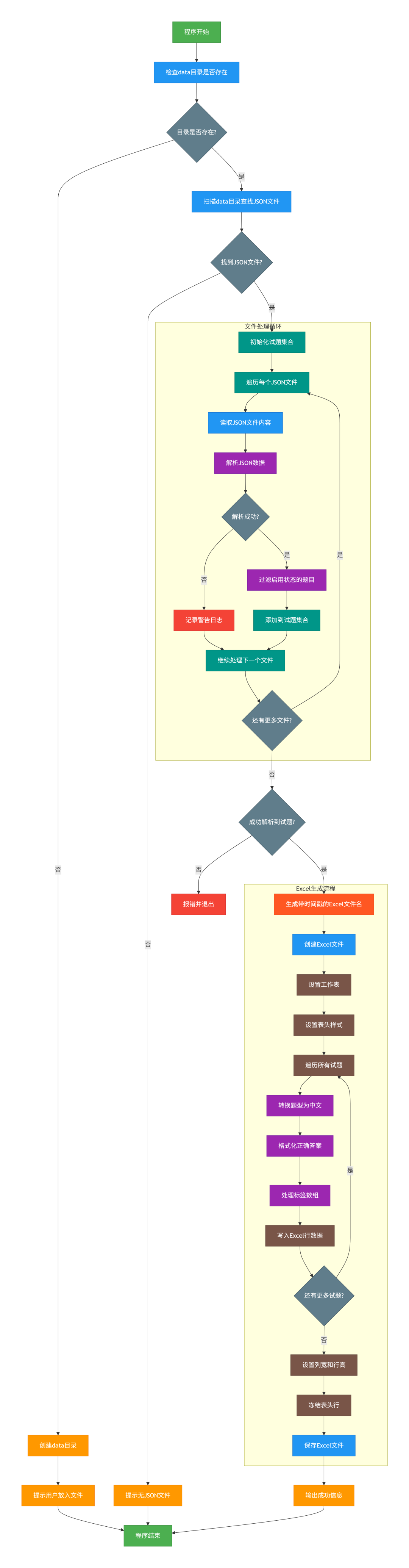
详细逻辑说明
1. 目录检查和文件扫描
检查data目录:验证数据目录是否存在
自动创建:如不存在则创建目录并提示用户
文件扫描:递归扫描data目录下所有JSON文件
2. 数据解析流程
批量处理:逐个读取和解析JSON文件
容错处理:单个文件解析失败不影响其他文件
数据过滤:只处理启用状态(Enabled=true)的题目
数据合并:将所有有效题目合并到统一集合
3. Excel生成流程
文件命名:生成带时间戳的唯一文件名
格式设置:
创建表格和设置表头样式
转换题型为中文显示
格式化正确答案(支持多种类型)
处理标签数组为逗号分隔字符串
样式优化:
设置合适的列宽和行高
冻结表头便于浏览
美化表头样式
4. 错误处理和用户反馈
进度显示:显示文件处理进度和统计
错误报告:详细记录解析失败的文件
结果汇总:最终输出处理成功的文件数和题目数
package mainimport ("encoding/json""fmt""log""os""path/filepath""strings""time""github.com/xuri/excelize/v2")// 试题结构体type Question struct {QuestionType string `json:"question_type"`Content string `json:"content"`Options map[string]string `json:"options"`CorrectAnswer interface{} `json:"correct_answer"`Analysis string `json:"analysis"`Difficulty string `json:"difficulty"`CategoryLevel1 string `json:"category_level1"`CategoryLevel2 string `json:"category_level2"`CategoryLevel3 string `json:"category_level3"`Tags []string `json:"tags"`Enabled bool `json:"enabled"`}// JSON数据结构体type QuestionBatch struct {BatchID string `json:"batch_id"`GeneratedAt string `json:"generated_at"`Questions []Question `json:"questions"`}// 题型映射var questionTypeMap = map[string]string{"single_choice": "单选","multiple_choice": "多选","true_false": "判断","fill_blank": "填空","short_answer": "简答",}func main() {// 创建data目录(如果不存在)dataDir := "data"if _, err := os.Stat(dataDir); os.IsNotExist(err) {if err := os.Mkdir(dataDir, 0755); err != nil {log.Fatal("创建data目录失败:", err)}fmt.Println("已创建data目录,请将JSON文件放入该目录后重新运行程序")return}// 获取data目录下所有JSON文件jsonFiles, err := findJSONFiles(dataDir)if err != nil {log.Fatal("查找JSON文件失败:", err)}if len(jsonFiles) == 0 {fmt.Println("data目录中没有找到JSON文件")fmt.Println("请将JSON试题文件放入data目录后重新运行程序")return}fmt.Printf("找到 %d 个JSON文件:\n", len(jsonFiles))for _, file := range jsonFiles {fmt.Printf(" - %s\n", file)}// 读取并解析所有JSON文件var allQuestions []Questionvar processedFiles intfor _, jsonFile := range jsonFiles {questions, err := parseJSONFile(jsonFile)if err != nil {log.Printf("警告: 解析文件 %s 失败: %v", jsonFile, err)continue}allQuestions = append(allQuestions, questions...)processedFiles++fmt.Printf("成功处理文件: %s (%d 道试题)\n", filepath.Base(jsonFile), len(questions))}if len(allQuestions) == 0 {log.Fatal("没有成功解析到任何试题")}fmt.Printf("\n成功处理 %d/%d 个文件,共 %d 道试题\n", processedFiles, len(jsonFiles), len(allQuestions))// 生成Excel文件outputFile := generateExcelFileName()err = createExcelFile(allQuestions, outputFile)if err != nil {log.Fatal("生成Excel文件失败:", err)}fmt.Printf("\n试题已成功生成到文件: %s\n", outputFile)fmt.Printf("共生成 %d 道试题\n", len(allQuestions))}// 查找data目录下的所有JSON文件func findJSONFiles(dataDir string) ([]string, error) {var jsonFiles []stringerr := filepath.Walk(dataDir, func(path string, info os.FileInfo, err error) error {if err != nil {return err}if !info.IsDir() && strings.EqualFold(filepath.Ext(path), ".json") {jsonFiles = append(jsonFiles, path)}return nil})return jsonFiles, err}// 解析单个JSON文件func parseJSONFile(filePath string) ([]Question, error) {// 读取JSON文件jsonData, err := os.ReadFile(filePath)if err != nil {return nil, fmt.Errorf("读取文件失败: %w", err)}// 解析JSON数据var batch QuestionBatcherr = json.Unmarshal(jsonData, &batch)if err != nil {return nil, fmt.Errorf("解析JSON失败: %w", err)}// 过滤启用的题目var enabledQuestions []Questionfor _, question := range batch.Questions {if question.Enabled {enabledQuestions = append(enabledQuestions, question)}}return enabledQuestions, nil}// 生成Excel文件名(包含时间戳)func generateExcelFileName() string {timestamp := time.Now().Format("20060102_150405")return fmt.Sprintf("merged_questions_%s.xlsx", timestamp)}// 创建Excel文件func createExcelFile(questions []Question, outputFile string) error {// 创建Excel文件f := excelize.NewFile()defer func() {if err := f.Close(); err != nil {log.Printf("关闭Excel文件失败: %v", err)}}()// 设置工作表名称sheetName := "试题"index, err := f.NewSheet(sheetName)if err != nil {return fmt.Errorf("创建工作表失败: %w", err)}f.DeleteSheet("Sheet1") // 删除默认的工作表f.SetActiveSheet(index)// 设置表头headers := []string{"question_type", "content", "option_a", "option_b", "option_c", "option_d","option_e", "option_f", "correct_answer", "analysis", "difficulty","category_level1", "category_level2", "category_level3", "tags",}// 设置表头样式headerStyle, err := f.NewStyle(&excelize.Style{Font: &excelize.Font{Bold: true,Color: "FFFFFF",},Fill: excelize.Fill{Type: "pattern",Color: []string{"2F75B5"},Pattern: 1,},Alignment: &excelize.Alignment{Horizontal: "center",Vertical: "center",},})if err != nil {return fmt.Errorf("创建表头样式失败: %w", err)}for i, header := range headers {cell, _ := excelize.CoordinatesToCellName(i+1, 1)f.SetCellValue(sheetName, cell, header)f.SetCellStyle(sheetName, cell, cell, headerStyle)}// 写入试题数据for row, question := range questions {// 转换题型questionType := questionTypeMap[question.QuestionType]if questionType == "" {questionType = question.QuestionType}// 处理正确答案correctAnswer := formatCorrectAnswer(question.CorrectAnswer)// 处理标签tags := strings.Join(question.Tags, ",")// 准备行数据rowData := []string{questionType,question.Content,question.Options["A"],question.Options["B"],question.Options["C"],question.Options["D"],question.Options["E"],question.Options["F"],correctAnswer,question.Analysis,question.Difficulty,question.CategoryLevel1,question.CategoryLevel2,question.CategoryLevel3,tags,}// 写入Excelfor col, value := range rowData {cell, _ := excelize.CoordinatesToCellName(col+1, row+2)f.SetCellValue(sheetName, cell, value)}// 设置行高,让内容显示更完整f.SetRowHeight(sheetName, row+2, 25)}// 设置列宽columnWidths := map[string]float64{"A": 8, // question_type"B": 50, // content"C": 15, // option_a"D": 15, // option_b"E": 15, // option_c"F": 15, // option_d"G": 15, // option_e"H": 15, // option_f"I": 15, // correct_answer"J": 50, // analysis"K": 8, // difficulty"L": 15, // category_level1"M": 15, // category_level2"N": 15, // category_level3"O": 20, // tags}for col, width := range columnWidths {f.SetColWidth(sheetName, col, col, width)}// 冻结首行(表头)if err := f.SetPanes(sheetName, &excelize.Panes{Freeze: true,XSplit: 0,YSplit: 1,TopLeftCell: "A2",ActivePane: "bottomLeft",}); err != nil {return fmt.Errorf("设置冻结窗格失败: %w", err)}// 保存文件if err := f.SaveAs(outputFile); err != nil {return fmt.Errorf("保存Excel文件失败: %w", err)}return nil}// 格式化正确答案func formatCorrectAnswer(correctAnswer interface{}) string {switch v := correctAnswer.(type) {case string:return vcase bool:if v {return "true"}return "false"case []interface{}:var answers []stringfor _, answer := range v {answers = append(answers, fmt.Sprintf("%v", answer))}return strings.Join(answers, ",")case []string:return strings.Join(v, ",")default:return fmt.Sprintf("%v", v)}}
文章转载自数据库平台优化,如果涉嫌侵权,请发送邮件至:contact@modb.pro进行举报,并提供相关证据,一经查实,墨天轮将立刻删除相关内容。
