



11 月 18 日,在 2025 OceanBase 年度发布会上,重磅发布全新产品 OceanBase seekdb。
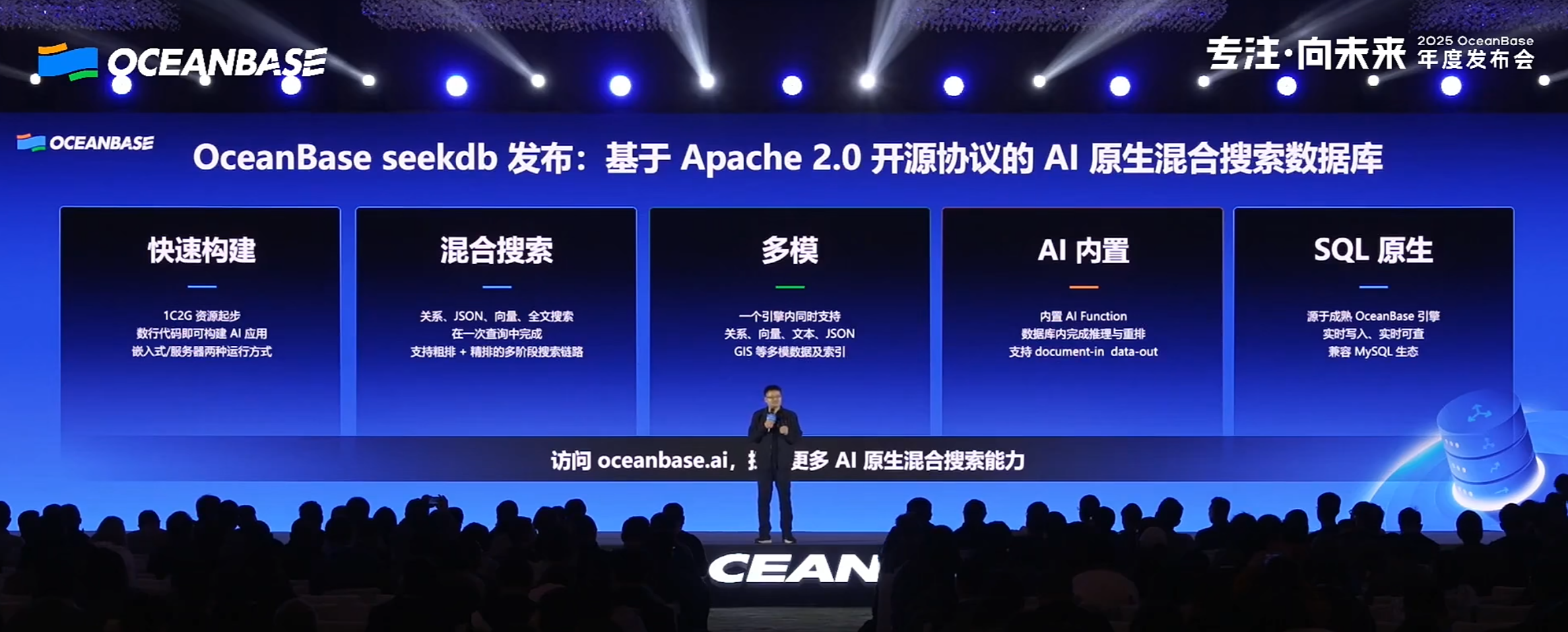
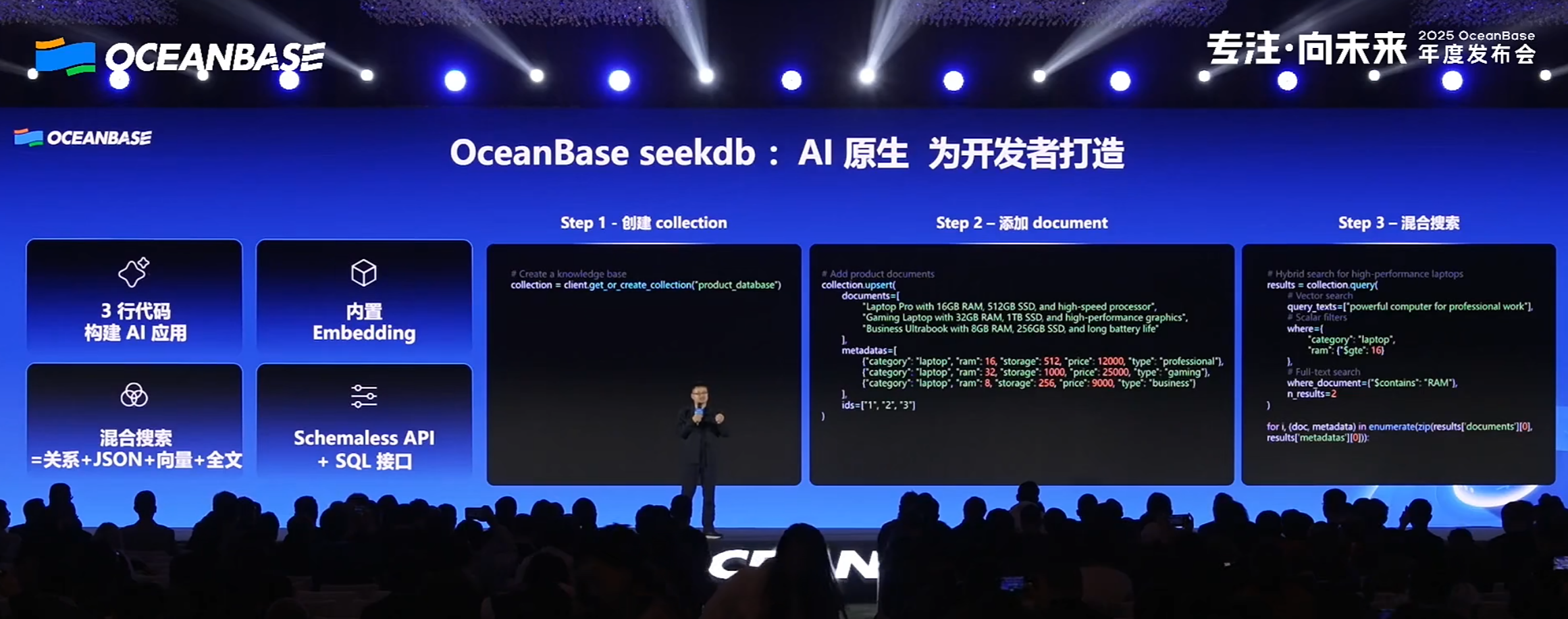
OceanBase seekdb(简称 seekdb)是一款开源的 AI 原生(AI-native)混合搜索数据库,在一个数据库中融合向量、文本、结构化与半结构化数据能力,并通过内置 AI Functions 支持多模混合搜索与智能推理。
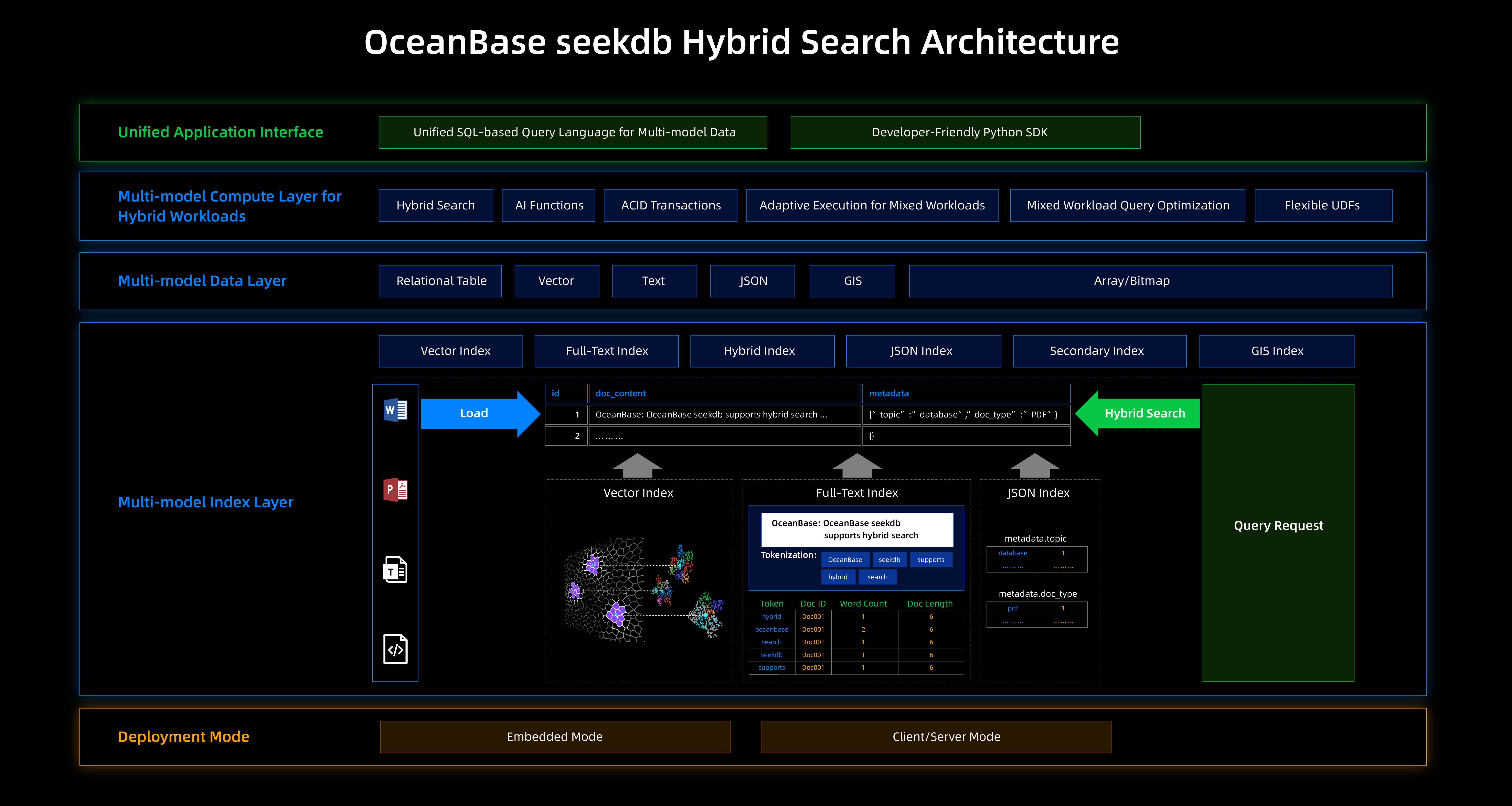
OceanBase seekdb 混合搜索架构图
了解 seekdb
seekdb 具有 快速构建、混合搜索、多模数据与索引、AI 内置、SQL 原生 等核心优势。

seekdb 通过轻量架构支持嵌入式或轻量服务器模式,在低资源占用下提供完整的 SQL 能力、JSON、混合搜索等能力,与 OceanBase 云端服务无缝协同,构建端云一体的智能系统。适用于 个人智能助理、智能车载终端、AI 教育辅导、AI 陪伴机器人、智慧医疗终端 等场景。
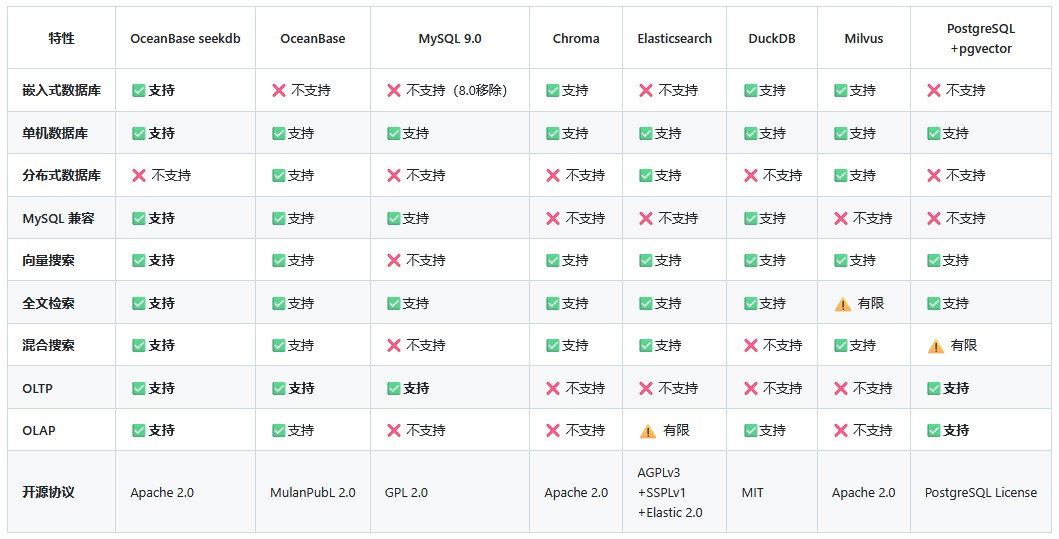
seekdb 与其他数据库的特性对比。
部署 seekdb
seekdb 提供嵌入式和服务器两种模式,你可以根据业务场景需要选择合适的部署模式。
以 1C2G 的 CentOS 7 服务器为例,快速部署 seekdb。
- 添加 seekdb 仓库
[root@oceanbase ~]# yum-config-manager --add-repo https://mirrors.aliyun.com/oceanbase/OceanBase.repo
Loaded plugins: fastestmirror, langpacks
adding repo from: https://mirrors.aliyun.com/oceanbase/OceanBase.repo
grabbing file https://mirrors.aliyun.com/oceanbase/OceanBase.repo to /etc/yum.repos.d/OceanBase.repo
repo saved to /etc/yum.repos.d/OceanBase.repo
- 安装 seekdb
[root@oceanbase ~]# yum install -y seekdb obclient
Loaded plugins: fastestmirror, langpacks
Loading mirror speeds from cached hostfile
Resolving Dependencies
--> Running transaction check
---> Package obclient.x86_64 0:2.2.10-4.el7 will be installed
---> Package seekdb.x86_64 0:1.0.0.0-100000262025111218.el7 will be installed
--> Finished Dependency Resolution

Dependencies Resolved

===============================================================================================================================
 Package             Arch              Version                                     Repository                             Size
===============================================================================================================================
Installing:
 obclient            x86_64            2.2.10-4.el7                                oceanbase.community.stable             11 M
 seekdb              x86_64            1.0.0.0-100000262025111218.el7              oceanbase.community.stable            131 M

Transaction Summary
===============================================================================================================================
Install  2 Packages

Total size: 143 M
Total download size: 131 M
Installed size: 654 M
Downloading packages:
No Presto metadata available for oceanbase.community.stable
warning: /var/cache/yum/x86_64/7/oceanbase.community.stable/packages/seekdb-1.0.0.0-100000262025111218.el7.x86_64.rpm: Header V4 RSA/SHA1 Signature, key ID e9b4a7aa: NOKEY
Public key for seekdb-1.0.0.0-100000262025111218.el7.x86_64.rpm is not installed
seekdb-1.0.0.0-100000262025111218.el7.x86_64.rpm                                                        | 131 MB  00:00:08
Retrieving key from https://mirrors.oceanbase.com/RPM-GPG-KEY-OceanBase
Importing GPG key 0xE9B4A7AA:
 Userid     : "OceanBase"
 Fingerprint: ef7d e8e3 6987 b60c acf9 9a53 2ff8 45a6 e9b4 a7aa
 From       : https://mirrors.oceanbase.com/RPM-GPG-KEY-OceanBase
Running transaction check
Running transaction test
Transaction test succeeded
Running transaction
  Installing : obclient-2.2.10-4.el7.x86_64                                                                                1/2
execute pre install script
  Installing : seekdb-1.0.0.0-100000262025111218.el7.x86_64                                                                2/2
execute post install script
To configure OceanBase : edit /etc/oceanbase/seekdb.cnf
To start OceanBase     : systemctl start seekdb
To enable OceanBase auto reboot  : systemctl enable seekdb
To get more infomation : https://www.oceanbase.com/docs
  Verifying  : seekdb-1.0.0.0-100000262025111218.el7.x86_64                                                                1/2
  Verifying  : obclient-2.2.10-4.el7.x86_64                                                                                2/2

Installed:
  obclient.x86_64 0:2.2.10-4.el7                         seekdb.x86_64 0:1.0.0.0-100000262025111218.el7

Complete!
- 启动 seekdb
[root@oceanbase ~]# systemctl start seekdb
- 检查 seekdb
[root@oceanbase ~]# systemctl status seekdb
● seekdb.service - seekdb
   Loaded: loaded (/usr/lib/systemd/system/seekdb.service; disabled; vendor preset: disabled)
   Active: active (running) since Tue 2025-11-18 22:03:47 CST; 9s ago
 Main PID: 59497 (observer)
   Status: "seekdb is ready and running"
    Tasks: 180
   CGroup: /system.slice/seekdb.service
           ├─59497 /usr/bin/observer --base-dir=/var/lib/oceanbase --port=2881 --data-dir=/var/lib/oceanbase/store --redo-di...
           ├─59675 /usr/bin/obshell daemon --base-dir /var/lib/oceanbase --seekdb
           └─59683 /usr/bin/obshell server --base-dir /var/lib/oceanbase --seekdb

Nov 18 22:03:44 oceanbase systemd[1]: Starting seekdb...
Nov 18 22:03:44 oceanbase seekdb_systemd_start[59433]: Starting seekdb with command: /usr/bin/observer --base-dir=/var/lib/o...
Nov 18 22:03:44 oceanbase seekdb_systemd_start[59433]: Configuration loaded from: /etc/oceanbase/seekdb.cnf
Nov 18 22:03:44 oceanbase seekdb_systemd_start[59433]: Change working directory to base dir. path='/var/lib/oceanbase/'
Nov 18 22:03:44 oceanbase seekdb_systemd_start[59433]: The log file is in the directory: /var/lib/oceanbase/log/
Nov 18 22:03:44 oceanbase seekdb_systemd_start[59433]: The observer will be started as a daemon process. You can check ...ater.
Nov 18 22:03:44 oceanbase seekdb_systemd_start[59433]: Start observer with --nodaemon if you don't want to start as a d...cess.
Nov 18 22:03:44 oceanbase seekdb_systemd_start[59433]: SeekDB started successfully, starting obshell agent...
Nov 18 22:03:47 oceanbase systemd[1]: Started seekdb.
Hint: Some lines were ellipsized, use -l to show in full.
[root@oceanbase ~]#
- 连接 seekdb
[root@oceanbase ~]# obclient -h127.0.0.1 -uroot -P2881 -A oceanbase
Welcome to the OceanBase.  Commands end with ; or \g.
Your OceanBase connection id is 3221500803
Server version: OceanBase 4.3.5.3 SeekDB (r1.0.0.0) (Built 100000262025111218-5343637512e28c346f938516af53b7879d4d5974 Nov 12 2025)

Copyright (c) 2000, 2018, OceanBase and/or its affiliates. All rights reserved.

Type 'help;' or '\h' for help. Type '\c' to clear the current input statement.

obclient(root@(none))[oceanbase]>
- 查看 seekdb 版本
obclient(root@(none))[oceanbase]> select version();
+----------------------------------+
| version()                        |
+----------------------------------+
| 5.7.25-OceanBase SeekDB-v1.0.0.0 |
+----------------------------------+
1 row in set (0.001 sec)
- 体验向量搜索
-- 创建带有向量数据类型的表
obclient(root@(none))[test]> CREATE TABLE t1(
    ->     id INT PRIMARY KEY,
    ->     doc VARCHAR(200),
    ->     embedding VECTOR(3),
    ->     VECTOR INDEX idx1(embedding) WITH (distance=L2, type=hnsw)
    ->     );
Query OK, 0 rows affected (0.146 sec)

-- 写入向量数据
obclient(root@(none))[test]> INSERT INTO t1
    -> VALUES (1, '苹果', '[1.2,0.7,1.1]'),
    ->         (2, '香蕉', '[0.6,1.2,0.8]'),
    ->         (3, '橙子','[1.1,1.1,0.9]'),
    ->         (4, '胡萝卜', '[5.3,4.8,5.4]'),
    ->         (5, '菠菜', '[4.9,5.3,4.8]'),
    ->         (6, '西红柿','[5.2,4.9,5.1]');
Query OK, 6 rows affected (0.007 sec)
Records: 6  Duplicates: 0  Warnings: 0

-- 执行向量搜索
obclient(root@(none))[test]> SELECT id, doc FROM t1
    -> ORDER BY l2_distance(embedding, '[0.9, 1.0, 0.9]')
    -> APPROXIMATE LIMIT 3;
+------+--------+
| id   | doc    |
+------+--------+
|    3 | 橙子   |
|    2 | 香蕉   |
|    1 | 苹果   |
+------+--------+
3 rows in set (0.005 sec)
更多探索
关于 seekdb 还有更多玩法,比如:编译安装 seekdb,通过 Python SDK 体验嵌入式模式,体验全文索引、混合搜索、语义搜索、AI 函数服务,以及基于 Vibe Coding 理念使用 seekdb 搭建 AI 应用等。
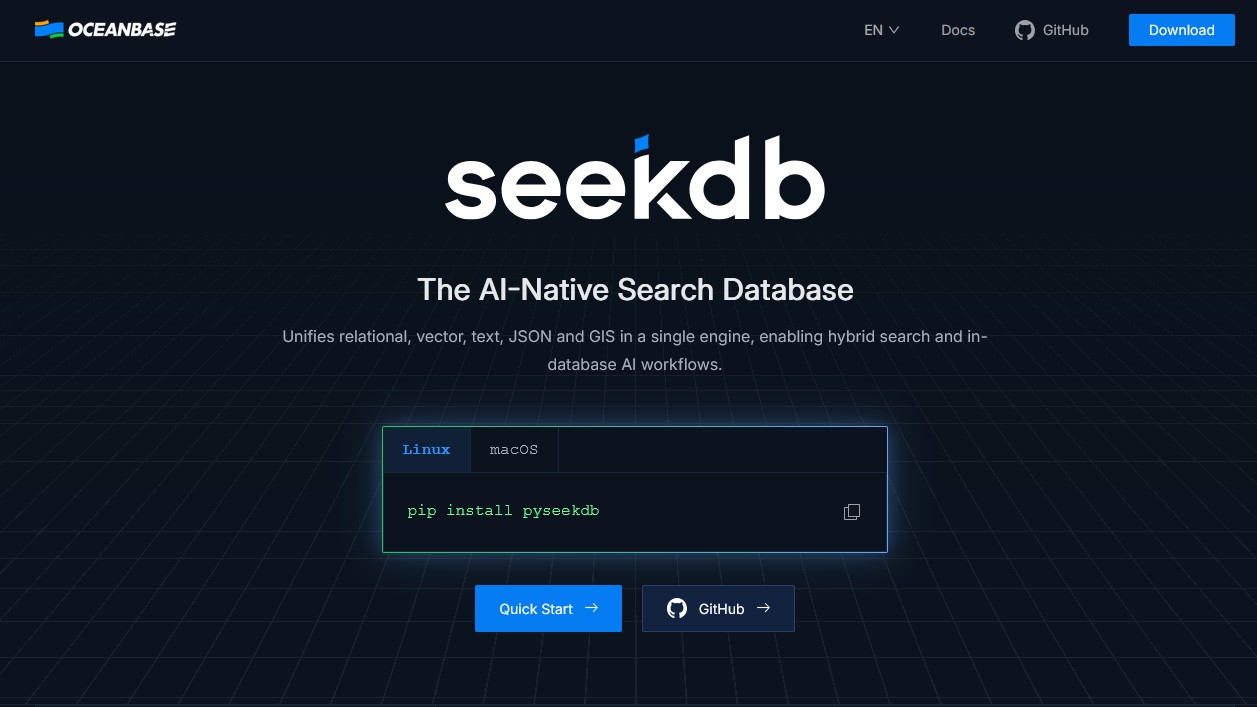
相关链接:
- 官网:https://www.oceanbase.ai/
- 文档:https://www.oceanbase.ai/docs/
- 源码:https://github.com/oceanbase/seekdb
欢迎大家下载使用 #seekdb。
Have a nice day ~ ☕
🌻 往期精彩 ▼
- 10个月净增百人!全球Oracle ACE突破600人
- 你想成为 Oracle ACE 见习生么?
- 如期而至!MySQL 9.5.0 创新版本发布
- 「合集」MySQL 8.x 系列文章汇总
- TiDB X: 以对象存储为核心要素构建全新AI原生数据库
- 星辰资讯 | Ti 星球新鲜事(2025.09)
- PostgreSQL 18 发布:令人兴奋的五大新特性
- IvorySQL 4.6 发布:新增兼容 MongoDB 解决方案
- PGer看过来:IvorySQL & PG 迁移实战经验征集中,欢迎来分享!
- 金仓数据库 JDBC 透明读写分离实战
- 金仓数据库 DBA 必看的 19 张高清大图
- 崖山数据库 YAC 共享集群入门
- 新建群聊:崖山和ta的朋友们~
- 一文带你了解 KWDB 数据库
- KWDB MVP 计划正式启动!速来!
- 国产老兵“虚谷数据库”初探
- 如果国产中间件也参与国测,会有哪些厂商和产品入围
- 对话晨章数据CTO张桓:中国企业出海需要更优质的合作伙伴
- 腾讯云数据库家族扩容:TDSQL 与 AI 共生进化
- 向量数据库 VexDB 入门指南
- SQLark 推出小百灵 AI,管理 PostgreSQL 18 更轻松
– / END / –
👉 欢迎关注我的视频号

👉 这里有得聊
如果对国产基础软件(操作系统、数据库、中间件)感兴趣,可以加群一起聊聊。
关注微信公众号:少安事务所,后台回复[群],即可看到入口。
如果这篇文章为你带来了灵感或启发,请帮忙『三连』吧,感谢!ღ( ´・ᴗ・` )~
