当完成一个项目的开发后,需要将其部署到相应的服务器当中去,以便提供资源给外部访问,以下记录springboot的两种部署方式。
一、以jar方式部署springboot项目
springboot内置了tomcat,所以它是默认将应用打包成可独立执行的jar包。部署jar包的springboot可以分为以下5个步骤:
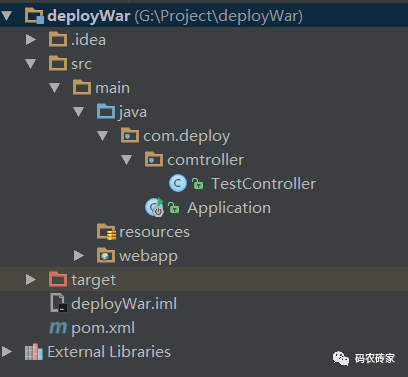
(1)目录结构、pom配置及代码清单
<packaging>jar</packaging><parent>
<groupId>org.springframework.boot</groupId>
<artifactId>spring-boot-starter-parent</artifactId>
<version>1.4.3.RELEASE</version>
</parent>
<dependency>
<groupId>org.springframework.boot</groupId>
<artifactId>spring-boot-starter-web</artifactId>
</dependency>
@EnableAutoConfiguration
@ComponentScan("com.deploy")
@SpringBootApplication
public class Application{
public static void main(String[] args) {
SpringApplication.run(Application.class, args);
}
}
(2)为项目配置程序的入口:在idea中添加一个jar,并设置程序的入口
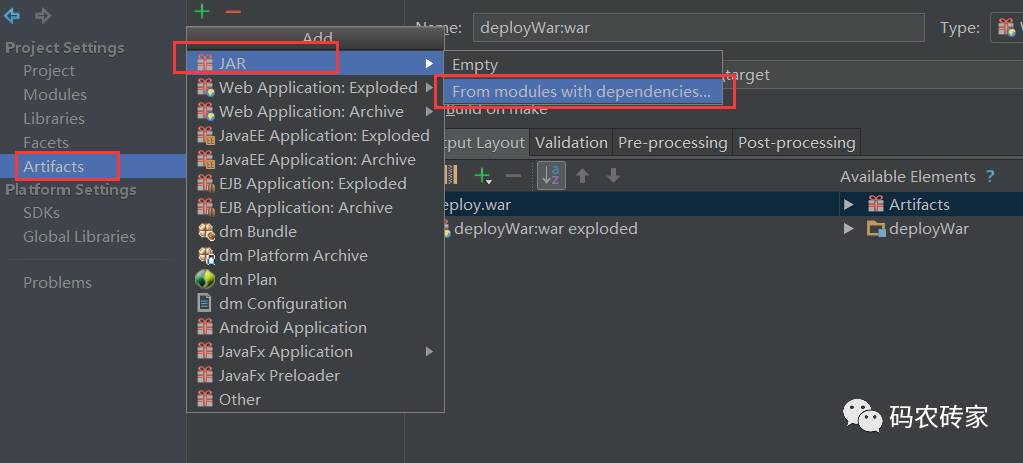
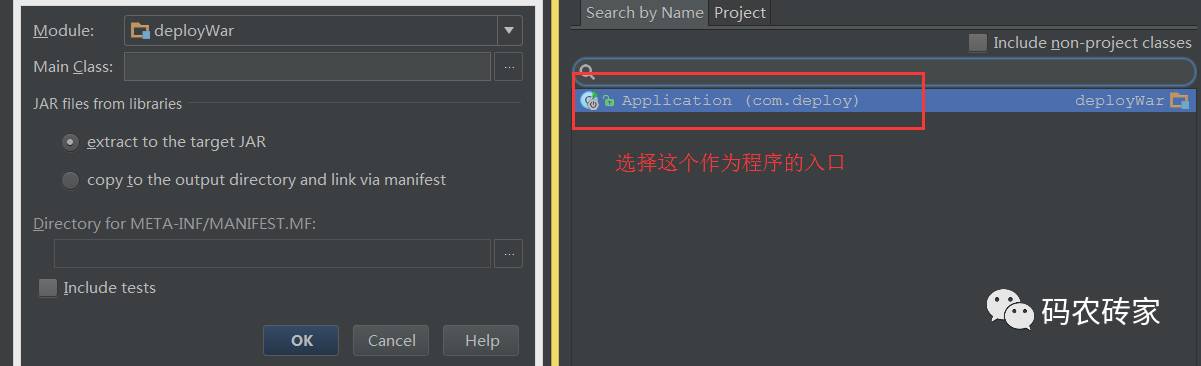
配置完成后,会在项目java目录下生成一个路径,并创建一个名称为MANIFEST.MF的文件
路径:
deployWar\target\classes\META-INF\MANIFEST.MF
内容如下:
Manifest-Version: 1.0
Main-Class: com.deploy.Application当然,也可以手动添加这样的一个文件,不需要通过idea生成。
(3)将项目打包成jar包
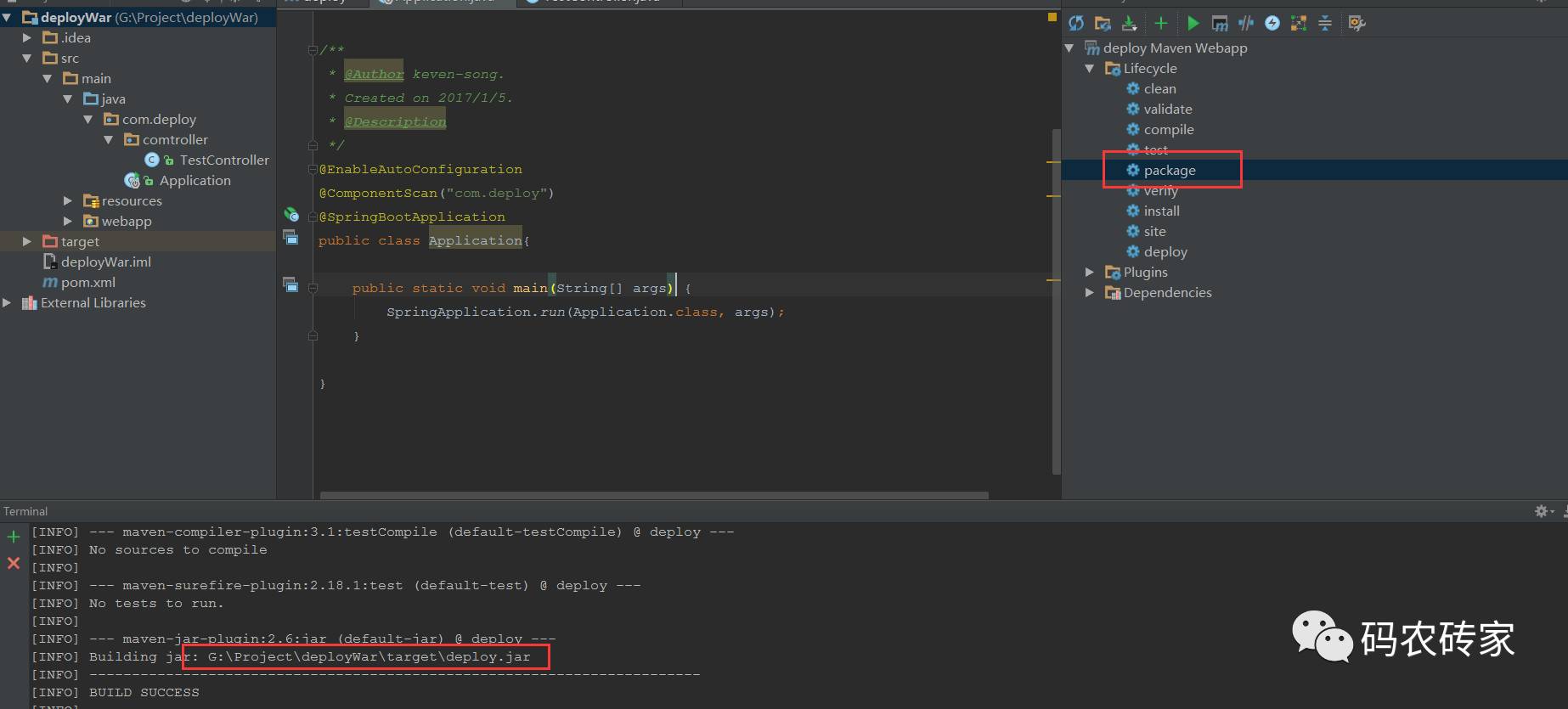
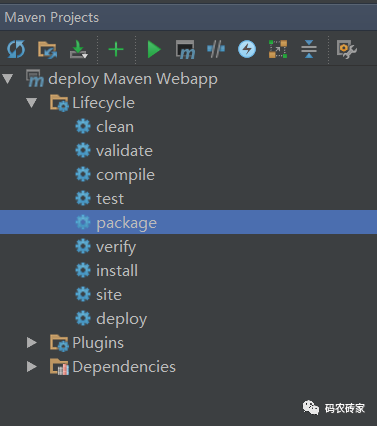
cd到项目路径下运行mvn package或者在idea 中双击package生成jar包,jar包生成地址默认在项目路径/target目录下的
(4)运行jar包
执行命令:
java -jar deploy.jar
输出以下内容,则说明执行成功:
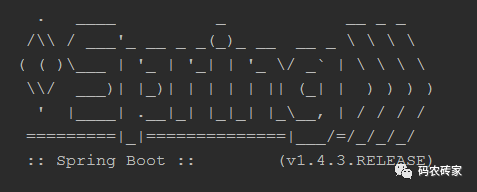
(5)访问资源
访问 http://localhost:8080/test,如果页面上输出“hello world”,说明部署成功了。
二、以war包方式部署springboot项目
(1)目录结构及代码清单
@EnableAutoConfiguration
@ComponentScan("com.deploy")
@SpringBootApplication
public class Application extends SpringBootServletInitializer{
public static void main(String[] args) {
SpringApplication.run(Application.class, args);
}
}
<modelVersion>4.0.0</modelVersion>
<groupId>com.test.deploy</groupId>
<artifactId>deploy</artifactId>
<packaging>war</packaging>
<version>1.0-SNAPSHOT</version>
<name>deploy Maven Webapp</name>
<url>http://maven.apache.org</url>
<parent>
  <groupId>org.springframework.boot</groupId>
  <artifactId>spring-boot-starter-parent</artifactId>
  <version>1.4.3.RELEASE</version>
</parent>
<dependency>
  <groupId>org.springframework.boot</groupId>
  <artifactId>spring-boot-starter-web</artifactId>
</dependency>
<dependency>
<groupId>org.springframework.boot</groupId>
<artifactId>spring-boot-starter-tomcat</artifactId>
<version>1.3.8.RELEASE</version>
<scope>provided</scope>
</dependency>
@Controller
@RequestMapping("/test")
public class TestController {

    @RequestMapping("")
    @ResponseBody
    public String test(){
        return "hello world";
    }

}
(2)打包成war包
执行命令 mvn package或者在IDEA的maven插件中双击“package”,如下图所示:
(3)部署
将打包好的war包copy到tomcat文件的webapps目录下,然后进入tomcat的bin目录下,双击打开startup.bat或用命令行形式执行startup.bat,如果有以下内容打印出来,说明启动成功了。
(4)测试是否真的部署成功
访问 http://localhost:8080/deploy/test,如果页面上输出“hello world”,说明部署成功了。
三、两种方式的区别
(1)packaging的方式不同
(2)war包:Application.java需要继承SpringBootServletInitializer,而jar包不需要
(3)springboot内置tomcat容器,war包部署时,需要在pom文件中,将spring-boot-starter-tomcat的scope设置成provided
(4)其他略
四、运行过程中可能抛出的异常
(1)不能启动tomcat
在tomcat/bin目录下执行命令:startup.bat,提示一下内容:
The JAVA_HOME environment variable is not defined correctly
This environment variable is needed to run this program NB: JAVA_HOME should point to a JDK not a JRE
原因:没有正确定义jdk环境变量;
解决方法:使用文本文件的方式打开startup.bat,在文件的第一行添加如下内容:
set JAVA_HOME=C:\Program Files\Java\jdk1.8.0_65
(2)项目依赖的jar重复
exceptionjavax.servlet.ServletException: java.lang.LinkageError: loader constraint violation: when resolving interface method "javax.servlet.jsp.JspApplicationContext.getExpressionFactory()Ljavax/el/ExpressionFactory;" the class loader (instance of org/apache/jasper/servlet/JasperLoader) of the current class, org/apache/jsp/index_jsp, and the class loader (instance of org/apache/catalina/loader/StandardClassLoader) for the method's defining class, javax/servlet/jsp/JspApplicationContext, have different Class objects for the type javax/el/ExpressionFactory used in the signature
org.apache.jasper.servlet.JspServlet.service(JspServlet.java:268)
javax.servlet.http.HttpServlet.service(HttpServlet.java:717)
root causejava.lang.LinkageError: loader constraint violation: when resolving interface method "javax.servlet.jsp.JspApplicationContext.getExpressionFactory()Ljavax/el/ExpressionFactory;" the class loader (instance of org/apache/jasper/servlet/JasperLoader) of the current class, org/apache/jsp/index_jsp, and the class loader (instance of org/apache/catalina/loader/StandardClassLoader) for the method's defining class, javax/servlet/jsp/JspApplicationContext, have different Class objects for the type javax/el/ExpressionFactory used in the signature
org.apache.jsp.index_jsp._jspInit(index_jsp.java:22)
org.apache.jasper.runtime.HttpJspBase.init(HttpJspBase.java:52)
org.apache.jasper.servlet.JspServletWrapper.getServlet(JspServletWrapper.java:164)
org.apache.jasper.servlet.JspServletWrapper.service(JspServletWrapper.java:338)
org.apache.jasper.servlet.JspServlet.serviceJspFile(JspServlet.java:313)
org.apache.jasper.servlet.JspServlet.service(JspServlet.java:260)
javax.servlet.http.HttpServlet.service(HttpServlet.java:717)
解决方法:将项目文件的WEB-INF\lib目录中包含或类似
jsp-api.jar, el-api.jar(tomcat-embed-el-8.0.37.jar), servlet-api.jar
的jar包删除,然后重新启动tomcat(运行tomcat中/bin目录下的startup.bat命令)即可。
长按下方二维码关注此公众号