一、无人值守批量装机服务(Cobbler)
1、关闭服务
(1)永久关闭selinux
#vi /etc/sysconfig/selinux
SELINUX=disabled
(2)永久关闭防火墙:
#systemctl status firewalld.service
#systemctl stop firewalld.service
#systemctl disable firewalld.service
(3)列出所有规则:
#iptables -L
(4)清除所有,好像没起作用
#iptables -F
2、安装软件
(1)配置yum源
#curl -s -o /etc/yum.repos.d/CentOS-Base.repo http://mirrors.aliyun.com/repo/Centos-7.repo
#curl -s -o /etc/yum.repos.d/epel.repo http://mirrors.aliyun.com/repo/epel-7.repo
(2)安装软件
#yum install cobbler cobbler-web dhcp tftp-server pykickstart httpd xinetd debmirror –y
(3)查看安装的文件
#rpm -ql cobbler
/etc/cobbler # 配置文件目录
/etc/cobbler/settings # cobbler主配置文件,这个文件是YAML格式,Cobbler是python写的程序。
/etc/cobbler/dhcp.template # DHCP服务的配置模板
/etc/cobbler/tftpd.template # tftp服务的配置模板
/etc/cobbler/rsync.template # rsync服务的配置模板
/etc/cobbler/iso # iso模板配置文件目录
/etc/cobbler/pxe # pxe模板文件目录
/etc/cobbler/power # 电源的配置文件目录
/etc/cobbler/users.conf # Web服务授权配置文件
/etc/cobbler/users.digest # 用于web访问的用户名密码配置文件
/etc/cobbler/dnsmasq.template # DNS服务的配置模板
/etc/cobbler/modules.conf # Cobbler模块配置文件
/var/lib/cobbler # Cobbler数据目录
/var/lib/cobbler/config # 配置文件
/var/lib/cobbler/kickstarts # 默认存放kickstart文件
/var/lib/cobbler/loaders # 存放的各种引导程序
/var/www/cobbler # 系统安装镜像目录
/var/www/cobbler/ks_mirror # 导入的系统镜像列表
/var/www/cobbler/images # 导入的系统镜像启动文件
/var/www/cobbler/repo_mirror # yum源存储目录
/var/log/cobbler # 日志目录
/var/log/cobbler/install.log # 客户端系统安装日志
/var/log/cobbler/cobbler.log # cobbler日志
4、检查并修复cobbler配置
(1)启动服务:
#systemctl start httpd
#systemctl start cobblerd
(2)检查cobbler
#cobbler check
The following are potential configuration items that you may want to fix:
问题1 : The 'server' field in /etc/cobbler/settings must be set to something other than localhost, or kickstarting features will not work. This should be a resolvable hostname or IP for the boot server as reachable by all machines that will use it.
问题2 : For PXE to be functional, the 'next_server' field in /etc/cobbler/settings must be set to something other than 127.0.0.1, and should match the IP of the boot server on the PXE network.
#vim /etc/cobbler/settings
server: 192.168.40.144
next_server: 192.168.40.144
问题3 : change 'disable' to 'no' in /etc/xinetd.d/tftp
#vim /etc/xinetd.d/tftp
disable= no
问题4 : Some network boot-loaders are missing from /var/lib/cobbler/loaders, you may run 'cobbler get-loaders' to download them, or, if you only want to handle x86/x86_64 netbooting, you may ensure that you have installed a *recent* version of the syslinux package installed and can ignore this message entirely. Files in this directory, should you want to support all architectures, should include pxelinux.0, menu.c32, elilo.efi, and yaboot. The 'cobbler get-loaders' command is the easiest way to resolve these requirements.
下载引导程序
#cobbler get-loaders
问题5 : enable and start rsyncd.service with systemctl
#CentOS7中在/etc/xinetd.d/目录下没有rsync这个文件,需要创建并加入如下的#参数,CentOS6中有rsync文件,只需修改即可.
#vim /etc/xinetd.d/rsync
service rsync
{
disable = no
flags = IPv6
socket_type = stream
wait = no
user = root
server = /usr/bin/rsync
server_args = --daemon
log_on_failure = USERID
}
#systemctl enable rsyncd.service
#systemctl start rsyncd.service
问题6 : comment out 'dists' on /etc/debmirror.conf for proper debian support
问题7 : comment out 'arches' on /etc/debmirror.conf for proper debian support
注释掉:
#vim /etc/debmirror.conf
#@dists="sid";
#@arches="i386";
问题8 : The default password used by the sample templates for newly installed machines (default_password_crypted in /etc/cobbler/settings) is still set to 'cobbler' and should be changed, try: "openssl passwd -1 -salt 'random-phrase-here' 'your-password-here'" to generate new one
更改默认密码openssl passwd -1 -salt 'alex' '#mifengDIANDI123456'
vim
default_password_crypted: "$1$alex$njJYjTOL7mMTTS/qmcMt51"

/etc/cobbler/settings里的密码要修改为此新密码:
#vim /etc/cobbler/settings |grep default_password_crypted
default_password_crypted: "$1$alex$njJYjTOL7mMTTS/qmcMt51"
问题9 : fencing tools were not found, and are required to use the (optional) power management features. install cman or fence-agents to use them
#yum install fence-agents
用Cobbler管理DHCP
#vim /etc/cobbler/settings
manage_dhcp: 1
防止循环装系统,适用于服务器第一启动项是PXE启动
#vim /etc/cobbler/settings
pxe_just_once: 1
以上问题处理完:
#systemctl restart cobblerd
#cobbler check

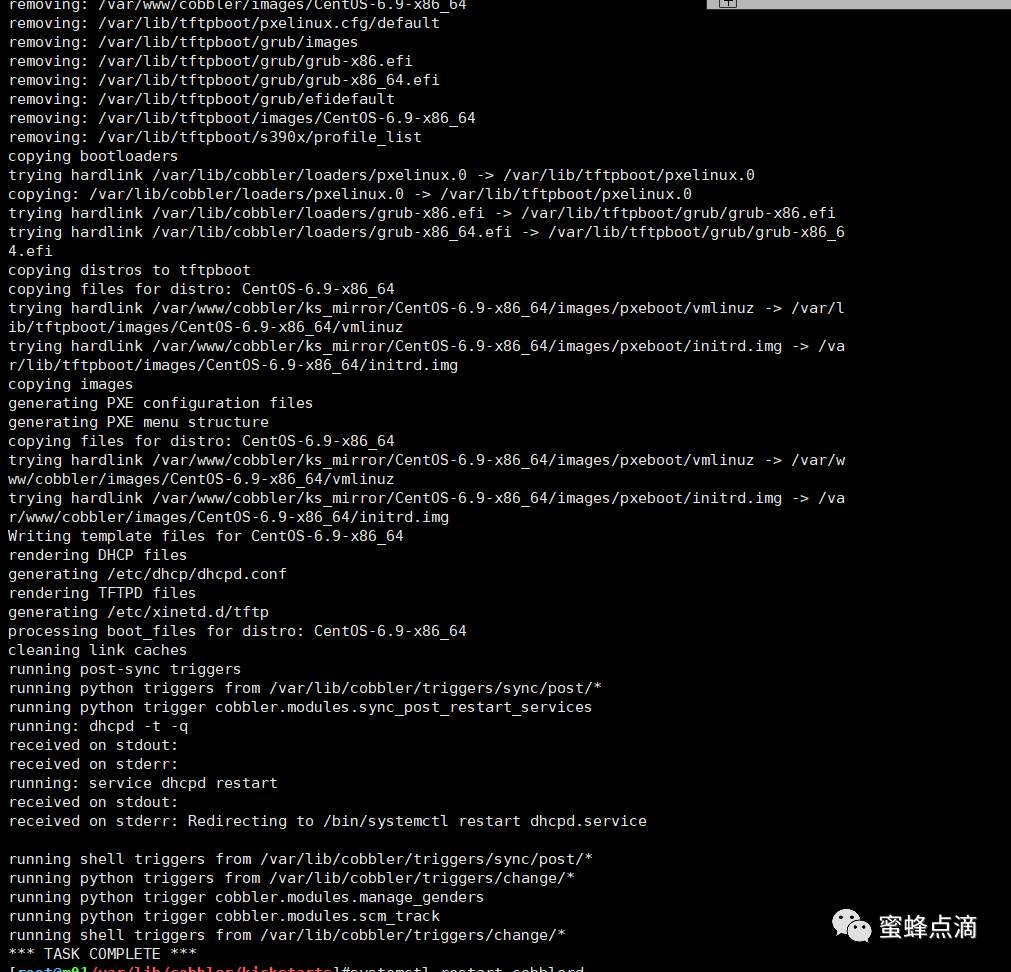
#cobbler sync
5、安装引导加载程序
Syslinux安装&配置
#yum install syslinux –y
6、配置DHCP
如何查看DNS:
#cat /etc/resolv.conf

# Generated by NetworkManager
search localdomain
nameserver 192.168.40.2
查看网关:
#ip route show

ip地址:192.168.40.144
网关:192.168.40.2
DNS:192.168.40.2
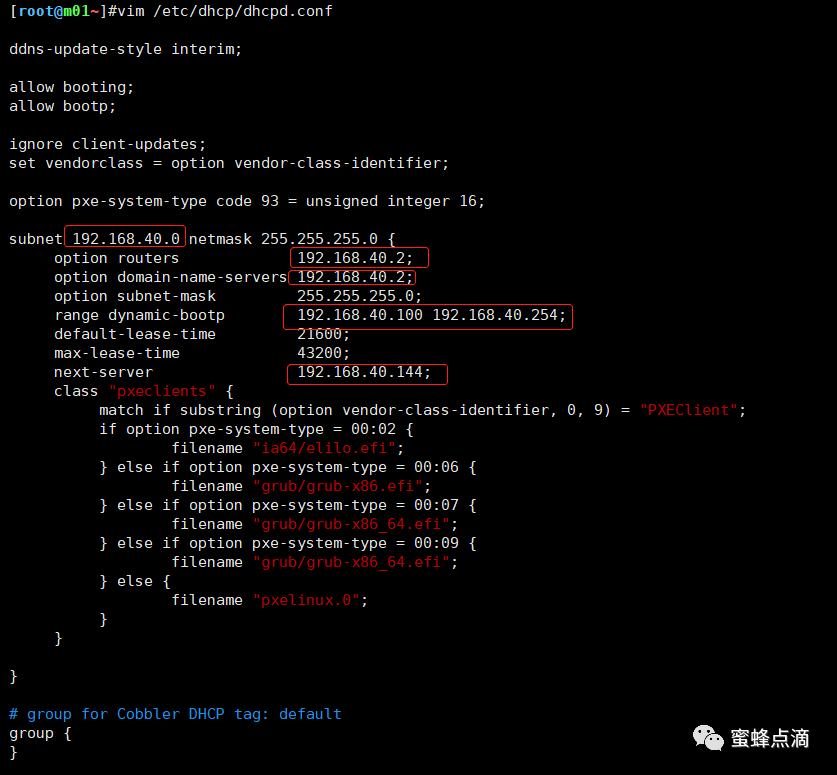
如果修改/etc/cobbler/dhcp.template,则/etc/dhcp/dhcpd.conf自动改变。
#vim /etc/cobbler/dhcp.template
或
#vim /etc/dhcp/dhcpd.conf
......
subnet 192.168.40.0 netmask 255.255.255.0 {
option routers 192.168.40.2;
option domain-name-servers 192.168.40.2;
option subnet-mask 255.255.255.0;
range dynamic-bootp 192.168.40.100 192.168.40.254;
default-lease-time 21600;
max-lease-time 43200;
next-server 192.168.40.144;
......
#systemctl restart dhcpd
#cobbler sync
7、系统镜像:
①错误操作:存放到一个固定位置比如/OS
上传镜像到/media目录
[root@m01/media]#rz
#cobbler import --name=CentOS-6.9-x86_64 --arch=x86_64 --path=/media/
错误提示:
task started: 2020-04-12_101817_import
task started (id=Media import, time=Sun Apr 12 10:18:17 2020)
No signature matched in /var/www/cobbler/ks_mirror/centos6-x86_64
!!! TASK FAILED !!!
解决方法:
#mkdir -p /var/www/html/os/CentOS-6.9-x86_64
#mkdir -p /usr/local/src/OS
#mv /media/CentOS-6.9-x86_64-bin-DVD.iso /usr/local/src/OS
②临时挂载:
#mount -t iso9660 -o loop /usr/local/src/OS/CentOS-6.9-x86_64-bin-DVD.iso /var/www/html/os/CentOS-6.9-x86_64
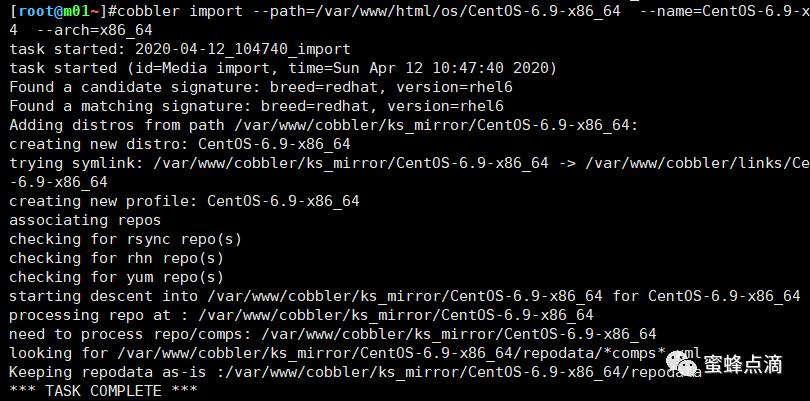
③导入镜像:
#cobbler import --path=/var/www/html/os/CentOS-6.9-x86_64 --name=CentOS-6.9-x86_64 --arch=x86_64
④配置profile文件:
[root@m01/var/lib/cobbler/kickstarts]#cp -a sample_end.ks CentOS-6.9-x86_64.ks
[root@m01/var/lib/cobbler/kickstarts]#vim CentOS-6.9-x86_64.ks
firewall --disabled
检查语法:问题提示
[root@m01/var/lib/cobbler/kickstarts]#ksvalidator CentOS-6.9-x86_64.ks
The following problem occurred on line 24 of the kickstart file:
Unknown command: $yum_repo_stanza
The following problem occurred on line 26 of the kickstart file:
Unknown command: $SNIPPET(network_config)
修改profile指定新的KS启动文件:
# vim /var/lib/cobbler/kickstarts/CentOS-6.9-x86_64.ks
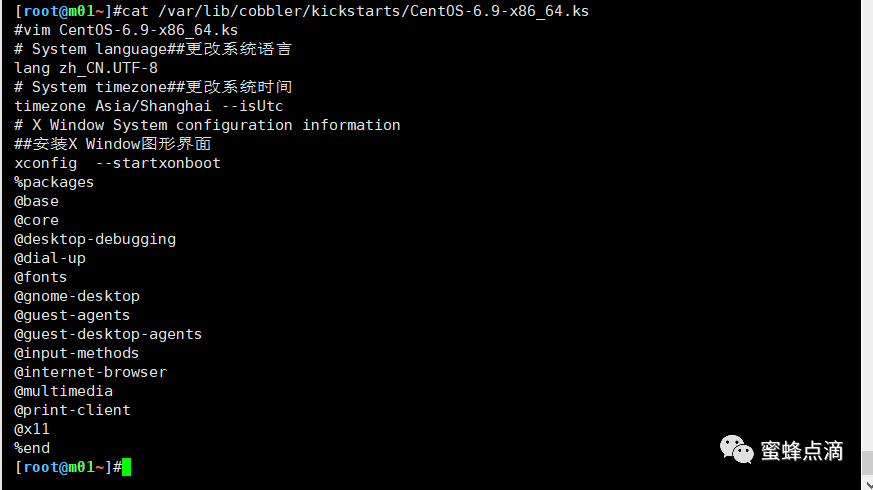
# System language##更改系统语言
lang zh_CN.UTF-8
# System timezone##更改系统时间
timezone Asia/Shanghai --isUtc
# X Window System configuration information
##安装X Window图形界面
xconfig --startxonboot
%packages
@base
@core
@desktop-debugging
@dial-up
@fonts
@gnome-desktop
@guest-agents
@guest-desktop-agents
@input-methods
@internet-browser
@multimedia
@print-client
@x11
%end
检查语法:
#ksvalidator /var/lib/cobbler/kickstarts/CentOS-6.9-x86_64.ks
添加profile:
cobbler profile add --name=CentOS-6.9-x86_64 --distro=CentOS-6.9-x86_64 --kickstart=/var/lib/cobbler/kickstarts/CentOS-6.9-x86_64.ks
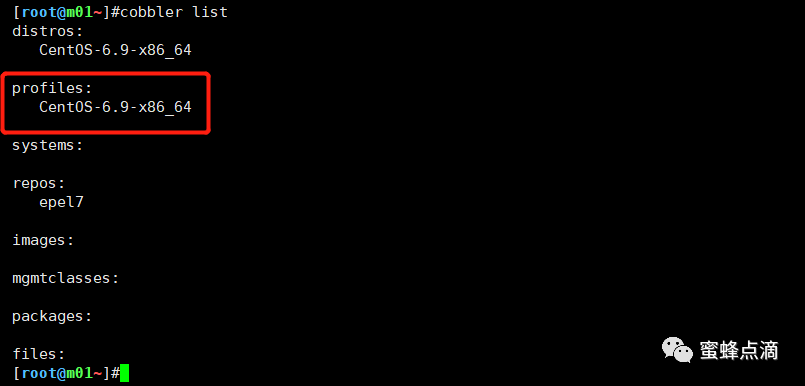
#cobbler check && cobbler sync
#systemctl restart cobblerd
⑤测试:
新建一个虚拟机:
打开虚拟机,自动出现界面:
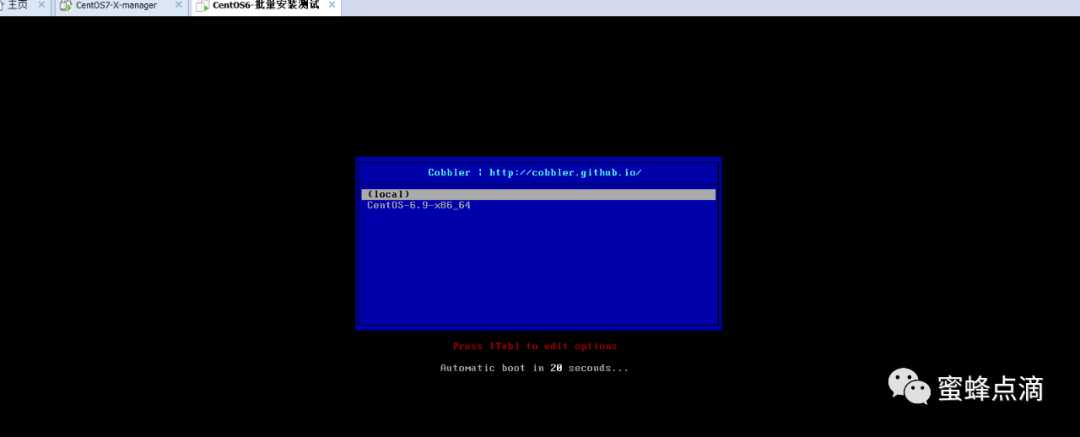
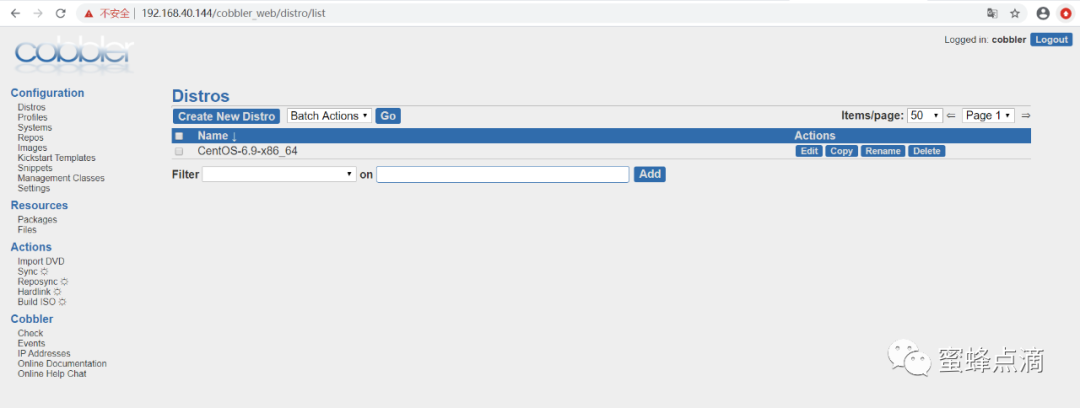
或使用cobbler_web界面:
浏览器输入:https://192.168.40.144/cobbler_web
二、制作yum仓库:
为cobbler添加RPM仓库:
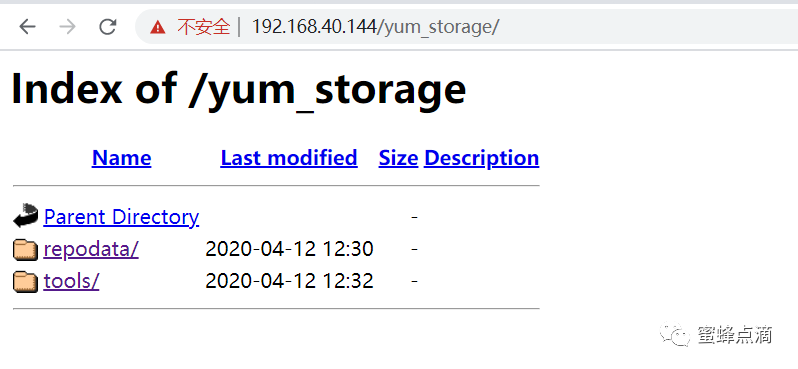
可以建一个yum目录:mkdir /var/www/html/yum_storage/。
①#createrepo -pdo /var/www/html/yum_storage/ /var/www/html/yum_storage/
Saving Primary metadata
Saving file lists metadata
Saving other metadata
Generating sqlite DBs
Sqlite DBs complete
②[root@m01/var/www/html/yum_storage/repodata]#cp repomd.xml repomd-comps.xml
③#createrepo -g `ls /var/www/html/yum_storage/repodata/*-comps.xml`/var/www/html/yum_storage/

#cobbler repo add --mirror=http://dl.fedoraproject.org/pub/epel/epel-release-latest-7.noarch.rp --name=epel7 --arch=x86_64 --breed=yum
浏览器输入:
https://192.168.40.144/yum_storage/