




目录结构
client_body_temp conf fastcgi_temp html logs proxy_temp sbin scgi_temp uwsgi_temp
conf 用来存放配置文件相关; html 用来存放静态文件的默认目录 html、css等; sbin nginx的主程序。
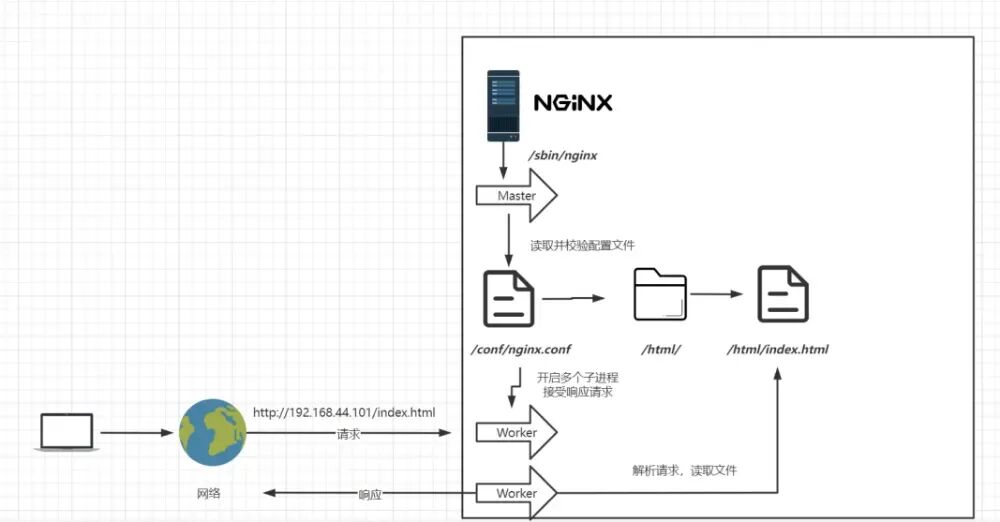
Nginx配置
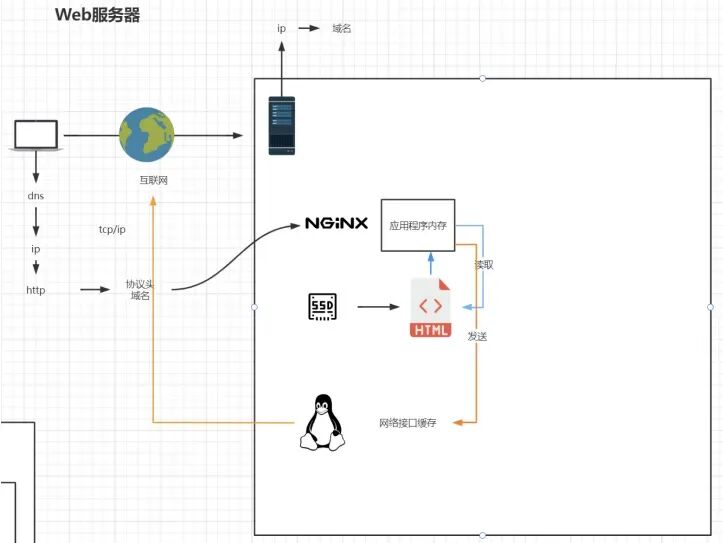
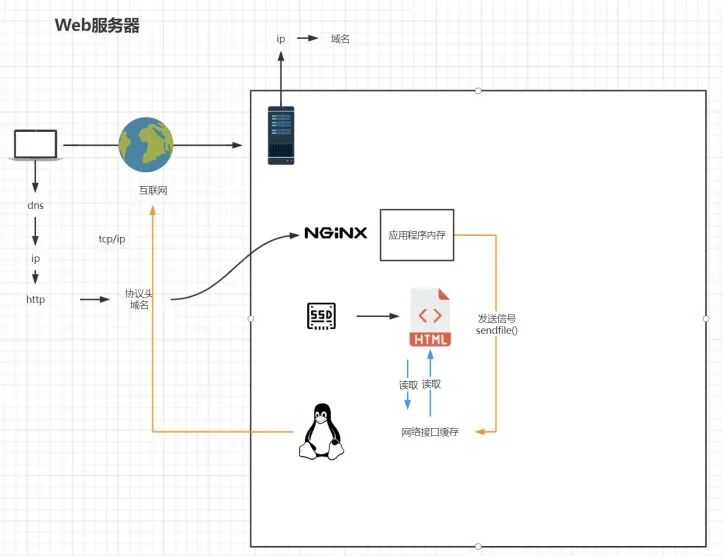
worker_processes worker_processes 1; 默认为1,表示开启一个业务进程 ; worker_connections worker_connections 1024; 单个业务进程可接受连接数; include mime.types include mime.types; 引入http mime类型; default_type application/octet-stream; default_type application/octet-stream; 如果mime类型没匹配上,默认使用二进制流的方式传输。 sendfile on; sendfile on; 使用linux的 sendfile(socket, file, len) 高效网络传输,也就是数据0拷贝。
server {
listen 80; 监听端口号
server_name localhost; 主机名
location  { 匹配路径
root html; 文件根目录
index index.html index.htm; 默认页名称
}
error_page 500 502 503 504 50x.html; 报错编码对应页面
location = 50x.html {
root html;
}
}
应用场景
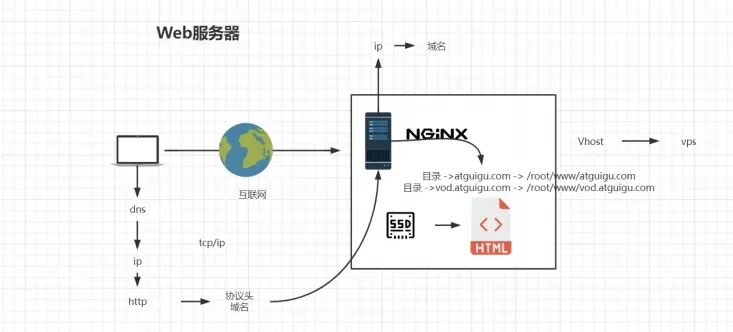
servername匹配规则 我们需要注意的是servername匹配分先后顺序,写在前面的匹配上就不会继续往下匹配了。 完整匹配 我们可以在同一servername中匹配多个域名,server_name vod.mmban.com www1.mmban.com; 通配符匹配 server_name *.mmban.com 通配符结束匹配 server_name vod.*; 正则匹配 server_name ~^[0-9]+\.mmban\.com$;
proxy_pass http://baidu.com;
location / {
proxy_pass http://atguigu.com/;
}
upstream httpd {
server 192.168.44.102:80;
server 192.168.43.103:80;
}
轮询 默认情况下使用轮询方式,逐一转发,这种方式适用于无状态请求。 weight(权重) 指定轮询几率,weight和访问比率成正比,用于后端服务器性能不均的情况。
upstream httpd {
server 127.0.0.1:8050 weight=10 down;
server 127.0.0.1:8060 weight=1;
server 127.0.0.1:8060 weight=1 backup;
}
ip_hash 根据客户端的ip地址转发同一台服务器,可以保持回话。 least_conn 最少连接访问。 url_hash 根据用户访问的url定向转发请求。 fair 根据后端服务器响应时间转发请求。
location / {
proxy_pass http://127.0.0.1:8080;
root html;
index index.html index.htm;
}
location /css {
root /usr/local/nginx/static;
index index.html index.htm;
}
location /images {
root /usr/local/nginx/static;
index index.html index.htm;
}
location /js {
root /usr/local/nginx/static;
index index.html index.htm;
}
使用正则 location 前缀 / 通用匹配,任何请求都会匹配到。 = 精准匹配,不是以指定模式开头。 ~ 正则匹配,区分大小写。 ~* 正则匹配,不区分大小写^~ 非正则匹配,匹配以指定模式开头的location。
多个正则location直接按书写顺序匹配,成功后就不会继续往后面匹配; 普通(非正则)location会一直往下,直到找到匹配度最高的(最大前缀匹配); 当普通location与正则location同时存在,如果正则匹配成功,则不会再执行普通匹配 ; 所有类型location存在时,“=”匹配 > “^~”匹配 > 正则匹配 > 普通(最大前缀匹配)。
location ~*/(css|img|js) {
root /usr/local/nginx/static;
index index.html index.htm;
}
location /css {
alias /usr/local/nginx/static/css;
index index.html index.htm;
}
alias指定的目录是准确的,即location匹配访问的path目录下的文件直接是在alias目录下查找的; root指定的目录是location匹配访问的path目录的上一级目录,这个path目录一定要是真实存在root指定目录下的; 使用alias标签的目录块中不能使用rewrite的break(具体原因不明);另外,alias指定的目录后面必须要加上"/"符号!! alias虚拟目录配置中,location匹配的path目录如果后面不带"/",那么访问的url地址中这个path目录后面加不加"/"不影响访问,访问时它会自动加上"/"; 但是如果location匹配的path目录后面加上"/",那么访问的url地址中这个path目录必须要加上"/",访问时它不会自动加上"/"。如果不加上"/",访问就会失败! root目录配置中,location匹配的path目录后面带不带"/",都不会影响访问。
systemctl start firewalld
systemctl restart firewalld
firewall-cmd --reload
firewall-cmd --list-all
firewall-cmd --permanent --add-rich-rule="rule family="ipv4" source address="192.168.44.101"
port protocol="tcp" port="8080" accept"
firewall-cmd --permanent --remove-rich-rule="rule family="ipv4" source
address="192.168.44.101" port port="8080" protocol="tcp" accept
"
upstream httpds {
server 192.168.44.102 weight=8 down;
server 192.168.44.103:8080 weight=2;
server 192.168.44.104:8080 weight=1 backup;
}
location / {
rewrite ^/([0-9]+).html$ /index.jsp?pageNum=$1 redirect;
proxy_pass http://httpds ;
}
valid_referers none | blocked | server_names | strings ....;
none, 检测 Referer 头域不存在的情况。 blocked,检测 Referer 头域的值被防火墙或者代理服务器删除或伪装的情况。这种情况该头域的值不以 “http://” 或 “https://” 开头。 server_names ,设置一个或多个 URL ,检测 Referer 头域的值是否是这些 URL 中的某一个。
valid_referers 192.168.44.101;
if ($invalid_referer) {
return 403;
}
curl -I http://192.168.44.101/img/logo.png
curl -e "http://baidu.com" -I http://192.168.44.101/img/logo.png
高可用配置
configure: error:
!!! OpenSSL is not properly installed on your system. !!!
!!! Can not include OpenSSL headers files. !!!
yum install openssl-devel
yum install keepalived
第一台机器:
! Configuration File for keepalived
global_defs {
router_id lb111
}
vrrp_instance atguigu {
state MASTER
interface ens33
virtual_router_id 51priority 100
advert_int 1
authentication {
auth_type PASS
auth_pass 1111
}
virtual_ipaddress {
192.168.44.200
}
}
第二台机器
! Configuration File for keepalived
global_defs {
router_id lb110
}
vrrp_instance atguigu {
state BACKUP
interface ens33
virtual_router_id 51
priority 50
advert_int 1
authentication {
auth_type PASS
auth_pass 1111
}
virtual_ipaddress {
192.168.44.200
}
}
systemctl start keepalived

本文作者:李 游(上海新炬中北团队)
本文来源:“IT那活儿”公众号

文章转载自IT那活儿,如果涉嫌侵权,请发送邮件至:contact@modb.pro进行举报,并提供相关证据,一经查实,墨天轮将立刻删除相关内容。
