



pgbarman 是 PostgreSQL 的企业级开源备份管理工具,由 2ndQuadrant 公司(现为 EDB 一部分)开发。
参考文档:https://docs.pgbarman.org/release/3.16.2/user_guide/architectures.html#scenario-1-backup-via-streaming-protocol
环境信息
| ip | 主机名 | 用途 | 系统 |
|---|---|---|---|
| 10.10.0.114 | cluster2 | PostgresSQL | 银河麒麟10-SP3 |
| 10.10.0.119 | barman | pgbarman | 银河麒麟10-SP3 |
10.10.0.114 主机安装好 pg 数据库,两台设置好主机名
hostnamectl set-hostname cluster2
hostnamectl set-hostname barman

vi /etc/hosts
10.10.3.114 cluster2
10.10.3.119 barman
barman 主机创建用户、设置存储路径
groupadd -g 60002 pgbarman
useradd -u 60002 -g pgbarman pgbarman
passwd pgbarman
mkdir -p /barmanbak
chown -R pgbarman:pgbarman /barmanbak
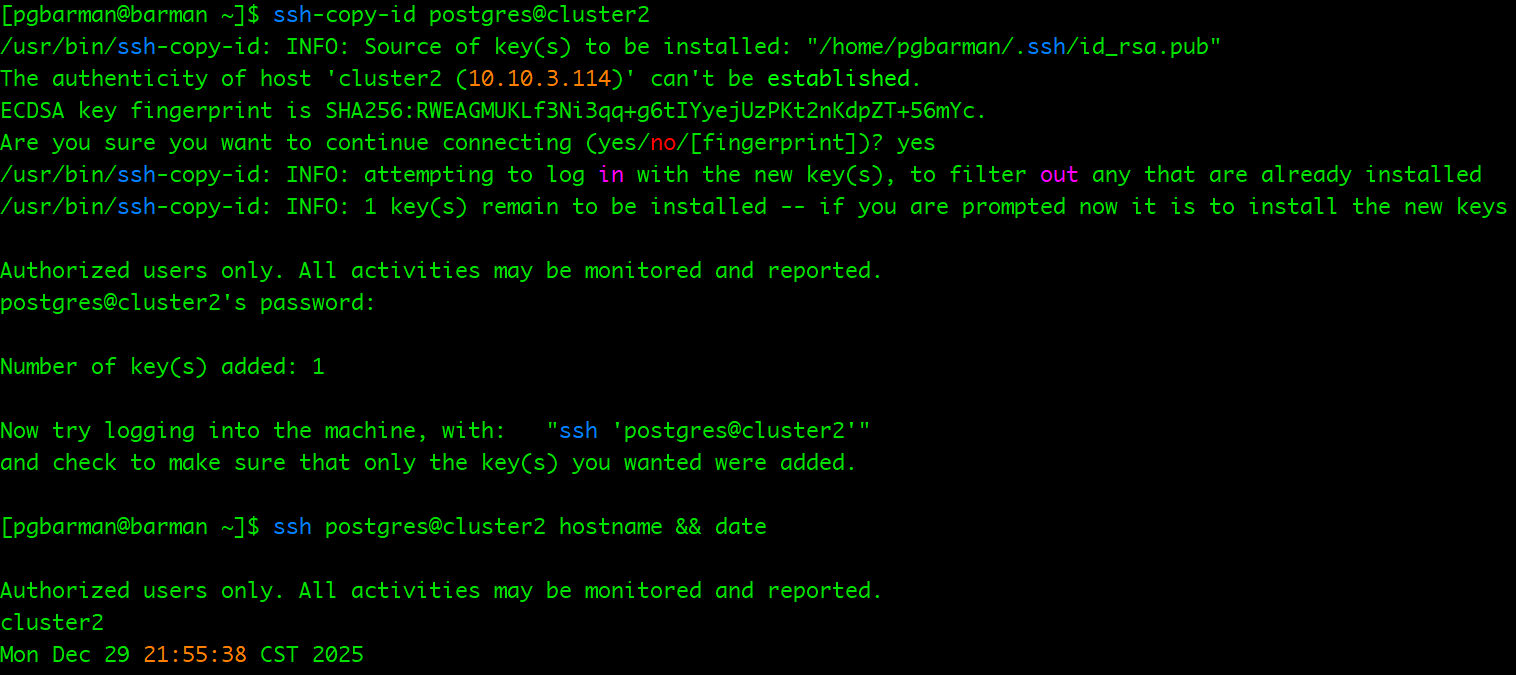
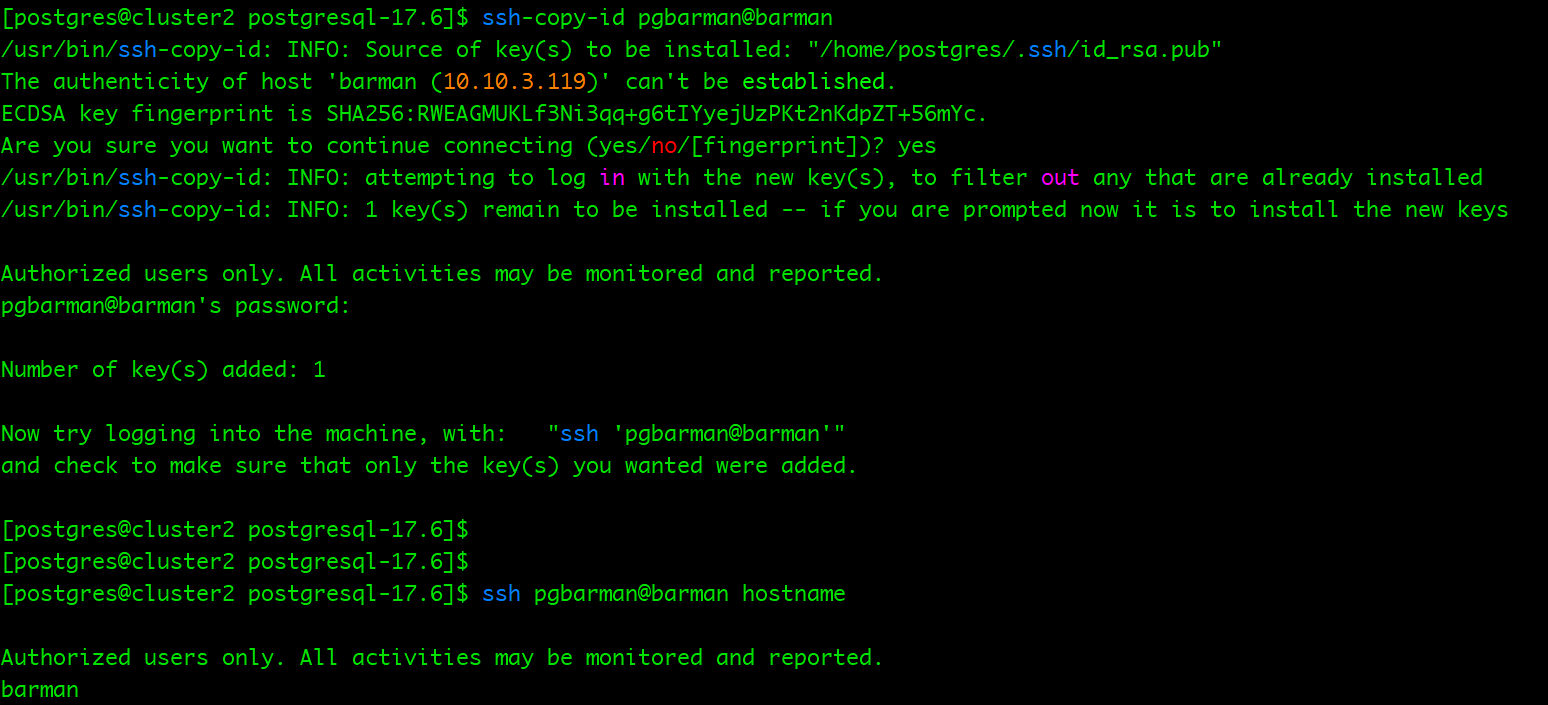
设置互信
# for pgbarman
su - pgbarman
ssh-keygen -f /home/pgbarman/.ssh/id_rsa -t rsa -b 4096 -N ""
ssh-copy-id postgres@cluster2
ssh postgres@cluster2 hostname && date

# for  cluster2
su - postgres
ssh-keygen
ssh-copy-id pgbarman@barman
ssh pgbarman@barman hostname
barman 安装
下载地址:https://github.com/EnterpriseDB/barman/releases?page=1
我这里使用 streaming 的方式,官方支持 ssh rsync, streaming, streaming + ssh rsync 三种方式
方案一:通过流媒体协议进行备份
如“流式备份”部分所述,此方法使用 Postgres 流式协议将集群文件传输到 Barman 服务器。这可以通过使用相应的实用程序来实现 。在 Barman 中,可以通过在 Barman 服务器配置中pg_basebackup进行设置来启用此方法。backup_method = postgres
通过这种方法,您可以利用Postgres 17 或更高版本中提供的块级增量备份 支持。 就重复数据删除率而言,块级增量备份通常比 Rsync 策略提供的文件级增量备份pg_basebackup效率更高。
此方法与 WAL 流式传输结合使用,用于处理 WAL 文件。按照 Barman 的术语,这种设置被称为“纯流式传输设置”,因为它不使用任何 SSH 连接进行备份和归档操作。例如,这对于 Docker 环境和高度监管的环境尤其适用且非常实用。
对于大多数使用场景,流式备份通常是推荐的方法。
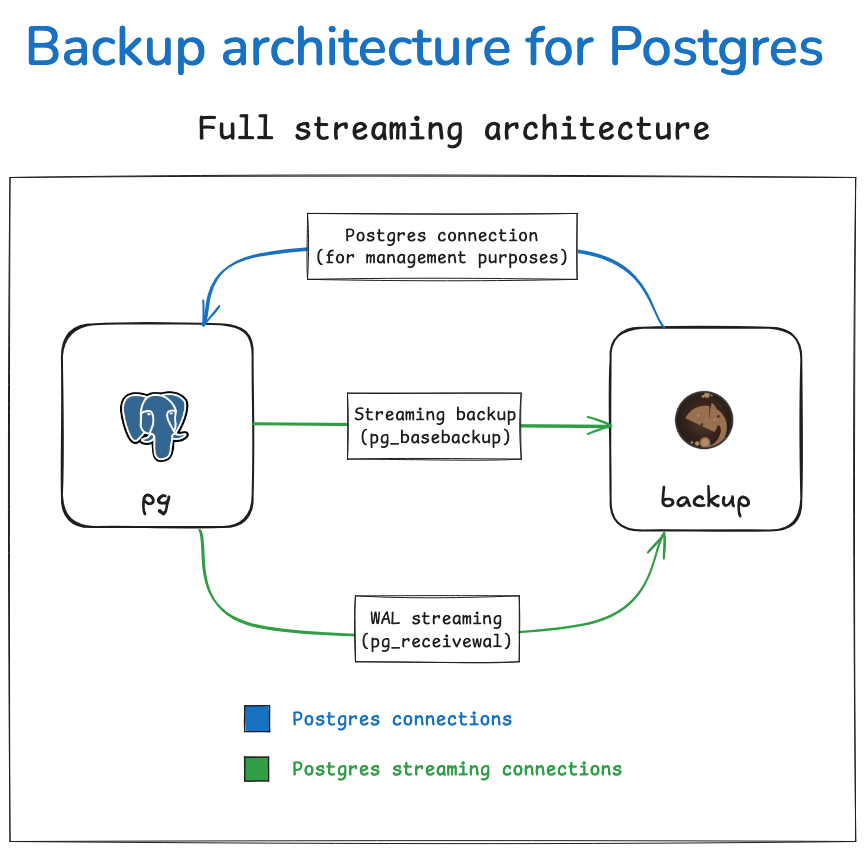
要进行配置,您需要:
- 与 Postgres 建立标准连接,用于管理、协调和监控目的。
pg_basebackup 2. 流式复制连接,可供(基本备份操作)和pg_receivewal(WAL 流式传输)使用。
方案二:通过 rsync/SSH 进行备份
正如rsync 备份概念中所述,此方法依赖于 Rsync 将备份文件传输到您的 Barman 服务器。具体操作方法是将服务器置于备份模式,然后使用 Rsync 传输集群文件。
这种方法的一个关键优势在于,它允许在运行备份操作时使用并行作业 ,从而显著缩短备份总时间。此外,它还支持文件级增量备份,即重用先前备份中的文件进行重复数据删除。文件级增量备份比块级增量备份更灵活, 因为每个备份都完全独立于其他备份,这意味着您可以删除根备份而不会以任何方式影响其增量备份。
这种方法的另一个优点是,它可以更精细地控制带宽使用情况,包括按表空间进行控制。您可以查看 “管理带宽使用情况”了解更多详情。
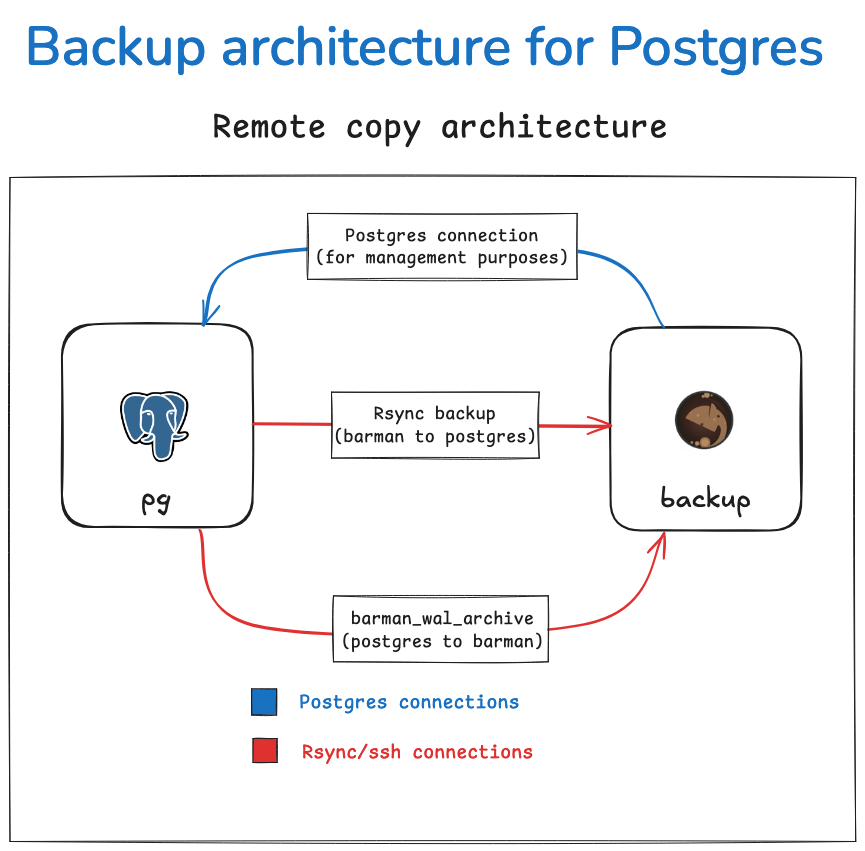
要进行配置,您需要:
-
与 Postgres 建立标准连接,用于管理、协调和监控目的。
-
Rsync 用于基本备份操作的 SSH 连接,允许 Barman 服务器上的barman用户以Postgres 服务器上的postgres用户身份进行连接。
-
Postgres 中用于 WAL 归档的 SSH 连接,archive_command允许Postgres 服务器上的postgres用户以 Barman 服务器上的barman用户身份进行连接。
方案三:混合方案
将 rsync 备份与 WAL 流式传输相结合,从而获得兼具 rsync 备份(文件级增量备份、并行作业等)和 WAL 流式传输(更高效的 WAL 传输、可选的 RPO 为零)优势的结果。
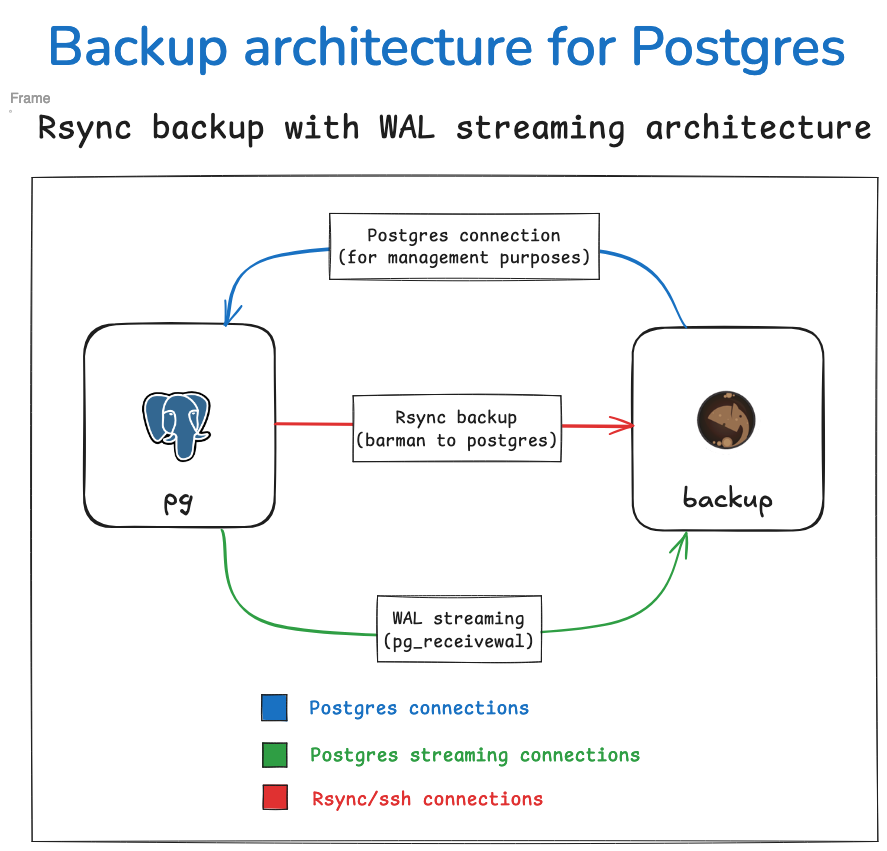
为此,您需要在 Barman 服务器配置中将 backup_methodasrsync和 set设置streaming_archiver为ontrue。您还需要一个流复制连接供 Rsync 用于pg_receivewalWAL 归档,以及一个 SSH 连接供 Rsync 用于基本备份操作。
参考官方文档:https://docs.pgbarman.org/release/3.16.2/user_guide/architectures.html#scenario-1-backup-via-streaming-protocol
WAL归档备用冗余
使用 Barman,除了 WAL 流式传输之外,您还可以配置 WAL 归档,以便在 WAL 流式传输失败时提供备用机制。这可以通过backup_method上述两种配置方式实现。
-
当使用
场景1中描述的仅流式传输设置时, 除了 WAL 流式传输之外,您还可以通过 SSH 配置 WAL 归档。在这种情况下,WAL 归档将作为 WAL 流式传输失败时的备用机制。 -
使用
场景2中描述的 Rsync 备份方法时 ,您还可以配置 WAL 流式传输,而不是使用 WAL 归档archive_command,以获得更低的恢复点目标 (RPO)。您也可以选择同时配置 WAL 流式传输和 WAL 归档,从而同时拥有这两种备份方式。
无论哪种情况,Barman 都会自动验证 WAL 文件在归档中是否重复,并且只会存储一次。
我这里使用streaming方式,也是新版本官方推荐的方式
我这里使用streaming方式,barman 也依赖pg客户端,我这里就直接打包一台变异好的pg包,解压
tar -cvzf postgresql-17_x86_kylin.tar.gz postgresql
scp postgresql-17_x86_kylin.tar.gz pgbarman@barman:/home/pgbarman
配置环境变量
[pgbarman@barman ~]$ cat ~/.bash_profile
# Source /root/.bashrc if user has one
[ -f ~/.bashrc ] && . ~/.bashrc

# ==== for PostgreSQL pgbarman ====
export PGPORT=1622
export PGDATA=/home/pgbarman/pgdata
export PGHOME=/home/pgbarman/postgresql
export PGHOST=
export LANG='en_US.UTF-8'
export LANG=en_US.UTF-8
export LD_LIBRARY_PATH=$PGHOME/lib:/lib64:/usr/lib64:/usr/local/lib64:/lib:/usr/lib:/usr/local/lib:$LD_LIBRARY_PATH
export PATH=$PGHOME/bin:$PATH:.
export DATE=`date +"%Y%m%d%H%M"`
export MANPATH=$PGHOME/share/man:$MANPATH
export PGHOST=$PGDATA
export PGUSER=sysdba
export PGDATABASE=postgres
安装
su - root

[root@barman soft]# tar -zxvf barman-3.13.3.tar.gz
[root@barman soft]# cd barman-3.13.3/
python3 setup.py build
python3 setup.py install
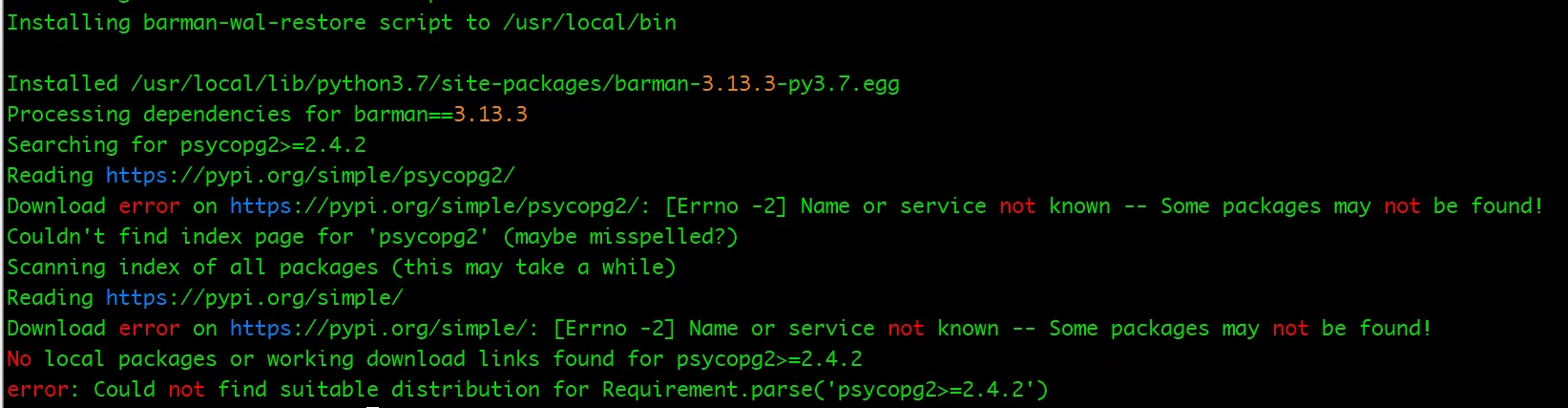
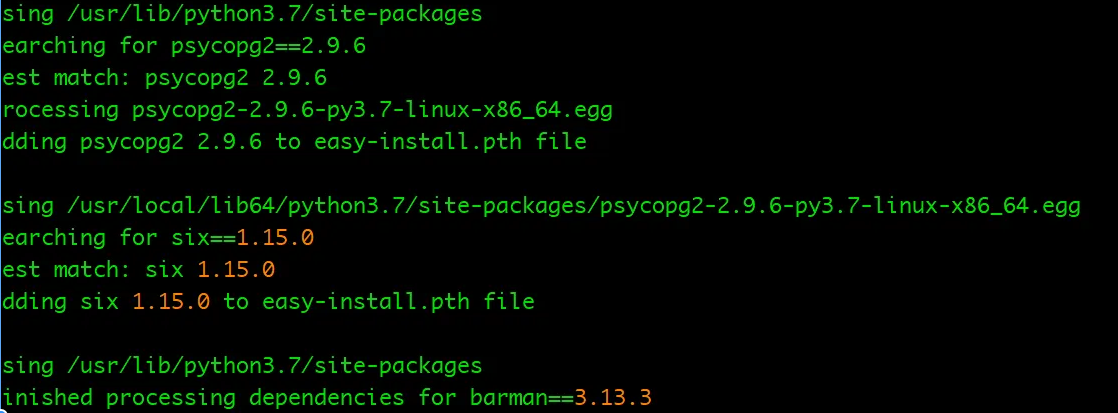
这里报错安装依赖 psycopg2 的版本,我们来升级下
tar zxvf psycopg2-binary-2.9.6.tar.gz
cd /soft/psycopg2-binary-2.9.6
python3 setup.py build_ext --pg-config /home/pgbarman/postgresql/bin/pg_config install

tar zxvf psycopg2-2.9.6.tar.gz
cd /soft/psycopg2-2.9.6
python3 setup.py build_ext --pg-config /home/pgbarman/postgresql/bin/pg_config install
which barman
barman --version

配置
vi /home/pgbarman/.barman.conf

[barman]
barman_home = /barmanbak
barman_user = pgbarman
log_file = /barmanbak/barman.log
log_level = INFO
configuration_files_directory = /barmanbak/conf.d
retention_policy = RECOVERY WINDOW OF 4 WEEKS

[cluster2]
description = "PostgreSQL cluster2 Database (Streaming)"
conninfo = host=10.10.3.114 port=1622 user=sysdba dbname=test
streaming_conninfo = host=10.10.3.114 port=1622 user=sysdba dbname=test
path_prefix = /home/postgres/app/postgresql/bin
backup_method = postgres
streaming_archiver = on
slot_name = cluster2
create_slot = auto
archiver = off
调整配置
wal_level='replica'
archive_mode='on'
# 归档可以配置,也可以不配置,配置的话,本地会落一份归档
archive_command='test ! -f /home/postgres/archive/%f && cp %p /home/postgres/archive/%f'
max_wal_senders=10
wal_keep_size=128MB
wal_sender_timeout=60s
max_replication_slots = 10

# TYPE  DATABASE        USER            ADDRESS                 METHOD
host    replication     sysdba          192.168.10.130/32       trust
host    all             sysdba          192.168.10.130/32       trust
密码文件 pgbarman主机
[pgbarman@barman ~]$ vi ~/.pgpass

10.10.3.114:1622:*:sysdba:1

[pgbarman@barman ~]$ chmod 600 ~/.pgpass
创建conf.d 文件
mkdir -p /barmanbak/conf.d
chown pgbarman:pgbarman /barmanbak/conf.d
chmod 750 /barmanbak/conf.d
关闭防火墙,或者配置防火墙策略
systemctl stop firewalld
创建复制槽
barman receive-wal --create-slot cluster2

上面的问题 需要识别处理下归档,关闭防火墙,再次尝试创建
barman cron

这里我们check 检查下
barman check cluster2
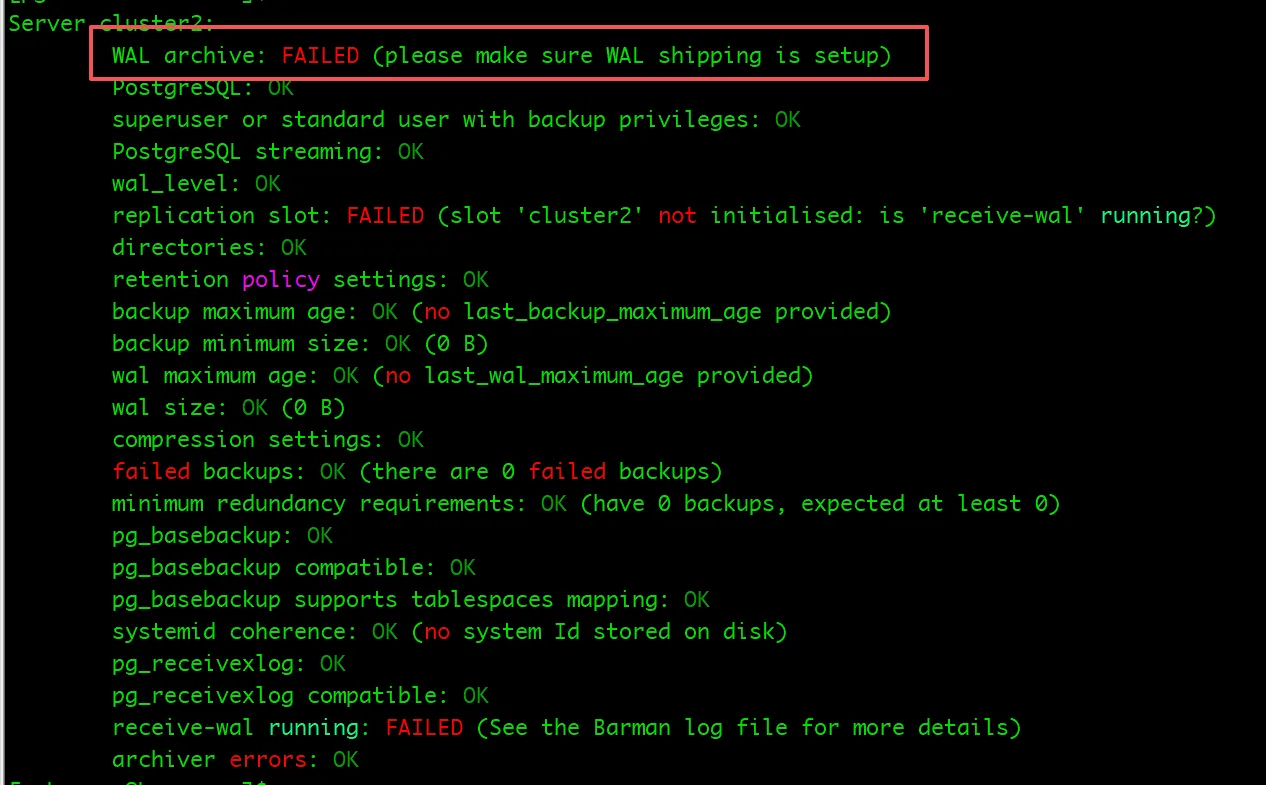
可以看到不能正常归档,这里需要强制归档下
barman switch-wal --force --archive cluster2
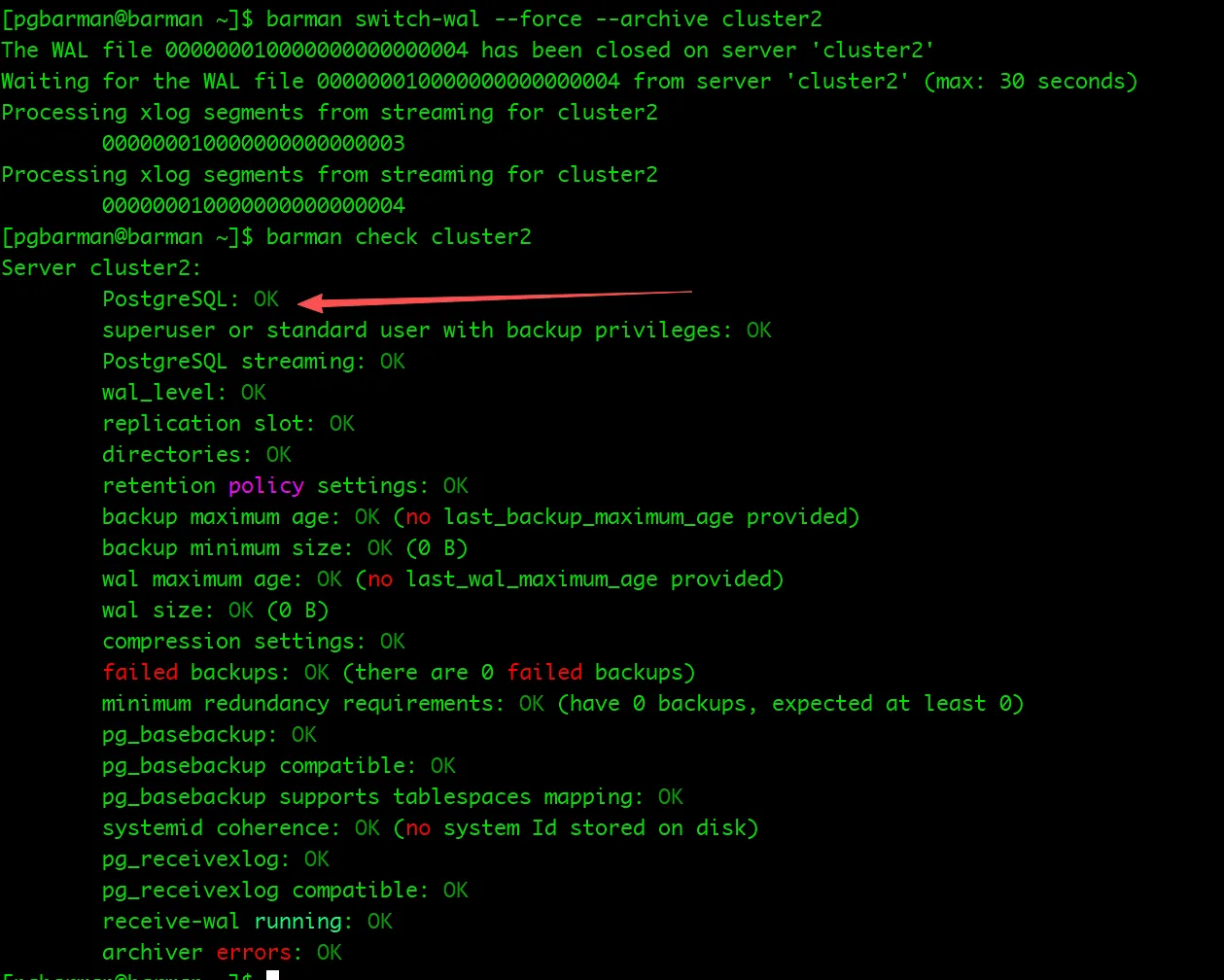
看日志已经切换成功

数据库端切换日志
[postgres@cluster2 ~]$ psql
psql (17.6)
Type "help" for help.

postgres=# select pg_switch_wal();
 pg_switch_wal
---------------
 0/5000078
(1 row)

postgres=# select pg_switch_wal();
 pg_switch_wal
---------------
 0/6000078
(1 row)
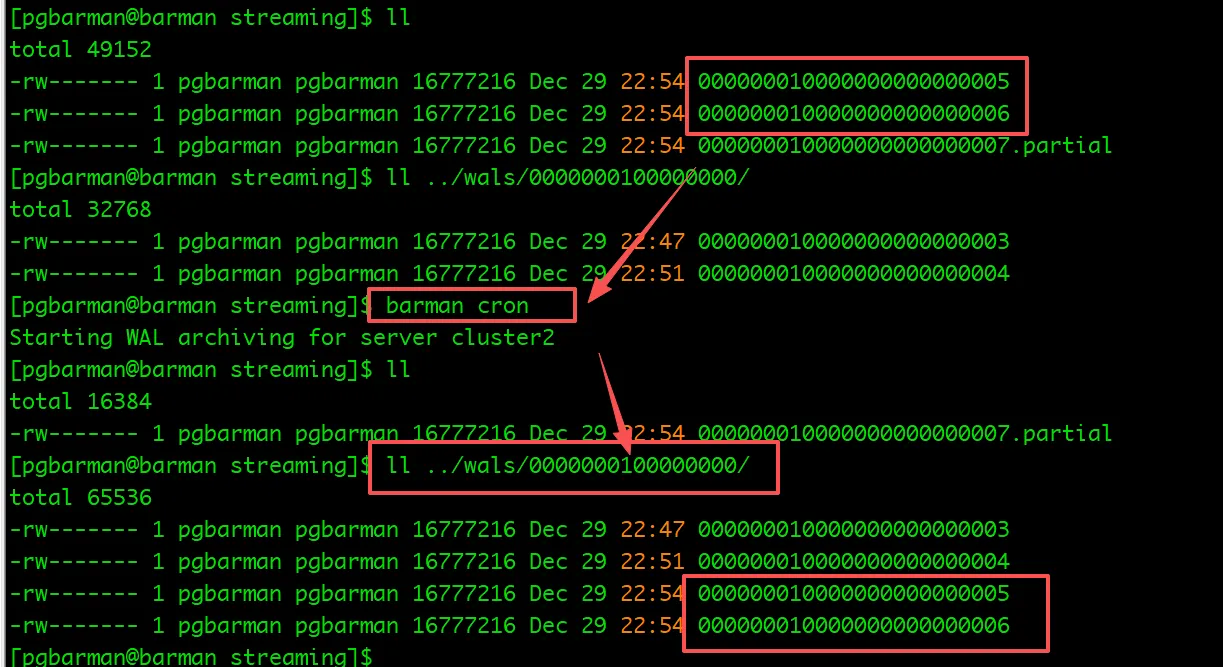
数据已归档 到 /barmanbak/cluster2/streaming ,这个是归档的临时取,

当执行 barman cron barman 会 自动管理 WAL 接收,可以看到归档已经到了 wals 文件夹下
执行备份
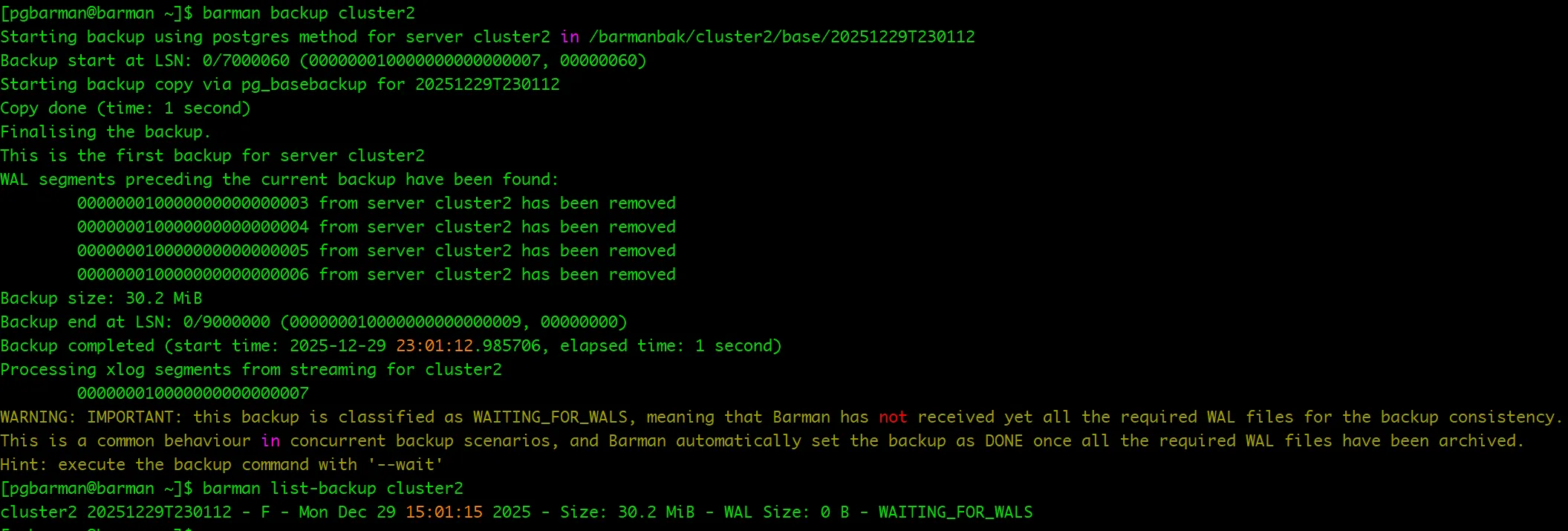
barman backup cluster2

barman list-backup cluster2
查看 复制信息
[pgbarman@barman ~]$ barman list-backup cluster2
cluster2 20251229T230112 - F - Mon Dec 29 15:01:15 2025 - Size: 30.2 MiB - WAL Size: 0 B - WAITING_FOR_WALS
[pgbarman@barman ~]$ barman replication-status cluster2
Status of streaming clients for server 'cluster2':
  Current LSN on master: 0/9000100
  Number of streaming clients: 1

  1. Async WAL streamer
     Application name: barman_receive_wal
     Sync stage      : 3/3 Remote write
     Communication   : TCP/IP
     IP Address      : 10.10.3.119 / Port: 54218 / Host: -
     User name       : sysdba
     Current state   : streaming (async)
     Replication slot: cluster2
     WAL sender PID  : 28929
     Started at      : 2025-12-29 14:46:48.843686+00:00
     Sent LSN   : 0/9000100 (diff: 0 B)
     Write LSN  : 0/9000100 (diff: 0 B)
     Flush LSN  : 0/9000000 (diff: -256 B)
查看连接服务的信息
barman show-server cluster2
#### 查看备份集
barman list-backup cluster2

#查看备份详细信息
barman show-backup cluster2  20251229T230112

# 实时查看备份情况:
barman status cluster2
[pgbarman@barman ~]$ barman list-backup cluster2
cluster2 20251229T230112 - F - Mon Dec 29 15:01:15 2025 - Size: 30.2 MiB - WAL Size: 0 B - WAITING_FOR_WALS
[pgbarman@barman ~]$ barman show-backup cluster2  20251229T230112
Backup 20251229T230112:
  Server Name            : cluster2
  System Id              : 7589276650470720483
  Status                 : WAITING_FOR_WALS
  PostgreSQL Version     : 170006
  PGDATA directory       : /home/postgres/pgdata
  Estimated Cluster Size : 30.5 MiB

  Server information:
    Checksums            : off
    WAL summarizer       : off

  Base backup information:
    Backup Method        : postgres
    Backup Type          : full
    Backup Size          : 30.2 MiB
    Timeline             : 1
    Begin WAL            : 000000010000000000000008
    End WAL              : 000000010000000000000009
    Begin time           : 2025-12-29 15:01:13.547916+00:00
    End time             : 2025-12-29 15:01:15.183686+00:00
    Copy time            : 1 second
    Estimated throughput : 18.6 MiB/s
    Begin Offset         : 40
    End Offset           : 0
    Begin LSN            : 0/8000028
    End LSN              : 0/9000000

  WAL information:
    No of files          : 0
    Disk usage           : 0 B
    Last available       : None

  Catalog information:
    Retention Policy     : -
    Previous Backup      : - (this is the oldest base backup)
    Next Backup          : - (this is the latest base backup)
测试恢复
test=# CREATE TABLE jobs
test-#     ( job_id         VARCHAR(10) PRIMARY KEY
test(#     , job_title      VARCHAR(35) NOT NULL
test(#     , min_salary     NUMERIC(6)
test(#     , max_salary     NUMERIC(6)
test(#     ) ;
CREATE TABLE
test=# INSERT INTO jobs VALUES ( 'AD_PRES','President',20000,40000);
INSERT 0 1
test=# INSERT INTO jobs VALUES ( 'AD_VP','Administration Vice President',15000,30000);
INSERT 0 1
test=# INSERT INTO jobs VALUES ( 'AD_ASST','Administration Assistant',3000,6000);
INSERT 0 1
test=# INSERT INTO jobs VALUES ( 'FI_MGR','Finance Manager',8200,16000);
INSERT 0 1
test=# INSERT INTO jobs VALUES ( 'FI_ACCOUNT','Accountant',4200,9000);
INSERT 0 1
test=# INSERT INTO jobs VALUES ( 'AC_MGR','Accounting Manager',8200,16000);
INSERT 0 1
test=# INSERT INTO jobs VALUES ( 'AC_ACCOUNT','Public Accountant',4200,9000);
INSERT 0 1
test=# INSERT INTO jobs VALUES ( 'SA_MAN','Sales Manager',10000,20000);
INSERT 0 1
test=# INSERT INTO jobs VALUES ( 'SA_REP','Sales Representative',6000,12000);
INSERT 0 1
test=# INSERT INTO jobs VALUES ( 'PU_MAN','Purchasing Manager',8000,15000);
INSERT 0 1
test=# INSERT INTO jobs VALUES ( 'PU_CLERK','Purchasing Clerk',2500,5500);
INSERT 0 1
test=# INSERT INTO jobs VALUES ( 'ST_MAN','Stock Manager',5500,8500);
INSERT 0 1
test=# INSERT INTO jobs VALUES ( 'ST_CLERK','Stock Clerk',2000,5000);
INSERT 0 1
test=# INSERT INTO jobs VALUES ( 'SH_CLERK','Shipping Clerk',2500,5500);
INSERT 0 1
test=# INSERT INTO jobs VALUES ( 'IT_PROG','Programmer',4000,10000);
INSERT 0 1
test=# INSERT INTO jobs VALUES ( 'MK_MAN','Marketing Manager',9000,15000);
INSERT 0 1
test=# INSERT INTO jobs VALUES ( 'MK_REP','Marketing Representative',4000,9000);
INSERT 0 1
test=# INSERT INTO jobs VALUES ( 'HR_REP','Human Resources Representative',4000,9000);
INSERT 0 1
test=# INSERT INTO jobs VALUES ( 'PR_REP','Public Relations Representative',4500,10500);
INSERT 0 1
test=#
test=#
test=# \d
       List of relations
 Schema | Name | Type  | Owner
--------+------+-------+--------
 public | jobs | table | sysdba
(1 row)

test=# select * from jobs limit 10;
   job_id   |           job_title           | min_salary | max_salary
------------+-------------------------------+------------+------------
 AD_PRES    | President                     |      20000 |      40000
 AD_VP      | Administration Vice President |      15000 |      30000
 AD_ASST    | Administration Assistant      |       3000 |       6000
 FI_MGR     | Finance Manager               |       8200 |      16000
 FI_ACCOUNT | Accountant                    |       4200 |       9000
 AC_MGR     | Accounting Manager            |       8200 |      16000
 AC_ACCOUNT | Public Accountant             |       4200 |       9000
 SA_MAN     | Sales Manager                 |      10000 |      20000
 SA_REP     | Sales Representative          |       6000 |      12000
 PU_MAN     | Purchasing Manager            |       8000 |      15000
[postgres@cluster2 ~]$ pg_ctl stop
waiting for server to shut down.... done
server stopped
[postgres@cluster2 ~]$ cd /home/postgres/pgdata/
[postgres@cluster2 ~]$ rm -rf *
[pgbarman@barman ~]$ barman list-backup cluster2
cluster2 20251229T230112 - F - Mon Dec 29 15:01:15 2025 - Size: 62.2 MiB - WAL Size: 0 B - WAITING_FOR_WALS
[pgbarman@barman ~]$ barman recover cluster2 20251229T230112 /home/postgres/pgdata --remote-ssh-command "ssh postgres@cluster2"
Starting remote restore for server cluster2 using backup 20251229T230112
Destination directory: /home/postgres/pgdata
Remote command: ssh postgres@cluster2
WARNING: IMPORTANT: You have requested a recovery operation for a backup that does not have yet all the WAL files that are required for consistency.
Copying the base backup.
WARNING: IMPORTANT: The backup we have restored IS NOT VALID. Required WAL files for consistency are missing. Please verify that WAL archiving is working correctly or evaluate using the 'get-wal' option for recovery
Copying required WAL segments.
Generating archive status files
Identify dangerous settings in destination directory.

IMPORTANT
These settings have been modified to prevent data losses

postgresql.conf line 53: archive_command = false

WARNING
You are required to review the following options as potentially dangerous

postgresql.conf line 23: unix_socket_directories = '/home/postgres/pgdata'

Restore operation completed (start time: 2025-12-29 23:13:24.573739+08:00, elapsed time: 4 seconds)
Your PostgreSQL server has been successfully prepared for recovery!
验证数据
postgres@cluster2 pgdata]$ pg_ctl start
waiting for server to start....2025-12-29 15:13:48.935 GMT [33296] LOG:  redirecting log output to logging collector process
2025-12-29 15:13:48.935 GMT [33296] HINT:  Future log output will appear in directory "/home/postgres/log".
 done
server started
[postgres@cluster2 pgdata]$ psql
psql (17.6)
Type "help" for help.

postgres=# \c test
You are now connected to database "test" as user "sysdba".
test=# \d
       List of relations
 Schema | Name | Type  | Owner
--------+------+-------+--------
 public | jobs | table | sysdba
(1 row)

test=# select * from jobs limit 10;
   job_id   |           job_title           | min_salary | max_salary
------------+-------------------------------+------------+------------
 AD_PRES    | President                     |      20000 |      40000
 AD_VP      | Administration Vice President |      15000 |      30000
 AD_ASST    | Administration Assistant      |       3000 |       6000
 FI_MGR     | Finance Manager               |       8200 |      16000
 FI_ACCOUNT | Accountant                    |       4200 |       9000
 AC_MGR     | Accounting Manager            |       8200 |      16000
 AC_ACCOUNT | Public Accountant             |       4200 |       9000
 SA_MAN     | Sales Manager                 |      10000 |      20000
 SA_REP     | Sales Representative          |       6000 |      12000
 PU_MAN     | Purchasing Manager            |       8000 |      15000
(10 rows)
修改参数
需要把恢复的参数还原,在重启

删除备份集
[pgbarman@barman ~]$   barman list-backup cluster2
\cluster2 20251229T230112 - F - Mon Dec 29 15:01:15 2025 - Size: 62.2 MiB - WAL Size: 0 B - WAITING_FOR_WALS
[pgbarman@barman ~]$ barman delete cluster2 20251229T230112
Deleting backup 20251229T230112 for server cluster2
Delete associated WAL segments:
Deleted backup 20251229T230112 (start time: Tue Dec 30 00:12:23 2025, elapsed time: less than one second)
[pgbarman@barman ~]$   barman list-backup cluster2
只是简单尝试安装使用,
barman 提供企业版的服务,功能很强大,也很丰富。比起其他的 pgbackrest、pg_probackup、pg_rman 要复制很多,只需要在 备份端安装就行。
pg_rman 简单,只能支持本地备份。pg_probackup 基于 pg_rman 功能很强大支持远程,
pgbackrest支持本地远程,但是需要数据库端和备份端都需要安装 pgbackrest,而且需要版本一致。
详细大家参考官方文档 :https://docs.pgbarman.org/release/3.16.2/user_guide/architectures.html#scenario-1-backup-via-streaming-protocol
