本章介绍如何安装和部署A-Tune。
软硬件要求
硬件要求
- 鲲鹏920处理器
软件要求
- 操作系统:openEuler 20.03 LTS
环境准备
-
安装openEuler系统,安装方法参考《openEuler 20.03 LTS 安装指南》。
-
安装A-Tune需要使用root权限。
安装A-Tune
本章介绍A-Tune的安装模式和安装方法。
安装模式介绍
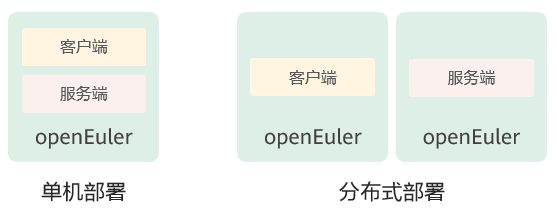
A-Tune支持单机模式和分布式模式安装:
-
单机模式
client和server安装到同一台机器上。
-
分布式模式
client和server分别安装在不同的机器上。
两种安装模式的简单图示如下:
安装操作
安装A-Tune的操作步骤如下:
-
挂载openEuler的iso文件。
```
mount openEuler-20.03-LTS-aarch64-dvd.iso /mnt
```
-
配置本地yum源。
```
vim /etc/yum.repos.d/local.repo
```
配置内容如下所示:
[local] name=local baseurl=file:///mnt gpgcheck=1 enabled=1 -
将RPM数字签名的GPG公钥导入系统。
```
rpm --import /mnt/RPM-GPG-KEY-openEuler
```
-
安装A-Tune服务端。
 说明:
说明:
本步骤会同时安装服务端和客户端软件包,对于单机部署模式,请跳过步骤5。```
yum install atune -y
```
-
若为分布式部署,请安装A-Tune客户端。
```
yum install atune-client -y
```
-
验证是否安装成功。命令和回显如下表示安装成功。
```
rpm -qa | grep atune
atune-client-xxx atune-db-xxx atune-xxx ```
部署A-Tune
本章介绍A-Tune的配置部署。
配置介绍
A-Tune配置文件/etc/atuned/atuned.cnf的配置项说明如下:
-
A-Tune服务启动配置
可根据需要进行修改。
-
protocol:系统grpc服务使用的协议,unix或tcp,unix为本地socket通信方式,tcp为socket监听端口方式。默认为unix。
-
address:系统grpc服务的侦听地址,默认为unix socket,若为分布式部署,需修改为侦听的ip地址。
- port:系统grpc服务的侦听端口,范围为0\~65535未使用的端口。如果protocol配置是unix,则不需要配置。
- rest_port:系统restservice的侦听端口, 范围为0\~65535未使用的端口。
- sample_num:系统执行analysis流程时采集样本的数量。
-
-
system信息
system为系统执行相关的优化需要用到的参数信息,必须根据系统实际情况进行修改。
- disk:执行analysis流程时需要采集的对应磁盘的信息或执行磁盘相关优化时需要指定的磁盘。
- network:执行analysis时需要采集的对应的网卡的信息或执行网卡相关优化时需要指定的网卡。
- user:执行ulimit相关优化时用到的用户名。目前只支持root用户。
-
tls:开启A-Tune的gRPC和http服务SSL/TLS证书校验,默认不开启。开启TLS后atune-adm命令在使用前需要设置以下环境变量方可与服务端进行通讯:
- export ATUNE_TLS=yes
- export ATUNE_CLICERT=<客户端证书路径>
-
tlsservercertfile:gPRC服务端证书路径。
- tlsserverkeyfile:gPRC服务端秘钥路径。
- tlshttpcertfile:http服务端证书路径。
- tlshttpkeyfile:http服务端秘钥路径。
- tlshttpcacertfile:http服务端CA证书路径。
-
日志信息
根据情况修改日志的路径和级别,默认的日志信息在/var/log/messages中。
-
monitor信息
为系统启动时默认采集的系统硬件信息。
配置示例
```
############################### server
atuned config
[server]
the protocol grpc server running on
ranges: unix or tcp
protocol = unix
the address that the grpc server to bind to
default is unix socket /var/run/atuned/atuned.sock
ranges: /var/run/atuned/atuned.sock or ip
address = /var/run/atuned/atuned.sock
the atuned grpc listening port, default is 60001
the port can be set between 0 to 65535 which not be used
port = 60001
the rest service listening port, default is 8383
the port can be set between 0 to 65535 which not be used
rest_port = 8383
when run analysis command, the numbers of collected data.
default is 20
sample_num = 20
Enable gRPC and http server authentication SSL/TLS
default is false
tls = true
tlsservercertfile = /etc/atuned/server.pem
tlsserverkeyfile = /etc/atuned/server.key
tlshttpcertfile = /etc/atuned/http/server.pem
tlshttpkeyfile = /etc/atuned/http/server.key
tlshttpcacertfile = /etc/atuned/http/cacert.pem
############################### log
Either "debug", "info", "warn", "error", "critical", default is "info"
level = info
############################### monitor
[monitor]
With the module and format of the MPI, the format is {module}_{purpose}
The module is Either "mem", "net", "cpu", "storage"
The purpose is "topo"
module = mem_topo, cpu_topo
############################### system
you can add arbitrary key-value here, just like key = value
you can use the key in the profile
[system]
the disk to be analysis
disk = sda
the network to be analysis
network = enp189s0f0
user = root ```
启动A-Tune
A-Tune安装完成后,需要启动A-Tune服务才能使用。
-
启动atuned服务:
```
systemctl start atuned
```
-
查询atuned服务状态:
```
systemctl status atuned
```
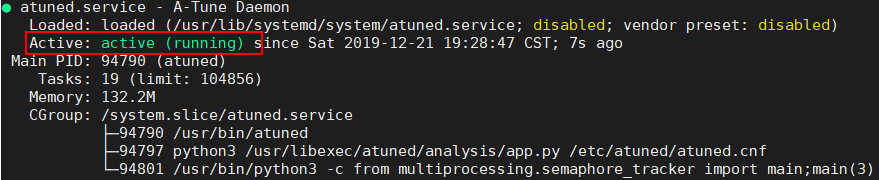
若回显为如下,则服务启动成功。