大家好,我是JiekeXu,江湖人称“强哥”,青学会MOP技术社区主席,荣获Oracle ACE Pro称号,OpenTenBase ACE,金仓社区最具价值倡导者KVA,崖山最具价值专家YVP,IvorySQL开源社区专家顾问委员会成员,KWDB社区MVP,墨天轮MVP,墨天轮连续多年度“墨力之星”,拥有Oracle OCP/OCM认证,MySQL 5.7/8.0 OCP认证以及金仓KCA、KCP、KCM、KCSM证书,TiDB PCTA/PCTP证书、PCA、OBCA、OGCA等众多国产数据库认证证书,欢迎关注我的微信公众号“JiekeXu DBA之路”,然后点击右上方三个点“设为星标”置顶,更多干货文章才能第一时间推送,谢谢!

目 录
前 言
问题故障
解决办法
    故障原因
网络配置如何改为永久配置
参考链接
前 言
事情发生在上个月的某个周末,一朋友想要在 x64 的 RHEL9.7 上安装 Oracle 19c RAC,聊起了我之前在 RHEL9.6 安装 RAC 遇到的 SSH 的坑,想着来寻求解决办法,但是又不想降低或升级 openssh 版本,那么只有通过打补丁到较新的 RU 版本即可,于是给他推荐了 19c RU23 版本,和我生产环境版本一致,并给出了安装时就可以打补丁的方案,想着应该是没有问题了。 那成想上周六又找来说安装数据库实例有问题报错了,无法同时启动两个实例,只能启动一个实例,自己卸载了又安装了一次还是一样的问题无法解决,于是上周末在百忙之中抽出了一下午的时间来帮忙填坑~
问题故障
当日,登录到环境后发现集群中数据库实例资源也没有,估计是误删了,手动无法启动。便想着让他再 dbca 建库看看会报什么错误,当 dbca 完成后,没有报错,但节点 1 数据库实例无法启动,自动、手动均无法启动。
于是我便开始了填坑之路,查看节点 1 alert 日志。
tail -f /u01/app/oracle/diag/rdbms/jieke/jieke1/trace/alert_jieke1.log
日志报错如下:
2026-03-22T15:17:15.482094+08:00
No connectivity to other instances in the cluster during startup. Hence, LMON is terminating the instance. Please check the LMON trace file for details. Also, please check the network logs of this instance along with clusterwide network health for problems and then re-start this instance.
LMON (ospid: 2678504): terminating the instance due to ORA error 481
Cause - 'Instance is being terminated by LMON'
2026-03-22T15:17:15.583960+08:00
ORA-1092 : opitsk aborting process
2026-03-22T15:17:15.607297+08:00
System state dump requested by (instance=1, osid=2678504 (LMON)), summary=[abnormal instance termination]. error - 'Instance is terminating.
'
System State dumped to trace file /u01/app/oracle/diag/rdbms/jieke/jieke1/trace/jieke1_diag_2678476.trc
2026-03-22T15:17:15.737953+08:00
Dumping diagnostic data in directory=[cdmp_20260322151715], requested by (instance=1, osid=2678504 (LMON)), summary=[abnormal instance termination].
2026-03-22T15:17:15.925802+08:00
ORA-1092 : opitsk aborting process
2026-03-22T15:17:16.831743+08:00
Instance terminated by LMON, pid = 2678504
2026-03-22T15:17:16.849779+08:00
Warning: 2 processes are still attacheded to shmid 32821:
 (size: 61440 bytes, creator pid: 2678305, last attach/detach pid: 2679179)
2026-03-22T15:17:16.960217+08:00
License high water mark = 1
2026-03-22T15:17:17.961160+08:00
USER(prelim) (ospid: 2679179): terminating the instance
2026-03-22T15:17:17.966566+08:00
Instance terminated by USER(prelim), pid = 2679179
从此日志中,我们看到了最前面两行的关键信息“LMON is terminating the instance…LMON (ospid: 2678504): terminating the instance due to ORA error 481”,实例被 LMON 进程终止,此实例在启动期间无法连接集群中的其他实例,因此,LMON 终止该实例。请检查 LMON 跟踪文件以获取详细信此外,请检查此实例的网络日志以及集群范围内的网络健康状况,排查问题后重新启动该实例。
于是又看了 LMON 进程的 trace 日志,$ORACLE_BASE/diag/rdbms/<db_name>/<instance_name>/trace 目录下最新的 LMON 跟踪文件(lmon*.trc)。
No reconfig messages from other instances in the cluster during startup. Hence, LMON is terminating the instance. Please check the network logs of this instance as well as the network health of the cluster for problems or if the GI is in patching mode

2026-03-22 15:17:15.482 :kjzduptcctx(): Notifying DIAG for crash event
----- Abridged Call Stack Trace -----
ksedsts()+426<-kjzduptcctx()+805<-kjzdicrshnfy()+1277<-ksuitm_opt()+1754<-kjxgrssvote_check_memverify()+1826<-kjxgrssvote_check()+1751<-kjxgmccs()+2300<-kjxgmpoll()+2092<-kjxggpoll()+646<-kjfmact()+104<-kjfcln()+4368<-ksbrdp()+1167<-opirip()+541<-op
idrv()+581
<-sou2o()+165<-opimai_real()+173<-ssthrdmain()+417<-main()+256<-__libc_start_call_main()+128
----- End of Abridged Call Stack Trace -----
Partial short call stack signature: 0xe1964d5688074111

*** 2026-03-22T15:17:15.504317+08:00
LMON (ospid: 2678504): terminating the instance due to ORA error 481
Cause - 'Instance is being terminated by LMON'
ksuitm: waiting up to [5] seconds before killing DIAG(2678476)
Warning: 2 processes are still attached to shmid 32821:

*** 2026-03-22T15:17:16.849851+08:00
 (size: 61440 bytes, creator pid: 2678305, last attach/detach pid: 2679179)
Process 2678504 [/u01/app/oracle/product/19.3.0/dbhome_1/bin/oracle] has an entry matching shmid
	362000000-36200f000 rw-s 00000000 00:01 32821                            /SYSV5c1d2e14 (deleted)
*********************** Dumping ipcs output ********************
------ Message Queues --------
key        msqid      owner      perms      used-bytes   messages
------ Shared Memory Segments --------
key        shmid      owner      perms      bytes      nattch     status
0xcacdecdc 3          grid       600        73728      40
根据这份详细的 LMON 跟踪日志,根本原因是本实例在启动时,其 LMON 进程无法通过集群的重配置协议与其他节点建立联系并完成“投票”验证,这通常由底层通信或资源访问故障引起。
于是乎,便从网络方面开始排查。/etc/hosts 配置大概如下所示,具体可能有差别,真实环境忘记截图了,然后发现私网网卡居然每个节点有两个,不管是通过相互 ping 私网还是 traceroute 私网都没有问题,
[root@jiekexu-r1 ~]# cat /etc/hosts
127.0.0.1   localhost localhost.localdomain localhost4 localhost4.localdomain4
::1         localhost localhost.localdomain localhost6 localhost6.localdomain6
#public ip
192.168.75.128  jiekexu-r1
192.168.75.129  jiekexu-r2
#private ip
10.10.10.128 jiekexu-r1-priv
10.10.10.129 jiekexu-r2-priv
10.10.10.130 jiekexu-r1-priv
10.10.10.131 jiekexu-r2-priv
#vip
192.168.75.130 jiekexu-r1-vip
192.168.75.131 jiekexu-r2-vip
#scanip
192.168.75.132 jiekexu-racscan
192.168.75.133 jiekexu-racscan
192.168.75.134 jiekexu-racscan

ping -c 4 10.10.10.129
ping -c 4 10.10.10.130
traceroute 10.10.10.129
traceroute 10.10.10.130
ip addr show eth0 | grep "inet "
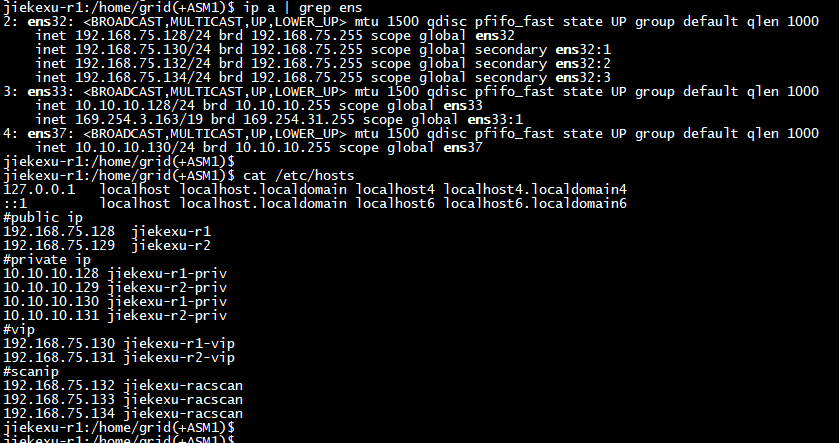
根据查看发现这套 RAC 有两个私网网卡,同时,也就有两个 HAIP,还有三个 Scan 地址;还说以前在 11g 的老环境就是这么配置的,所以这不是什么问题,网卡都运行正常,HAIP 也都分别绑定在两个私网网卡上,然后又做了一些其他资源状态的检查,也没发现问题。
-- 检查属组权限
id oracle
id grid

-- 检查并清理任何残留的共享内存段或信号量
ipcs -m | grep oracle
ipcs -m | grep grid
# 使用 iperm 命令谨慎清理残留资源,例如:
# iperm -m <shmid>

-- 检查集群私网配置 grid 用户
oifcfg getif
oifcfg iflist -p -n
cluvfy comp nodecon -n all
本来就这样借助 AI 排查了近一个小时后就没啥思路了,MOS 当时输入报错后居然也不能搜索,那就想着要不浏览器搜搜碰碰运气吧,结果柳暗花明又一村,抛弃了 AI 工具后转回到以前的浏览器搜索模式下,找到了网络上的两篇文章,这真是救命稻草啊,《Oracle RAC 12C,18C,19C for Linux私网多网卡的rp_filter参数设置问题》 和 《老司机遇到的ORACLE 12C安装问题-技术人生系列第二十五期-我和数据中心的故事》。这个现象和我目前遇到的十分相似。
解决办法
前面其实也重启过操作系统,发现了私网网卡不会开机自启动,也没有永久配置,这是一个问题,但不是私网无法通信的问题,后续将其配置成永久模式即可。那么,现在可以参考上面的方案,直接修改内核参数文件。
-- 重启后临时添加两块私网网卡
ip addr add 192.168.0.5/24 dev ens4p1
ip addr add 192.168.0.6/24 dev ens1p1

-- 两节点使用 root 用户编辑配置文件
vim /etc/sysctl.conf

# private interconnects (loose filtering) 私网宽松过滤
net.ipv4.conf.<私网网卡1>.rp_filter = 2
net.ipv4.conf.<私网网卡2>.rp_filter = 2

net.ipv4.conf.ens4p1.rp_filter = 2
net.ipv4.conf.ens1p1.rp_filter = 2

---- 使其配置生效
sysctl -p
# sysctl -a|grep rp_filter
net.ipv4.conf.ens4p1.rp_filter = 2
net.ipv4.conf.ens1p1.rp_filter = 2
配置生效后,重启数据库实例便可以正常启动,不管是使用 srvctl 还是直接 sqlplus 均可以正常启动两节点数据库实例,重启 CRS 集群也可以正常启动实例,那说明修改参数生效了。
故障原因
在 Oracle 安装文档官网上,其实也说明了私网多网卡问题,建议将此参数设置为 0 或 2。只是以前没有遇到多私网网卡的情况,也没有去关注到这一块,今天突然遇到,有亿点点的折腾,花费了好长的时间才算搞定。
When multiple private interconnects are configured, you must set the rp_filter value for the private interconnects to either 0 (no filtering) or 2 (loose filtering). Setting the private interconnect NIC to strict filtering (1) can cause connection issues on the private interconnect.
当配置多个专用互连时,您必须将专用互连的rp_filter值设置为0(无过滤)或2(宽松过滤)。将专用互连 NIC 设置为严格过滤(1)可能会导致专用互连出现连接问题。

It is safe to disable or relax this filtering, because the private interconnect should be on a private and isolated network.
禁用或放宽此过滤是安全的,因为专用互连应该位于专用且隔离的网络上

This requirement does not apply to a single private interconnect.
本要求不适用于单个专用互连。

注意:本要求适用于所有运行Linux内核2.6.32或更高版本的系统,包括Exadata系统。如果没有这些rp_filter参数设置,互连数据包可能会被阻止或丢弃。
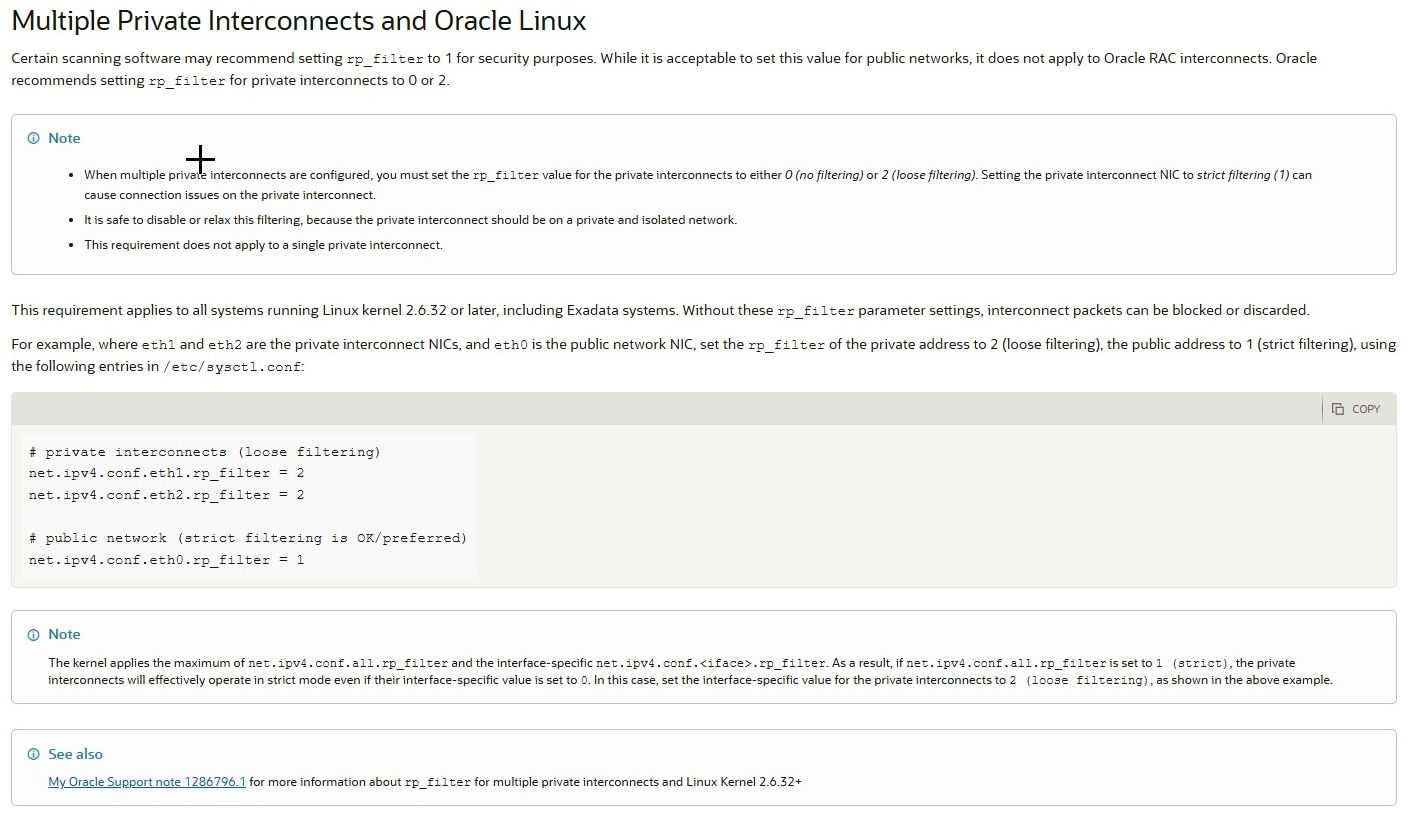
rp_filter 参数可以在所有网卡上全局设置,也可以在每个网卡上单独设置。取最大值(介于“全部”和特定接口之间)。这些数值定义如下:
rp_filter - 整数
• 0 - 无来源验证。
• 1 - 严格模式,定义于 RFC3704 严格反向路径:每个进站数据包都经过 FIB 测试,如果接口不是最佳反向路径,数据包检查将失败。默认情况下,失败的数据包会被丢弃。
• 2 - 松散模式,定义于 RFC3704 松散反向路径 每个入站包的源地址也都会与 FIB 进行测试,如果源地址无法通过任何接口访问,包检查将失败。
在 ib0 和 ib1 用于私有互连(两个或更多节点)的情况下,“all”和“ib0”和“ib1”的最大值 rp_filter 必须是 0 或 2,RAC 才能正常工作。例如,如果你设置“net.ipv4.conf.ib1.rp_filter = 0”禁用该网卡的过滤,然后又设置“net.ipv4.conf.all.rp_filter = 1”,那就是错误配置。这是错误的,因为 ib1 的取值是 1,即 0 到 1 之间的最大值。如上所述,最大值应为0或2,RAC 才能正常工作。
一个有效的配置是,例如设置“net.ipv4.conf.ib1.rp_filter = 2”和“net.ipv4.conf.all.rp_filter = 0或1”,在这种情况下,NIC ib1的MAX为2,这是有效的。
最后,在已经解决了此事之后我又去 MOS 试了试,为啥不能进行搜索了,结果又搜到了一篇标准的“解药”,要是当时一开始就搜到,那么也就不会浪费那么久的时间了。
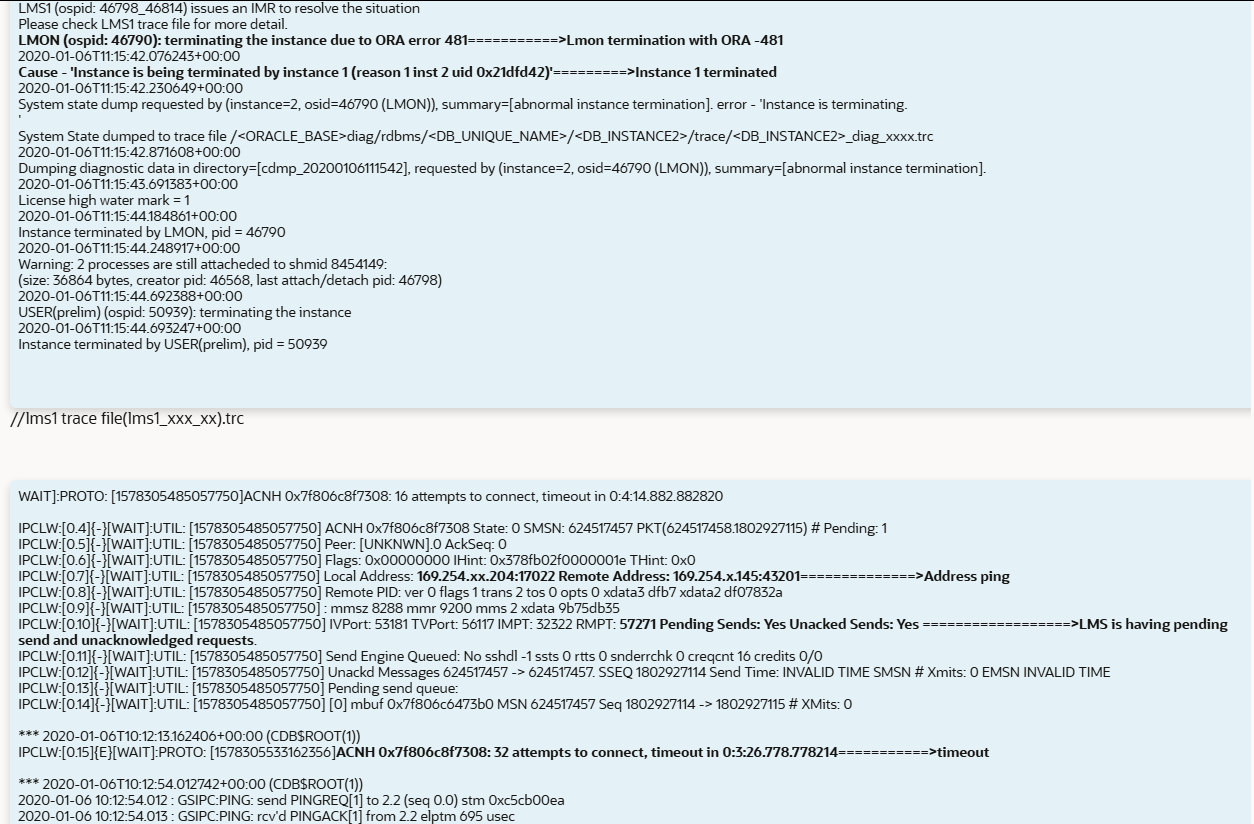
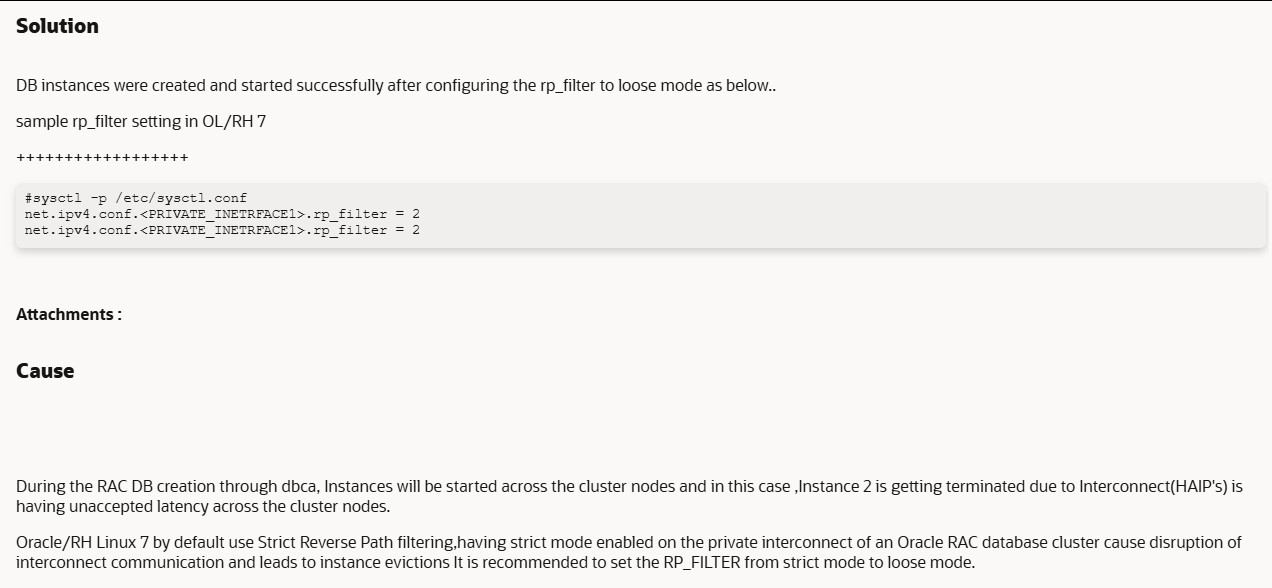
在通过 dbca 创建RAC数据库期间,实例将在集群节点间启动。在此情况下,由于集群节点间的互连(HAIP)存在不可接受的延迟,实例 2 正在终止。Oracle/RHEL Linux 7 默认使用严格的反向路径过滤。在 Oracle RAC 数据库集群的私有互连上启用严格模式会导致互连通信中断,并引发实例驱逐。建议将 RP_FILTER 从严格模式更改为宽松模式。
网络配置如何改为永久配置
在 RHEL/CentOS 8/9 等使用 NetworkManager 的系统中,需使用 nmcli 将配置保存到连接配置文件中:
# 1. 为接口创建或修改一个连接配置(例如连接名为“my-ens4”)
sudo nmcli connection add type ethernet con-name my-ens4 ifname ens4p1 ipv4.method manual ipv4.addresses 172.18.0.5/24

# 或修改现有连接
sudo nmcli connection modify my-ens4 ipv4.addresses 172.18.0.5/24 ipv4.method manual

# 2. 激活连接使配置生效
sudo nmcli connection up my-ens4
这样配置会保存在 /etc/NetworkManager/system-connections/下,重启后自动恢复。
临时添加的 IP 可以用 sudo ip addr del 172.18.0.5/24 dev ens4f1np1 立即删除。
使用 ip addr show dev ens4p1 可查看该接口当前的 IP 地址列表。
数据库其他优化参数
--开启归档
show parameter log_archive_dest_1
archive log list;
alter system set log_archive_dest_1='location=+DATA';
shu immediate
startup mount
alter database archivelog;
alter database open;
archive log list;

--内存参数调整
alter system set sga_max_size=120G scope=spfile sid='*';
alter system set sga_target=120G scope=spfile sid='*';
alter system set pga_aggregate_limit=40G scope=spfile sid='*';
alter system set pga_aggregate_target=20G scope=spfile sid='*';

--去掉密码180天有效
ALTER PROFILE DEFAULT limit FAILED_LOGIN_ATTEMPTS UNLIMITED PASSWORD_LIFE_TIME UNLIMITED;
--设置awr保留40d
exec dbms_workload_repository.modify_snapshot_settings(interval=>30,retention=>40*24*60);
--调整数据文件为2048
alter system set db_files=2048 scope=spfile sid='*';
--关闭数据库审计
alter system set audit_trail=none sid='*' scope=spfile;
--调整dump文件大小
alter system set MAX_DUMP_FILE_SIZE='200M';

--等待事件 event 设置
alter system  set event='10949 trace name context forever','28401 trace name context forever,level 1','10503 trace name context forever, level 4000' scope=spfile sid='*';

--优化原来 11g 客户端无法连接参数
--ORA-28040:No matching authentication protocol 没有匹配的认证协议
--在Oracle 19c服务器端的oracle用户下:
--cd $ORACLE_HOME/network/admin目录下 新建文件sqlnet.ora
vi $ORACLE_HOME/network/admin/sqlnet.ora
SQLNET.ALLOWED_LOGON_VERSION_SERVER=8
SQLNET.ALLOWED_LOGON_VERSION_CLIENT=8


--配置大页内存
vi /etc/sysctl.conf
vm.min_free_kbytes = 5242880
vm.hugetlb_shm_group = 54321
vm.nr_hugepages = 61500
参考链接
RAC DB creation fails with error - LMON (ospid: XXXX): terminating the instance due to ORA error 481  KB103507
rp_filter for multiple private interconnects and Linux Kernel 2.6.32+  KB151536
https://blog.itpub.net/31547066/viewspace-2222482/
https://blog.csdn.net/jetliu05/article/details/121096591
https://docs.oracle.com/en/database/oracle/oracle-database/19/cwlin/multiple-private-interconnects-and-oracle-linux.html#GUID-B9508AD5-AFD6-4D34-9DA9-773D44FD43A0
全文完,希望可以帮到正在阅读的你,如果觉得有帮助,可以分享给你身边的朋友,同事,你关心谁就分享给谁,一起学习共同进步~~~
欢迎关注我的公众号【JiekeXu DBA之路】,一起学习新知识!
——————————————————————————
公众号:JiekeXu DBA之路
墨天轮:https://www.modb.pro/u/4347
CSDN :https://blog.csdn.net/JiekeXu
ITPUB:https://blog.itpub.net/69968215
腾讯云:https://cloud.tencent.com/developer/user/5645107
——————————————————————————