



KingbaseES 集群 ,使用 sys_rman 备份归档到 对象存储 S3
sys_rman (pgbackrest 本身就是支持 S3 类协议),可以将数据备份到 此类存储是上,测试了下,也遇到了不少问题;
一、概念
上官网架构图:
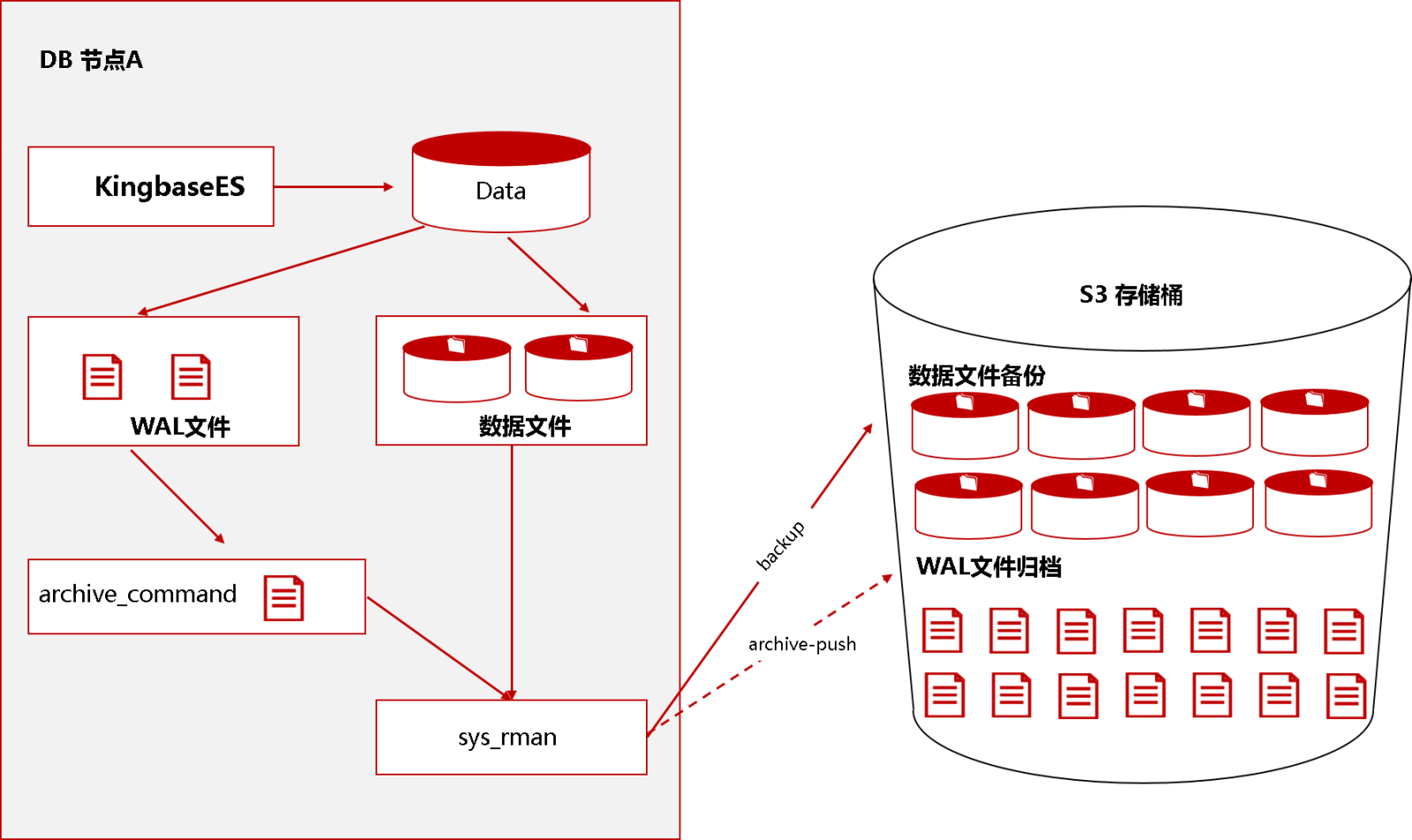
官方文档地址:https://docs.kingbase.com.cn/cn/KES-V9R1C10/availability/backup/backup-restore/physical-backup/sys_rman/sys_rman-6#%E5%85%B8%E5%9E%8B%E5%9C%BA%E6%99%AFs3%E4%BA%91%E5%AD%98%E5%82%A8-
下面这段 找 ai 给的 对比,当科普看看,不想看的直接跳过
各类存储对比:
| 维度 | 对象存储 (S3) | 块存储 (DAS/iSCSI) | NAS (NFS/SMB) | SAN (FC/iSCSI) |
|---|---|---|---|---|
| 数据访问 | HTTP/HTTPS API | 块设备 (需格式化) | 文件 (挂载目录) | 块设备 (需格式化) |
| 数据结构 | 对象 (扁平命名空间) | 扇区/块 | 文件/目录树 | 扇区/块 |
| 典型延迟 | 毫秒级 (高) | 微秒级 (最低) | 亚毫秒~毫秒级 | 微秒级 (极低) |
| 扩展性 | ★★★★★ (无限) | ★★ (受限) | ★★★ (纵向) | ★★★★ (横向) |
| 成本 | ★★★★★ (最低) | ★★★ (中等) | ★★★ (中等) | ★ (最高) |
| 共享性 | 多客户端并发 | 通常独占 (除非集群文件系统) | 多客户端并发 | 多客户端并发 (需集群感知) |
| 适用场景 | 备份、归档、静态资源、大数据分析 | 操作系统盘、本地数据库 | 文件共享、家目录、媒体库 | 核心数据库、虚拟化存储 |
1、架构层面的核心优势
完全兼容 S3 协议,接口标准化
(1)sys_rman 原生支持 repo1-type=s3 (2) MinIO/RustFS 100% 兼容 Amazon S3 API3) (3) 无需额外适配层
✅ 这使得 sys_rman 能以与公有云完全一致的方式访问私有对象存储。
存储与应用解耦,消除单点故障
(1) 传统备份常见问题:备份放在数据库本地磁盘,磁盘损坏 → 数据与备份同时丢失
(2) 使用 MinIO 后:数据库节点只负责产生 WAL / 备份 ,实际数据存储在 独立、分布式的 MinIO 集群
✅ 实现了 计算与存储分离,大幅提升容灾能力。
支持分布式纠删码(Erasure Code)
MinIO 的核心能力之一:(1)数据被切片、冗余存储,(2)可容忍多盘 / 多节点故障 (3)不依赖 RAID
相比本地文件系统备份,数据可靠性提升一个数量级。
2、备份能力与性能优势
并行上传与块级去重
sys_rman 特性:(1)支持并行推送 WAL 和备份文件,(2)基于 block 的增量备份
MinIO/RustFS 特性:(1)高吞吐对象写入,(2)稳定的长连接性能
✅ 二者结合可在 不牺牲性能的前提下 大幅降低存储占用。
无限容量扩展 :(1)sys_rman 不关心底层容量,(2)MinIO/RustFS 可通过增加节点线性扩容
✅ 适合:(1)长期归档,(2)全量 + 增量 + WAL 无限保留
3、运维与管理优势
备份集中化管理(多实例 / 多集群) :(1)多个 KingbaseES 实例,(2)多个 stanza,(3)不同业务系统
✅ 都可以统一写入 **同一个 MinIO/RustFS 集群,统一权限、统一生命周期管理。
与 sys_rman 生命周期高度契合
sys_rman 依赖:(1)archive.info ,(2)backup.info,(3)WAL 连续性
MinIO:(1)强一致性对象存储 ,(2)支持原子 PUT,(3)支持对象锁(可选)
✅ 非常适合作为 sys_rman 的 权威备份仓库。
4、成本与安全优势
私有化 & 合规友好 :(1)数据不出机房,(2)满足等保 / 内控要求,(3)不依赖第三方公有云账号
✅ 特别适合金融、政务、国企等关键系统。
支持 HTTPS + 证书体系 :(1)MinIO/RustFS 启用 TLS,sys_rman 使用 HTTPS endpoint
✅ 备份在 传输中和存储中均可加密,满足安全合规要求。
二、部署
我这里就使用 minio 做演示,这里 kingbaseES 两节点集群,MinIO 单机环境演示(集群一样的)
部署 规划
| 部署内容 | ip | 主机名 | 版本 | 系统 |
|---|---|---|---|---|
| kingbaseES Cluster | 10.10.3.112 | node01 | kingbaseES V9 | Oracle Linux 8.10 |
| kingbaseES Cluster | 10.10.3.113 | node02 | kingbaseES V9 | Oracle Linux 8.10 |
| MinIO/RustFS | 10.10.3.114 | s3-backup | 2026-02-14T12-00-00Z | Oracle Linux 8.10 |
1、kingbaseES 集群的部署,这里就不重复写了,见上一篇:
https://www.modb.pro/db/2052616553171587072
2、MinIO 这里用的单机版,RustFS配置是一样的,我也验证了,完全兼容,我这里已MinIO为例:
部署:生产可用集群,最少4 节点,每个节点 4 块盘;
默认纠删码(EC:4):总 16 块盘,12 块数据块 + 4 块校验块。
容错能力:
节点级:对多一个节点**1 个节点(共 4 块盘)**故障,集群仍能正常读写。
磁盘级:允许任意 4 块盘 故障(无论是否在同一节点),数据不丢失。
2.1 minIO 配置
这里 minio 我们需要生成自签证书,sys_rman 默认使用 https 协议;
[root@s3-backup pgha-pgbackrest-MinIO]# openssl genrsa -out private.key 2048^C
[root@s3-backup pgha-pgbackrest-MinIO]# mkdir -p /etc/minio/certs
[root@s3-backup pgha-pgbackrest-MinIO]# cd /etc/minio/certs
[root@s3-backup certs]#
[root@s3-backup certs]# ll
total 0
[root@s3-backup certs]# openssl genrsa -out private.key 2048
Generating RSA private key, 2048 bit long modulus (2 primes)
.................................................+++++
.......................+++++
e is 65537 (0x010001)
[root@s3-backup certs]# openssl req -new -x509 -days 3650 \
>   -key private.key \
>   -out public.crt \
>   -subj "/CN=s3.repo" \
>   -addext "subjectAltName = DNS:s3.repo"
[root@s3-backup certs]#
[root@s3-backup certs]#
[root@s3-backup certs]#
[root@s3-backup certs]# ll
total 8
-rw-------. 1 root root 1679 May  9 17:06 private.key
-rw-r--r--. 1 root root 1135 May  9 17:06 public.crt
修改权限
[root@s3-backup certs]# chown -R kingbase:kingbase /etc/minio/certs
[root@s3-backup certs]#
[root@s3-backup certs]# ll
total 8
-rw-------. 1 kingbase kingbase 1679 May  9 17:06 private.key
-rw-r--r--. 1 kingbase kingbase 1135 May  9 17:06 public.crt
重启
systemctl daemon-reload
systemctl restart minio
systemctl status minio.service
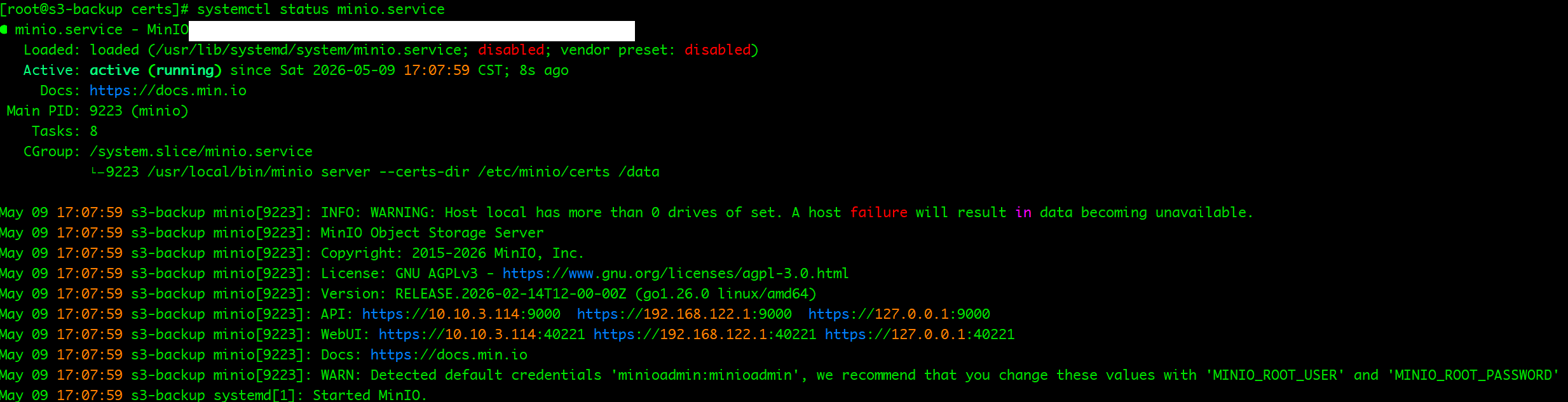
配置 host 每台都要配置,用于 域名解析
[kingbase@node02 S3_backup]$ cat /etc/hosts
10.10.3.114 s3.repo
2.2 数据库配置
查看集群状态
repmgr cluster show

修改数据库归档参数,每个节点都执行
alter system set archive_command = '/home/kingbase/cluster/install/kingbase/bin/sys_rman --config=/data/sys_rman.conf --stanza=kingbase archive-push %p';
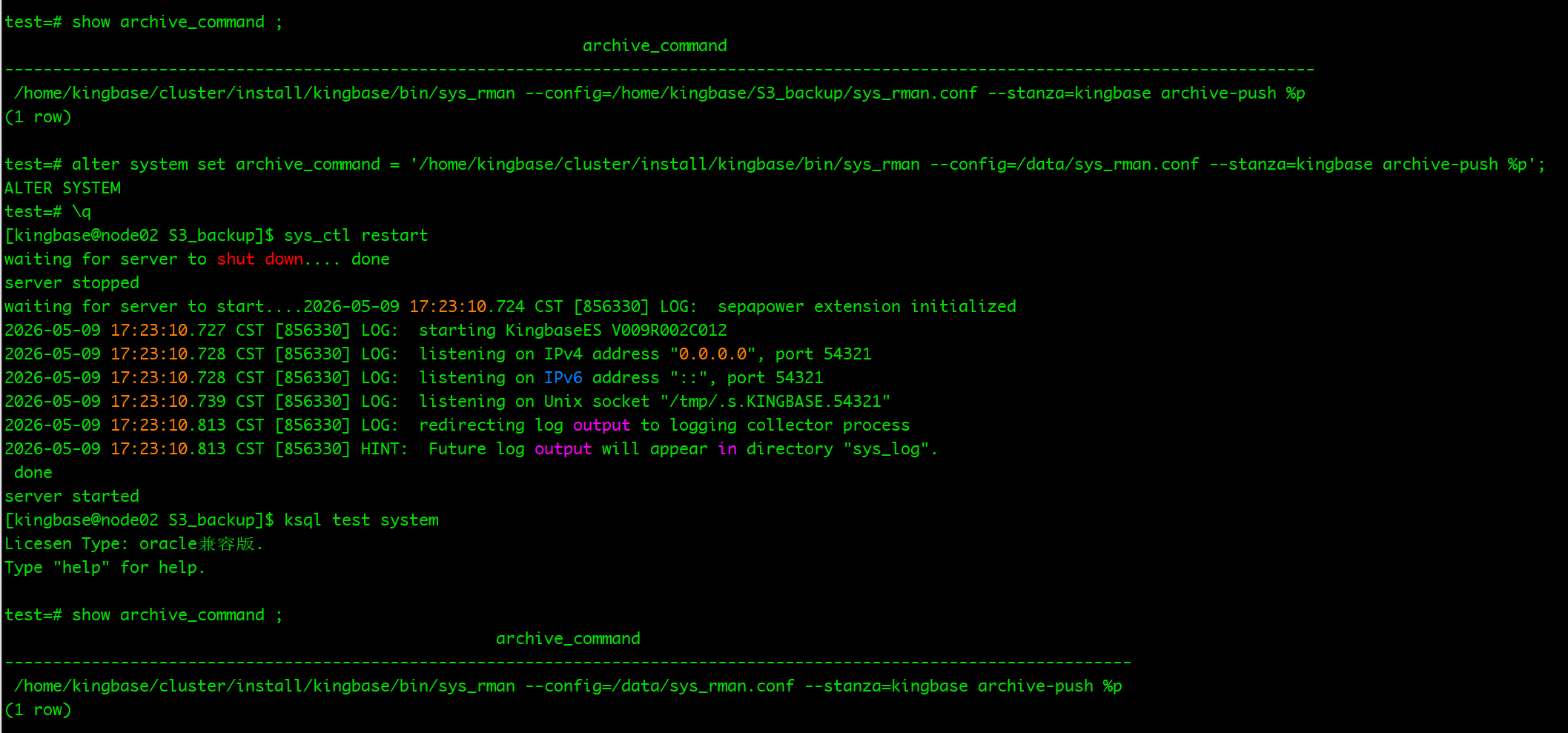
配置免密登录
sys_rman 备份过程中,repo 节点会调用 数据库节点上的 sys_rman ,需要做免密,一般可以用 ssh-keygen 去做,但是金仓数据库有自己的服务,我们自动下 sys_securecmdd 服务即可。
/home/kingbase/cluster/KESRealPro/V009R002C012/Server/bin/sys_HAscmdd.sh
/home/kingbase/cluster/KESRealPro/V009R002C012/Server/bin/sys_HAscmdd.sh init


编辑初始化文件
vi /home/kingbase/cluster/KESRealPro/V009R002C012/Server/share/sys_backup.conf
这里写出一些重点参数,其他参数,脚本会去读取数据库的配置,自动配置。
_target_db_style="cluster"
_one_db_ip="10.10.3.112"
_repo_ip="10.10.3.112"
_stanza_name="kingbase"
_os_user_name="kingbase"
_repo_path="/data/backup"
_repo_type=s3
_repo_s3_bucket=repo
_repo_s3_endpoint=https://s3.repo:9000
_repo_s3_region=chengdu
_repo_s3_key=admin
_repo_s3_key_secret=wkmo5q3xw737Tj9iuD
执行金仓脚本初始化
/home/kingbase/cluster/KESRealPro/V009R002C012/Server/bin/sys_backup.sh init
报错:
ERROR: [101]: TLS error [1:336130315] wrong version number
2026-05-08 18:40:12.594 P00   INFO: stanza-create command end: aborted with exception [101]
2026-05-09 18:02:01.922 P00   INFO: stanza-create command begin 2.27: --backup-from=cluster --band-width=0 --cmd-ssh=/home/kingbase/cluster/install/kingbase/bin/sys_securecmd --config=/data/backup/sys_rman.conf --exec-id=931889-051d5d1f --kb2-host=10.10.3.113 --kb2-host-user=kingbase --kb1-path=/home/kingbase/cluster/install/kingbase/data --kb2-path=/home/kingbase/cluster/install/kingbase/data --kb1-port=54321 --kb2-port=54321 --kb1-user=esrep --kb2-user=esrep --log-level-console=info --log-level-file=info --log-path=/home/kingbase/cluster/install/kingbase/log --log-subprocess --process-max=4 --repo1-path=/data/backup --repo1-s3-bucket=repo --repo1-s3-endpoint=https://s3.repo:9000 --repo1-s3-key=<redacted> --repo1-s3-key-secret=<redacted> --repo1-s3-region=chengdu --repo1-s3-uri-style=path --no-repo1-storage-verify-tls --repo1-type=s3 --stanza=kingbase
WARN: set process-max 4 is too large, auto set to CPU core count 2
2026-05-09 18:02:02.216 P00   INFO: stanza-create for stanza 'kingbase' on repo1
ERROR: [039]: HTTP request failed with 403 (Forbidden):
       *** Path/Query ***:
       HEAD /repo/data/backup/archive/kingbase/stat.info
       *** Request Headers ***:
       authorization: <redacted>
       content-length: 0
       host: s3.repo
       x-amz-content-sha256: e3b0c44298fc1c149afbf4c8996fb92427ae41e4649b934ca495991b7852b855
       x-amz-date: <redacted>
       *** Response Headers ***:
       accept-ranges: bytes
       content-length: 0
       date: Sat, 09 May 2026 10:02:02 GMT
       server: MinIO
       strict-transport-security: max-age=31536000; includeSubDomains
       vary: Origin, Accept-Encoding
       x-amz-id-2: dd9025bab4ad464b049177c95eb6ebf374d3b3fd1af9251148b658df7ac2e3e8
       x-amz-request-id: 18ADDD74F12350E4
       x-content-type-options: nosniff
       x-minio-error-code: InvalidAccessKeyId
       x-minio-error-desc: "The Access Key Id you provided does not exist in our records."
       x-ratelimit-limit: 1836
       x-ratelimit-remaining: 1836
       x-xss-protection: 1; mode=block
2026-05-09 18:02:02.319 P00   INFO: stanza-create command end: aborted with exception [039]
这个问题是 MinIO TLS 版本 / 加密套件 与 sys_rman 不兼容 导致的,ys_rman 使用的 libcurl / OpenSSL 较旧,双方在 TLS 握手阶段 协议版本不一致。
强制 MinIO 使用 TLS 1.2
vim /usr/lib/systemd/system/minio.service

[Service]
Environment="MINIO_TLS_MIN_VERSION=TLS1.2"
Environment="MINIO_TLS_CIPHER_SUITES=TLS_ECDHE_RSA_WITH_AES_128_GCM_SHA256"
重启MinIO
systemctl daemon-reload
systemctl restart minio
systemctl status minio
再次执行还是报错:
2026-05-09 18:06:24.918 P00   INFO: stanza-create command begin 2.27: --backup-from=cluster --band-width=0 --cmd-ssh=/home/kingbase/cluster/install/kingbase/bin/sys_securecmd --config=/data/backup/sys_rman.conf --exec-id=933704-c9acc818 --kb2-host=10.10.3.113 --kb2-host-user=kingbase --kb1-path=/home/kingbase/cluster/install/kingbase/data --kb2-path=/home/kingbase/cluster/install/kingbase/data --kb1-port=54321 --kb2-port=54321 --kb1-user=esrep --kb2-user=esrep --log-level-console=info --log-level-file=info --log-path=/home/kingbase/cluster/install/kingbase/log --log-subprocess --process-max=4 --repo1-path=/data/backup --repo1-s3-bucket=repo --repo1-s3-endpoint=https://s3.repo:9000 --repo1-s3-key=<redacted> --repo1-s3-key-secret=<redacted> --repo1-s3-region=chengdu --repo1-s3-uri-style=path --no-repo1-storage-verify-tls --repo1-type=s3 --stanza=kingbase
WARN: set process-max 4 is too large, auto set to CPU core count 2
2026-05-09 18:06:25.189 P00   INFO: stanza-create for stanza 'kingbase' on repo1
ERROR: [039]: HTTP request failed with 404 (Not Found):
       *** Path/Query ***:
       GET /repo/?delimiter=%2F&list-type=2&prefix=data%2Fbackup%2Farchive%2Fkingbase%2F
       *** Request Headers ***:
       authorization: <redacted>
       content-length: 0
       host: s3.repo
       x-amz-content-sha256: e3b0c44298fc1c149afbf4c8996fb92427ae41e4649b934ca495991b7852b855
       x-amz-date: <redacted>
       *** Response Headers ***:
       accept-ranges: bytes
       content-length: 309
       content-type: application/xml
       date: Sat, 09 May 2026 10:06:25 GMT
       server: MinIO
       strict-transport-security: max-age=31536000; includeSubDomains
       vary: Origin, Accept-Encoding
       x-amz-id-2: dd9025bab4ad464b049177c95eb6ebf374d3b3fd1af9251148b658df7ac2e3e8
       x-amz-request-id: 18ADDDB22BADC5E6
       x-content-type-options: nosniff
       x-ratelimit-limit: 1839
       x-ratelimit-remaining: 1839
       x-xss-protection: 1; mode=block
       *** Response Content ***:
       <?xml version="1.0" encoding="UTF-8"?>
       <Error><Code>NoSuchBucket</Code><Message>The specified bucket does not exist</Message><BucketName>repo</BucketName><Resource>/repo/</Resource><RequestId>18ADDDB22BADC5E6</RequestId><HostId>dd9025bab4ad464b049177c95eb6ebf374d3b3fd1af9251148b658df7ac2e3e8</HostId></Error>
2026-05-09 18:06:25.295 P00   INFO: stanza-create command end: aborted with exception [039]
显示没有名为 repo的 Bucket,这个我们去创建下就 ok 了
ERROR: [039]: HTTP request failed with 404 (Not Found)
<Code>NoSuchBucket</Code>
<Message>The specified bucket does not exist</Message>
<BucketName>repo</BucketName>
创建 名为 repo的 Bucket
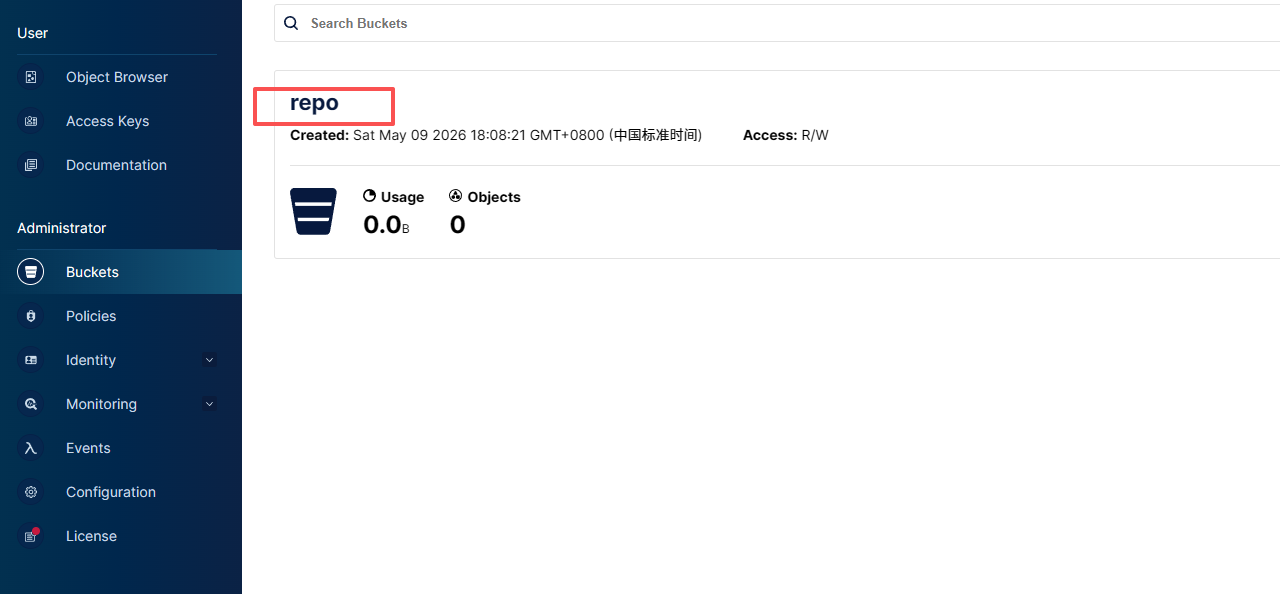
再次执行,可以看到日志,stanza 已经创建好了,第一次初始化会执行一次全备。


stanza 创建成功,归档的时候失败了,我们手动执行下吧
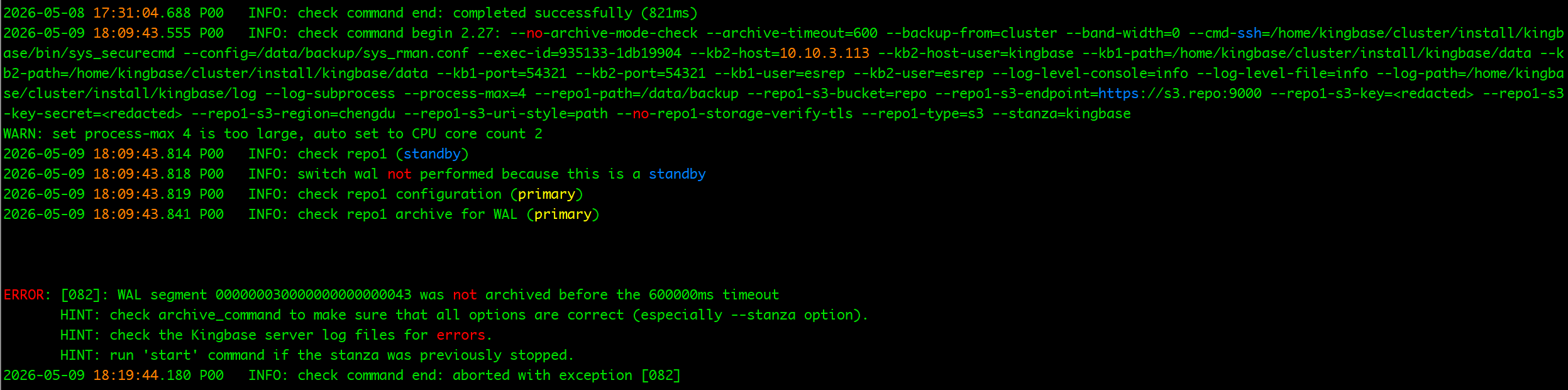
金仓脚本 sys_backup.sh init 初始了几次都失败了,我对这个还是比较熟悉,这里就不用脚本,手动修改参数文件,手动初始化。(大家配置有问题,可以一起交流)
先调整sys_rman 参数文件
数据库节点
vi /data/sys_rman.conf
# Genarate by script at 20260508183808, should not change manually
[kingbase]
kb1-path=/home/kingbase/cluster/install/kingbase/data
kb1-port=54321
kb1-user=system
kb1-database=test

[global]
repo1-host-config=/data/sys_rman.conf
repo1-retention-full=2
repo1-type=s3
repo1-s3-bucket=repo
repo1-s3-endpoint=https://s3.repo:9000
repo1-s3-region=us-east-1
repo1-s3-key=admin
repo1-s3-key-secret=wkmo5q3xw737Tj9iuD
repo1-s3-uri-style=path
repo1-storage-verify-tls=n
archive-statistics=n
log-path=/data/log
log-level-file=info
log-level-console=info
log-subprocess=y
process-max=4
#### support: gz none
compress-type=none
compress-level=3
start-fast=y
link-all=y
band-width=0
repo-disk-warn=16384MB
repo-disk-error=1024MB
non-archived-space=1024
archive-timeout=600
backup-from=cluster
archive-mode-check=n
#### Enable below alert-command to take custom action on issue during backup, such as sending alert mail
# alert-command=( cd /home/kingbase/cluster/install/kingbase/bin; ./sys_mail -s "%t" -b "%c" & )
cmd-ssh=/home/kingbase/cluster/install/kingbase/bin/sys_securecmd
s3 节点
vi /data/sys_rman.conf
# Genarate by script at 20260508183811, should not change manually
[kingbase]
kb1-path=/home/kingbase/cluster/install/kingbase/data
kb1-host=10.10.3.112
kb1-host-user=kingbase
kb1-port=54321
kb1-database=test
kb1-user=system
kb2-path=/home/kingbase/cluster/install/kingbase/data
kb2-host=10.10.3.113
kb2-host-user=kingbase
kb2-port=54321
kb2-database=test
kb2-user=system

[global]
repo1-type=s3
repo1-s3-endpoint=https://s3.repo:9000
repo1-s3-region=us-east-1
repo1-s3-bucket=repo
repo1-s3-key=admin
repo1-s3-key-secret=wkmo5q3xw737Tj9iuD
repo1-s3-uri-style=path
repo1-s3-verify-tls=n
repo1-host-config=/data/sys_rman.conf
repo1-retention-full=2
repo1-retention-diff=6
repo1-retention-archive=7
process-max=4
compress-type=gz
compress-level=6
start-fast=y
archive-copy=y
archive-timeout=60
archive-mode-check=n
archive-statistics=n
log-path=/data/log
log-level-file=info
log-level-console=info
log-subprocess=y
#### support: gz none
band-width=0
repo-disk-warn=16384MB
repo-disk-error=1024MB
link-all=y
cmd-ssh=/home/kingbase/cluster/install/kingbase/bin/sys_securecmd
重新手动创建 repo 库
/home/kingbase/cluster/KESRealPro/V009R002C012/Server/bin/sys_rman \
  --config=/data/sys_rman.conf \
  --stanza=kingbase \
  --log-level-console=info \
  stanza-create

手动 check 归档日志
/home/kingbase/cluster/KESRealPro/V009R002C012/Server/bin/sys_rman \
  --config=/data/sys_rman.conf \
  --stanza=kingbase \
  --log-level-console=info \
  check

执行 全备
/home/kingbase/cluster/KESRealPro/V009R002C012/Server/bin/sys_rman \
--config=/data/sys_rman.conf \
--stanza=kingbase \
--log-level-console=info \
--archive-copy \
--type=full backup
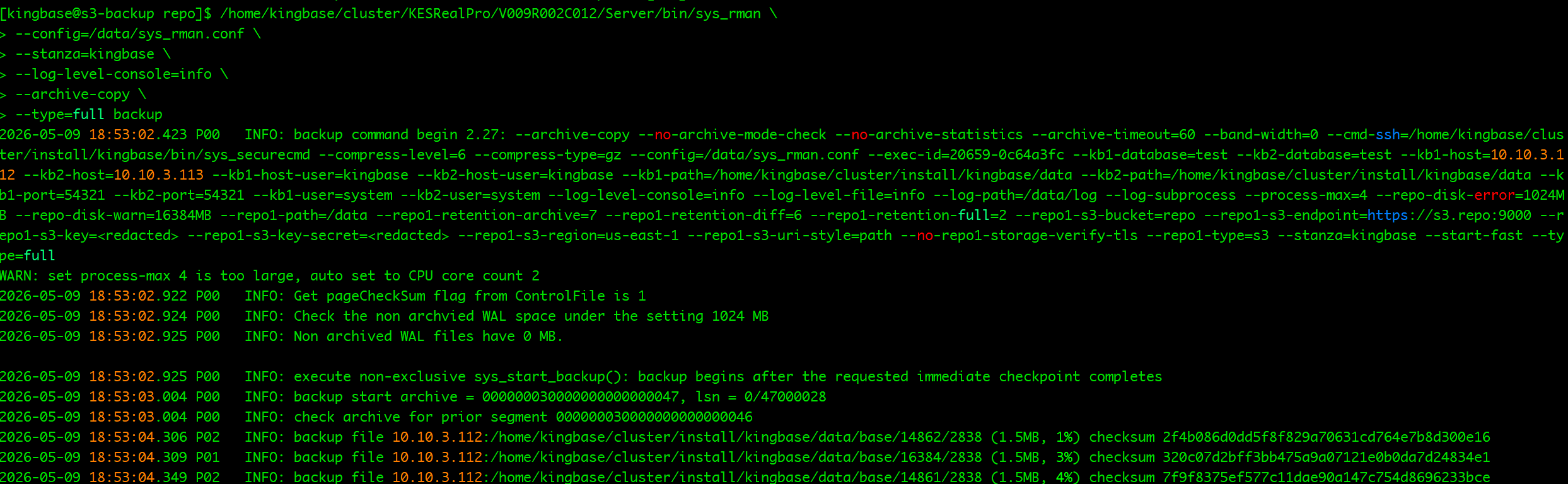
...... 中间略去

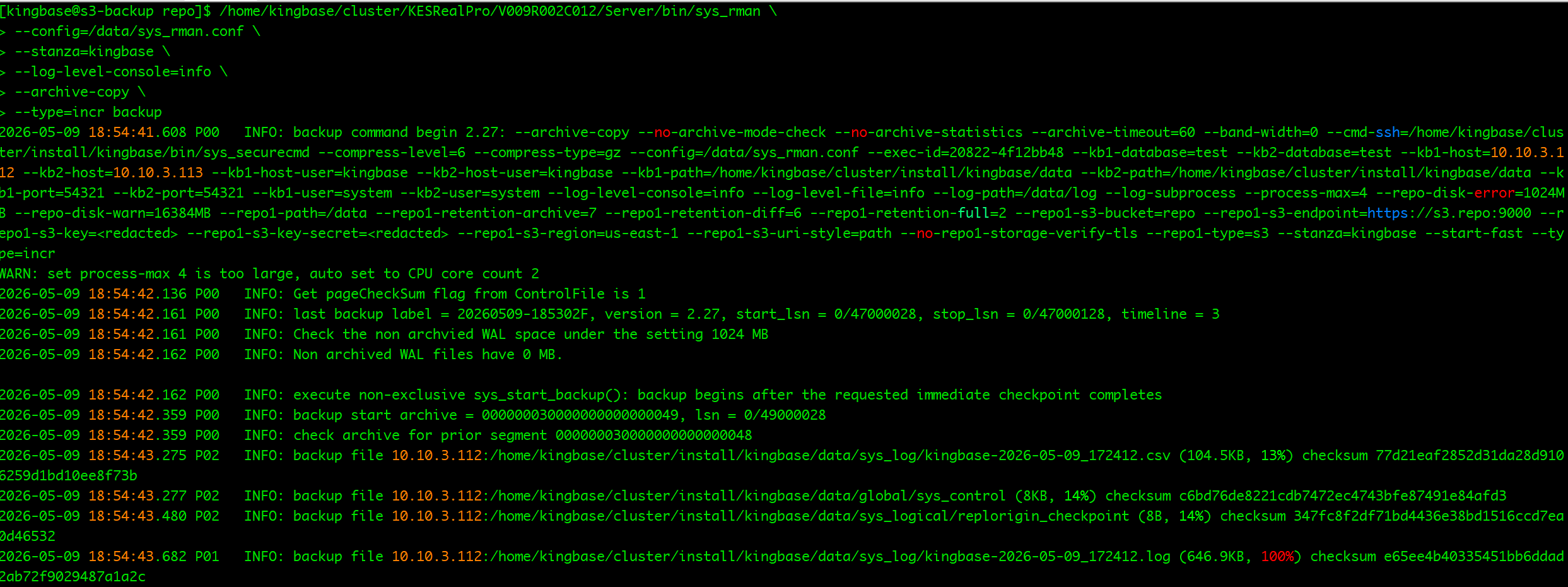
增备
/home/kingbase/cluster/KESRealPro/V009R002C012/Server/bin/sys_rman \
--config=/data/sys_rman.conf \
--stanza=kingbase \
--log-level-console=info \
--archive-copy \
--type=incr backup

查看备份
/home/kingbase/cluster/KESRealPro/V009R002C012/Server/bin/sys_rman \
--config=/data/sys_rman.conf \
--stanza=kingbase \
info
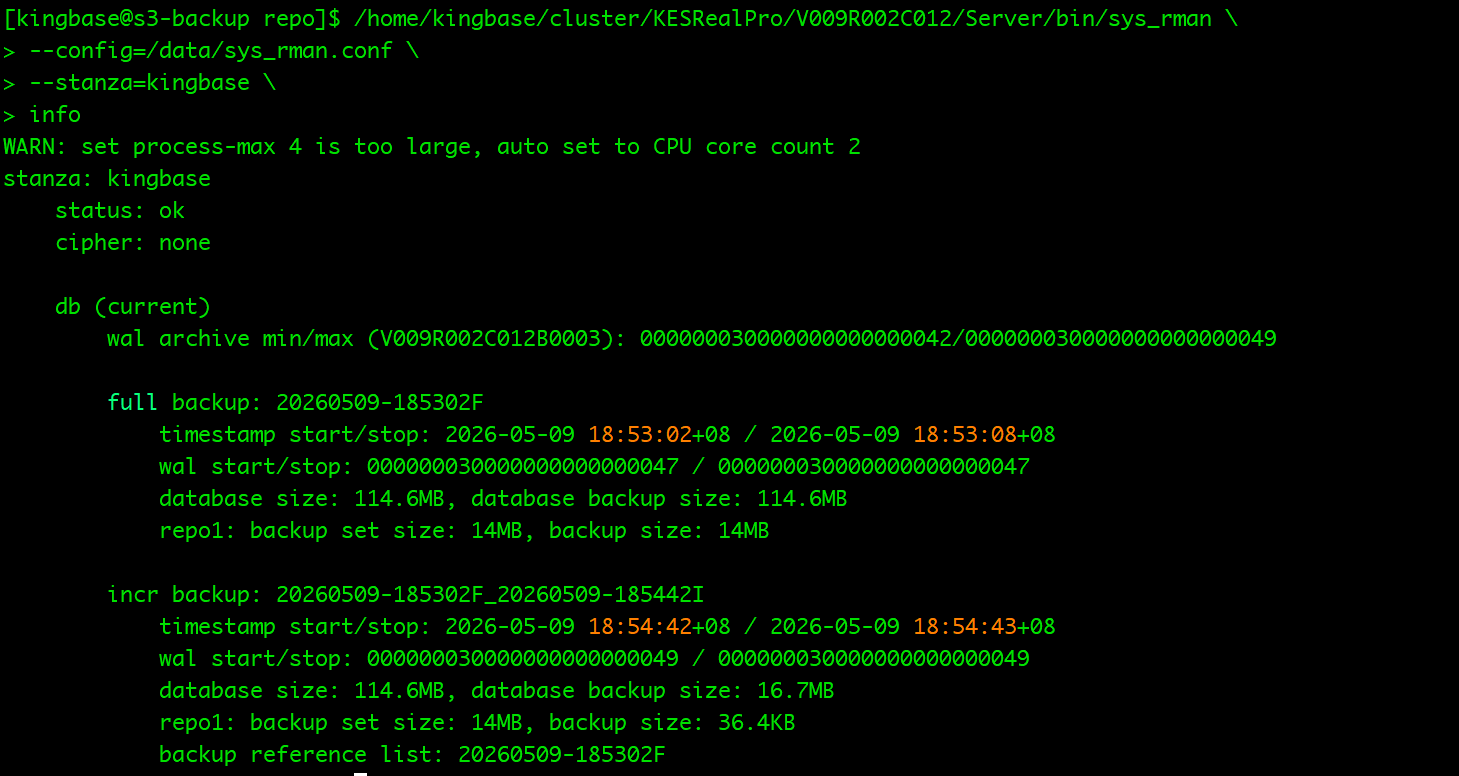
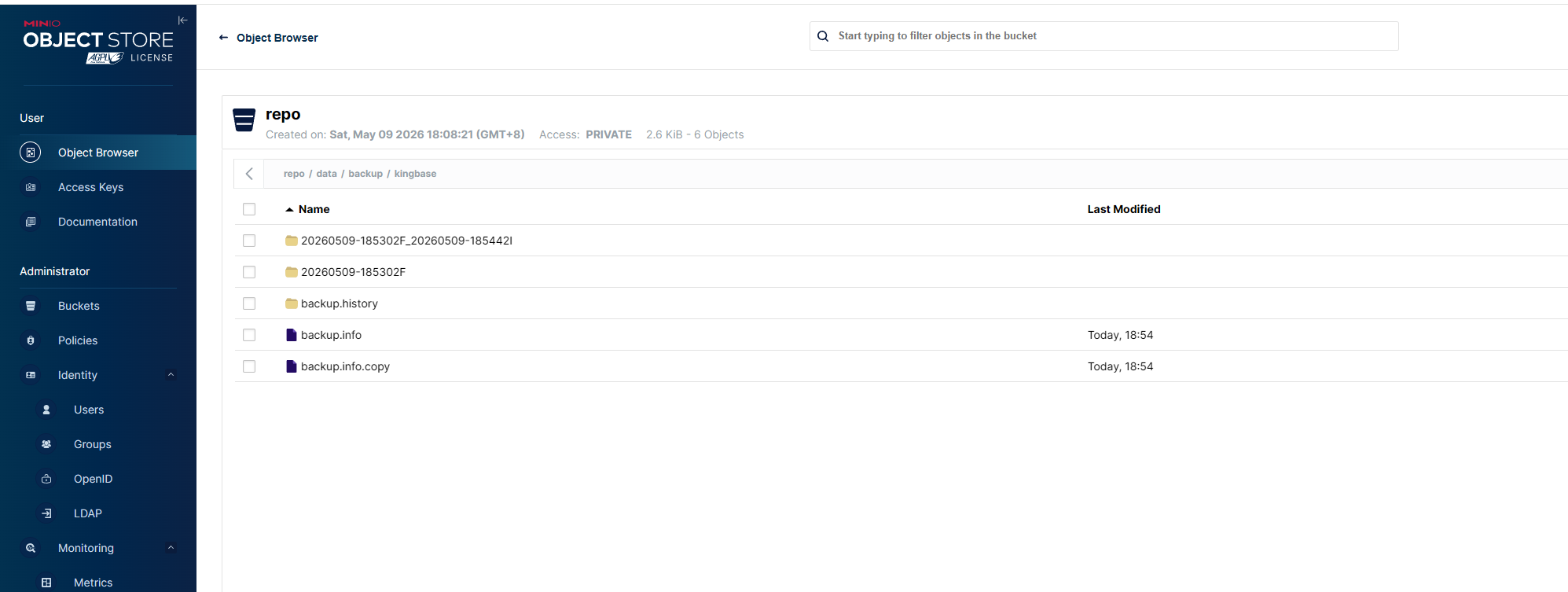
备份成功,现在备份和归档多已经在 minIO 中
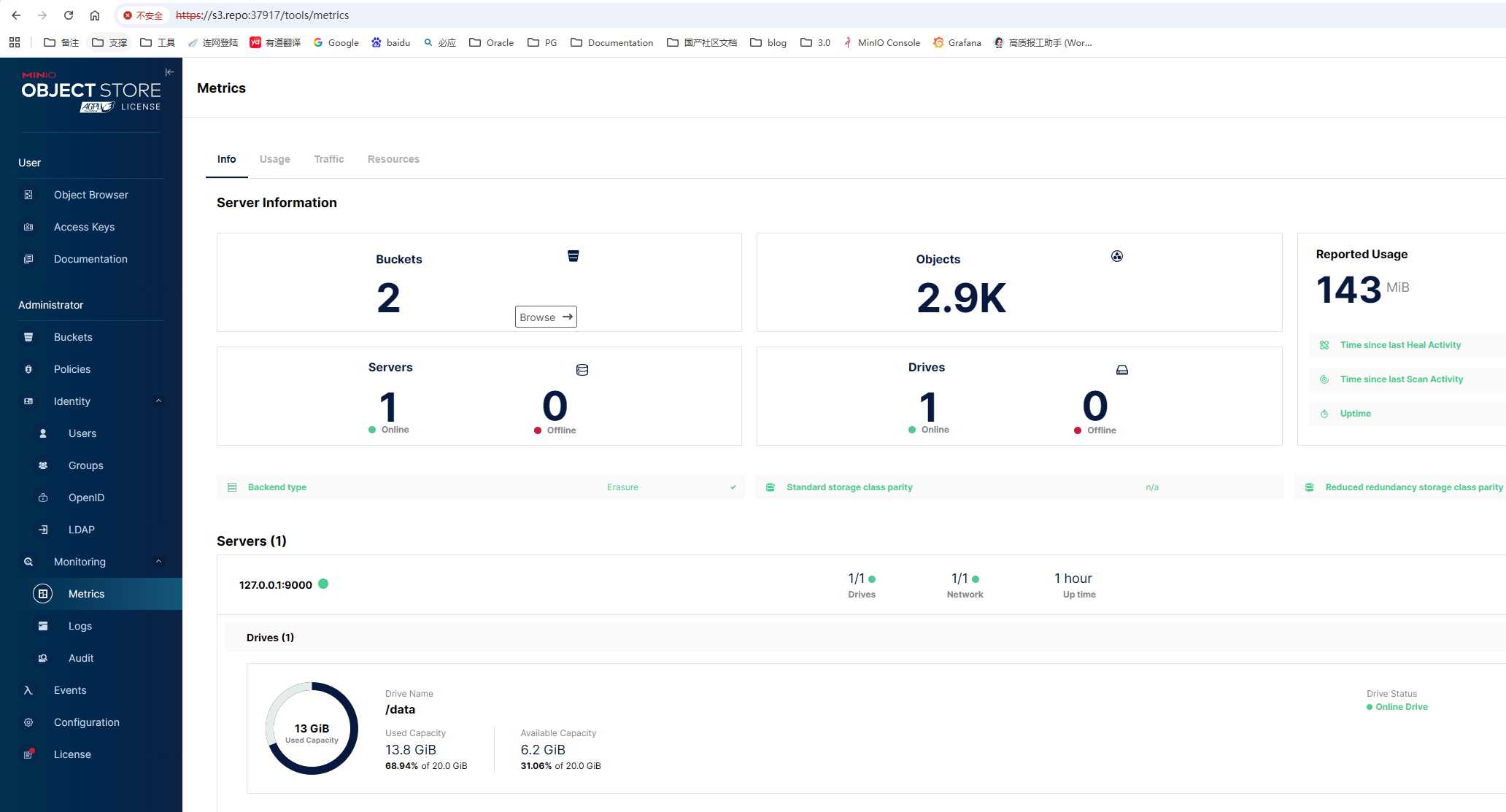
我们来访问下 minIO 的 webUI 页面
监控面板
看下我的备份文件
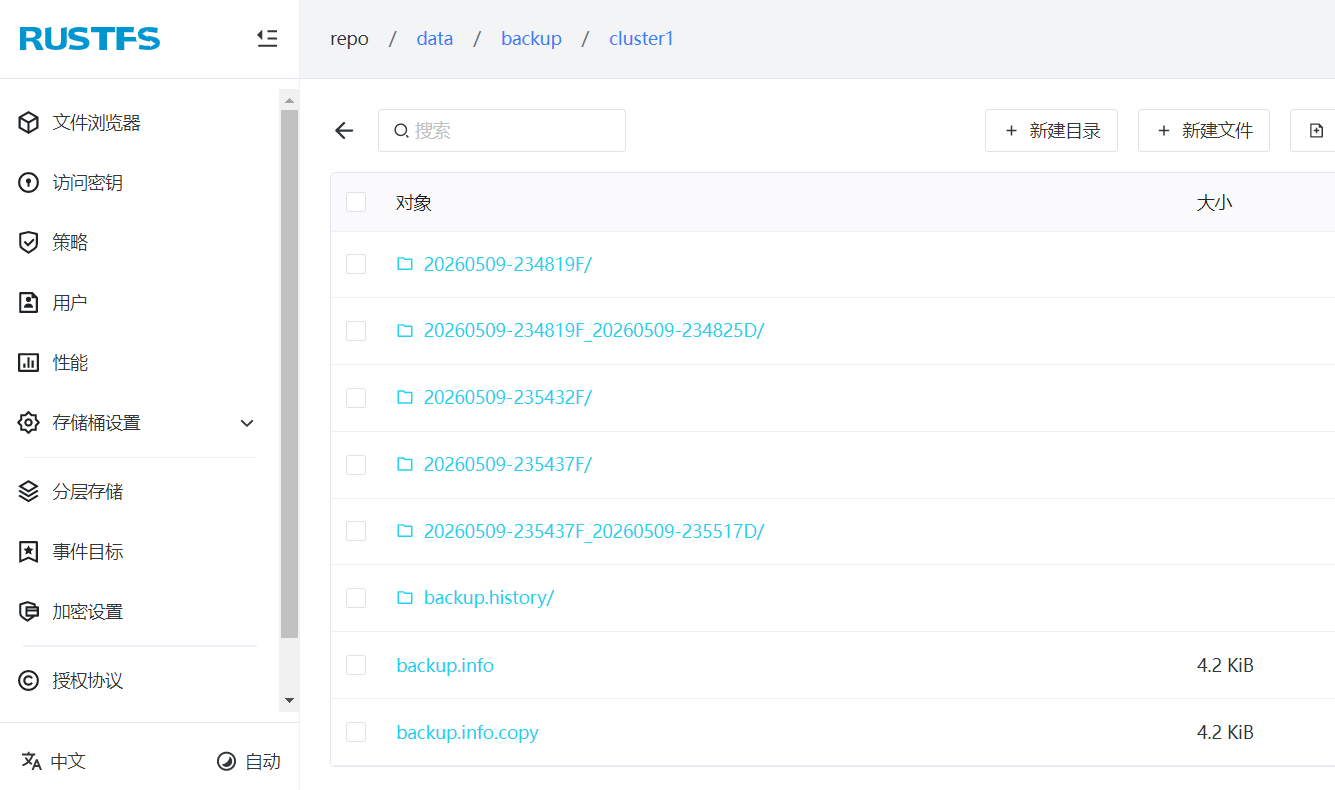
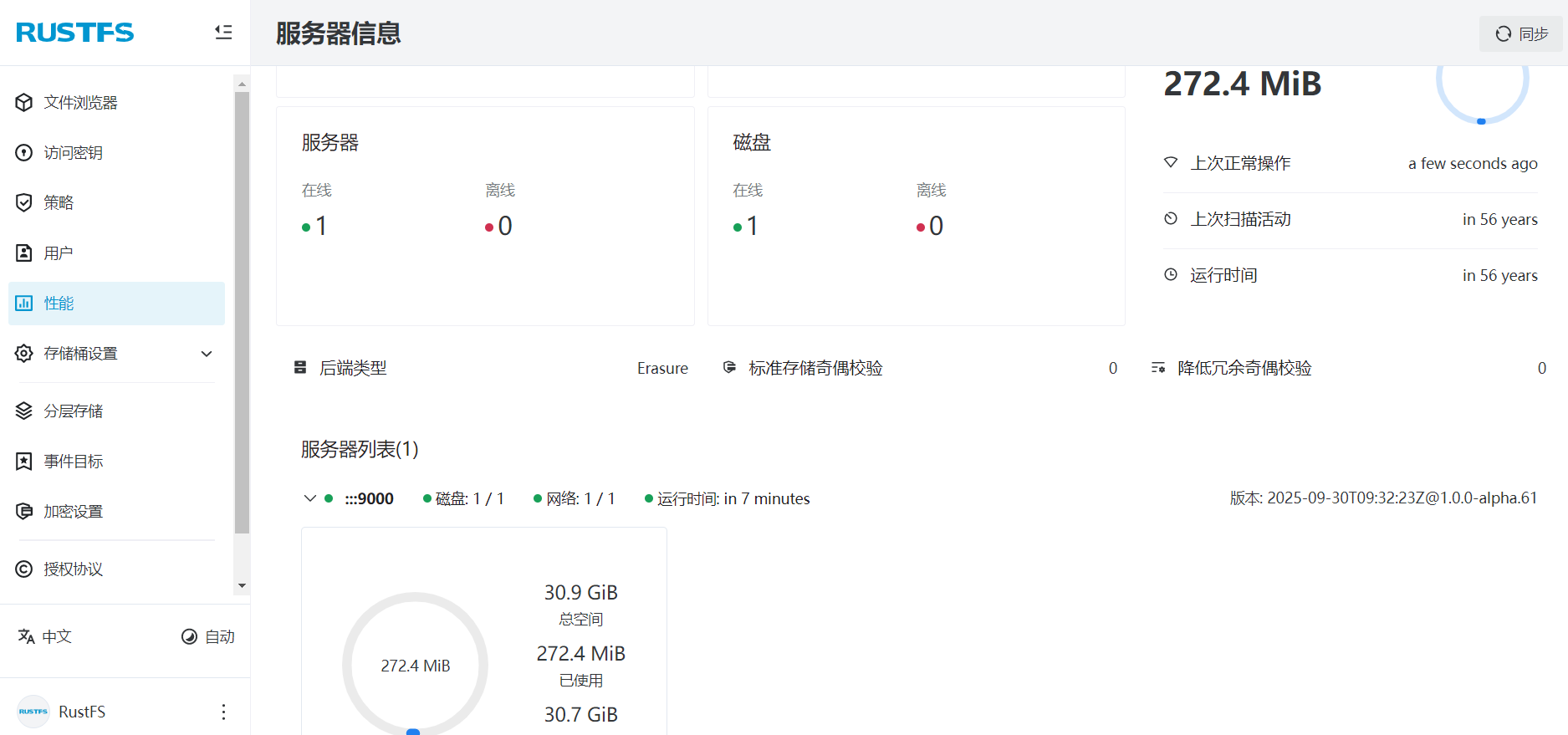
期待 国产 RustFS 越来越好吧!上生产还有待打磨。不过可以配置两个 repo并行, repo1到minIO,repo2到rustFS, 这个我也测试过了。如有问题的小伙伴可以一起交流。
[postgres@S3 soft]$ rustfs --version
Starting Tokio runtime with configured parameters:
worker_threads: 16, max_blocking_threads: 1024, thread_stack_size: 1048576, thread_keep_alive: 60, global_queue_interval: 31, thread_name: rustfs-worker
rustfs 1.0.0-alpha.61
build time : 2025-10-07 23:26:53 +00:00
正常的版本的 RustFS :
[postgres@rustfs ~]$ rustfs --version
rustfs 1.0.0-alpha.99
build time : 2026-04-25 13:45:13 +00:00
build profile: release
build os : linux-x86_64
rust version : rustc 1.95.0 (59807616e 2026-04-14)
到此就结束了,总体来说还行,有几点
(1) S3 存储 使用 sys_backup.sh 初始化,只能支持single 模式(_target_db_style="single" ),不支持 single-pro、cluster。自己验证后也跟原厂确认了无误。
如果想使用 cluster 模式,可以按我的方法改配置文件 sys_rman.conf 手动初始化。这个我觉得 金仓还可以 优化下。
(2) sys_rman 只支持 https 协议,最初我是用 http 协议配置的 MinIO,会显示 认证的问题 (我先测试了单机)。
(3) 初始化脚本一步到位是简单,但是遇到问题,不好定位。
(4) 官方文档对S3存储配置,写的篇幅贼小,细节都没有说明清楚,比如,如果初始化不成功,参数怎么配置,需要支持什么协议,毕竟各家厂商的S3估计五花八门。
(5) 如果用 RustFS 做S3存储,坑还是很多的,有待验证,MinIO还是久经考验的;
