



修改系统时区对数据库时间的影响
背景
最近一个客户误操作,导致系统时区发生了变化,影响了数据库中表的时间。
针对此问题,我们通过下面的实验,验证一下系统时区修改对数据库时间的影响。
一、环境变量中包含时区
1. 构造环境
-- 当前系统时区是+8
[oracle@ora11204 ~]$ date -R
Tue, 12 May 2026 13:26:27 +0800

-- 设置时区环境变量
[oracle@ora11204 ~]$ export TZ=Asia/Shanghai

-- 启动数据库和监听
[oracle@ora11204 ~]$ sqlplus / as sysdba

SQL*Plus: Release 11.2.0.4.0 Production on Tue May 12 13:28:22 2026

Copyright (c) 1982, 2013, Oracle.  All rights reserved.

Connected to an idle instance.

SQL> startup
ORACLE instance started.

Total System Global Area  325685248 bytes
Fixed Size                  2252944 bytes
Variable Size             167776112 bytes
Database Buffers          150994944 bytes
Redo Buffers                4661248 bytes
Database mounted.
Database opened.
SQL>
SQL> exit
Disconnected from Oracle Database 11g Enterprise Edition Release 11.2.0.4.0 - 64bit Production
With the Partitioning, OLAP, Data Mining and Real Application Testing options
[oracle@ora11204 ~]$
[oracle@ora11204 ~]$ lsnrctl start

LSNRCTL for Linux: Version 11.2.0.4.0 - Production on 12-MAY-2026 13:28:47

Copyright (c) 1991, 2013, Oracle.  All rights reserved.

Starting /u01/app/oracle/product/11.2.0.4/dbhome_1/bin/tnslsnr: please wait...

TNSLSNR for Linux: Version 11.2.0.4.0 - Production
System parameter file is /u01/app/oracle/product/11.2.0.4/dbhome_1/network/admin/listener.ora
Log messages written to /u01/app/oracle/diag/tnslsnr/ora11204/listener/alert/log.xml
Listening on: (DESCRIPTION=(ADDRESS=(PROTOCOL=ipc)(KEY=EXTPROC1521)))
Listening on: (DESCRIPTION=(ADDRESS=(PROTOCOL=tcp)(HOST=ora11204)(PORT=1521)))

Connecting to (DESCRIPTION=(ADDRESS=(PROTOCOL=IPC)(KEY=EXTPROC1521)))
STATUS of the LISTENER
------------------------
Alias                     LISTENER
Version                   TNSLSNR for Linux: Version 11.2.0.4.0 - Production
Start Date                12-MAY-2026 13:28:47
Uptime                    0 days 0 hr. 0 min. 0 sec
Trace Level               off
Security                  ON: Local OS Authentication
SNMP                      OFF
Listener Parameter File   /u01/app/oracle/product/11.2.0.4/dbhome_1/network/admin/listener.ora
Listener Log File         /u01/app/oracle/diag/tnslsnr/ora11204/listener/alert/log.xml
Listening Endpoints Summary...
  (DESCRIPTION=(ADDRESS=(PROTOCOL=ipc)(KEY=EXTPROC1521)))
  (DESCRIPTION=(ADDRESS=(PROTOCOL=tcp)(HOST=ora11204)(PORT=1521)))
The listener supports no services
The command completed successfully
[oracle@ora11204 ~]$

-- 检查数据库进程
[oracle@ora11204 ~]$ ps -ef|grep pmon
oracle    2483     1  0 13:28 ?        00:00:00 ora_pmon_LHR11G
oracle    2565  2031  0 13:29 pts/1    00:00:00 grep pmon

[oracle@ora11204 ~]$ strings /proc/2483/environ |grep TZ
TZ=Asia/Shanghai
- 可以看到数据库进程中包含了时区信息。
2. 查看当前时间和时区
session 1: 通过监听连接
[oracle@ora11204 ~]$ sqlplus sxc/sxc@172.88.0.101:1521/orcl

SQL*Plus: Release 11.2.0.4.0 Production on Tue May 12 13:34:59 2026

Copyright (c) 1982, 2013, Oracle.  All rights reserved.

Connected to:
Oracle Database 11g Enterprise Edition Release 11.2.0.4.0 - 64bit Production
With the Partitioning, OLAP, Data Mining and Real Application Testing options

SQL> select sysdate from dual;

SYSDATE
-------------------
2026-05-12 13:35:09

SQL> select systimestamp from dual;

SYSTIMESTAMP
---------------------------------------------------------------------------
12-MAY-26 01.35.16.236378 PM +08:00
- 分析:时区是+8 ,时间是正确的。
session 2 本地连接
[oracle@ora11204 ~]$ sqlplus sxc/sxc

SQL*Plus: Release 11.2.0.4.0 Production on Tue May 12 13:35:51 2026

Copyright (c) 1982, 2013, Oracle.  All rights reserved.

Connected to:
Oracle Database 11g Enterprise Edition Release 11.2.0.4.0 - 64bit Production
With the Partitioning, OLAP, Data Mining and Real Application Testing options

SQL> select sysdate from dual;

SYSDATE
-------------------
2026-05-12 13:35:54

SQL> select systimestamp from dual;

SYSTIMESTAMP
---------------------------------------------------------------------------
12-MAY-26 01.35.56.767798 PM +08:00
- 分析:时区是+8 ,时间是正确的。
3. 修改系统时区
[root@ora11204 ~]# mv /etc/localtime /etc/localtime.bak
[root@ora11204 ~]# cp /usr/share/zoneinfo/Etc/UTC /etc/localtime
[root@ora11204 ~]# date -R
Tue, 12 May 2026 05:37:56 +0000
- 分析:时区从+8 变成+0 ,系统时间自动倒退了8小时
4. 再次查看时间和时区
- session 1 和 session 2 还是修改时区之前的session,没有断开重连。
session 1
SQL> select sysdate from dual;

SYSDATE
-------------------
2026-05-12 13:38:45

SQL> select systimestamp from dual;

SYSTIMESTAMP
---------------------------------------------------------------------------
12-MAY-26 01.38.56.549010 PM +08:00
- 分析:时区是+8 ,时间是正确的。
session2
SQL> select sysdate from dual;

SYSDATE
-------------------
2026-05-12 13:38:49

SQL> select systimestamp from dual;

SYSTIMESTAMP
---------------------------------------------------------------------------
12-MAY-26 01.38.53.414766 PM +08:00
- 分析:时区是+8 ,时间是正确的。
新的 session 3:本地连接
[oracle@ora11204 ~]$ sqlplus / as sysdba

SQL*Plus: Release 11.2.0.4.0 Production on Tue May 12 05:39:52 2026

Copyright (c) 1982, 2013, Oracle.  All rights reserved.

Connected to:
Oracle Database 11g Enterprise Edition Release 11.2.0.4.0 - 64bit Production
With the Partitioning, OLAP, Data Mining and Real Application Testing options

SQL> select sysdate from dual;

SYSDATE
-------------------
2026-05-12 05:39:54

SQL> select systimestamp from dual;

SYSTIMESTAMP
---------------------------------------------------------------------------
12-MAY-26 05.39.57.255209 AM +00:00
- 分析:时区是+0 ,时间跟操作系统一样,是错误的。
新的session 4:通过监听连接
[oracle@ora11204 ~]$ sqlplus sxc/sxc@172.88.0.101:1521/orcl

SQL*Plus: Release 11.2.0.4.0 Production on Tue May 12 05:40:24 2026  ==》注意看这里的连接时间是05:40

Copyright (c) 1982, 2013, Oracle.  All rights reserved.

Connected to:
Oracle Database 11g Enterprise Edition Release 11.2.0.4.0 - 64bit Production
With the Partitioning, OLAP, Data Mining and Real Application Testing options

SQL> select systimestamp from dual;

SYSTIMESTAMP
---------------------------------------------------------------------------
12-MAY-26 01.40.26.290987 PM +08:00

SQL> select sysdate from dual;

SYSDATE
-------------------
2026-05-12 13:40:29

SQL> select systimestamp from dual;

SYSTIMESTAMP
---------------------------------------------------------------------------
12-MAY-26 01.40.32.248420 PM +08:00
- 分析:时区是+8 ,时间是正确的,并没有和操作系统时间保持一致。
5. 小结
-
session 1、2 因为是修改时区之前的session,所以时区都还是+8,数据库读取的时间是对的,不受系统时区修改影响。
-
session 3 是修改时区之后,本地连接session ,时区和操作系统一样,变成+0,数据库读取的时间和服务器一样,是错误的。
-
session 4 是修改时区之后,通过监听连接session ,时区读取的是数据库进程启动时候环境变量时区+8,数据库读取的时间是对的,也不受系统时区修改影响。
6. 延申
6.1 通过date -s 修改时间
- 只更改了时间,时区未修改。
[root@ora11204 ~]# date -s "2026-05-12 13:55:43"
Tue May 12 13:55:43 UTC 2026

[root@ora11204 ~]# date -R
Tue, 12 May 2026 13:55:48 +0000
6.2 再次查看时间
-- 1) 修改时区之前的session 或者 修改时区之后通过监听连接的session
SQL> select sysdate from dual;

SYSDATE
-------------------
2026-05-12 21:56:09

分析:sysdate 时间比服务器时间快了8小时,因为它计算系统时间又加上了时区,这些session的时区是+8,因此都快了8小时


-- 2) 修改时区之后本地连接的session
SQL> select sysdate from dual;

SYSDATE
-------------------
2026-05-12 13:56:16

分析:sysdate 时间和服务器时间保持一样。
二、还原环境
[root@ora11204 ~]# mv /etc/localtime.bak /etc/localtime
mv: overwrite `/etc/localtime'? y
[root@ora11204 ~]#
[root@ora11204 ~]# date -R
Tue, 12 May 2026 22:10:21 +0800
[root@ora11204 ~]#
[root@ora11204 ~]# /usr/sbin/ntpdate ntp1.aliyun.com
12 May 14:10:08 ntpdate[9284]: step time server 8.149.241.96 offset -28828.719738 sec
[root@ora11204 ~]# date -R
Tue, 12 May 2026 14:10:18 +0800
[root@ora11204 ~]# su - oracle
[oracle@ora11204 ~]$ sqlplus / as sysdba

SQL*Plus: Release 11.2.0.4.0 Production on Tue May 12 14:10:24 2026

Copyright (c) 1982, 2013, Oracle.  All rights reserved.

Connected to:
Oracle Database 11g Enterprise Edition Release 11.2.0.4.0 - 64bit Production
With the Partitioning, OLAP, Data Mining and Real Application Testing options

SQL> shutdown immediate
Database closed.
Database dismounted.
ORACLE instance shut down.
SQL>
SQL> exit
Disconnected from Oracle Database 11g Enterprise Edition Release 11.2.0.4.0 - 64bit Production
With the Partitioning, OLAP, Data Mining and Real Application Testing options
[oracle@ora11204 ~]$
[oracle@ora11204 ~]$ lsnrctl stop

LSNRCTL for Linux: Version 11.2.0.4.0 - Production on 12-MAY-2026 14:10:59

Copyright (c) 1991, 2013, Oracle.  All rights reserved.

Connecting to (DESCRIPTION=(ADDRESS=(PROTOCOL=IPC)(KEY=EXTPROC1521)))
The command completed successfully
三、环境变量中不包含时区
1. 构造环境
-- 当前系统时区是+8
[oracle@ora11204 ~]$ date -R
Tue, 12 May 2026 14:14:05 +0800

-- 启动数据库和监听
[oracle@ora11204 ~]$ sqlplus / as sysdba

SQL*Plus: Release 11.2.0.4.0 Production on Tue May 12 14:14:22 2026

Copyright (c) 1982, 2013, Oracle.  All rights reserved.

Connected to an idle instance.

SQL> startup
ORACLE instance started.
Total System Global Area  325685248 bytes
Fixed Size                  2252944 bytes
Variable Size             167776112 bytes
Database Buffers          150994944 bytes
Redo Buffers                4661248 bytes
Database mounted.
Database opened.
SQL> exit
Disconnected from Oracle Database 11g Enterprise Edition Release 11.2.0.4.0 - 64bit Production
With the Partitioning, OLAP, Data Mining and Real Application Testing options
[oracle@ora11204 ~]$
[oracle@ora11204 ~]$ lsnrctl start

LSNRCTL for Linux: Version 11.2.0.4.0 - Production on 12-MAY-2026 14:14:33

Copyright (c) 1991, 2013, Oracle.  All rights reserved.

Starting /u01/app/oracle/product/11.2.0.4/dbhome_1/bin/tnslsnr: please wait...

TNSLSNR for Linux: Version 11.2.0.4.0 - Production
System parameter file is /u01/app/oracle/product/11.2.0.4/dbhome_1/network/admin/listener.ora
Log messages written to /u01/app/oracle/diag/tnslsnr/ora11204/listener/alert/log.xml
Listening on: (DESCRIPTION=(ADDRESS=(PROTOCOL=ipc)(KEY=EXTPROC1521)))
Listening on: (DESCRIPTION=(ADDRESS=(PROTOCOL=tcp)(HOST=ora11204)(PORT=1521)))

Connecting to (DESCRIPTION=(ADDRESS=(PROTOCOL=IPC)(KEY=EXTPROC1521)))
STATUS of the LISTENER
------------------------
Alias                     LISTENER
Version                   TNSLSNR for Linux: Version 11.2.0.4.0 - Production
Start Date                12-MAY-2026 14:14:33
Uptime                    0 days 0 hr. 0 min. 0 sec
Trace Level               off
Security                  ON: Local OS Authentication
SNMP                      OFF
Listener Parameter File   /u01/app/oracle/product/11.2.0.4/dbhome_1/network/admin/listener.ora
Listener Log File         /u01/app/oracle/diag/tnslsnr/ora11204/listener/alert/log.xml
Listening Endpoints Summary...
  (DESCRIPTION=(ADDRESS=(PROTOCOL=ipc)(KEY=EXTPROC1521)))
  (DESCRIPTION=(ADDRESS=(PROTOCOL=tcp)(HOST=ora11204)(PORT=1521)))
The listener supports no services
The command completed successfully


-- 检查数据库进程
[oracle@ora11204 ~]$ ps -ef|grep pmon
oracle    3058     1  0 14:14 ?        00:00:00 ora_pmon_LHR11G
oracle    3133  3017  0 14:15 pts/8    00:00:00 grep pmon

[oracle@ora11204 ~]$ strings /proc/3058/environ |grep TZ
[oracle@ora11204 ~]$
- 可以看到数据库进程不包含时区信息了。
2. 查看当前时间和时区
session 1: 通过监听连接
[oracle@ora11204 ~]$ sqlplus sxc/sxc@172.88.0.101:1521/orcl

SQL*Plus: Release 11.2.0.4.0 Production on Tue May 12 14:16:12 2026

Copyright (c) 1982, 2013, Oracle.  All rights reserved.

Connected to:
Oracle Database 11g Enterprise Edition Release 11.2.0.4.0 - 64bit Production
With the Partitioning, OLAP, Data Mining and Real Application Testing options

SQL> select sysdate from dual;

SYSDATE
-------------------
2026-05-12 14:16:18

SQL> select systimestamp from dual;

SYSTIMESTAMP
---------------------------------------------------------------------------
12-MAY-26 02.16.21.951322 PM +08:00
- 分析:时区是+8 ,时间是正确的。
session 2 本地连接
[oracle@ora11204 ~]$ sqlplus sxc/sxc

SQL*Plus: Release 11.2.0.4.0 Production on Tue May 12 14:16:34 2026

Copyright (c) 1982, 2013, Oracle.  All rights reserved.

Connected to:
Oracle Database 11g Enterprise Edition Release 11.2.0.4.0 - 64bit Production
With the Partitioning, OLAP, Data Mining and Real Application Testing options

SQL> select sysdate from dual;

SYSDATE
-------------------
2026-05-12 14:16:39

SQL> select systimestamp from dual;

SYSTIMESTAMP
---------------------------------------------------------------------------
12-MAY-26 02.16.43.010633 PM +08:00
- 分析:时区是+8 ,时间是正确的。
3. 修改系统时区
[root@ora11204 ~]# mv /etc/localtime /etc/localtime.bak
[root@ora11204 ~]# cp /usr/share/zoneinfo/Etc/UTC /etc/localtime
[root@ora11204 ~]# date -R
Tue, 12 May 2026 06:17:10 +0000
- 分析:时区从+8 变成+0 ,系统时间自动倒退了8小时
4. 再次查看时间和时区
- session 1 和 session 2 还是修改时区之前的session,没有断开重连。
session 1
SQL> select sysdate from dual;

SYSDATE
-------------------
2026-05-12 14:17:41

SQL> select systimestamp from dual;

SYSTIMESTAMP
---------------------------------------------------------------------------
12-MAY-26 02.17.44.583175 PM +08:00
- 分析:时区是+8 ,时间是正确的,不受影响。
session2
SQL> select sysdate from dual;

SYSDATE
-------------------
2026-05-12 14:17:53

SQL> select systimestamp from dual;

SYSTIMESTAMP
---------------------------------------------------------------------------
12-MAY-26 02.17.54.590118 PM +08:00
- 分析:时区是+8 ,时间是正确的,不受影响。
新的 session 3:本地连接
[oracle@ora11204 ~]$ sqlplus / as sysdba

SQL*Plus: Release 11.2.0.4.0 Production on Tue May 12 06:18:23 2026

Copyright (c) 1982, 2013, Oracle.  All rights reserved.

Connected to:
Oracle Database 11g Enterprise Edition Release 11.2.0.4.0 - 64bit Production
With the Partitioning, OLAP, Data Mining and Real Application Testing options

SQL> select sysdate from dual;

SYSDATE
-------------------
2026-05-12 06:18:25

SQL> select systimestamp from dual;

SYSTIMESTAMP
---------------------------------------------------------------------------
12-MAY-26 06.18.29.694607 AM +00:00
- 分析:时区是+0 ,时间跟操作系统一样,是错误的。
新的session 4:通过监听连接
[oracle@ora11204 ~]$  sqlplus sxc/sxc@172.88.0.101:1521/orcl

SQL*Plus: Release 11.2.0.4.0 Production on Tue May 12 06:18:41 2026

Copyright (c) 1982, 2013, Oracle.  All rights reserved.

Connected to:
Oracle Database 11g Enterprise Edition Release 11.2.0.4.0 - 64bit Production
With the Partitioning, OLAP, Data Mining and Real Application Testing options

SQL> select sysdate from dual;

SYSDATE
-------------------
2026-05-12 06:18:44

SQL> select systimestamp from dual;

SYSTIMESTAMP
---------------------------------------------------------------------------
12-MAY-26 06.18.47.643038 AM +00:00
- 分析:时区是+0 ,时间跟操作系统一样,是错误的。
5. 小结
-
session 1、2 因为是修改时区之前的session,所以时区都还是+8,数据库读取的时间是对的,不受系统时区修改影响。
-
session 3 是修改时区之后,本地连接session ,时区和操作系统一样,变成+0,数据库读取的时间和服务器一样,是错误的。
-
session 4 是修改时区之后,通过监听连接session ,但是数据库进程中不包含时区信息,所以读取的也是当前系统时区,变成+0,数据库读取的时间和服务器一样,是错误的。
6. 延申
6.1 通过date -s 修改时间
- 只更改了时间,时区未修改。
[root@ora11204 ~]# date -s "2026-05-12 14:21:43"
Tue May 12 14:21:43 UTC 2026

[root@ora11204 ~]# date -R
Tue, 12 May 2026 14:21:48 +0000
6.2 再次查看时间
-- 1) 修改时区之前的session
SQL>  select sysdate from dual;

SYSDATE
-------------------
2026-05-12 22:22:14


分析:sysdate 时间比服务器时间快了8小时,因为它系统时间又加上了时区,这些session的时区是+8,因此都快了8小时


-- 2) 修改时区之后新的session
SQL> select sysdate from dual;

SYSDATE
-------------------
2026-05-12 14:22:35


分析:sysdate 时间和服务器时间保持一样。
四、总结
- 修改操作系统时区,从+8 改成 +0
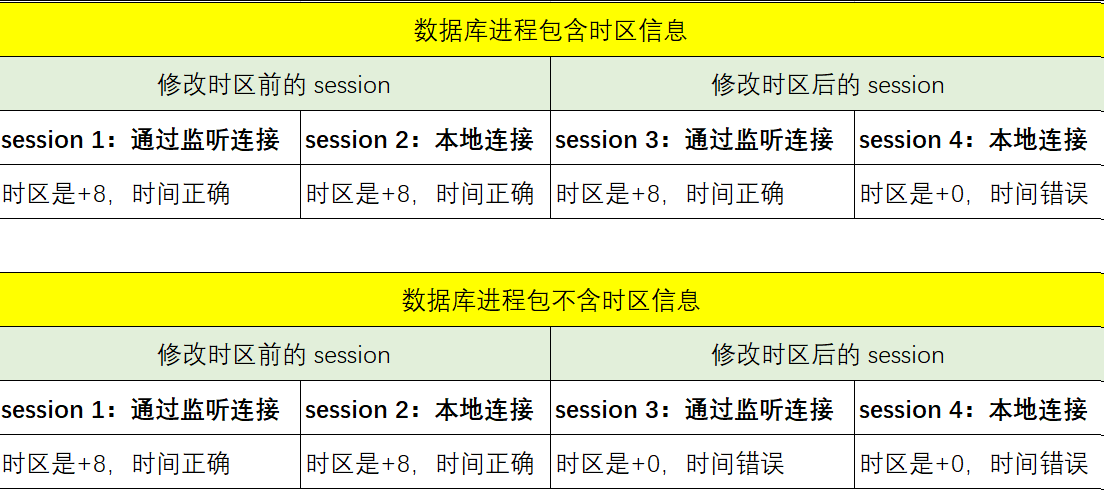
- 另外测试,监听进程中是否包含时区,不影响上述测试结果,也就是监听是否在有时区环境变量下启动,不影响。
最后修改时间:2026-05-13 09:37:49
「喜欢这篇文章,您的关注和赞赏是给作者最好的鼓励」
关注作者
【版权声明】本文为墨天轮用户原创内容,转载时必须标注文章的来源(墨天轮),文章链接,文章作者等基本信息,否则作者和墨天轮有权追究责任。如果您发现墨天轮中有涉嫌抄袭或者侵权的内容,欢迎发送邮件至:contact@modb.pro进行举报,并提供相关证据,一经查实,墨天轮将立刻删除相关内容。
