



Oracle TEMP文件报 ORA-01187 / ORA-01110 的处理案例
一、故障现象
接到客户电话反馈说查询视图报错:
ORA-01187: 由于验证测试失败而无法从文件读取
ORA-01110: 数据文件 201: '/u01/app/oracle/oradata/WMPROD/temp01.dbf'
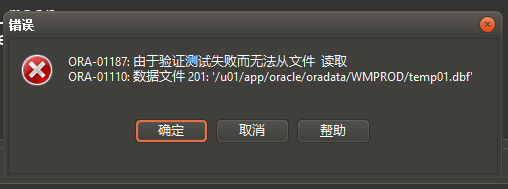
这类报错容易误判为普通数据文件损坏。实际上,如果 ORA-01110 指向的是 临时文件 tempfile,处理思路不要做 recover datafile。
TEMP 文件不保存业务数据,标准处理是重建临时表空间。
二、处理过程
检查 TEMP 当前使用率
先看 TEMP 表空间总量、已用、剩余、使用率
set lines 300 pages 1000
col tablespace_name for a20

select tablespace_name,
       round(sum(bytes_used + bytes_free) / 1024 / 1024 / 1024, 2) total_gb,
       round(sum(bytes_used) / 1024 / 1024 / 1024, 2) used_gb,
       round(sum(bytes_free) / 1024 / 1024 / 1024, 2) free_gb,
       round(sum(bytes_used) / nullif(sum(bytes_used + bytes_free),0) * 100, 2) used_pct
from v$temp_space_header
group by tablespace_name
order by tablespace_name;
本次现场查询结果类似:
TABLESPACE_NAME        TOTAL_GB    USED_GB    FREE_GB   USED_PCT
-------------------- ---------- ---------- ---------- ----------
TEMP                         32         32          0      100.00
继续查 tempfile 明细:
set lines 300 pages 1000
col tablespace_name for a20
col file_name for a120
col autoextensible for a15

select tablespace_name,
       file_id,
       file_name,
       round(bytes / 1024 / 1024 / 1024, 2) size_gb,
       autoextensible,
       round(maxbytes / 1024 / 1024 / 1024, 2) max_gb,
       status
from dba_temp_files
order by tablespace_name, file_id;
输出查询结果:
TEMP 1 /u01/app/oracle/oradata/WMPROD/temp01.dbf 32G YES 32G ONLINE
这里有一个关键判断:temp01.dbf 显示 AUTOEXTENSIBLE=YES,但是 MAX_GB=32。说明它已经到最大值,实际上不能继续扩展。
重建临时表空间
1. 创建新临时表空间
create temporary tablespace TEMP_NEW
tempfile '/u01/app/oracle/oradata/WMPROD/temp_new01.dbf'
size 31G
autoextend off;
再添加第二个 tempfile:
alter tablespace TEMP_NEW add tempfile
'/u01/app/oracle/oradata/WMPROD/temp_new02.dbf'
size 31G
autoextend off;
2. 切换数据库默认临时表空间
先确认当前默认 TEMP:
select property_name,
       property_value
from database_properties
where property_name = 'DEFAULT_TEMP_TABLESPACE';
切换:
alter database default temporary tablespace TEMP_NEW;
再次确认:
select property_name,
       property_value
from database_properties
where property_name = 'DEFAULT_TEMP_TABLESPACE';
结果:
DEFAULT_TEMP_TABLESPACE TEMP_NEW
3. 检查是否还有用户配置旧 TEMP
set lines 300 pages 1000
col username for a30
col temporary_tablespace for a30
col account_status for a30

select username,
       temporary_tablespace,
       account_status
from dba_users
where temporary_tablespace = 'TEMP'
order by username;
如果还有业务用户使用旧 TEMP,例如 WMPROD:
alter user WMPROD temporary tablespace TEMP_NEW;
也可以批量生成:
set pages 0 lines 300 feedback off heading off verify off

select 'alter user "' || username || '" temporary tablespace TEMP_NEW;'
from dba_users
where temporary_tablespace = 'TEMP'
order by username;
本次处理时,切换默认临时表空间后,查询 dba_users where temporary_tablespace='TEMP' 已经没有记录,说明新会话默认会走 TEMP_NEW。
删除旧 TEMP 表空间
切换完成后尝试删除旧 TEMP:
drop tablespace TEMP including contents and datafiles;
如果报:
ORA-60100: dropping temporary tablespace with tablespace ID number (...) is blocked due to sort segments
说明旧 TEMP 仍有 sort segment 或老会话残留。查 gv$sort_segment:
set lines 300 pages 1000
col tablespace_name for a20

select inst_id,
       tablespace_name,
       current_users,
       total_extents,
       used_extents,
       free_extents,
       round(used_blocks * 8192 / 1024 / 1024, 2) used_mb,
       round(free_blocks * 8192 / 1024 / 1024, 2) free_mb
from gv$sort_segment
where tablespace_name = 'TEMP'
order by inst_id, tablespace_name;
本次现场结果是:
INST_ID TABLESPACE_NAME CURRENT_USERS TOTAL_EXTENTS USED_EXTENTS FREE_EXTENTS USED_MB FREE_MB
------- --------------- ------------- ------------- ------------ ------------ ------- -------
1       TEMP                     1018         33544         1023        32521    1023   32521
这说明旧 TEMP 上仍有 1018 个使用者,不能删除。随后查询 gv$tempseg_usage 也能看到大量 WMPROD 的 INACTIVE JDBC 连接仍然挂在旧 TEMP 上。
继续查旧 TEMP 的会话来源:
set lines 300 pages 1000
col username for a20
col machine for a35
col program for a45
col status for a15

select s.username,
       s.machine,
       s.program,
       s.status,
       count(*) session_count,
       round(sum(u.blocks * p.value)/1024/1024,2) temp_mb
from gv$tempseg_usage u
join gv$session s
  on u.inst_id = s.inst_id
 and u.session_addr = s.saddr
join gv$parameter p
  on p.inst_id = u.inst_id
 and p.name = 'db_block_size'
where u.tablespace = 'TEMP'
group by s.username,
         s.machine,
         s.program,
         s.status
order by session_count desc;
处理选择:
| 场景 | 建议 |
|---|---|
| 业务允许重启应用 | 重启应用连接池,让老连接释放旧 TEMP |
| 业务允许 kill 会话 | 生成 kill 语句清理旧 TEMP 会话 |
| 不允许影响业务 | 保留旧 TEMP,等低峰窗口重启数据库 |
生成 kill 语句示例,RAC 环境要带 ,@inst_id:
set lines 300 pages 0 heading off feedback off verify off
spool /tmp/kill_old_temp_sessions_rac.sql

select distinct
       'alter system kill session ''' ||
       s.sid || ',' || s.serial# || ',@' || s.inst_id || ''' immediate;'
from gv$tempseg_usage u
join gv$session s
  on u.inst_id = s.inst_id
 and u.session_addr = s.saddr
where u.tablespace = 'TEMP'
  and s.username = 'WMPROD'
  and s.status = 'INACTIVE';

spool off
清理后再次确认:
select count(*) old_temp_sessions
from gv$tempseg_usage
where tablespace = 'TEMP';

select inst_id,
       tablespace_name,
       current_users,
       used_extents,
       round(used_blocks * 8192 / 1024 / 1024, 2) used_mb
from gv$sort_segment
where tablespace_name = 'TEMP';
如果 current_users=0,再执行:
drop tablespace TEMP including contents and datafiles;
把 TEMP_NEW 改回 TEMP
旧 TEMP 删除成功后,为了兼容历史脚本、监控和巡检习惯,建议把 TEMP_NEW 改回 TEMP:
alter tablespace TEMP_NEW rename to TEMP;
确认默认临时表空间:
select property_name,
       property_value
from database_properties
where property_name = 'DEFAULT_TEMP_TABLESPACE';
如果仍显示 TEMP_NEW,再执行:
alter database default temporary tablespace TEMP;
最终确认:
set lines 300 pages 1000
col tablespace_name for a20
col file_name for a120

select tablespace_name,
       file_id,
       file_name,
       round(bytes/1024/1024/1024,2) size_gb,
       status
from dba_temp_files
order by tablespace_name, file_id;
期望结果:
TABLESPACE_NAME         FILE_ID FILE_NAME                                                       SIZE_GB STATUS
-------------------- ---------- ------------------------------------------------------------ ---------- ----------
TEMP                          1 /u01/app/oracle/oradata/WMPROD/temp_new01.dbf                        31 ONLINE
TEMP                          2 /u01/app/oracle/oradata/WMPROD/temp_new02.dbf                        31 ONLINE
三、最终结论
ORA-01187 / ORA-01110 如果指向 TEMP 文件,本质上是 临时文件不可读或校验失败,不是业务数据损坏。处理重点重建临时表空间 TEMP_NEW 并切换默认临时表空间,旧 TEMP 因老连接和 sort segment 残留无法立即删除,最终需要释放老连接/重启后删除,并把 TEMP_NEW 改回 TEMP。
