



Greenplum DB 6.0.0 源码包 构建RPM
自 Greenplum 7 起,VMware 已将核心代码闭源 (被博通收购),受 Greenplum 社区策略调整影响,7.x 及后续版本已不再开源,官方也未发布对应 RPM 包。
目前在国产操作系统(如 Ky10)上,只能通过自行编译 GPDB 6.x 源码来满足部署需求。
一、环境说明
| 项目 | 说明 |
|---|---|
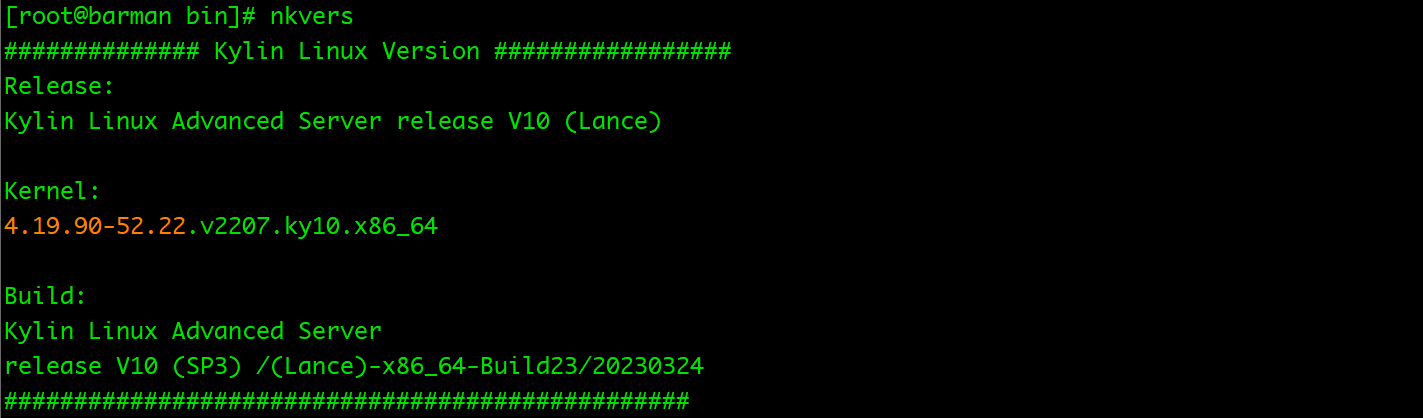
| OS | 银河麒麟 V10(Kylin V10 -SP3) |
| 架构 | x86_64 |
| GPDB | 6.0.0 |
| 构建方式 | 源码 → RPM |
| Python | Python 2.7 |
| ORCA | 关闭 |
| PyGreSQL | 不参与构建 |
环境信息:
二、准备构建环境
1、 基础工具
yum install -y \
  epel-release \
  rpm-build rpmdevtools \
  git wget curl \
  which sudo \
  python2 python2-devel \
  bison flex \
  readline-devel zlib-devel \
  openssl-devel libcurl-devel \
  pam-devel libxml2-devel \
  libxslt-devel \
  bzip2-devel \
  libevent-devel \
  perl-ExtUtils-MakeMaker \
  gcc gcc-c++ \
  cmake
2、 GPDB 额外依赖
yum install -y \
  apr-devel \
  libcurl-devel \
  libevent-devel \
  libyaml-devel \
  xerces-c \
  xerces-c-devel
3、 初始化 rpmbuild 目录
rpmdev-setuptree
ls ~/rpmbuild

三、准备源码
cp /opt/gpdb-6.0.0.zip ~/rpmbuild/SOURCES/

cd ~/rpmbuild/SOURCES
unzip gpdb-6.0.0.zip

四、准备RPM Spec
文件路径:
vi ~/rpmbuild/SPECS/greenplum-db-6.0.0.spec
%define gphome   /usr/local/greenplum-db-%{version}
%define version  6.0.0
%define release  1%{?dist}

%global debug_package %{nil}

Name:           greenplum-db
Version:        %{version}
Release:        %{release}
Summary:        Greenplum Database 6.0.0 MPP Analytics Database
License:        Apache-2.0
Group:          Applications/Databases
URL:            https://github.com/greenplum-db/gpdb
Source0:        gpdb-%{version}.zip

BuildRequires:  gcc gcc-c++
BuildRequires:  make bison flex
BuildRequires:  readline-devel zlib-devel openssl-devel
BuildRequires:  libcurl-devel libevent-devel
BuildRequires:  libxml2-devel libxslt-devel
BuildRequires:  pam-devel
BuildRequires:  python2-devel
BuildRequires:  perl-ExtUtils-MakeMaker
BuildRequires:  apr-devel
BuildRequires:  libyaml-devel
BuildRequires:  bzip2-devel

Requires:       bash coreutils net-tools
Requires:       openssh openssh-clients openssh-server
Requires:       readline zlib openssl libcurl libevent libxml2

AutoReqProv:    no

%description
Greenplum Database is an open-source massively parallel processing (MPP)
data platform based on PostgreSQL.

%prep
%setup -q -n gpdb-%{version}

export PATH=/usr/bin:/bin:/usr/sbin:/sbin
export PYTHON=/usr/bin/python2
export PYTHONHOME=/usr
export PYTHONPATH=/usr/lib64/python2.7:/usr/lib/python2.7

./configure \
  --prefix=%{gphome} \
  --with-perl \
  --with-python \
  --with-libxml \
  --with-openssl \
  --disable-orca \
  --disable-rpath

%build
make %{?_smp_mflags}

%install
rm -rf %{buildroot}

export PATH=/usr/bin:/bin:/usr/sbin:/sbin
export PYTHON=/usr/bin/python2

mkdir -p %{buildroot}%{gphome}
cat > %{buildroot}%{gphome}/greenplum_path.sh << 'EOF'
#!/bin/bash
export GPHOME=%{gphome}
export PATH=\$GPHOME/bin:\$PATH
export LD_LIBRARY_PATH=\$GPHOME/lib:\$LD_LIBRARY_PATH
export PYTHONPATH=\$GPHOME/lib/python
export OPENSSL_CONF=/etc/pki/tls/openssl.cnf
EOF
chmod 755 %{buildroot}%{gphome}/greenplum_path.sh

rm -rf gpMgmt/bin/pythonSrc/PyGreSQL-4.0
sed -i '/^pygresql:/,/^[a-zA-Z]/d' gpMgmt/bin/Makefile
sed -i 's/core: pygresql/core:/' gpMgmt/bin/Makefile

make install DESTDIR=%{buildroot}

pushd %{buildroot}%{gphome}/bin >/dev/null
rm -f lib/gpcheckcat
ln -sf ../gpcheckcat lib/gpcheckcat
rm -f stream/stream
mkdir -p stream
ln -sf ../lib/stream stream/stream
popd >/dev/null

chmod -R u+w %{buildroot}

%files
%defattr(-,root,root,-)
/usr/local/greenplum-db-%{version}

%changelog
* Wed Jun 03 2026 Your Name <you@example.com> - 6.0.0-1
- Initial RPM build of Greenplum Database 6.0.0 (Ky10 compatible)
五、执行构建
rpmbuild -ba ~/rpmbuild/SPECS/greenplum-db-6.0.0.spec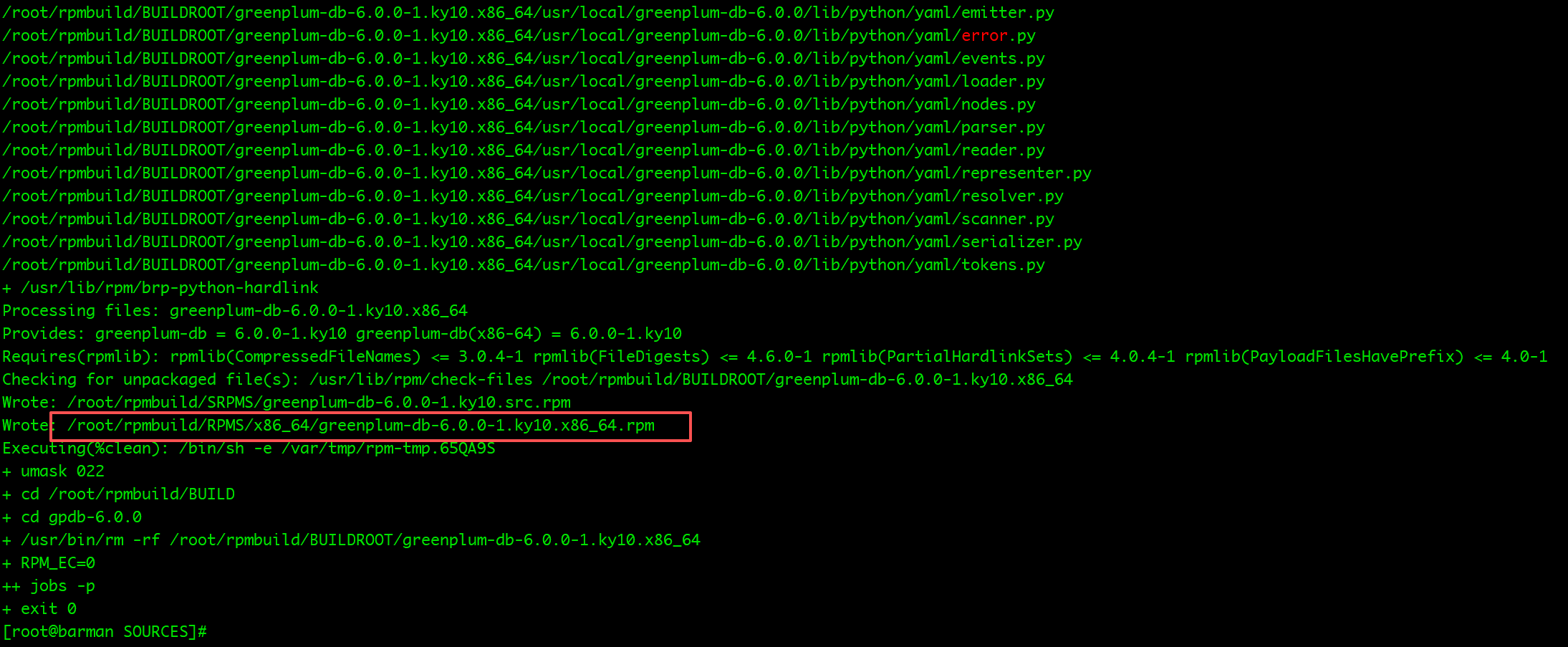
六、安装 GPDB RPM
1、卸载旧版本(如有)
rpm -e greenplum-db-6
2、 安装新 RPM
rpm -ivh greenplum-db-6.0.0-1.ky10.x86_64.rpm 
七、验证安装
source /usr/local/greenplum-db-6.0.0/greenplum_path.sh
psql --version
ok 这样一个greenplum-db-6 适配 银河麒麟V10 的rpm 包就构建好了,后面就可以按正常的模式去部署了。
最后修改时间:2026-06-04 10:00:25
「喜欢这篇文章,您的关注和赞赏是给作者最好的鼓励」
关注作者
【版权声明】本文为墨天轮用户原创内容,转载时必须标注文章的来源(墨天轮),文章链接,文章作者等基本信息,否则作者和墨天轮有权追究责任。如果您发现墨天轮中有涉嫌抄袭或者侵权的内容,欢迎发送邮件至:contact@modb.pro进行举报,并提供相关证据,一经查实,墨天轮将立刻删除相关内容。
