



磐维数据库V3.0通过国家安全可靠测评(2026 年 5 月 26 日)
磐维数据库产品体系
磐维数据库的研发是中国移动响应国家“加快建设科技强国”战略、践行中国移动创世界一流“力量大厦”战略规划的重要举措。磐维数据库为行业应用提供高兼容、高可靠、高性能、高安全的数据库产品,除数据库内核外,具备面向迁移、运维、开发的完整工具体系,支持高可用集中式集群、分布式集群、一体机、云化部署等多种部署形态。依托于多年的数据库应用经验,打造了完善的售后服务体系,高效、便捷的服务全国各区域用户。

磐维数据库部署
环境说明
| 主机名 | ip地址 | OS版本 | 内存、CPU | 节点角色 | 数据库端口 | cmserver端口 |
|---|---|---|---|---|---|---|
| node1 | 192.*.*.60 | Centos7.9 | 4G 、 1个双核 | 主节点 | 17700 | 18800 |
| node2 | 192.*.*.62 | Centos7.9 | 4G 、 1个双核 | 从节点 | 17700 | 18800 |
| node3 | 192.*.*.64 | Centos7.9 | 4G 、 1个双核 | 从节点 | 17700 | 18800 |
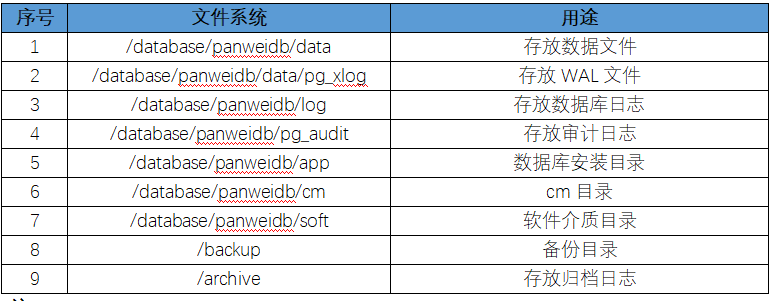
目录规划
安装要求
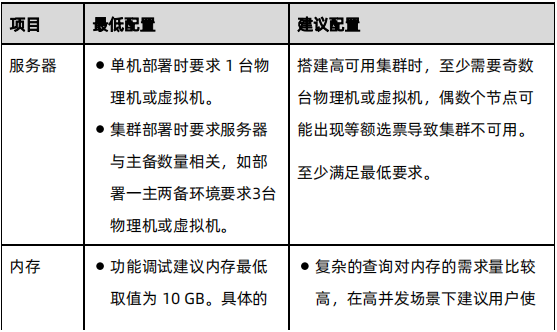
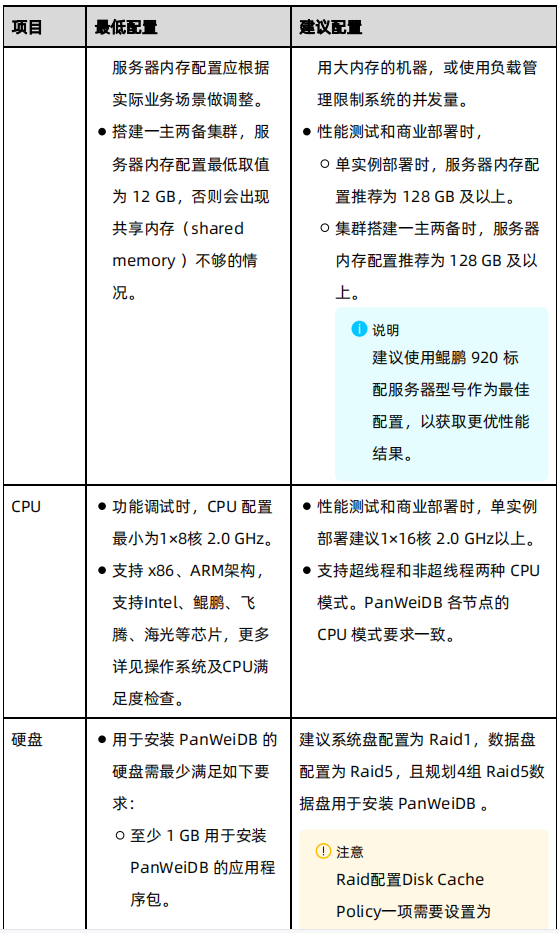
硬件环境要求
生产环境的最低及建议硬件配置

安装包准备
os环境是centos7.9,x86架构,使用下面的安装包部署:
PanWeiDB_V3.0-S3.4.0_B01-install-Linux-x86_64.tar.gz
软件依赖要求
通用环境安装 PanWeiDB 数据库的基础依赖包如下:
zlib-devel、libaio、libuuid、readline-devel、krb5-libs、libicu、libxslt、tcl、perl、openldap、pam、openssl-devel、libxml2、bzip2、python3
CM高可用依赖包如下:
通用操作系统环境:
libaio-devel、flex、bison、ncurses-devel、glibc-devel、patch、redhat-lsb-core、readline-devel、expect、bzip2、gcc
python依赖:
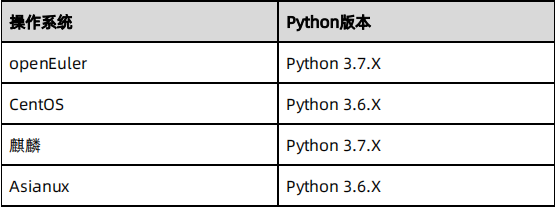
搭建CM高可用集群时要求通过–enable-shared方式编译 的Python3 环境,并且要求各个节点的 Python3 版本一致。
安装步骤
(一)配置操作系统
注意:以下步骤中除了第13、14、15步只需在主节点执行外,其他操作都需要在所有节点执行。
1.安装软件依赖包
yum -y install zlib-devel、libaio、libuuid、readline-devel、krb5-libs、libicu、libxslt、tcl、perl、openldap、pam、openssl-devel、libxml2、bzip2、python3
yum -y install libaio-devel、flex、bison、ncurses-devel、glibc-devel、patch、redhat-lsb-core、readline-devel、expect、bzip2、gcc
2.检查root权限是否禁止登录
注意事项:检查三台主机的 sshd_config 文件内 PermitRootLogin 是否为 yes,如果不是,需要修改为 yes,并重启 sshd 服务
cat /etc/ssh/sshd_config | grep PermitRootLogin
PermitRootLogin yes
vi /etc/ssh/sshd_config

# 重启sshd服务
systemctl restart sshd
3.关闭防火墙
systemctl disable firewalld.service
systemctl stop firewalld.service
systemctl status firewalld
4.关闭透明大页
vi /etc/systemd/system/disable-thp.service
[Unit]
Description=Disable Transparent Huge Pages (THP)
[Service]
Type=simple
ExecStart=/bin/sh -c "echo 'never' > /sys/kernel/mm/transparent_hugepage/enabled && echo 'never' > /sys/kernel/mm/transparent_hugepage/defrag"
[Install]
WantedBy=multi-user.target
加载系统服务,并设置开机自启动:
systemctl daemon-reload
systemctl start disable-thp
systemctl enable disable-thp
查看THP状态,当返回结果均为always madvise [never]时表示成功设置透明大页永久关闭。
cat /sys/kernel/mm/transparent_hugepage/enabled
cat /sys/kernel/mm/transparent_hugepage/defrag
5.时区配置
略
6.关闭RemoveIPC
在各数据库节点上,关闭RemoveIPC。CentOS操作系统默认为关闭,可以跳过该步骤。
 (1) 修改/etc/systemd/logind.conf文件中的“RemoveIPC”值为“no”
vim  /etc/systemd/logind.conf
RemoveIPC=no

(2) 修改/usr/lib/systemd/system/systemd-logind.service文件中的“RemoveIPC”值为“no”
vim /usr/lib/systemd/system/systemd-logind.service
RemoveIPC=no

(3) 重启服务
systemctl daemon-reload
systemctl restart systemd-logind.service

(4) 结果验证确认
由于CentOS操作系统环境的removeIPC默认为关闭,则执行如下语句是无返回结果的。用户在确保步骤1至步骤3已执行的前提下,可正常安装数据库。
loginctl show-session | grep RemoveIPC
systemctl show systemd-logind | grep RemoveIPC
7.内核参数优化
vi /etc/sysctl.conf
# panweidb
fs.aio-max-nr=1048576
fs.file-max= 76724600
kernel.sem = 4096 2097152000 4096 512000
kernel.shmall = 26843545 # pages, 80% MEM or higher
kernel.shmmax = 68719476736 # bytes, 50% MEM or higher
kernel.shmmin = 819200
net.core.netdev_max_backlog = 10000
net.core.rmem_default = 262144
net.core.rmem_max = 4194304
net.core.wmem_default = 262144
net.core.wmem_max = 4194304
net.core.somaxconn = 4096
net.ipv4.tcp_fin_timeout = 5
vm.dirty_background_bytes = 409600000
vm.dirty_expire_centisecs = 3000
vm.dirty_ratio = 80
vm.dirty_writeback_centisecs = 50
vm.overcommit_memory = 0
vm.swappiness = 0
net.ipv4.ip_local_port_range = 40000 65535
fs.nr_open = 20480000
生效:
sysctl -p
8.关闭SELINUX
vi /etc/selinux/config
修改SELINUX=disabled
或者
sed -i 's/^SELINUX=enforcing/SELINUX=disabled/g' /etc/selinux/config
9.配置时间同步
略
10.检查python3
检查 python3 版本,如果为 Python 3.6.x则满足要求,如果不满足则需重新yum安装
python3 --version
11.配置/etc/hosts文件
vi /etc/hosts

192.*.*.60 node1
192.*.*.62 node2
192.*.*.64 node3
12.创建用户及用户组
groupadd -g 1101 dbgrp
useradd -g dbgrp -u 1101 -m omm
passwd omm
13、创建安装包目录(主节点)
--只在主节点创建
mkdir -p /database/panweidb/soft
14、上传磐维数据库软件并解压(主节点)
把软件上传到/database/panweidb/soft下。
tar -zxf PanWeiDB_V3.0-S3.4.0_B01-install-Linux-x86_64.tar.gz
tar -zxf PanWeiDB_V3.0-S3.4.0_B01-Linux-64bit-om.tar.gz
15、安装目录授权(主节点)
chown -R omm:dbgrp /database/
chmod -R 755 /database/
(二)预安装磐维数据库
1.编辑panweidb1m2s.xml配置文件
vi /database/panweidb/soft/panweidb1m2s.xml
<?xml version="1.0" encoding="utf-8"?>
<ROOT>
  <CLUSTER>
    <PARAM name="clusterName" value="panweidb" />
    <PARAM name="nodeNames" value="node1,node2,node3"/>
    <PARAM name="gaussdbAppPath" value="/data/panweidb/app" />
    <PARAM name="gaussdbLogPath" value="/data/panweidb/log" />
    <PARAM name="tmpMppdbPath" value="/data/panweidb/tmp"/>
    <PARAM name="gaussdbToolPath" value="/data/panweidb/tool" />
    <PARAM name="corePath" value="/data/panweidb/corefile"/>
    <PARAM name="backIp1s" value="192.*.*.60,192.*.*.62,192.*.*.64"/>
  </CLUSTER>

  <DEVICELIST>
    <DEVICE sn="node1">
      <PARAM name="name" value="node1"/>
      <PARAM name="azName" value="AZ1"/>
      <PARAM name="azPriority" value="1"/>
      <PARAM name="backIp1" value="192.*.*.60"/>
      <PARAM name="sshIp1" value="192.*.*.60"/>
      <PARAM name="cmsNum" value="1"/>
      <PARAM name="cmServerPortBase" value="18800"/>
      <PARAM name="cmServerListenIp1" value="192.*.*.60,192.*.*.62,192.*.*.64"/>
      <PARAM name="cmServerHaIp1" value="192.*.*.60,192.*.*.62,192.*.*.64"/>
      <PARAM name="cmServerlevel" value="1"/>
      <PARAM name="cmServerRelation" value="node1,node2,node3"/>
      <PARAM name="cmDir" value="/data/panweidb/cm"/>
      <PARAM name="dataNum" value="1"/>
      <PARAM name="dataPortBase" value="17700"/>
      <PARAM name="dataNode1" value="/data/panweidb/data,node2,/data/panweidb/data,node3,/data/panweidb/data"/>
      <PARAM name="dataNode1_syncNum" value="1"/>
    </DEVICE>

    <DEVICE sn="node2">
      <PARAM name="name" value="node2"/>
      <PARAM name="azName" value="AZ1"/>
      <PARAM name="azPriority" value="1"/>
      <PARAM name="backIp1" value="192.*.*.62"/>
      <PARAM name="sshIp1" value="192.*.*.62"/>
      <PARAM name="cmServerPortStandby" value="18800"/>
      <PARAM name="cmDir" value="/data/panweidb/cm"/>
    </DEVICE>

    <DEVICE sn="node3">
      <PARAM name="name" value="node3"/>
      <PARAM name="azName" value="AZ1"/>
      <PARAM name="azPriority" value="1"/>
      <PARAM name="backIp1" value="192.*.*.64"/>
      <PARAM name="sshIp1" value="192.*.*.64"/>
      <PARAM name="cmServerPortStandby" value="18800"/>
      <PARAM name="cmDir" value="/data/panweidb/cm"/>
    </DEVICE>
  </DEVICELIST>
2.root用户在主节点预安装
cd /database/panweidb/soft/script
./gs_preinstall -U omm -G dbgrp -X /database/panweidb/soft/panweidb1m2s.xml
安装日志如下:
[root@node1 script]# ./gs_preinstall -U omm -G dbgrp -X ../panweidb1m2s.xml --sep-env-file=.panweidb34.env
Parsing the configuration file.
Successfully parsed the configuration file.
Installing the tools on the local node.
Successfully installed the tools on the local node.
Are you sure you want to create trust for root (yes/no)?yes
Please enter password for root
Please enter password for current user[root].
Password:
Checking network information.
All nodes in the network are Normal.
Successfully checked network information.
Creating SSH trust.
Creating the local key file.
Successfully created the local key files.
Appending local ID to authorized_keys.
Successfully appended local ID to authorized_keys.
Updating the known_hosts file.
Successfully updated the known_hosts file.
Appending authorized_key on the remote node.
Successfully appended authorized_key on all remote node.
Checking common authentication file content.
Successfully checked common authentication content.
Distributing SSH trust file to all node.
Distributing trust keys file to all node successfully.
Successfully distributed SSH trust file to all node.
Verifying SSH trust on all hosts.
Verifying SSH trust on all hosts by ip.
Successfully verified SSH trust on all hosts by ip.
Verifying SSH trust on all hosts by hostname.
Successfully verified SSH trust on all hosts.
Start set cron for root
Successfully to set cron for root
Successfully created SSH trust.
Successfully created SSH trust for the root permission user.
Setting host ip env
Successfully set host ip env.
Distributing package.
Begin to distribute package to tool path.
Successfully distribute package to tool path.
Begin to distribute package to package path.
Successfully distribute package to package path.
Successfully distributed package.
Are you sure you want to create the user[omm] and create trust for it (yes/no)? no
Preparing SSH service.
Successfully prepared SSH service.
Installing the tools in the cluster.
Successfully installed the tools in the cluster.
Checking hostname mapping.
Successfully checked hostname mapping.
Checking OS software.
Successfully check os software.
Checking OS version.
Successfully checked OS version.
Checking cpu instructions.
Successfully checked cpu instructions.
Checking command.
Successfully checked command.
Creating cluster's path.
Successfully created cluster's path.
Set and check OS parameter.
Setting OS parameters.
Successfully set OS parameters.
Warning: Installation environment contains some warning messages.
Please get more details by "/database/panweidb/soft/script/gs_checkos -i A -h node1,node2,node3 -X /database/panweidb/soft/panweidb1m2s.xml --detail".
Set and check OS parameter completed.
Preparing CRON service.
Successfully prepared CRON service.
Setting user environmental variables.
Successfully set user environmental variables.
Setting the dynamic link library.
Successfully set the dynamic link library.
Setting Core file
Successfully set core path.
Setting pssh path
Successfully set pssh path.
Setting Cgroup.
Successfully set Cgroup.
Set ARM Optimization.
No need to set ARM Optimization.
Fixing server package owner.
Setting finish flag.
Successfully set finish flag.
Preinstallation succeeded.
(三)正式安装磐维数据库
1.安装目录授权(主节点)
chown -R omm:dbgrp /database/
chmod -R 755 /database/
2.omm用户安装(主节点)
su - omm
source /database/panweidb/soft/script/.panweidb34.env
gs_install -X /database/panweidb/soft/panweidb1m2s.xml \
--dn-guc="max_process_memory=10GB" \
--gsinit-parameter="--encoding=UTF8" \
--gsinit-parameter="--lc-collate=C" \
--gsinit-parameter="--lc-ctype=C" \
--gsinit-parameter="--dbcompatibility=B"
安装日志如下:
[omm@node1 ~]$ gs_install -X /database/panweidb/soft/panweidb1m2s.xml \
> --dn-guc="max_process_memory=10GB" \
> --gsinit-parameter="--encoding=UTF8"  \
> --gsinit-parameter="--lc-collate=C"  \
> --gsinit-parameter="--lc-ctype=C"  \
> --gsinit-parameter="--dbcompatibility=B"
Parsing the configuration file.
Successfully checked gs_uninstall on every node.
Check preinstall on every node.
Successfully checked preinstall on every node.
Creating the backup directory.
Successfully created the backup directory.
begin deploy..
Installing the cluster.
begin prepare Install Cluster..
Checking the installation environment on all nodes.
begin install Cluster..
Installing applications on all nodes.
Successfully installed APP.
begin init Instance..
encrypt cipher and rand files for database.
Please enter password for database:
Please repeat for database:
begin to create CA cert files
The sslcert will be generated in /data/panweidb/app/share/sslcert/om
Create CA files for cm beginning.
Create CA files on directory [/data/panweidb/app_bf03575/share/sslcert/cm]. file list: ['cacert.pem', 'server.key', 'server.crt', 'client.key', 'client.crt', 'server.key.cipher', 'server.key.rand', 'client.key.cipher', 'client.key.rand']
Non-dss_ssl_enable, no need to create CA for DSS
Cluster installation is completed.
Configuring.
Deleting instances from all nodes.
Successfully deleted instances from all nodes.
Checking node configuration on all nodes.
Initializing instances on all nodes.
Updating instance configuration on all nodes.
Check consistence of memCheck and coresCheck on database nodes.
Successful check consistence of memCheck and coresCheck on all nodes.
Warning: The license file does not exist, so there is no need to copy it to the home directory.
Configuring pg_hba on all nodes.
Configuration is completed.
Starting cluster.
======================================================================
Successfully started primary instance. Wait for standby instance.
======================================================================
.
Successfully started cluster.
======================================================================
cluster_state      : Normal
redistributing     : No
node_count         : 3
Datanode State
    primary           : 1
    standby           : 2
    secondary         : 0
    cascade_standby   : 0
    building          : 0
    abnormal          : 0
    down              : 0

Successfully installed application.
end deploy..
3.查看集群状态
[omm@node1 ~]$ gs_om -t status --detail
[  CMServer State   ]

node     node_ip         instance                         state
-----------------------------------------------------------------
1  node1 192.*.*.60  1    /data/panweidb/cm/cm_server Primary
2  node2 192.*.*.62  2    /data/panweidb/cm/cm_server Standby
3  node3 192.*.*.64  3    /data/panweidb/cm/cm_server Standby

[   Cluster State   ]

cluster_state   : Normal
redistributing  : No
balanced        : Yes
current_az      : AZ_ALL

[  Datanode State   ]

node     node_ip         instance                 state
-------------------------------------------------------------------
1  node1 192.*.*.60  6001 /data/panweidb/data P Primary Normal
2  node2 192.*.*.62  6002 /data/panweidb/data S Standby Normal
3  node3 192.*.*.64  6003 /data/panweidb/data S Standby Normal
4.使用gsql登录数据库检查版本
[omm@node1 ~]$ gsql
gsql ((PanWeiDB_V3.0-S3.4.0_B01 Release) compiled at 2026-04-22 17:24:21 commit bf03575 )
非SSL连接(安全性要求高时,建议使用SSL连接)
输入 "help" 来获取帮助信息。

postgres=# select pw_version();
                                     pw_version
-------------------------------------------------------------------------------------
 (PanWeiDB_V3.0-S3.4.0_B01 Release) compiled at 2026-04-22 17:24:21 commit bf03575  +
  product name:PanWeiDB                                                             +
  version:V3.0-S3.4.0_B01 Release                                                   +
  commit:bf03575                                                                    +
  openGauss version:6.0.0                                                           +
  host:x86_64-pc-linux-gnu                                                          +
  support module:BASIC
(1 行记录)
总结
整个安装过程非常顺利,欢迎大家使用~~~
关于作者
网名:飞天,墨天轮2024年度、2025年度优秀原创作者,拥有 Oracle 10g OCM 认证、PGCE认证、MySQL 8.0 OCP认证以及OBCA、KCP、KCSM、ACP、YCP、HCIP-openGauss、HCCDP-GaussDB、磐维等众多国产数据库认证证书,目前从事Oracle、Mysql、PostgreSQL、磐维数据库管理运维工作,喜欢结交更多志同道合的朋友,热衷于研究、分享数据库技术。
微信公众号:飞天online
墨天轮:https://www.modb.pro/u/15197
如有任何疑问,欢迎大家留言,共同探讨~~~
