



密码强度有效期
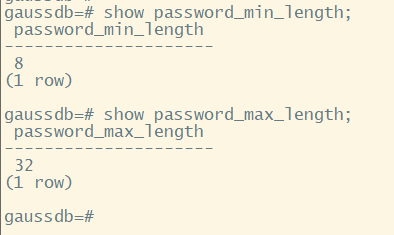
步骤1.设置密码最小长度
当前默认策略为最小长度8,最大长度32;可根据长度参数自定义配置;
gs_guc reload -Z datanode -N all -I all -c "password_min_length=8"
gs_guc reload -Z datanode -N all -I all -c "password_max_length=32"

步骤2.设置密码必须包含“数字、小写字母、大写字母、特殊字符”等类型
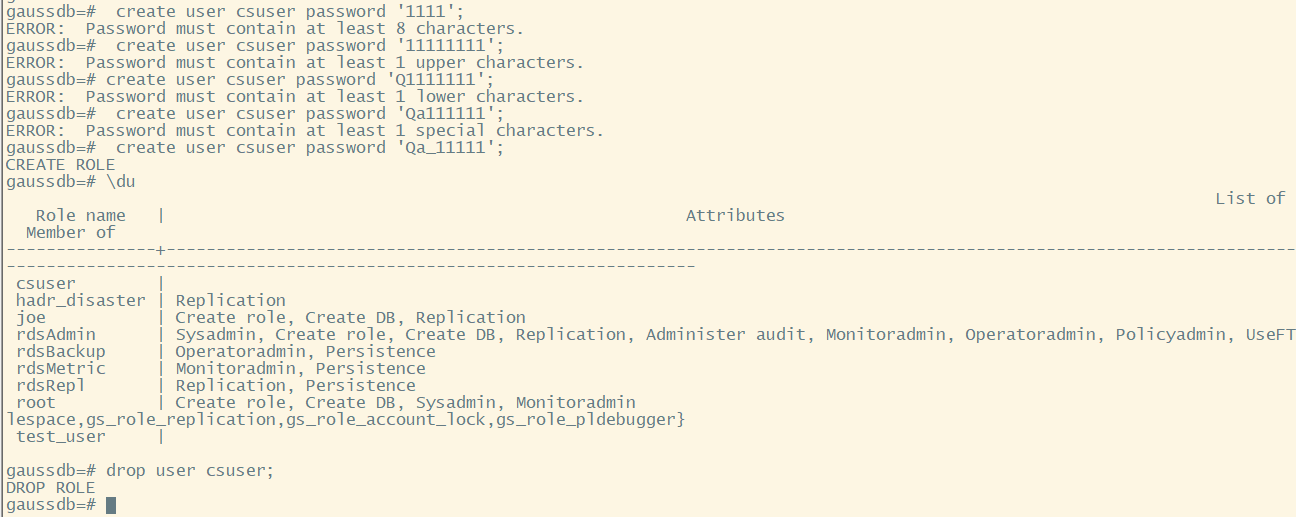
默认策略密码必须包含(数字、小写字母、大写字母、特殊字符)中三类;
可通过参数配置复杂度要求,字符包含个数要求:
gs_guc reload -Z datanode -N all -I all -c "password_min_uppercase=1"
gs_guc reload -Z datanode -N all -I all -c "password_min_lowercase=1"
gs_guc reload -Z datanode -N all -I all -c "password_min_digital=1"
gs_guc reload -Z datanode -N all -I all -c "password_min_special=1"
测试强度限制:
步骤3.设置密码有效期
测试设置3天有效期
gs_guc reload -Z datanode -N all -I all -c "password_effect_time=3"

预过期密码提醒天数设置(默认提前7日):
gs_guc reload -Z datanode -N all -I all -c "password_notify_time=7"
进行登录测试提醒
create user cs_user password 'Qq_111111';
gsql -p 8000 -d postgres -U cs_user -W Qq_111111 -ar gsql -p 8000 -d postgres -U cs_user -W Qq_111111 -ar

