



【免责声明】本公众号文章仅代表个人观点,与任何公司无关。

来源公众号|SQL和数据库技术(ID:SQLplusDB)
Windows 环境通过Virtual Box快速体验TiDB 5.0
安装虚拟机Virtual Box
安装Oracle Linux 7
配置虚拟机联网
通过TiUP Playground搭建基础测试集群
执行例
通过yum安装mysql 或者客户端
安装虚拟机Virtual Box
通过官网下载Virtual Box并安装。
https://www.virtualbox.org/wiki/Downloads


安装Oracle Linux 7
可以通过如下网址下载Oracle Linux 7。
下载Oracle Linux 7https://www.oracle.com/linux/文档:https://docs.oracle.com/en/operating-systems/oracle-linux/7/https://docs.oracle.com/en/operating-systems/oracle-linux/7/install/
配置虚拟机联网
使用桥接网卡的方式使虚拟机Virtual Box联网
1.配置虚拟机网络设置
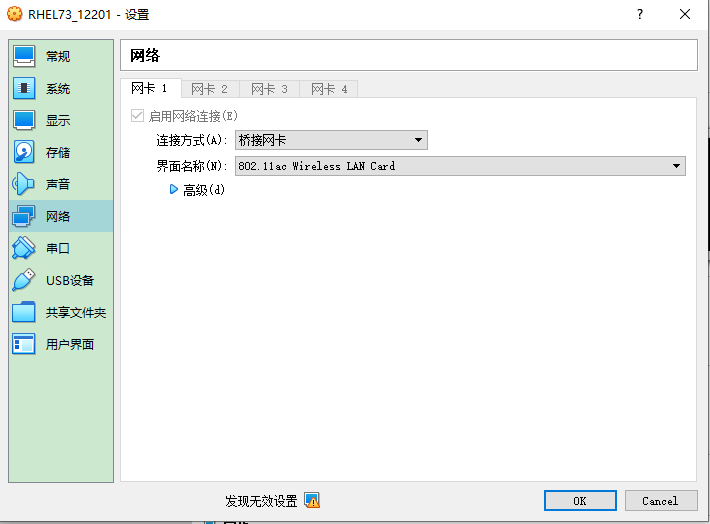
2. 根据本机的IP设置虚拟机的Linux的IP
C:\Users\Administrator>ipconfig
无线局域网适配器 WLAN:连接特定的 DNS 后缀 . . . . . . . :本地链接 IPv6 地址. . . . . . . . : ff80::aa11:2470:41e8:8a50%10IPv4 地址 . . . . . . . . . . . . : 192.168.31.16 **子网掩码 . . . . . . . . . . . . : 255.255.255.0默认网关. . . . . . . . . . . . . : 192.168.31.1 **
修改网络配置ifcfg-enp0s3
[root@db12201 ~]# nmcli connection show名前 UUID タイプ デバイスenp0s3 4924bacd-1a6b-412c-9392-29ad24b5fcaa 802-3-ethernet enp0s3virbr0 c04be18e-add6-4fd2-ac25-47f45f936a4f bridge virbr0[root@db12201 ~]# cd /etc/sysconfig/network-scripts/[root@db12201 network-scripts]# lsifcfg-enp0s3 ...
[root@db12201 network-scripts]# vi ifcfg-enp0s3TYPE="Ethernet"BOOTPROTO=dhcp ***DEFROUTE="yes"IPV4_FAILURE_FATAL="no"IPV6INIT="no"IPV6_AUTOCONF="yes"IPV6_DEFROUTE="yes"IPV6_PEERDNS="yes"IPV6_PEERROUTES="yes"IPV6_FAILURE_FATAL="no"IPV6_ADDR_GEN_MODE="stable-privacy"NAME="enp0s3"UUID="4924bacd-1a6b-412c-9392-29ad24b5fcaa"DEVICE="enp0s3"ONBOOT="yes"IPADDR="192.168.31.221" ***PREFIX="24"GATEWAY="192.168.31.1" ***DNS1=19.168.31.1 ***
重启网络
$ service network restart
测试连接外网成功
[root@db12201 ~]# ping www.baidu.comPING www.a.shifen.com (110.242.68.4) 56(84) bytes of data.64 bytes from 110.242.68.4 (110.242.68.4): icmp_seq=1 ttl=53 time=20.3 ms64 bytes from 110.242.68.4 (110.242.68.4): icmp_seq=2 ttl=53 time=23.5 ms64 bytes from 110.242.68.4 (110.242.68.4): icmp_seq=3 ttl=53 time=24.6 ms64 bytes from 110.242.68.4 (110.242.68.4): icmp_seq=4 ttl=53 time=27.3 ms64 bytes from 110.242.68.4 (110.242.68.4): icmp_seq=5 ttl=53 time=20.5 ms^C--- www.a.shifen.com ping statistics ---5 packets transmitted, 5 received, 0% packet loss, time 4006msrtt min/avg/max/mdev = 20.356/23.285/27.326/2.612 ms
通过TiUP Playground搭建基础测试集群
1.下载并安装 TiUP。
# curl --proto '=https' --tlsv1.2 -sSf https://tiup-mirrors.pingcap.com/install.sh | sh
2. 声明全局环境变量。
# source .bash_profile
3. 当前会话启动集群
# tiup playground
4. 新开会话访问 TiDB 数据库
tiup client或者mysql --host 127.0.0.1 --port 4000 -u root
执行例
[root@db12201 ~]# curl --proto '=https' --tlsv1.2 -sSf https://tiup-mirrors.pingcap.com/install.sh | sh% Total % Received % Xferd Average Speed Time Time Time CurrentDload Upload Total Spent Left Speed100 6064k 100 6064k 0 0 3727k 0 0:00:01 0:00:01 --:--:-- 3727kWARN: adding root certificate via internet: https://tiup-mirrors.pingcap.com/roo t.jsonYou can revoke this by remove /root/.tiup/bin/7b8e153f2e2d0928.root.jsonSuccessfully set mirror to https://tiup-mirrors.pingcap.comDetected shell: bashShell profile: /root/.bash_profile/root/.bash_profile has been modified to add tiup to PATHopen a new terminal or source /root/.bash_profile to use itInstalled path: /root/.tiup/bin/tiup===============================================Have a try: tiup playground===============================================[root@db12201 ~]# cat .bash_profile# .bash_profile# Get the aliases and functionsif [ -f ~/.bashrc ]; then. ~/.bashrcfi# User specific environment and startup programsPATH=$PATH:$HOME/binexport PATHexport PATH=/root/.tiup/bin:$PATH[root@db12201 ~]# source .bash_profile[root@db12201 ~]# tiup playgroundThe component `playground` version is not installed; downloading from repository.download https://tiup-mirrors.pingcap.com/playground-v1.7.0-linux-amd64.tar.gz 6.46 MiB / 6.46 MiB 100.00% 7.17 MiB/sStarting component `playground`: /root/.tiup/components/playground/v1.7.0/tiup-playgroundUsing the version v5.2.2 for version constraint "".If you'd like to use a TiDB version other than v5.2.2, cancel and retry with the following arguments:Specify version manually: tiup playground <version>Specify version range: tiup playground ^5The nightly version: tiup playground nightlyPlayground Bootstrapping...The component `prometheus` version v5.2.2 is not installed; downloading from repository.download https://tiup-mirrors.pingcap.com/prometheus-v5.2.2-linux-amd64.tar.gz 39.84 MiB / 39.84 MiB 100.00% 5.41 MiB/sdownload https://tiup-mirrors.pingcap.com/grafana-v5.2.2-linux-amd64.tar.gz 50.00 MiB / 50.00 MiB 100.00% 3.66 MiB/sStart pd instanceThe component `pd` version v5.2.2 is not installed; downloading from repository.download https://tiup-mirrors.pingcap.com/pd-v5.2.2-linux-amd64.tar.gz 40.10 MiB / 40.10 MiB 100.00% 4.62 MiB/sStart tikv instanceThe component `tikv` version v5.2.2 is not installed; downloading from repository.download https://tiup-mirrors.pingcap.com/tikv-v5.2.2-linux-amd64.tar.gz 165.15 MiB / 165.15 MiB 100.00% 7.82 MiB/sStart tidb instanceThe component `tidb` version v5.2.2 is not installed; downloading from repository.download https://tiup-mirrors.pingcap.com/tidb-v5.2.2-linux-amd64.tar.gz 45.55 MiB / 45.55 MiB 100.00% 9.42 MiB/sWaiting for tidb instances ready127.0.0.1:4000 ... DoneStart tiflash instanceThe component `tiflash` version v5.2.2 is not installed; downloading from repository.download https://tiup-mirrors.pingcap.com/tiflash-v5.2.2-linux-amd64.tar.gz 401.44 MiB / 401.44 MiB 100.00% 1.86 MiB/sfailed to download /tiflash-v5.2.2-linux-amd64.tar.gz(download from https://tiup-mirrors.pingcap.com/tiflash-v5.2.2-linux-amd64.tar.gz failed: stream error: stream ID 1; INTERNAL_ERROR; received from peer), retrying...download https://tiup-mirrors.pingcap.com/tiflash-v5.2.2-linux-amd64.tar.gz 401.44 MiB / 401.44 MiB 100.00% 137.28 MiB/sWaiting for tiflash instances ready127.0.0.1:3930 ... DoneCLUSTER START SUCCESSFULLY, Enjoy it ^-^To connect TiDB: mysql --comments --host 127.0.0.1 --port 4000 -u root -p (no password)To view the dashboard: http://127.0.0.1:2379/dashboardPD client endpoints: [127.0.0.1:2379]To view the Prometheus: http://127.0.0.1:9090To view the Grafana: http://127.0.0.1:3000
参考:
https://docs.pingcap.com/zh/tidb/stable/quick-start-with-tidb#LinuxTiDB 数据库快速上手指南
通过yum安装mysql 或者客户端
# yum list installed mysql*# yum list | grep mysql# wget http://repo.mysql.com/mysql-community-release-el7-5.noarch.rpm# rpm -ivh mysql-community-release-el7-5.noarch.rpm# yum install mysql-server# service mysqld start# ssystemctl status mysqld.service
参考:centos7下yum安装mysqlhttps://blog.csdn.net/wz1226864411/article/details/76146180https://www.cnblogs.com/brianzhu/p/8575243.html
——End——
专注于技术不限于技术!
用碎片化的时间,一点一滴地提高数据库技术和个人能力。
欢迎关注!
各种数据库:
Oracle vs. MySQL vs. SQL Server vs. PostgreSQL vs. MongoDB
TiDB vs. MySQL vs. PostgreSQL vs. Kingbase vs. AnalyticDB
视频:TiDB文档阅读
文章转载自SQL和数据库技术,如果涉嫌侵权,请发送邮件至:contact@modb.pro进行举报,并提供相关证据,一经查实,墨天轮将立刻删除相关内容。
