



通过压测验证了 HPA 部署成功了。
所使用的 HPA 配置文件如下:
apiVersion: autoscaling/v2beta2
kind: HorizontalPodAutoscaler
metadata:
  name: blog-web
spec:
  scaleTargetRef:
    apiVersion: apps/v1
    kind: Deployment
    name: blog-web
  minReplicas: 2
  maxReplicas: 8
  metrics:
  - type: Pods
    pods:
      metric:
        name: http_requests_received
      target:
        type: AverageValue
        averageValue: 10
最小 pod 副本数是 2 ,最大 pod 副本数是 8 ,基于 http_requests_received 指标(对应的就是 QPS )进行伸缩,当指标平均值高于 10 时,自动进行扩容。
使用下面的压测命令发起了 100 个并发请求。
hey -c 100 -z 5m http://hostname
随后 HPA 自动将对应的 pod 副本由 2 个扩容至 8 个。
NAME REFERENCE TARGETS MINPODS MAXPODS REPLICAS AGE
blog-web Deployment/blog-web 10253m/10   2         8         8          4d23h
上面的 http_requests_received 指标是 HPA 通过 custom-metrics-apiserver 获取到的(这个指标名称是由提供指标数据的应用决定的)。
# kubectl get apiservices | grep custom-metrics
v1beta1.custom.metrics.k8s.io monitoring/custom-metrics-apiserver True 5d16h
custom-metrics-apiserver 是一个 extension API server ,用于提供 custom metrics ,它是由 k8s-prometheus-adapter(http://dwz.date/bwxC)部署的,用于从 prometheus 中获取监控指标数据,可以通过下面的命令手动请求这个 api 。
kubectl get --raw /apis/custom.metrics.k8s.io/v1beta1/namespaces/production/pods/*/http_requests_received | jq .
http_requests_received 指标数据是 prometheus 通过 ServiceMonitor 发现对应的 target (这里是 pod )并请求 /metrics 抓取 http_requests_received_total 指标数据根据时间计算出来的。
http_requests_received_total 指标数据是由 pod 中应用的 exporter 组件通过 /metrics 提供的,我们的应用基于 asp.net core ,exporter 组件选用的是 prometheus-net(http://dwz.date/c58u)。
$ docker exec -t $(docker ps -f name=blog-web_blog-web -q | head -1) curl 127.0.0.1/metrics | grep http_requests_received_total
# HELP http_requests_received_total Provides the count of HTTP requests that have been processed by the ASP.NET Core pipeline.
# TYPE http_requests_received_total counter
http_requests_received_total{code="200",method="GET",controller="BlogMvc",action="CommentForm"} 5
http_requests_received_total{code="200",method="GET",controller="AggSite",action="SiteHome"} 1966
一图胜千言
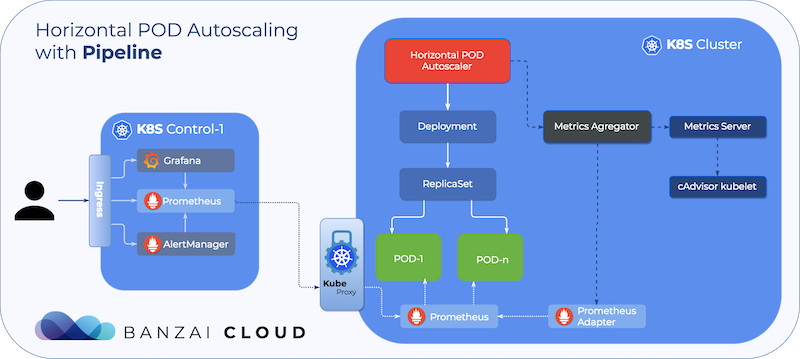
出处:http://dwz.date/c584



●使用 Elastic 技术栈构建 Kubernetes 全栈监控(完结)
●运维精华
