



学习目标
学习openGauss普通表索引
课程知识点
索引是对数据库表中一列或多列的值进行排序的一种结构,使用索引可快速访问数据库表中的特定信息
作业打卡
连接openGauss
#第一次进入等待15秒
#数据库启动中...
su - omm
gsql -r
1.创建表products, 分别为表创建一个unique索引1,指定b-tree索引2和表达式索引3
CREATE SCHEMA tpcds;
CREATE TABLE tpcds.products
(
    id integer not null,  //追加not null意为插入数据时该项不能为空
    name char(20) not null,
    brand char(30) not null
);
CREATE UNIQUE INDEX products_index1 ON tpcds.products(id);
CREATE INDEX products_index2 ON tpcds.products USING BTREE(name);
CREATE INDEX products_index3 ON tpcds.products(SUBSTR(brand, 1, 4));
2.设置索引1不可用,修改索引2的表空间,重命名索引3
ALTER INDEX tpcds.products_index1 UNUSABLE;
CREATE TABLESPACE example0 RELATIVE LOCATION 'tablespace1/tablespace_0';
ALTER INDEX tpcds.products_index2 SET TABLESPACE example0;
ALTER INDEX tpcds.products_index3 RENAME TO products_index30;
3.重建索引2和products的所有索引
REINDEX INDEX tpcds.products_index2;
REINDEX TABLE tpcds.products;
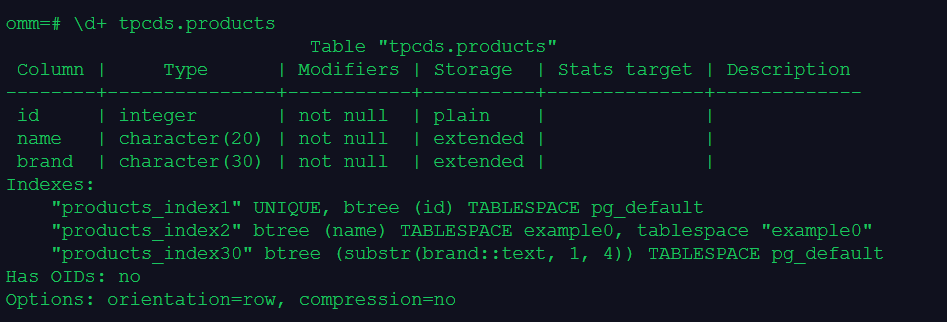
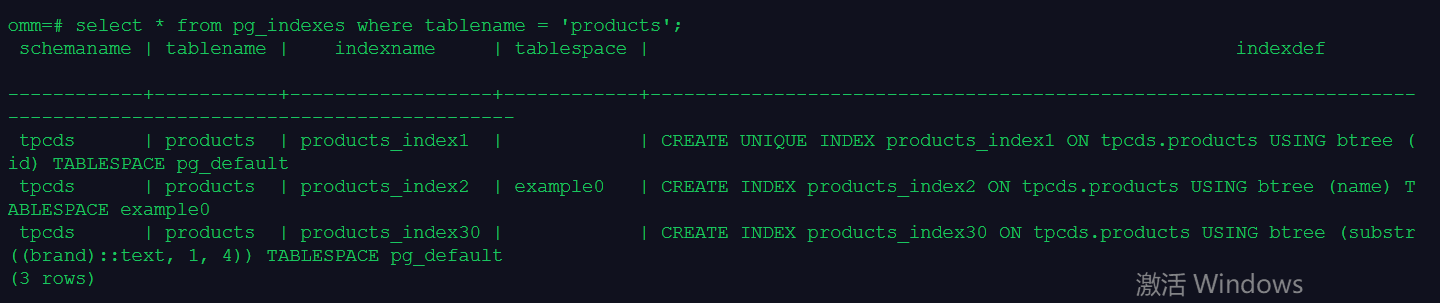
4.使用\d+和系统视图pg_indexes查看索引信息
\d+ tpcds.products
select * from pg_indexes where tablename = 'products';
5.删除索引、表和表空间
DROP INDEX tpcds.products_index1;
DROP INDEX tpcds.products_index2;
DROP INDEX tpcds.products_index30;
DROP TABLE tpcds.products;
DROP TABLESPACE example0;
DROP SCHEMA tpcds;
最后修改时间:2021-12-16 19:56:02
「喜欢这篇文章,您的关注和赞赏是给作者最好的鼓励」
关注作者
【版权声明】本文为墨天轮用户原创内容,转载时必须标注文章的来源(墨天轮),文章链接,文章作者等基本信息,否则作者和墨天轮有权追究责任。如果您发现墨天轮中有涉嫌抄袭或者侵权的内容,欢迎发送邮件至:contact@modb.pro进行举报,并提供相关证据,一经查实,墨天轮将立刻删除相关内容。
