



1、查找opengauss
[root@v1 ~]# docker search opengauss
NAME                             DESCRIPTION                                     STARS     OFFICIAL   AUTOMATED
enmotech/opengauss               openGauss latest images created by Enmotech     12
fibird/opengauss                                                                 1
gaobo1997/opengauss_compile      OpenGauss Compile Environment                   1
munanqing/opengauss              基于openGauss-2.0.1-CentOS-64bit.tar.bz2构建        1
modernoom/opengauss                                                              0
aff123/opengauss                 aff学习opengauss                                  0
modernoom/opengauss_operator                                                     0
yabinji/opengauss-operator                                                       0
waterme7on/opengauss             opengauss cluster with master and worker        0
zenghaocq/opengauss-controller                                                   0
enmotech/opengauss_exporter                                                      0
bzp2010/opengauss_exporter       A openGauss metric exporter for Prometheus      0
boycestar/opengauss-exporter     openGauss Prometheus Exporter                   0
travelliu/opengauss                                                              0
blueapple/opengauss              opengauss 1.0.0 CentOS 7.8.2003                 0
colinzeb/opengauss               asp.net core with odbc(opengauss)               0
ructrx/opengaussbase                                                             0
1049696130/opengauss             opengauss的编译开发环境                                0
larryyang97/opengauss-webhook                                                    0
waterme7on/opengauss-operator                                                    0
kilodleif/opengauss              based on Linux Distribution: CentOS 7.6.1810…   0
zh2k3ang/opengauss-operator                                                      0
taojintianxia/opengauss                                                          0
ructrx/opengauss-rmwal4                                                          0
ructrx/opengauss-rm-writing                                                      0
2、下载镜像
[root@v1 ~]# docker pull enmotech/opengauss
Using default tag: latest
latest: Pulling from enmotech/opengauss
Digest: sha256:d5a3e38fa2553a44e7fa1cd5cad0b4f0845a679858764067d7b0052a228578a0
Status: Image is up to date for enmotech/opengauss:latest
3、启动镜像
docker run --name opengauss --privileged=true -d -e GS_PASSWORD=Enmo@123 enmotech/opengauss:latest
openGauss的密码有复杂度要求,需要:密码长度8个字符及以上,必须同时包含英文字母大小写,数字,以及特殊符号**

`GS_NODENAME`

指定数据库节点名称 默认为gaussdb

 `GS_USERNAME`

指定数据库连接用户名 默认为gaussdb

 `GS_PORT`

指定数据库端口,默认为5432。
4、查看
[root@v1 ~]# docker ps -a
CONTAINER ID IMAGE COMMAND CREATED STATUS PORTS NAMES
59cdbac115da enmotech/opengauss:latest “entrypoint.sh gauss…” 6 days ago Up 1 second 5432/tcp opengauss
5、进入
[root@v1 ~]# docker exec -it 59cdbac115da   bash
root@59cdbac115da:/#
root@59cdbac115da:/#
root@59cdbac115da:/#
root@59cdbac115da:/#
root@59cdbac115da:/# su - omm
omm@59cdbac115da:~$ gsql -r
gsql ((openGauss 2.1.0 build 590b0f8e) compiled at 2021-09-30 14:29:04 commit 0 last mr  )
Non-SSL connection (SSL connection is recommended when requiring high-security)
Type "help" for help.
6、申请ecs
6.1 体验ecs
https://developer.aliyun.com/adc/scenario/410e5b6a852f4b4b88bf74bf4c197a57?taskCode=tiyan010&recordId=2450769
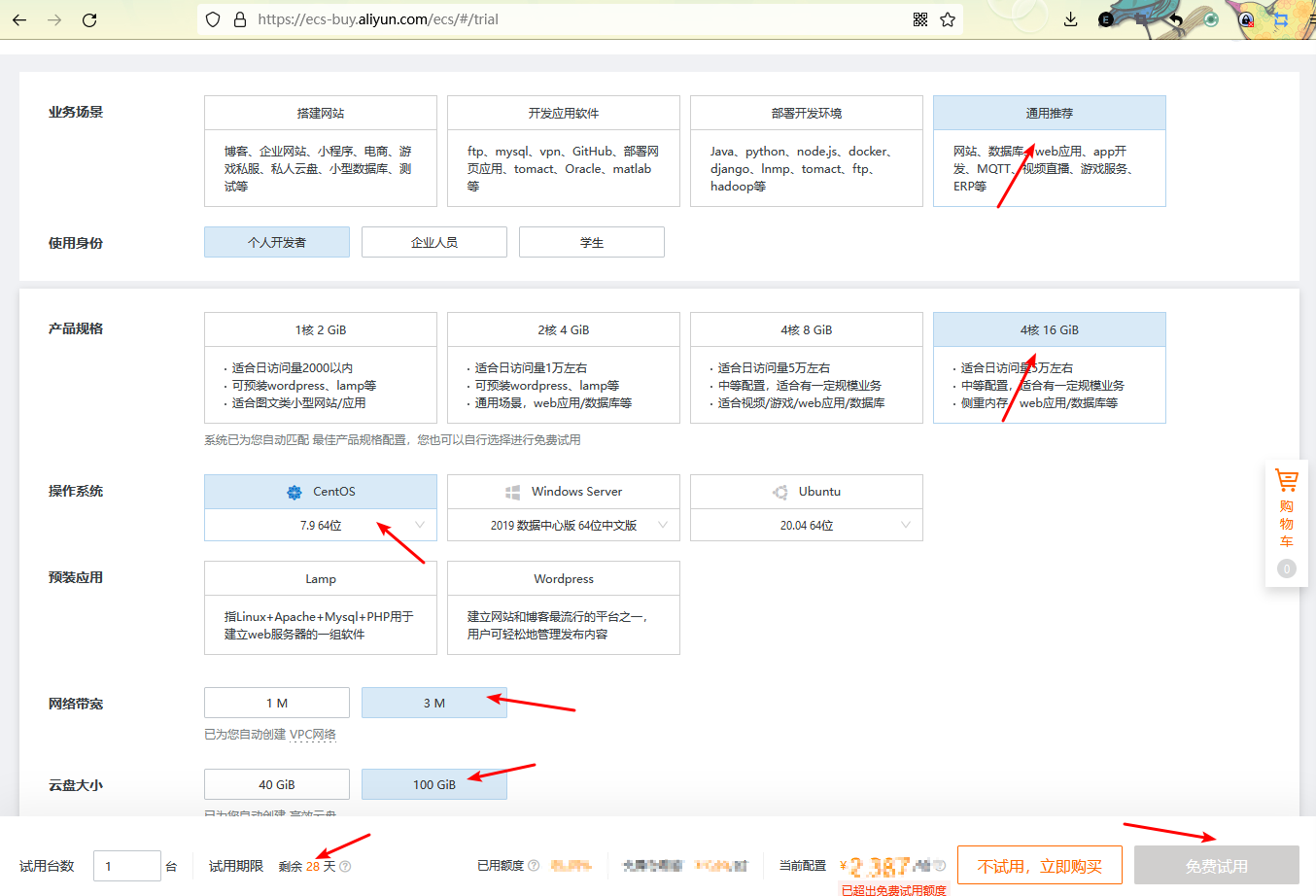
6.2申请一个免费一个月的ecs,安装docker,上面部署数据库环境,进行测试。
https://ecs-buy.aliyun.com/ecs/#/trial
7、查看docker信息,获取opengauss目录
[root@v1 ~]# docker history enmotech/opengauss:latest
IMAGE          CREATED        CREATED BY                                      SIZE      COMMENT
b4dd24d09223   2 months ago   /bin/sh -c #(nop)  CMD ["gaussdb"]              0B
<missing>      2 months ago   /bin/sh -c #(nop)  EXPOSE 5432                  0B
<missing>      2 months ago   /bin/sh -c #(nop)  ENTRYPOINT ["entrypoint.s…   0B
<missing>      2 months ago   /bin/sh -c chmod 755 /usr/local/bin/entrypoi…   17.8kB
<missing>      2 months ago   /bin/sh -c #(nop) COPY file:8fab192db1897860…   17.8kB
<missing>      2 months ago   /bin/sh -c #(nop)  ENV PGDATA=/var/lib/openg…   0B
<missing>      2 months ago   /bin/sh -c set -eux;      chmod +x /usr/loca…   2.4MB
<missing>      2 months ago   /bin/sh -c #(nop)  ENV GOSU_VERSION=1.12        0B
<missing>      2 months ago   /bin/sh -c set -eux;     echo "export GAUSSH…   3.9kB
<missing>      2 months ago   /bin/sh -c set -eux;     apt-get update && a…   18MB
<missing>      2 months ago   /bin/sh -c #(nop)  ENV LANG=en_US.utf8          0B
<missing>      2 months ago   /bin/sh -c #(nop) COPY file:c236b3ccd2d34fe2…   83.2kB
<missing>      2 months ago   /bin/sh -c #(nop) COPY file:5d709d802031d583…   405B
<missing>      2 months ago   /bin/sh -c #(nop) COPY file:51b55e1fb93d623d…   374kB
<missing>      2 months ago   /bin/sh -c #(nop) COPY file:4143efe4848fae62…   2.4MB
<missing>      2 months ago   /bin/sh -c #(nop) ADD file:1c095020e087ed59b…   296MB
<missing>      2 months ago   /bin/sh -c #(nop)  CMD ["bash"]                 0B
<missing>      2 months ago   /bin/sh -c #(nop) ADD file:0d82cd095966e8ee7…   63.1MB
[root@v1 ~]#
[root@v1 ~]# docker exec -it 59cdbac115da   bash
root@59cdbac115da:/# cd /var/lib/
apt/       dpkg/      misc/      opengauss/ pam/       systemd/
root@59cdbac115da:/# cd /var/lib/opengauss/
root@59cdbac115da:/var/lib/opengauss# ls
data
root@59cdbac115da:/var/lib/opengauss# cd data/
root@59cdbac115da:/var/lib/opengauss/data# ls
asp_data         gs_profile          pg_csnlog      pg_llog       pg_perf       pg_tblspc        postgresql.conf.lock
base             gswlm_userinfo.cfg  pg_ctl.lock    pg_location   pg_replslot   pg_twophase      postmaster.opts
gaussdb.state    mot.conf            pg_errorinfo   pg_log        pg_serial     PG_VERSION       postmaster.pid
global           pg_audit            pg_hba.conf    pg_multixact  pg_snapshots  pg_xlog          sql_monitor
gs_gazelle.conf  pg_clog             pg_ident.conf  pg_notify     pg_stat_tmp   postgresql.conf  undo
最后修改时间:2021-12-16 16:26:27
「喜欢这篇文章,您的关注和赞赏是给作者最好的鼓励」
关注作者
【版权声明】本文为墨天轮用户原创内容,转载时必须标注文章的来源(墨天轮),文章链接,文章作者等基本信息,否则作者和墨天轮有权追究责任。如果您发现墨天轮中有涉嫌抄袭或者侵权的内容,欢迎发送邮件至:contact@modb.pro进行举报,并提供相关证据,一经查实,墨天轮将立刻删除相关内容。
