



安装配置
下载安装包
tar xvf mysql-router-8.0.27-linux-glibc2.12-x86_64.tar.xz
mv mysql-router-8.0.27-linux-glibc2.12-x86_64 mysqlRouter8.0.27
mv mysqlRouter8.0.27 /usr/local/
配置环境变量
export PATH=/usr/local/mysqlRouter8.0.27/bin:$PATH
source /etc/profile
配置目录
cd /usr/local/mysqlRouter8.0.27/
mkdir  data
mkdir  log
mkdir  run
mkdir  config
配置文件
cp /usr/local/mysqlRouter8.0.27/share/doc/mysqlrouter/sample_mysqlrouter.conf /usr/local/mysqlRouter8.0.27/config/mysqlrouter.conf

vim /usr/local/mysqlRouter8.0.27/config/mysqlrouter.conf

--------------------------------------------------------
[DEFAULT]
logging_folder = /usr/local/mysqlRouter8.0.27/log  # 日志存放目录
plugin_folder = /usr/local/mysqlRouter8.0.27/lib/mysqlrouter # 插件存放目录
config_folder = /usr/local/mysqlRouter8.0.27/config # 配置文件存放目录
runtime_folder = /usr/local/mysqlRouter8.0.27/run # 运行目录
data_folder = /usr/local/mysqlRouter8.0.27/data
#keyring_path = /var/lib/keyring-data
#master_key_path = /var/lib/keyring-key

[logger]
level = INFO # 日志运行级别
filename = mysqlrouter.log
timestamp_precision = second

# 主节点故障转移配置
[routing:basic_failover]
# To be more transparent, use MySQL Server port 3306
# 写节点地址
bind_address = 0.0.0.0
# 写节点端口
bind_port = 7001
routing_strategy = first-available
# 模式,读写
mode = read-write
# 主节点地址:默认情况下第一台主数据库为写主库,当第一台主数据库DOWN机后,第二台数据库被提升为主库
destinations = 1.15.57.253:3306,1.15.57.253:3307


[routing:load_balance]
bind_address = 0.0.0.0
bind_port = 7002
#routing_strategy = first-available
mode = read-only
destinations = 1.15.57.253:3306,1.15.57.253:3307
# If no plugin is configured which starts a service, keepalive
# will make sure MySQL Router will not immediately exit. It is
# safe to remove once Router is configured.
[keepalive]
interval = 60
启动
/usr/local/mysqlRouter8.0.27/bin/mysqlrouter -c /usr/local/mysqlRouter8.0.27/config/mysqlrouter.conf &
负载均衡测试
mysql -ucjr -h1.15.57.253 -p'cjr' -P7001 -e"show variables like 'server_id';"
mysql -ucjr -h1.15.57.253 -p'cjr' -P7002 -e"show variables like 'server_id';"
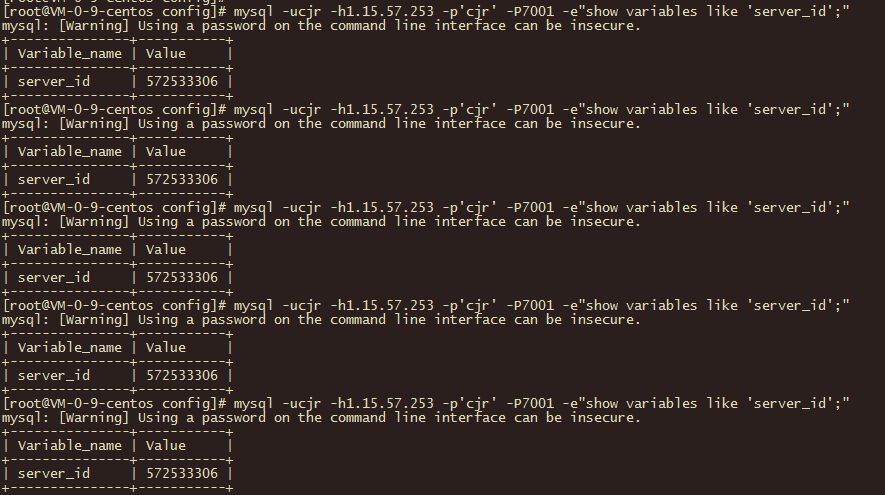
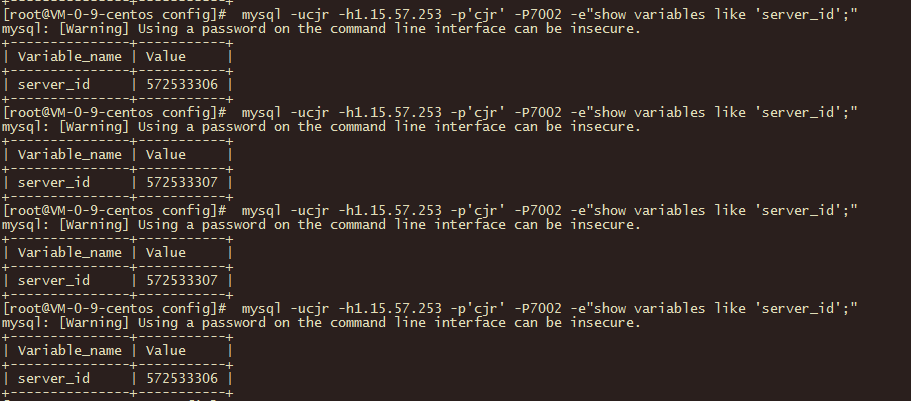
对于7001端口的请求,会全部发送到3306端口。对7002端口的请求,会轮询发送给3306和3307,也是实现了负载均衡。
自动失败切换测试
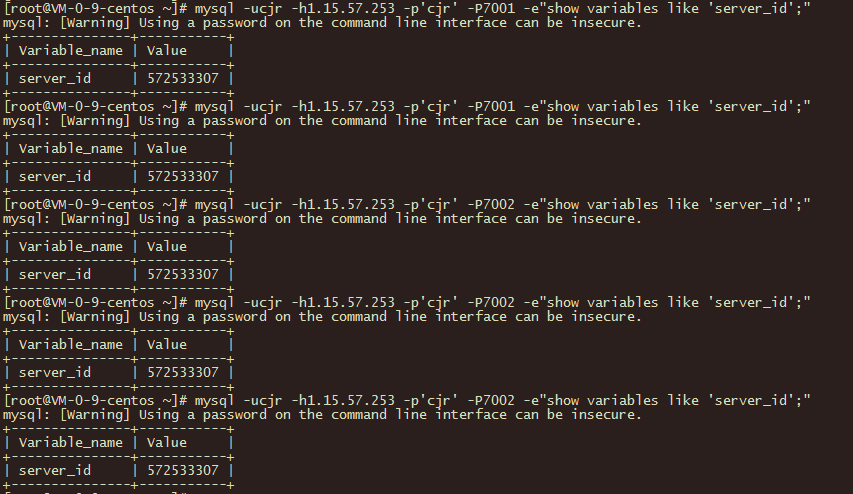
当3306不可用时,对于7001端口的请求,会自动切换到3307库
kill掉3306的库

可以看到3306挂掉之后,7001的请求发送到了3307
最后修改时间:2021-12-17 07:26:06
「喜欢这篇文章,您的关注和赞赏是给作者最好的鼓励」
关注作者
【版权声明】本文为墨天轮用户原创内容,转载时必须标注文章的来源(墨天轮),文章链接,文章作者等基本信息,否则作者和墨天轮有权追究责任。如果您发现墨天轮中有涉嫌抄袭或者侵权的内容,欢迎发送邮件至:contact@modb.pro进行举报,并提供相关证据,一经查实,墨天轮将立刻删除相关内容。
