



一、背景
假使阅读本文的你对canal已经有一定的了解。
两个项目的数据存储用的都是MySQL。
项目间数据同步用的是阿里开源的canal,在进行数据新增/更新/删除的时候会生成binlog日志,canal读取了这些日志后在另一个需要同步的数据库进行脚本重跑以实现两边数据一致。
在项目中有需求需要对整张表进行清空的操作,使用 DELETE FROM TABLE 进行数据清除,当表数据量过多时会生成大量的binlog,导致数据同步会相对慢,后来决定使用Truncate 命令对表进行清空,使用Truncate只会生成一条binlog日志,所以使用Truncate时是无法通过binlog对数据进行恢复的。
在通过对canal Sync-RDB官方文档进行阅读后,发现只有库间镜像schema同步的时候,DDL语句才会被执行(后面源码会证明这一点),但是镜像同步需要同步数据的库拥有被同步的库的所有表(字段也需要一致),然后我们的需求是只有需要同步的表才进行同步,因此需要对源码进行改造,使canal在不使用镜像同步的时候也可以执行Truncate语句。
由于在服务器上跑的版本为canal v-1.1.4,所以本文以1.1.4进行说明。
二、源码解析
将canal源码下载到本地,然后切换到1.1.4版本
git clone https://github.com/alibaba/canal.git
git checkout canal-1.1.4
将项目导入到idea中,目录结构如下
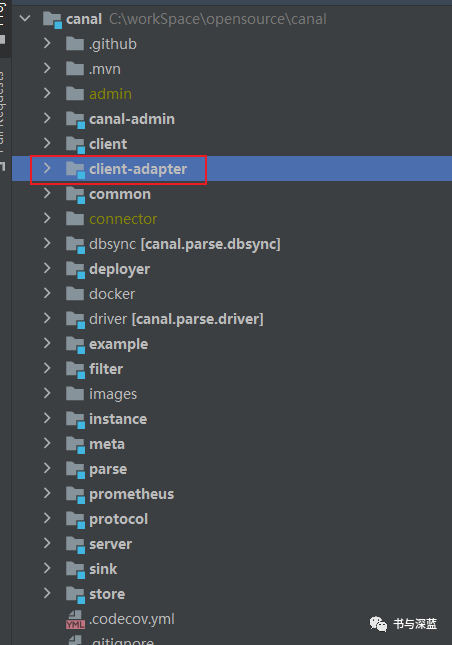
image-20210426185619759 canal在关系型数据库间同步是在adapter项目下的rdb子项目,所以我们需要改到的代码也在此目录下面
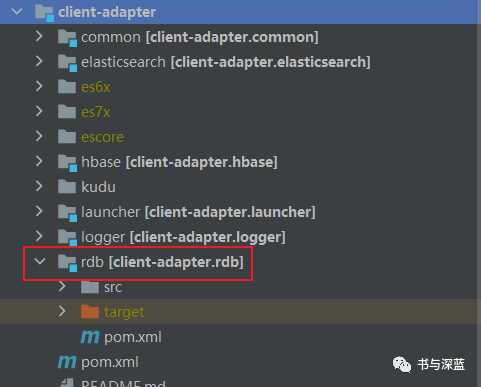
image-20210426185839262 通过正在运行的canal-adapter打印出来的日志可以定位到在进行逻辑处理的文件是RdbSyncService.java,找到其中的com.alibaba.otter.canal.client.adapter.rdb.service.RdbSyncService#sync(java.util.Map<java.lang.string,java.util.map<java.lang.string,com.alibaba.otter.canal.client.adapter.rdb.config.mappingconfig style="font-size: inherit;color: inherit;line-height: inherit;">>, java.util.List<com.alibaba.otter.canal.client.adapter.support.dml style="font-size: inherit;color: inherit;line-height: inherit;">, java.util.Properties)</com.alibaba.otter.canal.client.adapter.support.dml></java.lang.string,java.util.map<java.lang.string,com.alibaba.otter.canal.client.adapter.rdb.config.mappingconfig>方法,这是执行DML语句的入口。
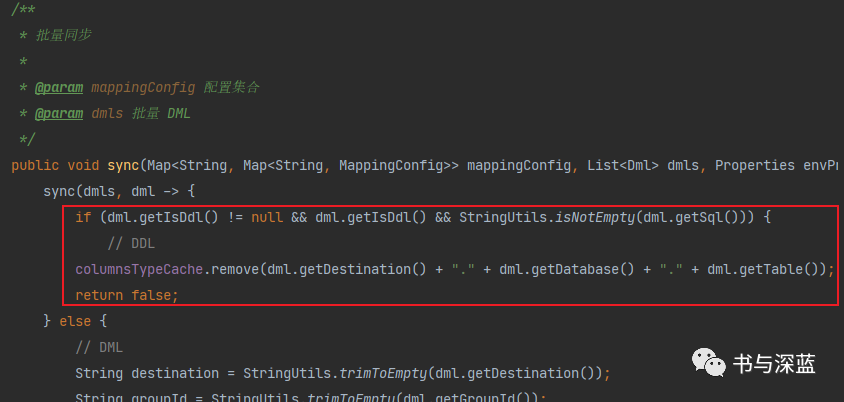
image-20210426191750623 这里可以看到在对DDL语句进行处理的时候只是移除Map中的值然后返回false,并没有对DDL语句进行处理,等待下面rdbMirrorDbSyncService.sync进行处理。
往上找此方法的调用方,找到RdbAdapter.java,这个就是RDB适配器的实现类中,找到调用方法
/**
    * 同步方法
    *
    * @param dmls 数据包
    */
   @Override
   public void sync(List<Dml> dmls) {
       if (dmls == null || dmls.isEmpty()) {
           return;
       }
       try {
           //这个就是上面第4点说的sync方法
           rdbSyncService.sync(mappingConfigCache, dmls, envProperties);
           //这个是镜像同步开启后执行的方法
           rdbMirrorDbSyncService.sync(dmls);
       } catch (Exception e) {
           throw new RuntimeException(e);
       }
}继续往上找,找到OracleSyncTest.java类,可以在这里进行单元测试。进行单元测试需要更改几处地方,如下:
TestConstant.java的链接,用户名和密码改为自己的
public final static String    jdbcUrl      = "jdbc:mysql://127.0.0.1:3306/dataBase?useUnicode=true&characterEncoding=utf-8";
public final static String    jdbcUser     = "root";
public final static String    jdbcPassword = "root";
Common.java
OuterAdapterConfig outerAdapterConfig = new OuterAdapterConfig();
outerAdapterConfig.setName("rdb");//默认是rdb,不需要更改
outerAdapterConfig.setKey("zsoa");//改为自己的 outerAdapterKey
Map<String, String> properties = new HashMap<>();
properties.put("jdbc.driveClassName", "com.mysql.jdbc.Driver");//因为用的都是MySQL,这里改为MySQL的驱动
properties.put("jdbc.url", "jdbc:mysql://127.0.0.1:3306/dataBase?useUnicode=true&characterEncoding=utf8");//这里是需要同步到的数据库链接
properties.put("jdbc.username", "root");//自己的用户名
properties.put("jdbc.password", "root_123456");//密码
outerAdapterConfig.setProperties(properties);
附上我自己的yml文件,需要放在resources的rdb目录下,在项目启动的时候会自己去读取以yml结尾的文件
mytest_stock.yml
dataSourceKey: dcDS                    #源数据源
outerAdapterKey: zsoa                #对外的key
destination: zsoa_db_canal                #所属的实例
groupId: sync_zsoa_db                        #所属的分组
dbMapping:
 truncate: true                            #这个是新加的属性,下面会说到
 database: data_center                        #数据中心数据库
 table: dc_stock_stock_detail            #数据中心效期库存明细表
 targetTable: zsoa.zsoa_goods_effective_stock_detail        #需要同步到的表
 targetPk:
   id: id
 targetColumns:                # 字段映射, 格式: 目标表字段: 源表字段, 如果字段名一样源表字段名可不填
   id:
   stock_id:
   warehouse:
   warehouse_total:
   create_date:
   stock_type:
   nc_code:
commitBatch: 3000OracleSyncTest.java里面有test01和test02两个方法,分别用来测试DDL和DML语句,需要自己组装同步的数据
OracleSyncTest#test01
@Test
public void test01() {
   Dml dml = new Dml();
   dml.setDestination("zsoa_db_canal");    //同yml里面的destination
   dml.setTs(new Date().getTime());
   dml.setType("TRUNCATE");             //binlog发生的类型
   dml.setDatabase("data_center");        //源数据库
   dml.setTable("dc_stock_stock_detail");    //源数据库操作的表
   dml.setIsDdl(true);                //是否DDL语句
   dml.setSql("TRUNCATE TABLE dc_stock_stock_detail"); //执行的具体的sql
   List<Map<String, Object>> dataList = new ArrayList<>();
   Map<String, Object> data = new LinkedHashMap<>();
   dml.setData(dataList);

   rdbAdapter.sync(Collections.singletonList(dml));//调用
}
OracleSyncTest#test02
@Test
public void test02() {
   Dml dml = new Dml();

   dml.setDestination("zsoa_db_canal");    //同yml里面的destination
   dml.setTs(new Date().getTime());
   dml.setType("UPDATE");                //binlog发生的类型
   dml.setDatabase("data_center");        //源数据库
   dml.setTable("dc_stock_stock_detail");    //源数据库操作的表
   dml.setIsDdl(false);        //是否DDL语句
   dml.setPkNames(Collections.singletonList("id"));    //主键字段

   List<Map<String, Object>> dataList = new ArrayList<>();
   Map<String, Object> data = new LinkedHashMap<>();
   dataList.add(data);
   //更新后的数据
   data.put("id", 123L);
   data.put("stock_id", 456L);
   data.put("warehouse", "改后的字段名称");
   data.put("warehouse_code", "789");
   data.put("warehouse_total",4607.0);
   data.put("box_gauge","12");
   data.put("item_no","3456");
   data.put("create_date",1619366400000L);
   data.put("stock_type",4);
   data.put("nc_code","66666");
   dml.setData(dataList);

   List<Map<String, Object>> oldList = new ArrayList<>();
   Map<String, Object> old = new LinkedHashMap<>();
   oldList.add(old);
   //更新前的数据
   old.put("warehouse", "改前的字段名称");
   dml.setOld(oldList);
   //调用
   rdbAdapter.sync(Collections.singletonList(dml));
}
先用test01方法进行测试,观察是DDL语句是怎么执行的
rdbSyncService.sync里面是直接跳过;然后执行到rdbMirrorDbSyncService.sync方法中,可以看到在获取到binlog执行的日志和镜像配置后会进行几个条件判断,然后executeDdl(mirrorDbConfig, dml)方法调用,执行完后清除配置信息,如果判断没通过就是DML的处理,也就是进行同表同字段的镜像复制,这里不做讨论。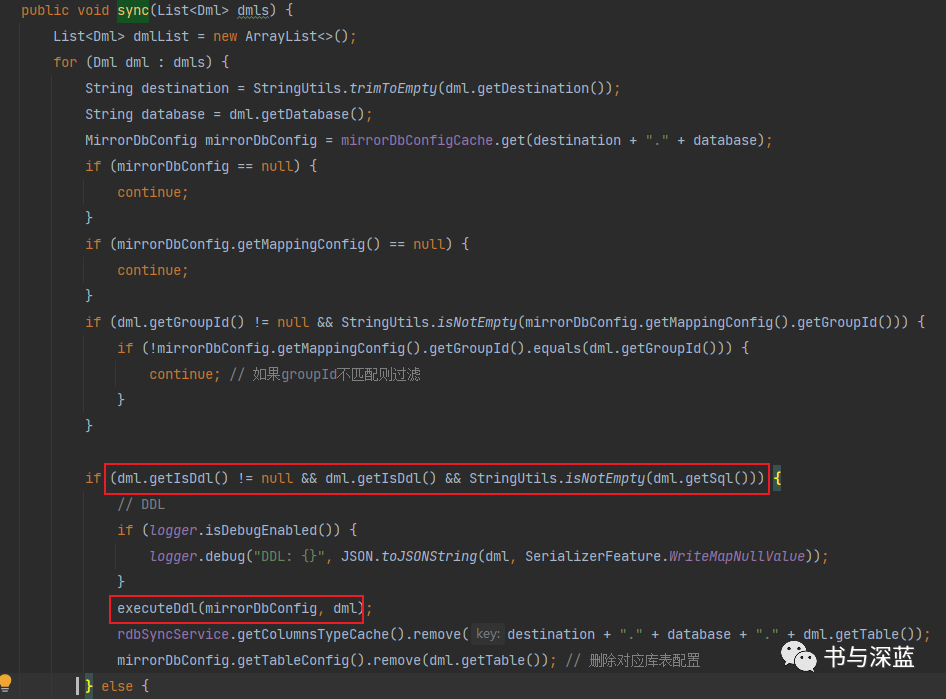
image-20210426194713375 查看executeDdl方法
/**
  * DDL 操作
  *
  * @param ddl DDL
  */
private void executeDdl(MirrorDbConfig mirrorDbConfig, Dml ddl) {
   try (Connection conn = dataSource.getConnection(); Statement statement = conn.createStatement()) {
       statement.execute(ddl.getSql());
       // 移除对应配置
       mirrorDbConfig.getTableConfig().remove(ddl.getTable());
       if (logger.isTraceEnabled()) {
           logger.trace("Execute DDL sql: {} for database: {}", ddl.getSql(), ddl.getDatabase());
       }
   } catch (Exception e) {
       throw new RuntimeException(e);
   }
}
可以发现在拿到执行的脚本后直接进行脚本执行,即在源库是怎么执行的sql,在新库就怎么执行,这就是镜像复制。但是我们的表名可能不是一致的,所以就需要进行源码的改造。
三、源码改造
查看RdbMirrorDbSyncService.java和RdbSyncService.java被初始化的地方,正好是之前我们看到的RdbAdapter.java,也是在这里面初始化了我们的yml文件,把配置文件的信息导入到mappingConfigCache(库名-表名对应配置)和mirrorDbConfigCache(镜像库配置)两个ConcurrentHashMap中。由于我们不能用镜像复制的方式进行同步,所以需要在RdbSyncService#sync方法中做文章,即让其在对DDL语句处理时不直接返回false,而是可以直接进行处理。参考rdbMirrorDbSyncService.sync里面对DDL语句的处理,我们需要新引入mirrorDbConfigCache和dataSource,并在RdbSyncService.java的有参构造器中对其进行初始化。
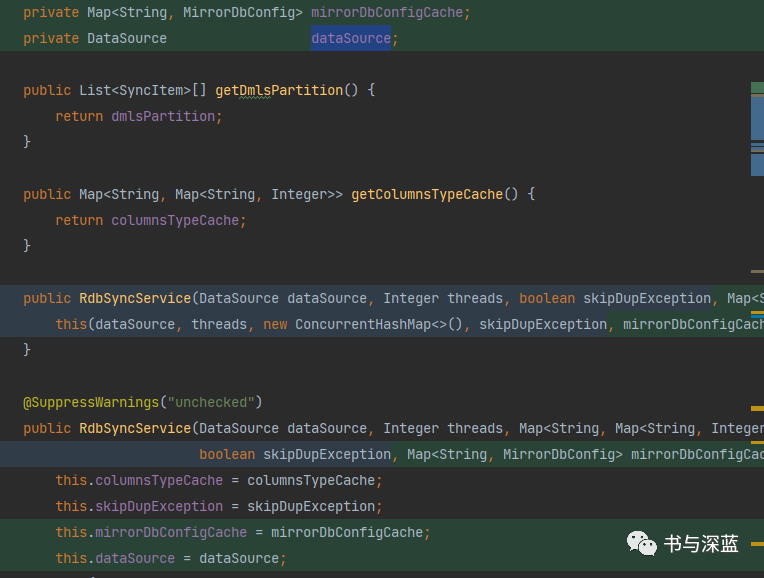
image-20210426200606289 然后找到次构造器调用方,分别在RdbAdapter.java和RdbMirrorDbSyncService.java,将相应的参数加上。
RdbAdapter.java
rdbSyncService = new RdbSyncService(dataSource,
           threads != null ? Integer.valueOf(threads) : null,
           skipDupException, mirrorDbConfigCache);//新增的mirrorDbConfigCache
RdbMirrorDbSyncService.java
public RdbMirrorDbSyncService(Map<String, MirrorDbConfig> mirrorDbConfigCache, DataSource dataSource,
                                 Integer threads, Map<String, Map<String, Integer>> columnsTypeCache,
                                 boolean skipDupException){
   this.mirrorDbConfigCache = mirrorDbConfigCache;
   this.dataSource = dataSource;
   this.rdbSyncService = new RdbSyncService(dataSource, threads, columnsTypeCache, skipDupException, mirrorDbConfigCache);
   }//新增的mirrorDbConfigCache
因为不使用镜像复制,所以MappingConfig.DbMapping#mirrorDb的属性我们也无法使用,但是在初始化的时候,只有当mirrorDb为true时配置才会初始化到mirrorDbConfigCache
if (!mappingConfig.getDbMapping().getMirrorDb()) {//mirrorDb为false,初始化到mappingConfigCache
   String key;
   if (envProperties != null && !"tcp".equalsIgnoreCase(envProperties.getProperty("canal.conf.mode"))) {
       key = StringUtils.trimToEmpty(mappingConfig.getDestination()) + "-"
           + StringUtils.trimToEmpty(mappingConfig.getGroupId()) + "_"
           + mappingConfig.getDbMapping().getDatabase() + "-" + mappingConfig.getDbMapping().getTable();
   } else {
       key = StringUtils.trimToEmpty(mappingConfig.getDestination()) + "_"
           + mappingConfig.getDbMapping().getDatabase() + "-" + mappingConfig.getDbMapping().getTable();
   }
   Map<String, MappingConfig> configMap = mappingConfigCache.computeIfAbsent(key,
                                                                             k1 -> new ConcurrentHashMap<>());
   configMap.put(configName, mappingConfig);
} else {
   // mirrorDB 为 true时,初始化到mirrorDbConfigCache
   String key = StringUtils.trimToEmpty(mappingConfig.getDestination()) + "."
       + mappingConfig.getDbMapping().getDatabase();
   mirrorDbConfigCache.put(key, MirrorDbConfig.create(configName, mappingConfig));
}
因此,我们需要新定义一个属性,然后根据这个属性进行配置判断后使yml配置文件也可以进入到mirrorDbConfigCache。在MappingConfig.DbMapping中定义属性
truncate
并提供get/set构造器private boolean truncate = false; //是否需要支持TRUNCATE然后在RdbAdapter.java中初始化配置文件时进行判断
if (!mappingConfig.getDbMapping().getMirrorDb()) {//mirrorDb为false,初始化到mappingConfigCache
   String key;
   if (envProperties != null && !"tcp".equalsIgnoreCase(envProperties.getProperty("canal.conf.mode"))) {
       key = StringUtils.trimToEmpty(mappingConfig.getDestination()) + "-"
           + StringUtils.trimToEmpty(mappingConfig.getGroupId()) + "_"
           + mappingConfig.getDbMapping().getDatabase() + "-" + mappingConfig.getDbMapping().getTable();
   } else {
       key = StringUtils.trimToEmpty(mappingConfig.getDestination()) + "_"
           + mappingConfig.getDbMapping().getDatabase() + "-" + mappingConfig.getDbMapping().getTable();
   }
   Map<String, MappingConfig> configMap = mappingConfigCache.computeIfAbsent(key,
                                                                             k1 -> new ConcurrentHashMap<>());
   configMap.put(configName, mappingConfig);
   //对 truncate 的支持,当truncate为true时,配置文件也进入到mirrorDbConfigCache
   if (mappingConfig.getDbMapping().getTruncate()) {
       mirrorDbConfigCache.put(key, MirrorDbConfig.create(configName, mappingConfig));
   }
} else {
   // mirrorDB 为 true时,初始化到mirrorDbConfigCache
   String key = StringUtils.trimToEmpty(mappingConfig.getDestination()) + "."
       + mappingConfig.getDbMapping().getDatabase();
   mirrorDbConfigCache.put(key, MirrorDbConfig.create(configName, mappingConfig));
           }
在
RdbSyncService.sync
中对DDL的处理进行改造,使其能够处理DDL语句sync(dmls, dml -> {
//将属性提取到上面
String destination = StringUtils.trimToEmpty(dml.getDestination());
String groupId = StringUtils.trimToEmpty(dml.getGroupId());
String database = dml.getDatabase();
String table = dml.getTable();
final String key;
//这个key的取值在RdbAdapter.java中一样的判断
if (envProperties != null && !"tcp".equalsIgnoreCase(envProperties.getProperty("canal.conf.mode"))) {
key = destination + "-" + groupId + "_" + database + "-" + table;
} else {
key = destination + "_" + database + "-" + table;
}
//DDL
if (dml.getIsDdl() != null && dml.getIsDdl() && StringUtils.isNotEmpty(dml.getSql())) {
// DDL
MirrorDbConfig mirrorDbConfig = mirrorDbConfigCache.get(key);
if (mirrorDbConfig == null) {
return false;
}
if (mirrorDbConfig.getMappingConfig() == null) {
return false;
}
if (dml.getGroupId() != null && StringUtils.isNotEmpty(mirrorDbConfig.getMappingConfig().getGroupId())) {
if (!mirrorDbConfig.getMappingConfig().getGroupId().equals(dml.getGroupId())) {
return false;// 如果groupId不匹配则过滤
}
}
// DDL
if (logger.isDebugEnabled()) {
logger.debug("DDL: {}", JSON.toJSONString(dml, SerializerFeature.WriteMapNullValue));
}
DbMapping dbMapping = mirrorDbConfig.getMappingConfig().getDbMapping();
//这里做没有配置truncate: true的拦截
if (!dbMapping.getTruncate()) {
logger.debug("未开启对truncate语句的支持.....暂时不予处理.....");
return false;
}
} else {Assert.notNull(table, "DbMapping.table required not null...");
String targetTable = dbMapping.getTargetTable();
Assert.notNull(targetTable, "DbMapping.targetTable required not null...");
String sql = dml.getSql();
//这里进行原表和targetTable的替换,使之对异库异表也能够进行支持
String executeSql = StringUtils.replace(sql, table, targetTable);
dml.setSql(executeSql);
//执行sql语句,这个方法需要从RdbMirrorDbSyncService.java中复制过来
executeDdl(mirrorDbConfig, dml);
getColumnsTypeCache().remove(destination + "." + database + "." + dml.getTable());
mirrorDbConfig.getTableConfig().remove(dml.getTable()); // 删除对应库表配置
columnsTypeCache.remove(dml.getDestination() + "." + dml.getDatabase() + "." + dml.getTable());
return true;
// DML
Map<String, MappingConfig> configMap = mappingConfig.get(key);
if (configMap == null) {
return false;
}
if (configMap.values().isEmpty()) {
return false;
}
for (MappingConfig config : configMap.values()) {
if (config.getConcurrent()) {
List<SingleDml> singleDmls = SingleDml.dml2SingleDmls(dml);
singleDmls.forEach(singleDml -> {
int hash = pkHash(config.getDbMapping(), singleDml.getData());
SyncItem syncItem = new SyncItem(config, singleDml);
dmlsPartition[hash].add(syncItem);
});
} else {
int hash = 0;
List<SingleDml> singleDmls = SingleDml.dml2SingleDmls(dml);
singleDmls.forEach(singleDml -> {
SyncItem syncItem = new SyncItem(config, singleDml);
dmlsPartition[hash].add(syncItem);
});
}
}
return true;
}
} );
四、打包测试
在client-adapter目录下执行打包命令
mvn package打包完成后会提示生成的包路径
C:\workSpace\opensource\canal\client-adapter\launcher\target\canal-adapter
这是我自己的路径
进入到本地plugin目录下找到
client-adapter.rdb-1.1.4-jar-with-dependencies.jar
文件,将文件拷贝到服务器的/data/canales/plugin
目录下,需要先删除原来的jar包然后进入服务器
/data/canales/conf/rdb
目录下修改你的配置文件dbMapping:
truncate: true #就是加这个然后到bin目录下进行./restart后就可以进行测试了,可以分别执行Truncate语句和正常的INSERT、UPDATE、DELETE语句进行测试,测试结果OK!
