sentinel dashboard配置
修改pom配置文件
<dependency>
    <groupId>com.alibaba.csp</groupId>
    <artifactId>sentinel-datasource-nacos</artifactId>
    <!--<scope>test</scope>-->
</dependency>
修改resources/app/scripts/directives/sidebar/sidebar.html文件
<li ui-sref-active="active" ng-if="!entry.isGateway">
<a ui-sref="dashboard.flowV1({app: entry.app})">
<i class="glyphicon glyphicon-filter"></i> 流控规则</a>
</li>
修改为:
<li ui-sref-active="active" ng-if="!entry.isGateway">
<a ui-sref="dashboard.flow({app: entry.app})">
<i class="glyphicon glyphicon-filter"></i> 流控规则</a>
</li>
修改后会调用FlowControllerV2中的接口
application.properties 中增加配置
sentinel.nacos.serverAddr=localhost:8848
sentinel.nacos.namespace=
sentinel.nacos.group-id=DEFAULT_GROUP
加入nacos配置
@EnableConfigurationProperties(NacosPropertiesConfiguration.class)
@Configuration
public class NacosConfiguration {

    @Bean
    public com.alibaba.csp.sentinel.datasource.Converter<List<FlowRuleEntity>, String> flowRuleEntityEncoder() {
        return JSON::toJSONString;
    }

    @Bean
    public com.alibaba.csp.sentinel.datasource.Converter<String, List<FlowRuleEntity>> flowRuleEntityDecoder() {
        return s -> JSON.parseArray(s, FlowRuleEntity.class);
    }

    @Bean
    public ConfigService nacosConfigService(NacosPropertiesConfiguration nacosPropertiesConfiguration) throws NacosException {
        Properties properties = new Properties();
        properties.put(PropertyKeyConst.SERVER_ADDR, nacosPropertiesConfiguration.getServerAddr());
        properties.put(PropertyKeyConst.NAMESPACE, nacosPropertiesConfiguration.getNamespace());
        return ConfigFactory.createConfigService(properties);
    }
}
从Nacos配置中心获取控流配置
@Component
public class FlowRuleNacosProvider implements DynamicRuleProvider<List<FlowRuleEntity>> {

    private static Logger log = LoggerFactory.getLogger(FlowRuleNacosProvider.class);

    @Autowired
    private NacosPropertiesConfiguration nacosPropertiesConfiguration;

    @Autowired
    private ConfigService configService;

    @Autowired
    private Converter<String, List<FlowRuleEntity>> converter;

    @Override
    public List<FlowRuleEntity> getRules(String appName) throws Exception {
        String dataId = new StringBuilder(appName).append(NacosConstants.DATA_ID_POSTFIX).toString();
        String rules = configService.getConfig(dataId, nacosPropertiesConfiguration.getGroupId(), 3000);
        log.info("pull rule config: {}", rules);
        if (StringUtil.isEmpty(rules)) {
            return new ArrayList<>();
        }
        return converter.convert(rules);
    }
}
动态刷新从Nacos配置中心获取的控流配置
@Component
public class FlowRuleNacosPublisher implements DynamicRulePublisher<List<FlowRuleEntity>> {

    private static Logger log = LoggerFactory.getLogger(FlowRuleNacosProvider.class);

    @Autowired
    private NacosPropertiesConfiguration nacosPropertiesConfiguration;

    @Autowired
    private ConfigService configService;

    @Autowired
    private Converter<List<FlowRuleEntity>, String> converter;

    @Override
    public void publish(String app, List<FlowRuleEntity> rules) throws Exception {
        if (rules == null || rules.size() == 0) {
            return;
        }
        String dataId = new StringBuilder(app).append(NacosConstants.DATA_ID_POSTFIX).toString();
        configService.publishConfig(dataId, nacosPropertiesConfiguration.getGroupId(), converter.convert(rules));
    }
}
修改FlowControllerV2改为注入nacos
@Autowired
@Qualifier("flowRuleNacosProvider")
private DynamicRuleProvider<List<FlowRuleEntity>> ruleProvider;

@Autowired
@Qualifier("flowRuleNacosPublisher")
private DynamicRulePublisher<List<FlowRuleEntity>> rulePublisher;
打包发布
客户端:
引入依赖
<dependency>
    <groupId>com.alibaba.cloud</groupId>
    <artifactId>spring-cloud-starter-alibaba-sentinel</artifactId>
    <version>2.1.1.RELEASE</version>
</dependency>
yml文件加入配置
spring:
  cloud:
    sentinel:
      datasource:
       - nacos:
        server-addr: 81.69.162.162:8848
        data-id:  ${spring.application.name}-sentinel-flow
        group-id: DEFAULT_GROUP
        data-type: json&
        rule-type: flow
启动完成后,在sentinel dashboard界面增加流控规则

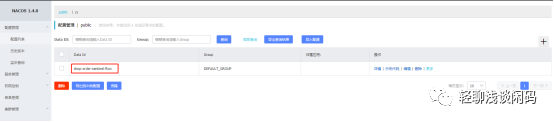
可以发现nacos中自动增加了一条配置