



broadcast receiver 特点
对外部事件进行过滤,只对感兴趣的事件做出响应。
通知方式:activity、serice、NotificationManager.
注册方式:动态注册、静态注册
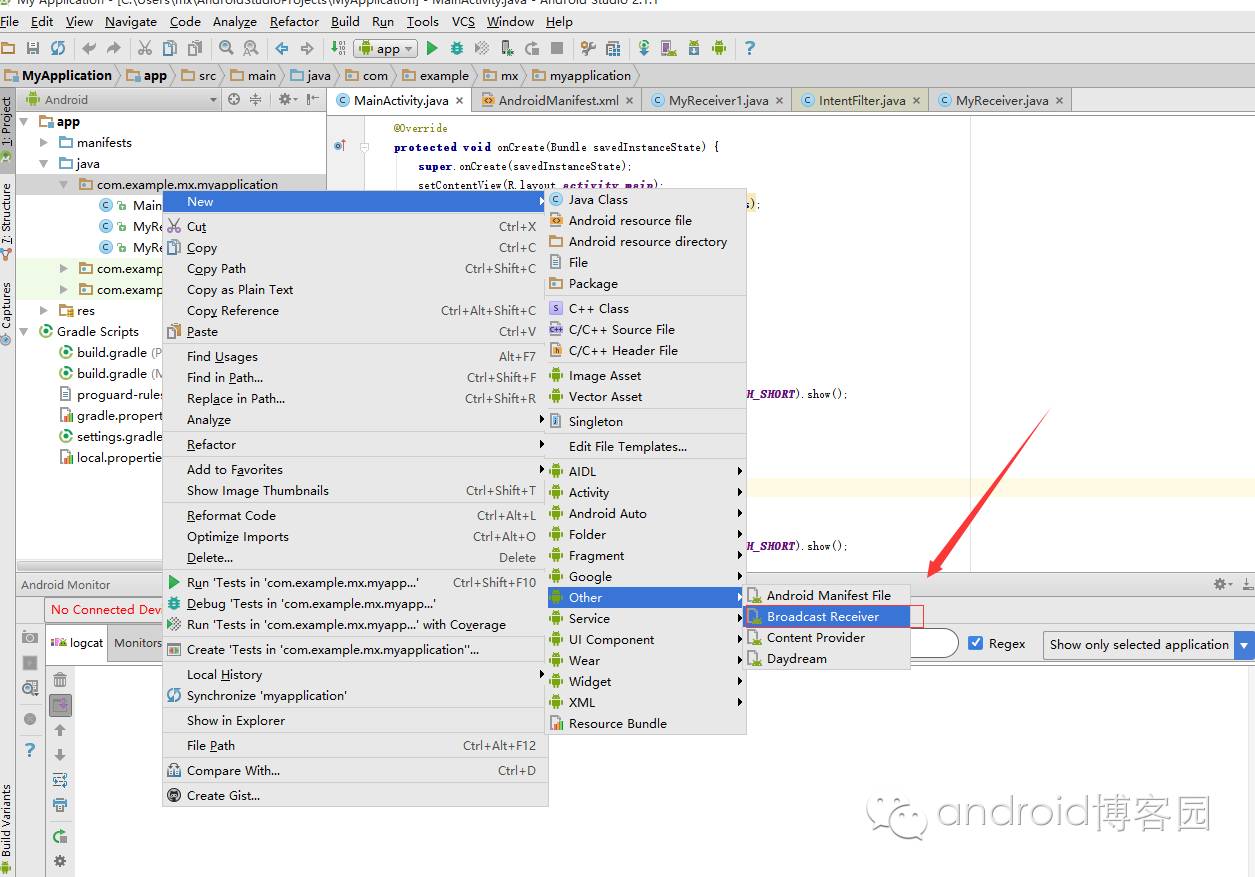
一、创建方式:
二、静态注册:
        <receiver android:name=".MyReceiver">
            <intent-filter android:priority="11">
                <action android:name="com.example.mx.myapplication.intent.action.MyReceiver" />
            </intent-filter>
        </receiver>
//android:priority 优先级,数字越大优先级高,可以不加
三、动态注册:
            //点击按钮动态注册
            case R.id.btnReg:
                Toast.makeText(this,"点击了注册",Toast.LENGTH_SHORT).show();
                if(receiver==null){
                    receiver=new MyReceiver();
                    registerReceiver(receiver,new IntentFilter(MyReceiver.ACTION));

                }
                break;
四、屏蔽广播
    public void onReceive(Context context, Intent intent) {
        // TODO: This method is called when the BroadcastReceiver is receiving
        // an Intent broadcast.
       //System.out.println("接受到了消息消息的内容是:"+intent.getStringExtra("data"));
        System.out.println("MyReceiver接收到了消息");
        abortBroadcast();
    }
五、后面加 abortBroadcast可以屏蔽广播
但是要修改一处代码,发送意图的方式由sendBroadcast改为sendOrderedBroadcast
            case R.id.btnSendMsg:
                Toast.makeText(this,"点击了发送",Toast.LENGTH_SHORT).show();
//                Intent i=new Intent(this,MyReceiver.class);
                Intent i=new Intent(MyReceiver.ACTION);
                i.putExtra("data","jikexueyuan");
                //sendBroadcast(i);

                sendOrderedBroadcast(i,null);
                break;
下面是一个广播接收器的Demo(用于发送和接收信息)
发送短信MainActivity.java
package com.example.mx.myapplication;

import android.content.Intent;
import android.content.IntentFilter;
import android.support.v7.app.AppCompatActivity;
import android.os.Bundle;
import android.view.View;
import android.widget.Toast;

public class MainActivity extends AppCompatActivity implements View.OnClickListener {

    @Override
    protected void onCreate(Bundle savedInstanceState) {
        super.onCreate(savedInstanceState);
        setContentView(R.layout.activity_main);
        findViewById(R.id.btnSendMsg).setOnClickListener(this);
        findViewById(R.id.btnReg).setOnClickListener(this);
        findViewById(R.id.btnUnreg).setOnClickListener(this);

    }

    @Override
    public void onClick(View v) {
        switch (v.getId()){
            case R.id.btnSendMsg:
                Toast.makeText(this,"点击了发送",Toast.LENGTH_SHORT).show();
//                Intent i=new Intent(this,MyReceiver.class);
                Intent i=new Intent(MyReceiver.ACTION);
                i.putExtra("data","jikexueyuan");
                //sendBroadcast(i);
                sendOrderedBroadcast(i,null);
                break;
            //点击按钮动态注册
            case R.id.btnReg:
                Toast.makeText(this,"点击了注册",Toast.LENGTH_SHORT).show();
                if(receiver==null){
                    receiver=new MyReceiver();
                    registerReceiver(receiver,new IntentFilter(MyReceiver.ACTION));

                }
                break;
            case R.id.btnUnreg:
                Toast.makeText(this,"点击了注销",Toast.LENGTH_SHORT).show();
                if(receiver!=null){
                    unregisterReceiver(receiver);
                    receiver=null;
                }
                break;
        }
    }


    private MyReceiver receiver=null;
}
接收信息1 MyReceiver.java
package com.example.mx.myapplication;

import android.content.BroadcastReceiver;
import android.content.Context;
import android.content.Intent;
import android.content.IntentFilter;

public class MyReceiver extends BroadcastReceiver {
    public static final String ACTION="com.example.mx.myapplication.intent.action.MyReceiver";

    public MyReceiver() {
    }

    @Override
    public void onReceive(Context context, Intent intent) {
        // TODO: This method is called when the BroadcastReceiver is receiving
        // an Intent broadcast.
       //System.out.println("接受到了消息消息的内容是:"+intent.getStringExtra("data"));
        System.out.println("MyReceiver接收到了消息");
        abortBroadcast();
    }
}
接收信息2 MyReceiver.java
package com.example.mx.myapplication;

import android.content.BroadcastReceiver;
import android.content.Context;
import android.content.Intent;

public class MyReceiver1 extends BroadcastReceiver {
    public MyReceiver1() {
    }

    @Override
    public void onReceive(Context context, Intent intent) {
        // TODO: This method is called when the BroadcastReceiver is receiving
        // an Intent broadcast.
        System.out.println("MyReceiver 1 接收到了消息");

    }
}
布局界面 activity_main.xml
<?xml version="1.0" encoding="utf-8"?>
<LinearLayout
    xmlns:android="http://schemas.android.com/apk/res/android"
    xmlns:tools="http://schemas.android.com/tools"
    android:layout_width="match_parent"
    android:layout_height="match_parent"
    android:orientation="vertical">

    <Button
        android:id="@+id/btnSendMsg"
        android:text="发送消息"
        android:layout_width="wrap_content"
        android:layout_height="wrap_content" />
    <Button
        android:layout_width="wrap_content"
        android:layout_height="wrap_content"
        android:text="注册接收器"
        android:id="@+id/btnReg"
        />
    <Button
        android:layout_width="wrap_content"
        android:layout_height="wrap_content"
        android:text="注销接收器"
        android:id="@+id/btnUnreg"/>
</LinearLayout>
配制界面:
<?xml version="1.0" encoding="utf-8"?>
<manifest xmlns:android="http://schemas.android.com/apk/res/android"
    package="com.example.mx.myapplication">

    <application
        android:allowBackup="true"
        android:icon="@mipmap/ic_launcher"
        android:label="@string/app_name"
        android:supportsRtl="true"
        android:theme="@style/AppTheme">
        <activity android:name=".MainActivity">
            <intent-filter>
                <action android:name="android.intent.action.MAIN" />

                <category android:name="android.intent.category.LAUNCHER" />
            </intent-filter>
        </activity>

        <receiver android:name=".MyReceiver">
            <intent-filter android:priority="11">
                <action android:name="com.example.mx.myapplication.intent.action.MyReceiver" />
            </intent-filter>
        </receiver>
        <receiver
            android:name=".MyReceiver1"
            android:enabled="true"
            android:exported="true">
            <intent-filter android:priority="10">
                <action android:name="com.example.mx.myapplication.intent.action.MyReceiver"></action>
            </intent-filter>
        </receiver>

    </application>

</manifest>
