



1. 什么是fortify
fottify全名叫:Fortify Source Code Analysis Suite是目前在全球使用最为广泛的软件源代码安全扫描,分析和软件安全风险管理软件。该软件多次荣获全球著名的软件安全大奖,包括InforWord, Jolt,SC Magazine….目前众多世界级的软件开发企业都在使用该软件方案在他们的开发团队中加速查找软件安全漏洞的效率,监视和管理软件安全的风险.
软件产品组成如下:
Fortify Source Code Analysis Engine(源代码分析引擎)
采用数据流分析引擎,语义分析引擎,结构分析引擎,控制流分析引擎,配置分析引擎和特有的X-Tier跟踪器从不同的方面查看代码的安全漏洞,最大化降低代码安全风险。
Fortify Secure Code rules:Fortify(软件安全代码规则集)
采用国际公认的安全漏洞规则和众多软件安全专家的建议,辅助软件开发人员、安全人员和管理人员快速掌握软件安全知识、识别软件安全漏洞和修复软件安全漏洞。其规则的分类和定义被众多国际权威机构采用,包括美国国土安全(CWE)标准、OWASP,PCI。。。等。
Fortify Audit Workbench (安全审计工作台)
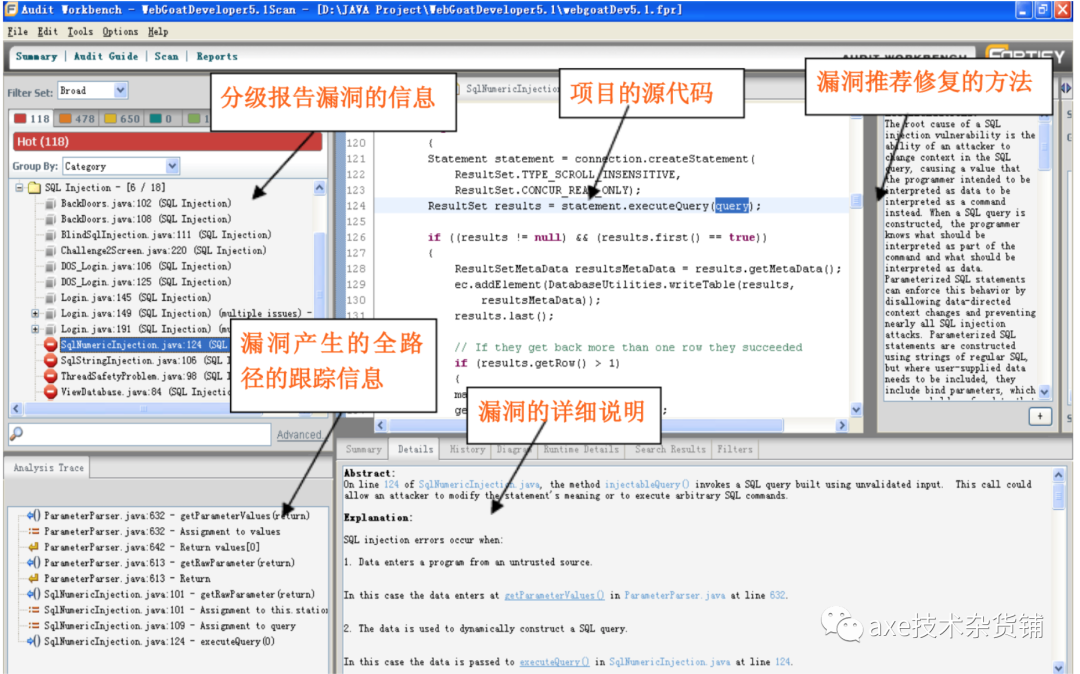
辅助开发人员、安全审计人员对Fortify Source Code Analysis Engines(源代码分析引擎)扫描结果进行快速分析、查找、定位和区分软件安全问题严重级别。
Fortify Rules Builder(安全规则构建器)
提供自定义软件安全代码规则功能,满足特定项目环境和企业软件安全的需要。
Fortify Source Code Analysis Suite plug in (Fortify SCA IDE集成开发插件)
Eclipse, WSAD, Visual Studio 集成开发环境中的插件,便于开发者在编写代码过程中可以直接使用工具扫描代码,立刻识别代码安全漏洞,并立即根据建议修复,消除安全缺陷在最初的编码阶段,及早发现安全问题,降低安全问题的查找和修复的成本。
产品功能:
源代码安全漏洞的扫描分析功能:
独特的数据流分析技术,跟踪被感染的、可疑的输入数据,直到该数据被不安全使用的全过程,并跨越整个软件的各个层次和编程语言的边界。
独特的语义分析技术发现易于遭受攻击的语言函数或者过程,并理解它们使用的上下文环境,并标识出使用特定函数或者过程带来的软件安全的隐患
独特的控制流分析技术精确地跟踪业务操作的先后顺序,发现因代码构造不合理而带来的软件安全隐患。
独特的配置流分析技术分析软件的配置和代码的关系,发现在软件配置和代码之间,配置丢失或者不一致而带来的安全隐患
独特的代码结构分析技术从代码的结构方面分析代码,识别代码结构不合理而带来的安全弱点和问题。
自定义安全代码规则功能。
源代码安全漏洞的审计功能:
1.安全漏洞扫描结果的汇总和问题优先级别划分功能。2.安全审计自动导航功能3.安全问题定位和问题传递过程跟踪功能。4.安全问题查询和过滤功能。5.安全问题审计结果、审计类别划分和问题旁注功能。6.安全问题描述和推荐修复建议。
产品特性:
从多方面分析软件源代码,查找软件安全漏洞,是目前采用分析技术最多的,最能全面检查代码安全问题,其检查方式分别为:数据流、控制流、语义、配置流和代码结构
是目前唯一的能跨越软件不同层次和不同语言边界的静态分析技术,能跟踪软件安全漏洞引入的过程。
安全代码规则最全面,安全漏洞检查最彻底。目前包括150多种类别的安全漏洞,其安全代码规则多达50000多条。规则内容涉及ASP.NET, C/C++, C#, ColdFusion,Java, JSP, PL/SQL, T-SQL, XML,VB.NET and other .NET等多种语言
支持多种国际软件安全的标准:OWASP、Payment Card Industry (PCI) Compliance、Federal Information Security Management Act(FISMA)Common Weakness Enumeration(CWE)….。
支持混合语言的分析,包括 ASP.NET, C/C++, C#, Java?, JSP, PL/SQL,T-SQL, VB.NET, XML and other .NET languages. Fortify SCA 支持 Windows?, Solaris?, Linux?, AIX? and Mac OS? X….等多种操作系统
支持自定义软件安全代码规则。
集成软件开发环境(Microsoft Visual Studio, IBM RAD, and Eclipse.)和自动产品构建过程。
基于Web接口,能对企业多个项目进行集中的安全统计、分析和管理
它支持扫描多少种语言?
FortifySCA支持的21语言,分别是:
1. asp.net2. VB.Net3. c#.Net4. ASP5. VBscript6. VS67. java8. JSP9. javascript10. HTML11. XML12. C/C++13. PHP14. T-SQL15. PL/SQL16. Action script17. Object-C (iphone-2012/5)18. ColdFusion5.0 - 选购19. python -选购20. COBOL - 选购21. SAP-ABAP -选购
1.1 Foritfy SCA扫描原理
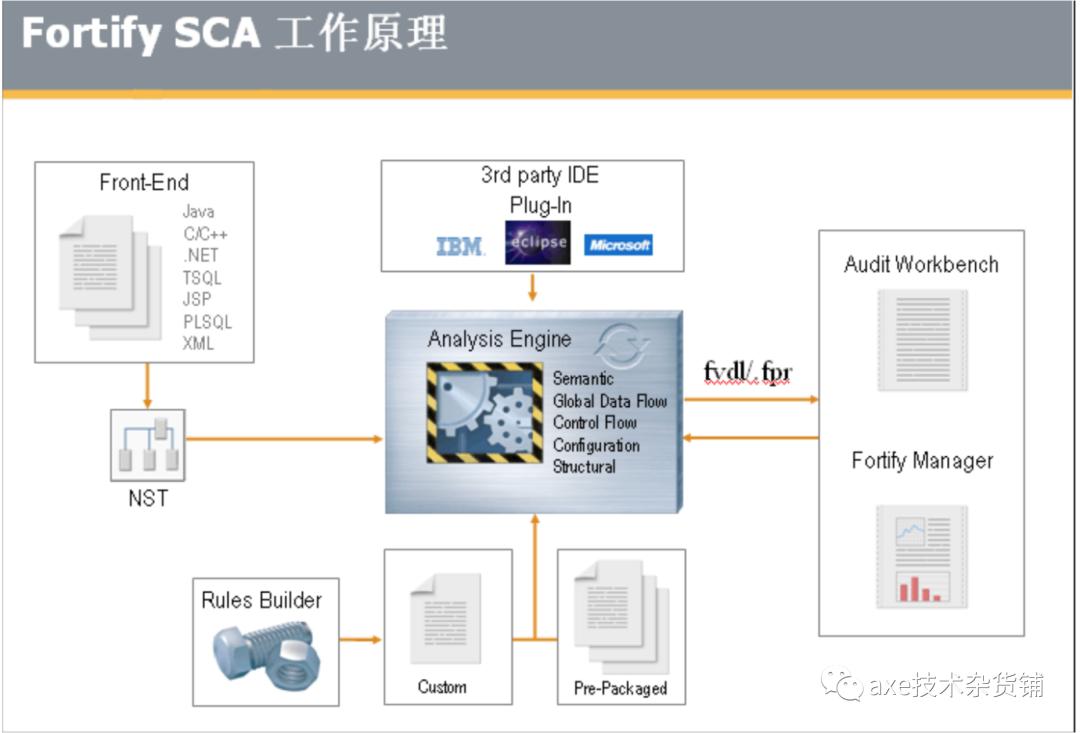
Foritfy SCA主要包含的五大分析引擎:
数据流引擎:跟踪,记录并分析程序中的数据传递过程所产生的安全问题;
语义引擎:分析程序中不安全的函数,方法的使用的安全问题;
结构引擎:分析程序上下文环境,结构中的安全问题;
控制流引擎:分析程序特定时间,状态下执行操作指令的安全问题;
配置引擎:分析项目配置文件中的敏感信息和配置缺失的安全问题;
说明:特有的X-Tier™跟踪器:跨跃项目的上下层次,贯穿程序来综合分析问题
原理:
Foritfy SCA 首先调用语言的编译器或者解释器把前端语言(java c/c++)转换为一种中间媒体文件NST(Normal Syntax Tree)将其源代码的调用关系,执行环境,上下文等分析清楚.然后再通过上述的五大分析引擎,从5个切面来分析这个NST, 匹配所有规则库中漏洞特征, 一旦发现漏洞就抓取下来. 最后形成包含漏洞信息的 FPR 结果文件, 用 AWB 打开查看.
查看结果如下:
1.2 静态代码扫描存在的价值
研发过程,发现BUG越晚,修复的成本越大
缺陷引入的大部分是在编码阶段,但发现的更多是在单元测试、集成测试、功能测试阶段
统计证明,在整个软件开发生命周期中,30% 至 70% 的代码逻辑设计和编码缺陷是可以通过静态代码分析来发现和修复的
以上三点证明了,静态代码扫描在整个安全开发的流程中起着十分关键的作用,且实施这件事情的时间点需要尽量前移,因为扫描的节点左移能够大幅度的降低开发以及修复的成本,能够帮助开发人减轻开发和修复的负担,许多公司在推行静态代码扫描工具的时候会遇到大幅度的阻力,这方面阻力主要来自于开发人员,由于工具能力的有限性,会产生大量的误报,这就导致了开发人员很可能在做BUG确认的工作时花费了大量的无用时间。因此选择一款合适的静态代码分析工具变得尤为重要,合适的工具能够真正达到降低开发成本的效果。
2. 如何将fortify集成到CICD中
2.1 fortify 对java项目进行扫描
将fortify打包成docker镜像
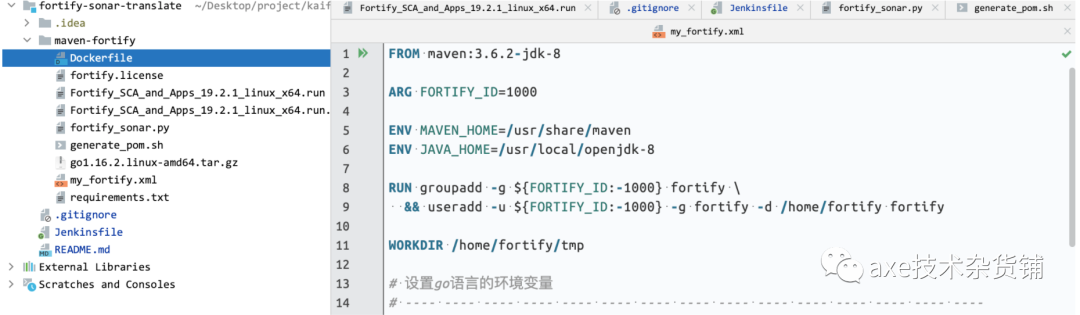
FROM maven:3.6.2-jdk-8ARG FORTIFY_ID=1000ENV MAVEN_HOME=/usr/share/mavenENV JAVA_HOME=/usr/local/openjdk-8RUN groupadd -g ${FORTIFY_ID:-1000} fortify \&& useradd -u ${FORTIFY_ID:-1000} -g fortify -d /home/fortify fortifyWORKDIR /home/fortify/tmpCOPY fortify.license ./# 测试用COPY fortify.license /opt# 下面的规则的没有用------------------------------------------------COPY rules/ /home/fortify/COPY rules/ ./# 下面的规则的没有用------------------------------------------------COPY Fortify_SCA_and_Apps_19.2.1_linux_x64.run* ./RUN chown -R fortify:fortify /home/fortify \&& chown -R fortify:fortify /usr/share/maven/ref/ \&& chmod u+x Fortify_SCA_and_Apps_19.2.1_linux_x64.runUSER fortifyENV HOME /home/fortifyRUN ./Fortify_SCA_and_Apps_19.2.1_linux_x64.run --mode unattended \&& tar -xzf /home/fortify/plugins/maven/maven-plugin-bin.tar.gz -C ./ENV PATH "/home/fortify/bin:${PATH}"ENV MAVEN_CONFIG /home/fortify/.m2RUN chmod u+x install.sh \&& ./install.sh \&& fortifyupdate# fortifyupdate 主要是更新规则库, 扫描的时候需要WORKDIR /RUN rm -rf /home/fortify/tmp#CMD tail -f /opt/fortify.license# 上面的这个Dockerfile 会默认把 maven 的仓库 ~/.m2 变成 /home/fortify/.m2
需要下面的三个文件,用于打镜像用

下面是
Fortify_SCA_and_Apps_19.2.1_linux_x64.run.options
里面的配置内容
# license的路径fortify_license_path=/home/fortify/tmp/fortify.license# fortify更新规则库的地址UpdateServer=https://update.fortify.com# 导入的目录installdir=/home/fortify
jenkinsfile 在jenkins中运行的语法
#!/usr/bin/env groovynode {stage('Fortify Scan') {fortifyScan()}// stage('Translate Results') {// translateResults()// }stage('Sonarqube Analysis') {sonarqubeScan()}}def fortifyScan() {def plugin = "com.fortify.sca.plugins.maven:sca-maven-plugin:19.2.0"def artifactId = readMavenPom().getArtifactId()def version = readMavenPom().getVersion()String filename = "${artifactId}-${version}"docker.image('fortify_maven0004').inside() {sh "mvn -B ${plugin}:clean -Duser.home=/home/fortify/"sh "mvn -B ${plugin}:translate -Duser.home=/home/fortify/"sh "mvn -B ${plugin}:scan -Dfortify.sca.Xmx=8G -Duser.home=/home/fortify/"// sh "FPRUtility -information -listIssues -project target/fortify/${filename}.fpr -outputFormat CSV -f /var/lib/jenkins/workspace/axe-fortify/fprcsv2222.csv"// !!!!!!!!!注意!!!!!!!! !!!!!!!! !!!!!!!! !!!!!!!!//下面这一行运行不起来, /opt/fortify/Core/config/reports/my_fortify.xml 得存在才行sh "ReportGenerator -format xml -f my_protify0001.xml -source target/fortify/${filename}.fpr -template /opt/fortify/Core/config/reports/my_fortify.xml -showSuppressed -showHidden"}}// def translateResults() {// docker.image('coveros/fortify-to-sonarqube').inside() {// sh 'transform --input target/fortify/fprcsv.csv --output target/fortify/fprresults.json'// }// }def sonarqubeScan() {withEnv(['MAVEN_HOME=/usr/share/maven', 'JAVA_HOME=/usr/local/openjdk-8']) {docker.image('fortify_maven0004').inside() {withSonarQubeEnv('sonarqube_new') {sh "mvn -B org.sonarsource.scanner.maven:sonar-maven-plugin:3.8.0.2131:sonar -Dsonar.login=87e9f00729c7c5247c90862ddb73f423e0b805dd -Duser.home=/home/fortify/ -Dsonar.externalIssuesReportPaths=./ssss.json"}}}}// 坑1com.fortify.sca.plugins.maven:sca-maven-plugin:19.2.0 这个要去/home/fortify/.m2 里面去找.// 坑2org.sonarsource.scanner.maven:sonar-maven-plugin:3.8.0.2131:sonar 去mvn查找// 坑3-Duser.home=/home/fortify/ //是设置 m2. 的路径
补充说明1:
readMavenPom() 需要安装jenkins 插件: pipeline-utility-steps;
org.jenkinsci.plugins.scriptsecurity.sandbox.RejectedAccessException: Scripts not permitted to use method如果报上面的错, 需要去下图的里面点击 approve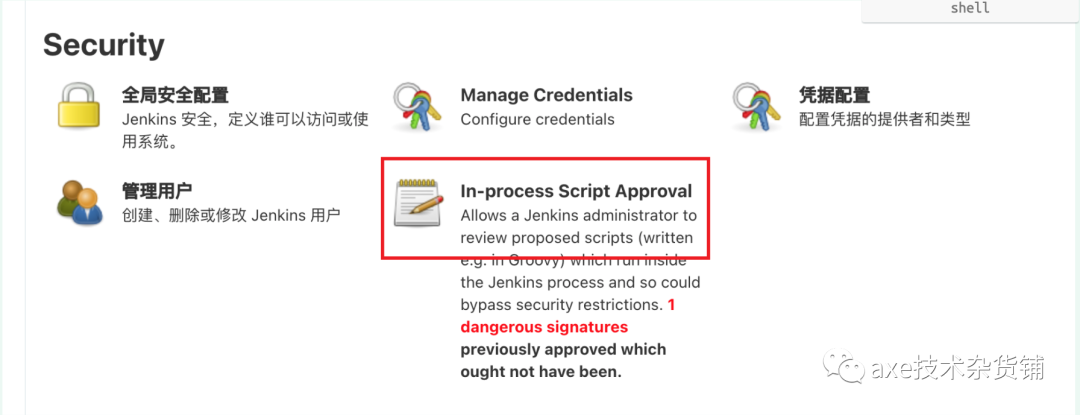
docker.image('fortify_maven0004').inside() 需要安装jenkins 插件: Docker Pipeline
docker.image('fortify_maven0004').inside()
这个其实是将 workspace 直接挂载到容器内部
上面就是将 /var/lib/jenkins/workspace/axe-fortify/ 这个目录所有文件挂载到 fortify_maven0004 这个容器中
补充说明2:
/opt/fortify/Core/config/reports/my_fortify.xml 这个东西是可以自己定制的, 上面的容器中存在的路径是:
/home/fortify/Core/config/reports/*.xml 里面的内容可以根据自己需要的定制
* my_fortify.xml
<?xml version="1.0" encoding="utf-8"?><ReportDefinition type="standard" ID="developerWorkbook"><TemplateName>Fortify Developer Workbook</TemplateName><TemplatePath/><LogoPath>/MF_logo.jpg</LogoPath><Footnote>Copyright 2019 Micro Focus or one of its affiliates.</Footnote><ReportSection enabled="true" optionalSubsections="true"><Title>Results</Title><SubSection enabled="true"><Title>Vulnerability_Results</Title><Description>Results summary</Description><IssueListing limit="50000" listing="true"> 这里的限制根据自己的需要设置<Refinement/><Chart chartType="list"><Axis>Category</Axis></Chart></IssueListing></SubSection></ReportSection></ReportDefinition>
生成 my_fortify.xml 后 , 上传到 sonarqube 需要转换成 sonarqube需要的格式
下面是 由 *.xml -> *.json 的脚本.
运行命令是: python3 fortify_sonar.py -i ./ssss.xml -o ssss.json
# ----------------------------------# 将fortify 生成的xml 转换为 sonarqube需要的格式# ----------------------------------import osimport argparsefrom xml.etree import ElementTreeimport ijsonimport jsonLISTTYPE = 1DICTTYPE = 0# issue_sort = {}# 为sonarqube准备到格式issues_sonarqube = {}issues_sonarqube_list = []input_file = Noneoutput_file = None# 解析argsdef main(args):''' Call functions based on user args '''global input_fileglobal output_fileinput_file = args.inputoutput_file = args.outputprint(input_file)print(output_file)def getDictResults(res_dicts, iters):result_dicts = {}# for iter in iters.getchildren():for iter in list(iters):iterxml(iter, result_dicts)if result_dicts:res_dicts[iters.tag].update(result_dicts)def getListResults(res_dicts, iters):result_lists = []# for iter in iters.getchildren():for iter in list(iters):result_dicts = {}iterxml(iter, result_dicts)result_lists.append(result_dicts.copy())del (result_dicts)if result_lists:if len(res_dicts[iters.tag].items()) == 0:res_dicts[iters.tag] = result_lists.copy()else:for resobj in result_lists:resobjkey = list(resobj.keys())[0]if res_dicts[iters.tag].get(resobjkey) == None:res_dicts[iters.tag].update(resobj)else:if type(res_dicts[iters.tag][resobjkey]) == list:res_dicts[iters.tag][resobjkey].append(resobj[resobjkey].copy())else:old_value = res_dicts[iters.tag][resobjkey]res_dicts[iters.tag][resobjkey] = []res_dicts[iters.tag][resobjkey].append(old_value)res_dicts[iters.tag][resobjkey].append(resobj[resobjkey].copy())del (result_lists)def checkxmlchildrentype(iters):taglist = []# for iter in iters.getchildren():for iter in list(iters):taglist.append(iter.tag)if len(set(taglist)) == len(taglist):return DICTTYPEelse:return LISTTYPEdef getResults(res_dicts, iters):if checkxmlchildrentype(iters):return getListResults(res_dicts, iters)else:return getDictResults(res_dicts, iters)# @res_dicts {}def iterxml(iter, res_dicts):res_dicts[iter.tag] = {}if iter.attrib:for k, v in dict(iter.attrib).items():res_dicts[iter.tag].update({k: v})if iter.text is not None and iter.text.strip() != "":res_dicts[iter.tag].update({"__XmlTagText__": iter.text.strip()})# if iter.getchildren():if list(iter):getResults(res_dicts, iter)def parserxmltojson(file_path):try:tree = ElementTree.parse(file_path)except Exception as e:# multi-byte encodings are not supported 把字符集改成utf-8就可以# encoding specified in XML declaration is incorrect xml encoding标识和文件的字符集不同# syntax error 语法错误,乱码等# not well-formed (invalid token) 编辑器点击后字符集被修改成ASCII等,或者文件本身字符集和xml encoding不相同print("Parser {} Error, Errmsg: {}".format(file_path, e))return ""if tree is None:print("{} is None.".format(file_path))return ""root = tree.getroot()report = {}iterxml(root, report)return reportdef parse_fortify_sonar(input_file, output_file):with open(input_file, 'r', encoding='utf-8') as f:friority_list = list(ijson.items(f, 'ReportDefinition.ReportSection.SubSection.IssueListing.Chart.GroupingSection.item'))# 封装成为sonarqube格式for issue_sonar in friority_list:issue_list = issue_sonar["Issue"]if (type(issue_list) == dict):try:coverJson(issue_list)except Exception as e:print(e)continueelse:for issue_info in issue_list:try:coverJson(issue_info)except Exception as e:print(e)continueissues_sonarqube["issues"] = issues_sonarqube_listb = json.dumps(issues_sonarqube)f2 = open(output_file, 'w')f2.write(b)f2.close()def coverJson(issue_info):try:_issuedict = {}_primaryLocation = {"filePath": None,"message": None,"textRange": {"startLine": None}}_primaryLocation["filePath"] = issue_info["Primary"]["FilePath"]["__XmlTagText__"]_primaryLocation["message"] = issue_info["Category"]["__XmlTagText__"]_primaryLocation["textRange"]["startLine"] = issue_info["Primary"]["LineStart"]["__XmlTagText__"]_issuedict["effortMinutes"] = 0_issuedict["engineId"] = "fortify"_issuedict["primaryLocation"] = _primaryLocation_issuedict["ruleId"] = issue_info["ruleID"]# _issuedict["severity"] = issue_info["Friority"]["__XmlTagText__"]if(issue_info["Friority"]["__XmlTagText__"] == "Critical"):_issuedict["severity"] = "BLOCKER"elif(issue_info["Friority"]["__XmlTagText__"] == "High"):_issuedict["severity"] = "CRITICAL"elif (issue_info["Friority"]["__XmlTagText__"] == "Medium"):_issuedict["severity"] = "MAJOR"elif (issue_info["Friority"]["__XmlTagText__"] == "Low"):_issuedict["severity"] = "MINOR"else:_issuedict["severity"] = "INFO"_issuedict["type"] = "VULNERABILITY"issues_sonarqube_list.append(_issuedict)except Exception as e:print(e)if __name__ == '__main__':input_file = Noneoutput_file = Nonetmp_file = "tmp.json"parser = argparse.ArgumentParser(description='Convert Fortify reports to a friendly spreadsheet formats',)parser.add_argument('--input', '-i',help='input Fortify report .xml file',dest='input',required=True,)parser.add_argument('--output', '-o',help='ouput file (default: stdout)',dest='output',default=None,)args = parser.parse_args()if os.path.exists(args.input) and os.path.isfile(args.input):main(args)else:print('Error: Target file does not exist.')# ------- ------- ------- ------- ------- ------- ------- ------- ------- -------# xml -> json# ------- ------- ------- ------- ------- ------- ------- ------- ------- -------jsonret = parserxmltojson(input_file)with open(tmp_file, "w", encoding="utf-8") as fd:fd.truncate() # 清空文件fd.write(json.dumps(jsonret, ensure_ascii=False, indent=4))# print(json.dumps(jsonret, ensure_ascii=False, indent=4))# ------- ------- ------- ------- ------- ------- ------- ------- ------- -------# fortify: json -> sonarqube: json# ------- ------- ------- ------- ------- ------- ------- ------- ------- -------parse_fortify_sonar(tmp_file, output_file)
将生成的json 上传到 sonarqube, 放到jenkins里面去
-Dsonar.externalIssuesReportPaths=*.json #上传到sonarqube的文件
def sonarqubeScan() {withEnv(['MAVEN_HOME=/usr/share/maven', 'JAVA_HOME=/usr/local/openjdk-8']) {docker.image('fortify_maven0004').inside() {withSonarQubeEnv('sonarqube_new') {sh "mvn -B org.sonarsource.scanner.maven:sonar-maven-plugin:3.8.0.2131:sonar -Dsonar.login=87e9f00729c7c5247c90862ddb73f423e0b805dd -Duser.home=/home/fortify/ -Dsonar.externalIssuesReportPaths=./ssss.json"}}}}
在sonarqube上展示出扫到的安全漏洞
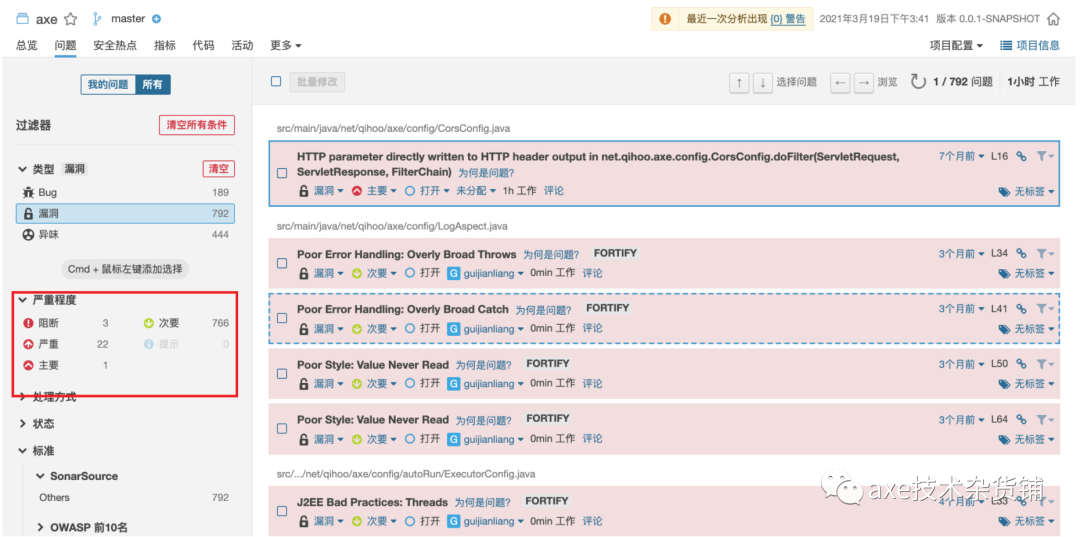
如果想看fortify 完整的数据,以及解决方案, 还需要 fortify自己的软件来展示.
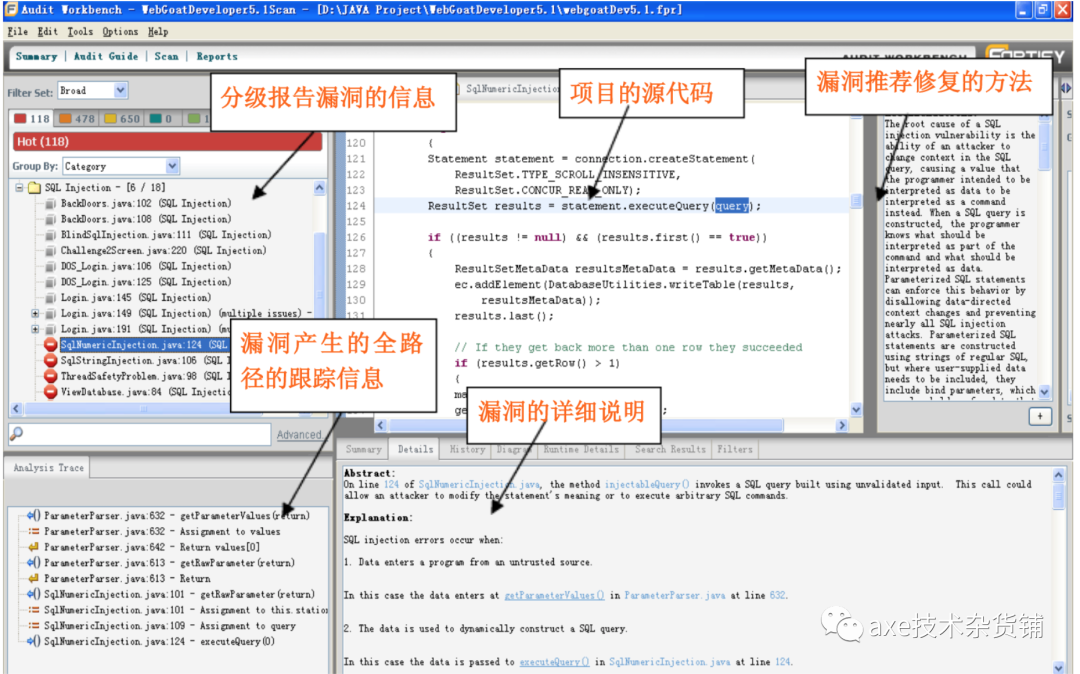
用Fortify SCA 打开扫描结果界面介绍
2.2 fortify 扫描Golang
安装go 语言环境, 这个还是安装到上面的 docker 文件中;
FROM maven:3.6.2-jdk-8...# 设置go语言的环境变量# ---- ---- ---- ---- ---- ---- ---- ---- ---- ---- ---- ---- ---- ---- ----COPY go1.16.2.linux-amd64.tar.gz ./RUN tar -C /usr/local/ -xzvf go1.16.2.linux-amd64.tar.gz# 设置go语言的环境变量RUN echo "export GOROOT=/usr/local/go" >> /etc/profileRUN echo "export GOPATH=/var/lib/jenkins/workspace/" >> /etc/profileRUN echo "export GOBIN=\$GOPATH/bin" >> /etc/profileRUN echo "export PATH=\$PATH:\$GOROOT/bin" >> /etc/profileRUN echo "export PATH=\$PATH:\$GOPATH/bin" >> /etc/profile# ---- ---- ---- ---- ---- ---- ---- ---- ---- ---- ---- ---- ---- ---- ----...CMD source /etc/profile
同java, 直接集成到jenkins到pipeline中
node {stage('Fortify Scan') {fortifyScan()}//...}//...def fortifyScan() {String filename = "axe-fortify-0008"docker.image('fortify_maven0008').inside() {sh "sourceanalyzer -b ${filename} -clean"sh "sourceanalyzer -b ${filename} -gopath ./ -goroot /usr/local/go ./" //直接编译当前目录sh "sourceanalyzer -b ${filename} -gopath ./ -goroot /usr/local/go -scan -f ${filename}.fpr"//生成 .fpr 文件}}
生成 xml 和 json 文件 同java
扫描go的语法如下:
sourceanalyzer -b <build_id> [-gopath <paths>] [-goroot <path>] <files>
2.3 fortify 对 python的扫描
安装python语言环境
FROM maven:3.6.2-jdk-8...# 安装python3# ---- ---- ---- ---- ---- ---- ---- ---- ---- ---- ---- ---- ---- ---- ----RUN apt-get updateRUN apt-get install -y python3RUN apt-get install -y python3-pipCOPY requirements.txt /opt/convert/requirements.txtCOPY my_fortify.xml /opt/convert/my_fortify.xmlRUN pip3 install -r /opt/convert/requirements.txtCOPY fortify_sonar.py /opt/convert/fortify_sonar.pyRUN chmod u+x /opt/convert/my_fortify.xml && chmod u+x /opt/convert/fortify_sonar.py# ---- ---- ---- ---- ---- ---- ---- ---- ---- ---- ---- ---- ---- ---- ----#上传sonarqube的 时候会用到COPY generate_pom.sh /opt/convert/generate_pom.shRUN chmod 777 /opt/convert/generate_pom.sh...
同java, 直接集成到jenkins到pipeline中
node {stage('Fortify Scan') {fortifyScan()}stage('Sonarqube Analysis') {sonarqubeScan()}}def fortifyScan() {String filename = "${JOB_NAME}"docker.image('fortify_maven0011').inside() {sh "sourceanalyzer -b ${filename} -python-version 3 -python-path /usr/bin/python3:/usr/lib/python3/dist-packages ./"sh "sourceanalyzer -b ${filename} -python-version 3 -python-path /usr/bin/python3:/usr/lib/python3/dist-packages -scan -f ${filename}.fpr"sh "ReportGenerator -format xml -f ${filename}.xml -source ${filename}.fpr -template /opt/convert/my_fortify.xml -showSuppressed -showHidden"sh "python3 /opt/convert/fortify_sonar.py -i ./${filename}.xml -o ${filename}.json"}}def sonarqubeScan() {String filename = "${JOB_NAME}"withEnv(['MAVEN_HOME=/usr/share/maven', 'JAVA_HOME=/usr/local/openjdk-8']) {docker.image('fortify_maven0011').inside() {withSonarQubeEnv('sonarqube_new') {sh "sh /opt/convert/generate_pom.sh ${filename}"sh "mvn -B org.sonarsource.scanner.maven:sonar-maven-plugin:3.8.0.2131:sonar -Dsonar.login=87e9f00729c7c5247c90862ddb73f423e0b805dd -Duser.home=/home/fortify/ -Dsonar.externalIssuesReportPaths=./${filename}.json"}}}}
生成 xml 和 json 文件 同java
上传到sonar
上传到sonarqube的时候, 因为用的是mvn的插件, 需要在目录下有个pom.xml 文件, 下面是生成generate_pom.xml 代码
generate_pom.xml
#!/bin/bashcat << EOF > pom.xml<?xml version="1.0" encoding="UTF-8"?><project xmlns="http://maven.apache.org/POM/4.0.0" xmlns:xsi="http://www.w3.org/2001/XMLSchema-instance"xsi:schemaLocation="http://maven.apache.org/POM/4.0.0 https://maven.apache.org/xsd/maven-4.0.0.xsd"><modelVersion>4.0.0</modelVersion><groupId>org.springframework.boot</groupId><version>0.0.1-SNAPSHOT</version><artifactId>$1</artifactId><name>$1</name><description>for sonar</description></project>EOF
3. 完整代码
Fortify_SCA_and_Apps_19.2.1_linux_x64.run.options 里面代码
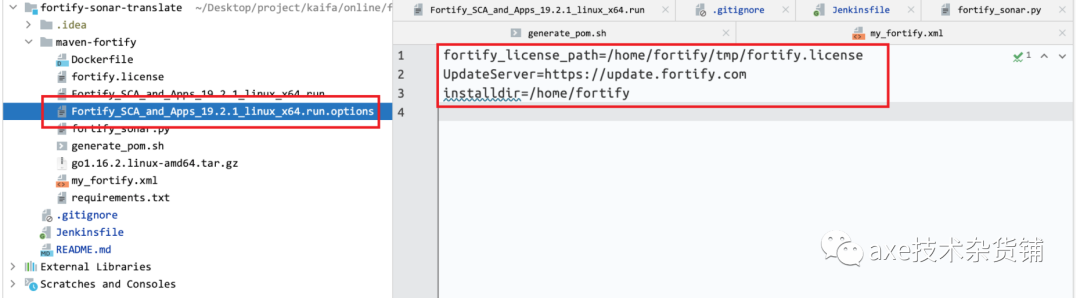
fortify_license_path=/home/fortify/tmp/fortify.licenseUpdateServer=https://update.fortify.cominstalldir=/home/fortify
my_fortify.xml
<?xml version="1.0" encoding="utf-8"?><ReportDefinition type="standard" ID="developerWorkbook"><TemplateName>Fortify Developer Workbook</TemplateName><TemplatePath/><LogoPath>/MF_logo.jpg</LogoPath><Footnote>Copyright 2019 Micro Focus or one of its affiliates.</Footnote><ReportSection enabled="true" optionalSubsections="true"><Title>Results</Title><SubSection enabled="true"><Title>Vulnerability_Results</Title><Description>Results summary</Description><IssueListing limit="50000" listing="true"><Refinement/><Chart chartType="list"><Axis>Category</Axis></Chart></IssueListing></SubSection></ReportSection></ReportDefinition>
requirements.txt
ijson==3.1.1lxml==4.4.2xmltodict==0.12.0
Jenkinsfile - java / go /python 参考上面.
