先说结论
Redux 是状态管理库,也是一种架构 Redux 与 React 无关,但它是为了解决 React 组件中状态无法共享而出的一种解决方案 单纯的 Redux 只是一个状态机, store 中存放了所有的状态 state,要想改变里面的状态 state,只能 dispatch 一个动作 发出去的 action 需要用 reducer 来处理,传入 state 和 action,返回新的 state subscribe 方法可以注册回调方法,当 dispatch action 的时候会执行里面的回调 Redux 其实是一个发布订阅模式 Redux 支持 enhancer,enhancer 其实就是一个装饰器模式,传入当前的 createStore,返回一个增强的 createStore Redux 使用 applyMiddleware 函数支持中间件,它的返回值其实就是一个 enhancer Redux 的中间件也是一个装饰器模式,传入当前的 dispatch,返回一个增强了的 dispatch 单纯的 Redux 是没有 View 层的
为什么出现Redux?
我们默认使用 React 技术栈,当页面少且简单时,完全没必要使用 Redux。Redux 的出现,是为了应对复杂组件的情况。即当组件复杂到三层甚至四层时(如下图),组件 4 想改变组件 1 的状态
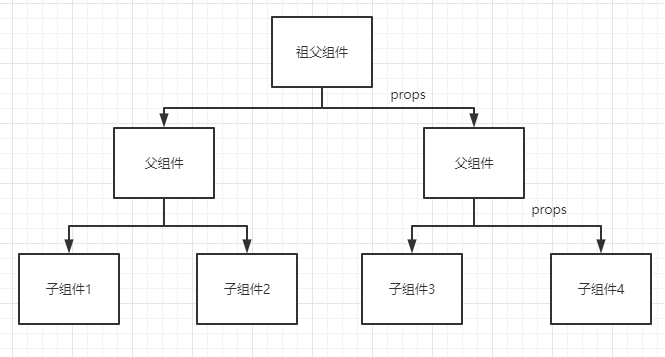
按照 React 的做法,状态提升,将状态提升至同一父组件(在图中为祖父组件)。但层级一多,根组件要管理的 state 就很多了,不方便管理。
所以当初有了 context(React 0.14 确定引入),通过 context 能实现”远房组件“的数据共享。但它也有缺点,使用 context 意味着所有的组件都可以修改 context 里面的状态,就像谁都可以修改共享状态一样,导致程序运行的不可预测,这不是我们想要的
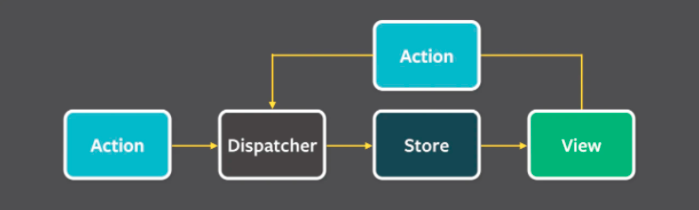
facebook 提出了 Flux 解决方案,它引入了单向数据流的概念(没错,React 没有单向数据流的概念,Redux 是集成了 Flux 的单向数据流理念),架构如下图所示:
Flux 数据流
这里不表 Flux。简单理解,在 Flux 架构中,View 要通过 Action (动作)通知 Dispatcher(派发器),Dispatcher 来修改 Store,Store 再修改 View
Flux 的问题或者说缺点在哪?
store 之间存在依赖关系、难以进行服务器端渲染、 stores 混杂了逻辑和状态
笔者在学习的 React 技术栈时是 2018 年,那是已然流行 React + Redux 的解决方案,Flux 已经被淘汰了,了解 Flux 是为了引出 Redux
Redux 的出现
Redux 主要解决状态共享问题
官网:Redux 是 JavaScript 状态容器,它提供可预测的状态管理
它的作者是 Dan Abramov
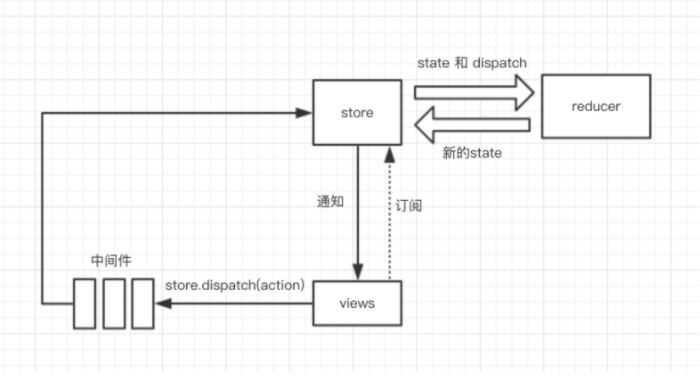
其架构为:
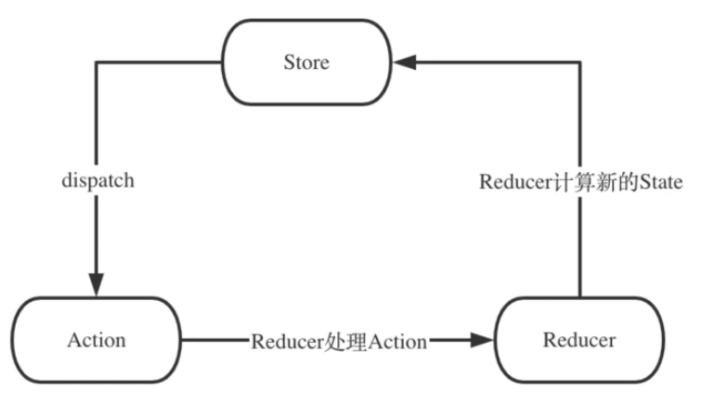
可以看得出,Redux 只是一个状态机,没有 View 层。其过程可以这样描述:
通过 createStore 生成 store,此变量包含了三个重要的属性 store.getState:得到唯一值 store.dispatch:动作行为 store.subscribe:订阅 通过 store.dispatch 派发一个 action reducer 处理 action 返回一个新的 store 如果你订阅过,当数据改变时,你会收到通知
按照行为过程,我们可手写一个 Redux,下文在表,先说特点
三大原则
单一数据源 整个应用的 全局 state 被储存在一棵 object tree 中,并且这个 object tree 只存在于唯一一个 store 中 State 是只读的 唯一改变 state 的方法就是触发 action,action 是一个用于描述已发生时间的普通对象 使用纯函数来执行修改 为了描述 action 如何改变 state tree,你需要编写纯的 reducers
三大原则是为了更好地开发,按照单向数据流的理念,行为变得可回溯
让我们动手写一个 Redux 吧
手写 redux
按照行为过程和原则,我们要避免数据的随意修改、行为的可回溯等问题
基础版:23行代码让你使用redux
export const createStore = (reducer, initState) => {
    let state = initState;
    let listeners = [];

    const subscribe = (fn) => {
        listeners.push(fn)
    }

    const dispatch = (action) => {
        state = reducer(state, action)
        listeners.forEach(fn => fn())
    }

    const getState = () => {
        return state
    }

    return {
        getState,
        dispatch,
        subscribe
    }
}
搞个测试用例
import { createStore } from '../redux/index.js';

const initState = {
    count: 0
}

const reducer = (state, action) => {
    switch (action.type) {
        case 'INCREMENT':
            return {
                ...state,
                count: state.count + 1
            }
        case 'DECREMENT':
            return {
                ...state,
                count: state.count - 1
            }
        default:
            return state
    }
}

const store = createStore(reducer, initState)

store.subscribe(() => {
    let state = store.getState();
    console.log('state', state)
})

store.dispatch({
    type: 'INCREMENT'
})
PS:俺是在 node 中使用 ES6 模块,需要升级Node版本至13.2.0
第二版:难点突破:中间件
普通的 Redux 只能做最基础地根据动作返回数据,dispatch 只是一个取数据的命令,例如:
dispatch({
    type: 'INCREMENT'
})
// store 中的 count + 1
但在开发中,我们有时候要查看日志、异步调用、记录日常等
怎么办,做成插件
在 Redux 中,类似的概念叫中间件
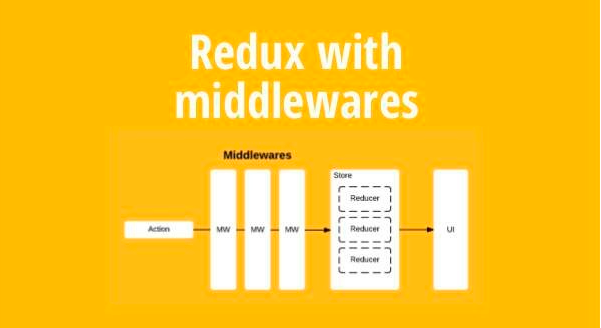
Redux 的 createStore 共有三个参数
createStore([reducer], [initial state], [enhancer]);
第三个参数为 enhancer,意为增强器。它的作用就是代替普通的 createStore,转变成为附加上中间件的 createStore。打几个比方:
托尼·斯塔克本来是一个普通有钱人,加上增强器(盔甲)后,成了钢铁侠 中央下发一笔救灾款,加上增强器(大小官员的打点)后,到灾民手上的钱只有一丢丢 路飞用武装色打人,武装色就是一个中间件
enhancer要做的就是:东西还是那个东西,只是经过了一些工序,加强了它。这些工序由 applyMiddleware 函数完成。按照行业术语,它是一个装饰器模式。它的写法大致是:
applyMiddleware(...middlewares)
// 结合 createStore,就是
const store = createStore(reudcer,initState,applyMiddleware (...middlewares))
所以我们需要先对 createStore 进行改造,判断当有 enhancer 时,我们需传值给中间件
export const createStore = (reducer, initState, enhancer) => {
    if (enhancer) {
        const newCreateStore = enhancer(createStore)
        return newCreateStore(reducer, initState)
    }

	let state = initState;
    let listeners = [];
    ...
}
如果有 enhancer 的话,先传入 createStore 函数,生成的 newCreateStore 和原来的 createStore 一样,会根据 reducer, initState 生成 store。可简化为:
if (enhancer) {
    return enhancer(createStore)(reducer, initState)
}
这样我们的 applyMiddleware 自然就明确了
const applyMiddleware = (...middlewares) => {
    return (oldCreateStore) => {
        return (reducer, initState) => {
            const store = oldCreateStore(reducer, initState)
            ...
        }
    }
}
这里的 store 表示的是普通版中的 store,接下来我们要增强 store 中的属性
我愿称之为:五行代码让女人为我花了18万
export const applyMiddleware = (...middlewares) => { return (oldCreateStore) => { return (reducer, initState) => { const store = oldCreateStore(reducer, initState) // 以下为新增 const chain = middlewares.map(middleware => middleware(store)) // 获得老 dispatch let dispatch = store.dispatch chain.reverse().map(middleware => { // 给每个中间件传入原派发器,赋值中间件改造后的dispatch dispatch = middleware(dispatch) }) // 赋值给 store 上的 dispatch store.dispatch = dispatch return store } }}
现在写几个中间件来测试一下
// 记录日志export const loggerMiddleware = (store) => (next) => (action) => { console.log('this.state', store.getState()) console.log('action', action) next(action) console.log('next state', store.getState())}// 记录异常export const exceptionMiddleware = (store) => (next) => (action) => { try { next(action) } catch (error) { console.log('错误报告', error) }}// 时间戳export const timeMiddleware = (store) => (next) => (action) => { console.log('time', new Date().getTime()) next(action)}
引入项目中,并运行
import { createStore, applyMiddleware } from '../redux/index.js';import { loggerMiddleware, exceptionMiddleware, timeMiddleware } from './middleware.js';const initState = { count: 0}const reducer = (state, action) => { switch (action.type) { case 'INCREMENT': return { ...state, count: state.count + 1 } case 'DECREMENT': return { ...state, count: state.count - 1 } default: return state }}const store = createStore(reducer, initState, applyMiddleware(loggerMiddleware, exceptionMiddleware, timeMiddleware))store.subscribe(() => { let state = store.getState(); console.log('state', state)})store.dispatch({ type: 'INCREMENT'})
运行发现已经实现了 redux 最重要的功能——中间件
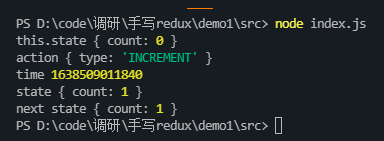
来分析下中间件的函数式编程,以 loggerMiddleware 为例:
export const loggerMiddleware = (store) => (next) => (action) => { console.log('this.state', store.getState()) console.log('action', action) next(action) console.log('next state', store.getState())}
在 applyMiddleware 源码中,
const chain = middlewares.map(middleware => middleware(store))
相当于给每个中间件传值普通版的store
let dispatch = store.dispatchchain.reverse().map(middleware => dispatch = middleware(dispatch))
相当于给每个中间件在传入 store.dispatch,也就是 next,原dispatch = next。这个时候的中间件已经本成品了,代码中的 (action) => {...}
就是函数 const dispatch = (action) => {}
。当你执行 dispatch({ type: XXX })
时执行中间件这段(action) => {...}
PS:柯里化一开始比较难理解,用多习惯就慢慢能懂
第三版:结构复杂化与拆分
中间件理解起来或许有些复杂,先看看其他的概念换换思路
一个应用做大后,单靠一个 JavaScript 文件来维护代码显然是不科学的,在 Redux 中,为避免这类情况,它提供了 combineReducers
来整个多个 reducer,使用方法如:
const reducer = combinReducers({ counter: counterReducer, info: infoReducer,})
在 combinReducers
中传入一个对象,什么样的 state 对应什么样的 reducer。这就好了,那么 combinReducers
怎么实现呢?因为比较简单,不做多分析,直接上源码:
export const combinReducers = (...reducers) => { // 拿到 counter、info const reducerKey = Object.keys(reducers) // combinReducers 合并的是 reducer,返回的还是一个 reducer,所以返回一样的传参 return (state = {}, action) => { const nextState = {} // 循环 reducerKey,什么样的 state 对应什么样的 reducer for (let i = 0; i < reducerKey.length; i++) { const key = reducerKey[i] const reducer = reducers[key] const previousStateForKey = state[key] const nextStateForKey = reducer(previousStateForKey, action) nextState[key] = nextStateForKey } return nextState }}
同级目录下新建一个 reducer 文件夹,并新建 reducer.js
、info.js
、index.js
// reducer.jsexport default (state, action) => { switch (action.type) { case 'INCREMENT': return { count: state.count + 1 } case 'DECREMENT': { return { count: state.count - 1 } } default: return state; }}
// info.jsexport default (state, action) => { switch (action.type) { case 'SET_NAME': return { ...state, name: action.name } case 'SET_DESCRIPTION': return { ...state, description: action.description } default: return state; }}
合并导出
import counterReducer from './counter.js';import infoReducer from './info.js';export { counterReducer, infoReducer}
我们现在测试一下
import { createStore, applyMiddleware, combinReducers } from '../redux/index.js';import { loggerMiddleware, exceptionMiddleware, timeMiddleware } from './middleware.js';import { counterReducer, infoReducer } from './reducer/index.js';const initState = { counter: { count: 0 }, info: { name: 'johan', description: '前端之虎' }}const reducer = combinReducers({ counter: counterReducer, info: infoReducer,})const store = createStore(reducer, initState, applyMiddleware(loggerMiddleware, exceptionMiddleware, timeMiddleware))store.dispatch({ type: 'INCREMENT'})
combinReducers
也完成了
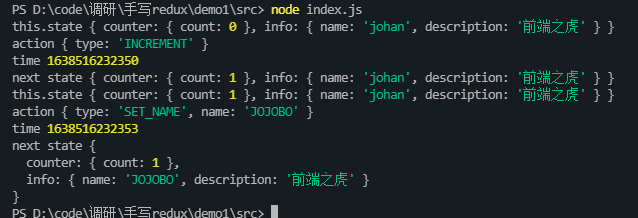
既然拆分了 reducer,那么 state 是否也能拆分,并且它是否需要传,在我们平时的写法中,一般都不传 state。这里需要两点改造,一是
每个 reducer 中包含了它的 state 和 reducer;二是改造 createStore,让 initState 变得可传可不传,以及初始化数据
// counter.js 中写入对应的 state 和 reducerlet initState = { counter: { count: 0 }}export default (state, action) => { if (!state) { state = initState } switch (action.type) { case 'INCREMENT': return { count: state.count + 1 } case 'DECREMENT': { return { count: state.count - 1 } } default: return state; }}
// info.jslet initState = { info: { name: 'johan', description: '前端之虎' }}export default (state, action) => { if (!state) { state = initState } switch (action.type) { case 'SET_NAME': return { ...state, name: action.name } case 'SET_DESCRIPTION': return { ...state, description: action.description } default: return state; }}
改造 createStore
export const createStore = (reducer, initState, enhancer) => { if (typeof initState === 'function') { enhancer = initState; initState = undefined } ... const getState = () => { return state } // 用一个不匹配任何动作来初始化store dispatch({ type: Symbol() }) return { getState, dispatch, subscribe }}
主文件中
import { createStore, applyMiddleware, combinReducers } from './redux/index.js';import { loggerMiddleware, exceptionMiddleware, timeMiddleware } from './middleware.js';import { counterReducer, infoReducer } from './reducer/index.js';const reducer = combinReducers({ counter: counterReducer, info: infoReducer,})const store = createStore(reducer, applyMiddleware(loggerMiddleware, exceptionMiddleware, timeMiddleware))console.dir(store.getState());
到此为止,我们已经实现了一个七七八八的 redux 了
完整体的 Redux
退订
const subscribe = (fn) => { listeners.push(fn) return () => { const index = listeners.indexOf(listener) listeners.splice(index, 1) }}
中间件拿到的 store
现在的中间件能拿到完整的 store,他甚至可以修改我们的 subscribe 方法。按照最小开放策略,我们只用给 getState 即可,修改下 applyMiddleware 中给中间件传的 store
// const chain = middlewares.map(middleware => middleware(store))const simpleStore = { getState: store.getState }const chain = middlewares.map(middleware => middleware(simpleStore))
compose
在我们的 applyMiddleware 中,把 [A, B, C] 转换成 A(B(C(next))),效果是:
const chain = [A, B, C];let dispatch = store.dispatch;chain.reverse().map(middleware => { dispatch = middleware(dispatch);});
Redux 提供了一个 compose ,如下
const compose = (...funcs) => { if (funcs.length === 0) { return args => args } if (funcs.length === 1) { return funcs[0] } return funcs.reduce((a, b) => (...args) => a(b(...args)))}
2行代码 replaceReducer
替换当前的 reudcer ,使用场景:
代码分割 动态加载 实时 reloading 机制
const replaceReducer = (nextReducer) => { reducer = nextReducer // 刷新一次,广播 reducer 已经替换,也同样把默认值换成新的 reducer dispatch({ type: Symbol() })}
bindActionCreators
bindActionCreators 是做什么的,他通过闭包,把 dispatch 和 actionCreator 隐藏起来,让其他地方感知不到 redux 的存在。一般与 react-redux 的 connect 结合
这里直接贴源码实现:
const bindActionCreator = (actionCreator, dispatch) => { return function () { return dispatch(actionCreator.apply(this, arguments)) }}export const bindActionCreators = (actionCreators, dispatch) => { if (typeof actionCreators === 'function') { return bindActionCreator(actionCreators, dispatch) } if (typeof actionCreators !== 'object' || actionCreators === null) { throw new Error() } const keys = Object.keys(actionCreators) const boundActionCreators = {} for (let i = 0; i < keys.length; i++) { const key = keys[i] const actionCreator = actionCreators[key] if (typeof actionCreator === 'function') { boundActionCreators[key] = bindActionCreator(actionCreator, dispatch) } } return boundActionCreators}
以上,我们就已经完成了 Redux 中所有的代码。大体上这里100多行的代码就是 Redux 的全部,真 Redux 无非是加了些注释和参数校验
额外:换种思考方式理解
我们说过, Redux 只是一个状态管理库,它是由数据来驱动,发起 action,会引发 reducer 的数据更新,从而更新到最新的 store
与 React 结合
拿着刚做好的 Redux,放到 React 中,试试什么叫 Redux + React 集合,注意,这里我们先不使用 React-Redux,单拿这两个结合
先创建项目
npx create-react-app demo-5-react
引入手写的 redux 库
在 App.js
中引入 createStore,并写好初始数据和 reducer,在 useEffect 中监听数据,监听好之后当发起一个 action 时,数据就会改变,看代码:
import React, { useEffect, useState } from 'react';import { createStore } from './redux';import './App.css';const initState = { count: 0}const reducer = (state, action) => { switch (action.type) { case 'INCREMENT': return { ...state, count: state.count + 1 } case 'DECREMENT': return { ...state, count: state.count - 1 } default: return state }}const store = createStore(reducer, initState)function App() { const [count, setCount] = useState(store.getState().count) useEffect(() => { const unsubscribe = store.subscribe(() => { setCount(store.getState().count) }) return () => { if (unsubscribe) { unsubscribe() } } }, []) const onHandle = () => { store.dispatch({ type: 'INCREMENT' }) console.log('store', store.getState().count) } return ( <div className="App"> <div>{count}</div> <button onClick={onHandle}>add</button> </div> );}export default App;
点击 button 后,数据跟着改变
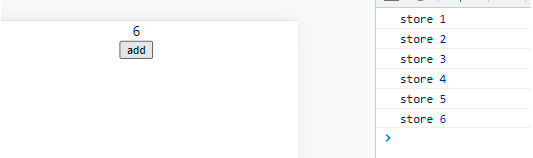
PS:虽然我们可以用这种方式订阅 store 和改变数据,但是订阅的代码重复过多,我们可以用高阶组件将他提取出去。这也是 React-Redux 所做的事情
与原生JS+HTML结合
我们说过,Redux 是个独立于 Redux 的存在,它不仅可在 Redux 充当数据管理器,还可以在原生 JS + HTML 中充当起职位
<!DOCTYPE html><html lang="en"><head> <meta charset="UTF-8"> <meta http-equiv="X-UA-Compatible" content="IE=edge"> <meta name="viewport" content="width=device-width, initial-scale=1.0"> <title>Document</title></head><body> <div class="container"> <div id="count">1</div> <button id="btn">add</button> </div> <script type="module"> import { createStore } from './redux/index.js'; const initState = { count: 0 } const reducer = (state, action) => { switch (action.type) { case 'INCREMENT': return { ...state, count: state.count + 1 } case 'DECREMENT': return { ...state, count: state.count - 1 } default: return state } } const store = createStore(reducer, initState) let count = document.getElementById('count') let add = document.getElementById("btn") add.onclick = function () { store.dispatch({ type: 'INCREMENT' }) } // 渲染视图 function render() { count.innerHTML = store.getState().count } render() // 监听数据 store.subscribe(() => { let state = store.getState(); console.log('state', state) render() }); </script></body></html>
效果如下:
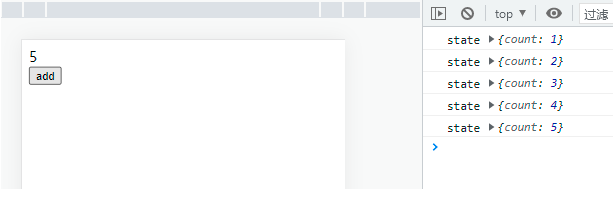
总结
我们把与 Redux 相关的名词列出来,梳理它是做什么的
createStore 创建 store 对象,包含 getState、dispatch、subscribe、replaceReducer reducer 纯函数,接受旧的 state、action,生成新的 state action 动作,是一个对象,必须包括 type 字段,表示 view 发出通知告诉 store 要改变 dispatch 派发,触发 action ,生成新的 state。是 view 发出 action 的唯一方法 subscribe 订阅,只有订阅了,当派发时,会执行订阅函数 combineReducers 合并 reducer 成一个 reducer replaceReudcer 代替 reducer 的函数 middleware 中间件,扩展 dispatch 函数
总结一下 Redux 的流程图
- END -