



学习openGauss收集统计信息、打印执行计划、垃圾收集和checkpoint
作业打卡:
1.创建分区表,并用generate_series(1,N)函数对表插入数据
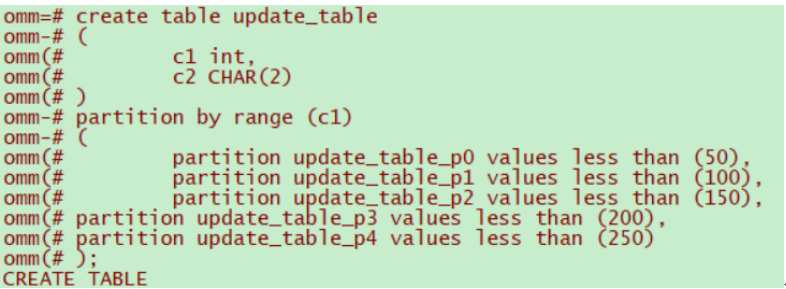
create table update_table
(
c1 int,
c2 CHAR(2)
)
partition by range (c1)
(
partition update_table_p0 values less than (50),
partition update_table_p1 values less than (100),
partition update_table_p2 values less than (150),
partition update_table_p3 values less than (200),
partition update_table_p4 values less than (250)
);
insert into update_table values (1, 'a'), (50, 'b'), (100, 'c');
insert into update_table values(generate_series(10, 200),'c');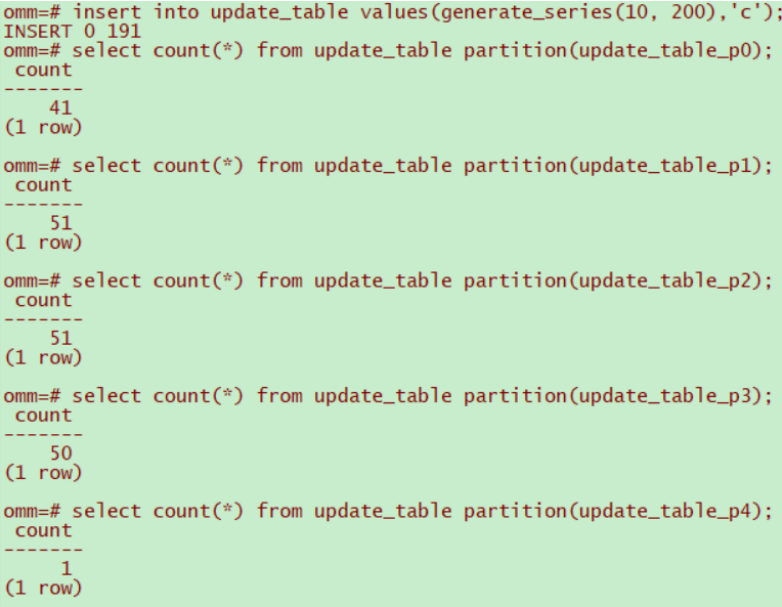
2.收集表统计信息
omm=# select relname, relpages, reltuples from pg_class where relname = 'update_table';
relname | relpages | reltuples
--------------+----------+-----------
update_table | 0 | 0
(1 row)
omm=# analyze VERBOSE update_table;
INFO: analyzing "public.update_table"(dn_6001 pid=2778)
INFO: ANALYZE INFO : "update_table": scanned 1 of 1 pages, containing 41 live rows and 80 dead rows; 41 rows in sample, 41 estimated total rows(dn_6001 pid=2778)
INFO: ANALYZE INFO : "update_table": scanned 1 of 1 pages, containing 51 live rows and 100 dead rows; 51 rows in sample, 51 estimated total rows(dn_6001 pid=2778)
INFO: ANALYZE INFO : "update_table": scanned 1 of 1 pages, containing 51 live rows and 100 dead rows; 51 rows in sample, 51 estimated total rows(dn_6001 pid=2778)
INFO: ANALYZE INFO : "update_table": scanned 1 of 1 pages, containing 50 live rows and 100 dead rows; 50 rows in sample, 50 estimated total rows(dn_6001 pid=2778)
INFO: ANALYZE INFO : "update_table": scanned 1 of 1 pages, containing 1 live rows and 100 dead rows; 1 rows in sample, 1 estimated total rows(dn_6001 pid=2778)
ANALYZE
omm=# select relname, relpages, reltuples from pg_class where relname = 'update_table';
relname | relpages | reltuples
--------------+----------+-----------
update_table | 5 | 194
(1 row)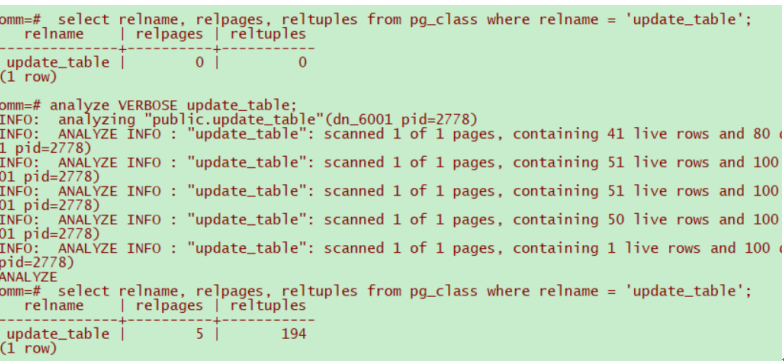
3.显示简单查询的执行计划;建立索引并显示有索引条件的执行计划
CREATE INDEX update_p_index1 ON update_table(c1) LOCAL;
omm=# explain select * from update_table partition(update_table_p2);
QUERY PLAN
---------------------------------------------------------------------------------
Partition Iterator (cost=0.00..2.94 rows=194 width=10)
Iterations: 1
-> Partitioned Seq Scan on update_table (cost=0.00..2.94 rows=194 width=10)
Selected Partitions: 3
(4 rows)
omm=# CREATE INDEX update_p_index1 ON update_table(C1) LOCAL;
CREATE INDEX
omm=# explain select * from update_table partition(update_table_p2);
QUERY PLAN
---------------------------------------------------------------------------------
Partition Iterator (cost=0.00..2.94 rows=194 width=10)
Iterations: 1
-> Partitioned Seq Scan on update_table (cost=0.00..2.94 rows=194 width=10)
Selected Partitions: 3
(4 rows)
CREATE INDEX p1_index3 ON update_table(c1) GLOBAL;
omm=# explain select * from update_table where c1>100;
QUERY PLAN
-------------------------------------------------------------------------------
Partition Iterator (cost=0.00..5.43 rows=99 width=7)
Iterations: 3
-> Partitioned Seq Scan on update_table (cost=0.00..5.43 rows=99 width=7)
Filter: (c1 > 100)
Selected Partitions: 3..5
(5 rows)
4.更新表数据,并做垃圾收集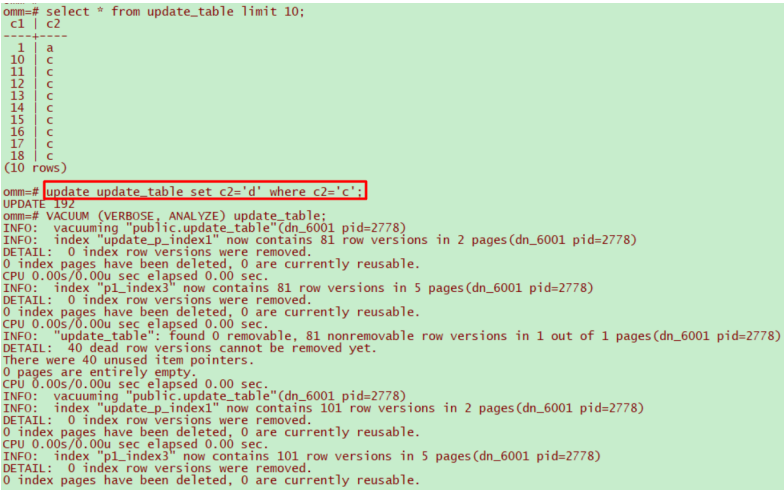
5.清理数据
omm=# drop table update_table;
DROP TABLE
-----------------------------------
随堂练习
-----------------------------------
准备数据
create schema tpcds;
CREATE TABLE tpcds.customer_address
(
ca_address_sk integer NOT NULL ,
ca_address_id character(16),
ca_street_number character(10) ,
ca_street_name character varying(60) ,
ca_street_type character(15) ,
ca_suite_number character(10) ,
ca_city character varying(60) ,
ca_county character varying(30) ,
ca_state character(2) ,
ca_zip character(10) ,
ca_country character varying(20) ,
ca_gmt_offset numeric(5,2) ,
ca_location_type character(20)
);
insert into tpcds.customer_address values
(1, 'AAAAAAAABAAAAAAA', '18', 'Jackson', 'Parkway', 'Suite 280', 'Fairfield', 'Maricopa County', 'AZ', '86192' ,'United States', -7.00, 'condo'),
(2, 'AAAAAAAACAAAAAAA', '362', 'Washington 6th', 'RD', 'Suite 80', 'Fairview', 'Taos County', 'NM', '85709', 'United States', -7.00, 'condo'),
(3, 'AAAAAAAADAAAAAAA', '585', 'Dogwood Washington', 'Circle', 'Suite Q', 'Pleasant Valley', 'York County', 'PA', '12477', 'United States', -5.00, 'single family');
–使用序列的generate_series(1,N)函数对表插入数据
insert into tpcds.customer_address values(generate_series(10, 10000));
收集统计信息
–查看系统表中表的统计信息
select relname, relpages, reltuples from pg_class where relname = 'customer_address';
—使用ANALYZE VERBOSE语句更新统计信息,并输出表的相关信息
analyze VERBOSE tpcds.customer_address;
–查看系统表中表的统计信息
select relname, relpages, reltuples from pg_class where relname = 'customer_address';
打印执行计划
–使用默认的打印格式
SET explain_perf_mode=normal;
–显示表简单查询的执行计划
EXPLAIN SELECT * FROM tpcds.customer_address;
–以JSON格式输出的执行计划(explain_perf_mode为normal时)
EXPLAIN(FORMAT JSON) SELECT * FROM tpcds.customer_address;
–禁止开销估计的执行计划
EXPLAIN(COSTS FALSE)SELECT * FROM tpcds.customer_address;
–带有聚集函数查询的执行计划
EXPLAIN SELECT SUM(ca_address_sk) FROM tpcds.customer_address WHERE ca_address_sk<100;
–有索引条件的执行计划
create index customer_address_idx on tpcds.customer_address(ca_address_sk);
EXPLAIN SELECT * FROM tpcds.customer_address WHERE ca_address_sk<100;
垃圾收集
–VACUUM回收表或B-Tree索引中已经删除的行所占据的存储空间
update tpcds.customer_address set ca_address_sk = ca_address_sk + 1 where ca_address_sk <100;
VACUUM (VERBOSE, ANALYZE) tpcds.customer_address;
事务日志检查点
–检查点(CHECKPOINT)是一个事务日志中的点,所有数据文件都在该点被更新以反映日志中的信息,所有数据文件都将被刷新到磁盘
CHECKPOINT;
清理数据
drop schema tpcds cascade;
