




(业精于勤荒于嬉,_ _ _ _ _ _ _)
大家周末好,前两天有个小伙伴在社区里咨询了一个小问题,如何给Swagger页面增加权限,虽然每个接口都已经有了权限,但是还是不想要所有人都能看到接口列表。如果大家没有考虑过这个问题,可以先暂停下,不往下看,喝杯水,思考下如果是自己的话会怎么设计这个需求:
1、过程不要很复杂,但是又可以自由的扩展(下文会说到);
2、重要的一点就是不能对当前项目过多的影响和侵入
我简单的设计了一个方案,可能不是最优解,如果小伙伴有不同的意见,或者更好的建议,欢迎留言哟。废话不多说,马上上代码。
PS:Blog.Core线上已经集成了这个方案,可以自行访问下试试。
地址:http://apk.neters.club/
很简单,既然要对Swagger的.html页面进行限制,常规的思路都是增加一个拦截器之类的,那自然而然的就想到了ASP.NetCore的中间件,目前Blog.Core已经集成了16个中间件,涵盖了平时开发需要用到的服务列表、本地Mock用户、异常、限流、审计、权限、MiniProfiler、种子数据、任务调度、Swagger等等,感兴趣的可以一一拆分出来看看学习。
直接上代码:
namespace Blog.Core.Middlewares{public class SwaggerAuthMildd{private readonly RequestDelegate next;public SwaggerAuthMildd(RequestDelegate next){this.next = next;}public async Task InvokeAsync(HttpContext context){// 也可以根据是否是本地做判断 IsLocalRequestif (context.Request.Path.Value.ToLower().Contains("index.html")){// 判断权限是否正确if (IsAuthorized(context)){await next.Invoke(context);return;}// 无权限,跳转swagger登录页context.Response.Redirect("/swg-login.html");}else{await next.Invoke(context);}}public bool IsAuthorized(HttpContext context){// 使用session模式// 可以使用其他的return context.Session.GetString("swagger-code") == "success";}/// <summary>/// 判断是不是本地访问/// 本地不用swagger拦截/// </summary>/// <param name="context"></param>/// <returns></returns>public bool IsLocalRequest(HttpContext context){if (context.Connection.RemoteIpAddress == null && context.Connection.LocalIpAddress == null){return true;}if (context.Connection.RemoteIpAddress.Equals(context.Connection.LocalIpAddress)){return true;}if (IPAddress.IsLoopback(context.Connection.RemoteIpAddress)){return true;}return false;}}// 定义扩展public static class SwaggerAuthorizeExtensions{public static IApplicationBuilder UseSwaggerAuthorized(this IApplicationBuilder builder){return builder.UseMiddleware<SwaggerAuthMildd>();}}}
代码比较简单,主要是拦截了下index.html,因为我是自定义的Swagger首页,如果你有不同的设计,可以酌情修改代码。
此外权限判断的依据,我是用的Session作为当前登录依据,如果存在Session,证明通过,否则跳转到Swagger的登录页,如果浏览器关闭或者换了其他地方Session失效的话,就需要重新登陆,这当然无伤大雅,只要保证浏览器不关闭,其实一直调试是没问题的。
然后就在Startup的中间件管理里,增加上刚刚定义好的中间件扩展方法就行了,而且用到了Session,就需要配置下session的服务注入和中间件:
// 注册服务services.AddSession();// 使用中间件,放到Swagger中间件之前app.UseSession();app.UseSwaggerAuthorized();
上边咱们配置好了中间件,现在就需要配置下无权限的时候的跳转页面了,直接在wwwroot文件夹里新建一个swg-login.html:
<!DOCTYPE html><html><head><meta charset="utf-8" /><title>默认首页</title><script src="http://code.jquery.com/jquery-1.8.3.min.js"></script></head><body><div id="requestMsg"></div><div style="text-align: center;"><p>用户名:admin,密码:admin</p><input id="name" placeholder="name" type="text" /><br /><input id="pwd" placeholder="pwd" type="password" /><br /><input type="submit" onclick="submit()" value="submit" /></div><script>function submit() {let postdata = {"name": $("#name").val(),"pwd": $("#pwd").val(),};if (!(postdata.name && postdata.pwd)) {alert('参数不正确');return}$.ajax({url: "/api/Login/swgLogin",type: "POST",contentType: "application/json; charset=utf-8",data: JSON.stringify(postdata),dataType: 'json',success: function (data) {if (data?.result) {window.location.href = "/index.html";} else {alert('参数不正确');}}});}</script></body></html>
代码很简单,就是做一个Ajax的Post请求,成功后跳转到Swagger的index页面即可。
这一块就更简单了,直接接收用户名和密码就行,然后存到Session里,其实这一块的扩展性很强,无论是简单的登录,还是连接数据的登录都是可以的:
/// <summary>/// swagger登录/// </summary>/// <param name="loginRequest"></param>/// <returns></returns>[HttpPost][Route("swgLogin")]public dynamic SwgLogin([FromBody] SwaggerLoginRequest loginRequest){// 这里可以查询数据库等各种校验if (loginRequest?.name == "admin" && loginRequest?.pwd == "admin"){HttpContext.Session.SetString("swagger-code", "success");return new { result = true };}return new { result = false };}
到这里基本都已经完成了,很简单的过程,来个效果动图看看吧
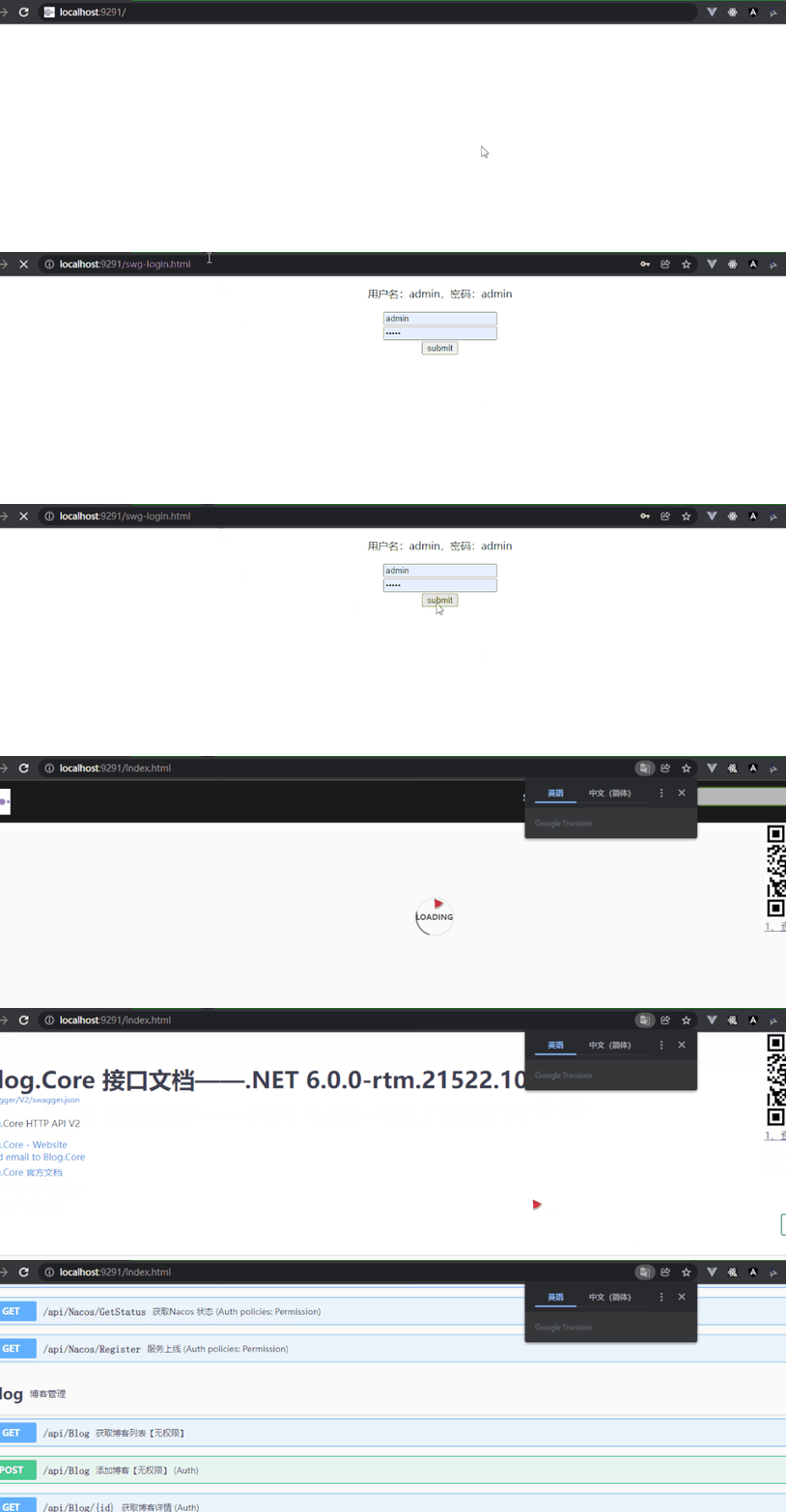
其实本文只是众多思路当中的一个,你可以发散思维,比如直接在我们的Swagger自定义的首页里做操作,毕竟是自定义的index.html嘛,可以加个登录。
也可以使用我这种单独登录页面的方案,再丰富些,对接ids4认证中心等等,都是不错的想法和思路。
好啦,今天就到这里了,欢迎更多的小伙伴来分享更好更棒的思路吧。
