



常见问题
1. 执行 php artisan migration:make 报 Command "migrate:make" is not defined?
因为 php artisan migrate:make 是 Laravel 4 的语法,而 Laravel5 已经换成了 php artisan make:migration
执行 php artisan make:migration table_name 会为每个表在工程的 database 目录下的 migrations 目录下生成一个 php 文件。
如果要将这些文件添加到库中生成对应的表则需要执行 php artisan migrate
2. 更新依赖时出问题了如何解决?
先 composer clearcache 清理包、仓库缓存,再用 composer update,如果不起效,就删掉 vendor 目录重新安装。
3. Laravel 源码的结构
app:网站的业务逻辑代码,例如:控制器/模型/路由等
bootstrap:框架启动与自动加载设置相关的文件
config:网站的各种配置文件
database:数据库操作相关的文件
public:网站的对外文件夹,入口文件和静态资源(CSS,JS,图片等)
resources:前端视图文件和原始资源(CSS,JS,图片等)
storage:编译后的视图、基于会话、文件缓存和其它框架生成的文件
tests:自动化测试文件
vendor:Composer 依赖文件
app/Http/Controllers:存放控制器
app/Http/Middleware:存放中间件
resources/views:视图路径 blade 视图
4. laravel 配置文件
.env: 环境配置文件
.env.example:.env 文件的一个示例
.gitignore: git 的设置文件,制定哪些文件会被 git 忽略,不纳入文件管理
composer.json: 网站所需的 composer 扩展包
composer.lock: 扩展包列表,确保这个网站的副本使用相同版本的扩展包
gulpfile.js:GULP 配置文件( GULP 后边会学到)
package.json: 网站所需的 npm 包
readme.md: 网站代码说明文件
app/Http/routes.php:网站的大多数路由都定义在该文件中,该文件将会被 App\Providers\RouteServiceProvider 类加载。
5. phpstorm 中使用 laravel 的方法
安装 Laravel Plugin 插件
安装 Laravel IDE Helper 代码提示
5.1. 使用 composer 安装插件
composer require barryvdh/laravel-ide-helper
在 config 目录里的 app.php 文件中的'providers'添加如下内容
Barryvdh\LaravelIdeHelper\IdeHelperServiceProvider::class,
5.2. 在 app 目录里的 Providers 目录里的 AppServiceProvider.php 文件中的
public function register()里输入如下内容来注册

        if ($this->app->environment() !== 'production') {
            $this->app->register(\Barryvdh\LaravelIdeHelper\IdeHelperServiceProvider::class);
        }
5.3. 生成代码跟踪支持
php artisan ide-helper:generate
5.4. php artisan serve 启动服务
artisan 的 serve 命令还支持两个参数:
host 设置主机地址
port 设置 web server 监听的端口号 例如:php artisan serve --port=8888
5.5. 如果添加了 debugbar 拓展
composer require barryvdh/laravel-debugbar
页面下方会出现:

如何查看 phpinfo
创建一个简单的文本文档并命名为 phpinfo.php
代码如下:
<?php

phpinfo();

?>
放入 nginx 或 apache 中之后,通过浏览器访问这个文件即可显示 PHP 信息 如:http://192.168.1.100/phpinfo.php
配置 phpstorm+xdebug+laravel 环境来 debug 源码
1. 安装
安装 phpstorm 和 laravel 的部分这里不再多说,之前都有提到。
安装 xdebug:
E:\software\nginx-1.10.3>php -v
PHP 7.1.32 (cli) (built: Aug 28 2019 09:08:22) ( NTS MSVC14 (Visual C++ 2015) x64 )
Copyright (c) 1997-2018 The PHP Group
Zend Engine v3.1.0, Copyright (c) 1998-2018 Zend Technologies
下载 Xdebug
地址:https://xdebug.org/download.php 下载对应 php 版本的即可。
将下载下来的 dll 文件放置 php 安装目录的 ext 目录中并重命名为 php_xdebug.dll
配置 php.ini,添加以下配置:
[xdebug]
zend_extension="E:\software\php-7.1.32-nts-Win32-VC14-x64\ext\php_xdebug.dll"
xdebug.remote_enable=1
xdebug.remote_port=9000
xdebug.remote_host=localhost
xdebug.profiler_enable=1
xdebug.remote_mode = "req"
xdebug.trace_output_dir="./xdebug"
xdebug.profiler_output_dir="./xdebug"
xdebug.remote_handler="dbgp"
xdebug.idekey = "phpstorm"  //必填
扫行php -m查看安装情况:
C:\Users\admin>php -m
[PHP Modules]
bcmath
bz2
calendar
Core
ctype
curl
date
dom
exif
fileinfo
filter
ftp
gd
gettext
gmp
hash
iconv
imap
intl
json
ldap
libxml
mbstring
mcrypt
mysqli
mysqlnd
odbc
openssl
pcre
PDO
pdo_mysql
PDO_ODBC
pdo_pgsql
pdo_sqlite
pgsql
Phar
readline
Reflection
session
shmop
SimpleXML
soap
sockets
SPL
sqlite3
standard
tidy
tokenizer
wddx
xdebug
xml
xmlreader
xmlrpc
xmlwriter
xsl
zip
zlib

[Zend Modules]
Xdebug
可以看到Xdebug已经安装成功。
配置phpstorm,主要参考下面两张图片
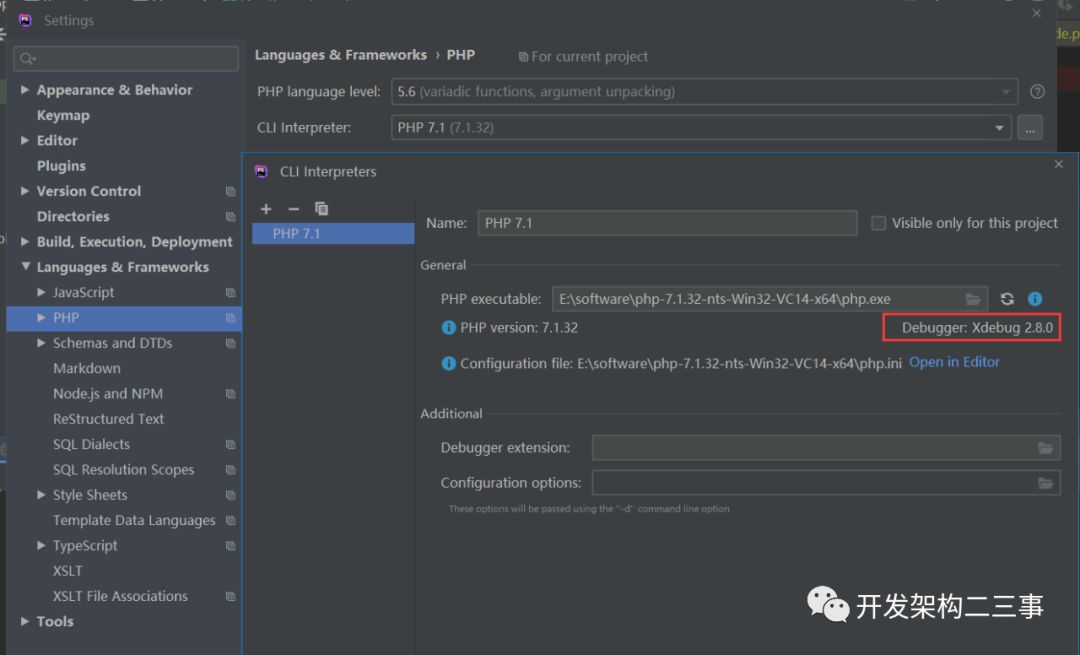
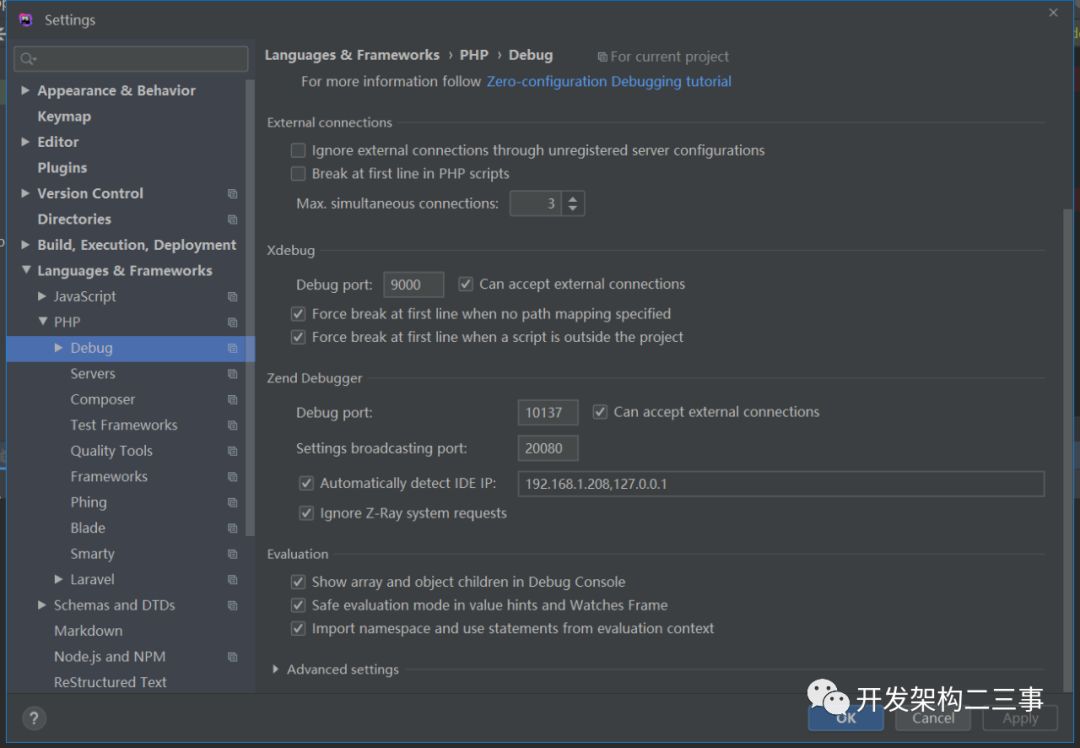
laravel在phpstorm中的配置主要参考:https://www.jetbrains.com/help/phpstorm/laravel.html,这里只是列出Debug Artisan commands的phpstorm的配置:
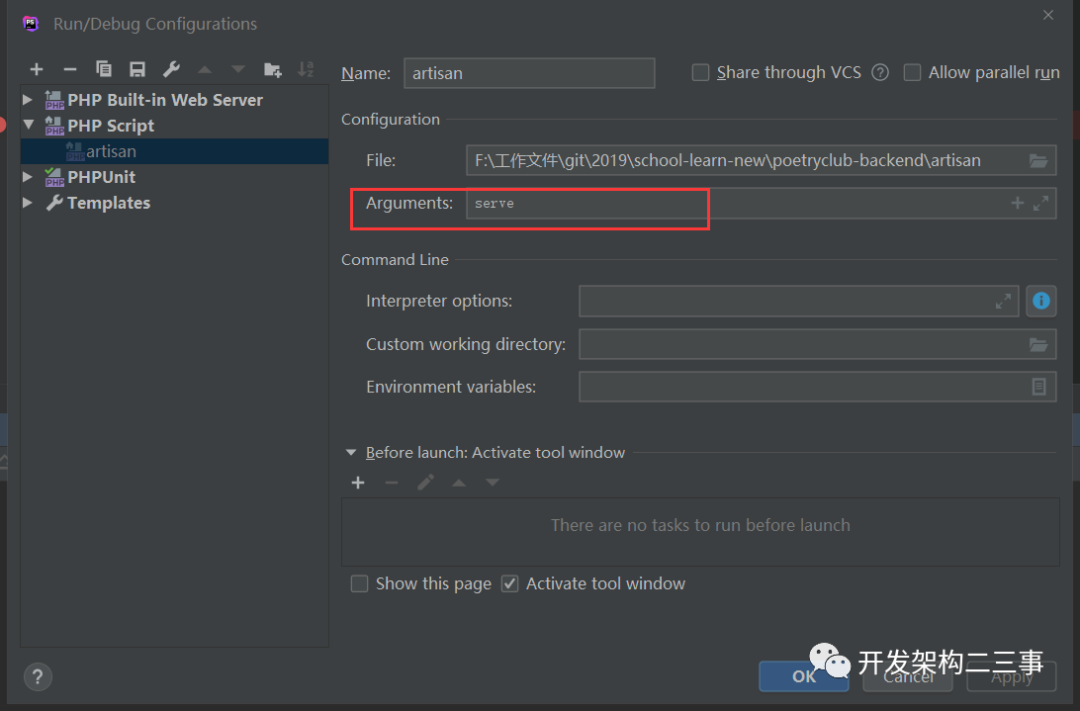
图中arguments配置的是artisan的命令。
源码跟踪
Auth::attempt($username, $request->isRemember))
对于Auth的attempt方法,表面上来看我们无从找起,但是进入Auth类会发现,Auth 是通过 Facade 动态绑定的,绑定到哪里呢,进一步寻找我们发现 在 vendor/laravel/framework/src/Illuminate/AuthServiceProvider 中:
 class AuthServiceProvider extends ServiceProvider
{
    /**
     * Register the authenticator services.
     *
     * @return void
     */
    protected function registerAuthenticator()
    {
        $this->app->singleton('auth', function ($app) {
            $app['auth.loaded'] = true;
            return new AuthManager($app);
        });

        $this->app->singleton('auth.driver', function ($app) {
            return $app['auth']->guard();
        });
    }
}
默认Auth是绑定了AuthManager:
 <?php
namespace Illuminate\Auth;

use Closure;
use InvalidArgumentException;
use Illuminate\Contracts\Auth\Factory as FactoryContract;
class AuthManager implements FactoryContract
{
    use CreatesUserProviders;

    protected $app;

    protected $guards = [];

    public function guard($name = null)
    {
        $name = $name ?: $this->getDefaultDriver();

        return isset($this->guards[$name])
                    ? $this->guards[$name]
                    : $this->guards[$name] = $this->resolve($name);
    }

    public function getDefaultDriver()
    {
        return $this->app['config']['auth.defaults.guard'];
    }

    public function __call($method, $parameters)
    {

        return $this->guard()->{$method}(...$parameters);
    }
}
并没有找到 attempt 方法,不过有一个__call 的魔术方法,那肯定是他里面没错了,为了快速找到他究竟是何方神圣,直接用
dd(get_class($this->guard()));
输出为:
Illuminate\Auth\SessionGuard
再往下的方法调用都可以通过debug的方式确定实现类了。这里就不再赘述,详情见:https://learnku.com/articles/5963/toggle-laravel-login-default-bcrypt-encryption-validation
初始化laravel程序时通过修改库的方式添加了一个用户,校验不通过的问题
Auth.attempt调用了:
\Illuminate\Auth\SessionGuard::attempt:
 public function attempt(array $credentials = [], $remember = false)
    {
        $this->fireAttemptEvent($credentials, $remember);
        $this->lastAttempted = $user = $this->provider->retrieveByCredentials($credentials);
        // If an implementation of UserInterface was returned, we'll ask the provider
        // to validate the user against the given credentials, and if they are in
        // fact valid we'll log the users into the application and return true.
        if ($this->hasValidCredentials($user, $credentials)) {
            $this->login($user, $remember);
            return true;
        }
        // If the authentication attempt fails we will fire an event so that the user
        // may be notified of any suspicious attempts to access their account from
        // an unrecognized user. A developer may listen to this event as needed.
        $this->fireFailedEvent($user, $credentials);
        return false;
    }
        /**
     * Determine if the user matches the credentials.
     *
     * @param  mixed  $user
     * @param  array  $credentials
     * @return bool
     */
    protected function hasValidCredentials($user, $credentials)
    {
        return ! is_null($user) && $this->provider->validateCredentials($user, $credentials);
    }
然后$this->provider->validateCredentials调用了:
\Illuminate\Auth\EloquentUserProvider::validateCredentials:
   public function validateCredentials(UserContract $user, array $credentials)
    {
        $plain = $credentials['password'];
        return $this->hasher->check($plain, $user->getAuthPassword());
    }
这里会发现是通过hasher去check库里的密码和登录端传入的密码的,通过debug查看这个hasher为BcryptHasher的一个实例,于是对往库中添加的密码123456做如下处理:
   $hasher = new BcryptHasher();
        $hashPass = $hasher ->make("123456");
        printf($hashPass);
将打印出来的结果添加到库中的密码栏即可用该用户名与密码登录。
参考
laravel入门:https://segmentfault.com/a/1190000002505703
环境配置:https://www.jetbrains.com/help/phpstorm/laravel.html
https://blog.csdn.net/u014665013/article/details/77758948
https://www.jianshu.com/p/15b496d8954c
https://segmentfault.com/a/1190000013025428
https://learnku.com/laravel
https://learnku.com/articles/5963/toggle-laravel-login-default-bcrypt-encryption-validation
