



作者:Kamil Polak 翻译:刘思婧
校对:孙韬淳
本文约2700字,建议阅读5分钟
本文为大家介绍了主题建模的概念、LDA算法的原理,示例了如何使用Python建立一个基础的LDA主题模型,并使用pyLDAvis对主题进行可视化。

引言
发现数据集中隐藏的主题;
将文档分类到已经发现的主题中;
使用分类来组织/总结/搜索文档。
潜在语义索引(Latent semantic indexing)
潜在狄利克雷分配(Latent Dirichlet Allocation,LDA)
非负矩阵分解(Non-negative matrix factorization,NMF)
什么是潜在狄利克雷分配(LDA, Latent Dirichlet allocation);
LDA算法如何工作;
如何使用Python建立LDA主题模型。
什么是潜在狄利克雷分配(LDA, Latent Dirichlet allocation)?
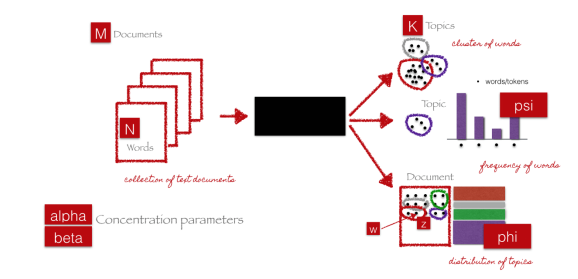
LDA算法如何工作?
我们已知的属于文件的单词;
需要计算的属于一个主题的单词或属于一个主题的单词的概率。
P(T | D):文档D中,指定给主题T的单词的比例;
P(W | T):所有包含单词W的文档中,指定给主题T的比例。
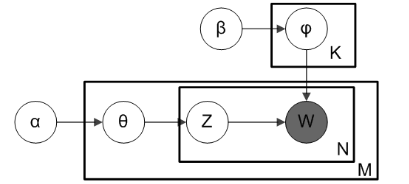
LDA主题模型的图示如下。

如何使用Python建立LDA主题模型
1. import re2. import numpy as np3. import pandas as pd4. from pprint import pprint5.6. # Gensim7. import gensim8. import gensim.corpora as corpora9. from gensim.utils import simple_preprocess10. from gensim.models import CoherenceModel11.12. # spacy for lemmatization13. import spacy14.15. # Plotting tools16. import pyLDAvis17. import pyLDAvis.gensim # don't skip this18. import matplotlib.pyplot as plt19. %matplotlib inline20.21. # Enable logging for gensim - optional22. import logging23. logging.basicConfig(format='%(asctime)s : %(levelname)s : %(message)s', level=logging.ERROR)24.25. import warnings26. warnings.filterwarnings("ignore",category=DeprecationWarning)
1. # NLTK Stop words2. from nltk.corpus import stopwords3. stop_words = stopwords.words('english')4. stop_words.extend(['from', 'subject', 're', 'edu', 'use'])
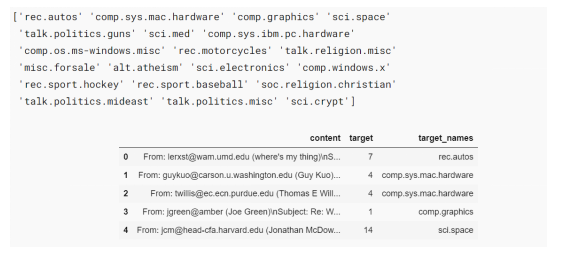
1. # Import Dataset2. df = pd.read_json('https://raw.githubusercontent.com/selva86/datasets/master/newsgroups.json')3. print(df.target_names.unique())4. df.head()
1. # Convert to list2. data = df.content.values.tolist()3.4. # Remove Emails5. data = [re.sub('\S*@\S*\s?', '', sent) for sent in data]6.7. # Remove new line characters8. data = [re.sub('\s+', ' ', sent) for sent in data]9.10. # Remove distracting single quotes11. data = [re.sub("\'", "", sent) for sent in data]12.13. pprint(data[:1])
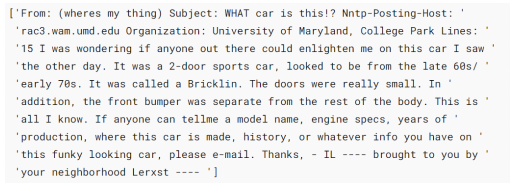
1. def sent_to_words(sentences):2. for sentence in sentences:3. yield(gensim.utils.simple_preprocess(str(sentence), deacc=True)) # deacc=True removes punctuations4.5. data_words = list(sent_to_words(data))6.7. print(data_words[:1])
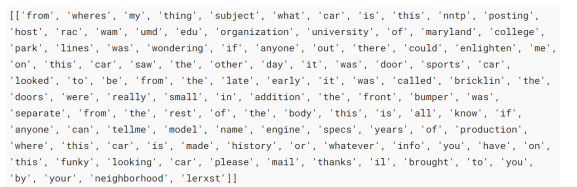
1. # Build the bigram and trigram models2. bigram = gensim.models.Phrases(data_words, min_count=5, threshold=100) # higher threshold fewer phrases.3. trigram = gensim.models.Phrases(bigram[data_words], threshold=100)4.5. # Faster way to get a sentence clubbed as a trigram/bigram6. bigram_mod = gensim.models.phrases.Phraser(bigram)7. trigram_mod = gensim.models.phrases.Phraser(trigram)8.9. # See trigram example10. print(trigram_mod[bigram_mod[data_words[0]]])
1. # Define functions for stopwords, bigrams, trigrams and lemmatization2. def remove_stopwords(texts):3. return [[word for word in simple_preprocess(str(doc)) if word not in stop_words] for doc in texts]4.5. def make_bigrams(texts):6. return [bigram_mod[doc] for doc in texts]7.8. def make_trigrams(texts):9. return [trigram_mod[bigram_mod[doc]] for doc in texts]10.11. def lemmatization(texts, allowed_postags=['NOUN', 'ADJ', 'VERB', 'ADV']):12. """https://spacy.io/api/annotation"""13. texts_out = []14. for sent in texts:15. doc = nlp(" ".join(sent))16. texts_out.append([token.lemma_ for token in doc if token.pos_ in allowed_postags])17. return texts_out1. # Remove Stop Words2. data_words_nostops = remove_stopwords(data_words)3.4. # Form Bigrams5. data_words_bigrams = make_bigrams(data_words_nostops)6.7. # Initialize spacy 'en' model, keeping only tagger component (for efficiency)8. # python3 -m spacy download en9. nlp = spacy.load('en', disable=['parser', 'ner'])10.11. # Do lemmatization keeping only noun, adj, vb, adv12. data_lemmatized = lemmatization(data_words_bigrams, allowed_postags=['NOUN', 'ADJ', 'VERB', 'ADV'])13.14. print(data_lemmatized[:1])

1. # Create Dictionary2. id2word = corpora.Dictionary(data_lemmatized)3.4. # Create Corpus5. texts = data_lemmatized6.7. # Term Document Frequency8. corpus = [id2word.doc2bow(text) for text in texts]9.10. # View11. print(corpus[:1])

num_topics —需要预先定义的主题数量;
chunksize — 每个训练块(training chunk)中要使用的文档数量;
alpha — 影响主题稀疏性的超参数;
passess — 训练评估的总数。
1. # Build LDA model2. lda_model = gensim.models.ldamodel.LdaModel(corpus=corpus,3. id2word=id2word,4. num_topics=20,5. random_state=100,6. update_every=1,7. chunksize=100,8. passes=10,9. alpha='auto',10. per_word_topics=True)
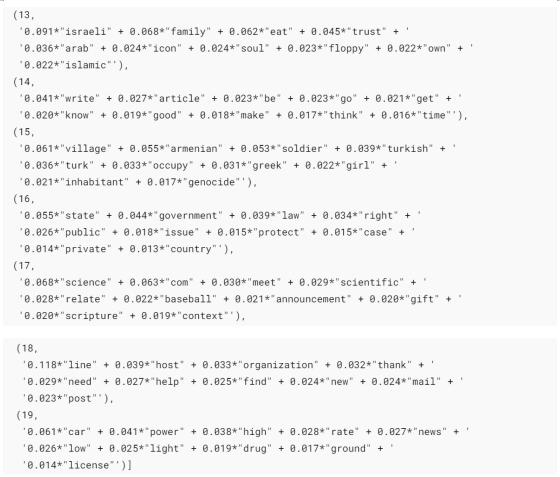
1. # Print the Keyword in the 10 topics2. pprint(lda_model.print_topics())3. doc_lda = lda_model[corpus]
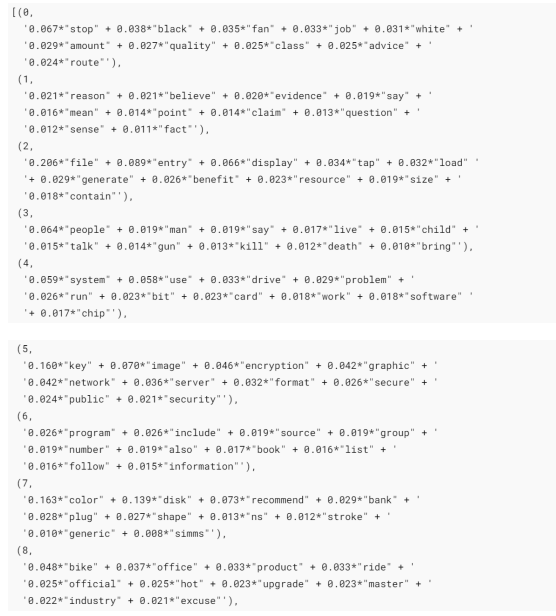
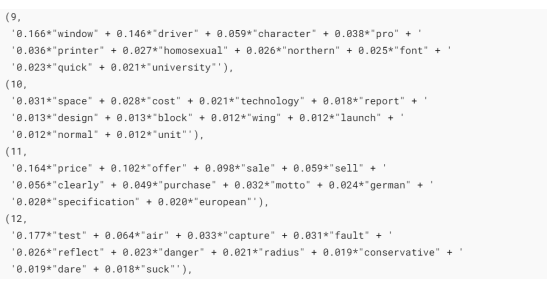
1. # Compute Perplexity2. print('\nPerplexity: ', lda_model.log_perplexity(corpus)) # a measure of how good the model is. lower the better.3.4. # Compute Coherence Score5. coherence_model_lda = CoherenceModel(model=lda_model, texts=data_lemmatized, dictionary=id2word, coherence='c_v')6. coherence_lda = coherence_model_lda.get_coherence()7. print('\nCoherence Score: ', coherence_lda)

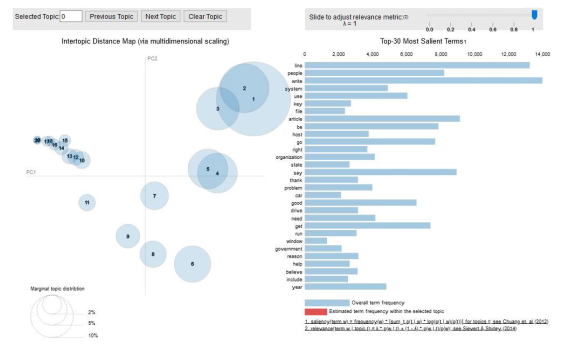
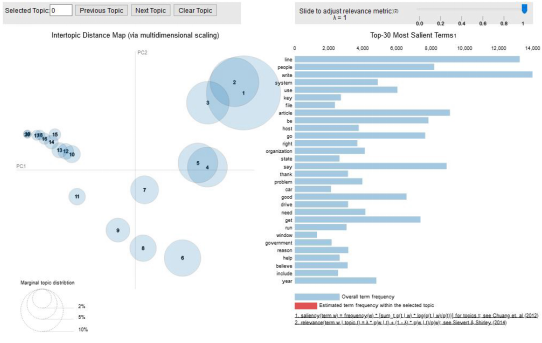
1. # Visualize the topics2. pyLDAvis.enable_notebook()3. vis = pyLDAvis.gensim.prepare(lda_model, corpus, id2word)4. vis

结语
主题建模是自然语言处理的主要应用之一。本文的目的是解释什么是主题建模,以及如何在实际使用中实现潜在狄利克雷分配(LDA)模型。
希望您喜欢该文并有所收获。
References:
编辑:王菁
校对:林亦霖
译者简介

刘思婧,清华大学新闻系研一在读,数据传播方向。文理兼爱,有点小情怀的数据爱好者。希望结识更多不同专业、不同专长的伙伴,拓宽眼界、优化思维、日日自新。
翻译组招募信息
工作内容:需要一颗细致的心,将选取好的外文文章翻译成流畅的中文。如果你是数据科学/统计学/计算机类的留学生,或在海外从事相关工作,或对自己外语水平有信心的朋友欢迎加入翻译小组。
你能得到:定期的翻译培训提高志愿者的翻译水平,提高对于数据科学前沿的认知,海外的朋友可以和国内技术应用发展保持联系,THU数据派产学研的背景为志愿者带来好的发展机遇。
其他福利:来自于名企的数据科学工作者,北大清华以及海外等名校学生他们都将成为你在翻译小组的伙伴。
点击文末“阅读原文”加入数据派团队~
转载须知
如需转载,请在开篇显著位置注明作者和出处(转自:数据派ID:DatapiTHU),并在文章结尾放置数据派醒目二维码。有原创标识文章,请发送【文章名称-待授权公众号名称及ID】至联系邮箱,申请白名单授权并按要求编辑。
发布后请将链接反馈至联系邮箱(见下方)。未经许可的转载以及改编者,我们将依法追究其法律责任。


点击“阅读原文”拥抱组织
