



点击上方“IT那活儿”,关注后了解更多精彩内容!!
一

手动rollback
1. 环境背景
red hat 7.2
MySQL 5.7.17
log_bin=ON
binlog_format=ROW
2. 测试数据生成
create database test;use test;create table rollback(id int,name varchar(50),age int,update_date TIMESTAMP);alter table rollback add primary key(id), modify id int auto_increment;insert into rollback(name,age) values('cde',23),('xiaoming',22),('heshui',55),('dashan',33),('kuangfeng',23);
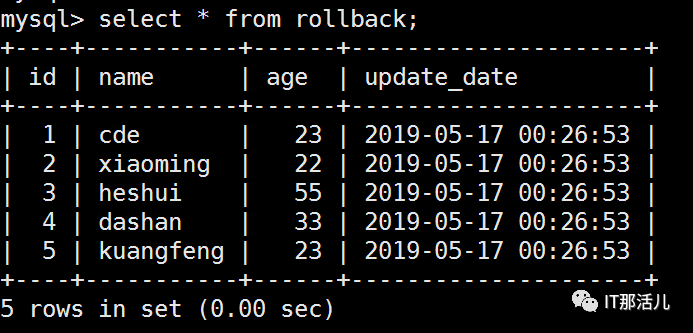
3. 模拟误操作
update rollback set age=11;
#上:update语句未加where条件,导致错误更新全表的数据。
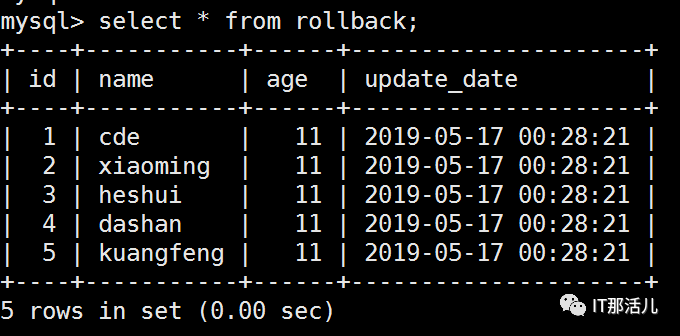
#上:看到误操作之后所有人的年龄都变成了11。这里我使用update_date字段用来记录误操作的时间,用来快速查找binlog的位置。
4. rollback数据
show variables like 'log_bin_basename';
#上:通过这个参数找到binlog日志位置。
cd /u01/my3306/log/binlog
#上:进入binlog日志目录。
ls -l
#上:查看所有binlog文件最后更新时间。
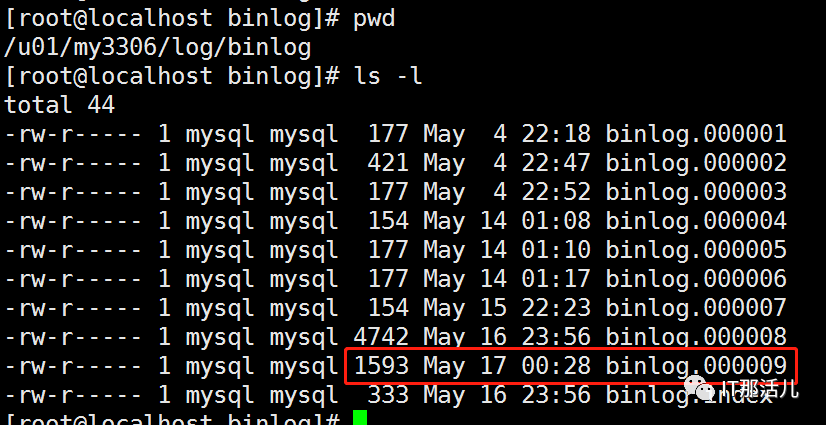
#上:可以看到binlog.000009这个日志文件的最后更新时间与我们误操作的时间吻合。
5. binlog解析
mysqlbinlog -vv --start-datetime='2019-05-17 00:28:00' --stop-datetime='2019-05-17 00:29:00' binlog.000009
#上:mysqlbinlog用来将binlog日志解析成可以看得懂数据变更信息。需要通过这种解析将误操作之前的数据查找出来。
-vv :表示解析成SQL语句,并且显示字段类型。
--start-datetime:表示误操作开始的时间,与stop-datetime相结合用来定位需要rollback的数据。

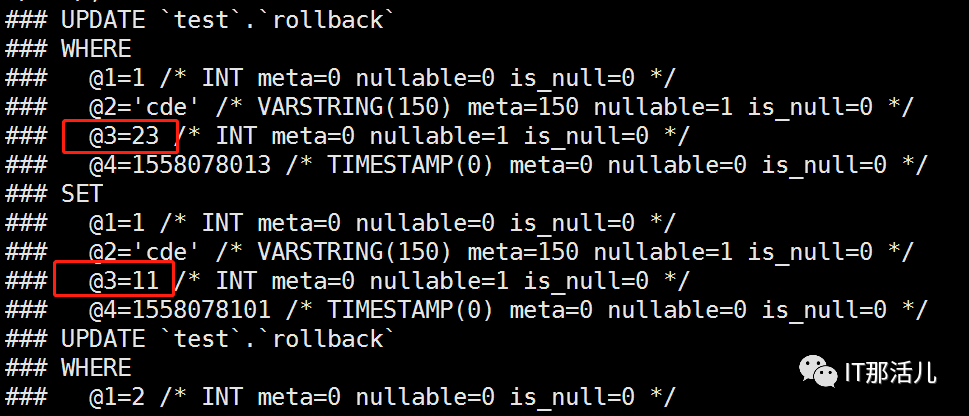
#上:解析结果说明:
这是一个update操作。
操作的表名叫rollback。
WHERE下面的信息表示,update之前的行记录。
SET下面的信息表示,update之后的行记录。
”@1“表示rollback表中的第一个字段,他的值是1。“@2”就是第二个字段,它的值是cde。
at 1265表示这个事件在日志当中的开始位置,end_log_pos 1562表示事件在日志当中的结束位置。
binlog解析出来的内容,我们通过以下四点来找到需要回滚的事务。
事务开始时间是否与误操作的时间相吻合。
事务的表名是否与误操作的表名相吻合。
事务与误操作的dml语句是否一样。
比对误操作的数据变更。这里是从23变成11,与我们误操作的数据一致。
6. rollback SQL
确定了误操作之前的数据,我们就需要用这些数据来拼接rollback SQL。让数据变成误操作之前的样子。
begin;update `test`.`rollback` set id=1,name='cde',age=23,update_date=from_unixtime(1558078013) where id=1 and name='cde' and age=11 and update_date=from_unixtime(1558078101);update `test`.`rollback` set id=2,name='xiaoming',age=22,update_date=from_unixtime(1558078013) where id=2 and name='xiaoming' and age=11 and update_date=from_unixtime(1558078101);update `test`.`rollback` set id=3,name='heshui',age=55,update_date=from_unixtime(1558078013) where id=3 and name='heshui' and age=11 and update_date=from_unixtime(1558078101);update `test`.`rollback` set id=4,name='dashan',age=33,update_date=from_unixtime(1558078013) where id=4 and name='dashan' and age=11 and update_date=from_unixtime(1558078101);update `test`.`rollback` set id=5,name='kuangfeng',age=23,update_date=from_unixtime(1558078013) where id=5 and name='kuangfeng' and age=11 and update_date=from_unixtime(1558078101);commit;
#上:我们将误操作之前的数据填写到set后面,将误操作之后的数据填写到where后面。进行反向更新达到rollback数据的效果。
#上:当我们执行了rollback SQL之后可以看到数据已经恢复成误操作之前的样子了。
二
MyFlash
如果需要rollback 的数据量小可以通过手动拼写rollback SQL的方式实现。但是一旦需要rollback的数据量大就需要借助工具来实现,这里可以使用美团的开源工具MyFlash。
MyFlash 非常适合回滚大量数据,可以将binlog文件转换成rollback binlog。通过执行rollback binlog来达到rollback 误操作数据的目的。
1. 安装
https://github.com/Meituan-Dianping/MyFlash
#上:下载地址
cd /opt/unzip MyFlash-master.zip
#上:解压
yum install gcc* pkg-config glib2 libgnomeui-devel -y
#上:下载依赖包
gcc -w `pkg-config --cflags --libs glib-2.0` source/binlogParseGlib.c -o binary/flashback
#上:动态编译
注意:经过我的测试,如果你系统上面有glib2(我的glib2版本:glib2-2.42.2-5)。不用执行yum和gcc也可以正常使用flashback,但是官方文档上面说需要执行gcc。
2. 生成测试数据
use test;create table myflash(id int,name varchar(50),age int,update_date TIMESTAMP);alter table myflash add primary key(id), modify id int auto_increment;insert into myflash(name,age) values('cde',23),('xiaoming',22),('heshui',55),('dashan',33),('kuangfeng',23);
3. 模拟误操作
update myflash set age=11;
#上:update语句未加where条件,导致错误更新全表的数据。
4. rollback数据
mysqlbinlog -vv --start-datetime='2019-05-19 22:29:00' --stop-datetime='2019-05-19 22:31:00' binlog.000010
#上:通过误操作时间来填写start-datetime和stop-datetime来缩小查询binlog的范围,加快速度。
通过binlog文件最近更新时间,来确定误操作事务记录在binlog.000010文件当中。

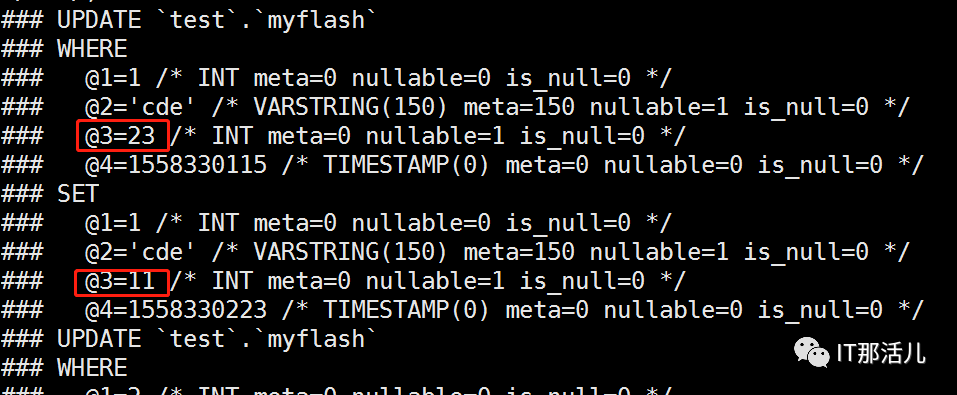
#上:查看解析出的内容,通过误操作时间,误操作表,以及误操作的数据,这些信息来找到误操作的事务。并记录at 1415和end_log_pos 1711,这两个值。
/opt/MyFlash-master/binary/flashback --binlogFileNames=/u01/my3306/log/binlog/binlog.000010 --databaseNames=test --tableNames=myflash --start-position=1415 --stop-position=1711 --outBinlogFileNameBase=/u01/my3306/log/binlog/myflash-binlog.000010
#上:通过以上命令来生成误操作事务的rollback binlog文件。
binlogFileNames:指定flashback要读取的binlog文件
databaseNames:指定库名之后flashback只会将该库的事务解析到rollback binlog当中
tableNames:指定表名之后flashback只会将该表的事务解析到rollback binlog当中
start-position:指定binlog文件的偏移量,flashback会从binlog文件的这个位置开始读取内容。
stop-position:指定binlog文件的偏移量,flashback读取到binlog文件这个位置的时候停止读取。
outBinlogFileNameBase:指定flashback生成的rollback binlog保存到哪里。
mysqlbinlog -vv /u01/my3306/log/binlog/myflash-binlog.000010.flashback
#上:通过mysqlbinlog解析rollback binlog文件内容
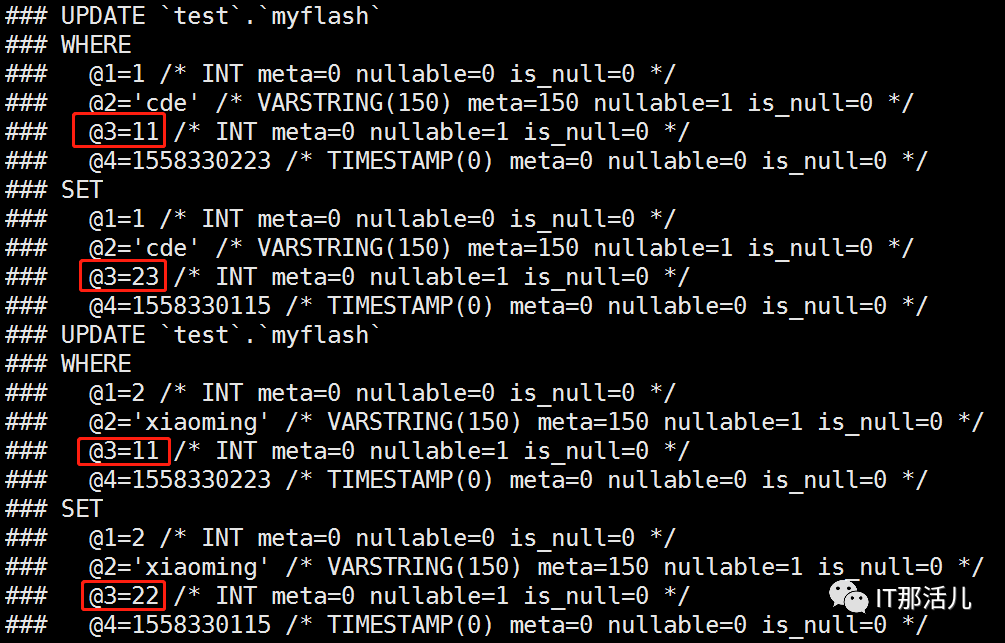
#上:可以看到where和set的数据跟binlog.000010文件中记录的相反。
lashback | mysql -uroot -proot
#上:用mysqlbinlog 将myflash生成的rollback binlog文件解析,并发送mysql客户端执行。
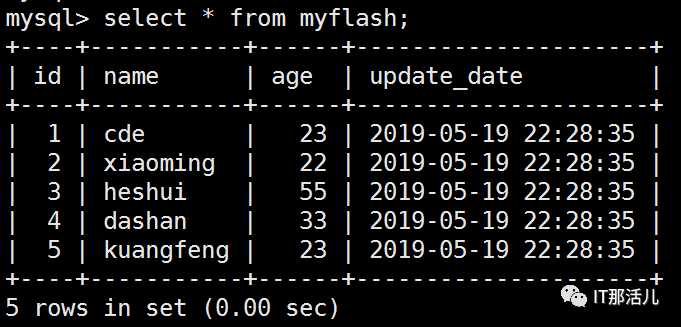
#上:数据已经rollback 到误操作之前。当需要rollback的数据非常多的时候这么做非常快速。
冬至,福至,一切都会如约而至。
本 文 原 创 来 源:IT那活儿微信公众号(上海新炬王翦团队)


