一、环境介绍
操作系统:CentOS Linux release 7.6.1810 (Core)
DB版本:PostgreSQL -11.5 on x86_64-pc-linux-gnu
| Name | Description |
|---|---|
xmin | Earliest transaction ID (txid) that is still active. All earlier transactions will eithe r be committed and visible, or rolled back and dead. |
xmax | First as-yet-unassigned txid. All txids greater than or equal to this are not yet started as of the time of the snapshot, and thus invisible. |
xip_list | Active txids at the time of the snapshot. The list includes only those activetxid s between at is e of the snapshot, and thus either visible or dead according to its commit stat us. The list does not include txids of subtransactions. |
xmin,当前处于active状态的最小事务编号;
xmax,未来产生的事务中,第一个将被分配的事务编号;
xip_list,当前处于active 状态的事务列表
(包括in progress和future状态的事务),其余为inactive。
(postgres@[local]:5432)[akendb01]#select txid_current_snapshot();txid_current_snapshot-----------------------639:642:639,641 <<<事务快照文本格式:xmin:xmax:xip_list
xmin=639,表示当前时刻快照中最小的是639这个事务。小于该编号的事务都已经终止(提交、回滚或异常终止),这些事务属于“过去的”范围区域。
xmax=642,表示将来新事务产生时分配到的第一个事务编号txid,大于等于642的事务未产生,属于“将来的”范围区域。
xip_list=(639,641),表示该快照时刻639和641这两个事务正处于active状态,属于“当前的”范围区域。
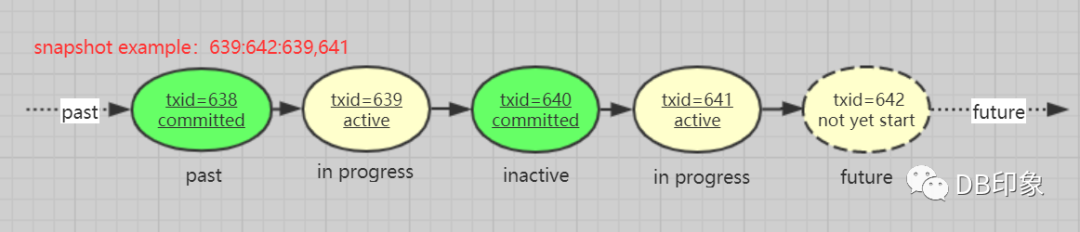 transaction snapshot examples
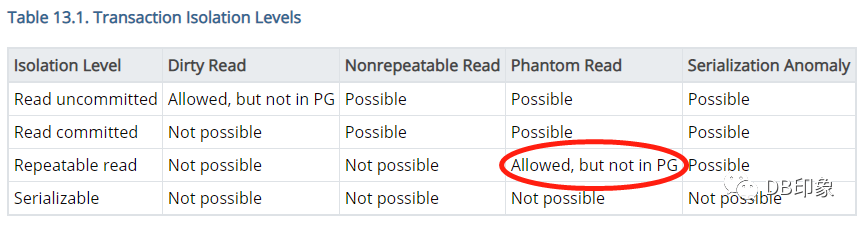
PostgreSQL-12事务隔离级别
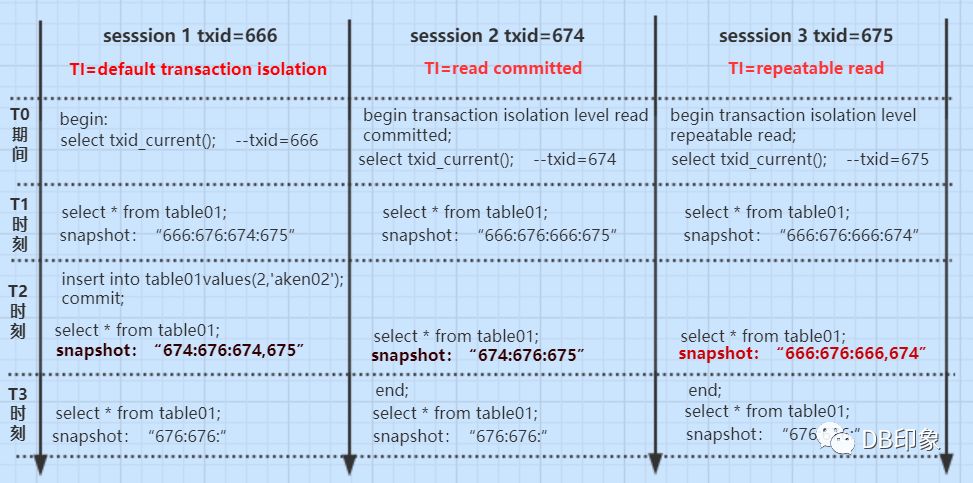
session 1在默认情况下开启事务,txid=666。
session 2在read committed隔离模式下开启事务,txid=674;
session 3在可重复读repeatable read隔离模式下开启事务,txid=675;
session 4开启事务txid=676(略)。
(postgres@[local]:5432)[akendb01]#select * from table01;id | name----+--------1 | aken01(1 row)(postgres@[local]:5432)[akendb01]#
(postgres@[local]:5432)[akendb01]#begin;BEGIN(postgres@[local]:5432)[akendb01]#show default_transaction_isolation;default_transaction_isolation-------------------------------read committed(1 row)(postgres@[local]:5432)[akendb01]#(postgres@[local]:5432)[akendb01]#select txid_current();txid_current--------------666(1 row)(postgres@[local]:5432)[akendb01]#
3)session 2:在提交读隔离级别下开启事务,事务编号txid=674。
(postgres@[local]:5432)[akendb01]#start transaction isolation level read committed;START TRANSACTION(postgres@[local]:5432)[akendb01]#select txid_current();txid_current--------------674(1 row)
4)session 3:在可重复读隔离级别下开启事务,事务编号txid=675
(postgres@[local]:5432)[akendb01]#start transaction isolation level repeatable read;START TRANSACTION(postgres@[local]:5432)[akendb01]#select txid_current();txid_current--------------675(1 row)
5)session 4:分配一个事务txid=676
(postgres@[local]:5432)[akendb01]#select txid_current();txid_current--------------676(1 row)
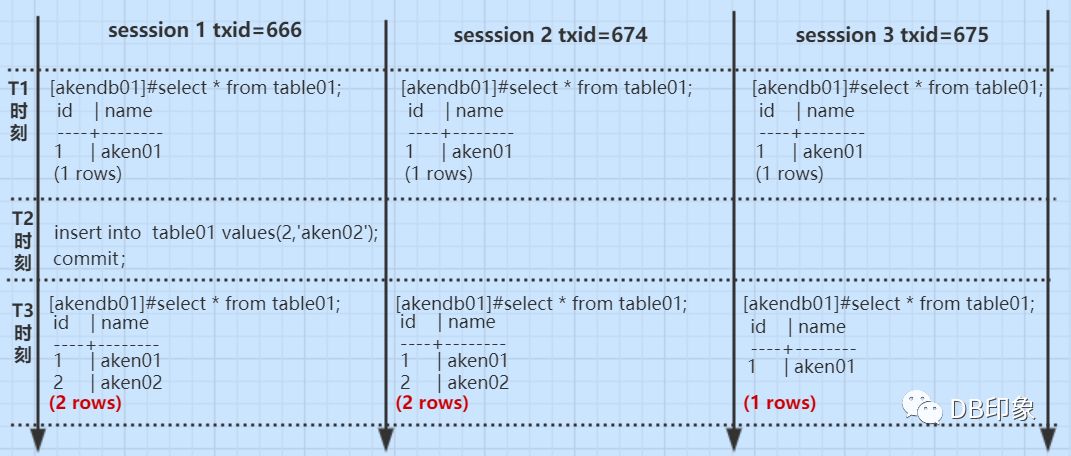
(postgres@[local]:5432)[akendb01]#select txid_current_snapshot();txid_current_snapshot-----------------------666:676:674,675 <<< 实际上txid=676在session 4已经分配,这个和官网将xmax解析为将来产生的第一个事务有矛盾,pg获取事务快照时最后一个txid是否会滞后?(1 row)(postgres@[local]:5432)[akendb01]#(postgres@[local]:5432)[akendb01]#select * from table01;id | name----+--------1 | aken01(1 rows)(postgres@[local]:5432)[akendb01]#
(postgres@[local]:5432)[akendb01]#select txid_current_snapshot();txid_current_snapshot-----------------------666:676:666,675(1 row)(postgres@[local]:5432)[akendb01]#(postgres@[local]:5432)[akendb01]#select * from table01;id | name----+--------1 | aken01(1 rows)(postgres@[local]:5432)[akendb01]#
3)session 3:读取到的事务快照为'666:676:666,674',读取表的记录数为1行。
(postgres@[local]:5432)[akendb01]#select txid_current_snapshot();txid_current_snapshot-----------------------666:676:666,674(1 row)(postgres@[local]:5432)[akendb01]#(postgres@[local]:5432)[akendb01]#select * from table01;id | name----+--------1 | aken01(1 rows)(postgres@[local]:5432)[akendb01]#
1)session 1在事务txid=666中获取的事务快照为'674:676:674,675',查看结果中可以看到自己新插入的tuple 2。
(postgres@[local]:5432)[akendb01]#insert into table01 values(2,'aken02');INSERT 0 1(postgres@[local]:5432)[akendb01]#commit;COMMITTED(postgres@[local]:5432)[akendb01]#select txid_current_snapshot();txid_current_snapshot-----------------------674:676:674,675 <<< 事务666已提交,session 1事务快照改变,xmin=674(1 row)(postgres@[local]:5432)[akendb01]#select * from table01;id | name----+--------1 | aken012 | aken02(2 rows)(postgres@[local]:5432)[akendb01]#
(postgres@[local]:5432)[akendb01]#select txid_current_snapshot();txid_current_snapshot-----------------------674:676:675 <<< session 1的事务666<xmin,txid=666变成过去状态的inactive事务,可见。(1 row)(postgres@[local]:5432)[akendb01]#(postgres@[local]:5432)[akendb01]#select * from table01;id | name----+--------1 | aken012 | aken02(2 rows)(postgres@[local]:5432)[akendb01]#
3)session 3:
session 3在事务txid=675中获取的事务快照依旧为'666:676:666,674',和T1时刻的保持一致,看不到事务txid=666新插入的tuple 2,无幻读产生。
(postgres@[local]:5432)[akendb01]#select txid_current_snapshot();txid_current_snapshot-----------------------666:676:666,674 <<<尽管session 1事务txid=666已提交,但在repeatable read隔离级别下仍然当作active处理,不可见(1 row)(postgres@[local]:5432)[akendb01]#select * from table01;id | name----+--------1 | aken01(1 rows)(postgres@[local]:5432)[akendb01]#
4.T3时间段
(postgres@[local]:5432)[akendb01]#select txid_current_snapshot();txid_current_snapshot-----------------------676:676: <<<xip_list为空,xmin=xmax,表示当前快照无活跃事务,未来产生的第一个事务为676.(1 row)(postgres@[local]:5432)[akendb01]#(postgres@[local]:5432)[akendb01]#select * from table01;id | name----+--------1 | aken012 | aken02(2 rows)
参考资料:
http://www.interdb.jp/pg/pgsql05.html
https://www.postgresql.org/docs/current/functions-info.html
I Love PG 关于我们
中国开源软件推进联盟PostgreSQL分会(简称:PG分会)于2017年成立,由国内多家PG生态企业所共同发起,业务上接受工信部产业发展研究院指导。PG分会致力于构建PG产业生态,推动PG产学研用发展,是国内一家PG行业协会组织。
技术文章精彩回顾 PostgreSQL学习的九层宝塔 PostgreSQL职业发展与学习攻略 搞懂PostgreSQL数据库透明数据加密之加密算法介绍 一文读懂PostgreSQL-12分区表 PostgreSQL源码学习之:RegularLock Postgresql源码学习之词法和语法分析 PostgreSQL buffer管理 最佳实践—PG数据库系统表空间重建 PostgreSQL V12中的流复制配置 2019,年度数据库舍 PostgreSQL 其谁? PostgreSQL使用分片(sharding)实现水平可扩展性 一文搞懂PostgreSQL物化视图 PostgreSQL原理解析之:PostgreSQL备机是否做checkpoint PostgreSQL复制技术概述 PG活动精彩回顾 见证精彩|PostgresConf.CN2019大会盛大开幕 PostgresConf.CN2019大会DAY2|三大分论坛,精彩不断 PostgresConf.CN2019培训日|爆满!Training Day现场速递! 「PCC-Training Day」培训日Day2圆满结束,PCC2019完美收官 创建PG全球生态!PostgresConf.CN2019大会盛大召开 首站起航!2019“让PG‘象’前行”上海站成功举行 走进蓉城丨2019“让PG‘象’前行”成都站成功举行 中国PG象牙塔计划发布,首批合作高校授牌仪式在天津举行 PostgreSQL实训基地落户沈阳航空航天大学和渤海大学,高校数据库课改正当时 群英论道聚北京,共话PostgreSQL 相聚巴厘岛| PG Conf.Asia 2019 DAY0、DAY1简报 相知巴厘岛| PG Conf.Asia 2019 DAY2简报 相惜巴厘岛| PG Conf.Asia 2019 DAY3简报 独家|硅谷Postgres大会简报 全球规模最大的PostgreSQL会议等你来! PG培训认证精彩回顾 关于中国PostgreSQL培训认证,你想知道的都在这里! 首批中国PGCA培训圆满结束,首批认证考试将于10月18日和20日举行! 中国首批PGCA认证考试圆满结束,203位考生成功获得认证! 中国第二批PGCA认证考试圆满结束,115位考生喜获认证! 请查收:中国首批PGCA证书! 重要通知:三方共建,中国PostgreSQL认证权威升级! 一场考试迎新年 | 12月28日,首次PGCE中级认证考试开考! 近500人参与!首次PGCE中级、第三批次PGCA初级认证考试落幕!