



正在尝试使用以下用户ID连接system
测试没有成功。
ORA-28547:连接服务器失败,可能是Oracle Net管理错误
在输入的字段中可能有错误,
或者服务器连接未就绪。
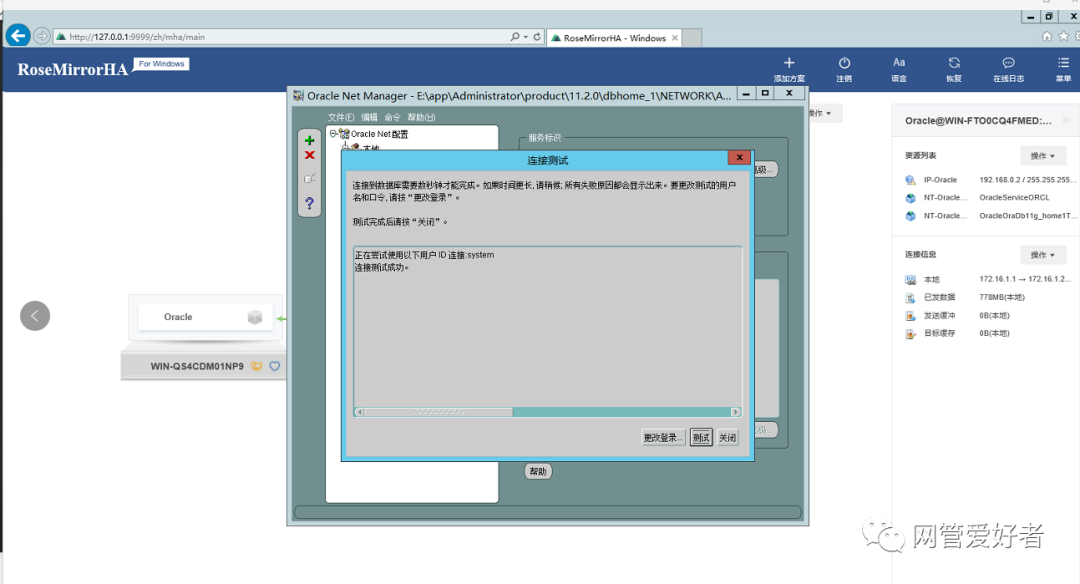
测试成功的提示这样的
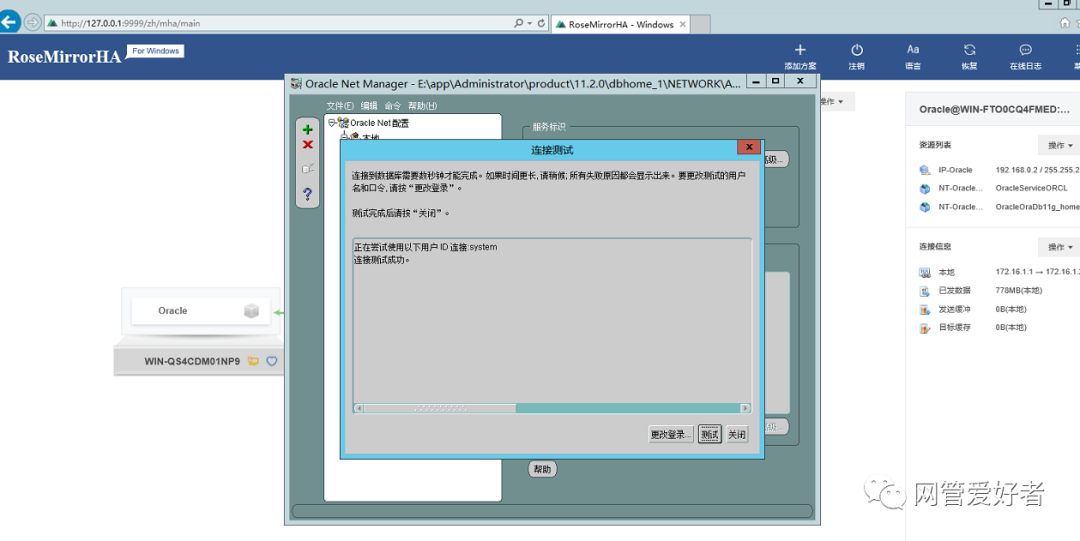
最后问题解决也是奇奇怪怪,居然重新安装oracle,重新设置系统密码,调试listen文件里面的计算机名字都改为IP地址,勉强可以,上午可以下午又不行了,最后切换一下rosemirrorHA 然后测试就大功告成了,真是稀罕人。
这个系统忙活的oracle的人员,和rose的人员都闹了,互相赖,对方的原因,反正都是自己的系统最好,别人的都是问题百出
真稀罕这个成功的画面
不成功的画面还有如下的内容:
ORA-00214
ORA-12528: TNS:监听程序:所有适用例程都无法建立新连接
ORA-12514: TNS:监听程序当前无法识别连接描述符中请求的服务
正在尝试使用以下用户ID连接system
测试没有成功。
ORA-28547:连接服务器失败,可能是Oracle Net管理错误
在输入的字段中可能有错误,
或者服务器连接未就绪。|
数据库 用户名orcl 密码 asdf1234!@#¥ sid是ORCL
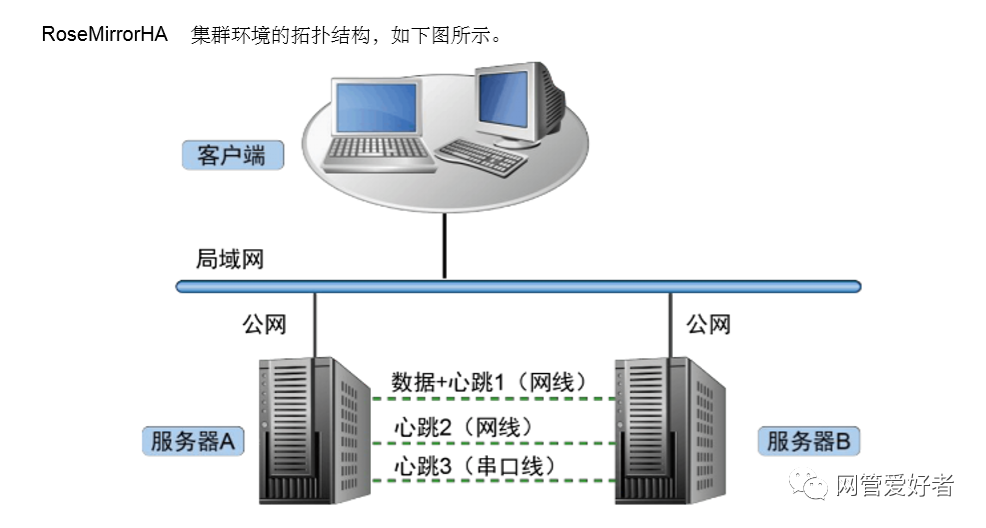
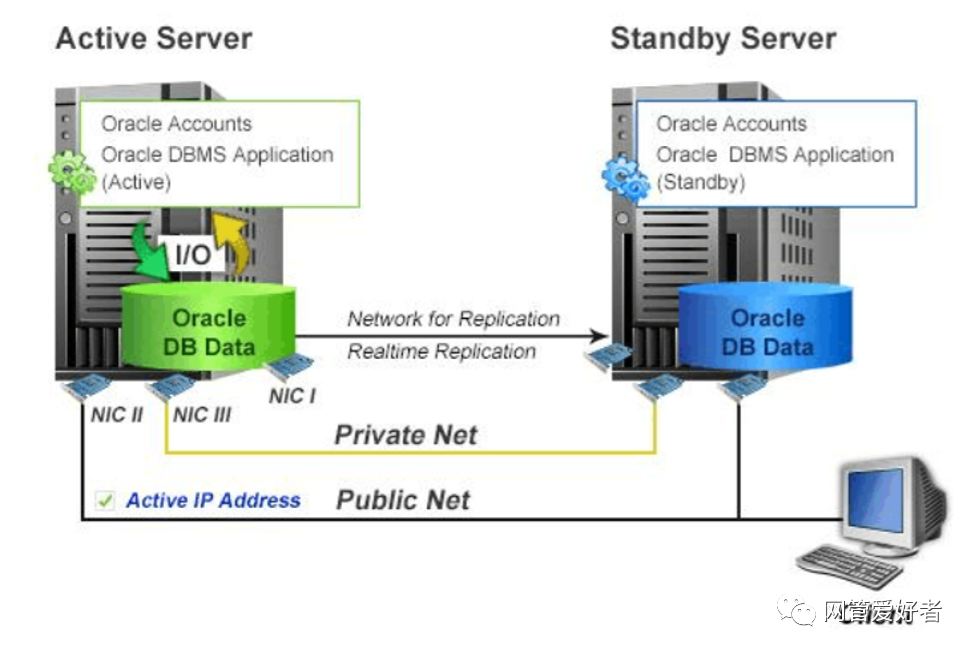
对业务地址192.168.0.2
C:\Users\Administrator>sqlplus / as sysdba
SQL*Plus: Release 11.2.0.4.0 Production on 星期三 4月 28 09:18:16 2021
Copyright (c) 1982, 2013, Oracle. All rights reserved.
连接到:
Oracle Database 11g Enterprise Edition Release 11.2.0.4.0 - 64bit Production
With the Partitioning, OLAP, Data Mining and Real Application Testing options
SQL> show parameter name;
NAME TYPE VALUE
------------------------------------ ----------- ------------------------------
cell_offloadgroup_name string
db_file_name_convert string
db_name string xl
db_unique_name string xl
global_names boolean FALSE
instance_name string xl
lock_name_space string
log_file_name_convert string
processor_group_name string
service_names string xl
SQL> exit
从 Oracle Database 11g Enterprise Edition Release 11.2.0.4.0 - 64bit Production
With the Partitioning, OLAP, Data Mining and Real Application Testing options 断
开
C:\Users\Administrator>lsnrctl status
LSNRCTL for 64-bit Windows: Version 11.2.0.4.0 - Production on 28-4月 -2021 09:1
8:48
Copyright (c) 1991, 2013, Oracle. All rights reserved.
正在连接到 (DESCRIPTION=(ADDRESS=(PROTOCOL=TCP)(HOST=WIN-FTO0CQ4FMED)(PORT=1521)
))
LISTENER 的 STATUS
------------------------
别名 LISTENER
版本 TNSLSNR for 64-bit Windows: Version 11.2.0.4.0 - Produ
ction
启动日期 28-4月 -2021 09:17:29
正常运行时间 0 天 0 小时 1 分 21 秒
跟踪级别 off
安全性 ON: Local OS Authentication
SNMP OFF
监听程序参数文件 E:\app\Administrator\product\11.2.0\dbhome_1\network\a
dmin\listener.ora
监听程序日志文件 E:\app\Administrator\diag\tnslsnr\WIN-FTO0CQ4FMED\list
ener\alert\log.xml
监听端点概要...
(DESCRIPTION=(ADDRESS=(PROTOCOL=tcp)(HOST=WIN-FTO0CQ4FMED)(PORT=1521)))
(DESCRIPTION=(ADDRESS=(PROTOCOL=ipc)(PIPENAME=\\.\pipe\EXTPROC1521ipc)))
服务摘要..
服务 "CLRExtProc" 包含 1 个实例。
实例 "CLRExtProc", 状态 UNKNOWN, 包含此服务的 3 个处理程序...
服务 "xl" 包含 1 个实例。
实例 "xl", 状态 READY, 包含此服务的 1 个处理程序...
服务 "xlXDB" 包含 1 个实例。
实例 "xl", 状态 READY, 包含此服务的 1 个处理程序...
命令执行成功
C:\Users\Administrator>sqlplus / as sysdba
SQL*Plus: Release 11.2.0.4.0 Production on 星期三 4月 28 09:21:02 2021
Copyright (c) 1982, 2013, Oracle. All rights reserved.
连接到:
Oracle Database 11g Enterprise Edition Release 11.2.0.4.0 - 64bit Production
With the Partitioning, OLAP, Data Mining and Real Application Testing options
SQL> alter user sys identified by xinlong1;
用户已更改。
SQL> create user test identified by test;
用户已创建。
SQL> grant dba to test;
授权成功。
SQL> select * from all_user;
select * from all_user
*
第 1 行出现错误:
ORA-00942: 表或视图不存在
SQL> select * from all_users;
USERNAME USER_ID CREATED
------------------------------ ---------- --------------
XS$NULL 2147483638 09-10月-13
TEST 84 28-4月 -21
SCOTT 83 09-10月-13
OWBSYS_AUDIT 79 09-10月-13
OWBSYS 78 09-10月-13
APEX_030200 77 09-10月-13
APEX_PUBLIC_USER 75 09-10月-13
FLOWS_FILES 74 09-10月-13
MGMT_VIEW 73 09-10月-13
SYSMAN 71 09-10月-13
SPATIAL_CSW_ADMIN_USR 69 09-10月-13
USERNAME USER_ID CREATED
------------------------------ ---------- --------------
SPATIAL_WFS_ADMIN_USR 66 09-10月-13
MDDATA 64 09-10月-13
OLAPSYS 60 09-10月-13
MDSYS 57 09-10月-13
SI_INFORMTN_SCHEMA 56 09-10月-13
ORDPLUGINS 55 09-10月-13
ORDDATA 54 09-10月-13
ORDSYS 53 09-10月-13
ANONYMOUS 46 09-10月-13
XDB 45 09-10月-13
CTXSYS 43 09-10月-13
USERNAME USER_ID CREATED
------------------------------ ---------- --------------
EXFSYS 42 09-10月-13
WMSYS 32 09-10月-13
APPQOSSYS 31 09-10月-13
DBSNMP 30 09-10月-13
ORACLE_OCM 21 09-10月-13
DIP 14 09-10月-13
OUTLN 9 09-10月-13
SYSTEM 5 09-10月-13
SYS 0 09-10月-13
已选择31行。
SQL> drop user test;
用户已删除。
SQL> create user xl identified by Xinlong1;
用户已创建。
SQL> grant dba to xl;
授权成功。
SQL> exit
从 Oracle Database 11g Enterprise Edition Release 11.2.0.4.0 - 64bit Production
With the Partitioning, OLAP, Data Mining and Real Application Testing options 断
开
C:\Users\Administrator>sqlplus xl/Xinling1
SQL*Plus: Release 11.2.0.4.0 Production on 星期三 4月 28 09:31:42 2021
Copyright (c) 1982, 2013, Oracle. All rights reserved.
ERROR:
ORA-01017: invalid username/password; logon denied
请输入用户名: xl
输入口令:
ERROR:
ORA-01017: invalid username/password; logon denied
请输入用户名:
ERROR:
ORA-01017: 用户名/口令无效; 登录被拒绝
SP2-0157: 在 3 次尝试之后无法连接到 ORACLE, 退出 SQL*Plus
C:\Users\Administrator>
C:\Users\Administrator>
C:\Users\Administrator>sqlplus xl/Xinlong1
SQL*Plus: Release 11.2.0.4.0 Production on 星期三 4月 28 09:32:03 2021
Copyright (c) 1982, 2013, Oracle. All rights reserved.
连接到:
Oracle Database 11g Enterprise Edition Release 11.2.0.4.0 - 64bit Production
With the Partitioning, OLAP, Data Mining and Real Application Testing options
SQL> show parameter name;
NAME TYPE VALUE
------------------------------------ ----------- ------------------------------
cell_offloadgroup_name string
db_file_name_convert string
db_name string xl
db_unique_name string xl
global_names boolean FALSE
instance_name string xl
lock_name_space string
log_file_name_convert string
processor_group_name string
service_names string xl
SQL> select status from v$instance;
STATUS
------------
OPEN
SQL> exit
从 Oracle Database 11g Enterprise Edition Release 11.2.0.4.0 - 64bit Production
With the Partitioning, OLAP, Data Mining and Real Application Testing options 断
开
C:\Users\Administrator>sqlplus xl/xinlong1
SQL*Plus: Release 11.2.0.4.0 Production on 星期三 4月 28 09:32:45 2021
Copyright (c) 1982, 2013, Oracle. All rights reserved.
ERROR:
ORA-01017: invalid username/password; logon denied
请输入用户名: ^C
C:\Users\Administrator>sqlplus xl/Xinlong1
SQL*Plus: Release 11.2.0.4.0 Production on 星期三 4月 28 09:34:14 2021
Copyright (c) 1982, 2013, Oracle. All rights reserved.
连接到:
Oracle Database 11g Enterprise Edition Release 11.2.0.4.0 - 64bit Production
With the Partitioning, OLAP, Data Mining and Real Application Testing options
SQL> exit
从 Oracle Database 11g Enterprise Edition Release 11.2.0.4.0 - 64bit Production
With the Partitioning, OLAP, Data Mining and Real Application Testing options 断
开
C:\Users\Administrator>ipcofnig
'ipcofnig' 不是内部或外部命令,也不是可运行的程序
或批处理文件。
C:\Users\Administrator>ipconfig
Windows IP 配置
以太网适配器 Embedded FlexibleLOM 1 Port 2:
连接特定的 DNS 后缀 . . . . . . . :
本地链接 IPv6 地址. . . . . . . . : fe80::d5a6:757e:709a:ef53%15
IPv4 地址 . . . . . . . . . . . . : 172.16.1.1
子网掩码 . . . . . . . . . . . . : 255.255.255.0
默认网关. . . . . . . . . . . . . :
以太网适配器 Embedded FlexibleLOM 1 Port 4:
连接特定的 DNS 后缀 . . . . . . . :
本地链接 IPv6 地址. . . . . . . . : fe80::c4c:cc2a:1d8a:b885%14
IPv4 地址 . . . . . . . . . . . . : 192.168.0.2
子网掩码 . . . . . . . . . . . . : 255.255.255.0
IPv4 地址 . . . . . . . . . . . . : 192.168.0.6
子网掩码 . . . . . . . . . . . . : 255.255.255.0
默认网关. . . . . . . . . . . . . : 192.168.0.254
以太网适配器 Embedded FlexibleLOM 1 Port 1:
媒体状态 . . . . . . . . . . . . : 媒体已断开
连接特定的 DNS 后缀 . . . . . . . :
以太网适配器 Embedded FlexibleLOM 1 Port 3:
连接特定的 DNS 后缀 . . . . . . . :
IPv4 地址 . . . . . . . . . . . . : 172.16.2.1
子网掩码 . . . . . . . . . . . . : 255.255.255.0
默认网关. . . . . . . . . . . . . :
隧道适配器 isatap.{534F06C0-31E9-4DF7-860D-6BFD66862475}:
媒体状态 . . . . . . . . . . . . : 媒体已断开
连接特定的 DNS 后缀 . . . . . . . :
隧道适配器 isatap.{16219397-C502-48AB-9BF8-76990D89E087}:
媒体状态 . . . . . . . . . . . . : 媒体已断开
连接特定的 DNS 后缀 . . . . . . . :
隧道适配器 isatap.{7D2FFBF7-87D7-43F8-B98D-98775AE706B9}:
媒体状态 . . . . . . . . . . . . : 媒体已断开
连接特定的 DNS 后缀 . . . . . . . :
C:\Users\Administrator>
Oracle 11g数据库安装(包含PLSQL)
***********************************
。cuu ea1 HppriCation Testing opt ions
SQL> alter systen set control files E:\app\Adninistrator\oradata \x1\CONTROL01.CTL' , E: \app\Adninistrator\oradata\xl\CONTROLO2.CTL' scope =spfile ;
系统已更改。
SqL> shutdoun immediate
提序已经关团。
经卸载数据库。
ORACLE例程已经关团。
SqL> startup
SQL> select from v$control_file;
SQL> select from v$control_files;
