







在本文中,我将为您介绍Gin框架是如何处理请求参数的,并介绍几种请求参数的处理方式。

Gin处理请求参数
在一个API的请求中,通常需要获取到请求参数,对请求参数做处理,实现业务逻辑。
在这里,将为您介绍3种类型的请求参数的获取方式。
1. URL路径参数处理
关于URL路径参数的说明,可参考 上一篇文章——> Golang Web开发之Gin路由、控制器、分组路由,这里不在赘述。
可以通过Gin中Context上下文的Param方法来获取您的API中URL路径参数。这里给出Param方法源码:
// Param returns the value of the URL param.// It is a shortcut for c.Params.ByName(key)// router.GET("/user/:id", func(c *gin.Context) {// // a GET request to /user/john// id := c.Param("id") // id == "john"// })func (c *Context) Param(key string) string {return c.Params.ByName(key)}
在GO工作目录下,创建main.go文件,编写以下的代码:
package mainimport ("github.com/gin-gonic/gin""net/http")func main() {r := gin.Default()// 获取 /user/:id 这类型路由绑定的参数r.GET("/user/:id", func(c *gin.Context) {// 获取url参数idid := c.Param("id")c.String(http.StatusOK, "%s的信息", id)})r.Run()}
运行上述main.go文件(go run main.go),并使用postman测试:
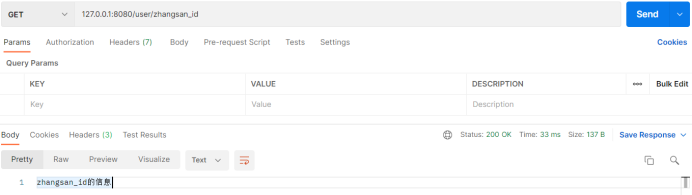
[GIN-debug] [WARNING] Creating an Engine instance with the Logger and Recovery middleware already attached.[GIN-debug] [WARNING] Running in "debug" mode. Switch to "release" mode in production.- using env: export GIN_MODE=release- using code: gin.SetMode(gin.ReleaseMode)[GIN-debug] GET /user/:id --> main.main.func1 (3 handlers)[GIN-debug] Environment variable PORT is undefined. Using port :8080 by default[GIN-debug] Listening and serving HTTP on :8080[GIN] 2021/10/13 - 14:36:54 | 200 | 0s | 127.0.0.1 | GET "/user/zhangsan_id"

■ ■■■■
2. GET请求参数处理
一个URL:/user?user_id=123456&name=sirxy&age=18,这这个URL中,其中user_id、name和age叫做GET请求参数。
在Gin中,可以通过下面的3个常用函数,获取GET请求参数。
// Query returns the keyed url query value if it exists,// otherwise it returns an empty string `("")`.// It is shortcut for `c.Request.URL.Query().Get(key)`// GET /path?id=1234&name=Manu&value=// c.Query("id") == "1234"// c.Query("name") == "Manu"// c.Query("value") == ""// c.Query("wtf") == ""func (c *Context) Query(key string) (value string) {value, _ = c.GetQuery(key)return}
2.2. DefaultQuery函数,其源码如下:
// DefaultQuery returns the keyed url query value if it exists,// otherwise it returns the specified defaultValue string.// See: Query() and GetQuery() for further information.// GET /?name=Manu&lastname=// c.DefaultQuery("name", "unknown") == "Manu"// c.DefaultQuery("id", "none") == "none"// c.DefaultQuery("lastname", "none") == ""func (c *Context) DefaultQuery(key, defaultValue string) string {if value, ok := c.GetQuery(key); ok {return value}return defaultValue}
2.3. GetQuery函数,其源码如下:
// GetQuery is like Query(), it returns the keyed url query value// if it exists `(value, true)` (even when the value is an empty string),// otherwise it returns `("", false)`.// It is shortcut for `c.Request.URL.Query().Get(key)`// GET /?name=Manu&lastname=// ("Manu", true) == c.GetQuery("name")// ("", false) == c.GetQuery("id")// ("", true) == c.GetQuery("lastname")func (c *Context) GetQuery(key string) (string, bool) {if values, ok := c.GetQueryArray(key); ok {return values[0], ok}return "", false}
现在,创建一个代码文件main.go,编写如下代码:
package mainimport ("github.com/gin-gonic/gin""net/http""fmt")func main() {r := gin.Default()r.GET("/user", testGetParamHandler)r.Run()}func testGetParamHandler(c *gin.Context) {// 获取请求参数的三种方式:// 方式一:Query函数name := c.Query("name")fmt.Println("方式一:", name)// 方式二:DefaultQuery函数// 可以通过第二个参数设置默认值。name = c.DefaultQuery("name", "sirxy")fmt.Println("方式二:", name)// 方式三:GetQuery函数,// 它返回两个参数,第一个是参数值,// 第二个参数是参数是否存在的bool值,可以用来判断参数是否存在。name, ok := c.GetQuery("name")if !ok {// 参数不存在逻辑}fmt.Println("方式三:", name)// 其他业务逻辑// 返回结果c.JSON(http.StatusOK, gin.H{"name": name,})}
运行代码,使用接口测试工具postman测试:
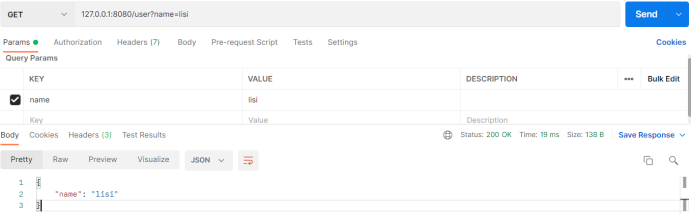
控制台终端中输出如下信息:
[GIN-debug] [WARNING] Creating an Engine instance with the Logger and Recovery middleware already attached.[GIN-debug] [WARNING] Running in "debug" mode. Switch to "release" mode in production.- using env: export GIN_MODE=release- using code: gin.SetMode(gin.ReleaseMode)[GIN-debug] GET /user --> main.testGetParamHandler (3 handlers)[GIN-debug] Environment variable PORT is undefined. Using port :8080 by default[GIN-debug] Listening and serving HTTP on :8080方式一:lisi方式二:lisi方式三:lisi[GIN] 2021/10/13 - 15:04:08 | 200 | 516.7µs | 127.0.0.1 | GET "/user?name=lisi"
PS1:GetQuery函数,判断参数是否存在的逻辑是,参数值为空,参数也算存在,只有没有提交参数,才算参数不存在。
PS2:上述三种get参数的获取,参数值都是String类型,若您的业务中约定了传的是数字,注意将字符串转为数字类型的处理。

■ ■■■■
3. POST请求参数处理
同样地,在Gin中,可以通过下面这3个常用函数,获取POST请求参数。
// PostForm returns the specified key from a POST urlencoded form or multipart form// when it exists, otherwise it returns an empty string `("")`.func (c *Context) PostForm(key string) (value string) {value, _ = c.GetPostForm(key)return}
// DefaultPostForm returns the specified key from a POST urlencoded form or multipart form// when it exists, otherwise it returns the specified defaultValue string.// See: PostForm() and GetPostForm() for further information.func (c *Context) DefaultPostForm(key, defaultValue string) string {if value, ok := c.GetPostForm(key); ok {return value}return defaultValue}
3.3 GetPostForm函数,它的源码如下:
// GetPostForm is like PostForm(key). It returns the specified key from a POST urlencoded// form or multipart form when it exists `(value, true)` (even when the value is an empty string),// otherwise it returns ("", false).// For example, during a PATCH request to update the user's email:// email=mail@example.com --> ("mail@example.com", true) := GetPostForm("email") // set email to "mail@example.com"// email= --> ("", true) := GetPostForm("email") // set email to ""// --> ("", false) := GetPostForm("email") // do nothing with emailfunc (c *Context) GetPostForm(key string) (string, bool) {if values, ok := c.GetPostFormArray(key); ok {return values[0], ok}return "", false}
package mainimport ("github.com/gin-gonic/gin""net/http""fmt")func main() {r := gin.Default()// 测试获取post请求参数r.POST("/user", testPostParamHandler)r.Run()}func testPostParamHandler(c *gin.Context) {// POST请求参数的三种处理方式// 方式一:PostForm函数获取请求参数name := c.PostForm("name")fmt.Println(name)// 方式二:DefaultPostForm函数获取请求参数name = c.DefaultPostForm("name", "sirxy")fmt.Println(name)// 方式三:GetPostForm函数获取请求参数name, ok := c.GetPostForm("name")if !ok {// 参数不存在的逻辑}fmt.Println(name)c.JSON(http.StatusOK, gin.H{"name": name,})}
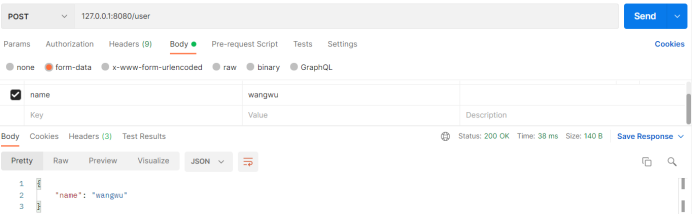
[GIN-debug] [WARNING] Creating an Engine instance with the Logger and Recovery middleware already attached.[GIN-debug] [WARNING] Running in "debug" mode. Switch to "release" mode in production.- using env: export GIN_MODE=release- using code: gin.SetMode(gin.ReleaseMode)[GIN-debug] POST /user --> main.testPostParamHandler (3 handlers)[GIN-debug] Environment variable PORT is undefined. Using port :8080 by default[GIN-debug] Listening and serving HTTP on :8080wangwuwangwuwangwu[GIN] 2021/10/13 - 15:31:42 | 200 | 1.2036ms | 127.0.0.1 | POST "/user"

■ ■■■■
总结
本文介绍了,在Gin中是如何处理各类请求参数的,也给出了它们的处理API源码,并对各种方式做了一个简单阐述与演示。
后续,我将为您逐步介绍Gin的一些其他教程,敬请期待~~。
👇👇👇👇👇👇

长按二维码关注我们吧
不要错过
