



<Server>元素是Tomcat中最顶级的配置了,它抽象的代表一个Tomcat实体,也可以认为是一个Tomcat容器,它是Tomcat实例服务启动的入口点,同时在其中也可以配置n个服务,并且JNDI全局树也是在<Server>中进行定义的;
Introduction
A Server element represents the entire Catalina servlet container. Therefore, it must be the single outermost element in the conf/server.xml
configuration file. Its attributes represent the characteristics of the servlet container as a whole.
本文主要从三个方面主要讲解一下Server(Tomcat容器);
1.Server的顶层结构
还是首先来看看架构图中Server的位置:
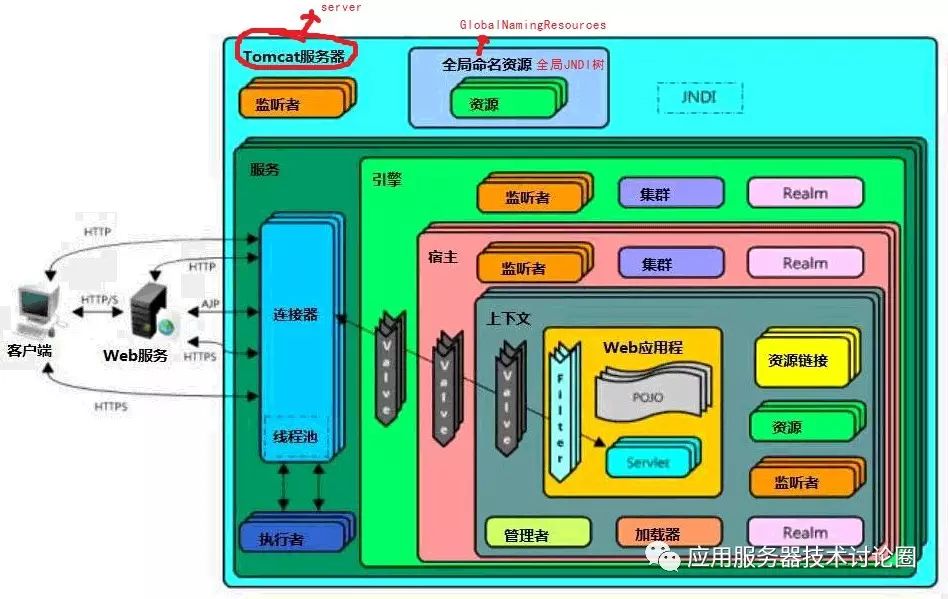
如上述架构图所示,Server实例主要负责Tomcat服务器的启停,持有全局JNDI树;
并可以根据需要安装Service服务,当然默认还是使用的StandardService,下面就是调用addService的代码部分:
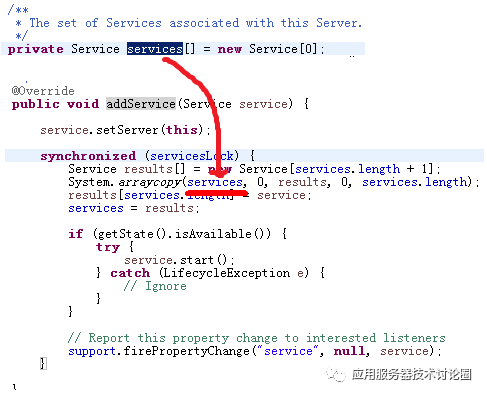
services[]是一个数组,其中每一个service服务都作为数组中的元素,每一次加入一个service,都会对数组元素进行扩充;
当service添加完毕之后,调用其start方法,开始生命周期事件,进而将其子容器接单,Connector,Engine,Host,Context,Mapper等容器组件都进行启动起来;
这一步骤称之为点火过程;
2.shutDown命令与awaitsocket
我们从Tomcat的架构图中进行分析,Tomcat的后续在addService的时候,会将整个Tomcat的catalina Service加入进来,这里面会有n个线程存在并执行,很多线程都是从Executor线程池中分离的线程;
但是,上述的线程都是后续了,我们讲解过启动包,其实就是Catalina类的一个main函数的执行,执行到最后如果main函数退出了,那么Tomcat的该jvm直接就会被kill掉了;如果是这样的话,也就没有咱们前面说的Tomcat容器启动了;
Tomcat显然不会这么做的,它在此之前就会在Catalina类的最后搞出一个await方法:
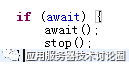
await方法是在StandardServer中启动一个serverSocket,等待Catalina命令发过来的shutdown命令,一旦该serverSocket接受到这个命令,进行Server的关闭操作,await方法才能最终返回;
当await方法返回后,最后执行stop方法,这个方法也就是Catalina著名的“钩子”方法,进行最终清理并完全shutdown掉Tomcat:
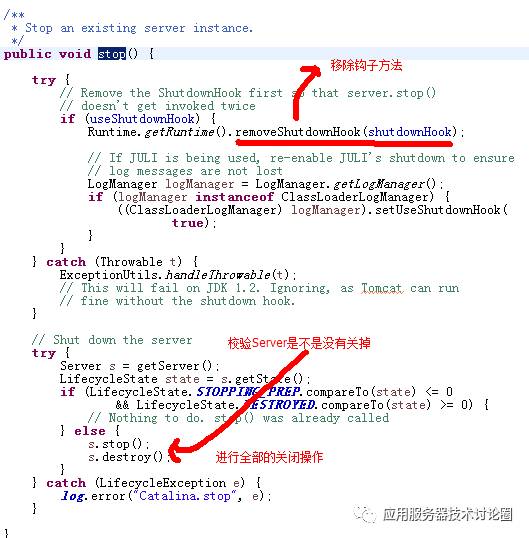
到这整个Server实例就关闭了;
我们来详细的分解一下StandardServer中的await方法:
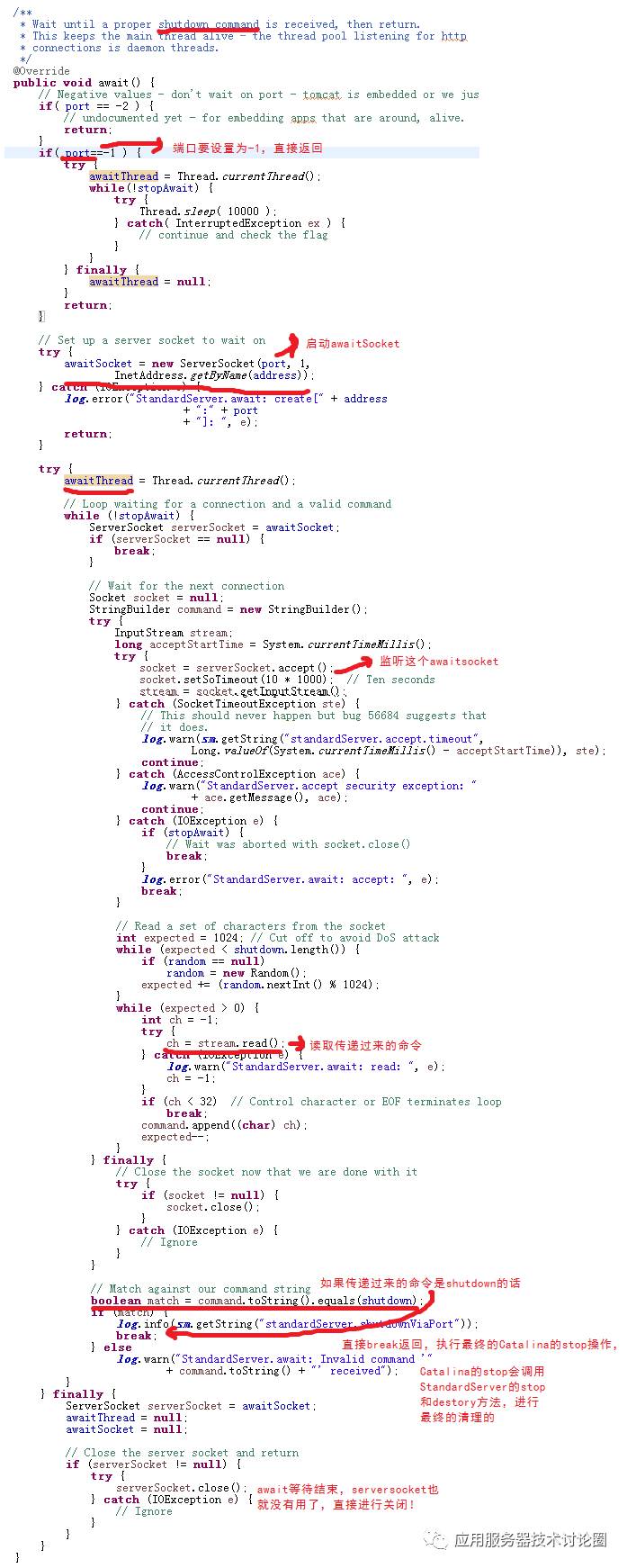
在上述的代码中,StandardServer开放了几个配置:
Common Attributes
All implementations of Server support the following attributes:
| Attribute | Description |
|---|---|
className | Java class name of the implementation to use. This class must implement the |
address | The TCP/IP address on which this server waits for a shutdown command. If no address is specified, |
port | The TCP/IP port number on which this server waits for a shutdown command. Set to Note: Disabling the shutdown port works well when Tomcat is started using Apache Commons Daemon (running as a service on Windows or with jsvc on un*xes). It cannot be used when running Tomcat with the standard shell scripts though, as it will prevent shutdown.bat|.sh and catalina.bat|.sh from stopping it gracefully. |
shutdown | The command string that must be received via a TCP/IP connection to the specified port number, in order to shut down Tomcat. |
className:可以自己实现Server,替换StandardServer;
address:绑定的awaitscket的IP地址;
port:绑定的awaitscket的port地址,从源码中也可以分析出来,当为-1的时候,直接返回;
shutdown:这个是执行awaitsocket与客户端传递的字符串的匹配,默认是shutdown这个字符串,当然你也可以自己任意进行指定;
3.全局JNDI配置
在Server这一级除了上述的工作,还维护着一颗JNDI树:

glabalnamingContext就是全局JNDI树的根节点入口,该节点在前面讲解JNDi系统的时候多次提到,这里就不再缀余;
在这块我们主要看看GlobalNamingResources的配置,作为全局JNDI树的配置,实际和Context等级别,web.xml中的定义都类似;
在GlobalNamingResources中可以定义2种资源:
a.环境变量
Environment Entries
You can configure named values that will be made visible to all web applications as environment entry resources by nesting <Environment>
entries inside this element. For example, you can create an environment entry like this:
<GlobalNamingResources ...>
  ...
  <Environment name="maxExemptions" value="10"
         type="java.lang.Integer" override="false"/>
  ...
</GlobalNamingResources>
This is equivalent to the inclusion of the following element in the web application deployment descriptor (/WEB-INF/web.xml
):
<env-entry>
  <env-entry-name>maxExemptions</env-entry-name>
  <env-entry-value>10</env-entry-value>
  <env-entry-type>java.lang.Integer</env-entry-type>
</env-entry>
but does not require modification of the deployment descriptor to customize this value.
The valid attributes for an <Environment>
element are as follows:
| Attribute | Description |
|---|---|
description | Optional, human-readable description of this environment entry. |
name | The name of the environment entry to be created, relative to the |
override | Set this to |
type | The fully qualified Java class name expected by the web application for this environment entry. Must be a legal value for |
value | The parameter value that will be presented to the application when requested from the JNDI context. This value must be convertable to the Java type defined by the |
对于环境变量来说,其实际相当于web.xml中的env-entry;
上述属性中的override是可以对web.xml中的env-entry是否进行覆盖的;
b.全局资源定义
Resource Definitions
You can declare the characteristics of resources to be returned for JNDI lookups of <resource-ref>
and <resource-env-ref>
elements in the web application deployment descriptor by defining them in this element and then linking them with<ResourceLink> elements in the <Context>
element. You MUST also define any other needed parameters using attributes on the Resource element, to configure the object factory to be used (if not known to Tomcat already), and the properties used to configure that object factory.
For example, you can create a resource definition like this:
<GlobalNamingResources ...>
  ...
  <Resource name="jdbc/EmployeeDB" auth="Container"
            type="javax.sql.DataSource"
     description="Employees Database for HR Applications"/>
  ...
</GlobalNamingResources>
This is equivalent to the inclusion of the following element in the web application deployment descriptor (/WEB-INF/web.xml
):
<resource-ref>
  <description>Employees Database for HR Applications</description>
  <res-ref-name>jdbc/EmployeeDB</res-ref-name>
  <res-ref-type>javax.sql.DataSource</res-ref-type>
  <res-auth>Container</res-auth>
</resource-ref>
but does not require modification of the deployment descriptor to customize this value.
The valid attributes for a <Resource>
element are as follows:
| Attribute | Description |
|---|---|
auth | Specify whether the web Application code signs on to the corresponding resource manager programmatically, or whether the Container will sign on to the resource manager on behalf of the application. The value of this attribute must be |
closeMethod | Name of the zero-argument method to call on a singleton resource when it is no longer required. This is intended to speed up clean-up of resources that would otherwise happen as part of garbage collection. This attribute is ignored if the For Apache Commons DBCP and Apache Tomcat JDBC connection pools you can use |
description | Optional, human-readable description of this resource. |
name | The name of the resource to be created, relative to the |
scope | Specify whether connections obtained through this resource manager can be shared. The value of this attribute must be |
singleton | Specify whether this resource definition is for a singleton resource, i.e. one where there is only a single instance of the resource. If this attribute is |
type | The fully qualified Java class name expected by the web application when it performs a lookup for this resource. |
一般通常数据源等全局资源,都是通过这种方式进行定义的;
当定义完全局数据源,应用级通过Resource-Link进行链接,然后开放给应用进行使用;
当然,如上所述,在全局JNDI树上定义的Resource,等同于你在web.xml中定义的resource-ref,只不过二者的区别前面已经讲解过了,因为DTD等限制,web.xml中定义的resource-ref关于数据库的一些配置属性是没法加到web.xml中的,只能另找地方进行配置,而在GlobalNamingResources中的Resource是可以任意添加属性的;
所以,一般Tomcat都会使用全局定义,应用进行Resource-Link的方式,如下:
Resource Links
Use <ResourceLink>
elements to link resources from the global context into per-web-application contexts. Here is an example of making a custom factory available to an application, based on the example definition in the JNDI Resource HOW-TO:
<Context>
  <ResourceLink
    name="bean/MyBeanFactory"
    global="bean/MyBeanFactory"
    type="com.mycompany.MyBean"
  />
</Context>
总结:
Tomcat的Server级别可以抽象为Tomcat的应用容器实例,其主要维护n个service服务,包括应用容器的shutdown命令的监听,还有全局JNDI树这3个大的功能;
