



session的一些属性可以开放在Tomcat中进行配置。
1.session-config标签
session的相关配置,因为和应用相关,主要在web.xml中进行:
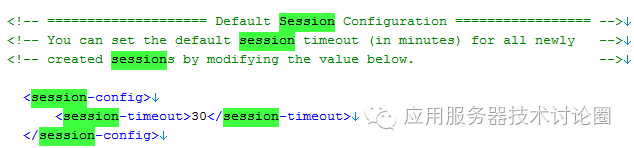
session-config标签是配置session信息的父节点,其最主要的子节点就是配置session超时的时间;
因为web.xml是对应每一个应用的,所以每一个应用都对应一个session配置。
除此之外,我们可以看到还有其它的几个属性可以配置:
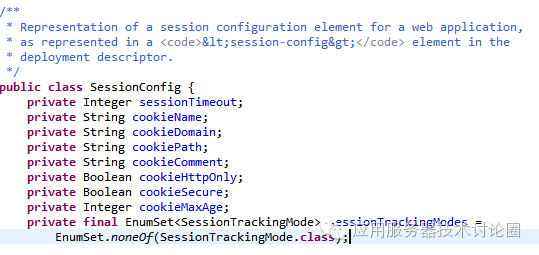
sessionTimeout:session超时时间
cookieName:session通过cookie存放的名字,默认为JSESSIONID
cookieDomain:session关联的cookie所在保存的域,例如网址为www.jb51.net/test/test.aspx,那么domain默认为www.jb51.net ,如果没有定义这个属性,默认和当前Context配置的一样
cookiePath:cookieDomain域名为前缀,cookiePath为后缀,也是存储session关联的cookie所在保存的路径,如果没有配置的话,默认和当前Context配置的一样
cookieCommet:cookie的注释
cookieHttpOnly:对于这个属性,其作用如下:
`HttpOnly’:
Set-Cookie: RMID=732423sdfs73242; expires=Fri, 31-Dec-2010 23:59:59 GMT; path=/; domain=.example.net;
When the browser receives such a cookie, it is supposed to use it as usual in the following HTTP exchanges, but not to make it visible to client-side scripts.[21] The `HttpOnly` flag is not part of any standard, and is not implemented in all browsers. Note that there is currently no prevention of reading or writing the session cookie via a XMLHTTPRequest.[36]
浏览器客户端的javascript是可以读取cookie的,但是有一种办法是可以不让javascript读取到,就是在响应头上加这个httponly标识:
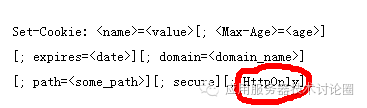
这种做法是保护session,其他的开放cookie部分可以通过JavaScript获得,但是关于session的敏感数据,不能在这次请求中获得(虽然也可以想一些歪招,例如直接直接篡改服务器端输出流,直接使用js输出JSESSIONID)。
cookieSecure:该属性的作用是保证cookie只有在https的协议才能传递到服务器中,在http协议中服务器中是没有传递到服务器的,这种方式针对于session来说,也就变相禁止了session窃听,并只限定在https协议中。
cookieMaxAge:session以cookie形式存储的最大时间。
sessionTrackingMode:配置session跟踪的策略,可以是cookie跟踪,也可以是url重写,甚至让该应用的session只能在https中,这几个属性和servlet中定义的一样
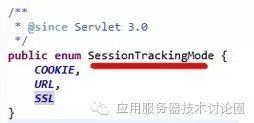
上述的属性可以配置n个,如果配置不是1个,按照其顺序先后发挥作用。
2.Context的属性配置
对于上述的session-config的内容,实际上在早期的Tomcat版本中,可以在Context中进行配置:
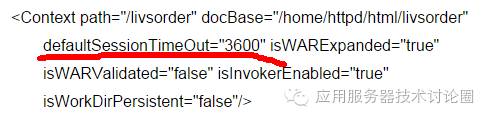
对于新版本的Tomcat,将这个配置转移到了web.xml中或者通过API进行编程配置,如下面:
session.setMaxInactiveInterval(600);
参数600单位是秒,即在没有10分钟活动后,session将失效。
我们来看看Tomcat官方文档中的配置属性:
cookies | Set to |
是否在该应用中开启使用cookie来存储session
sessionCookieDomain | The domain to be used for all session cookies created for this context. If set, this overrides any domain set by the web application. If not set, the value specified by the web application, if any, will be used. |
同第一节的cookieDomain
sessionCookieName | The name to be used for all session cookies created for this context. If set, this overrides any name set by the web application. If not set, the value specified by the web application, if any, will be used, or the name |
同第一节的cookieName
sionCookiePath | The path to be used for all session cookies created for this context. If set, this overrides any path set by the web application. If not set, the value specified by the web application will be used, or the context path used if the web application does not explicitly set one. To configure all web application to use an empty path (this can be useful for portlet specification implementations) set this attribute to Note: Once one web application using |
同第一节的cookiePath
sessionCookiePathUsesTrailingSlash | Some browsers, such as IE, will send a session cookie for a context with a path of /foo with a request to /foobar. To prevent this, Tomcat will add a trailing slash to the path associated with the session cookie so, in the above example, the cookie path becomes /foo/. However, with a cookie path of /foo/, IE will no longer send the cookie with a request to /foo. This should not be a problem unless there is a servlet mapped to /*. In this case this feature will need to be disabled. The default value for this attribute is |
该属性是为了解决类似IE这种浏览器的session的cookie存储后不加最后的反斜杠,这可能导致一些路径错误;
useHttpOnly | Should the HttpOnly flag be set on session cookies to prevent client side script from accessing the session ID? Defaults to |
同第一节的cookieHttpOnly
validateClientProvidedNewSessionId | When a client provides the ID for a new session, this attribute controls whether that ID is validated. The only use case for using a client provided session ID is to have a common session ID across multiple web applications. Therefore, any client provided session ID should already exist in another web application. If this check is enabled, the client provided session ID will only be used if the session ID exists in at least one other web application for the current host. Note that the following additional tests are always applied, irrespective of this setting:
If not specified, the default value of |
在集群环境下,不同机器的sessionID是不同的,这个和JVMRoute的唯一标识有关,但是Tomcat可以为所在集群环境下的每一台机器,基于每一次请求,提供一样的sessionID;
在配置为该属性后,该功能就被打开。
可以分析出来,基本上server.xml中主要的几个属性可以和web.xml中配置的对应上。
3.Manager元素
对于server.xml的配置还没有讲述完,而最重要的是StandardManager的配置,该类主要是对Session进行管理,特别是持久化管理;
映射到server.xml中是<Context>节点下的Manager
className | Java class name of the implementation to use. This class must implement the |
Tomcat开放出来的manager的session管理的实现,默认为(org.apache.catalina.session.StandardManager)
maxActiveSessions | The maximum number of active sessions that will be created by this Manager, or When the limit is reached, any attempt to create a new session (e.g. with |
最大session活动连接数,这个属性的实现其实很简单,就是在需要创建的session的时候,在这里进行一次判断
sessionIdLength | The length of session ids created by this Manager, measured in bytes, excluding subsequent conversion to a hexadecimal string and excluding any JVM route information used for load balancing. This attribute is deprecated. Set the length on a nested SessionIdGenerator element instead. |
sessionid的长度设置,但是在新版本中已经是用了一个内嵌的SessionIdGenerator进行
对于SessionIdGenerator 来说,其无非就是如何生成sessionid的,
className | Java class name of the implementation to use. This class must implement the SessionIdGenerator 的实现类,可以自定义实现,默认为org.apache.catalina.SessionIdGenerator; |
jvmRoute | A routing identifier for this Tomcat instance. It will be added to the session id to allow for stateless stickyness routing by load balancers. The details on how the NOTE - The value for this property is inherited automatically from the 每一个Tomcat实例都对应一个jvmRoute; |
sessionIdLength | The length of session ids created by this SessionIdGenerator. The details on how the 产生的sessionid的长度; |
对于上面的className,Tomcat允许有两种实现,一种是 (org.apache.catalina.session.StandardManager),一种是(org.apache.catalina.session.PersistentManager.)
如果上述的实现是Tomcat默认的 (org.apache.catalina.session.StandardManager),配置为:
pathname | Absolute or relative (to the work directory for this Context) pathname of the file in which session state will be preserved across application restarts, if possible. The default is "SESSIONS.ser". SESSIONS.ser是session信息持久化成文件,该pathname代表着路径,如果不写的话,默认在work工作目录下的对应context的文件夹下。 该文件在Tomcat启动的时候会重新load; |
processExpiresFrequency | Frequency of the session expiration, and related manager operations. Manager operations will be done once for the specified amount of backgroundProcess calls (i.e., the lower the amount, the more often the checks will occur). The minimum value is 1, and the default value is 6. StandardManager会隔一段时间去check当前session的过期时间,通常这个参数设置的越低,频率越多,消耗的系统资源越多,如果不在意session超时多超出那么几秒,可以设置一个比较大的值; 最低1s,默认6s; |
secureRandomClass | Name of the Java class that extends 对于SessionID的规则需要一个随机数的计算器,默认是使用java.security.SecureRandom来做的,这里设置设置是哪个自定义的类产生随机数; |
secureRandomProvider | Name of the provider to use to create the 随机数的Provider方法,用于创建随机数的; |
secureRandomAlgorithm | Name of the algorithm to use to create the 如果是自定义的随机数类,这里可以制定使用什么算法,默认使用SHA1PRNG ; |
sessionAttributeNameFilter | A regular expression used to filter which session attributes will be distributed. An attribute will only be distributed if its name matches this pattern. If the pattern is zero length or 在tomcat集群的环境中,session是需要被分发的,这个属性是针对于session的attributes集合做一次过滤,只有配置为指定pattern的格式匹配才被分发,如果设置为0或者是null的话,所有的属性都被分发; |
sessionAttributeValueClassNameFilter | A regular expression used to filter which session attributes will be distributed. An attribute will only be distributed if the implementation class name of the value matches this pattern. If the pattern is zero length or 与上一个类型,只不过这个属性过滤的是值,并且过滤条件的是值+类型; |
warnOnSessionAttributeFilterFailure | If sessionAttributeNameFilter or sessionAttributeValueClassNameFilter blocks an attribute, should this be logged at 这个属性是上面两个过滤器设置之后,session分发由于过滤器的限制,阻塞了属性的分发,那么该日志需要进行记录; |
如果上述的实现是Tomcat默认的 (org.apache.catalina.session. PersistentManager),配置稍微多一些:
className | It has the same meaning as described in the Common Attributes above. You must specify className,设置为org.apache.catalina.session. PersistentManager即可,除非你自己还要基于PersistentManager再进行扩展 |
maxIdleBackup | The time interval (in seconds) since the last access to a session before it is eligible for being persisted to the session store, or 当前请求访问,记录一下session访问的时间,session空闲了多久,这个时候不能总占用内存,立刻就进行持久化了,而这个时间的间隔,就是该属性 |
maxIdleSwap | The maximum time a session may be idle before it is eligible to be swapped to disk due to inactivity. Setting this to 该属性是maxIdleBackup + session从持久化状态变为内存态的时间 ;肯定比maxIdleBackup 要大; |
minIdleSwap | The minimum time in seconds a session must be idle before it is eligible to be swapped to disk to keep the active session count below maxActiveSessions. Setting to 该属性是maxIdleSwap 相对的一个最小值; |
processExpiresFrequency | 同org.apache.catalina.session.StandardManager |
saveOnRestart | Should all sessions be persisted and reloaded when Tomcat is shut down and restarted (or when this application is reloaded)? By default, this attribute is set to 是否所有的session在Tomcat关闭的时候被持久化,并且在Tomcat启动的时候被reload;默认为true; 该开关是可以关闭的,也就是说直接忽略掉session持久化这个功能; |
secureRandomClass | 同org.apache.catalina.session.StandardManager |
secureRandomProvider | 同org.apache.catalina.session.StandardManager |
secureRandomAlgorithm | 同org.apache.catalina.session.StandardManager |
sessionAttributeNameFilter | 同org.apache.catalina.session.StandardManager |
sessionAttributeValueClassNameFilter | 同org.apache.catalina.session.StandardManager |
warnOnSessionAttributeFilterFailure | 同org.apache.catalina.session.StandardManager |
有如下的例子:
<Manager className="org.apache.catalina.session.PersistentManager" >
debug=0
saveOnRestart="true"
maxActiveSession="-1"
minIdleSwap="-1"
maxIdleSwap="-1"
maxIdleBackup="-1"
<Store className="org.apache.catalina.session.FileStore" directory="../session" />
</Manager>
需要注意到,如果是(org.apache.catalina.session.PersistentManager)的话,那么其下面还有一个Store标签
对于Store,其实即使存储的形式不一定就是session.ser了,因为java默认的序列化效率真的不敢恭维,可以选择JDBC存储为数据库的方式:
<Store calssName="org.apache.catalina.JDBCStore" driverName="com.mysql.jdbc.Driver"
connectionURL="jdbc:mysql://localhost/session?usename=xxx&password=xxx"
sessionTable="session" sessionIdCol="session_id" sessionDataCol="session_data"
sessionValidCol="sessionValid" sessionMaxInactiveCol="maxInactive"
sessionLastAccessedCol="lastAccess" sessionAppCol="appName" checkInterval="60" debug="99" />
如可以使用上述的Store标签替换掉前面的FileStore,这样session信息直接就入库了;
需要注意的是,你必须在数据库中,创建如:
create table tomcat_sessions (
  session_id     varchar(100) not null primary key,
  valid_session  char(1) not null,
  max_inactive   int not null,
  last_access    bigint not null,
  app_name       varchar(255),
  session_data   mediumblob,
  KEY kapp_name(app_name)
);
的库表才可以;
4.-D参数
前面三节的session配置其实已经很全了;
但是Tomcat基于不同的场景,更细化了一些配置,以-D的形式作为开关:
Sessions
| Property | Description |
|---|---|
org.apache.catalina.authenticator. Constants.SSO_SESSION_COOKIE_NAME | An alternative name for the single sign on session cookie. Defaults to 该属性可以修改默认的通过realm登陆之后的session cookie的名称,默认是JSESSIONIDSSO |
org.apache.catalina.core. StandardHostValve.ACCESS_SESSION | If this is If 每一个请求都会更新session的last accessed的时间,而对于正常情况来讲,仅仅是在该请求getSession方法或者与session相关的操作调用,才会被算作accesstime,才会更新last accessed time,而当设置这个属性,每一次请求都更新这个时间; |
org.apache.catalina.session. StandardSession.ACTIVITY_CHECK | If this is If 该属性可以总结为,当前session的活跃请求的一个在线统计值; |
org.apache.catalina.session. StandardSession.LAST_ACCESS_AT_START | If this is If 该属性可以总结为两次last accessed time 之间的间距计算,当为true,间距起止是上一次请求开始到这一次请求开始,当为false,是上一次请求结束到这一次请求开始; |
总结:
session的配置可以在web.xml,server.xml,-D等三个维度中进行配置,在server.xml中的持久化配置非常多,可以配置文件,数据库存储session信息!
