开发过程中,很多时候我们需要将json数据直接显示在页面上(比如在做一个接口测试的项目,需要将接口返回的结果直接展示),但是如果直接显示字符串,不方便查看。需要格式化一下。
解决方案:
其实JSON.stringify本身就可以将JSON格式化,具体的用法是:
JSON.stringify(res, null, 2); //res是要JSON化的对象,2是spacing
如果想要效果更好看,还要加上格式化的代码和样式:
js代码:
01
| function
syntaxHighlight(json) {
|
02
| if
(typeof json !=
'string'
) {
|
03
| json = JSON.stringify(json, undefined, 2);
|
05
| json = json.replace(/&/g,
'&'
).replace(/</g,
'<'
).replace(/>/g,
'>'
);
|
06
| return
json.replace(/(
"(\\u[a-zA-Z0-9]{4}|\\[^u]|[^\\"
])*"(\s*:)?|\b(true|false|null)\b|-?\d+(?:\.\d*)?(?:[eE][+\-]?\d+)?)/g,
function
(match) {
|
08
| if
(/^"/.test(match)) {
|
09
| if
(/:$/.test(match)) {
|
14
| }
else
if
(/true|false/.test(match)) {
|
16
| }
else
if
(/null/.test(match)) {
|
19
| return
'<span class="'
+ cls +
'">'
+ match +
'</span>'
;
|
效果
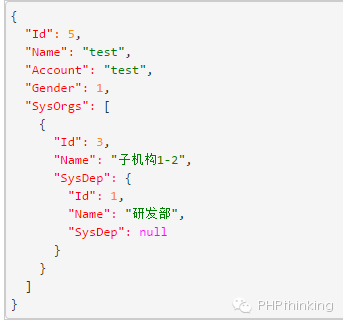
更多代码,及实例,请点击阅读原文!




