



Swagger是什么?
一个自动生成接口文档的框架
目前使用的技术架构 : 前后端分离 vue+springBoot
产生一个问题:
前后端集成联调:前端人员和后端人员无法做到即时协商,最终问题爆发
解决方案:(1)首先指定schema(计划提纲),实时更新最新api,降低集成风险;
(2)早些年指定word文档;
(3)前后端分离:
早期:前端测试postman;
后端:提供接口,需要实时更新最新的改动;
Swagger
(1)号称世界上最流行的api框架;
(2)RestFul api 文档自动在线自动生成工具--->api文档与api定义同步 更新
(3)直接运行,可以在线测试api接口
(4)支持多种语言
在项目中使用Swagger需要springFox
(1)swagger2
(2)ui
SpringBoot集成Swagger
(1)创建项目
(2)导入依赖
<!-- https://mvnrepository.com/artifact/io.springfox/springfox-swagger2 --><dependency><groupId>io.springfox</groupId><artifactId>springfox-swagger2</artifactId><version>2.9.2</version></dependency><!-- https://mvnrepository.com/artifact/io.springfox/springfox-swagger-ui --><dependency><groupId>io.springfox</groupId><artifactId>springfox-swagger-ui</artifactId><version>2.9.2</version></dependency>
(3)编写一个hello工程
(4)配置Swagger--->config
package com.clpc.un.pafp.statistics.config;import org.springframework.context.annotation.Bean;import org.springframework.context.annotation.Configuration;import org.springframework.core.env.Environment;import org.springframework.web.bind.annotation.RequestMapping;import springfox.documentation.builders.RequestHandlerSelectors;import springfox.documentation.service.ApiInfo;import springfox.documentation.service.Contact;import springfox.documentation.service.VendorExtension;import springfox.documentation.spi.DocumentationType;import springfox.documentation.spring.web.plugins.Docket;import springfox.documentation.swagger2.annotations.EnableSwagger2;import java.util.ArrayList;@Configuration@EnableSwagger2public class SwaggerConfig {//配置Swagger实例@Beanpublic Docket docket(Environment environment){return new Docket(DocumentationType.SWAGGER_2).apiInfo(apiInfo())//页面信息.groupName("第一开发小组")//分组名称(每个开发组配置对应的名称).enable(true)//是否开启swagger.select()//扫描包//.apis(RequestHandlerSelectors.basePackage("com.ljw.rxgl.controller"))//扫描类上的注解(类必须是个类上的注解)//.apis(RequestHandlerSelectors.withClassAnnotation(GetMapping.class))//扫描方法上的注解(参数是个方法上的注解).apis(RequestHandlerSelectors.withMethodAnnotation(RequestMapping.class))//接口过滤(参数:全部,全部不过滤,正则)//.paths(PathSelectors.any()).build();//加载}//配置页面信息private ApiInfo apiInfo() {Contact contact = new Contact("名称", "https://www.XXXX.com.cn/", "906497785@qq.com");return new ApiInfo("数据展示后台接口文档","描述:该文档作为数据后台接口对接文档","1.0","https://www.XXXX.com.cn/",contact,"Apache 2.0","http://www.apache.org/licenses/LICENSE-2.0",new ArrayList<VendorExtension>());}}
页面效果(地址:/swagger-ui.html)
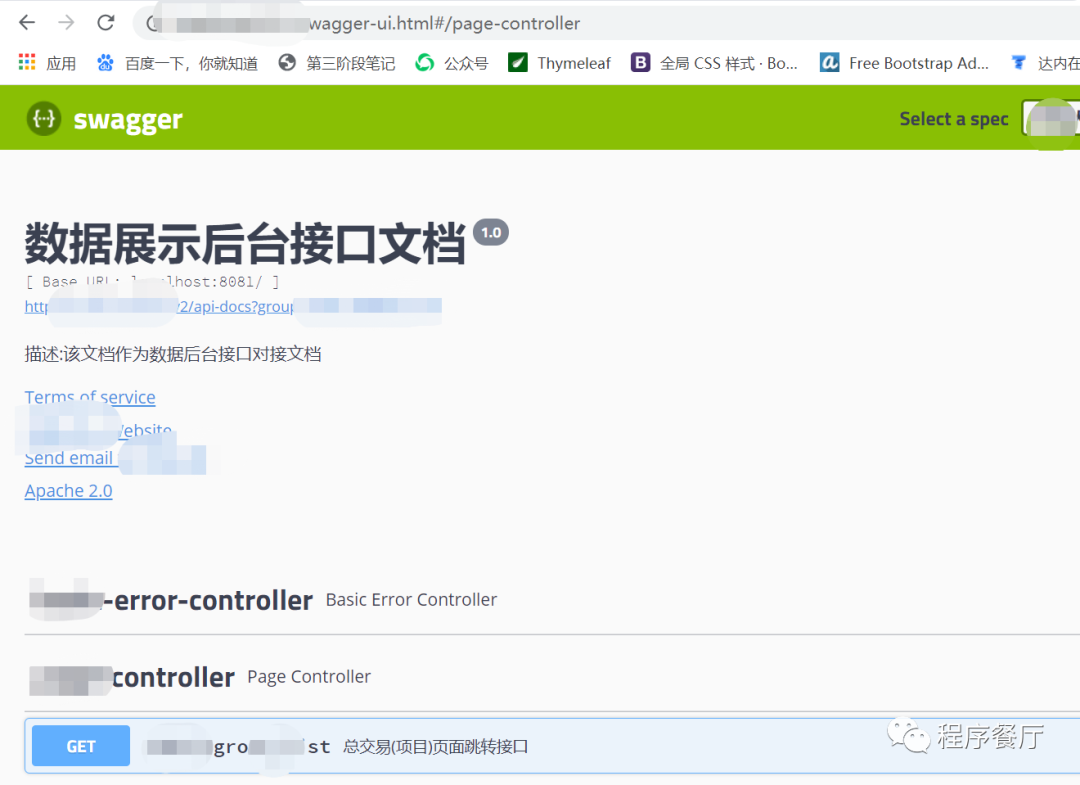
再此页面可以看到项目中的接口(根据需要扫描),并可以直接发送请求测试
文章转载自程序餐厅,如果涉嫌侵权,请发送邮件至:contact@modb.pro进行举报,并提供相关证据,一经查实,墨天轮将立刻删除相关内容。
