



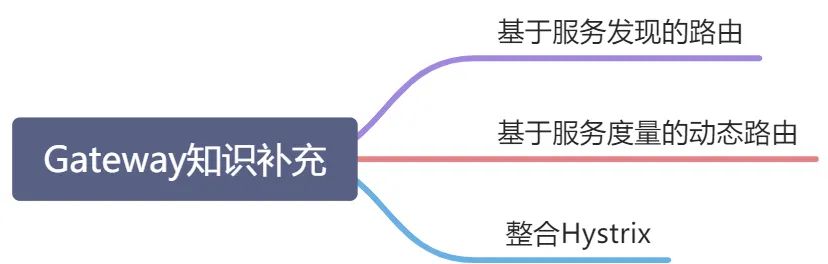
基于服务发现的路由
在新服务网关Gateway动态路由中,我们基于数据库和Redis实现了动态路由。本小节将基于服务发现的方式实现服务路由。在Gateway提供的全局过滤器中的LoadBalancerClientFilter,会帮助我们完成基于服务发现的路由。
项目依赖
<!--Eureka客户端--><dependency><groupId>org.springframework.cloud</groupId><artifactId>spring-cloud-starter-netflix-eureka-client</artifactId></dependency>
配置文件
spring:application:name: gateway-demoserver:port: 9001#将Gateway注册至服务注册中心eureka:client:service-url:defaultZone: http://localhost:8701/eureka/,http://localhost:8702/eureka/
Gateway应用启动后,注册至服务注册中心。Gateway模块拥有了从服务注册中心获取服务实例列表中包含的服务实例相关功能。此时我们可以通过http://GATEWAY_HOST:GATEWAY_PORT/SERVICE_ID进行服务实例调用(SERVICE_ID需大写)。经过如下配置后
spring:cloud:gateway:discovery:locator:enabled: true//是否开启与服务发现组件交互功能(默认为false)lower-case-service-id: true//是否开启服务实例标识转小写功能(默认为false)application:name: gateway-demoserver:port: 9001#将Gateway注册至服务注册中心eureka:client:service-url:defaultZone: http://localhost:8701/eureka/,http://localhost:8702/eureka/
可以通过SERVICE_ID小写的方式进行服务实例调用。如果服务实例标识名称过长,可以通过服务实例别名的方式进行服务实例路由转发调用。
配置类方式配置
@Configurationpublic class EurekaClientGatewayConfigRoute {@Beanpublic RouteLocator customEurekaClientGatewayRouteConfig(RouteLocatorBuilder builder){return builder.routes().route("user-routes",r->r.path("/user/**").uri("lb://user")).build();}}
配置文件方式创建
spring:cloud:gateway:routes:- id: user-routeuri: lb://userpredicates:- Path=/user/**discovery:locator:enabled: true//是否开启与服务发现组件交互功能(默认为false)lower-case-service-id: true//是否开启服务实例标识转小写功能(默认为false)application:name: gateway-demoserver:port: 9001#将Gateway注册至服务注册中心eureka:client:service-url:defaultZone: http://localhost:8701/eureka/,http://localhost:8702/eureka/
服务实例别名方式进行路由转发的配置中,需要将开启与服务发现组件交互功能及服务实例标识转小写功能均配置为false,否则等于创建了两种服务路由方式对用户服务实例进行调用。
基于服务度量的动态路由
引入服务度量依赖
<dependency><groupId>org.springframework.boot</groupId><artifactId>spring-boot-starter-actuator</artifactId></dependency>
在Gateway中,提供的度量控制器名称为gateway,为了能够查看到端点,需要在YAML文件中进行如下配置以暴露端点:
#度量端点暴露配置management:endpoints:web:exposure:#暴露端点include: gateway#暴露端点配置(与org.springframework.cloud.gateway.actuate.GatewayEndPointController中的id属性值一致)
启动Gateway应用,查看服务路由信息
@GetMapping({"/routes"})public Flux<Map<String, Object>> routes() {return this.routeLocator.getRoutes().map(this::serialize);}Map<String, Object> serialize(Route route) {HashMap<String, Object> r = new HashMap();r.put("route_id", route.getId());r.put("uri", route.getUri().toString());r.put("order", route.getOrder());r.put("predicate", route.getPredicate().toString());if (!CollectionUtils.isEmpty(route.getMetadata())) {r.put("metadata", route.getMetadata());}ArrayList<String> filters = new ArrayList();for(int i = 0; i < route.getFilters().size(); ++i) {GatewayFilter gatewayFilter = (GatewayFilter)route.getFilters().get(i);filters.add(gatewayFilter.toString());}r.put("filters", filters);return r;}
除了暴露Gateway基本的服务路由端点集合信息,还包含其他端点
| 度量端点 | 方法 | 方法描述 |
| /actuator/gateway/refresh | POST | 刷新当前路由 |
| /actuator/gateway/globalfilters | GET | 获取全局过滤器信息 |
| /actuator/gateway/routes | GET | 获取服务路由集合 |
| /actuator/gateway/routes/{id} | POST | 新增或更新路由信息 |
| /actuator/gateway/routes/{id} | DELETE | 根据ID删除路由信息 |
| /actuator/gateway/routes/{id} | GET | 根据ID获取路由信息 |
| /actuator/gateway/routes/{id}/combinedfilters | GET | 根据ID获取对应路由的所有过滤器 |
配置类
此处仅作为使用示例,具体使用过程中需要在控制器接收对应路由描述信息(RouteDefinition)参数
@Configurationpublic class GatewayEndPointConfig {/***保存ID为point-route的路由信息*/public static void saveRoutes(){RestTemplate restTemplate=new RestTemplate();RouteDefinition definition=routeDefinition();HttpEntity<RouteDefinition> routeDefinitionHttpEntity=new HttpEntity<>(definition);String uri="http://localhost://9001/actuator/gateway/routes/point-route";ResponseEntity<Void> responseEntity=restTemplate.postForEntity(uri,routeDefinitionHttpEntity,Void.class);}/*** 定义路由描述信息* @return 路由描述信息*/private static RouteDefinition routeDefinition(){RouteDefinition definition=new RouteDefinition();definition.setId("point-route");definition.setUri(URI.create("lb://user"));definition.setOrder(1000);//服务断言信息(此处使用类型为Path断言)PredicateDefinition predicateDefinition=new PredicateDefinition("Path=/user/**");List<PredicateDefinition> predicateDefinitionList=new ArrayList<PredicateDefinition>();predicateDefinitionList.add(predicateDefinition);definition.setPredicates(predicateDefinitionList);FilterDefinition filterDefinition=new FilterDefinition("AddRequestHeader=id,1");List<FilterDefinition> filterDefinitionList=new ArrayList<>();filterDefinitionList.add(filterDefinition);definition.setFilters(filterDefinitionList);return definition;}/*** 删除ID为point-route的路由信息*/public static void deleteRoute(){RestTemplate restTemplate=new RestTemplate();RouteDefinition definition=routeDefinition();HttpEntity<RouteDefinition> routeDefinitionHttpEntity=new HttpEntity<>(definition);String uri="http://localhost://9001/actuator/gateway/routes/point-route";restTemplate.delete(uri);}}
整合Hystrix
项目依赖
<!--熔断器--><dependency><groupId>org.springframework.cloud</groupId><artifactId>spring-cloud-starter-netflix-hystrix</artifactId></dependency>
应用程序入口使用@EnableCircuitBreaker注解配置使用Hystrix
熔断器配置
spring:cloud:gateway:routes:- id: hystrix-routeuri: localhost://8100/test/hystrixpredicates:- Path=/test/hystrixfilters:-name: Hystrixargs:name: fallbackCmdfallbackUri: forward://fallbackOperate#设置Hystrix相关配置参数hystrix:command:fallbackCmd:execution:isolation:thread:#断路器的超时时间ms,默认1000timeoutInMilliseconds: 2000circuitBreaker:#是否启动熔断器,默认为true,false表示不要引入Hystrix。enabled: true#当在配置时间窗口内达到此数量的失败后,进行短路requestVolumeThreshold: 20#出错百分比阈值,当达到此阈值后,开始短路。默认50%)errorThresholdPercentage: 50%#短路多久以后开始尝试是否恢复,默认5s)-单位mssleepWindowInMilliseconds: 30000
控制器
@RestControllerpublic class GatewayHystrixfallbackController {@GetMapping("/fallbackOperate")public ResultMessage gatewayFallback(){return new ResultMessage(false,"服务调用超时,执行快速失败");}}
文章转载自CodeWu,如果涉嫌侵权,请发送邮件至:contact@modb.pro进行举报,并提供相关证据,一经查实,墨天轮将立刻删除相关内容。
