



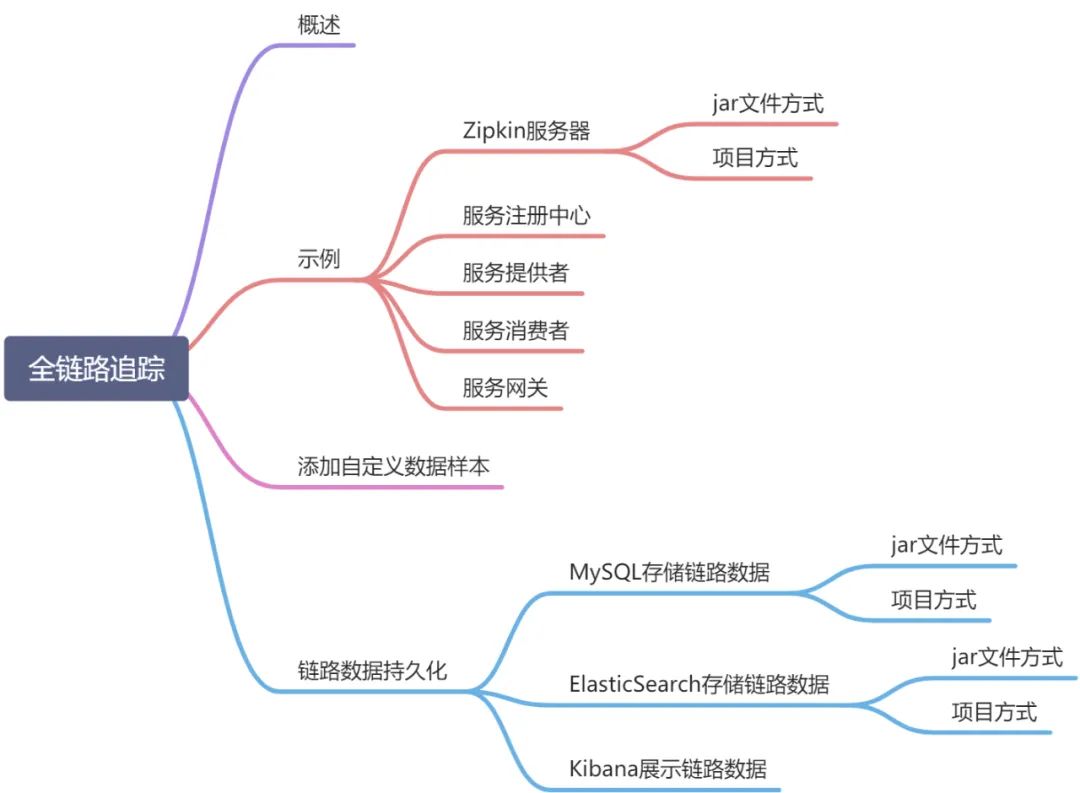
概述
微服务架构作为一个分布式架构,按照业务规模和系统要求分为服务提供者、服务注册中心、服务消费者、服务网关等多个模块。由于涉及到的功能模块及组件较多,系统复杂度较高,如果出现了错误和异常,很难去定位相关信息。所以在微服务架构中,需要实现分布式链路跟踪,去跟进一个服务调用请求有哪些服务实例参与,服务实例参与的顺序是怎样的,从而达到每个服务调用请求步骤清晰可见,服务调用出现问题可以快速精准定位。
Spring Cloud Sleuth使用了Google的开源项目Dapper的专业术语。
Span:基本工作单元。发送一个远程服务调用请求就会产生一个基本工作单元,用来记录服务调用信息,以一个64位ID作为唯一标识。Span还包含其他数据信息,如摘要、时间戳事件、关键值注释(tags)、Span的ID和进度ID(通常是IP地址)。
Trace:具体服务调用请求,以一个64位ID作为唯一标识(业务号)。由多个基本工作单元组成,通过服务调用请求标识多个基本工作单元为同一个服务调用请求。以树状形式展示服务调用,在树状形式中查看服务调用请求调用多个基本工作单元的调用轨迹。
Annotation:注解,代表服务调用的客户端和服务端的行为。存在以下注解:
cs(Client Sent):客户端(服务调用者)发起一个服务调用,意味着一个Span的开始。
sr(Server Received):服务端(服务提供者)获得服务调用请求信息,并开始具体的服务调用处理。将sr减去cs得到的时间戳,就是具体的网络延迟时间。
ss(Server Sent):服务端处理完服务调用请求,将服务调用结果返回给客户端。将ss减去sr得到的时间戳,就是服务端处理请求所用的时间。
cr(Client Received):代表一个Span的结束,客户端成功收到服务端的回复。将cr减去cs得到的时间戳,就是客户端从服务端获取到响应所用的时间。
Spring Cloud Sleuth提供了一套完整的链路解决方案,可以结合Zipkin,将链路数据发送到Zipkin,并利用Zipkin来存储链路信息,也可以利用Zipkin UI来展示数据。Zipkin致力于收集分布式系统的链路数据,提供了数据持久化策略,也提供面向开发者的API接口,用于查询数据,还提供了UI组件帮助我们查看具体的链路信息。同时Zipkin提供了可插拔式的数据存储方式,目前支持的数据存储有In-Memory,MySQL,Cassandra和ElasticSearch。Zipkin主要由4个核心组件组成:
Collector:链路数据收集器,主要用于处理从链路客户端发送过来的链路数据,将链路数据转换为Zipkin内部处理的Span格式,以支持后续的存储、分析和展示等功能。
Storage:存储组件,用来存储收到的链路数据,默认会将这些数据存储在内存中,同时支持多种存储策略,比如将链路数据存储至MySQL,Cassandra和ElasticSearch中。
RESTful API:API组件,面向开发者的,提供外部访问API接口,可以通过这些API接口自定义展示界面。
Web UI:UI组件,基于API接口实现的上层应用,用户利用UI组件可以方便的查询和分析链路数据。
示例
在此示例中,包含如下模块:
| 模块名称 | 模块描述 | 模块端口 |
| sleuth-eureka | 服务注册中心 | 9001 |
| sleuth-zipkin | Zipkin服务器 | 9411 |
| sleuth-zuul | Zuul网关 | 8001 |
| sleuth-provider | 服务提供者 | 2001 |
| sleuth-consumer | 服务消费者 | 2002 |
Zipkin服务器
jar文件方式
在使用SpringBoot2.x版本以前, 搭建Zipkin服务器,需要单独建立Zipkin服务器项目引入Zipkin依赖进行搭建,在使用SpringBoot2.x之后,可以通过
https://mvnrepository.com/artifact/io.zipkin.java/zipkin-server
,执行zipkin-server-2.12.9-exec.jar的方式启动Zipkin服务器。(官方推荐)
java -jar zipkin-server-2.12.9-exec.jar
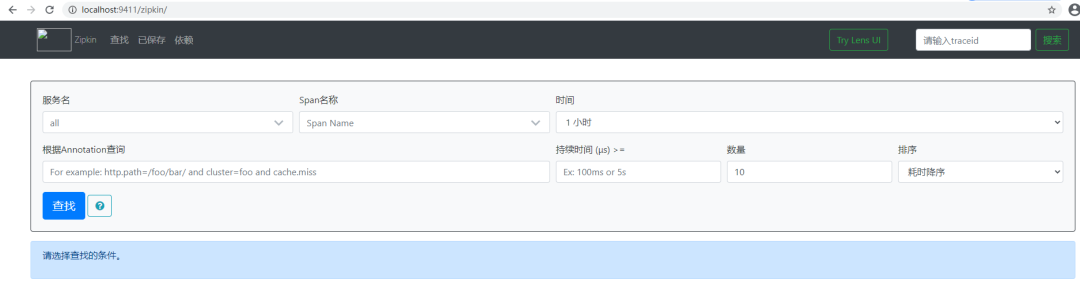
通过上述方式启动ZipkinServer,访问9411端口(zipkin配置文件默认应用端口),如下
项目方式
引入项目依赖
<!--Web依赖--><dependency><groupId>org.springframework.boot</groupId><artifactId>spring-boot-starter-web</artifactId></dependency><!--服务发现依赖--><dependency><groupId>org.springframework.cloud</groupId><artifactId>spring-cloud-starter-netflix-eureka-client</artifactId></dependency><!--Zipkin服务端包--><dependency><groupId>io.zipkin.java</groupId><artifactId>zipkin-server</artifactId><version>2.12.3</version></dependency><!--ZipkinUI依赖--><dependency><groupId>io.zipkin.java</groupId><artifactId>zipkin-autoconfigure-ui</artifactId><version>2.12.3</version></dependency>
Zipkin服务器入口程序
@SpringBootApplication@EnableZipkinServerpublic class SleuthzipkinApplication {public static void main(String[] args) {SpringApplication.run(SleuthzipkinApplication.class, args);}}
Zipkin配置文件
#应用名称spring:application:name: sleuth-zipkin#服务注册中心地址eureka:client:service-url:defaultZone: http://localhost:9001/eureka#自动定时请求配置management:metrics:web:server:auto-time-requests: false#Zipkin服务器端口server:port: 9411
服务注册中心
项目依赖
<dependencies><dependency><groupId>org.springframework.cloud</groupId><artifactId>spring-cloud-starter-netflix-eureka-server</artifactId></dependency></dependencies>
配置文件
server:port: 9001 #服务注册中心端口eureka:instance:prefer-ip-address: truehostname: localhost #主机名client:register-with-eureka: false #不向服务注册中心注册自己fetch-registry: false #不向服务注册中心注册自己service-url:defaultZone: http://localhost:9001/eurekaspring:application:name: sleuth-eureka-server #服务注册中心应用名
服务注册中心程序入口
@SpringBootApplication@EnableEurekaServerpublic class SleuthEurekaServerApplication {public static void main(String[] args) {SpringApplication.run(SleuthEurekaServerApplication.class, args);}}
服务提供者
项目依赖
<dependencies><dependency><groupId>org.springframework.boot</groupId><artifactId>spring-boot-starter-web</artifactId></dependency><!--服务发现--><dependency><groupId>org.springframework.cloud</groupId><artifactId>spring-cloud-starter-netflix-eureka-client</artifactId></dependency><!--sleuth--><dependency><groupId>org.springframework.cloud</groupId><artifactId>spring-cloud-starter-sleuth</artifactId></dependency><!--Zipkin客户端--><dependency><groupId>org.springframework.cloud</groupId><artifactId>spring-cloud-starter-zipkin</artifactId></dependency></dependencies>
配置文件
spring:application:name: sleuth-providersleuth:sampler:probability: 1.0 #配置样本百分比rate: 30 #配置样本速率zipkin:base-url: http://localhost:9411eureka:client:service-url:defaultZone: http://localhost:9001/eureka
服务提供者控制器
@RestControllerpublic class SleuthProviderController {private static final Logger logger= LoggerFactory.getLogger(SleuthProviderController.class);@GetMapping("/hello/{message}")public String welcomeMessage(@PathVariable("message") String message){logger.info("param:"+message);String resultMessage="Welcome "+message;logger.info("响应结果: {}"+resultMessage);return resultMessage;}@GetMapping("/hello/{name}")public String getNameInfo(@PathVariable("name") String name){logger.info("name:"+name);String nameMessage="Hi "+name;logger.info("响应结果: {}"+name);return nameMessage;}}
服务消费者
项目依赖
<!--Web依赖--><dependency><groupId>org.springframework.boot</groupId><artifactId>spring-boot-starter-web</artifactId></dependency><!--服务发现--><dependency><groupId>org.springframework.cloud</groupId><artifactId>spring-cloud-starter-netflix-eureka-client</artifactId><version>1.4.0.RELEASE</version></dependency><!--服务调用--><dependency><groupId>org.springframework.cloud</groupId><artifactId>spring-cloud-starter-openfeign</artifactId></dependency><!--sleuth--><dependency><groupId>org.springframework.cloud</groupId><artifactId>spring-cloud-starter-sleuth</artifactId></dependency><!--Zipkin客户端--><dependency><groupId>org.springframework.cloud</groupId><artifactId>spring-cloud-starter-zipkin</artifactId></dependency><dependency><groupId>org.springframework.boot</groupId><artifactId>spring-boot-starter-tomcat</artifactId><scope>provided</scope></dependency>
程序入口
@SpringBootApplication(scanBasePackages = "com.spring.cloud.zipkin.consume.demo")@EnableFeignClients(basePackages="com.spring.cloud.zipkin.consume.demo")public class DemoApplication {@Bean@LoadBalancedpublic RestTemplate getRestTemplate(){return new RestTemplate();}public static void main(String[] args) {SpringApplication.run(DemoApplication.class, args);}}
使用@EnableFeignClients开启Feign调用服务实例;使用@LoadBalanced注解开启负载均衡功能。
调用服务实例接口
@FeignClient("sleuth-provider")public interface SleuthFeign {@GetMapping("/hello/{message}")public String getHelloMessage(@PathVariable("message") String message);}
使用@FeignClient开启Feign调用服务实例功能,值为服务提供者的应用名称(配置文件application-name),@GetMapping开启Get方式调用服务实例,值与服务实例URL地址相同。
服务消费者控制器
@RestControllerpublic class SleuthConsumerController {private static final Logger logger= LoggerFactory.getLogger(SleuthConsumerController.class);@Autowiredprivate RestTemplate restTemplate=null;@Autowiredprivate SleuthFeign sleuthFeign=null;@GetMapping("/hello/rest/{message}")public String getRestMessage(@PathVariable("message") String message){logger.info("RestTemplate Param: {}",message);String restUrl="http://sleuth-provider/hello/{message}";logger.info("RestTemplate URL: {}",restUrl);String resultMessage=restTemplate.getForObject(restUrl,String.class,message);logger.info("RestTemplate Result: {}",resultMessage);return resultMessage;}@GetMapping("/hello/feign/{message}")public String getFeignMessage(@PathVariable("message") String message){logger.info("Feign param: {}",message);String resultMessage=sleuthFeign.getHelloMessage(message);logger.info("Feign Result: {}",resultMessage);return resultMessage;}}
服务网关
项目依赖
<!--web--><dependency><groupId>org.springframework.boot</groupId><artifactId>spring-boot-starter-web</artifactId></dependency><!--服务发现--><dependency><groupId>org.springframework.cloud</groupId><artifactId>spring-cloud-starter-netflix-eureka-client</artifactId></dependency><!--Zuul服务网关--><dependency><groupId>org.springframework.cloud</groupId><artifactId>spring-cloud-starter-netflix-zuul</artifactId></dependency><!--Sleuth--><dependency><groupId>org.springframework.cloud</groupId><artifactId>spring-cloud-starter-sleuth</artifactId></dependency><!--Zipkin客户端--><dependency><groupId>org.springframework.cloud</groupId><artifactId>spring-cloud-starter-zipkin</artifactId></dependency>
配置文件
spring:application:name: sleuth-zuul #服务网关应用名称sleuth:sampler:probability: 1.0 #配置样本百分比rate: 30 #配置样本速率zipkin:base-url: http://localhost:9411 #Zipkin应用端口eureka:client:service-url:defaultZone: http://localhost:9001/eureka #将服务网关注册到服务注册中心zuul:routes:provider:path: /provider/** #配置网关服务路由相关信息,/provider/**路径用于访问服务提供者service-id: sleuth-providerconsumer:path: /consumer/**service-id: sleuth-consumer #配置网关服务路由相关信息,/consumer/**路径用于访问服务消费者
依次启动服务注册中心、zipkin-server、服务网关、服务提供者、服务消费者相关应用。
通过服务网关提供的服务消费者接口调用服务提供者提供的相应功能
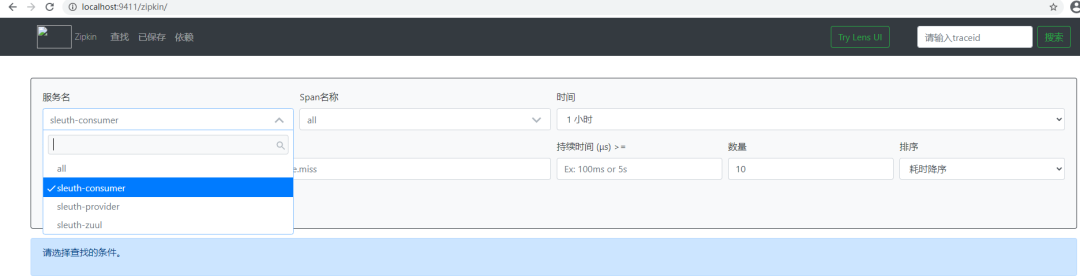
通过上图,看到服务提供者、服务消费者、服务网关均已注册至服务注册中心,此时选择服务网关应用(sleuth-zuul)点击查询可以查看服务调用结果。
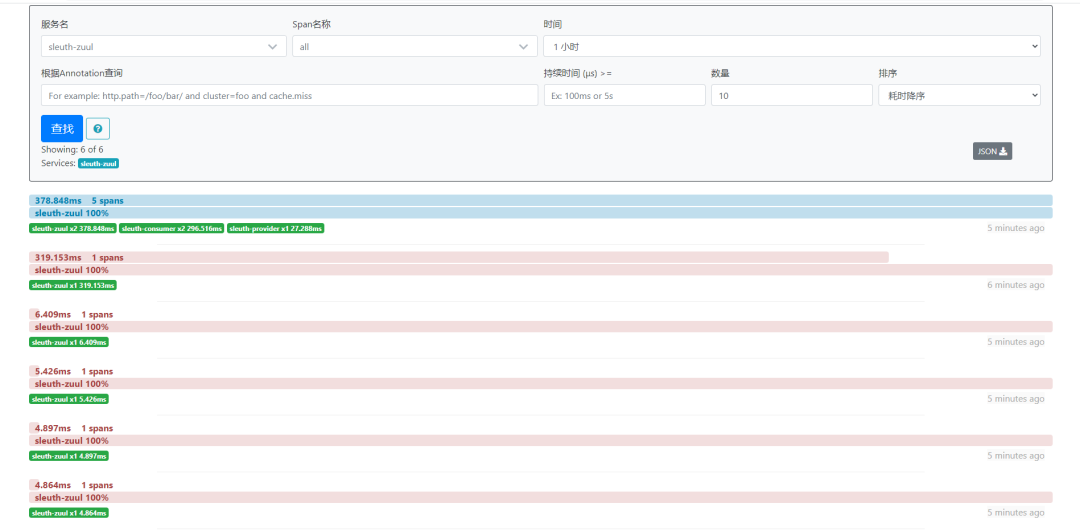
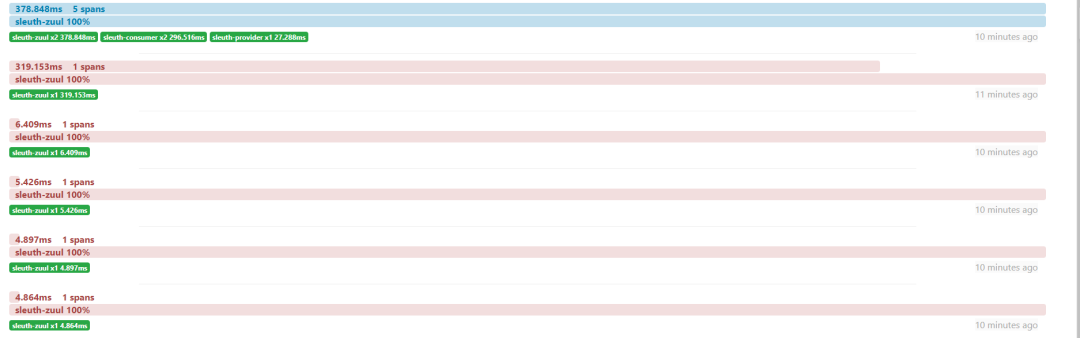
通过下图,可以看到通过服务网关发起了5次服务调用请求(Trace),每个服务调用请求可以看到调用链路耗时、多少个基本工作单元(Span)组成,经历了哪些服务的调用。
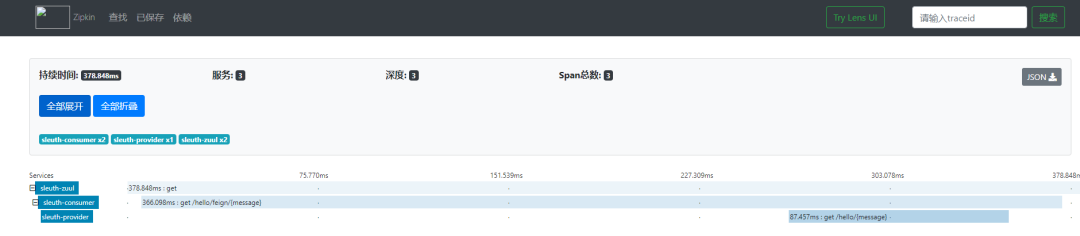
点击第一个服务调用请求,可以查看服务调用请求详细信息,包括服务名称、服务调用耗时及路径,同时提供JSON数据集的下载。
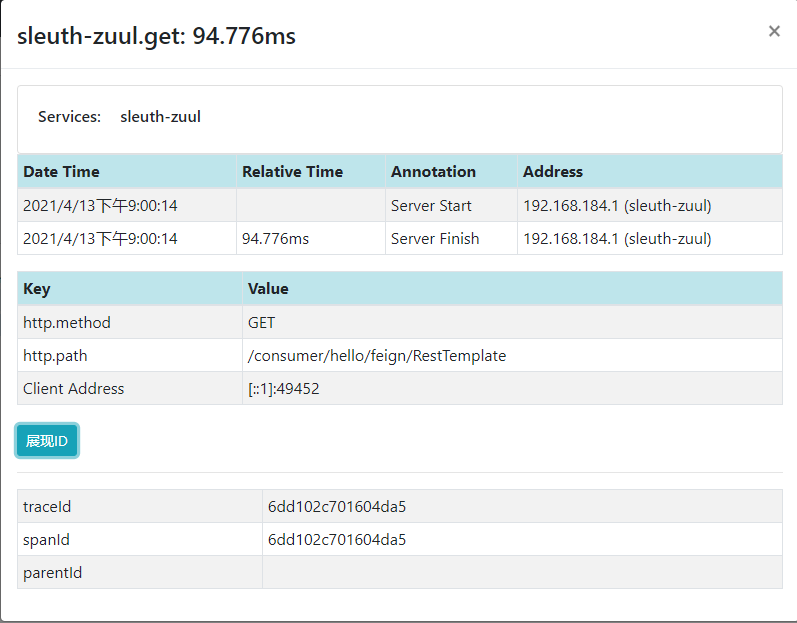
点击服务请求调用树根节点,可以看到最详细的链路追踪样本,依靠这些样本,能够发现出现错误和性能缓慢的服务调用,快速定位和处理相关问题。
添加自定义数据样本
@AutowiredTracer tracer;@Value("${server.port}")String port;@GetMapping("/hello/feignName/{name}")public String getFeignName(@PathVariable("name") String name){//添加一个新的Span属性标记tracer.currentSpan().tag("name","traceName");String traceId=tracer.currentSpan().context().traceIdString();//获取TraceIdString spanId=tracer.currentSpan().context().spanIdString();//获取SpanIdlogger.info("当前追踪参数: tarceId={},spanId={}",traceId,spanId);return "Hi "+name+", from port:"+port;}
链路调用数据持久化
在上述案例中,Zipkin Server将数据存储于内存中,一旦程序重启,之前的链路调用数据全部丢失。Zipkin支持将链路调用数据存储于MySQL、ElasticSearch、和Cassandra中。
在数据库中存储链路数据
https://github.com/openzipkin/zipkin/blob/master/zipkin-storage/mysql-v1/src/main/resources/mysql.sql下载链路调用数据存储MySQL脚本,内容如下:
CREATE TABLE IF NOT EXISTS zipkin_spans (`trace_id_high` BIGINT NOT NULL DEFAULT 0 COMMENT 'If non zero, this means the trace uses 128 bit traceIds instead of 64 bit',`trace_id` BIGINT NOT NULL,`id` BIGINT NOT NULL,`name` VARCHAR(255) NOT NULL,`remote_service_name` VARCHAR(255),`parent_id` BIGINT,`debug` BIT(1),`start_ts` BIGINT COMMENT 'Span.timestamp(): epoch micros used for endTs query and to implement TTL',`duration` BIGINT COMMENT 'Span.duration(): micros used for minDuration and maxDuration query',PRIMARY KEY (`trace_id_high`, `trace_id`, `id`)) ENGINE=InnoDB ROW_FORMAT=COMPRESSED CHARACTER SET=utf8 COLLATE utf8_general_ci;ALTER TABLE zipkin_spans ADD INDEX(`trace_id_high`, `trace_id`) COMMENT 'for getTracesByIds';ALTER TABLE zipkin_spans ADD INDEX(`name`) COMMENT 'for getTraces and getSpanNames';ALTER TABLE zipkin_spans ADD INDEX(`remote_service_name`) COMMENT 'for getTraces and getRemoteServiceNames';ALTER TABLE zipkin_spans ADD INDEX(`start_ts`) COMMENT 'for getTraces ordering and range';CREATE TABLE IF NOT EXISTS zipkin_annotations (`trace_id_high` BIGINT NOT NULL DEFAULT 0 COMMENT 'If non zero, this means the trace uses 128 bit traceIds instead of 64 bit',`trace_id` BIGINT NOT NULL COMMENT 'coincides with zipkin_spans.trace_id',`span_id` BIGINT NOT NULL COMMENT 'coincides with zipkin_spans.id',`a_key` VARCHAR(255) NOT NULL COMMENT 'BinaryAnnotation.key or Annotation.value if type == -1',`a_value` BLOB COMMENT 'BinaryAnnotation.value(), which must be smaller than 64KB',`a_type` INT NOT NULL COMMENT 'BinaryAnnotation.type() or -1 if Annotation',`a_timestamp` BIGINT COMMENT 'Used to implement TTL; Annotation.timestamp or zipkin_spans.timestamp',`endpoint_ipv4` INT COMMENT 'Null when Binary/Annotation.endpoint is null',`endpoint_ipv6` BINARY(16) COMMENT 'Null when Binary/Annotation.endpoint is null, or no IPv6 address',`endpoint_port` SMALLINT COMMENT 'Null when Binary/Annotation.endpoint is null',`endpoint_service_name` VARCHAR(255) COMMENT 'Null when Binary/Annotation.endpoint is null') ENGINE=InnoDB ROW_FORMAT=COMPRESSED CHARACTER SET=utf8 COLLATE utf8_general_ci;ALTER TABLE zipkin_annotations ADD UNIQUE KEY(`trace_id_high`, `trace_id`, `span_id`, `a_key`, `a_timestamp`) COMMENT 'Ignore insert on duplicate';ALTER TABLE zipkin_annotations ADD INDEX(`trace_id_high`, `trace_id`, `span_id`) COMMENT 'for joining with zipkin_spans';ALTER TABLE zipkin_annotations ADD INDEX(`trace_id_high`, `trace_id`) COMMENT 'for getTraces/ByIds';ALTER TABLE zipkin_annotations ADD INDEX(`endpoint_service_name`) COMMENT 'for getTraces and getServiceNames';ALTER TABLE zipkin_annotations ADD INDEX(`a_type`) COMMENT 'for getTraces and autocomplete values';ALTER TABLE zipkin_annotations ADD INDEX(`a_key`) COMMENT 'for getTraces and autocomplete values';ALTER TABLE zipkin_annotations ADD INDEX(`trace_id`, `span_id`, `a_key`) COMMENT 'for dependencies job';CREATE TABLE IF NOT EXISTS zipkin_dependencies (`day` DATE NOT NULL,`parent` VARCHAR(255) NOT NULL,`child` VARCHAR(255) NOT NULL,`call_count` BIGINT,`error_count` BIGINT,PRIMARY KEY (`day`, `parent`, `child`)) ENGINE=InnoDB ROW_FORMAT=COMPRESSED CHARACTER SET=utf8 COLLATE utf8_general_ci;
数据库中执行上述脚本内容进行初始化。Zipkin Server连接数据库需要从环境变量读取,连接数据库属性和环境变量如下:
| 属性 | 环境变量 | 描述 |
zipkin.storage.type | STORAGE_TYPE | 存储类型,默认内存(mem),其他还可支持Cassabdra、MySQL、ElasticSearch |
| zipkin.storage.mysql.host | MYSQL_HOST | 数据库的host,默认localhost |
zipkin.storage.mysql.port | MYSQL_TCP_PORT | 数据库的端口,默认3306 |
zipkin.storage.mysql.username | MYSQL_USER | 连接数据库的用户名,默认为空 |
zipkin.storage.mysql.password | MYSQL_PASS | 连接数据库的密码,默认为空 |
zipkin.storage.mysql.db | MYSQL_DB | Zipkin使用的数据库名,默认为zipkin |
zipkin.torage.mysql.max-active | MYSQL_MAX_CONNECTIONS | 最大连接数,默认为10 |
JAR文件方式
执行如下命令启动Zipkin Server(启动顺序为服务注册中心->Zipkin Server->服务网关Zuul->服务提供者->服务消费者),就可以在启动时连接数据库,并将链路数据存储在数据库中,命令如下:
java -jar zipkin-server-2.12.9-exec.jar --STORAGE_TYPE=mysql --MYSQL_HOST=localhost --MYSQL_TCP_PORT=3306 --MYSQL_DB=zipkin --MYSQL_USER=root --MYSQL_PASS=xxxxxx
链路调用数据成功存储至MYSQL

重新执行上述命令启动Zipkin Server,访问9411端口,链路调用数据依然存在。
项目方式
项目依赖
<!--Zipkin持久化MySQL依赖--><dependency><groupId>io.zipkin.java</groupId><artifactId>zipkin-autoconfigure-storage-mysql</artifactId><version>2.12.3</version></dependency><!--SpringJdbc依赖--><dependency><groupId>org.springframework.boot</groupId><artifactId>spring-boot-starter-jdbc</artifactId></dependency><!--MySQL连接依赖--><dependency><groupId>mysql</groupId><artifactId>mysql-connector-java</artifactId></dependency>
配置文件
#ZipkinServer应用名spring:application:name: sleuth-zipkin#服务注册中心地址eureka:client:service-url:defaultZone: http://localhost:9001/eureka#自动定时请求配置management:metrics:web:server:auto-time-requests: false#ZipkinServer端口server:port: 9411#MySQL连接信息datasource:url: jdbc:mysql://localhost:3306/zipkin?serverTimeZone=GMT%2B8driver-class-name: com.mysql.jdbc.Driverusername: rootpassword: WU830118#tomcat配置tomcat:#最小空闲数min-idle: 10#最大连接数max-active: 50#最大空闲数max-idle: 20#链路数据存储类型配置zipkin:storage:type: mysql
在ElasticSearch中存储链路数据
在高并发的情况下,需要借助ElasticSearch存储链路数据。从https://www.elastic.co/下载elasticsearch和kibana(因最新版与引入的zipkin-autoconfigure-storage-elasticsearch依赖存在冲突,使用的版本为5.4.3)。
ElasticSearch默认端口号9200,Kibana默认端口号5601。
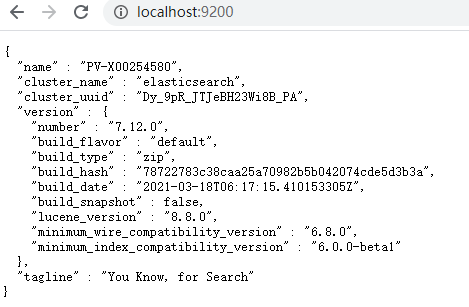
下载完成,解压elasticsearch压缩包,进入bin目录执行elasticsearch.bat,访问9200端口,elasticsearch安装成功。
Zipkin Server连接ElasticSearch同样也需要从环境变量中读取连接属性,环境变量和对应的属性如下:
| 属性 | 环境变量 | 描述 |
| zipkin.storage.elasticsearch.host | ES_HOSTS | ES主机列表 |
| zipkin.torage.elasticsearch.pipeline | ES_PIPELINE | ES数据管道 |
| zipkin.storage.elasticsearch.max-requests | ES_MAX_REQUESTS | ES最大请求数(默认64) |
| zipkin.storage.elasticsearch.timeout | ES_TIMEOUT | ES超时参数(默认10S) |
| zipkin.storage.elasticsearch.index | ES_INDEX | ES索引名称(默认Zipkin) |
| zipkin.storage.elasticsearch.date-separator | ES_DATE_SEPARATOR | ES日期分隔符(默认"-") |
| zipkin.storage.elasticsearch.index-shards | ES_INDEX_SHARDS | ES索引主分片数(默认为5) |
| zipkin.storage.elasticsearch.index-replicas | ES_INDEX_REPLICAS | ES索引副本分片数(默认为1) |
| zipkin.storage.elasticsearch.username | ES_USERNAME | ES用户名(默认为空) |
| zipkin.storage.elasticsearch.password | ES_PASSWORD | ES密码(默认为空) |
此处只对Zipkin Server连接ElasticSearch属性及环境变量信息进行说明,不对ElasticSearch相关内容做深入探讨。
JAR文件方式
使用以下命令启动Zipkin Server(启动顺序为服务注册中心->Zipkin Server->服务网关Zuul->服务提供者->服务消费者),就可以将服务调用链路数据存储与ElasticSearch中:
java -jar zipkin-server-2.12.9-exec.jar -STORAGE_TYPE=elasticsearch -ES_HOSTS=localhost:9200 -ES_INDEX=zipkin
项目方式(ZipkinServer)
项目依赖
<!--链路调用数据存储至ElasticSearch依赖--><dependency><groupId>io.zipkin.java</groupId><artifactId>zipkin-autoconfigure-storage-elasticsearch</artifactId><version>2.12.3</version></dependency>
配置文件
#ZipkinServer应用名称spring:application:name: sleuth-zipkin#服务注册中心地址eureka:client:service-url:defaultZone: http://localhost:9001/eureka#自动定时请求配置management:metrics:web:server:auto-time-requests: false#ZipkinServer端口server:port: 9411#存储类型配置zipkin:storage:type: elasticsearchelasticsearch:#ElasticSearch索引名称index: zipkin#最大请求数max-requests: 64#索引分片数index-shards: 5#索引复制数index-replicas: 1#ElasticSearch端口hosts: localhost:9200
ZipkinServer应用入口
@SpringBootApplication(exclude = DataSourceAutoConfiguration.class)@EnableZipkinServerpublic class SleuthzipkinApplication {public static void main(String[] args) {SpringApplication.run(SleuthzipkinApplication.class, args);}}
在使用MySQL存储链路调用数据导入数据库连接相关依赖,使用ElasticSearch存储链路调用数据,需要忽略该配置类或移除数据库连接相关依赖,否则ZipkinServer无法正常启动。
If you want an embedded database (H2, HSQL or Derby), please put it on the classpath.If you have database settings to be loaded from a particular profile you may need to activate it (no profiles are currently active).
用Kibana展示链路数据
在上一节中,我们将分布式链路调用数据存储于ElasticSearch中,可以结合Kibana对分布式链路调用数据进行展示。
进入Kibana解压目录,修改Kibana配置相关信息:
#配置Kibana端口server.port: 5601#配置ElasticSearch端口elasticsearch.hosts: ["http://localhost:9200"]
进入bin目录执行kibana.bat批处理文件启动Kibana应用。访问5601端口,如下:
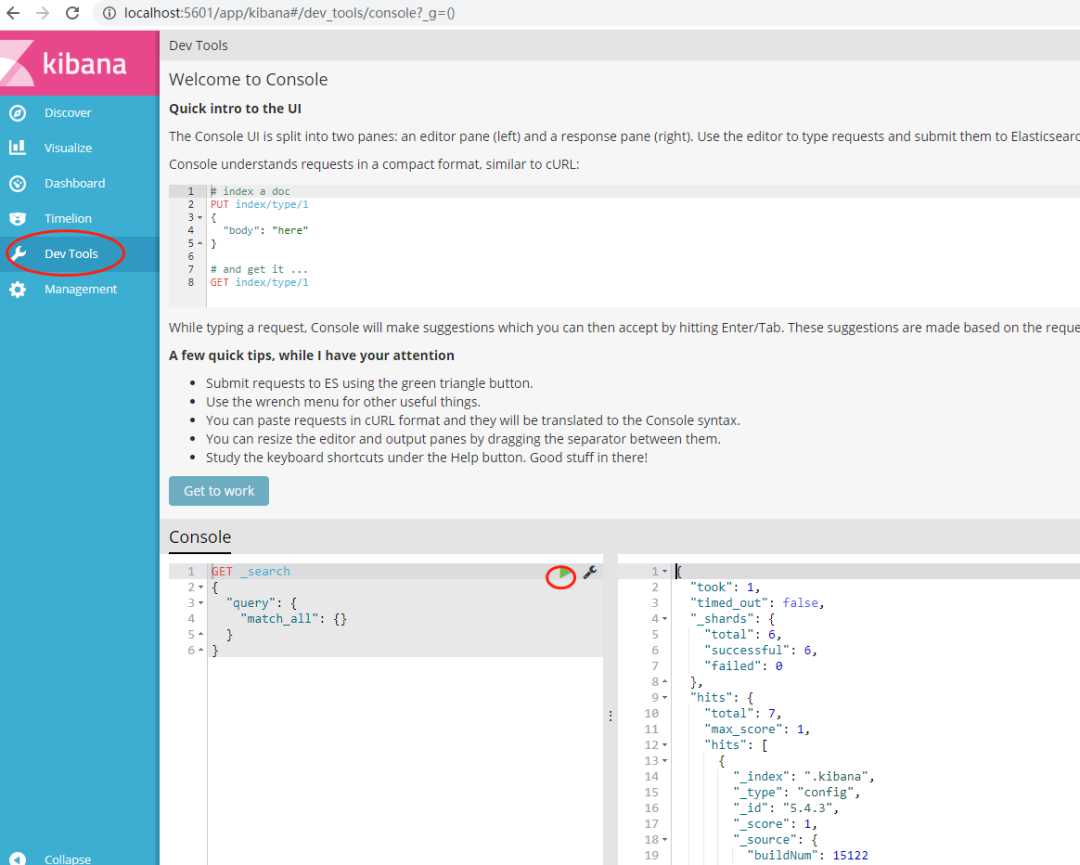
点击Dev Tools,点击查询按钮,得到链路调用数据。
{"took": 3,"timed_out": false,"_shards": {"total": 6,"successful": 6,"failed": 0},"hits": {"total": 7,"max_score": 1,"hits": [{"_index": ".kibana","_type": "config","_id": "5.4.3","_score": 1,"_source": {"buildNum": 15122}},{"_index": "zipkin:span-2021-04-23","_type": "span","_id": "AXj-an_vH77e42Q67NZV","_score": 1,"_source": {"traceId": "809a34aba1f30196","duration": 2080,"remoteEndpoint": {"ipv6": "::1"},"shared": true,"localEndpoint": {"serviceName": "sleuth-consumer","ipv4": "192.168.184.1"},"timestamp_millis": 1619176094942,"kind": "SERVER","name": "get /hello/feignname/{name}","id": "6115269b20af0df0","parentId": "809a34aba1f30196","timestamp": 1619176094942028,"tags": {"http.method": "GET","http.path": "/hello/feignName/zhangsan","mvc.controller.class": "SleuthConsumerController","mvc.controller.method": "getFeignName","name": "traceName"}}},{"_index": "zipkin:span-2021-04-23","_type": "span","_id": "AXj-an_vH77e42Q67NZU","_score": 1,"_source": {"traceId": "809a34aba1f30196","duration": 5404,"localEndpoint": {"serviceName": "sleuth-zuul","ipv4": "192.168.184.1"},"timestamp_millis": 1619176094938,"kind": "CLIENT","name": "get","id": "6115269b20af0df0","parentId": "809a34aba1f30196","timestamp": 1619176094938803,"tags": {"http.method": "GET","http.path": "/hello/feignName/lisi"}}},{"_index": "zipkin:span-2021-04-23","_type": "span","_id": "AXj-an_vH77e42Q67NZW","_score": 1,"_source": {"traceId": "809a34aba1f30196","duration": 8249,"remoteEndpoint": {"ipv6": "::1","port": 58783},"localEndpoint": {"serviceName": "sleuth-zuul","ipv4": "192.168.184.1"},"timestamp_millis": 1619176094937,"kind": "SERVER","name": "get","id": "809a34aba1f30196","timestamp": 1619176094937030,"tags": {"http.method": "GET","http.path": "/consumer/hello/feignName/wangwu"}}},{"_index": "zipkin:span-2021-04-23","_type": "span","_id": "AXj-amMyH77e42Q67NZT","_score": 1,"_source": {"traceId": "2ba7c5f5c1b1ad6e","duration": 29548,"remoteEndpoint": {"ipv6": "::1"},"shared": true,"localEndpoint": {"serviceName": "sleuth-consumer","ipv4": "192.168.184.1"},"timestamp_millis": 1619176086438,"kind": "SERVER","name": "get /hello/feignname/{name}","id": "0ccb354afed3828b","parentId": "2ba7c5f5c1b1ad6e","timestamp": 1619176086438672,"tags": {"http.method": "GET","http.path": "/hello/feignName/zhaoliu","mvc.controller.class": "SleuthConsumerController","mvc.controller.method": "getFeignName","name": "traceName"}}}]}}
存储数据包括服务调用请求标识(traceId)、服务调用应用名称(serviceName)、服务调用应用地址(ipv4)、服务调用请求方式(http.method)、服务调用请求地址(http.path)、服务调用控制器(mvc.controller.class)、服务调用方法(mvc.controller.method)相关内容。
